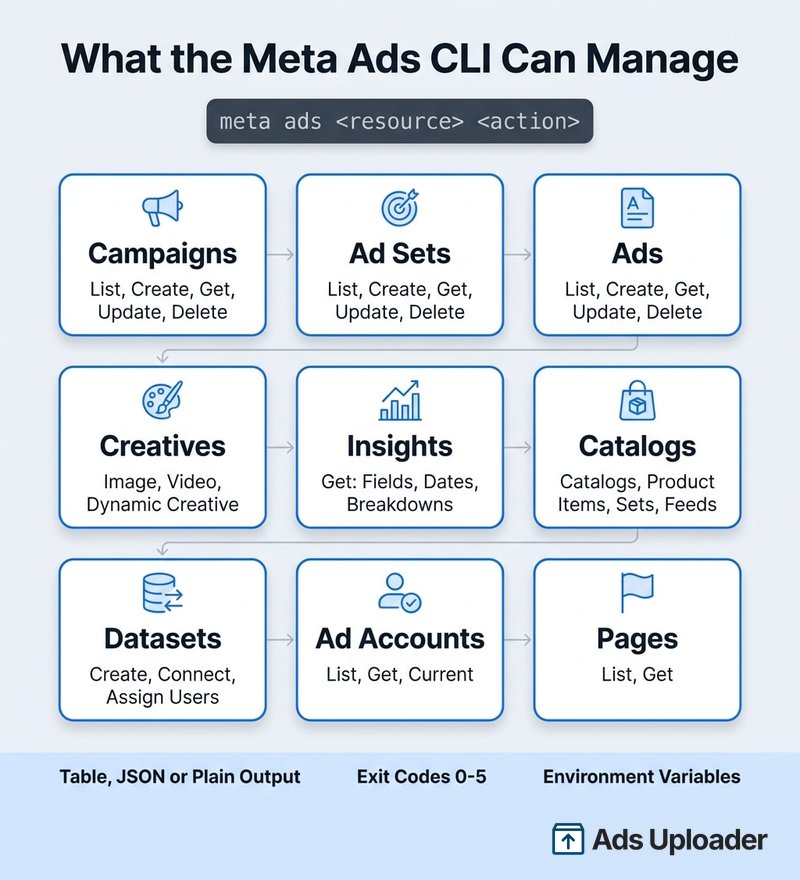
A Meta Ads CLI é a ferramenta oficial de linha de comando da Meta para a Marketing API, lançada em 29 de abril de 2026 como parte dos seus Ads AI Connectors. Ela é instalada como um pacote Python 3.12+, autentica com um token de acesso de usuário do sistema e executa comandos no padrão meta ads <resource> <action>. Cobre campanhas, conjuntos de anúncios, anúncios, criativos, insights, catálogos e datasets, com saída em tabela, JSON ou texto simples que scripts conseguem interpretar. Com ela, desenvolvedores e agentes de programação com IA gerenciam anúncios da Meta sem escrever código de API.
A Meta é uma das primeiras plataformas de anúncios a lançar sua própria ferramenta de linha de comando, e deixou bem claro para quem ela foi feita: desenvolvedores e agentes de IA. Se você tentou configurá-la desde o lançamento, provavelmente encontrou as peças espalhadas por oito páginas de documentação, um post de lançamento no blog e muito comentário de terceiros que discorda até no básico, como o caminho de instalação e o funcionamento da autenticação.
Este guia da Meta Ads CLI junta tudo: a instalação exata, a configuração do token de usuário do sistema (onde a maioria das pessoas trava), cada grupo de comandos, uso seguro a partir do Claude Code ou do Codex, limites atuais, solução de problemas e como ela se compara com a Ads Uploader CLI. O conteúdo foi conferido com a documentação atual da Meta e com o pacote mais recente, versão 1.2.0, e escrito por uma equipe que desenvolve a própria CLI para Meta Ads e lança anúncios pela Marketing API todos os dias.
Por que acho que uma CLI é a melhor forma de subir anúncios
Já escrevi sobre isso antes na nossa comparação entre Meta Ads MCP e CLI, e o ponto central não mudou. Na minha opinião, uma CLI é a melhor infraestrutura para subir anúncios.
O primeiro motivo são os arquivos. Uma CLI tem controle nativo do seu sistema de arquivos. Lançamentos geralmente começam do seu disco rígido, ou de um armazenamento em nuvem transmitido ou sincronizado com o seu computador, e uma CLI lê esses arquivos de fato. Um servidor MCP hospedado, como o da Meta em mcp.facebook.com/ads, não enxerga o seu disco, então os arquivos precisam chegar por URL, por um link do Drive ou como dados inline. Essa gambiarra é o motivo de as pessoas acharem vídeo mais difícil do que imagem por um MCP hospedado. A própria lista de ferramentas do MCP da Meta tem uma ferramenta de criativo descrita como "single-image link ad creative", além de ferramentas para listar imagens e vídeos existentes, mas nenhuma ferramenta dedicada de upload e nenhum limite de arquivo documentado. Imagens parecem viáveis; vídeo não está documentado. (Um MCP instalado localmente é diferente: ele roda na sua máquina e consegue ler arquivos, e é por isso que o MCP da própria Ads Uploader também vem como um pacote local que lê do disco.)
O segundo motivo é a forma como o agente encontra o caminho. Acho a CLI mais determinística. O feedback da linha de comando funciona como uma grade de proteção: a saída do --help, os códigos de saída e os erros estruturados conduzem o agente por um caminho específico. Com um MCP, o agente precisa saber mais sobre como as ferramentas se encaixam para montar um lançamento, e muitos clientes carregam todas as definições de ferramentas no contexto logo de início, cerca de 90 no caso da Meta. Alguns clientes agora carregam ferramentas sob demanda, mas um MCP pode consumir mais tokens e, na minha experiência, a CLI é simplesmente mais direta.
O MCP ainda tem seu lugar para relatórios conversacionais e perguntas sobre a conta, o que o nosso guia do Meta Ads MCP cobre. Este guia fica na CLI.
O que é a Meta Ads CLI?
Nas palavras da Meta, na sua documentação da Ads CLI: "Ads CLI is a command-line tool for managing Meta advertising from your terminal." É um wrapper Python sobre a Marketing API que cuida das partes que todo desenvolvedor costumava reconstruir na mão: autenticação, paginação, formatação de saída e tratamento de erros.
Os fatos principais, em 30 de setembro de 2026:
- Pacote:
meta-adsno PyPI, mantido pela Meta. O executável émeta. - Versão mais recente: 1.2.0, lançada em 29 de setembro de 2026.
- Status: a Meta lançou a família Ads AI Connectors (a CLI mais o servidor MCP hospedado) como beta aberto. O PyPI classifica o pacote como Alpha.
- Licença: proprietária. A instalação é gratuita, mas não é open source, e não há repositório público no GitHub nem issue tracker.
- Público: a Meta cita desenvolvedores criando integrações de anúncios, equipes de operações automatizando com scripts e CI/CD, e "AI agents and tools".
A motivação por trás da Meta Ads CLI é familiar para quem já automatizou anúncios da Meta. Um comprador de mídia de agência no r/FacebookAds descreveu seu setup pré-CLI de scripts Python e cron jobs como "frágil pra caramba", quebrando toda vez que a Meta mudava algo na API. Uma ferramenta oficial transfere boa parte dessa manutenção para a Meta, embora não toda.
O que a Meta Ads CLI consegue fazer
O executável 1.2.0 expõe 14 grupos de recursos. A referência pública de comandos lista a maioria deles, e o pacote instalado inclui alguns extras (feeds de produtos, guidance e studies) que a documentação web mal cobre.
| Recurso | Ações |
|---|---|
campaign | list, create, get, update, delete |
adset | list, create, get, update, delete |
ad | list, create, get, update, delete |
creative | list, create, get, update, delete |
insights | get |
catalog | list, create, get, update, delete |
product-item | list, create, get, update, delete |
product-set | list, create, get, update, delete |
product-feed | list, create, get, update, delete |
dataset | list, create, get, connect, disconnect, assign-user |
adaccount | list, get, current |
page | list, get |
guidance | list |
study | list |
Não existe um grupo audience, video, image ou lead-form independente. Uploads de vídeo passam pelo creative create, e custom audiences são referenciadas dentro do JSON de segmentação do conjunto de anúncios.
Os recursos de automação são o que tornam a Meta Ads CLI amigável para agentes:
- Três formatos de saída:
table(o padrão, para humanos),json(para agentes ejq) eplain(separado por tabulação, paraawkecut). --no-inputsuprime prompts interativos para que um script nunca fique travado esperando um y/n.- Códigos de saída padrão de 0 a 5, para que um script ou agente possa tomar decisões com base no tipo de falha.
- Variáveis de ambiente e suporte a
.env, para que os tokens fiquem fora do histórico de comandos.
Como instalar a Meta Ads CLI
Os requisitos da Meta são curtos: Python 3.12 ou superior, e pip ou uv.
O comando oficial de instalação é:
pip install meta-ads
A página de primeiros passos da Meta segue isso com um uv sync solto, que só funciona se você já estiver dentro de um projeto uv com um pyproject.toml. Depois de uma instalação normal via pip, você não precisa dele. Para Macs com Apple Silicon, a página do pacote da Meta agora também lista uma instalação via Homebrew (brew tap facebook/fb, depois brew install meta-ads). Para uma configuração limpa e reproduzível, use um ambiente virtual e fixe a versão:
python3.12 -m venv .venv
source .venv/bin/activate
python -m pip install meta-ads==1.2.0
meta --version
Vale conhecer duas pegadinhas de instalação logo de cara:
- "No matching distribution found for meta-ads." O pacote é distribuído como wheels compilados, não como distribuição de código-fonte. Se o seu Python for anterior ao 3.12, ou se a sua plataforma não corresponder a um wheel publicado, o pip não consegue encontrá-lo. Um usuário do r/FacebookAds bateu exatamente nisso na primeira semana. Confira
python --versionantes de concluir que o nome do pacote está errado. - A versão da API vem do SDK. A CLI herda a versão da Marketing API do SDK
facebook-businessinstalado. A versão 1.1.0 aceitava qualquer SDK a partir do 20.0, então uma instalação nova em 23 de setembro de 2026 resolvia o SDK 26.0.2 e a Marketing API v26.0. A versão 1.2.0 fixa o SDK na linha 24.x, então uma instalação nova hoje resolve o SDK 24.0.1 e a Marketing API v24.0. Atualizar a CLI pode mudar a versão da API por baixo dos seus scripts, então fixe tantometa-adsquantofacebook-businessem tudo o que você automatizar.
No Claude Code ou no Codex, você pode pedir ao agente para instalar a Meta Ads CLI para você. O que ele não consegue fazer é a configuração do lado da Meta, descrita na próxima seção.
Autenticação com um token de acesso de usuário do sistema
A Meta é explícita ao dizer que a Meta Ads CLI precisa de um token: "Ads CLI requires a system user access token to authenticate for programmatic access." Não há comando meta auth login, nem fluxo OAuth pelo navegador, nem whoami. Você gera um token no Business Manager e o entrega à CLI por meio de uma variável de ambiente.
É aqui que a maioria das configurações trava, então aqui vai a sequência completa.
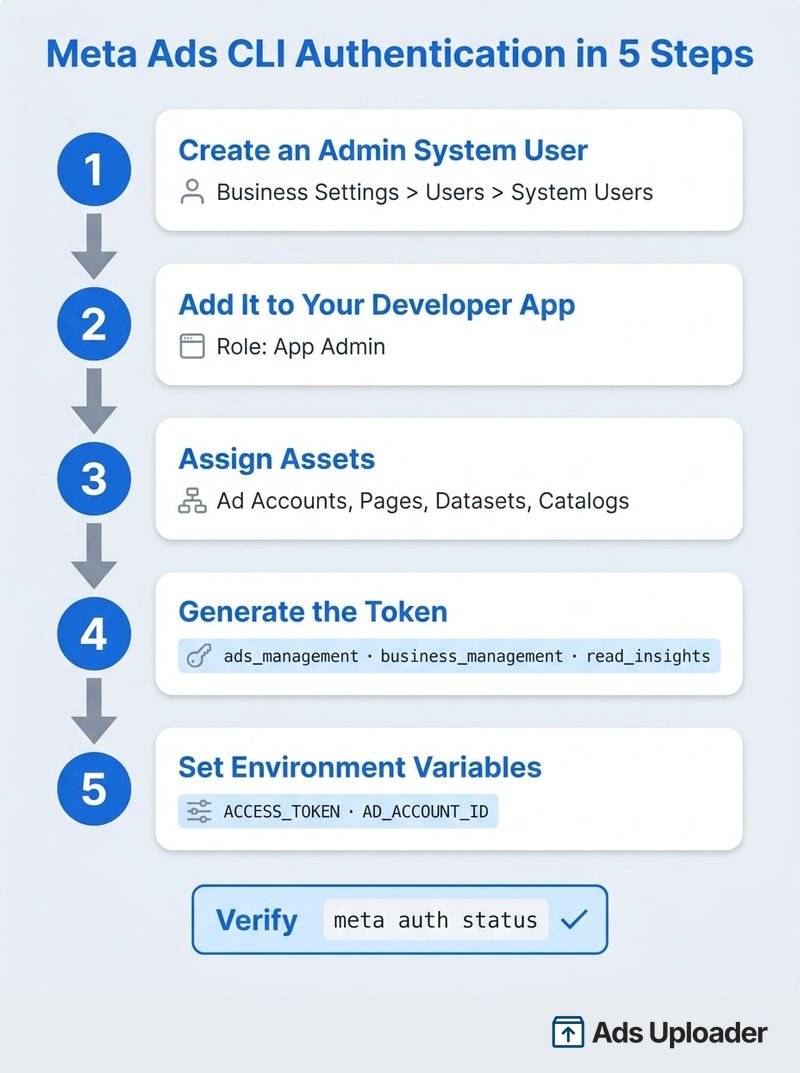
Crie o app da Meta e o usuário do sistema
- No Meta Business Suite, vá em Configurações > Usuários > Usuários do sistema.
- Crie um usuário do sistema com a função de Administrador.
- Crie ou selecione um app de desenvolvedor da Meta para a empresa.
- Adicione o usuário do sistema ao app como Administrador do app.
Um app de desenvolvedor é obrigatório no caminho da CLI. Essa é uma diferença real em relação ao MCP hospedado, que funciona por um conector OAuth padrão sem precisar de um app próprio.
Atribua os ativos e gere o token
- Atribua ao usuário do sistema todos os ativos que a CLI vai tocar: contas de anúncios, Páginas do Facebook, datasets (Pixels) e catálogos de produtos, se você os usar. Um ativo não atribuído é o motivo mais comum para
meta ads adaccount listvoltar vazio. - Gere um token para o app com estes escopos, listados no guia de configuração da Meta:
business_management
ads_management
pages_show_list
pages_read_engagement
pages_manage_ads
catalog_management
read_insights
A documentação da Meta no Postman observa que tokens de usuário do sistema podem durar até 60 dias ou nunca expirar, dependendo da opção escolhida e da elegibilidade da sua empresa.
Permissões do app e App Review
A Meta Ads CLI sempre roda pelo seu próprio app de desenvolvedor da Meta, e as permissões desse app decidem o que a CLI pode fazer. Quando uma tarefa nova ou um tipo diferente de campanha falha, a causa costuma ser um bloqueio de permissão, e não um bug da CLI:
- Criativo vinculado a uma Página precisa de
pages_manage_ads. - Catálogos precisam de
catalog_management. - Anúncios de parceria precisam das permissões de conteúdo de marca além dos escopos de anúncios.
- Alguns caminhos de criativo ficam bloqueados enquanto o app está em modo de desenvolvimento, o que aparece como erro 1885183. Um passo a passo no YouTube de maio mostrou uma campanha e um conjunto de anúncios sendo criados sem problema enquanto os anúncios falhavam, até o app ser mudado para Live.
O nível de acesso também importa. A Meta agora descreve o acesso à Marketing API como Limited ou Full. O Limited Access basta para as contas de anúncios da sua própria empresa, mas gerenciar contas de outras empresas, que é o que agências e parceiros fazem, exige Full Access e App Review.
O App Review também não acontece uma vez só. À medida que os requisitos da Meta mudam, você passa por ele de novo para se manter em dia. Na nossa experiência, revisões que levavam alguns dias há um ano, antes de todo mundo usar IA, agora levam de 10 a 20 dias, às vezes mais. A Meta não publica um prazo de revisão, então solicite novas permissões bem antes do lançamento que depende delas.
Defina as variáveis de ambiente e a precedência de configuração
A CLI lê três variáveis:
| Variável | Finalidade | Obrigatória |
|---|---|---|
ACCESS_TOKEN | Token de acesso do usuário do sistema | Sim |
AD_ACCOUNT_ID | Conta de anúncios padrão, no formato act_ | Para a maioria dos comandos de anúncios |
BUSINESS_ID | Empresa padrão para catálogos e datasets | Opcional |
Coloque-as em um arquivo .env do projeto que esteja excluído do controle de versão:
ACCESS_TOKEN=<SYSTEM_USER_TOKEN>
AD_ACCOUNT_ID=act_123456789
BUSINESS_ID=123456789
As configurações são resolvidas nesta ordem, da mais alta para a mais baixa: flags de linha de comando, variáveis de ambiente do shell, o .env do projeto e, por fim, a configuração do usuário em ~/.config/meta/. Depois, verifique se tudo funciona:
meta auth status
meta ads adaccount current
meta ads page list
meta auth status mostra se você está autenticado, com o token mascarado. Se adaccount current retornar o ID act_ correto, está tudo pronto.
Comandos da Meta Ads CLI: uma cola prática
Uma regra de sintaxe importa antes de qualquer outra coisa: opções raiz como --output vêm antes de ads, e opções de conta vêm depois de ads, mas antes do recurso.
meta --output json ads campaign list
meta ads --ad-account-id act_123456789 campaign list
Receio de conectar a IA direto à Meta?
O Ads Uploader é adorado por media buyers avançados e agências, que confiam nele para lançar centenas de milhares de anúncios da Meta todos os meses.
Teste Ads Uploader grátisNão precisa de cartão de crédito • Teste grátis de 7 dias
Comandos de leitura (contas, campanhas, insights)
meta ads adaccount list
meta ads campaign list
meta ads adset list
meta ads ad list
meta ads insights get --date-preset last_7d
Insights usa last_30d por padrão, retorna spend,impressions,clicks,ctr,cpc,reach e se limita a 50 linhas, a menos que você mude isso. Você pode filtrar por um objeto e adicionar breakdowns:
meta --output json ads insights get \
  --campaign-id <CAMPAIGN_ID> \
  --date-preset last_7d \
  --fields spend,impressions,clicks,ctr,cpc \
  --breakdown publisher_platform
Existem filtros para --campaign-id, --adset-id e --ad-id, e os breakdowns incluem idade, gênero, país, plataforma de publicação, plataforma do dispositivo e posição na plataforma.
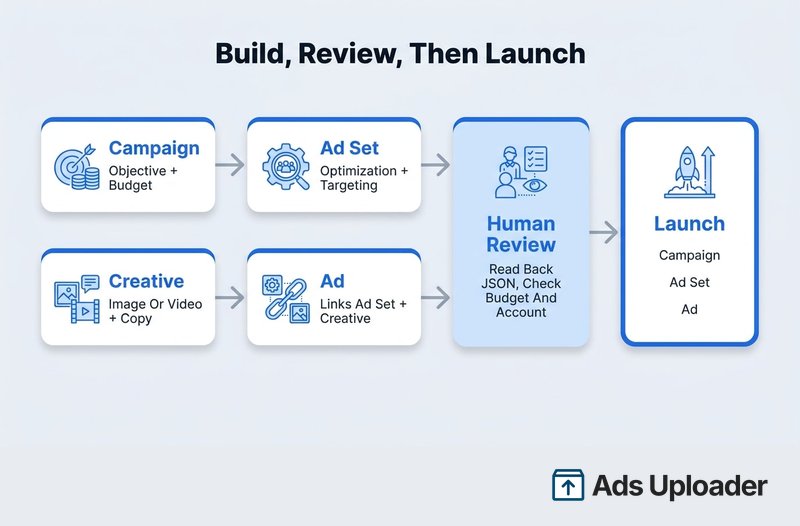
Monte uma campanha de ponta a ponta
Esta é a sequência documentada pela Meta. Todo comando de criação aceita --status, então você escolhe se cada objeto começa pausado ou ativo. Estes exemplos criam tudo pausado e ativam no final:
# 1. Campaign (budget in cents: 5000 = $50.00 on a USD account)
meta ads campaign create \
  --name "Spring Test | Traffic" \
  --objective OUTCOME_TRAFFIC \
  --daily-budget 5000 \
  --status PAUSED

# 2. Ad set
meta ads adset create <CAMPAIGN_ID> \
  --name "US | Broad" \
  --optimization-goal LINK_CLICKS \
  --billing-event IMPRESSIONS \
  --targeting-countries US \
  --status PAUSED

# 3. Creative (image or --video ./file.mp4)
meta ads creative create \
  --name "Hero Banner" \
  --page-id <PAGE_ID> \
  --image ./banner.jpg \
  --body "Check out our latest deals!" \
  --title "Shop Now" \
  --link-url https://example.com/sale \
  --call-to-action SHOP_NOW \
  --status PAUSED

# 4. Ad
meta ads ad create <AD_SET_ID> \
  --name "Hero Banner Ad" \
  --creative-id <CREATIVE_ID> \
  --status PAUSED
Algumas regras que as flags não contam:
- Orçamentos ficam na menor unidade da moeda da conta.
5000equivale a $50.00 em USD. Confira a moeda da conta antes de um agente definir um orçamento. - O orçamento fica em um lugar só. Coloque-o na campanha (CBO) ou nos conjuntos de anúncios (ABO), não nos dois. Os dois ao mesmo tempo geralmente retornam o erro 1885621.
--targeting-countriesé a única flag de segmentação simples. Idade, gênero, interesses, custom audiences, exclusões e posicionamentos manuais passam por--targetingcomo JSON ou@file.json.- Criativo dinâmico precisa de um conjunto de anúncios dinâmico. Crie primeiro o conjunto de anúncios com
--dynamic-creative. - A flag do Instagram mudou. A referência web diz
--instagram-actor-id; o pacote 1.2.0 usa--instagram-user-id. Executemeta ads creative create --helpna versão que você tem instalada.
Nomes consistentes importam mais quando um script ou agente está criando objetos, porque você vai lê-los de volta em listas depois. Defina uma convenção de nomenclatura antes de automatizar qualquer coisa.
Ative, pause e faça a limpeza
A ativação são três atualizações separadas, uma por camada de veiculação:
meta ads campaign update <CAMPAIGN_ID> --status ACTIVE
meta ads adset update <AD_SET_ID> --status ACTIVE
meta ads ad update <AD_ID> --status ACTIVE
Pausar é o mesmo comando com --status PAUSED. Exclusões pedem confirmação, a menos que você passe --force, e são em cascata: excluir uma campanha exclui seus conjuntos de anúncios e anúncios, e excluir um conjunto de anúncios exclui seus anúncios.
meta ads campaign delete <CAMPAIGN_ID>
Catálogos e datasets
Os comandos de catálogo e dataset determinam a empresa a partir de --business-id, depois de BUSINESS_ID e, por fim, da conta de anúncios configurada.
meta ads dataset create --name "Website Pixel"
meta ads dataset connect <PIXEL_ID> --ad-account-id act_123456789
meta ads dataset connect <PIXEL_ID> --catalog-id <CATALOG_ID>
meta ads catalog create --name "My Product Catalog"
meta ads product-set list --catalog-id <CATALOG_ID>
A criação de datasets exige que um administrador da empresa tenha aceitado os termos das Business Tools da Meta (erro 1870092 caso contrário). Datasets são os mesmos Pixels que você vê no Events Manager, então tudo o que você cria aqui aparece lá também.
A Meta Ads CLI cria anúncios pausados ou ativos?
Campanhas, conjuntos de anúncios e anúncios começam pausados, a menos que você passe --status ACTIVE. O tutorial da Ads CLI da Meta diz: "Ads CLI creates everything in PAUSED status by default." Na versão 1.2.0, os criativos são a exceção e ficam ativos por padrão. De qualquer forma, a decisão é sua: defina --status em cada criação e ative ou desative objetos depois com update.
Usando a Meta Ads CLI a partir do Claude Code ou do Codex
Não é preciso nada especial para conectar um agente. O Claude Code, o Codex e ferramentas parecidas executam comandos de shell, então rodam a Meta Ads CLI exatamente como você faria e interpretam o --output json. Essa é toda a integração.
O importante é entender que o agente herda todas as permissões que o token tem. O comentário mais afiado de uma das primeiras threads do r/FacebookAds tocou nesse ponto: o mesmo setup que rascunha criativos substitutos também pode mudar orçamentos e pausar campanhas, então a sua etapa de revisão é a única coisa entre um rascunho e uma mudança ao vivo, e ela só funciona se o agente não estiver aprovando escritas automaticamente. A divisão recomendada por eles é a que vale copiar: aprove leituras automaticamente e exija aprovação para tudo o que altera gasto ou status.
No Claude Code, isso se traduz diretamente em regras de permissão no .claude/settings.json:
{
  "permissions": {
    "allow": [
      "Bash(meta --output json ads campaign list:*)",
      "Bash(meta --output json ads insights get:*)",
      "Bash(meta ads adaccount current:*)"
    ],
    "ask": [
      "Bash(meta ads campaign create:*)",
      "Bash(meta ads campaign update:*)",
      "Bash(meta ads adset update:*)",
      "Bash(meta ads ad update:*)"
    ],
    "deny": [
      "Bash(meta ads campaign delete:*)"
    ]
  }
}
O Codex tem suas próprias configurações de aprovação; use-as do mesmo jeito, para que as leituras rodem livremente e as escritas esperem por você.
Mais algumas proteções que funcionam na prática:
- Use um usuário do sistema dedicado para o agente, atribuído apenas às contas de que ele precisa. Não reutilize um token amplo e compartilhado.
- Mantenha o token no
.env, nunca em um prompt, em um arquivoCLAUDE.mdou em um argumento de comando. - Peça um plano por escrito antes de qualquer montagem: ID da conta, IDs dos objetos pai, objetivo, orçamentos em centavos e em dólares, segmentação, Pixel e status final de cada objeto. Depois, peça ao agente para ler cada objeto de volta em JSON e comparar.
- Nunca deixe o agente usar
--forcepor conta própria. E observe que--no-inputapenas suprime prompts. Não é um recurso de segurança. - Limite loops e novas tentativas. Um loop de novas tentativas em uma criação que falhou é como você acaba com cinco campanhas duplicadas.
Os fluxos de trabalho mais úteis com agentes são do lado da leitura. O mesmo profissional do Reddit roda uma checagem matinal que puxa as campanhas ativas, compara gasto, ROAS e CPL nas últimas 72 horas e sinaliza tudo o que passar dos limites de cada cliente (um CPL de $5 é ótimo para uma conta e péssimo para outra). Segundo ele, isso economizou cerca de 45 minutos por dia. A regra de fadiga dele também é um bom ponto de partida: frequência subindo enquanto o CTR cai por três dias ou mais dispara um rascunho de texto substituto, que uma pessoa revisa. E bons agentes acrescentam um contexto que um limite fixo não consegue, como segurar uma campanha cujo CPL saltou porque você escalou o orçamento dela dois dias atrás.
Limitações e lacunas conhecidas
A Meta Ads CLI é uma base sólida, mas há coisas que ela ainda não faz:
- Dry run só para campanhas. A versão 1.2.0 adicionou
--execution-options validate_onlyaocampaign createe aocampaign update, que valida a campanha sem criá-la nem alterá-la. Conjuntos de anúncios, criativos e anúncios não têm equivalente, e não há preview de uma montagem completa, então sua etapa de revisão continua sendo um plano por escrito mais uma leitura de volta. - Sem transações. Uma montagem são quatro chamadas de API separadas. Se o anúncio falhar depois de a campanha e o conjunto de anúncios terem sido criados, esses objetos ficam para trás e você mesmo precisa limpá-los.
- Sem comando em lote. Trabalho em massa significa loops de shell, o que aumenta o risco de falhas parciais, duplicatas e limites de taxa.
- Recursos avançados exigem JSON bruto. Carrosséis, controles do Advantage+ creative (
--degrees-of-freedom-spec,--asset-feed-spec), personalização de ativos por posicionamento e segmentação complexa recebem JSON da Marketing API. Nesse ponto, você precisa conhecer o schema da API. - Insights é mais limitado que a API. Você pode filtrar por campanha, conjunto de anúncios ou anúncio, mas não há uma flag
--levelexplícita, nem relatórios assíncronos, nem controle de janela de atribuição. - Sem perfis de conta nomeados. O trabalho com várias contas passa por
AD_ACCOUNT_IDe--ad-account-id, sem um seletorclient-a/client-b. - Alguns campos de criativo não podem ser editados depois da criação. Planeje criar um criativo substituto.
- A documentação está atrás do pacote. O 1.2.0 instalado tem mais flags e grupos de recursos do que a referência pública, e não há changelog público. Os primeiros usuários no Reddit disseram que descobriram alguns comandos na tentativa e erro, e o
--helpda versão instalada ainda é a referência mais confiável.
Alguns limites iniciais já foram corrigidos. Relatos da semana de lançamento diziam que uploads de vídeo não eram possíveis e que insights só funcionavam no nível de campanha. As versões atuais suportam --video em criativos e filtros para insights de conjunto de anúncios e de anúncio.
Solução de erros comuns
Comece pelo código de saída, que diz qual camada falhou:
| Código de saída | Significado |
|---|---|
| 0 | Sucesso |
| 1 | Erro geral |
| 2 | Erro de uso ou de argumento |
| 3 | Erro de autenticação |
| 4 | Erro de API |
| 5 | Recurso não encontrado |
Em scripts, trate cada um de forma diferente. Tentar de novo um erro de uso (2) ou de autenticação (3) nunca funciona. Só alguns erros de API (4) valem uma nova tentativa.
Os erros da Meta com que você tem mais chance de se deparar:
| Sintoma | Causa provável | Solução |
|---|---|---|
| Saída 3, erro de API 190 | Token ausente, expirado ou revogado | Gere o token de novo e execute meta auth status |
| Erros 10, 200 ou 294 | Escopo ou nível de acesso ausente | Confira os escopos do token, o acesso do app e a atribuição de ativos |
adaccount list está vazio | Usuário do sistema não atribuído à conta | Atribua a conta de anúncios em Business Settings |
| Erro 1885183 | Post do criativo feito por um app em modo de desenvolvimento | Mude o app para Live e confirme o nível de acesso |
| Erro 1885621 | Orçamento na campanha e no conjunto de anúncios | Escolha CBO ou ABO, não os dois |
| Erro 1870092 | Termos das Business Tools não aceitos | Um administrador da empresa aceita os termos |
| Saída 4 com erro 17 ou 613 | Limite de taxa | Espere antes de tentar de novo; não repita em um loop apertado |
A Meta Ads CLI não tem uma cota de limite de taxa separada. Ela compartilha os limites da Marketing API, que a Meta documenta na sua página de limites de taxa. Com Limited Access, a pontuação da conta de anúncios tem teto de 60 (uma leitura custa cerca de um ponto, uma escrita cerca de três) e um bloqueio dura cinco minutos. O Full Access eleva o teto para 9.000. Mudanças de orçamento têm um limite próprio de cerca de quatro por conjunto de anúncios por hora, o que importa se um agente gosta de ficar mexendo.
A Meta Ads CLI é segura para a sua conta de anúncios?
Se você passa tempo no X ou em comunidades de compra de mídia, já deve ter visto o barulho: anunciantes que conectaram os conectores de IA da Meta, ou apontaram um agente para a própria conta, e depois postaram que a conta foi restringida por automação. Vale levar isso a sério. Também vale ler com cuidado, porque cada caso é diferente, restrições raramente têm uma causa única e não podemos comentar os detalhes de nenhuma conta específica.
A posição oficial da Meta é o que a sua documentação diz. A CLI é uma ferramenta criada pela Meta voltada explicitamente para desenvolvedores e agentes de IA, e chama a mesma Marketing API que qualquer outra integração, então as mesmas políticas de publicidade, níveis de acesso e limites de taxa se aplicam. A Meta não disse que a CLI isenta uma conta de nenhum deles, e também não disse que usar a CLI causa restrições.
O que um agente muda é o padrão de atividade. Um comprador de mídia no Ads Manager trabalha em velocidade humana. Um agente em loop pode disparar dezenas de escritas em um minuto, repetir chamadas que falharam, subir a mesma mídia de novo e mexer em orçamentos para lá e para cá, e visto de fora esse padrão parece muito diferente de qualquer chamada isolada. Os riscos que você controla são os que já vimos: escritas na conta act_ errada, orçamentos na unidade errada, novas tentativas descontroladas e tokens vazados. Exija aprovação para escritas, limite loops e respeite os erros de limite de taxa, e a CLI se comporta como qualquer outra integração bem construída.
Onde a Ads Uploader CLI se encaixa
A CLI e o MCP da Meta basicamente expõem a Marketing API em um formato mais amigável para agentes chamarem. Isso é útil, e é o que a Meta se propôs a construir. O que provavelmente recebeu menos atenção em uma camada fina e de uso geral é tudo o que envolve as chamadas: controlar o ritmo das requisições dentro dos limites de taxa, o padrão de ações que um agente executa em uma conta ao longo do dia e o upload seguro de mídia. A documentação da CLI da Meta não descreve nenhuma camada de controle de ritmo ou de novas tentativas; a ferramenta herda os limites da Marketing API do jeito que são. Essas são as coisas que a Ads Uploader tem embutidas e resolve no próprio backend.
Há também um problema mais silencioso. Deixar campanhas, conjuntos de anúncios e anúncios exatamente com o objetivo e a configuração que você quer é uma arte subestimada. Objetivo, meta de otimização, posicionamentos, identidade, rastreamento, nomenclatura e formato do criativo precisam se alinhar, e as combinações que funcionam não estão escritas em um só lugar. Esse é todo o propósito da Ads Uploader.
A Ads Uploader CLI foi feita para ser controlada por um agente como o Claude Code ou o Codex, e permite modelar anúncios novos a partir dos seus anúncios existentes: salve um anúncio que já está configurado do jeito que você gosta como preset (ads presets:save --from-ad), e os novos lançamentos herdam essas configurações. Com milhões de anúncios lançados, sabemos quais combinações de configurações andam juntas e onde as pessoas encontram problemas, e esse conhecimento coletivo fica dentro do fluxo de trabalho, e não em um prompt. Seu agente sobe uma pasta de criativos, executa ads create:preview para conferir exatamente o que será criado e então cria os anúncios, usando os mesmos presets e builds salvos do app web. A documentação da CLI cobre o conjunto completo de comandos.
Três diferenças práticas aparecem rápido:
- Configuração. A instalação é
npm install -g @adsuploader/cli(requer Node.js 18+), e depoisads loginautentica no seu navegador com a sua conta da Ads Uploader. Não há app de desenvolvedor nem token de usuário do sistema. Opip install meta-adsda Meta também é uma linha só se o Python 3.12+ estiver presente; a verdadeira dor de cabeça ali é a autenticação: um app de desenvolvedor, um usuário do sistema administrador, atribuição de ativos e um token com escopos. - Armazenamento em nuvem. O criativo geralmente fica no Google Drive.
ads upload:drive "<shared folder link>"entrega uma pasta do Drive compartilhada por link para a nossa infraestrutura, que baixa e processa a mídia no servidor, e o Ads Uploader MCP hospedado aceita um link de pasta ou arquivo do Drive da mesma forma. Isso costuma ser mais rápido do que você mesmo ficar movendo arquivos. - Builds salvos que você pode abrir. O app web, a CLI e o MCP compartilham o mesmo build. Um agente pode montar uma campanha inteira pela CLI ou pelo MCP e retornar um link do build. Abra-o no uploader da Ads Uploader e você pode mudar textos, a configuração do conjunto de anúncios e os aprimoramentos ou adicionar mais mídia, e então lançar pela web ou continuar pela CLI ou pelo MCP com o mesmo build. Uma aba do uploader aberta recebe as edições do agente automaticamente. Em um fluxo só por chat, você não vê de verdade o resultado pretendido até os anúncios serem lançados, e isso pesa mais quando se trata da conta de outras pessoas.
Qual caminho faz sentido depende do seu setup:
- Um setup simples: uma conta de anúncios, imagens estáticas em alguns tamanhos, uma estrutura de campanha. Você pode criar suas próprias skills sobre a CLI ou o MCP da Meta para subir anúncios exatamente como quer, e é uma boa forma de aprender a API.
- Agências e parceiros: muitas contas, configurações de campanha diferentes por cliente e as complicações que vêm com cada uma. É aí que skills feitas à mão costumam desandar, porque cada conta nova acrescenta combinações para tratar. A Ads Uploader é a rede de segurança nesse caso. Você terceiriza o conhecimento e a implementação para um fluxo de trabalho testado e aprovado por milhares de media buyers e agências, a um preço bem acessível.
Há também a manutenção. As ferramentas, permissões e regras de aprovação da Meta não param de mudar: os níveis de acesso foram renomeados para Limited e Full, novos tipos de campanha trazem novas permissões, o App Review se aplica assim que um app gerencia contas de outras empresas e precisa ser repetido quando os requisitos mudam e, na nossa experiência, essas revisões agora levam muito mais tempo do que antes. Ter alguém acompanhando as ferramentas, permissões e aprovações significa que você não fica para trás quando elas mudam. A Ads Uploader é um app aprovado pela Meta, mantido por nós, com canais estabelecidos para levar problemas de plataforma e de API à Meta quando algo quebra do lado dela, então acompanhar essas mudanças é trabalho nosso, e não seu.
Meta Ads CLI vs Ads Uploader CLI
Veja como as duas se comparam, lado a lado:
| Meta Ads CLI | Ads Uploader CLI | |
|---|---|---|
| Instalação | pip install meta-ads (Python 3.12+) | npm install -g @adsuploader/cli (Node.js 18+) |
| Autenticação e configuração | Seu próprio app de desenvolvedor da Meta, um usuário do sistema administrador, atribuição de ativos e um token com escopos | ads login no navegador com a sua conta da Ads Uploader |
| Preview | Sem preview da montagem completa; validate_only valida só campanhas, então o resto é revisado lendo os objetos de volta | ads create:preview mostra o que será criado antes de você criar |
| Importação da nuvem | Lê arquivos locais; o armazenamento em nuvem precisa estar sincronizado com o disco | ads upload:drive importa uma pasta do Google Drive compartilhada por link no servidor |
| Builds e revisão | Cada comando é uma chamada de API isolada, sem plano salvo | Builds salvos compartilhados com o app web e o MCP; abra o link do build para revisar e editar na interface |
| Manutenção e aprovações do app | Você mantém o app, o token, o nível de acesso e qualquer App Review | App aprovado pela Meta, mantido por nós |
| Custo | Gratuita; você paga apenas o investimento em anúncios | Planos pagos |
Se você quer entregar a API da Meta a um agente de programação sem nada no meio, a Meta Ads CLI oficial é o ponto de partida óbvio, e para um setup simples é uma boa escolha. Se você prefere não construir e manter o preview, a lógica de lançamento e as aprovações por conta própria, esse é o trabalho que a Ads Uploader CLI faz.
Dê ao Seu Agente de IA uma Rede de Segurança
Lance em todas as contas de clientes com um MCP e uma CLI feitos para media buyers avançados e agências.
Teste Ads Uploader grátisNão precisa de cartão de crédito • Teste grátis de 7 dias
Perguntas frequentes
A Meta Ads CLI é gratuita?
Sim. A Meta não cobra nenhuma taxa separada pela CLI. Você instala o pacote meta-ads do PyPI sem custo e paga apenas o seu investimento normal em anúncios. O pacote é proprietário, e não open source, e você ainda precisa de um app de desenvolvedor da Meta e de um token de usuário do sistema.
Existe uma CLI oficial para Facebook Ads?
Sim. A CLI oficial da Meta para anúncios no Facebook e no Instagram é o pacote Python meta-ads, lançado em 29 de abril de 2026, com comandos sob meta ads.
A Meta Ads CLI consegue fazer upload de anúncios em vídeo?
Sim. Passe um arquivo local para meta ads creative create com --video e a CLI faz o upload. A Meta documenta arquivos mp4, mov, avi, mkv e wmv, e o criativo dinâmico aceita até 10 vídeos por meio de flags --videos repetíveis.
Preciso ser desenvolvedor para usar a Meta Ads CLI?
Você não precisa escrever código de API, mas a configuração tem cara de coisa de desenvolvedor: Python 3.12+, um app de desenvolvedor da Meta, um usuário do sistema administrador com ativos atribuídos e um token com os escopos certos. Muitos media buyers deixam um agente de programação com IA cuidar da instalação e executar os comandos.
Posso gerenciar várias contas de anúncios com a Meta Ads CLI?
Sim, se o usuário do sistema estiver atribuído a cada conta. Liste-as com meta ads adaccount list, defina um padrão com AD_ACCOUNT_ID ou substitua por comando com --ad-account-id. Não existem perfis nomeados, então indique a conta explicitamente em toda escrita.
Qual versão do Python a Meta Ads CLI exige?
Python 3.12 ou superior. O pacote é distribuído como wheels compilados, então um Python mais antigo ou uma plataforma não suportada retorna "No matching distribution found." Um ambiente virtual com Python 3.12 ou 3.13 evita isso.
A Meta Ads CLI funciona com Claude Code e Codex?
Sim. A Meta lista agentes de IA como público-alvo, e qualquer agente que execute comandos de shell e leia JSON pode controlá-la. Nenhum dos dois agentes adiciona segurança por conta própria, então aprove leituras automaticamente e exija sua aprovação para criações, ativações, mudanças de orçamento e exclusões.
Usar a Meta Ads CLI pode fazer minha conta de anúncios ser banida?
Não há um sim ou não simples. A CLI é a própria ferramenta da Meta para desenvolvedores e agentes de IA, e a Meta não disse que usá-la causa restrições nem que isenta você delas. Políticas, níveis de acesso e limites de taxa se aplicam como em qualquer integração. Alguns anunciantes relatam restrições depois de automatizar com agentes, mas cada caso é diferente, então mantenha as escritas sob aprovação e os loops limitados.
Qual é a diferença entre a Meta Ads CLI e o Meta Ads MCP?
A CLI é uma ferramenta Python local que executa comandos de shell com um token de usuário do sistema. O Meta Ads MCP é um servidor hospedado pela Meta em mcp.facebook.com/ads ao qual clientes de chat com IA se conectam via OAuth, sem app de desenvolvedor no fluxo padrão do conector. A CLI serve para scripts e agentes de programação; o MCP serve para trabalho conversacional.
Primeiros passos com a Meta Ads CLI
A Meta Ads CLI dá a desenvolvedores e agentes de IA um acesso oficial e programável à Marketing API, e a versão 1.2.0 cobre muito mais do que a versão da semana de lançamento. Resumindo:
- Instale o
meta-adsem um ambiente virtual com Python 3.12+ e fixe a versão junto com ofacebook-business. - Autentique com um token de usuário do sistema administrador, atribuído apenas aos ativos de que você precisa, guardado no
.env. - Decida o que construir: um setup simples, de uma conta só, é fácil de automatizar por conta própria; trabalho de agência com várias contas é onde um fluxo de lançamento mantido por terceiros se paga.
- Planeje em torno das lacunas: dry run só para campanhas, sem transações, sem comando em lote, JSON bruto para formatos avançados.
- Com um agente, aprove leituras automaticamente e exija aprovação para toda escrita.
Faça da sua primeira semana com a Meta Ads CLI uma semana só de leitura. Puxe insights em JSON, depois monte uma campanha de teste e conduza a revisão e a ativação manualmente. Quando esse ciclo parecer rotina, você vai saber quais partes automatizar e quais manter nas suas próprias mãos.
