Meta Ads MCP is Meta's official Model Context Protocol server, hosted at mcp.facebook.com/ads and launched in open beta on April 29, 2026 within Meta ads AI connectors. Advertisers add the URL as a custom connector in ChatGPT, Claude, Claude Code or Perplexity, sign in with Facebook Login for Business, and an AI agent can report on, create and edit campaigns in plain language. Since July 16, 2026, business admins can also block specific actions and cap budgets. The result is first-party AI access without API work.
A year ago, letting an AI assistant touch your ad account meant an unofficial script, a pasted access token and a bit of nerve. Now Meta hosts the server itself. Paste one URL into Claude or ChatGPT, sign in with Meta, and you can question your account the way you'd question a junior buyer.
Most of what's written about the Meta Ads MCP dates from launch week, though. Since then Meta has added admin rules that block actions and cap budgets, opened the server to any AI app through your own developer app, and published a much fuller tool list.
This guide covers where things stand in September 2026: the URL, setup in each supported client, what the tools do, how safe it is, how to lock it down, prompts worth copying, and where it runs out of road. I launch Meta ads every week and build MCP tooling for that work, so the focus is on what holds up in a real account.
What Is the Meta Ads MCP?
MCP (Model Context Protocol) is an open standard that lets an AI assistant call tools in another system. The system publishes structured, permission-scoped actions, such as "get ad accounts" or "create ad set", and the AI picks which to call based on what you ask.
Meta's server applies that standard to advertising. It's remote-hosted at https://mcp.facebook.com/ads, so there's nothing to install or run. Meta groups it with its Ads CLI under the banner Meta ads AI connectors. If you're weighing the two, our Meta Ads MCP vs CLI comparison covers that decision, and the CLI itself gets its own Meta Ads CLI guide. This guide stays on the MCP.
Two dates matter:
- April 29, 2026: Meta announced the connectors in open beta, with the MCP working in ChatGPT, Claude, Claude Code and Perplexity and no developer credentials required.
- July 16, 2026: Meta added ads MCP server rules (admin guardrails) and support for connecting any AI application through your own developer app, per its developer announcement.
As of September 30, 2026, Meta still calls it open beta and hasn't announced general availability. We track changes like these in our running Meta Ads updates page.
What the Meta Ads MCP Server Can Do
Meta's developer overview groups the tools into seven categories, and the help center adds custom audiences as an eighth. By my count of Meta's published tool tables, that comes to roughly 90 individual tools.
| Category | Examples of what you can ask |
|---|---|
| Comprehensive reporting | "What changed in CPA this week and why?" Anomaly signals, performance trends, auction and industry benchmarks, opportunity score |
| Ad creation and management | Create campaigns, ad sets, ads and creatives; edit entities; pull ad previews; search the Ads Library; boost an Instagram post |
| Custom audiences | Create, update and delete custom audiences, including audience membership |
| Catalog management | Create catalogs, edit products and product sets, manage feeds and feed rules, check catalog diagnostics |
| Signals and datasets | Dataset quality and stats, pixel events and parameters, custom conversions |
| Help and troubleshooting | Explain account errors and search Meta Business Help Center articles |
| A/B tests and lift studies | Check eligibility, create and read A/B tests and conversion lift studies |
| Activity logs | See who or what changed a campaign, budget or status, and when |
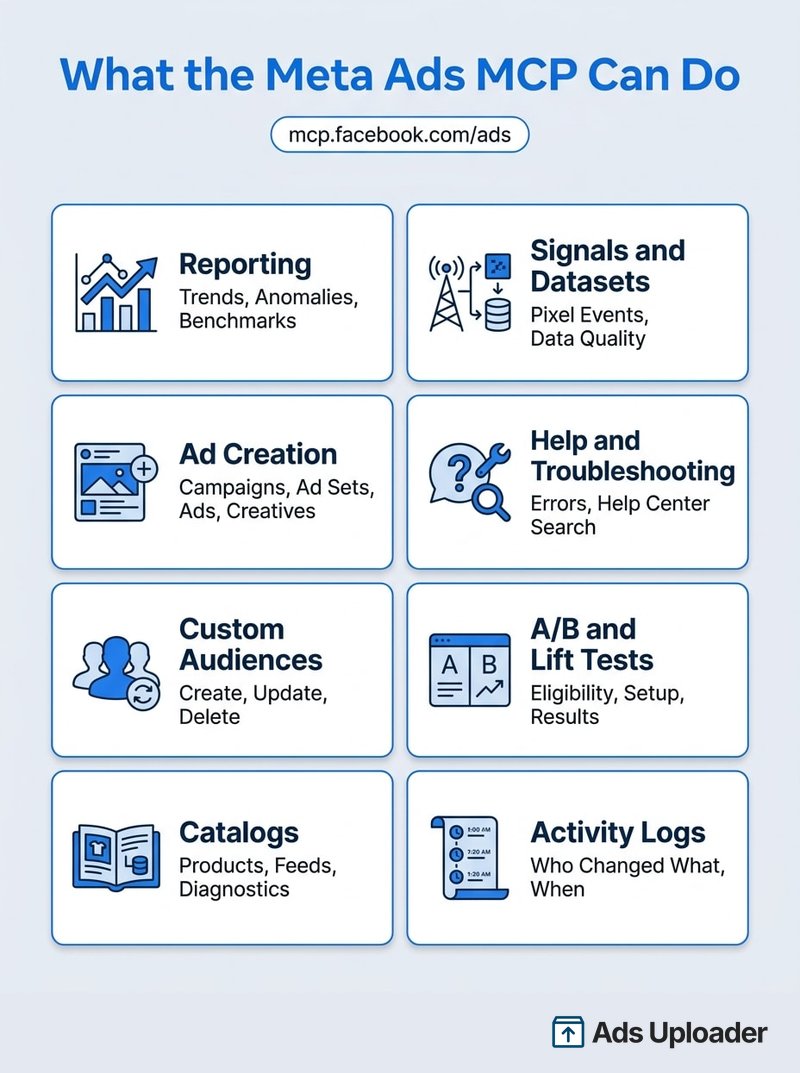
On creative, Meta's ad creation and management tools page says the tools cover uploading creatives, but the tools it actually lists are narrower: ads_create_creative, which creates a single-image link ad creative, plus ads_get_ad_images and ads_get_ad_videos, which list media already in the account. There's no dedicated upload tool, no documented transfer method and no published file-size limits. Images through single-image link creatives look like the workable path; video isn't documented. The help center describes a broader set, which may reflect the staged rollout, so check your own tool list.
One thing to check before you plan anything: your tool list may be shorter. Meta warns "You may not have access to all tools/features yet," so ask the agent to list its available tools before you build a workflow around one.
How to Connect the Meta Ads MCP
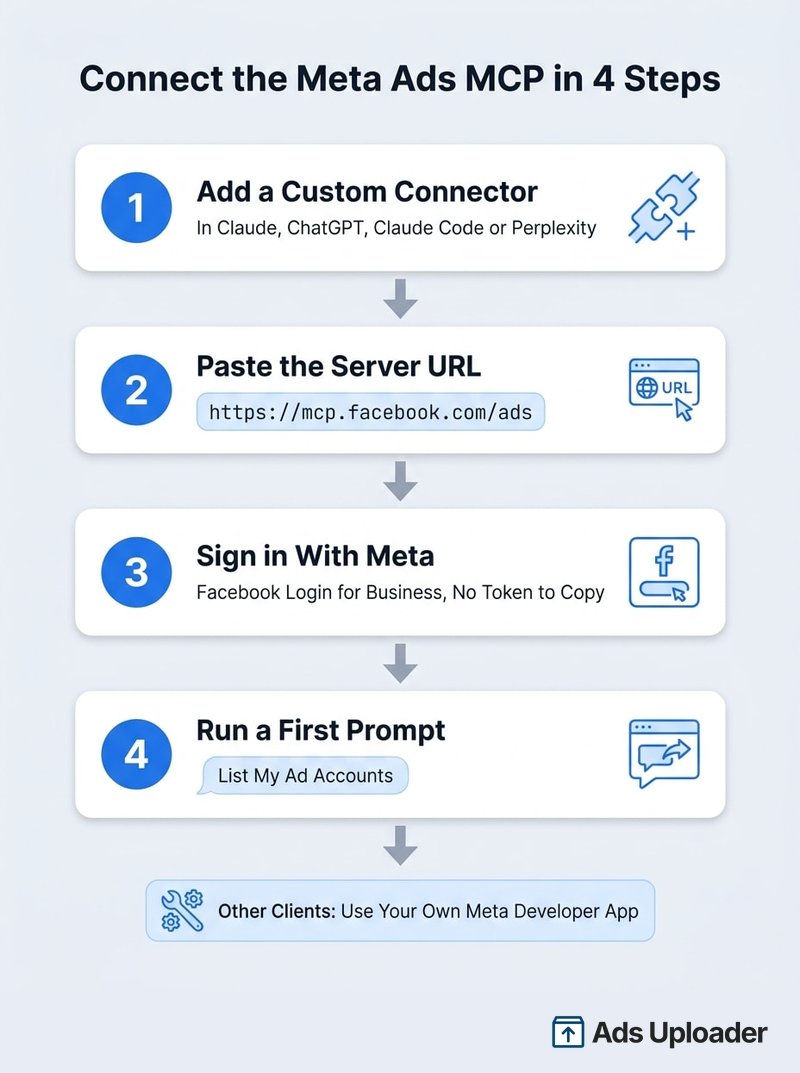
For the four supported clients you don't need a developer app, an API token or any code. You need a login that already has access to the ad account, and a client plan that allows custom connectors. The server URL is the same everywhere: https://mcp.facebook.com/ads.
Claude
In Claude, open Customize → Connectors, click +, then Add custom connector. Name it "Meta Ads", paste the URL and sign in with Meta when prompted. Anthropic supports custom connectors on Free, Pro, Max, Team and Enterprise plans, with a limit of one custom connector on Free. On Team and Enterprise, an owner adds the connector under organization settings first, then each member connects their own Meta login.
Claude Code
Meta's help page points to Claude Code's standard remote-server setup:
claude mcp add --transport http meta-ads https://mcp.facebook.com/ads
Then run /mcp inside Claude Code, pick meta-ads and complete the Meta sign-in in your browser. If you're using your own Meta app, Meta's docs add --client-id <META_APP_ID> to that command and ask you to register the callback URL Claude Code shows you.
ChatGPT
ChatGPT connects remote MCP servers through developer mode: turn it on in settings, create a custom app with the Meta URL and authorize with Meta. Plan support is the messy part. OpenAI's help center documents full read and write connectors on Business, Enterprise and Edu and read-only tools on Pro, while its developer guide also lists Plus, so check your own account before counting on write actions. On Business and Enterprise, an admin has to enable developer mode and publish the app first.
Perplexity
Go to Account settings → Connectors → + Custom connector → Remote, enter the URL, choose OAuth and sign in. Perplexity supports custom remote connectors on Pro, Max and Enterprise, and Enterprise admins may need to allow custom connectors first.
Other Clients and Your Own Developer App
Cursor, Codex, Gemini CLI and other MCP clients aren't on Meta's supported list. Since July 16, the documented route for them is your own Meta developer app: add the Create & manage ads with ads MCP server use case, set up the redirect URL your client provides, and point the client at the same endpoint. If your app will manage ads for other businesses, such as an agency platform, Meta requires App Review and Advanced Access for the ads_mcp_management permission.
Once connected, the best first prompt is boring: "List my ad accounts." If it answers, you're in. If you see "This ad account is not enabled for the Ads MCP" or is_ads_mcp_enabled: false, sign-in worked but that account hasn't been reached by the rollout yet. Plenty of buyers hit that message in the first months, and Meta hasn't published a waitlist or timeline.
Wary of Wiring AI Straight to Meta?
Ads Uploader is loved by power media buyers and agencies, and trusted to launch hundreds of thousands of Meta ads every month.
Try Ads Uploader FreeNo credit card required • 7-day free trial
Is the Meta Ads MCP Safe?
It's the first question everyone asks, and Meta answers it directly on its ads AI connectors help page: "It's safe to connect your ad account through Meta's ads MCP server, and it's unlikely that an account would be banned simply for using it." Meta ties bans to policy violations, noncompliant ads and attempts to evade enforcement, not to the connector.
That's a fair statement, not a guarantee, and it hasn't quietened the noise. Spend any time on X and you'll see advertisers saying their accounts were restricted after they connected an AI agent or automated their account work, sometimes through the official connector. Every case is different, and we can't comment on the specifics of any one account: a restriction can stem from the ads, the landing pages, payment history or the pattern of changes, and a post rarely shows all of that.
What we can say is that Meta's official position is clear, and that the stories with real detail tend to share a shape: rapid-fire edits, errors retried in loops, many accounts touched at once, creative launched without review. Those patterns don't become safe because Meta runs the server.
The official server does remove one big risk. You aren't handing a Meta token to an unknown operator; you sign in through Meta's own OAuth, and the agent can only touch assets your login can already reach. From there, three separate controls stack:
- OAuth consent decides which permissions the client gets.
- Your AI client's confirmation prompts approve individual actions, including going live.
- Ads MCP server rules block whole classes of action at the business level, whatever the prompt says.
The remaining risks are operational: the wrong account, the wrong attribution window, a budget change you didn't mean. A connector that can't get you banned can still spend your budget badly. Read-only work is low risk. Live edits deserve a change log and a human checkpoint, which is what rules give you.
Ads MCP Server Rules: Limit What Your Agent Can Do
Ads MCP server rules are the most useful thing Meta has added since launch. They let an admin decide what any connected agent may do in an ad account or catalog, regardless of who's prompting it.
Anyone with full control of a business portfolio can set them:
- In Meta Business Suite, go to Settings.
- Under Integrations, select Ads MCP server. If it isn't there, your business doesn't have the feature yet.
- Choose the ad account or catalog.
- Switch individual actions between Allowed and Blocked.
Meta gives two examples. Set Create campaigns to Blocked and any agent request to create a campaign in that account is denied. Or set Edit or set budget to Blocked; if you'd rather allow budget changes within limits, switch Budgets set above this amount to Blocked and enter a ceiling, such as $1,000, and anything above it is refused. When some actions are blocked, the account shows Limited next to "Take actions in this ad account."
Meta's rules documentation has also described finer switches (creating ad sets and ads, editing targeting, creative or status, percentage caps on budget changes), so check what your Business Suite shows.
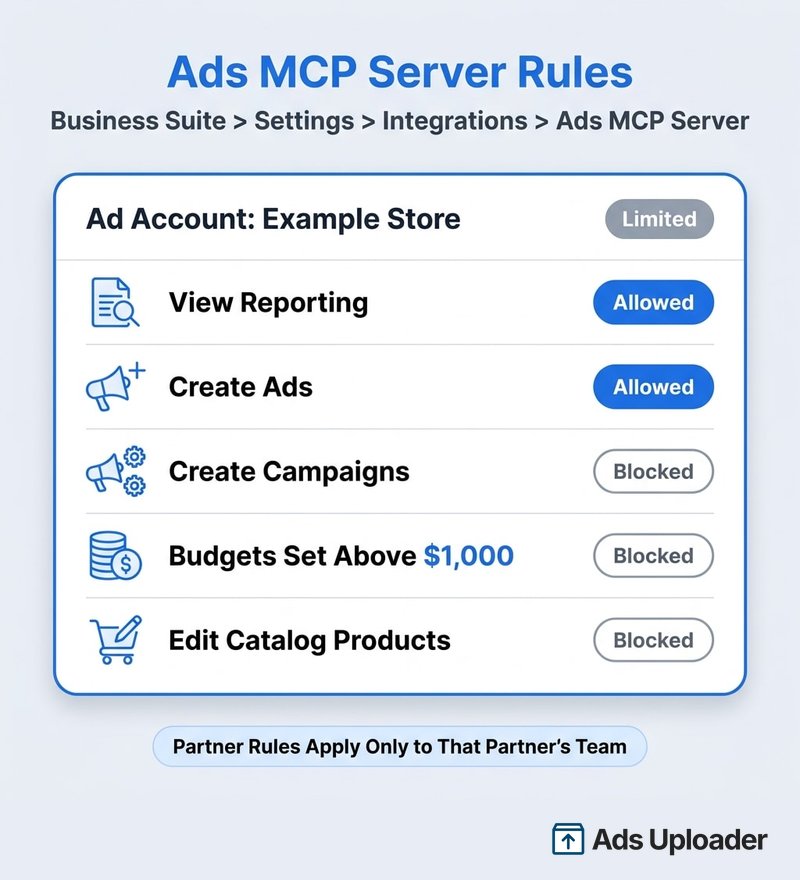
The agency detail matters. When a client shares an ad account with your agency, your agency can set its own rules on that account, and they apply only to your team's business users. The client keeps owner-level rules; you can run stricter ones for your staff. Meta also lets you manage rules through the Marketing API, which helps if you're setting guardrails across dozens of accounts.
A sensible starting policy for a new rollout:
- Allow reporting, diagnostics and activity logs.
- Allow creating ad sets and ads, but block campaign creation until the team is comfortable.
- Block budget edits above a ceiling you'd approve without a second look.
- Block catalog product edits unless someone owns the feed.
- Review the activity log weekly for the first month.
Meta Ads MCP Prompts That Actually Save Time
Answers are only as good as the scoping. Name the ad account ID, the date range and the attribution setting, and say whether the agent may change anything. Meta's starter prompts ("List my ad accounts", "Summarize top-spending campaigns for the last 30 days") are fine for a first test; these are closer to daily use.
Reporting
- "Use only act_123456789. Compare September 1-21 with the previous 21 days on spend, purchases, CPA, ROAS, CPM, CTR and frequency, using the same attribution setting for both. Separate delivery changes from conversion-rate changes. Don't modify anything."
Audits and diagnostics
- "Audit act_123456789 without making changes: sharp spend swings, ads with delivery errors, dataset quality warnings and every budget or status change in the activity log this week. Cite object IDs for each finding."
- "Check catalog 123456789 for feed failures, rejected products and event-source health problems. Explain the impact of each. Change nothing."
Controlled drafts
- "Draft, but don't activate, a Sales campaign in act_123456789 with a $500 daily budget cap, US only, optimizing for purchases with dataset 1234. Show me every field before calling a write tool, then return the IDs and ad previews."
- "Find ad sets with seven-day CPA at least 20% below target and 20+ purchases. Propose budget increases capped at 15%. Don't execute them."
If a number looks wrong, ask which fields, dates and attribution window the agent used; mismatched windows and summed unique metrics cause most bad answers. Keep analysis and activation in separate prompts so going live is always deliberate.
Where the Official Meta Ads MCP Stops
For reporting, audits and the odd hand-built campaign, the official server is the obvious default: first-party, free to connect and now properly governable. Where it gets thin is high-volume, creative-heavy launching, which is a question of fit rather than quality.
It helps to be clear about what the official server is. Meta's MCP, like its CLI, essentially exposes the Marketing API in a shape that's friendlier for agents to call. The harder parts of launching at volume sit above the API: pacing requests so an agent stays inside rate limits, the pattern of actions an agent performs on an account (dozens of edits in a few minutes looks nothing like a buyer's afternoon), and getting media uploaded safely and matched to the right placements. Those layers appear to have had less attention so far. Meta publishes no MCP-specific rate limits, no guidance on agent action patterns and no documented upload method.
- Getting files in. A hosted MCP server can't read your disk, and Meta's is hosted-only. Files have to arrive some other way, by URL, a shared Drive link or inline data sent through the chat, and Meta doesn't document which of those its server accepts or any size limits. That's why video tends to be harder than images. Meta's developer tool table lists only a single-image link creative tool with no documented upload method, and inline data is only practical for small images, so video needs a URL or Drive workaround. A locally installed MCP can read your disk; the limit belongs to hosted servers.
- One object at a time. The agent builds campaigns, ad sets, creatives and ads with separate tool calls. Twenty creatives across three ad sets means a long chain of calls, confirmation prompts and context-window use, with no documented rollback if call 34 fails. Meta publishes no bulk limits or batch transaction model.
- Nothing reusable. When the chat ends, the build ends with it. There's no saved launch spec to review, reuse next week or hand to a colleague.
- Formats and details. The published tool list has no dedicated targeting search, no placement-specific asset customization, and no documented support for flexible format, dynamic creative or partnership ads. Meta announced on September 15 that Partnership Ads are coming to the connector, with rollout through the rest of 2026, so check whether your tool list has them yet. Instant Form (lead form) creation isn't in the tool list either, which matters for lead-gen accounts. Absence from the docs doesn't prove a tool is missing everywhere, but test it before you build a process around it.
If your week means turning a folder of 40 videos, their 9:16 and 4:5 variants and a copy sheet into live ads, the work is consistent naming, the right asset in each placement, settings copied from proven ads, and a preview before money moves.
The Ads Uploader MCP for Creative-Heavy Launches
This is where I'll talk about our own product, because it's the job we built it for.
Getting campaigns, ad sets and ads into exactly the right place, with exactly the setup you intended, is an underappreciated art. Every account has its own conventions: which ad set a creative belongs in, which Page and Instagram identity it runs under, the UTMs, the placement assets, the naming, the partner and catalog quirks. Get one of them wrong and the ad still launches, just not the way you meant. Doing that part reliably is the whole purpose of Ads Uploader.
The Ads Uploader MCP for Meta Ads comes in two forms. The hosted server lives at https://adsuploader.com/api/mcp: add it as a custom connector in Claude, ChatGPT, Claude Code or Cursor and sign in through the browser. The local package runs on your own machine, uses the credentials saved by ads login, and uploads files straight from disk. Either way, your agent gets the same launch surface as our web app and CLI. Setup details are in the Ads Uploader MCP docs.
The core idea is modelling new ads on the ads you already run. Point the agent at a proven ad and it carries that ad's settings into the new batch, or saves it as a reusable preset. Across millions of ads launched through Ads Uploader, we've learned which combinations of settings go together and where launches tend to break. That collective knowledge is built into the workflow, so the agent doesn't have to rediscover it one API call at a time. The layers described above live on our side too: launches run as server-side jobs rather than a long chain of calls from the chat, media is downloaded and processed in the background, and errors are handled on our side rather than retried blindly by the agent.
In practice, that looks like this:
- Bulk creative launches. One spec or saved build can create many ads across ad sets, including carousel, flexible, Multi Media and placement-variant formats, instead of a long chain of single-object calls.
- Media from cloud storage or your disk. With the hosted server, share a Google Drive folder by link (anyone with the link can view), or hand the agent file links, and our infrastructure imports and processes the media server-side while the agent just tracks progress. The files never pass through the chat, video included, and it's often quicker than downloading and re-uploading them yourself. With the local package, the agent uploads images and videos straight from folders on your machine.
- Modelled on proven ads. The agent can copy a winning ad's settings into new ads, save it as a preset, or duplicate ads by post ID so they keep their engagement.
- Preview before spend. A preview shows exactly what will be created, ad by ad and ad set by ad set, before anything reaches Meta.
- Saved builds and the build link. Web app, CLI and MCP share the same saved build. The agent assembles the whole campaign and hands back a build link; open it in the Ads Uploader uploader and change the text, the ad set configuration or the creative enhancements, or add more media. Then launch from the web interface, or tell the agent to carry on with the same build. If the uploader tab is already open, it picks up the agent's edits automatically.
That build link is the interoperability layer a chat-only workflow doesn't give you. In a pure chat flow you don't really see the intended output until the ads launch. With a build, you review the campaign the agent assembled before it exists in Ads Manager, which matters most on client accounts, where launching exactly what was agreed is the job.
Do you need it? If your setup is simple, say one account and statics in a few sizes, you can build your own skills on top of Meta's MCP or CLI and upload exactly the way you want. Where that comes unstuck is agencies working across many accounts, or partners with different campaign setups and complications, where every exception is one more thing your homemade skill has to know about. That's where Ads Uploader is the safety net: you outsource the knowledge and the implementation to us at a very affordable price point, with a workflow tried and tested by thousands of media buyers and agencies.
On trust: Ads Uploader is an approved Meta app, maintained by us, with established channels to raise platform and API issues with Meta when something breaks on Meta's side. You connect through OAuth sign-in rather than pasting a token, and MCP access is included on paid plans.
Official Meta Ads MCP vs Ads Uploader MCP
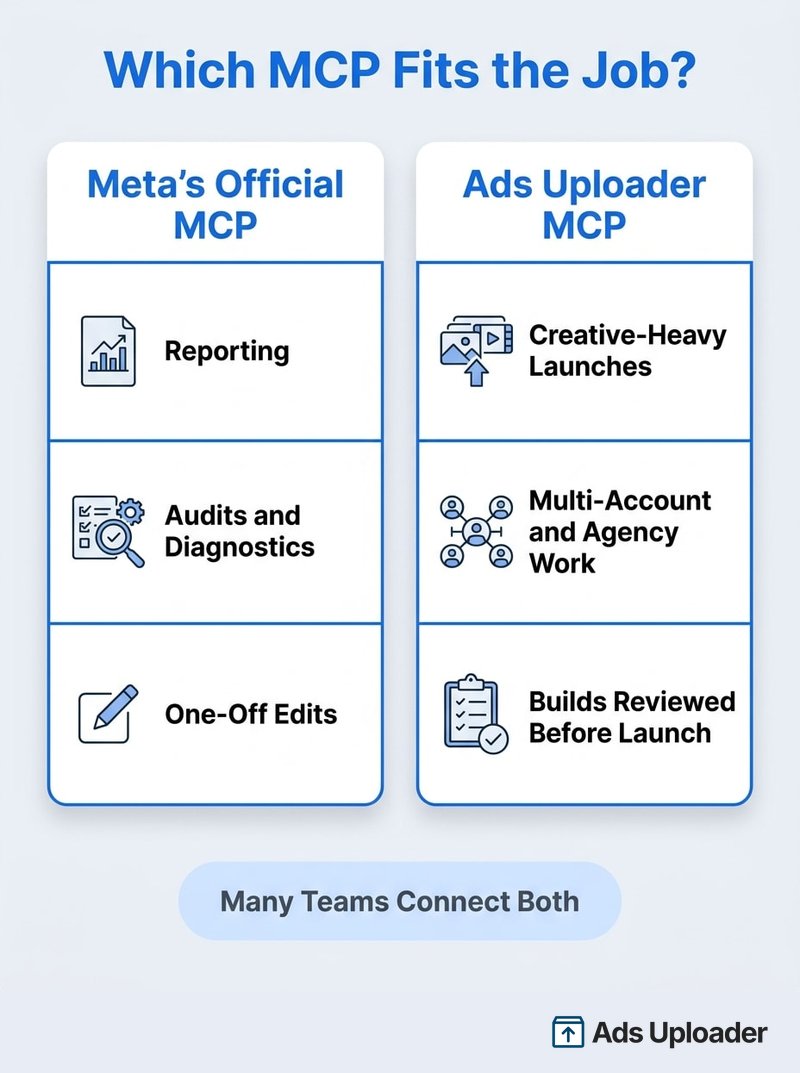
The two servers do different jobs, and plenty of teams connect both. Here's how they line up:
| Official Meta Ads MCP | Ads Uploader MCP | |
|---|---|---|
| What it is | Meta's hosted access layer to the Marketing API, with about 90 tools | A hosted launch workflow for building and shipping ads |
| Server URL | mcp.facebook.com/ads | adsuploader.com/api/mcp |
| Sign-in | Facebook Login for Business | Ads Uploader account: browser sign-in (hosted) or ads login (local) |
| Cost | Free to connect (open beta) | Included on paid Ads Uploader plans |
| Strongest at | Reporting, audits, diagnostics, catalogs, experiments, one-off edits | Bulk creative launches modelled on ads you already run |
| Getting media in | Images via single-image link creatives; no dedicated upload tool, documented video path or published file limits; no disk access | Hosted: Drive folders and file links imported server-side. Local: files uploaded straight from disk |
| Building many ads | One object per tool call | One spec or saved build creates many ads across ad sets |
| Reviewing before launch | Ad previews, one call at a time | A full preview plus a build link you can open and edit in the web app |
| Guardrails | Ads MCP server rules in Business Suite | Launches run as server-side jobs with error handling, after a preview |
Whichever server you connect, a few checks are worth making first:
- Do you sign in with OAuth, or are you asked to paste a token?
- Which permissions does it request, and are they more than the job needs?
- Can you see exactly what will be created before anything reaches Meta?
- Can budget and status changes be restricted, by rules or by the workflow itself?
- Will you be able to trace what changed afterwards? Meta's activity log records changes whichever tool made them.
None of that makes it either-or. The official server is the free default for reporting, audits and one-off edits, and many teams run both side by side: Meta's to find out what's working, Ads Uploader's to ship the next batch exactly as intended.
Frequently Asked Questions
What Is the Meta Ads MCP Server URL?
The official URL is https://mcp.facebook.com/ads. Meta hosts it, so there's nothing to install. Paste it into a custom connector in ChatGPT, Claude, Claude Code or Perplexity and sign in with Facebook Login for Business.
Give Your AI Agent a Safety Net
Launch across every client account with an MCP and CLI built for power media buyers and agencies.
Try Ads Uploader FreeNo credit card required • 7-day free trial
Is the Meta Ads MCP Free?
Meta charges no separate fee for the server. You still pay for ad spend, and your AI client may need a paid plan: Claude allows one custom connector on Free, ChatGPT documents full read and write connectors on Business, Enterprise and Edu, and Perplexity needs Pro, Max or Enterprise.
Does the Meta Ads MCP Work With ChatGPT and Claude?
Yes. Meta supports ChatGPT, Claude, Claude Code and Perplexity through its standard sign-in flow. Other clients, such as Cursor or Codex, use Meta's bring-your-own developer app route added on July 16, 2026.
Can the Meta Ads MCP Get My Ad Account Banned?
Meta says it's safe to connect and unlikely that an account would be banned simply for using it. Some advertisers do report restrictions after automating their accounts, and every case is different. Meta ties bans to what's done through the connector: policy-violating ads, sudden high-frequency changes or evading enforcement.
Do Ads Created Through the Meta Ads MCP Go Live Immediately?
No. Meta says ads created through its MCP are paused until you set them live, and its developer docs say the same for campaigns and ad sets.
Can I Stop an AI Agent From Changing Budgets?
Yes. Anyone with full control of the business portfolio can set ads MCP server rules in Meta Business Suite under Settings, Integrations, Ads MCP server. Block budget edits entirely, or block any budget above a ceiling you choose.
Is Facebook Ads MCP the Same as Meta Ads MCP?
In practice, yes. Meta's official product is the Meta Ads MCP server, which covers Facebook, Instagram and Meta's other placements.
Do I Need a Meta Developer App?
Not for the four supported clients. You need your own app only for other AI clients or custom products, and an app serving other businesses must pass App Review with Advanced Access for ads_mcp_management.
Can the Meta Ads MCP Upload Creatives and Launch Ads in Bulk?
Meta says its tools cover uploading creatives, but the only creative tool it lists makes single-image link creatives, with no dedicated upload tool, no documented video path and no published file limits. Meta also documents no bulk limits or rollback for partial batches, so it suits drafting a handful of image ads better than high-volume launches.
The Takeaway
The Meta Ads MCP is the easiest way yet to put an AI assistant on your ad account, and since the July update it's also one of the easiest to govern.
- The URL is
https://mcp.facebook.com/ads; ChatGPT, Claude, Claude Code and Perplexity connect with a Meta sign-in and no developer app. - It covers reporting, creation, catalogs, audiences, signals, experiments and activity logs, but tool availability still varies by account.
- Ads MCP server rules let admins block actions and cap budgets before anyone writes a prompt.
- It's strongest for analysis, audits and small, reviewed drafts. High-volume creative launches still need a workflow built for them.
If you're setting it up this week: set your rules first, connect one low-risk account, run a week of read-only prompts, then open up writes once the team trusts what the Meta Ads MCP returns.