Meta Ads MCP vs CLI comes down to how you work. The MCP is Meta's hosted connector: Claude or ChatGPT signs in through OAuth and queries or manages an ad account in plain language, with no developer setup. The CLI is a local command-line tool that an agentic coding tool like Claude Code or Codex runs, authenticated with a system-user token. Both launched on April 29, 2026. Use the MCP for conversational analysis, the CLI for automation you maintain yourself, and Ads Uploader for high-volume creative launches.
For the last year the loudest question in performance marketing was some version of "if I let AI touch my ad account, will Meta ban me?" On April 29, 2026 Meta answered it by shipping the tools itself: an official MCP server and an official CLI, bundled under the name "Meta ads AI connectors," both in open beta. That changes the conversation from should I to which one, and the search results are now full of vendor pages nudging you toward their wrapper instead of answering it straight.
This is the operator's read. Ads Uploader runs an approved Meta app for ad launches every day, and we also ship our own Ads Uploader CLI and Ads Uploader MCP for ad creation. The goal here is not to pretend Meta's official tools are weak. They are useful. The real question is what you have to build around them before a media buyer or AI agent can use them safely for repeatable launches. Where Meta's own documentation confirms a detail, I'll say so plainly. Where the only evidence is third-party, I'll flag it, because a lot of the early coverage is mixing the two up.
What Meta Shipped on April 29, 2026
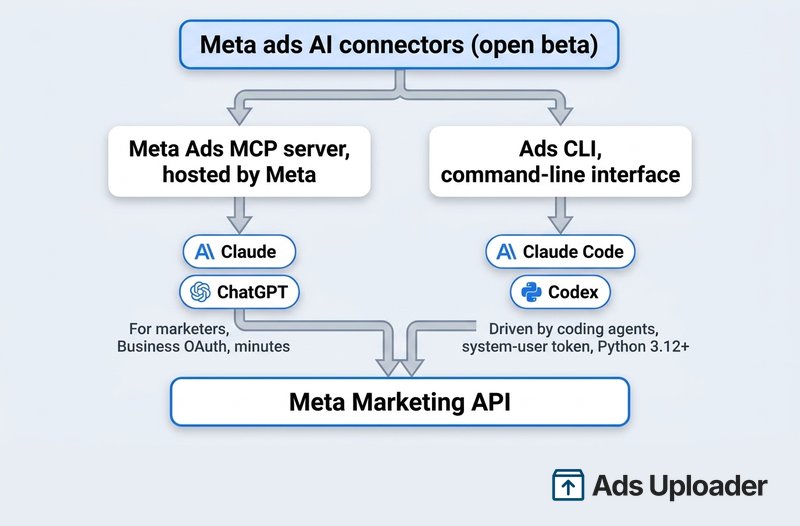
Meta released two things at once under one umbrella. The umbrella name on Meta's own launch page is Meta ads AI connectors. Underneath it sit the hosted connector most people are calling the "Meta Ads MCP" and the first-party command-line tool Meta calls the Ads CLI. Both are explicitly labeled open beta.
One naming note worth getting right, because the SERP is sloppy about it: Meta's own docs call the MCP piece the ads MCP server and the command-line tool the Ads CLI, both part of the connectors umbrella. "Meta Ads MCP" is the market's shorthand for that same first-party server, not a separate product.
What you can do through the connectors, per Meta's launch material: pull performance data, create and edit campaigns, ad sets, and ads, build a product catalog and add product data, and check signal health and quality. That is a read and write surface, not a reporting-only tool. The headline shift is less about new capability and more about sanction: this is Meta's own front door, announced on the Meta for Developers blog and the Meta for Business launch page. If you track these releases as they land, they tend to show up in our roundup of monthly Meta Ads changes too.
The Meta Ads MCP Server in Brief
The Model Context Protocol is an open standard for connecting AI clients to external systems through one common interface. The Meta Ads MCP is Meta's hosted implementation of that: a server Meta runs, exposing Marketing API operations as tools an AI client can call on your behalf. The Marketing API stays the source of truth. The MCP doesn't store your ad data; it's a transport layer.
This is the short version for comparing the two. For setup in each client, Codex included, the full tool list and the July 2026 admin rules, see our Meta Ads MCP guide.
AI Connectors and the Meta Ads MCP Endpoint
When Meta shipped its MCP support on April 29 2026, it did so under a specific name and at a specific address. Meta's official term for these integrations is AI connectors, and the Meta Ads MCP endpoint is https://mcp.facebook.com/ads. That is the URL your AI client connects to in order to talk to the Marketing API through MCP.
Two things to keep straight:
- AI connectors is Meta's umbrella term for the MCP-based bridges between AI tools and Meta's APIs. When Meta's own docs say "AI connectors," they mean this MCP layer (plus the companion CLI).
https://mcp.facebook.com/adsis the ads-specific endpoint. You point a compatible MCP client at it, authenticate with your Meta credentials, and the client can then read and act on your ad account through natural-language requests.
The defining characteristic, in Meta's own words, is that the hosted path needs "no developer credentials, API setup or coding required." You add a connector URL inside Claude or ChatGPT, authorize through Meta Business OAuth, approve the scopes, and you are querying live campaigns in minutes. There is no Developer App to register and no Marketing API approval queue for this route. That is the entire reason it exists: it collapses a multi-day setup into a sign-in.
Reporting and analysis is where the MCP genuinely shines, and it's the use most marketers will get the most value from day to day:
- Pulling campaign, ad set, and ad performance across any date range with plain-language queries
- Multi-account rollups, active campaigns across 20 accounts in one prompt instead of 20 tab switches
- Soft and hard metrics side by side, engagement signals like CTR and CVR next to outcome signals like ROAS, CAC, and purchases
- Best-creative analysis, the winners surfaced by whatever metric combination you care about, ranked the way you'd ask a human analyst
- Creative fatigue detection, ads where frequency is climbing and CTR is dropping, flagged before you notice manually
- Ad-to-landing-page parity checks, pulling the actual ad copy and destination alongside the numbers so you can reason about why a creative works
On the endpoint, third-party guides contradict each other. https://mcp.facebook.com/ads is a live, first-party Meta endpoint (opening it directly returns a 401, as an authenticated service should, and Anthropic's connector catalog references it). After auth, several setup guides report Meta hands you a business-scoped URL like https://mcp.meta.com/ads/<your-business-id>: consistently reported, but not in a public Meta doc. Trust the URL your own auth flow returns over anything copied from a blog.
Plan support is set by the AI vendor, not Meta. Anthropic supports remote MCP connectors in Claude, Cowork, and Claude Desktop, with free plans limited to a single custom connector. OpenAI lists ChatGPT developer mode, the route for custom MCP connectors, for Plus, Pro, Business, Enterprise, and Edu accounts on the web, with stricter admin rules on workspace plans. The MCP is best for marketers who live in a chat client and want conversational reporting and ad-hoc account work without standing up an agent-driven CLI.
Meta Ads MCP Server and Connector Setup
Setting up the Meta Ads MCP connector means adding Meta's remote MCP endpoint, https://mcp.facebook.com/ads, as a custom connector inside your AI client. Meta does not ship its own installer; you follow your client's instructions for adding a remote MCP server. Meta officially documents four clients today:
- ChatGPT via developer mode.
- Claude via custom connectors using remote MCP.
- Claude Code via its remote MCP server setup.
- Perplexity via custom remote connectors.
The flow is the same in each: add the endpoint as a remote connector, authenticate with your Meta account, and approve access to the ad account you want to manage. Once connected, the agent exposes Meta's tool groups: comprehensive reporting, ad creation and management, custom audiences, catalog creation and management, signal diagnostics, help and troubleshooting, A/B tests and lift studies, and activity logs. Any write action, creating or editing a campaign, ad set, or ad, requires your explicit authorization through the agent.
For your first session, stick to read actions (pull performance, list ad sets) before you let it make changes, so you can confirm it is pointed at the right account. If a connection fails, the usual causes are an expired Meta session (re-authenticate), the wrong ad account approved, or a client that does not support remote MCP connectors.
Connecting the Meta Ads MCP to Codex or Claude Code
Claude Code is now on Meta's supported list, so it connects the same way as the chat clients: add https://mcp.facebook.com/ads as a remote HTTP server and complete the Meta sign-in. OpenAI's Codex CLI is not on the list. Since July 16, 2026, Meta's documented route for Codex and other MCP clients is your own Meta developer app: add the Create & manage ads with ads MCP server use case, set the redirect URL your client needs, then register https://mcp.facebook.com/ads as a remote MCP server in Codex's MCP configuration and complete Meta's authentication when prompted. For programmatic setups, Meta also documents passing a user access token as a Bearer header. Either way, verify the connection with a read-only request like listing your campaigns before relying on it, and review any write action before you approve it. The per-client steps are in the Meta Ads MCP guide linked above.
The Meta Ads CLI in Brief
The Meta ads CLI is Meta's command-line interface to the same Marketing API. You don't sit in a terminal running it by hand; it's built to be driven by an agentic coding tool like Claude Code or Codex, which installs it, runs the commands, and reads the structured output back. Meta positions it as a developer-friendly tool, but in practice the Meta-side setup is a defined sequence, so it's less a coding barrier than a workflow you still have to supply yourself.
For install, system user token setup and a full command cheat sheet, see our Meta Ads CLI guide.
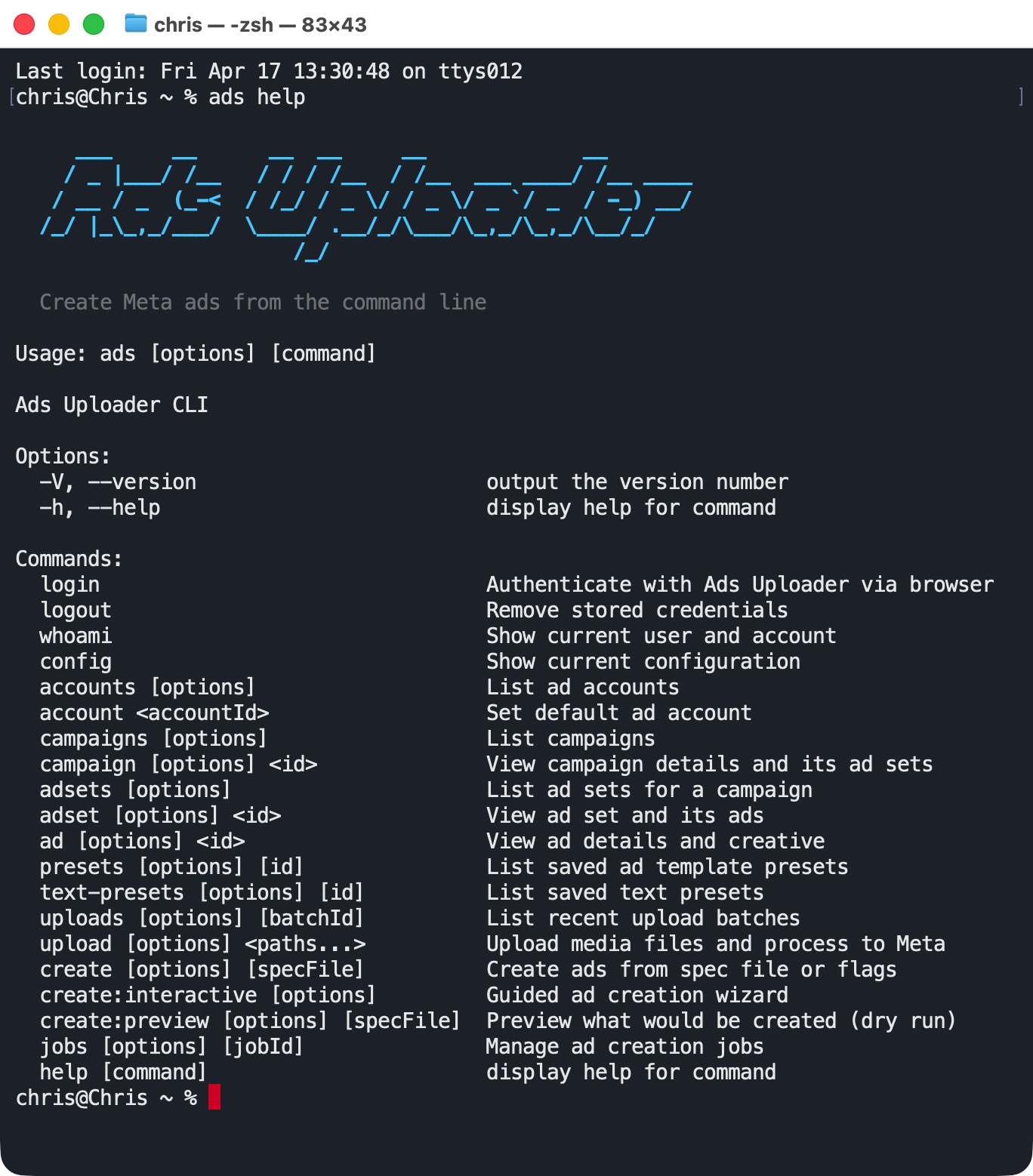
Our own Ads Uploader CLI is built for that same agentic workflow, just on the more guarded side of it. It is also meant to be driven by an agent, not used instead of one, but it's the workflow-friendly version: built-in guardrails, a preview step before anything goes live, and support for many different account configurations, so an AI agent can run bulk, repeatable launches without you hand-building the safety net first. And for the interactive, conversational side we ship our own Ads Uploader MCP: connect Claude or ChatGPT as a custom connector and the agent edits the campaign build you have open in the Ads Uploader web app - pasting a client launch sheet and landing the copy on the right creatives by file name, arranging ad sets, drafting text - while Create Ads stays your click if you want it. Both are public on GitHub: the Meta Ads CLI repo and the Meta Ads MCP repo.
There's a deeper point worth being honest about, though. Any CLI that sits directly on Meta's Marketing API, including Meta's official one, is essentially a thin layer over an API that has been publicly accessible for years. You inherit that API's entire long tail: transient errors that need smart retries, rate-limit backoff, oversized-image rejections that need an automatic resize, asset-processing races, and dozens of edge cases that only surface at volume. None of it is secret. Thousands of advertisers and the tools they rely on have already hit every one of these and worked the handling out through trial and error, and dedicated third-party tooling is largely that accumulated scar tissue, productized. Our CLI runs on the same hardened pipeline as the web app rather than raw API calls, so it inherits that handling instead of asking you to rebuild it.
The official prerequisites are concrete: Python 3.12 or newer, install with pip install meta-ads (or sync via uv), and confirm the connection with meta auth status. Authentication is a system-user access token, not OAuth, which means the CLI path does require a Meta app, a system user with assigned assets, and a generated token from Business Manager. That is the trade for the deeper, scriptable control it gives you.
The command surface spans campaigns, ad sets, ads, creatives, insights, datasets and Meta Pixels, and product catalogs, with verbs like meta ads campaign create, meta ads adset create, meta ads insights get, and meta ads catalog create. Output comes back as a human-readable table by default, or json and plain for piping into scripts. Automation flags such as --no-input, --no-color, and --debug exist, plus a --force (-f) flag that bypasses confirmation prompts.
That makes the official CLI a strong primitive, not a finished ad-launch product. You don't need a developer for the Meta side: the setup is a defined sequence an AI assistant like Claude can work through. What the CLI doesn't give you is a workflow. It doesn't know your naming conventions, campaign presets, thumbnail rules, aspect-ratio mapping, approval process, or what your team considers a safe launch, and it has none of the edge-case scar tissue a tool that launches ads all day accumulates. Get it working for one account and you still own the glue around it: auth, asset access, token handling, retries, rate-limit behavior, logging, and the preview step that stops an AI agent from turning a plausible command into live spend. Set up differently on the next client account, and you own it again.
Wary of Wiring AI Straight to Meta?
Ads Uploader is loved by power media buyers and agencies, and trusted to launch hundreds of thousands of Meta ads every month.
Try Ads Uploader FreeNo credit card required • 7-day free trial
Meta MCP vs Meta CLI vs a Dedicated Tool: Side-by-Side
The same Meta ad system ultimately receives the work, but the ownership surface is very different. Meta's MCP and CLI are general-purpose connectors. A dedicated tool like Ads Uploader is purpose-built for one job: turning creatives into launched ads reliably through a maintained workflow.
| Dimension | Meta Ads MCP server | Meta Ads CLI | Ads Uploader (dedicated) |
|---|---|---|---|
| Best for | Reporting, analysis, ad-hoc questions | Scripted automation, scheduled jobs | High-volume, file-heavy ad launch |
| Who uses it | Marketers, agencies | Anyone who owns the workflow (or an AI driving it) | Media buyers and the AI driving them |
| How you use it | Chat in Claude or ChatGPT | Commands run by a coding agent (Claude Code, Codex) | Web app, Ads Uploader CLI, or Ads Uploader MCP from Claude and ChatGPT |
| Setup | URL + Business OAuth, minutes | Python 3.12+, Meta app, system-user token | Ads Uploader login, connected account, point at creatives |
| Coding needed | None | Minimal: an AI can drive it; the work is the workflow, not the code | None |
| Local creative files | Needs hosted URLs | Reads filesystem | Reads filesystem and mounted drives |
| Guardrails | AI client prompts plus Meta's ads MCP server rules | You build and maintain them | Preview, validation, presets, upload rules |
| Repeatable launches | Conversation, not saved | Hand-rolled scripts | Saved builds and specs, reusable across web, CLI, and MCP |
| Meta API ownership | Meta-hosted connector | Your app, token, and auth setup | Ads Uploader backend through its approved Meta app |
| Support when it breaks | Open-beta, docs and community | You debug your own wrapper | Vendor support whose job is keeping the launch path working |
The cleanest mental model: MCP is a connectivity standard, a CLI is an execution surface, and Ads Uploader is a maintained workflow layer for one specific job. MCP gets an LLM connected to your account through one common protocol any compatible client speaks. The official CLI runs Meta operations deterministically. A purpose-built tool handles the part general connectors don't: turning a folder of fifty creatives into reviewed, repeatable launches. None of the three replaces the others; plenty of teams run all three.
Which Should You Use?
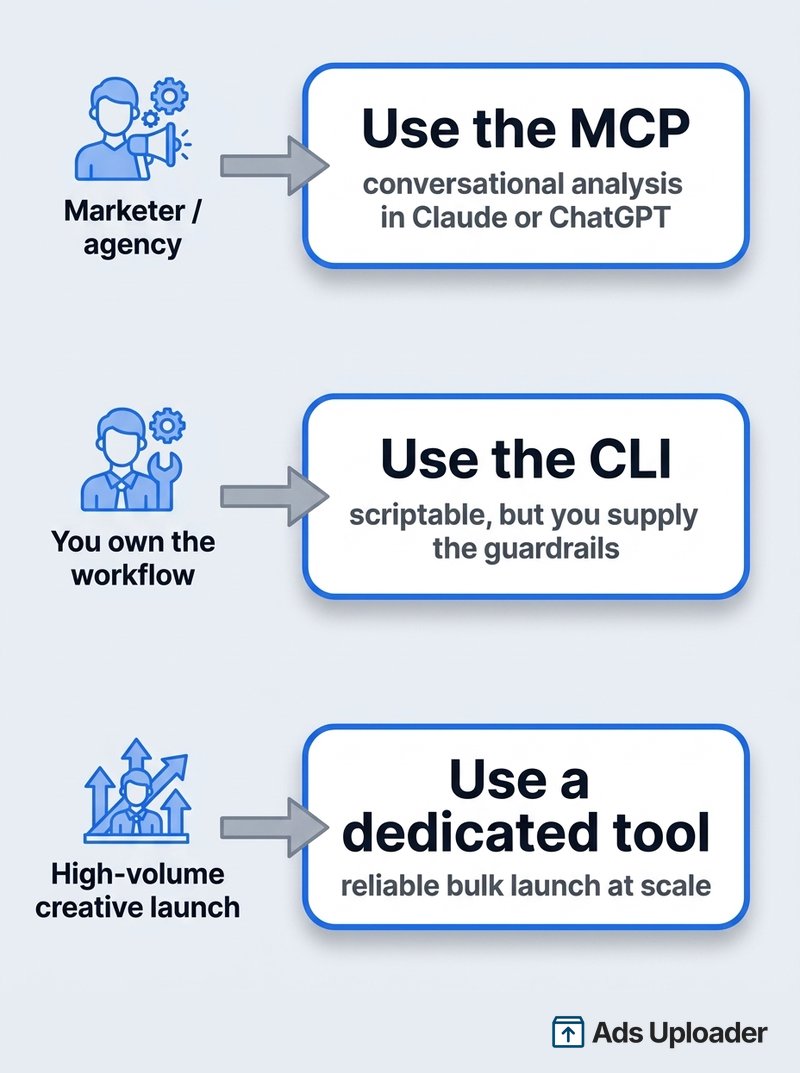
Three personas cover almost everyone.
You're a marketer or agency strategist. You want to ask your account questions, pull weekly performance, spot fatigue, and do ad-hoc analysis inside a tool you already use. The MCP is the right shape. No CLI to stand up, no token plumbing, and the conversational interface is genuinely good at the interpretation work.
You want to own your own automation layer. Maybe that's a 6 a.m. job that pulls yesterday's numbers, a scripted audit you can replay and log, a scheduled budget report. You don't need to be a developer for the Meta mechanics; an AI can drive the CLI fine. Meta's CLI is the right shape if you're happy to own and maintain the workflow around it as each account's setup varies. That maintenance, not the coding, is the real cost.
You launch creatives at volume. You're shipping dozens of ad variations a week from a folder of videos, thumbnails, and aspect-ratio variants. You can build that on top of Meta's CLI, but then you are building a product. The dedicated-tool answer is Ads Uploader: the same workflow as the web app, exposed as surfaces an AI agent can drive - the CLI for end-to-end launches from a folder of files, the MCP for working on the build you have open in the web app - with the upload logic, validation, preview, and Meta communication already handled.
One practical caution that applies to all three: most of the durable productivity here is read-only. Write automation, especially anything that changes budgets, bids, or status, multiplies risk fast without an approval step and a change log in front of it. That isn't anti-AI; it's the same discipline you'd want before handing a junior buyer the keys to a six-figure budget.
How This Works in Practice
In a real workflow these don't compete; they hand off to each other. The MCP surfaces the insight, a dedicated tool acts on it.
The analysis side. Most weeks I run a cross-source health report for one of my ecommerce businesses. It isn't just Meta Ads. It pulls a P&L analytics MCP for the commercial picture (gross sales, net revenue, COGS, contribution margin, ad spend, new-customer CAC and ROAS), an ad-platform connector for campaign and creative-level metrics across Meta, Google, and Microsoft, and an inventory API for stock position and days of cover. Claude ties all three together and answers the questions that used to take hours of manual joining: are the campaigns I'm scaling actually profitable after variable costs, which creatives are winning and does the landing page deliver what the ad promised, can I push spend on a top SKU without stocking out before the next purchase order lands. That analysis is the basis for the next round of decisions.
The execution side. The analysis tells me a particular hook angle is winning. The next step is variations. Compare what launching a batch looks like through each path.
A typical official-MCP launch flow:
- Load tool definitions into the model's context
- Upload files through individual tool calls, each needing a reachable URL
- Resolve media IDs from the upload responses
- Build ad objects field by field through more tool calls
- Repeat across every creative variation
- Hope the conversation state stays coherent through all of it
An official Meta Ads CLI launch flow can be much more repeatable, but only after you build the surrounding app:
- Create and maintain the Meta app, system user, tokens, and asset access
- Decide how files should be uploaded, named, grouped, and mapped to placements
- Wrap CLI commands with validation, retries, rate-limit handling, and
--status PAUSED - Add a preview or approval step so a generated command does not become live spend
- Store launch plans and logs somewhere your team can review later
- Keep the workflow current when auth, scopes, API behavior, or your own account conventions change
An Ads Uploader MCP launch flow, for the launch-sheet job agencies actually have:
- Upload the creatives and apply a preset in the web app, as normal
- Paste the client's approved launch sheet into Claude or ChatGPT
- The agent keys every row to the right creative by file name and writes headlines, primary texts, descriptions, CTAs, and destination URLs into your build
- Your open uploader tab picks the changes up in seconds - you proof them and press Create Ads yourself
An Ads Uploader CLI launch flow, when you want the whole thing end to end:
ads upload spring-campaign/to batch upload an entire local folder- The AI writes a spec file, or modifies a saved template
ads create:preview launch-spec.jsonto review before any spendads create launch-spec.jsonto launch
The AI still drives the work. It reads your creatives, writes the copy, builds the plan. The difference is that Ads Uploader controls the execution path rather than the model improvising each API call. Both surfaces talk to the same backend as the Ads Uploader web app, so the same upload flow, presets, validation, preview logic, and error handling apply whether a human is clicking in the browser or an agent is doing the work. The two split the job honestly: the CLI is the stronger tool for file-heavy, end-to-end agentic launches, the MCP is the campaign surgeon for working alongside the web app, and saved builds move a launch between them - start in the web app, patch it from chat, finish it wherever suits.
Where Meta's Connectors Stop and a Dedicated Tool Fits
Here's the gap none of the vendor pages will tell you, because most of them are selling a thin wrapper over the official connectors: bulk, file-heavy creative launch.
Meta's own documentation covers creating ads, ad sets, catalogs, and datasets. What it does not give you is a productized, Ads Manager-like launch workflow for heavy creative-file ingestion and repeatable launch pipelines. That's not a knock on Meta. It's a different problem than "connect an LLM to my account," and five things make it a different problem:
Files start local, and MCP wants URLs. Ad creation begins with a folder of videos, images, thumbnails, and aspect-ratio variants for Feed, Stories, and Reels. A hosted MCP generally needs something reachable by URL, not a path on your machine or a mounted Drive. A command-line tool can read the filesystem directly, which is why execution-heavy work tends to live there. But reading files is only the start. The product work is matching ratios, applying naming rules, pairing thumbnails, carrying over known-good campaign settings, and catching the mistakes before upload.
Repeatability needs more than a one-off command. When you create ads through a chat-driven MCP, the interaction is a conversation. The model calls tools, gets results, calls more tools, and when the chat ends that sequence is gone. (This is exactly why our own MCP writes into saved builds instead: the conversation ends, the build persists, and it opens in the web app or the CLI.) The official CLI improves that, but a shell script is not automatically a launch process. A useful spec file describes exactly what will be created: presets, copy variations, destination URLs, call-to-action buttons, how creatives map to ad sets. It sits on disk where you can review it, diff it against last week's, reuse it as a template, or hand it to a colleague as a complete instruction. When real budget is on the line, that paper trail is the point.
Guardrails and business logic are the product. Meta's CLI can create the resource if you pass the right fields. It does not decide whether your creative grouping is valid, whether every placement has the right asset, whether your UTM pattern matches the account convention, whether the CTA is allowed for the destination, or whether the launch should pause for human review. You can build all of that, or use a surface where it already exists.
Authentication is ongoing maintenance. With the official CLI, your automation depends on your own Meta app, system-user token, assigned assets, scopes, and local environment. If auth breaks, the workflow stops. If scopes or account access change, you debug it. If Meta shifts API behavior, you keep your wrapper in tune. That maintenance never really ends; it just moves to whoever owns the integration.
Support and troubleshooting is the quiet differentiator. The official MCP and CLI are open beta. When an upload fails at 2pm before a launch, your support options are Meta's docs, a community thread, and a GitHub issue queue (the launch itself surfaced public client issues like the Claude Code OAuth failure, closed as a duplicate). There is no Meta line to call about your specific connector setup. With the official CLI you also support the wrapper you built, which means you own both layers of the failure. A dedicated tool changes who picks up the pager. For agencies running client spend, "who fixes this when it breaks" is not a footnote.
This is the same split the rest of the industry already settled. Shopify, Stripe, Vercel, GitHub, and npm all ship CLIs for execution alongside APIs and MCP-style integrations for connectivity. The tools that need to be discoverable ship as connectors. The tools that need to be reliable at volume ship as CLIs. It's why we built a dedicated bulk ad launch tool for exactly this, and why Ads Uploader does one thing rather than trying to be a Swiss Army knife that reads data, analyzes it, generates creative, and optimizes bids with shallow mechanics on every axis. We only upload ads. That's what we're good at. There's also no native multi-tenancy in the MCP protocol, so agencies running many client accounts end up bolting per-client scoping, routing, and write logs on top of it regardless of which connector they start from.
Using MCP With the Meta Ad Library
MCP is not only for managing your own account. You can also point MCP-capable tools at the Meta Ad Library to research competitors conversationally, asking an agent to surface who is running what rather than clicking through the Library by hand. If you work this way, the free Ad Library Helper extension (adlibraryhelper.com) complements the MCP approach for the manual, in-browser side of competitor research.
Is It Safe? Will It Get My Account Banned?
This is still the first question most people ask, so here is the careful answer. Most of the fear mixes two different things: whether the Marketing API itself is dangerous (it isn't) and whether a particular implementation is trustworthy (that depends entirely on who built it).
Give Your AI Agent a Safety Net
Launch across every client account with an MCP and CLI built for power media buyers and agencies.
Try Ads Uploader FreeNo credit card required • 7-day free trial
Where People Actually Get Into Trouble
The accounts that run into problems aren't the ones using the API; they're the ones using it badly. I've written about this in more detail in a LinkedIn post, Claude, MCP, and the Meta API: Here's What I've Actually Seen, but the short version is three patterns:
- Incorrect API calls. Payloads that don't match the shape Meta expects, missing fields, wrong settings for an objective. Rejected often enough, the app behind them gets throttled or flagged.
- No real error handling. Retrying permanent errors instead of backing off, burning rate limits on calls that will never succeed.
- Flooding the API with noise. Pulling the same data repeatedly, hammering endpoints in tight loops. The pattern looks abusive before any single call does. An AI agent running thirty budget edits an hour is the modern version of that mistake.
The official connectors are meaningfully safer than unofficial ones, because auth runs through Meta's own OAuth or your own system-user token and traffic hits Meta's official endpoints. But "safer" is not "ban-proof," and the vendor pages aren't precise about this. Meta's help center now says it's safe to connect through the ads MCP server and unlikely that an account would be banned simply for using it, tying bans to policy violations and evading enforcement instead. That covers the connector, not what an agent does through it, and Meta hasn't said the same about the CLI. Standard controls still apply: the Marketing API Access Tier governs your rate limits, usage shows up in headers like X-Ad-Account-Usage and X-Business-Use-Case-Usage, Insights has a fixed load limit, and exceeding it returns error 613. Heavy POST activity or large asynchronous Insights pulls can time out, and async jobs can take up to an hour with retries.
Safety Comes From the App Behind It
This is the most important thing to understand, and it's more relevant now, not less, because a wave of vendors is wrapping the official connectors and reselling them. When you use a wrapper or a tool, you're connecting to that vendor's application, and they're managing the direct API connection with their own error handling, rate limiting, payload validation, and retry logic. The quality of that layer is what determines whether your account stays healthy. Evaluate who's behind it:
- Apps through Meta's app review have at least had scopes, error rates, and use cases checked.
- Random GitHub projects and self-hosted scripts are where trouble usually starts, not because open source is bad, but because unvetted code rarely has real error handling and "it has 700 stars" is not a security audit.
The same logic applies to anything you build on the official CLI: the connection is first-party, but the error handling, payload validation, and retry quality around it are yours to get right, and that layer is what keeps an account healthy. With an approved, maintained tool, that layer sits server-side rather than in a Meta app you maintain. The account still has to be authorized properly and nothing is magic, but the operational burden sits with the product whose job is keeping that path healthy.
If You're Going to Build Your Own
Use the CLI path or a proper Facebook app, not a raw token. Do not generate an access token through the Graph API Explorer and wire a connector to that. As a baseline, grant only ads_read for the first couple of weeks; it covers almost every useful workflow and removes the entire write-side risk. If you later test writes, use Meta's Marketing API Sandbox first. Two open-beta realities are worth knowing, both reported by early testers rather than documented by Meta: some users found cost per add-to-cart and custom conversions missing through the MCP, and attribution-window settings ignored in places, so reconcile against Ads Manager before trusting a number that drives spend. Access also arrived in waves. Treat both as beta friction, not permanent behavior.
Stay the Orchestrator
The official launch makes write actions trivially easy, which makes this point more important, not less. Easy is exactly when people over-automate.
Meta's delivery system is now substantially autonomous. Meta's Andromeda delivery system, Advantage+, and the newer auto-optimization layers are built to handle micro-adjustments themselves. Every time you flip a status or nudge a budget you reset part of the learning phase. A bot tweaking bids every fifteen minutes isn't leverage; it's interference with the algorithm you're paying to optimize for you. That looked dated when Perplexity demoed an AI shuffling bids in a flurry of micro-optimizations, and it's no smarter now that the connector making it easy carries Meta's logo.
The workflows that actually pay are the ones that surface what Meta doesn't show you well: cross-account rollups, creative fatigue detection, cross-channel comparison, pacing spend against real P&L, checking whether the landing page delivers what the ad promised. Use AI for the interpretation layer. Don't use it to micromanage what Meta's own system already does. The marketers who win modularize: best analytics connector, best execution tool, best creative generator, and a human stringing them together. Be the pilot of a stack, not a passenger in any one product. That applies to us too. Ads Uploader is one tool in a modular stack, not the stack.
Frequently Asked Questions
What's the difference between the Meta Ads MCP and the Meta Ads CLI? The MCP server is a hosted connector Meta runs for you. You add a URL to an AI client like Claude or ChatGPT, authorize through Meta Business OAuth, and manage your account in plain language with no developer setup. The CLI is a program installed locally and driven by an agentic coding tool like Claude Code or Codex, not a human typing in a terminal, authenticated with a system-user token tied to your own Meta app. The MCP is a conversational access layer; the CLI is a scriptable primitive that still needs workflow logic around it.
Is the Meta Ads MCP and CLI free? Both launched in open beta and Meta has not published a separate pricing page or a connector fee in its official documentation. You still pay your normal ad spend, plus whatever your AI client costs. Treat "free" as "no separate Meta connector fee was visible in official sources at launch," not a permanent guarantee.
Will using Meta's official MCP or CLI get my ad account banned? Meta's help center says it's safe to connect through its ads MCP server and unlikely that an account would be banned simply for using it, tying bans to policy violations and evading enforcement instead. Meta hasn't made an equivalent statement about the CLI. Neither tool lifts standard Marketing API rate limits or ad policies, so heavy automated edits, tight request loops, and ignoring rate-limit signals can still flag an account. Safer than unofficial connectors is accurate; ban-proof is not.
Do I need to be a developer to use the Meta Ads CLI? Not really. The Meta-side setup is a fixed sequence (a Meta app, a system user with assigned assets, an access token, Python 3.12+ and a PyPI install), and an AI assistant like Claude can walk through it and the commands without a dedicated developer. The real gap isn't coding. It's that the CLI has no built-in workflow, guardrails, or edge-case handling, so making it reliable across multiple client accounts with different setups is work you own.
Can I use the Meta Ads MCP and CLI at the same time? There is no official Meta guidance forbidding it, and practitioners commonly run both: the MCP for conversational analysis, the CLI for scheduled or scripted automation. They share the same Marketing API, so the split is about which interface fits the task, not a technical conflict.
Why use Ads Uploader if Meta now has an official Ads CLI? Meta's CLI gives an agentic coding tool like Claude Code or Codex direct access to Meta's Marketing API. It does not give you Ads Uploader's launch workflow: media upload handling, aspect-ratio matching, thumbnails, presets, validation, previews, retries, and the same rules media buyers already use in the web app. You can build that on top of Meta's CLI, but then you own the app and authentication. Ads Uploader gives the AI a maintained surface to drive - and the same applies conversationally through the Ads Uploader MCP, where Claude or ChatGPT edits the build you have open in the web app with the final click still yours.
Does Ads Uploader have its own MCP? Yes. The Ads Uploader MCP connects Claude or ChatGPT to the same campaign build you have open in the Ads Uploader web app. Add it as a custom connector, sign in with your Ads Uploader account, and your agent can fill ad text from a launch sheet, arrange ad sets, and draft copy - every edit lands in your live build, and you press Create Ads yourself, or let the agent run the launch end to end. It's included on paid plans alongside the CLI.
Which AI clients work with the Meta Ads MCP? Meta lists four supported clients: ChatGPT, Claude, Claude Code, and Perplexity. Other MCP clients, such as Codex or Cursor, connect through your own Meta developer app. On the Anthropic side, remote MCP connectors work in Claude, Cowork, and Claude Desktop, with free plans limited to one custom connector. On the OpenAI side, ChatGPT connects through developer mode, which OpenAI lists for Plus, Pro, Business, Enterprise, and Edu accounts on the web, with stricter admin rules on workspace plans.
Does the Meta Ads CLI create campaigns paused by default? Yes. Meta's current Ads CLI documentation says campaigns, ad sets and ads are created paused by default, with creatives the one exception. Whether you launch paused or live is your call either way, and an agent can switch ads on afterwards.
The Takeaway
Meta shipping the tools itself on April 29, 2026 mostly settles the long-running "will AI get my account banned?" worry. What's left is a cleaner three-way decision. The Meta Ads MCP is the connectivity layer: hosted, OAuth, minutes to set up, right for marketers working conversationally. The official Ads CLI is the execution primitive: local, system-user token, driven by an agentic coding tool like Claude Code or Codex, right for anyone willing to own the workflow and guardrails around it, and keep them reliable as account setups vary. Ads Uploader is the workflow layer for high-volume creative launch: the same upload and creation process as the web app, exposed through a CLI an AI agent can drive end to end and an MCP that lets Claude or ChatGPT work on the build you have open in the web app, with the product logic already figured out and the final click still yours if you want it.