Koast Alternative With Unlimited Ad Accounts
Start a Meta batch from a running ad, reuse saved builds and presets, duplicate by Post ID and import Google Drive folders with Ads Uploader. Koast combines bulk launching with AI creatives, agents, stop-loss monitoring and a portfolio view. Growth connects your own accounts, while Agency includes Koast-hosted agency ad accounts.
Updated November 2026 · Pricing checked 13 November 2026
| Scorecard | Ads Uploader | Koast |
|---|---|---|
| Bulk Launch | Full | Full |
| Launch From an Existing Ad | Full | Not Documented |
| Saved Builds and Presets | Yes | Launch Templates |
| Post ID Duplication | Yes | Yes |
| Google Drive Import | Yes | Yes |
| Many Ad Accounts | Unlimited | Up to 10 |
| 10 Ad Accounts | $59 | $299 |
Koast Growth is $299/month for up to 10 ad accounts, and more than 10 needs a custom Enterprise deal. Ads Uploader is $59/month with unlimited ad accounts.
Why Meta Teams Choose Ads Uploader
Ads Uploader has a deep understanding of the Meta ecosystem, and it shows in every launch.
The Most Complete
Launch, duplicate and reuse saved builds and presets in one tool.
The Deepest Meta Integration
A deep, rich integration with the most complete understanding of Meta.
The Best Launch Workflow
Start from an ad you already run or a saved preset, save the build as you go, and launch it as one job.
Made for Agencies
Every client account across Business Managers, team seats, per-account permissions.
Try Ads Uploader Free for 7 Days
No credit card needed. Unlimited ad accounts from day one.
Start 7-Day Free TrialLaunch From an Ad You Already Run
Pick a running ad and copy its campaign, ad set and ad settings. Save the configuration as a preset, add your media and copy, and launch the batch as one job.
See the Bulk Launch Workflow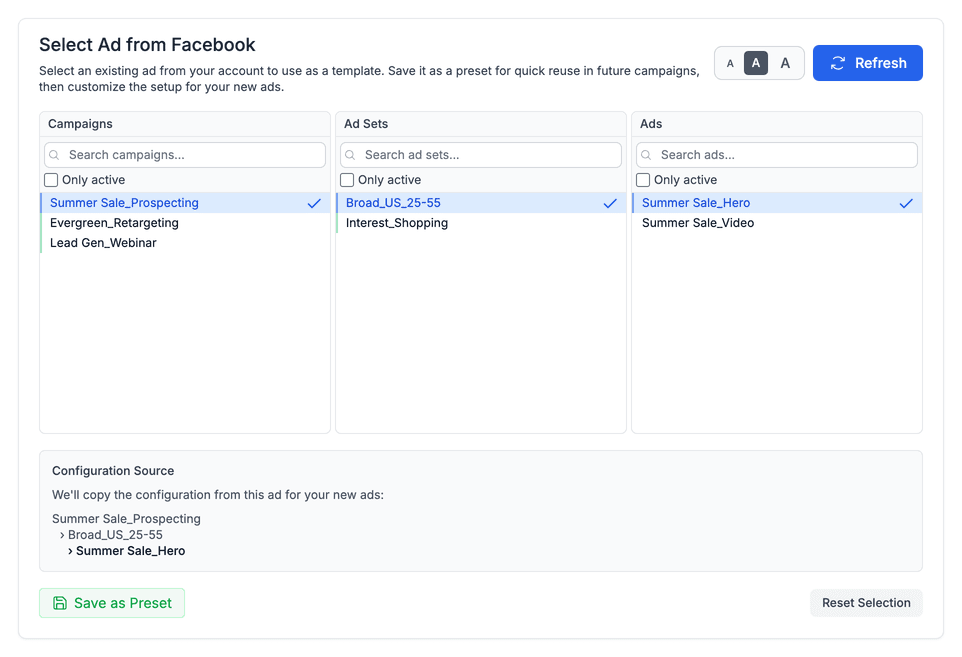
Feature Comparison
Ads Uploader results are tested in our own ad accounts. Koast results come from its documentation.
| Feature | Ads Uploader | Koast |
|---|---|---|
| Launching | ||
| Bulk Launch | Many ads across ad sets in one job | Unlimited launching with batches of ads |
| Launch From an Existing Ad | Pick an ad you already run and copy its campaign, ad set and ad settings into the new launch | Full campaign and ad set setup from an existing ad not documented |
| Saved Builds and Presets | Save a build to finish later, or a preset to reuse your settings; both work in the web app, CLI and MCP | Saved naming, UTMs, pixels and placement templates |
| Post ID Duplication | Duplicates keep the original post’s likes, comments and shares | Shared post IDs across accounts to retain engagement |
| Meta Ad Formats | Carousels, flexible ads, multimedia ads, partnership ads, product showcase and catalog extensions | Named Meta format coverage not documented on the checked pages |
| Placements | 1:1, 4:5, 9:16 and 16:9 all supported, routed to the right Meta placements for every ad type | Groups 1:1, 4:5 and 9:16 exports into one ad |
| Lead Forms | Lead ads launch with the source ad’s instant form already attached | Existing Meta instant form, one per campaign |
| Auto Naming | Every campaign, ad set and ad your agent creates follows your naming pattern | Token formats for campaign, ad set and ad names |
| Advantage+ Controls | You decide which Advantage+ enhancements Meta may apply, on every launch | Pick individual creative enhancements per ad account |
| Split Destinations | Test 2 to 5 landing pages in one launch, each in its own ad set so Meta optimizes each one | Destination URL editable per ad set or ad; no URL split documented |
| Google Drive Import | Import whole folders from Google Drive, or add media from public links and your computer | Google Drive, Dropbox, Frame.io and other integrations |
| Accounts and Teams | ||
| Ad Accounts | Unlimited, across Business Managers | Up to 10 on Growth and Agency; unlimited on Enterprise |
| Team Seats | Team plans from 2 to 20 seats, priced per seat, with shared presets | Unlimited teammate seats on every plan, per the collaboration page |
| Ways to Work | Web app, CLI and MCP | Web app and MCP with separate read, write and publish permissions |
| Pricing Model | One flat price, never a percentage of ad spend | Flat monthly Growth and Agency plans; Enterprise by annual agreement |
| Ad Platforms | Meta, integrated end to end: bulk launches, duplication, presets and every major format | Meta launches; Meta and TikTok account import, including hosted TikTok accounts |
Pricing Side by Side
Monthly plans in USD, checked 13 November 2026.
Ads Uploader
Unlimited Ad AccountsNo per-account fees. One price for 1 or 100 ad accounts.
- Solo
- $59/month · unlimited ad accounts
- Solo, Annual
- $44/month billed yearly
- Team
- $54 to $32 per seat · 2 to 20 seats
CLI and MCP included on every paid plan.
Koast
Flat Plans, Capped at 10 Ad Accounts- Growth
- $299/month · bring your own accounts, up to 10, unlimited launching
- Agency
- $499/month · up to 10 Koast-hosted agency accounts, AI creative generation
- Enterprise
- Custom annual agreement · unlimited ad accounts and teammates
Growth has a 30-day satisfaction guarantee. Agency includes unlimited seats and no implementation fee. Koast also imports TikTok accounts and lists hosted premium TikTok accounts. No free trial is offered.
One Price for Every Ad Account
$59/month for 1 or 100 ad accounts, after a 7-day free trial.
Start 7-Day Free TrialCost as You Add Ad Accounts
Growth covers up to 10 of your own accounts for $299/month. Larger portfolios need Enterprise; the Agency plan also caps accounts at 10.
1 Ad Account
10 Ad Accounts
25 Ad Accounts
Monthly USD prices for Growth; Enterprise pricing is custom on an annual agreement, so its bar is empty. Agency costs $499/month when you want Koast-hosted accounts. Ads Uploader Solo covers one user; Team plans are per seat. Koast lists unlimited teammates on every plan.
When Koast Fits Better
You want Koast-hosted agency ad accounts and free AI creative generation in the same tool.
Frequently Asked Questions
How much does Koast cost?
Koast Growth is $299/month for up to 10 of your own ad accounts, Agency is $499/month with Koast-hosted accounts, and more than 10 accounts needs a custom Enterprise deal. Ads Uploader is $59/month for unlimited ad accounts.
What is the best Koast alternative for bulk Meta launching?
Ads Uploader, if you manage more than 10 ad accounts or want to configure every batch yourself. It builds from an ad you already run, saves builds and presets and duplicates by Post ID. It costs $59/month with unlimited ad accounts, where Koast starts at $299.
How many ad accounts can I connect to Koast?
Up to 10 on Growth or Agency; more than that needs a custom Enterprise agreement. Ads Uploader has no ad account limit on any plan.
Does Koast support TikTok accounts?
Yes. Koast imports Meta and TikTok accounts and offers hosted TikTok ad accounts, though its docs describe launching to Meta. Ads Uploader focuses on Meta and goes deep on it.
Is there a free trial?
Koast has no free trial, though Growth comes with a 30-day satisfaction guarantee. Ads Uploader has a 7-day free trial with no credit card.
How we compared: we make Ads Uploader. We checked Koast's pricing and features on 13 November 2026. Plans change, so check current pricing before you buy.
Faster Meta Launches Start Today
7 days free, no credit card. Then $59/month with unlimited ad accounts.
Start 7-Day Free Trial