Bid cap is a Meta Ads bid strategy that sets the maximum amount you're willing to bid per optimization event (click, lead, purchase) in the ad auction. Unlike automated bidding that lets Meta decide what to bid, bid cap gives you hard control over the auction by never bidding above your specified maximum, though Meta notes the cost per result in reporting can still land above or below it. Bid cap flips the equation: instead of constant spend with variable CPA, you get capped CPA with variable spend. It works best when you know your target CPA precisely and prioritize profitability over volume.
Most advertisers stick with Meta's default "Highest volume" or cost cap (now labeled "Cost per result goal") bidding. That's usually the right starting point for campaigns in learning phase or when you're still figuring out your numbers.
But here's what most advertisers miss: many brands are spending unprofitably when they could be spending profitably. They're chasing volume and trusting the algorithm to care about their margins. It doesn't. Meta's goal is to spend your budget efficiently, not to protect your profit on every conversion.
"Last year was our most profitable year ever," says Mathias Schrøder, founder of Shopify analytics platform Kleio and operator of multiple e-commerce brands. "We made a deliberate shift to prioritize profit over revenue. Bid caps were central to that strategy. We do less revenue but we're making significantly more profit."
Mathias has been running bid caps for years across his brands, and his background in statistics informs his approach. This guide draws from a 90-minute conversation where we debated the finer points of e-commerce analytics and bid cap strategy. You'll see his perspective referenced throughout, sometimes in agreement with my own approach, sometimes offering a counterpoint. His experience reflects what many advertisers eventually discover: volume doesn't equal profit.
This guide explains how bid cap actually works, when it makes sense, and the specific tactics that make it successful. If you're scaling campaigns and want to prioritize profitability over pure volume, bid cap might be the strategy you're missing.
What Is Bid Cap in Facebook Ads?
Bid cap is a bid strategy option in Meta Ads Manager that sets a hard ceiling on what you'll bid per optimization event. If you're optimizing for purchases and set a bid cap of $30, Meta will never bid more than $30 to win an auction for your ad.
This is fundamentally different from your budget. Your budget controls total spend. Bid cap controls what you bid for each result.
Where to find it in Ads Manager:
- If you use Advantage+ campaign budget (formerly CBO), open the campaign's budget settings. With ad set budgets, open the ad set's "Budget & schedule" section
- Find "Bid strategy" ("Campaign bid strategy" at the campaign level)
- Select "Bid cap" from the dropdown
- Enter your maximum bid amount. With Advantage+ campaign budget, every ad set shares the campaign's bid strategy, and you set the cap amount on each ad set
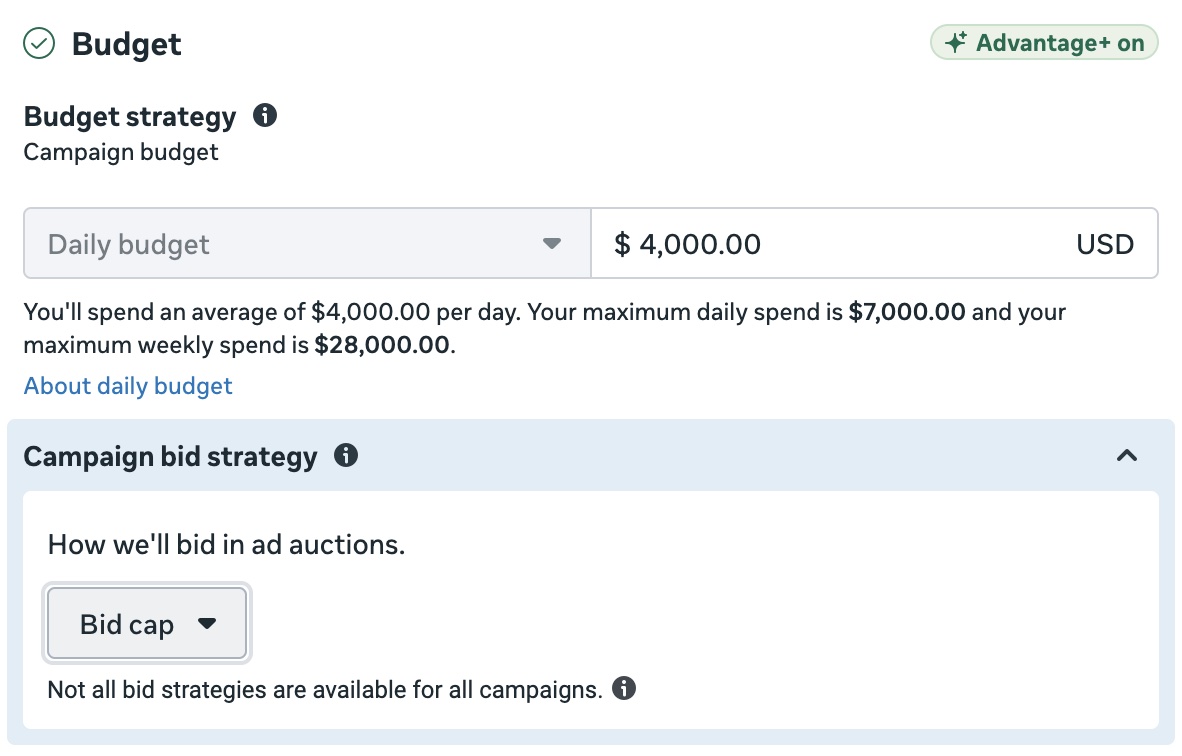
The bid cap applies to whatever you're optimizing for. If you're optimizing for leads, it's your max bid per lead. If you're optimizing for purchases, it's your max bid per purchase.
Key distinction: Bid cap is a hard ceiling on the bid, not on the reported cost. Meta's bid cap documentation says it sets the maximum you bid across auctions but doesn't cap the cost per result you see in reporting. In my accounts, CPA usually settles at or below the cap over a 7-day window once there's enough spend, but individual days can come in above it. You may pay less than your cap, and you may not spend your full budget if your cap is below what the market requires.
How Bid Cap Changes the Game
Most bid strategies optimize for spending your budget. You tell Meta "here's $500/day" and Meta finds ways to spend it. Your cost per result fluctuates based on competition, audience quality, and a hundred other factors. Monday might be $30 CPA, Tuesday $45, Wednesday $25.
Bid cap inverts this relationship. You tell Meta "I'll pay up to $40 per purchase, spend whatever you can below that price." Now your CPA stays controlled, but your daily spend becomes the variable. Some days you might only spend $200 because the algorithm couldn't find enough auctions to win at your price. Other days you'll hit your full budget.
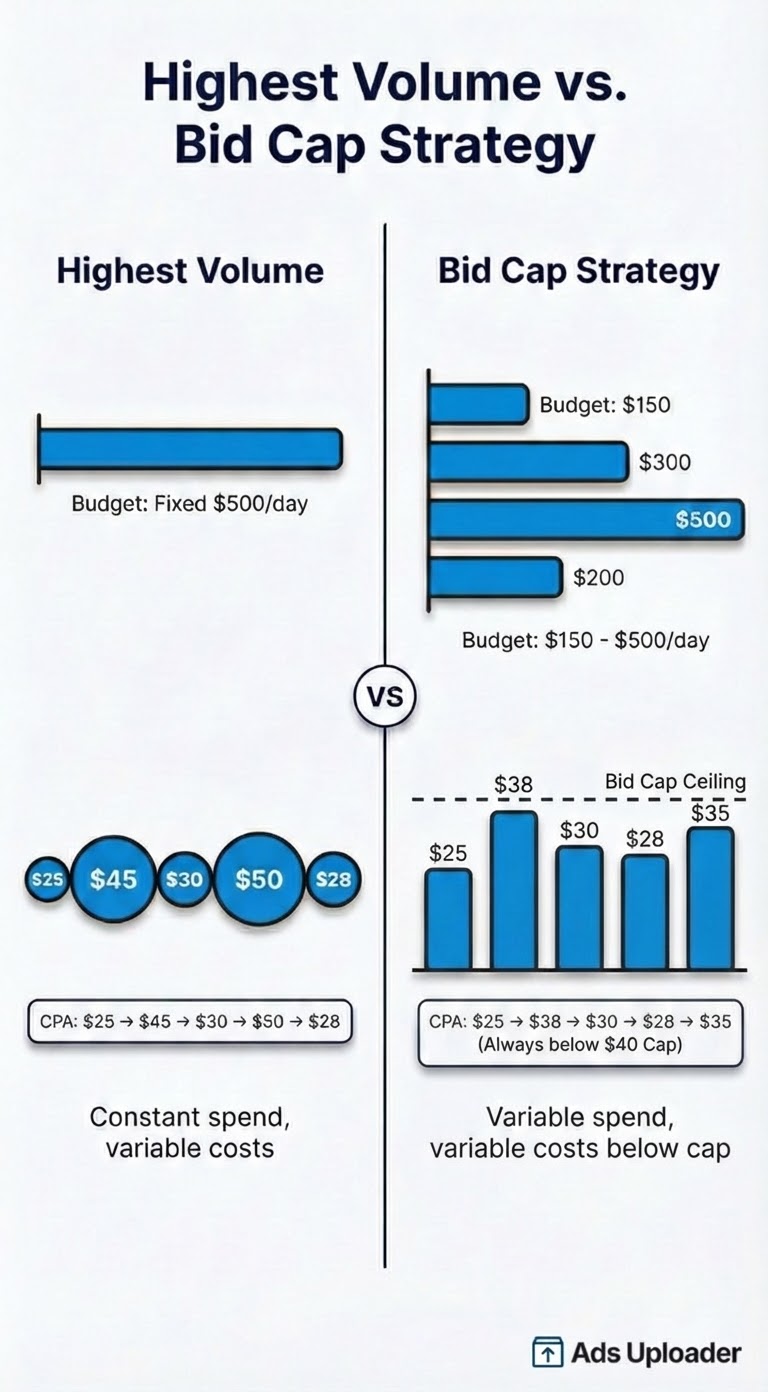
This requires a mindset shift. If you're obsessing over spending your daily budget, bid cap may drive you crazy. But if you care more about profitability per customer than total volume, this tradeoff makes sense.
Real Results: The Profitability Shift
When I switched one of my own brands to bid caps in mid-December, the impact was immediate and dramatic.
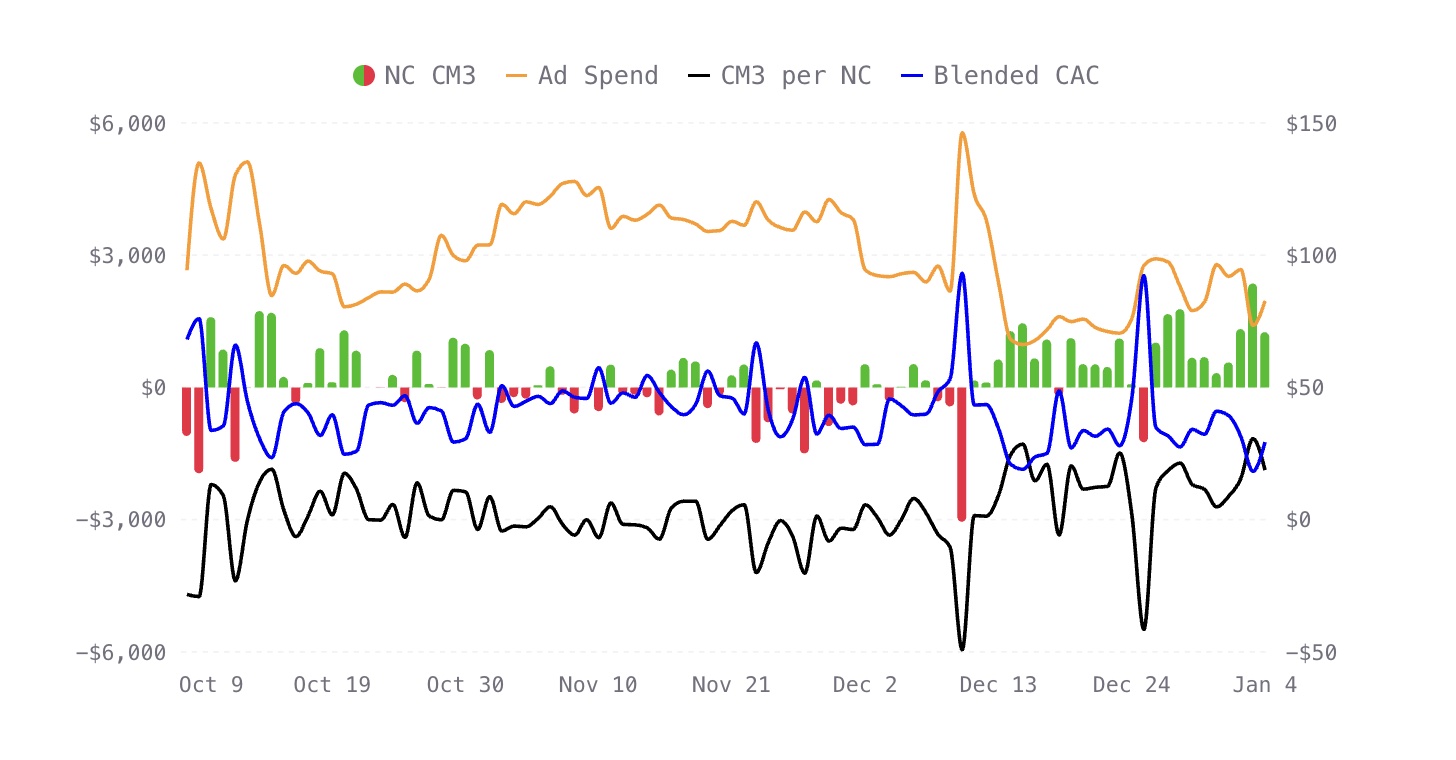
Data from Kleio, a Shopify analytics platform that tracks contribution margin and CAC.
Before the switch: volatile CM3 (contribution margin), inconsistent profitability, multiple unprofitable days scattered throughout.
After the switch: consistent positive contribution margin, stabilized blended CAC, far fewer red days. The spend became more volatile day-to-day, but the profitability per customer stayed consistent.
This mirrors what Mathias sees across his own e-commerce brands: less revenue, more profit. For many businesses, that's the right tradeoff.
When to Use Bid Cap
Bid cap isn't a default strategy. It's optimal for specific situations:
You Know Your Target CPA Precisely
This is non-negotiable. Bid cap requires you to specify an exact number. If you don't know what a profitable CPA looks like for your business, you're guessing.
You should be able to answer: "What's the maximum I can pay per conversion and still be profitable?" with a specific number backed by data.
You Prioritize Profitability Over Volume
If your goal is "spend this budget" or "maximize conversions regardless of efficiency," bid cap works against you. If your goal is "only acquire customers at profitable unit economics," bid cap is your tool.
You Have a Proven Funnel
There's no point testing bid caps on an unproven funnel and offer. You need to know your funnel converts and looks promising from proxy metrics like CTR. A week's worth of data at decent spend is enough - you don't need months of history. What matters is confidence that your offer actually converts.
You're Patient
Bid caps can look bad in the beginning - not just in terms of results, but in lack of spending. You need to get your head into the mindset that you don't need to be spending X amount every day. Meta is only going to spend where it's going to be profitable for you.
If you're the type to make changes every day based on short-term results, bid cap may frustrate you.
The Debate: When Should You Start Using Bid Caps?
There are two schools of thought on when to implement bid caps, and they're worth understanding because they reflect different philosophies about how much to trust Meta's algorithm.
The Case for Starting with Highest Volume
At lower budgets or with new campaigns, Highest Volume helps you understand your funnel faster. The algorithm has maximum flexibility to explore different audiences and placements, giving you data quickly. Once you have a sense of what works and what your CPA looks like, you can layer in bid caps to control costs.
This approach treats bid caps as a scaling and profitability tool, something you graduate to once you've proven the funnel works.
The Case for Bid Caps from Day One
Mathias takes a harder line: "I don't think Highest Volume or cost caps makes more sense, ever. Not in the learning phase either. I've seen a lot of people burn their hands at cost caps because they expect it to behave more like bid caps."
His view is that Meta's algorithm is sophisticated enough to estimate performance, so you can use bid caps to test funnels from the start. Why risk unprofitable spend when you can cap it immediately? If your bid is set at break-even, you're unlikely to lose money even while learning.
He also points out that you almost never want unprofitable ad spend. If your bid is set correctly, there's little reason to let Meta spend freely above that threshold.
Launch More. Click Less.
Upload hundreds of creatives at once, auto-match thumbnails to videos, and publish straight to your ad accounts through Meta's API.
Try Ads Uploader FreeNo credit card required • 7-day free trial
A Note on Cost Caps
Worth mentioning: cost caps sit between Highest Volume and bid caps, but they can be deceptive. Meta now labels cost cap "Cost per result goal" in Ads Manager (and minimum ROAS is now "ROAS goal"), but the mechanics haven't changed. Cost cap is an average target, not a hard ceiling, and Meta's own API docs say adherence to it is not guaranteed. Meta can exceed your cost cap on individual conversions as long as the average stays in range. Many advertisers expect cost caps to behave like bid caps and get burned when costs spike on specific days or placements.
The Bottom Line
Both approaches can work. If you're budget-constrained and need to learn fast, Highest Volume gives the algorithm maximum flexibility. If you're prioritizing profitability from the start and have a reasonable sense of your break-even CPA, bid caps can work even on new campaigns.
What doesn't work: using bid caps without knowing your numbers, or setting them so low that you can't spend at all.
Limited Budgets
If you're running $20-50/day, bid cap may add unnecessary friction. At these levels, the risk of overspending isn't as acute, and you may benefit more from letting the algorithm learn freely. Save bid caps for campaigns where overspending is actually a risk.
How to Calculate Your Bid Cap
Start with Break-Even
A good starting point is your break-even CPA - the cost at which you acquire a customer without losing money on the initial purchase. Why break-even instead of profitable? Because if your retention channels are dialed in (email, SMS, loyalty program), customers acquired at break-even still generate profit over their lifetime. The initial sale funds the acquisition, and everything after is margin.
Calculate your break-even CPA by including all costs, not just COGS. As Mathias puts it: "Make sure you include everything in your break-even calculations: shipping, handling, packaging, payment fees, average returns. All of it." If a $100 product costs you $60 all-in after accounting for everything, your break-even CPA is $40.
If calculating true break-even is difficult for your business, tools like Kleio can help you nail down the real numbers.
Add a Buffer (Maybe)
Some advertisers add a buffer above break-even to give themselves room in the auction. The logic: if your break-even is $40, bidding $48-52 gives you more chances to win auctions while still being profitable.
However, Mathias cautions against inflating bids unless you really know your numbers: "You need to understand the gap between what Meta is reporting and what you're actually getting." If you're not confident in that gap, starting at break-even is safer. You can always raise it if you're not spending.
- Break-even CPA: $40
- Conservative starting bid cap: $40
- With buffer (if confident in numbers): $44-48
Use an Inflated Budget
Here's a tip that seems counterintuitive: set your daily budget higher than you actually expect to spend. If there are occasions where Meta believes it can profitably spend more at your bid cap, an inflated budget gives it access to those auctions. You won't spend that amount every day - the bid cap controls efficiency. But you won't miss opportunities when conditions are favorable.
Adjust Based on Performance
Your initial bid cap is a starting point. Plan to adjust based on real performance data after 7-14 days.
Campaign Organization for Bid Caps
This is where many advertisers go wrong. With bid caps, campaign structure matters more than with automated bidding.
Organize by Bid Amount
Rather than organizing campaigns by product category or AOV, Mathias recommends grouping by bid amount. All ads where you want to bid $40 go in the same ad set. All ads where you want to bid $60 go in another.
This consolidates spend and gives Meta more data to optimize within each ad set. For more on campaign budget structure, see our ABO vs CBO guide. Instead of fragmenting your budget across many small ad sets organized by product type, you're pooling similar-value conversions together.
The practical effect: if you have products with different margins, they naturally end up in different ad sets based on what you can afford to pay per conversion, not based on arbitrary category distinctions.
Consider Campaign Spending Limits
One common piece of advice you may want to implement: set a campaign spending limit alongside your bid cap. Think of it as a backstop - if auction conditions suddenly become favorable and Meta starts winning lots of auctions at your bid cap, the spending limit prevents you from blowing through more budget than you planned for. This is most relevant if you're spending significant amounts and want to ensure you don't accidentally spend the full inflated budget amount.
How to Scale with Bid Caps
Scaling bid cap campaigns requires a different approach than automated bidding. You're not just cranking up the daily budget and hoping for the best.
When a bid cap campaign is performing well and consistently hitting budget, you have choices. You can increase the budget to capture more volume at the same efficiency. Or if you're inventory-constrained or want to improve margins further, you can actually lower your bid - you'll maintain similar spend levels but at better unit economics.
The mental model shift: think of bid and spending limit as your primary controls. Budget becomes secondary.
Save Hours on Creative Testing
Stop uploading ads one by one. Bulk process unlimited creatives with automatic media matching and direct API publishing.
Try Ads Uploader FreeNo credit card required • 7-day free trial
Attribution Settings for Bid Caps
For most e-commerce brands, 7-day click attribution is the better choice when running bid caps. It gives Meta more conversion data to optimize against and typically delivers more volume.
That said, some advertisers (including Mathias) prefer 1-day click because it may help Meta regulate bids faster. The tradeoff is you'll likely get less volume, but tighter control over efficiency.
The reason 7-day often wins: most customers don't convert on the first touch. They might watch your video ad on Tuesday, browse your site on Thursday, and finally purchase on Saturday. With 7-day attribution, all those touchpoints contribute to Meta's understanding of what's working.
If you're optimizing for tighter control and faster feedback loops, 1-day click is worth testing. For most brands prioritizing volume within their cost constraints, 7-day click remains the default recommendation.
One 2026 change to keep in mind when you compare periods: since March 2026, Meta counts only link clicks as click-through for website and in-store conversions, and moved likes, shares and saves into a separate engage-through bucket. A 7-day click window can therefore report fewer conversions than the same window did in 2025, which can make a bid-capped campaign look more expensive than it is. Our guide to Meta click attribution covers how to read your numbers across that change.
Creative Volume with Bid Caps
Here's a key difference from automated bidding: with bid caps, you scale through creative volume, not budget increases.
For my own accounts, I typically launch around 10 ads per ad set, organized around a specific persona or intent angle. For static creatives, that might be 10 variations testing different hooks, formats, or messaging on the same angle. For video, I'll launch 4 cuts of a video together, then bucket them into sets of 10-12 with other related creatives.
The number of ads per ad set is really a function of your spend. The more you spend, the more ads you can test effectively. At lower budgets, 5-10 ads per ad set is a reasonable starting point. At higher spend levels, you can run significantly more without the algorithm struggling to distribute impressions. If you only have 3-5 ads with a tight bid cap, you may struggle to find the creative that converts efficiently at your price point.
Another approach worth considering: Meta's flexible ad format lets you include up to 10 media assets within a single ad unit. Meta rotates through them automatically. This is useful for accounts running lots of ads because it keeps your ad count lower (avoiding account limits) while still giving the algorithm creative variety to work with.
Common Bid Cap Mistakes
Mistake 1: Not Waiting Long Enough
The first few days may test your patience as the algorithm calibrates to your constraints. Don't judge performance too early, and don't make bid changes until you have 7+ days of data.
Mistake 2: Setting Bid Cap Too Low
If you're barely spending, your bid cap is probably below market. Raise by 10% increments until you find the clearing price.
Mistake 3: Expecting Full Budget Utilization
Budget volatility is normal and expected. Some days 60%, some days 100%. If you need consistent daily spend, bid cap isn't for you.
Mistake 4: Ignoring AOV Differences
Different products need different bid caps. Don't use one bid cap across campaigns with vastly different average order values.
Optimizing Bid Caps Over Time
When to Raise Your Bid Cap
- Spend pacing well below daily budget (under 70%)
- Delivery declining week over week
- CPM rising while CPA stays flat
Raise bid cap by 10-15% and give it another week.
When to Lower Your Bid Cap
- CPA consistently 20%+ below bid cap
- Spending full budget with room to spare
- Testing shows lower bids maintain delivery
Lower by 5-10% incrementally. Aggressive cuts risk delivery crashes.
Monitor Bid vs. Cost When Offers Change
If you change your offer (discount, bundle, free shipping), your conversion rate changes. Watch the relationship between your bid cap and actual CPA. You may need to adjust.
Conclusion
Bid cap flips the equation from "constant spend, variable CPA" to "capped CPA, variable spend." For brands that prioritize profitability over volume, this shift can be transformational.
What makes bid caps work:
- Accept inconsistent daily spend. Some days you'll spend 60% of budget, some days 100%. That's the tradeoff for consistent unit economics.
- Give it time to stabilize. The first few days often look rough. Performance typically improves after the algorithm calibrates.
- Organize by bid amount. Group ads with similar target bids into the same ad sets to consolidate spend and data.
- Scale with creative, not just budget. More ad variations give the algorithm options within your cost constraints.
- Use 7-day attribution. Most customers need multiple touchpoints before converting.
- Set spending limits as a backstop. Protects you when auction conditions suddenly favor high volume.
The debate around bid cap vs. cost cap vs. highest volume will continue. Every brand needs to find what works for their specific situation. But if you're spending unprofitably and want to change that, bid cap is worth serious consideration.
When creative diversity is your scaling lever, Ads Uploader makes it easy to launch hundreds of ads without the manual grind.