Meta carousel ads are a swipeable ad format displaying 2-10 images or videos within a single ad unit across Facebook, Instagram, Messenger and Audience Network. Each card has its own headline, description, link and call-to-action, letting advertisers showcase multiple products or tell a sequential story. The format uses 1:1 aspect ratio at 1080x1080 minimum resolution with 30MB per image or 4GB per video. According to Meta, carousel link ads deliver 30-50% lower cost per conversion than single-image ads and support both manual and catalog-based campaigns.
Carousel ads have been around for years. Yet most advertisers underutilize them, stacking product images with no strategy behind the sequence, or skipping the format entirely in favor of video and single image.
That's a missed opportunity. Carousels let you tell stories through images for people who don't sit around watching videos. Each card carries its own link, headline and creative, making carousels function less like a single ad and more like a mini landing-page sequence. You get 2-10 cards of real estate per ad, but only if you use that space strategically.
This guide covers everything from current specs and setup to creative strategies, performance benchmarks and scaling workflows: how to create carousel ads efficiently, test them systematically and scale winners without losing social proof.
What Are Meta Carousel Ads?
Meta carousel ads are a swipeable format that lets you display two or more cards inside a single ad unit. Each card carries its own image or video, headline, description, link and Call-to-Action (CTA). Users swipe through cards on mobile or click arrows on desktop.
There are two distinct types:
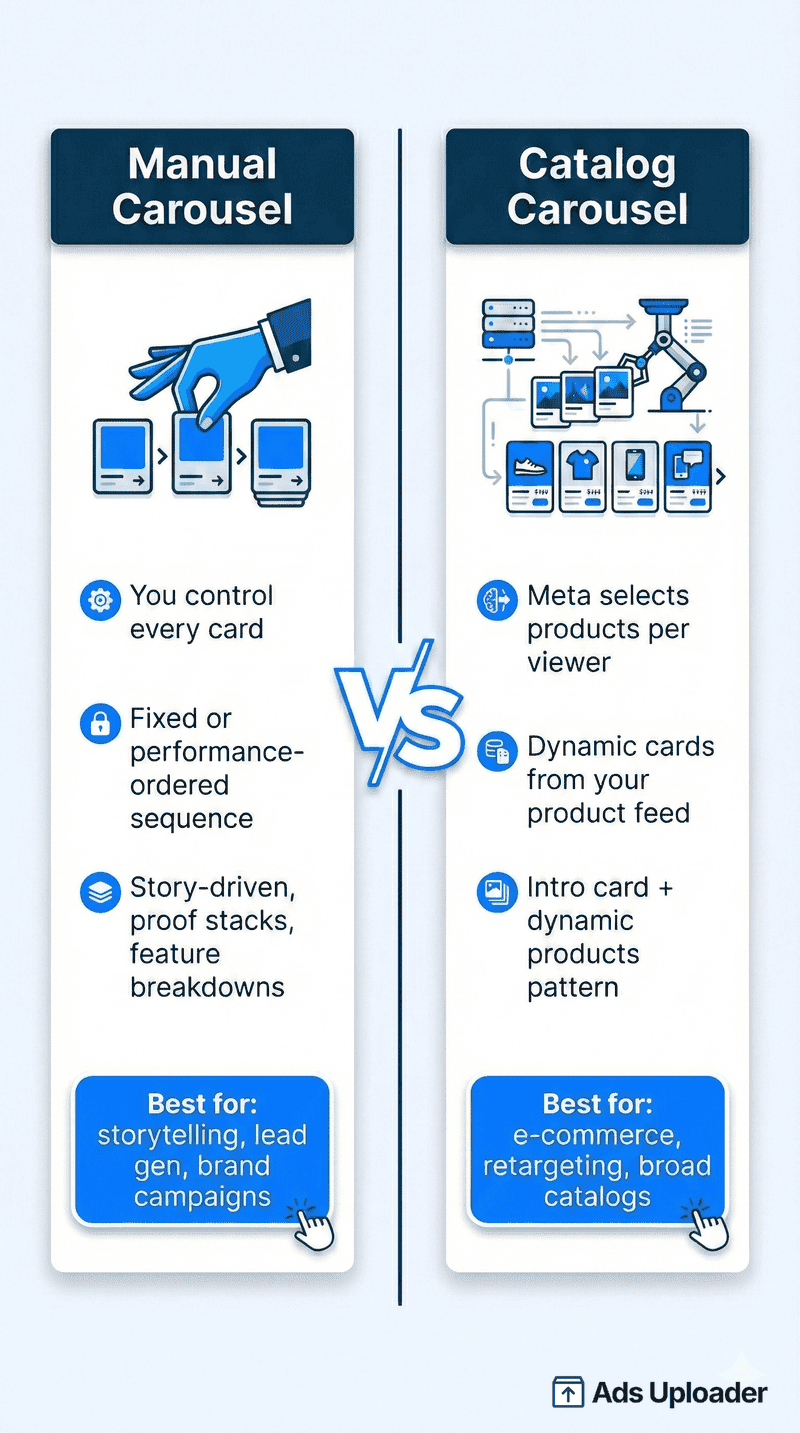
Manual carousel: you pick every card, choose every destination and control the exact sequence. Everyone sees the same structure.
Catalog carousel: Meta's system automatically selects products from your catalog based on predicted relevance. Advantage+ catalog ads show users the most relevant products based on their interests, intent and actions.
This distinction matters because carousel strategy diverges completely. Manual carousels are about card narrative. Catalog carousels are about feed quality, product rules and creative wrappers.
Carousels appear across Feed, Stories, Reels, Marketplace, Right Column, Explore and Messenger, though rendering behavior changes by placement. Feed carousels swipe horizontally. Stories carousels tap through vertically. Desktop placements use arrow navigation.
Use carousel ads when you have multiple products to showcase, features to break down, a story to tell across cards or a proof stack to build (benefits → demo → testimonials → offer). Every good ad tells a story, and carousels give you more space to tell it.
One common point of confusion: organic Instagram carousels expanded to 20 slides in 2024, but ad carousels remain capped at 10 cards. Don't confuse the two.
Worth noting: Meta Flexible Ads saw strong performance in Q4 2025, and part of their success may be that Meta frequently chooses to display your assets as carousels. If the algorithm keeps selecting carousel as the delivery format when given the choice, that tells you something about how valuable the format is, even if most advertisers aren't using it intentionally.
Meta Carousel Ad Specs 2026
Getting specs wrong is the fastest way to tank carousel performance. Here's what actually ships across placements in 2026.
Image Specs
- Format: JPG, PNG
- Resolution: 1080x1080 minimum (1:1 square)
- Aspect ratio: 1:1 (square) for manual carousels. This is our recommended default because it has the best chance of displaying correctly across all placements. 4:5 (1080x1350) is only available for Advantage+ catalog ads using product images from your catalog
- Max file size: 30MB per image (keep under 1MB for faster loading. A 1MB image looks identical to a 30MB one)
Video Specs
- Format: MP4, MOV, GIF
- Resolution: 1080x1080 recommended
- Codec: H.264 video, AAC audio
- Aspect ratio: match your image cards (1:1 or 4:5 for catalog)
- Max file size: 4GB per video
- Duration: 1 second to 240 minutes (Facebook Feed), 1-15 seconds (Instagram Stories)
Video looping is placement-dependent. On Facebook, videos under 30 seconds loop for roughly 90 seconds. On Instagram Feed, videos loop continuously while visible. But Instagram carousel video cards may not auto-loop. The video plays once and stops, which changes how you should design the ending frame.
Text and Character Limits
- Primary text: 125 characters before truncation (Instagram), 80 characters (Facebook)
- Headline: 45 characters max per card
- Description: 18 characters (Facebook only, rarely displayed on mobile)
- Cards: minimum 2, maximum 10
Stories and Reels Specs
- Aspect ratio: 9:16 full-vertical (1080x1920)
- Safe zone: Keep 269px (14%) clear at the top and 672px (35%) at the bottom to avoid UI overlap from profile icons and CTA buttons
- Video duration: 1-15 seconds per card (Instagram Stories)
- Card behavior: You can upload up to 10 cards, but Stories auto-displays only a subset (between one and five cards) before requiring a tap to continue
| Element | Feed | Stories | Right Column |
|---|---|---|---|
| Aspect Ratio | 1:1 | 9:16 | 1:1 |
| Image Size | 1080x1080 | 1080x1920 | 1080x1080 |
| Max Image File | 30MB | 30MB | 30MB |
| Max Video File | 4GB | 4GB | - |
| Video Duration | Up to 240 min | 1-15 sec | - |
| Max Cards | 10 | Up to 10 (3-5 shown) | 10 |
For the full breakdown of every placement dimension, check our Meta ads size guide.
Carousel Ad Specs and Image Size by Placement
The most-asked question about carousels is the simplest: what image size should each card be. Here are the carousel ad specs and dimensions, placement by placement.
| Placement | Recommended image size (dimensions) | Aspect ratio | Cards |
|---|---|---|---|
| Facebook Feed | 1080 x 1080 px | 1:1 | 2 to 10 |
| Instagram Feed | 1080 x 1080 px | 1:1 | 2 to 10 |
| Stories | 1080 x 1920 px | 9:16 | 2 to 10 |
| Reels | 1080 x 1920 px | 9:16 | up to 10 |
| Messenger | 1080 x 1080 px | 1:1 | 2 to 10 |
Key carousel specs to lock in before you build:
- Image size: 1080 x 1080 px per card is the universal safe choice. Carousels render square in Feed regardless of where they run, so square is the format that never gets cropped.
- Consistency: every card in a single carousel must share the same dimensions and aspect ratio. Mixing a square and a vertical card in one carousel is not supported; Meta will use one ratio for the whole set.
- File type and size: JPG or PNG for images, under 30 MB per card. Video cards are MP4 or MOV, up to 4 GB.
- Minimum: do not go below 1080 px on a side. Carousels are tap-and-zoom heavy, so soft images show badly.
- Text per card: each card has its own headline and description; the primary text sits above the whole carousel, not per card.
Facebook Carousel Ads
A lot of advertisers search "Facebook carousel ads" rather than "Meta carousel ads," so to be clear: they are the same format. Facebook carousel ads, Instagram carousel ads, and Meta carousel ads all refer to the same multi-card, swipeable unit, built in the same place in Ads Manager, governed by the same specs.
If you specifically want Facebook carousel ad sizes and Facebook carousel specs:
- Facebook Feed carousel image size: 1080 x 1080 px, 1:1.
- Facebook Stories carousel: 1080 x 1920 px, 9:16.
- Cards: 2 to 10, each with its own image or video, headline, description, and link.
- File limits: images under 30 MB, video under 4 GB.
The only practical difference between "Facebook" and "Instagram" carousels is the placement, not the build. Create one carousel, set 1:1 cards, and it runs cleanly across Facebook Feed, Instagram Feed, and Messenger from the same asset.
How to Create Meta Carousel Ads
Step-by-Step in Ads Manager
- Choose your objective. Carousel ads work with most ODAX objectives: Awareness, Traffic, Leads, App Promotion and Sales. Some performance goals within those objectives may not support carousel format, so confirm during setup.
- Configure your ad set. Set budget, audience, placements and optimization event as usual.
- Select Carousel format. At the ad level, choose Carousel under Format.
- Add cards. Upload images or videos for each card. Set individual headlines, descriptions, destination URLs and CTAs per card.
- For catalog carousels: Toggle on "Use a Catalog" at the campaign level, select your product set and Meta populates cards dynamically.
Launch More. Click Less.
Upload hundreds of creatives at once, auto-match thumbnails to videos, and export directly to Meta Ads Manager.
Try Ads Uploader FreeNo credit card required • 7-day free trial
Carousel Optimization Options
Meta provides several carousel-specific controls that affect delivery:
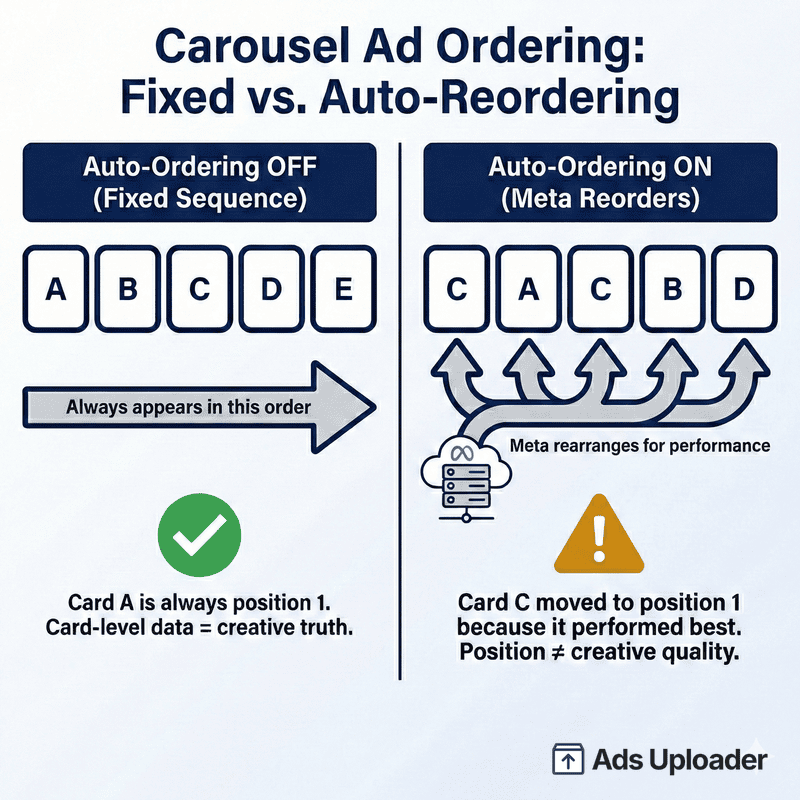
- Automatically show best performing cards first: Meta reorders cards based on performance among viewers. Enable this for conversion-optimized campaigns. Disable it when you need fixed sequencing for storytelling.
- Custom positioning: starts the carousel on a card based on individual user preferences while keeping card creative and order the same.
- Display carousel cards as video: converts your static carousel into a video slideshow for Facebook Feed.
- Add music: attach audio to carousel cards, especially useful for Instagram placements.
- Add a map card: appends a final card showing store locations for retail advertisers.
Creating Carousel Ads at Scale
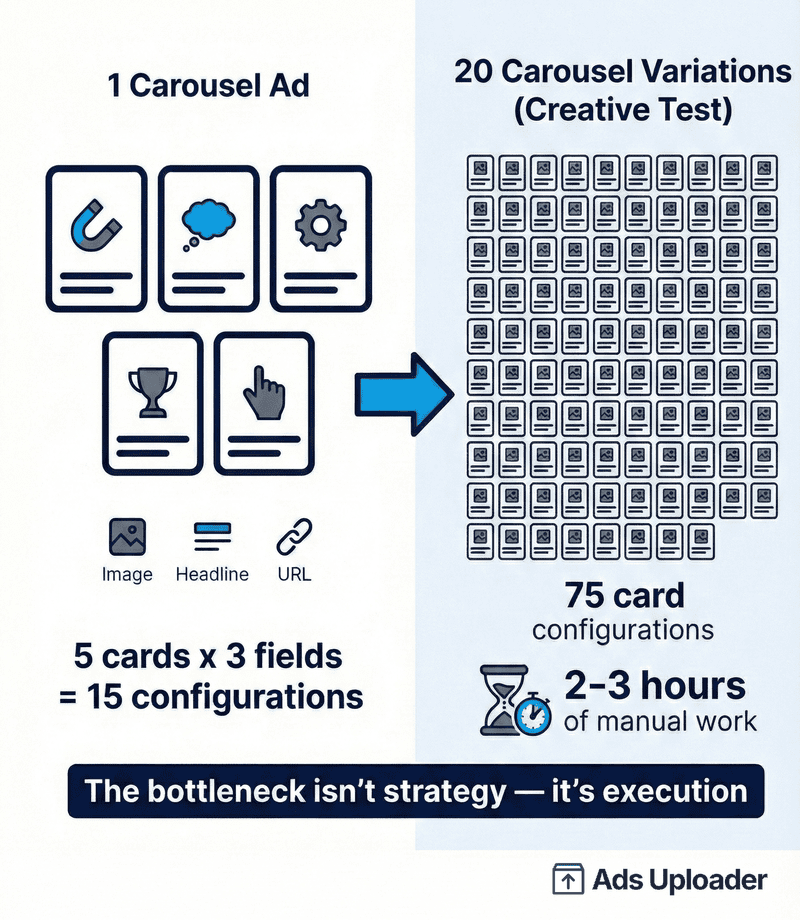
Here's where it gets painful. Building one carousel ad takes 5-10 minutes of clicking. Building 20 carousel variations for a creative test takes 3-4 hours of repetitive uploading, naming and configuring.
The bottleneck isn't strategy. It's execution. Every card needs its own image upload, headline, URL and CTA configuration. Multiply that by five cards per carousel and 20 variations per test, and you're looking at 100 individual card configurations.
Campaign presets help standardize settings across carousel campaigns. API publishing eliminates the manual Ads Manager workflow entirely. For teams running carousel tests at scale, bulk upload workflows cut the time from hours to minutes, letting you spend that time on creative strategy instead of busywork.
Ads Uploader now supports launching carousel ads directly. You create carousel groups and choose whether to maintain common text values across all carousels or edit each card's headline, description and link individually. This also works with lead objectives like instant forms, where carousels are popular but especially tedious to build manually.
How to Edit Carousel Ad Aspect Ratio for Different Placements in Meta Ads Manager
Once you've added your cards, you don't have to ship the same 1:1 creative to every placement. Ads Manager lets you swap the image used in each individual placement so you can give Stories its own 9:16 frame, Reels its own vertical cut and feed its default square, all on the same ad.
After you upload your cards, scroll to the placement summary at the bottom of the ad creation panel. You'll see a list of every placement your ad set targets, grouped by default crop. Click Select a placement to edit to open the dropdown, then choose the placement you want to customize.
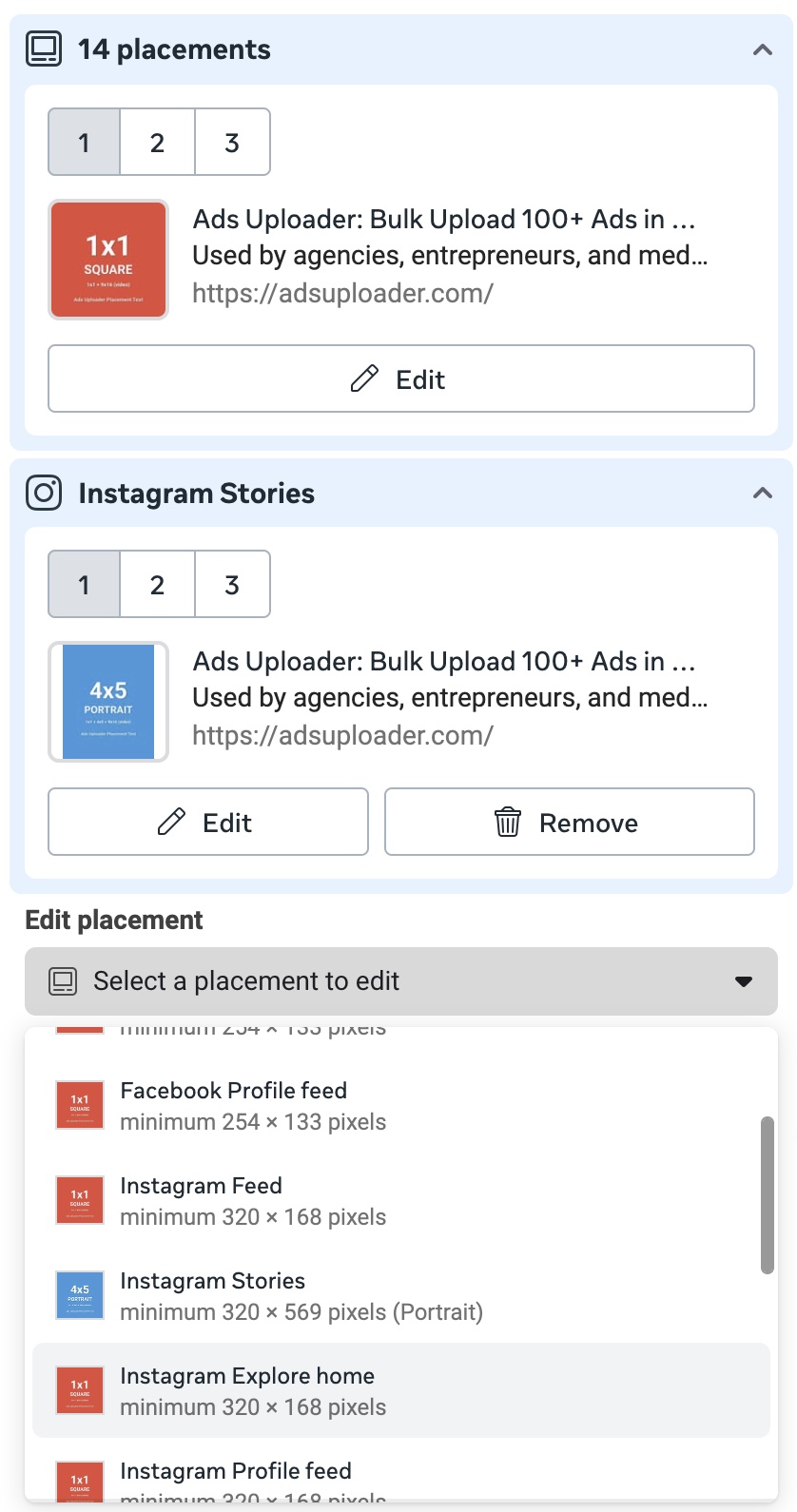
That opens a modal where you can replace the image or video for each card in that placement, set independent headlines and destination URLs if you want, and confirm. Each card position keeps its own slot, so you can run a 1:1 square for Facebook Feed on card 1 and a 4:5 portrait for Instagram Stories on the same card 1, without rebuilding the ad.
A few things worth knowing before you go deep on per-placement edits:
- Every card needs a version for each placement you customize. Per-placement customization applies to the whole carousel, not to individual cards. If you give Stories its own 9:16 cut, you have to supply that 9:16 version for every card in the set, not just card one. You cannot have card one carrying both a 1:1 and a 9:16 while the rest of the cards only have a 1:1; the customization has to be consistent across the entire set, so a placement either gets a complete set of cards or falls back to the default crop.
- Match the minimum pixel dimensions Meta shows in the dropdown. Each placement lists its own minimum (e.g. Instagram Stories at 320x569 portrait). Anything smaller gets rejected at publish.
- Customize the placements that genuinely need it. Stories, Reels and Instagram Explore are the usual suspects because their aspect ratio diverges from feed. Feeds across Facebook, Messenger and Instagram can usually share the same 1:1 asset.
- Per-placement edits multiply at scale. One ad with five cards and three customized placements is fifteen creative assets to design, upload and QA. For high-volume testing, build placement-customized variants once and reuse them across campaigns.
This is the same pattern Meta uses for single-image ads, just multiplied by card count. It's powerful for Stories-first creative strategies but easy to over-engineer if you customize every placement on every test.
You don't have to give these per-placement aspect ratios up when you move from Ads Manager to bulk launching. Ads Uploader respects them: if the ad you're building from already has different aspect ratios mapped to different placements, that placement routing is carried straight through when Ads Uploader assembles your carousel, so each placement keeps its own crop instead of being flattened back to a single 1:1. Set the per-placement creative once and it's preserved across every carousel you launch from it, without rebuilding the placement customization card by card each time.
Carousel Ad Strategies That Actually Work
Before you design from scratch, search the Meta Ads Library for more carousel examples -- filter to carousel media type and study which advertisers have kept the same carousel running for months.
First Card Strategy
Your first card determines whether users swipe or scroll past. It's the hook. The only card guaranteed to get seen.
Approaches that earn the swipe:
- Bold benefit statement: lead with the strongest value proposition
- Curiosity gap: tease a result or transformation without revealing the full story
- Surprising statistic: a number that stops the thumb
- Before/after tease: show "before" on card one, making users swipe to see the transformation
Frontloading your best offer or bestseller in the first card matters. If users don't engage with card one, they never see cards two through ten.
Storytelling and Card Sequencing
Here's what most advertisers miss: carousels are video-style storytelling in a swipeable format. They reach people who don't sit around watching videos but will absolutely swipe through a sequence of images. Each slide is part of a story, and the user controls the pace.
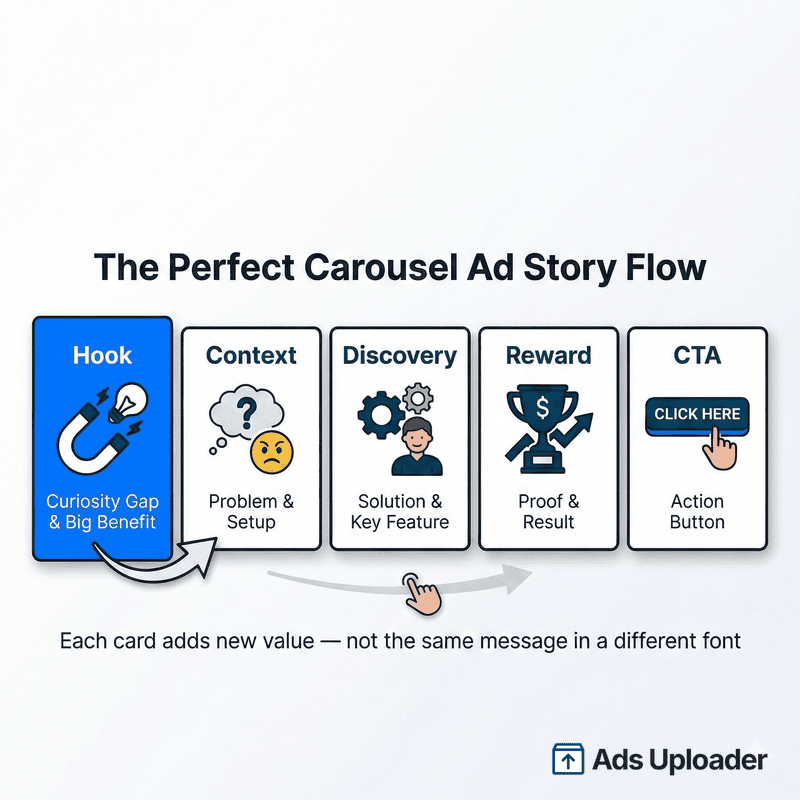
Think of carousel sequencing like a five-beat story: Hook → Context → Discovery → Reward → CTA. Each card should add new value, not repeat the same message in a different font.
Two distinct test philosophies work here:
Fixed-order tests: pure storytelling control. You dictate exactly what users see and when. Disable "best performing cards first" for these tests.
Performance-ordered tests: let Meta's algorithm optimize card order based on viewer behavior. Enable auto-ordering and let data drive the sequence.
Both are valid. They answer different questions and affect how you interpret card-level performance data.
Catalog Carousel Best Practices
For e-commerce advertisers with real SKU breadth, catalog carousels can outscale manual selection, especially when paired with the "intro card + dynamic products" pattern. A static or video lead card followed by dynamic product cards from your catalog combines storytelling with personalized product relevance.
Advantage+ catalog ads automatically show users the most relevant products based on intent signals. The system's relevance engine can outperform manual card selection when your catalog feed quality is solid. If you are running catalog or dynamic carousels, keep in mind that the Advantage+ creative enhancements you enable on the ad can affect how each card is framed and cropped per placement. They won't take the per-placement assembly off your plate entirely, but whichever enhancements are switched on can change how a given card renders in a given placement, so check the previews rather than assuming your exact crop ships untouched.
Design consistency matters. Match backgrounds, fonts and photography style across catalog cards. Include price and social proof elements on product cards. Data suggests ads with visible pricing drive meaningfully higher Return on Ad Spend (ROAS).
Design and Copy Tips
- Visual consistency: use the same style treatment across all cards so the carousel reads as one cohesive unit
- Minimal text, high contrast: large fonts readable on mobile at a glance
- Visual swiping cues: arrows, overlapping elements or images that bleed across card boundaries encourage engagement
- Match aspect ratios: all cards must use the same ratio or Facebook crops to the first card's ratio
Common Carousel Ad Mistakes
Mixing aspect ratios within one carousel. Meta crops all cards to match the first card's ratio. If your first card is 1:1 and the rest are 4:5, you'll get unintended crops that break product framing and text legibility.
Using too many cards. More cards doesn't mean more performance. Three to five cards is a strong starting point. Expand only when card-level breakdown data shows incremental cards driving measurable value. For Stories, where only a subset auto-displays, fewer cards often outperform.
Uploading oversized files. A 3MB image looks identical to a 30MB image but loads significantly faster. Compress your assets, especially when running across markets with variable connection speeds.
Ignoring the primary text above the carousel. The copy that sits above your carousel cards is the "silent hook." It's visible before any swiping happens and determines whether users engage with the carousel at all.
Sequential storytelling with auto-optimize enabled. If your cards tell a story in a specific order, turn off "best performing cards first." Otherwise Meta reorders your narrative and the story breaks.
Misreading card performance when auto-ordering is active. If you enable auto-ordering and then interpret "Card 1 wins" as a creative truth, you're confusing placement (being moved to position one) with creative merit. Track auto-ordering state alongside card breakdown data for accurate analysis.
Designing for Feed but delivering to Stories. A feed-first carousel pushed to Stories without safe-zone discipline loses key elements under UI overlays. Always preview across placements before launching.
Scaling Winning Carousel Ads
Duplicating with Post ID
When you find a winning carousel, scaling it correctly is critical. Standard duplication in Ads Manager creates a new post and all social proof starts from zero.
Post ID duplication preserves everything. The same mechanism that works for single-image ads applies to carousels: all likes, comments and shares carry over to the new ad instance. Users who see the duplicated ad see the same engagement count as the original, which improves Click-Through Rate (CTR) and conversion rate.
The workflow: find the post ID of your winning carousel, create a new ad using "Use Existing Post" and paste the ID. The new ad references the exact same post with all its engagement intact.
For a detailed walkthrough of all four methods, see our post ID duplication guide. When scaling carousel winners, bid cap strategy helps maintain profitable unit economics as you increase spend.
Save Hours on Creative Testing
Stop uploading ads one by one. Bulk process unlimited creatives with automatic media matching and direct API publishing.
Try Ads Uploader FreeNo credit card required • 7-day free trial
Testing Carousel Variations
A practitioner-grade carousel testing strategy in 2026 should test along three axes:
- Card count: test three cards vs five vs seven. Meta supports 2-10, but the sweet spot varies by offer and placement.
- Sequencing: test auto-ordering vs fixed order. They answer different questions about what drives performance.
- First card variations: keep cards two through five identical and swap only the first card to isolate hook performance.
- Static vs video cards: test whether video cards outperform static within the carousel context.
In a world where Meta's Andromeda system rewards format diversity, carousels offer something genuinely different from single image and video. That alone makes them worth including in your testing rotation. Each carousel card should express a meaningfully different angle: different product, benefit, use case or proof type. Near-duplicate cards waste space. Creative diversity within your carousel gives the algorithm more distinct signals to work with.
Carousel Ads vs Other Meta Ad Formats
| Format | Best For | Tradeoff |
|---|---|---|
| Carousel | Multi-product showcase, storytelling, catalog retargeting | Requires more creative assets per ad |
| Single Image | One strong visual, simple message | Limited to single angle per impression |
| Video | Demonstrations, emotional storytelling | Forces linear consumption, no self-pacing |
| Collection | Full-screen shopping experience | Requires tap to expand, less feed-native |
| Flexible | Algorithmic format selection | Less control, limited reporting by format |
Carousel vs single image: Carousels give multiple chances to capture interest within one impression. Meta's own data shows 30-50% lower cost per conversion for carousel link ads compared to single-image.
Carousel vs video: Carousels let users self-pace through content. Video forces linear consumption. When your message benefits from exploration rather than a fixed narrative, carousel wins.
Carousel vs collection: Collection ads require a tap to open a full-screen experience. Carousels keep everything in-feed where users already are.
Carousel vs Flexible Ads: Flexible Ads let Meta choose the format automatically. Carousels give you explicit control over format, sequence and card count. Use carousels when format control matters. Use Flexible when you want the algorithm to decide.
Frequently Asked Questions
How Many Cards Should I Use in a Carousel Ad?
Meta supports 2-10 cards. Start with three to five and expand only if card-level breakdown data shows incremental cards driving measurable value. For Stories, fewer cards often outperform because only a subset auto-displays before requiring users to tap for more.
Are Carousel Ads Better Than Single Image Ads?
Meta reports that carousel link ads deliver 30-50% lower cost per conversion and 20-30% lower Cost Per Click (CPC) than single-image link ads. But "better" is conditional. If your offer is singular and one strong visual captures it, single-image can still win. Treat it as a structured test, not a default assumption.
Can I Mix Images and Videos in the Same Carousel?
Yes. Meta explicitly supports images and videos within the same carousel ad. Maintain consistent aspect ratios across all cards to avoid unintended crops.
What Aspect Ratio Is Best for Carousel Ads?
1:1 (1080x1080) is our go-to recommendation. It has the best chance of displaying correctly across Feed, Stories fallback, Right Column and every other placement Meta serves. The 4:5 ratio offers more screen real estate but is only available for Advantage+ catalog ads using product images from your catalog. For Stories, use 9:16 (1080x1920).
Do Carousel Ads Work for Stories and Reels?
Stories: yes, with tap-through navigation. You can upload up to 10 cards, but Stories auto-displays a smaller subset. For Reels, carousel support exists in some surfaces but availability varies. Confirm by checking placement preview in your account.
How Do I Track Performance of Individual Carousel Cards?
In Ads Manager, use Breakdown → By action → Carousel card to view card-level results. Always note whether auto-ordering is enabled. If Meta is reordering your cards based on performance, "Card 1" in the data may not be the card you designed for position one.
Can I Use Carousel Ads with Advantage+ Campaigns?
Yes. Advantage+ catalog ads support carousel format and automatically show relevant products based on user intent. The 4:5 aspect ratio and features like dynamic overlays are available specifically for Advantage+ catalog carousels on feed placements.
Conclusion
Meta carousel ads remain one of the most versatile ad formats available, but only when used strategically. Here are the key takeaways:
- Carousels give you 2-10 cards per ad unit. Use each card to express a distinct angle, not a variation of the same message.
- Match your specs: 1080x1080 minimum, consistent aspect ratio across all cards, compressed files.
- First card is your hook. Earn the swipe with a bold benefit, curiosity gap or surprising stat.
- Catalog carousels outperform manual selection for e-commerce with strong product feeds and real SKU breadth.
- Scale winners using post ID duplication to preserve social proof across ad sets.
For media buyers creating carousel ads at scale, the bottleneck isn't strategy. It's the hours spent manually uploading and configuring cards. Ads Uploader eliminates that bottleneck so you can focus on creative strategy instead of clicking through Ads Manager.
The carousel format rewards creative strategy, not creative volume. Build the system. Test the sequence. Scale the winners.