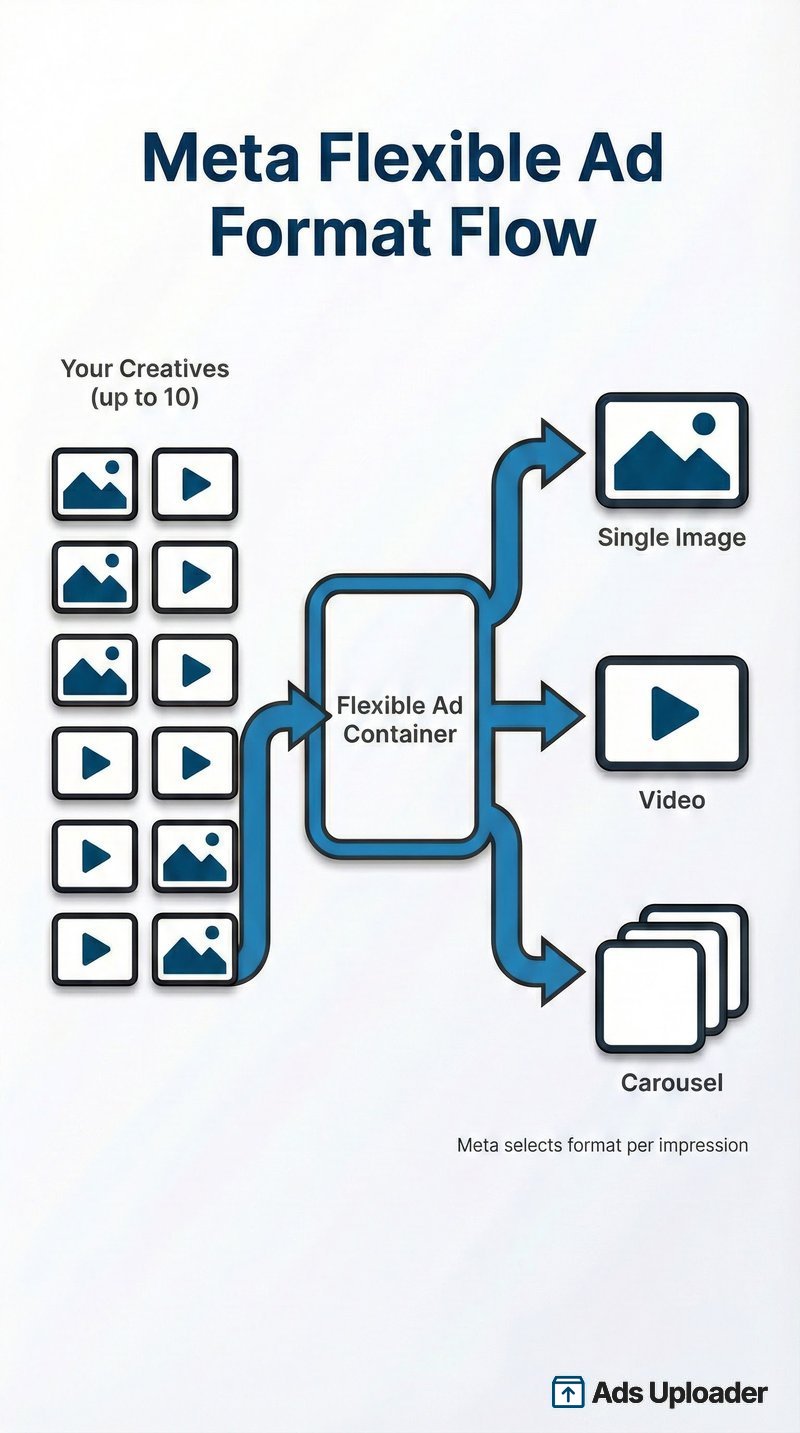
Meta Flexible Ads are a single ad container holding up to 10 images and videos, where Meta's algorithm automatically picks the best format (single image, video, or carousel) for each impression. Instead of choosing a format yourself, you upload multiple assets and let delivery match format to placement and user behavior. Flexible Ads launched for the Sales and App Promotion objectives in June 2024. As of March 2026, Meta removed "Flexible" from the top-level format picker and moved the same capability into the Flexible media toggle under Format display options inside Advantage+ creative, while the Marketing API gained a newer successor construct called multi-media ads. Existing Flexible Ads keep running, both formats can still be built through the API, and this guide covers when the format helps, how to set it up now, and how to fix the errors that block it.
You have 47 creatives from last quarter's campaigns. Some are winners. Some never got enough spend to know. Now you need to launch a new campaign and you're staring at the same old question: do you create 47 separate ads and let the algorithm pick winners, or is there a smarter way?
Meta thinks there is. Flexible Ads let you dump up to 10 creatives into a single ad container and let the algorithm figure out which format works for each user. One person might see a carousel. Another sees a single image. Someone else gets your video. All from the same ad.
If you've been running Meta ads for a while, this probably sounds familiar. Dynamic Creative did something similar. But Meta deprecated Dynamic Creative for Sales and App Promotion objectives in June 2024, replacing it with Flexible Ads. Then in March 2026, Meta folded the standalone Flexible format into Advantage+ creative, so the automation lives on even though the button moved. This guide explains what actually changed, when Flexible Ads make sense for your workflow, and how to use them without losing visibility into what's working.
What Is Meta's Flexible Ad Format?
The Flexible Ad format is Meta's approach to automated format optimization for Sales and App Promotion campaigns. Think of it as a container: you upload multiple creative assets, and Meta's delivery system automatically determines whether to show each user a single image, a video, or a carousel version of your ad.
Here's what makes it different from running separate ads:
Format optimization, not creative personalization. Flexible Ads optimize which format (image, video, carousel) gets shown. This is different from testing which specific creative performs best. Meta isn't trying to find your "winner" - it's matching format to placement and user behavior.
Automatic carousel generation. When you upload multiple static images, Meta automatically creates carousel variations. You don't build carousels manually. The system generates them from your image pool.
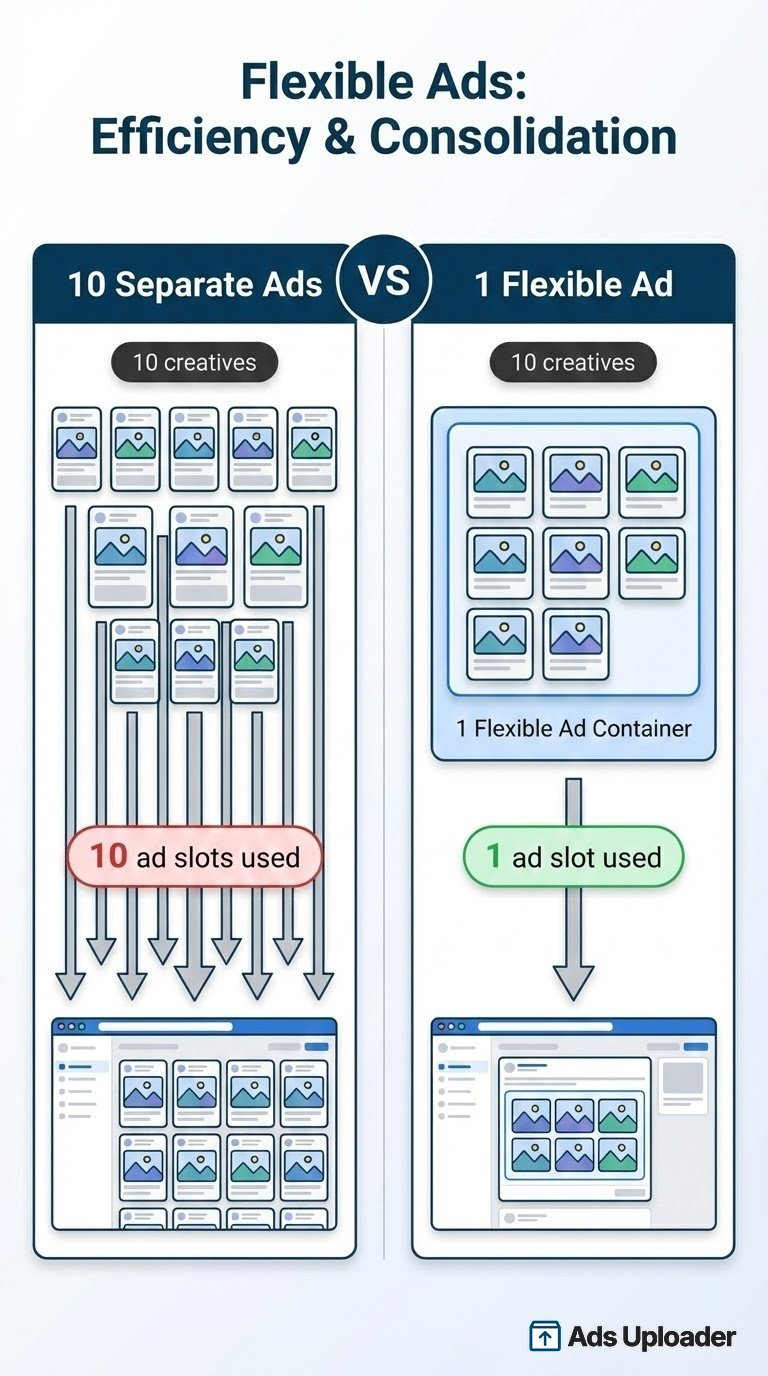
Single ad, multiple formats. Ten creatives in a Flexible Ad counts as one ad in your account. Ten separate ads count as ten. This matters if you're hitting ad account limits or want cleaner campaign structures.
Where the Flexible Format Lives Now (2026 Update)
Flexible is no longer a standalone choice in the format picker. Starting in March 2026, Meta removed the top-level "Flexible" option from ad setup and rebuilt the same behavior as the Flexible media toggle under Format display options inside Advantage+ creative. The practical workflow barely changes: you still upload your assets and let Meta adapt format and aspect ratio per placement.
Two things to know. Existing Flexible Ads keep delivering, but you cannot edit one to add the new controls, so you have to duplicate and rebuild it in the Advantage+ creative workflow. And Meta made the same move for the Collection format, which now sits under the same Format display options menu. Meta has not published a formal deprecation notice, but the change is live in Ads Manager and widely reported by advertisers.
There is also an API-level successor with its own name: multi-media ads. In May 2026, Meta documented a new Marketing API construct called Multi-Media Ads that does what Flexible does - up to 10 images and videos in a single ad - and adds what Flexible never had: per-asset customization of text, destination URLs, placements, and cropping. It lines up with the 10-asset creative workflow Meta has been testing in Ads Manager as the eventual replacement for both Flexible Format and Dynamic Creative. Meanwhile, the classic Flexible Ad API path still works. Tools that publish through the Marketing API, Ads Uploader included, build both flexible ads and multi-media ads, so you can keep launching flexible ads until Meta shuts the old path off and move to multi-media ads whenever you are ready.
The Technical Details
- Asset limit: Up to 10 images and/or videos per ad
- Objectives: Sales and App Promotion only
- Catalog support: Not available - you must toggle off "Use a Catalog" when creating the campaign
- Conversion locations: Website or App (not "Website and App" combined)
Flexible Ads vs Regular Ads: The Key Difference
With regular ads, you pick the format. You decide this ad is a carousel, that one is a video, this other one is a static image. Meta then optimizes delivery within your chosen format.
With Flexible Ads, Meta picks the format. You provide options. The algorithm decides carousel vs. video vs. single image based on placement requirements and predicted user response.
The tradeoff is control for automation. You lose granular format control. You gain simplified campaign structure and (theoretically) better format matching per impression.
Flexible Ads vs Dynamic Creative: What Actually Changed
If you used Dynamic Creative before June 2024, Flexible Ads will feel familiar. Both let you submit multiple creative elements and let Meta mix and match. But there are real differences worth understanding.
| Feature | Dynamic Creative | Flexible Ads |
|---|---|---|
| Available Objectives | All except Sales/App Promotion | Sales, App Promotion only |
| Media Limit | Up to 10 images/videos | Up to 10 images/videos |
| Text Variations | Built-in (5 per field) | Use standard Text Variations |
| CTA Button Options | Multiple CTAs testable | Single CTA only |
| Format Selection | Optimizes element combinations | Optimizes format (image/video/carousel) |
| Auto-Generated Carousels | No | Yes |
| Reporting Breakdown | Available (by element) | Per-asset breakdown rolling out in 2026 |
The biggest practical differences:
CTA testing is gone. Dynamic Creative let you test multiple call-to-action buttons. Flexible Ads only support one CTA per ad. If you need CTA testing, you'll need separate ads.
Carousel generation is automatic. Flexible Ads create carousel versions from your static images. You don't configure this. Meta just does it.
Reporting is improving. The "Breakdown by Dynamic Creative Element" feature that showed which specific image or video performed best never worked reliably for Flexible Ads, which frustrated advertisers for over a year. That is finally changing: in 2026 Meta started rolling out a creative-level breakdown, and some accounts now see a "Media" option under the Creative breakdown that reports per-asset results. It is not on every account yet. More on workarounds below.
Dynamic Creative is being retired too. When Flexible Ads launched, Dynamic Creative stayed available for Traffic, Leads, Awareness, and Engagement. That is changing. Many advertisers now see "Dynamic creative is no longer available" when building an ad set, as Meta consolidates both Dynamic Creative and Flexible into its Advantage+ creative system. Treat Dynamic Creative as a sunsetting feature, not a long-term option.
When to Use Meta Flexible Ads (And When Not To)
Here's the practical decision framework. Flexible Ads aren't universally better or worse. They're a specific tool for specific situations.

Flexible Ads Work Best For:
Consolidation containers. You have 10 sale creatives for Black Friday. You don't need to know which specific image performs best. You just want to throw them all into one container and let Meta figure it out. This is the ideal Flexible Ads use case.
Winners consolidation. Take your top 5-10 performers from the past quarter and combine them into a single Flexible Ad. Give the algorithm options to rotate through. The goal isn't finding a new winner - it's giving proven creatives a unified container that stays fresh longer.
Low-maintenance evergreen campaigns. You want something running in the background without constant optimization attention. Upload diverse creatives, set your budget, and let it run. The algorithm rotates through formats automatically.
Fighting creative fatigue in small audiences. When you're targeting a narrow audience that sees your ads repeatedly, Flexible Ads give the algorithm 10 options instead of 1. More variety means slower fatigue.
Working around ad account limits. Meta has limits on how many ads you can run per page and per account. Ten creatives in a Flexible Ad = 1 ad slot. Ten separate ads = 10 slots. High-volume advertisers use Flexible Ads specifically to launch more creative volume without burning through account limits.
Skip Flexible Ads When:
You need to find a winner. Flexible Ads are not for creative testing. You can't reliably see which specific image or video drives results. If your goal is "which of these 10 creatives performs best?", use separate ads or A/B testing.
You have specific format requirements. Some brands need precise control over how creatives display. If your guidelines require specific image presentations or you can't accept auto-generated carousels, use single-format ads with placement customization.
You're running catalog or DPA campaigns. Flexible Ads don't work with product catalogs. Stick with standard catalog ad formats.
You need detailed creative-level reporting. If stakeholders require reports showing "Image A got 2.3% CTR while Image B got 1.8%", Flexible Ads can't deliver that data reliably right now.
Why Flexible Ads Are Getting Attention
Flexible Ads have gained traction among performance advertisers, particularly for consolidation workflows. Here's what practitioners are saying:
The consolidation approach works. Multiple advertisers report that taking top-performing creatives from separate ads and consolidating them into a single Flexible Ad actually increases overall spend and extends creative lifespan. The theory: instead of fragmenting performance data across 10 ads, you're consolidating it into one ad with more signals for the algorithm.
The ad account limits benefit is real. This often gets overlooked in feature discussions. If you're managing high-volume campaigns and hitting Meta's limits on ads per page or per account, Flexible Ads let you pack 10 creatives into a single ad slot. For agencies managing multiple clients or e-commerce brands with dozens of product variations, this is a meaningful operational benefit.
Honest take on performance claims. It's unclear whether Flexible Ads actually optimize delivery differently than 10 separate ads in the same ad set. Meta's delivery system is a black box. We can't verify that Flexible Ads get preferential treatment or smarter format matching. What we can verify: the consolidation benefit is real, the account limits benefit is real, and many practitioners report positive results. Whether that's due to format optimization or simply data consolidation, the outcome often works in advertisers' favor.
How to Create Meta Flexible Ads in Ads Manager
Setting up Flexible Ads requires specific campaign configuration. Here's the step-by-step process:
Prerequisites
Before you start, verify these requirements:
- Campaign objective is Sales or App Promotion
- "Use a Catalog" is toggled OFF (if using Sales objective)
- Conversion location is Website or App (not "Website and App")
- Creative source is manual upload, not catalog
Step-by-Step Setup
1. Create your campaign
In Ads Manager, click Create and select either Sales or App Promotion objective. In the Campaign details, make sure "Use a Catalog" is OFF.
2. Configure the ad set
At the ad set level, select Website or App as your conversion location. Note that "Website and App" combined does not support Flexible Ads.
3. Turn on Flexible media
At the ad level, open Advantage+ creative and, under Format display options, enable the Flexible media toggle. Before March 2026 this was a standalone "Flexible" choice in the Format list; Meta has since moved it here. If your account still shows "Flexible" in the format picker, selecting it does the same thing. Meta describes the setting as showing your ad in the format it predicts may perform best.
4. Upload your media
Click "Add Media" and upload or select up to 10 images and/or videos. You can mix image and video formats. Click "Add Media" again if you need to add both types.
5. Edit media if needed
Click "Edit" on your uploaded media to crop images or trim videos. A useful tip: trim videos to 15 seconds or less so they qualify for all placements including Stories and Reels.
6. Add text and destination
Configure your primary text, headline, and description. You can use Text Variations here if desired (this is separate from the Flexible format feature). Set your destination URL and single CTA button.
7. Preview variations
Use the Advanced Preview to see how your ad will render across different formats (single image, video, carousel) and placements. This is informational only - you can't selectively disable specific variations.
8. Publish
Review everything and publish. The ad goes live with Meta automatically selecting which format version to show each user.
Pro Tips for Setup
Include multiple aspect ratios. Upload 1:1, 4:5, and 9:16 versions of your creatives for better placement coverage. Meta will match the right ratio to each placement.
Check auto-generated carousels in preview. Sometimes the carousel combinations look strange. If something displays poorly, swap out that creative for one that works better universally.
Keep video lengths reasonable. 15-second videos qualify for the widest placement range. Longer videos may get excluded from certain placements.
Why Is Your Flexible Ad Getting Rejected? Common Errors and Fixes
Flexible Ads throw a specific set of errors, and most trace back to two things: a placement that cannot render your creative, or an objective that never supported the format. Here are the exact messages advertisers hit and how to clear each one.
Launch More. Click Less.
Upload hundreds of creatives at once, auto-match thumbnails to videos, and publish straight to your ad accounts through Meta's API.
Try Ads Uploader FreeNo credit card required • 7-day free trial
"No valid formats" Error (#1487569)
Error #1487569 means at least one placement you selected cannot render the creative you uploaded, almost always an aspect ratio or format mismatch. A common trigger is a single 9:16 or 1:1 asset paired with placements that expect a different ratio, or a carousel variation being generated for a placement that does not support carousels. Meta's own message points to the two real fixes: change the placements so they match your creative, or swap in creative the selected placements accept. The durable fix is to upload multiple aspect ratios (1:1, 4:5, and 9:16) so every placement has something valid to show. Our Meta ad aspect ratio guide lists the right ratio for each placement. If nothing looks wrong and the error still fires, Meta's backend sometimes re-flags eligibility by mistake, and duplicating or rebuilding the ad usually clears it.
"Flexible format unsupported by objective" Error (#3858343)
Error #3858343 means you tried to use the Flexible format with a campaign objective that does not support it. Flexible only ever worked with the Sales and App Promotion objectives, so the fix is to switch your campaign to Sales or App Promotion, toggle off "Use a Catalog," and set the conversion location to Website or App (not "Website and App" combined). Since March 2026 there is a second reason you may see this: Meta removed the standalone Flexible option from ad setup, so if you are following an older tutorial that tells you to pick "Flexible," rebuild the ad with Advantage+ creative and turn on the Flexible media toggle under Format display options instead.
"The sales objective doesn't support ads with media customized for different placements"
This error appears when you hand-customize different media per placement on a Sales campaign that expects one consistent creative set. The fix is to stop customizing media per placement manually and instead let Meta adapt your assets automatically: upload your creatives and enable Flexible media under Format display options, which handles per-placement delivery without the customization that triggers the block. If you genuinely need different creative per placement, split them into separate ads rather than one customized ad.
"Dynamic creative is no longer available"
This one is not a rejection. It is Meta telling you the old Dynamic Creative toggle has been retired for your account or objective. Meta is consolidating Dynamic Creative and Flexible into its Advantage+ creative system, so the path forward is to build the ad with multiple assets and let Advantage+ creative optimize format and combinations. For Sales and App Promotion, use Flexible media under Format display options; for the automated element-mixing you used to get from Dynamic Creative, rely on Advantage+ creative enhancements.
"The ad creative you chose isn't compatible with this optimization"
This means your creative and your optimization goal contradict each other. The classic cases are optimizing for link clicks or conversions with an asset that has no clickable destination, or selecting a placement your creative cannot fill, such as a square (1:1) video with Stories or Reels, which need a 9:16 vertical. Check the per-placement preview before publishing: wherever a placement shows an error or blank creative, either add a matching aspect ratio or remove that placement. Aligning the creative to the optimization goal clears the error.
"The in-stream Reels placement you selected does not support this ad format"
In-stream and Reels placements are video-only, so they reject image-only creatives and some carousel or flexible combinations. The fix is to include a video asset (ideally 9:16, trimmed to 15 seconds or less so it qualifies across Stories and Reels) or remove the in-stream and Reels placements from that ad set. If you want those placements without redesigning the ad, add a compliant vertical video to your asset pool and let Meta serve it there.
The Reporting Problem (And Workarounds)
For most of Flexible Ads' life, the biggest frustration was reporting. The "Breakdown by Dynamic Creative Element" option that should show individual image and video performance never worked reliably for Flexible Ads. That is finally changing: in 2026 Meta began rolling out a creative-level breakdown, and some accounts now see a "Media" option under the Creative breakdown that reports results per asset. It is not everywhere yet, so check your own account before you count on it.
Why This Matters Less Than You Think
Jon Loomer puts it directly: "If you have a need to uncover a winning ad creative, Flexible Ads are not the way you should use." He's right. The entire point of Flexible Ads is to give the algorithm options and let it optimize. You're not running a creative test. You're running an optimization container.
If you accept that framing, the missing breakdown is annoying but not campaign-breaking. You care about overall Flexible Ad performance, not which specific image got 0.3% more clicks.
Practical Workarounds
Check for the new Media breakdown first. In Ads Manager, open the Breakdown menu and look under "By Dynamic Creative Asset" or a "Media" option within the Creative breakdown. If your account has the 2026 rollout, this shows per-asset results and you can skip the proxies below. If it is missing or greyed out, fall back to these.
Check engagement via Page Inbox. Go to your Facebook Page > Inbox to see which ad variations are generating comments and engagement. This isn't precise performance data, but it shows which creatives users interact with most.
Use engagement as a proxy. More comments and shares typically correlate with more delivery. If one creative in your Flexible Ad is generating visible engagement, it's likely getting disproportionate impressions.
For actual creative testing, use separate ads. If you need to know "Image A vs Image B", don't use Flexible Ads. Create two separate ads and compare performance directly.
Building Meta Flexible Ads at Scale
Creating one Flexible Ad in Ads Manager is straightforward. Creating 10 or 20 across multiple ad sets and campaigns? That's hours of repetitive clicking.
The Manual Pain
Each Flexible Ad requires:
- Selecting up to 10 assets from your library
- Organizing them into groups (if using that feature)
- Configuring text variations
- Setting up destination URLs
- Previewing to catch display issues
Multiply by 15 ad sets across 3 campaigns. Then do it again for another client. The per-ad setup time adds up fast.
The Bulk Approach
Tools like Ads Uploader solve this with dedicated Flexible Ads builders:
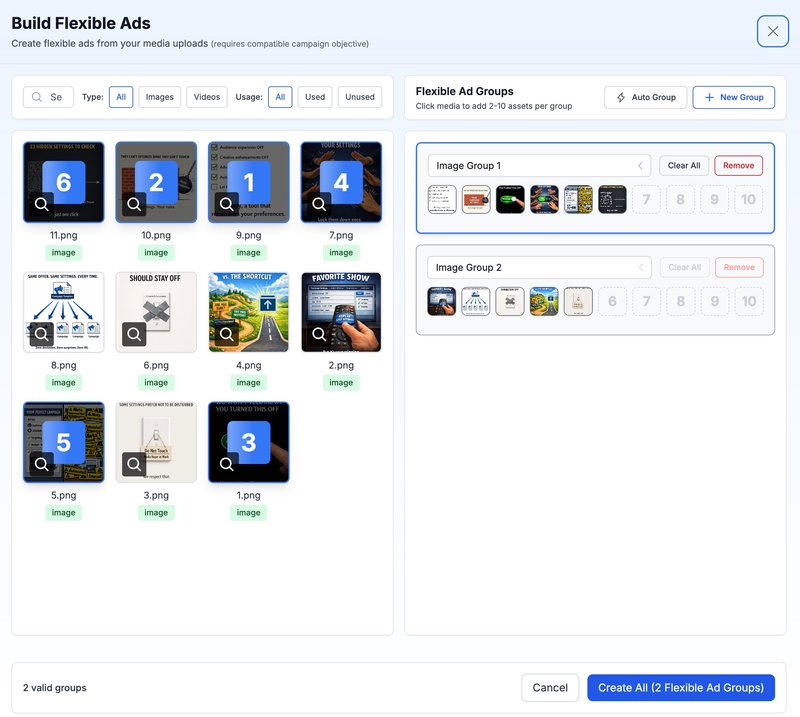
Visual asset selection. See your entire media library in a filterable grid. Click to add assets directly to Flexible Ad groups.
Auto-grouping. Instead of manually dragging 30 assets into three groups, use automatic grouping based on asset type (separate image and video groups) or custom logic.
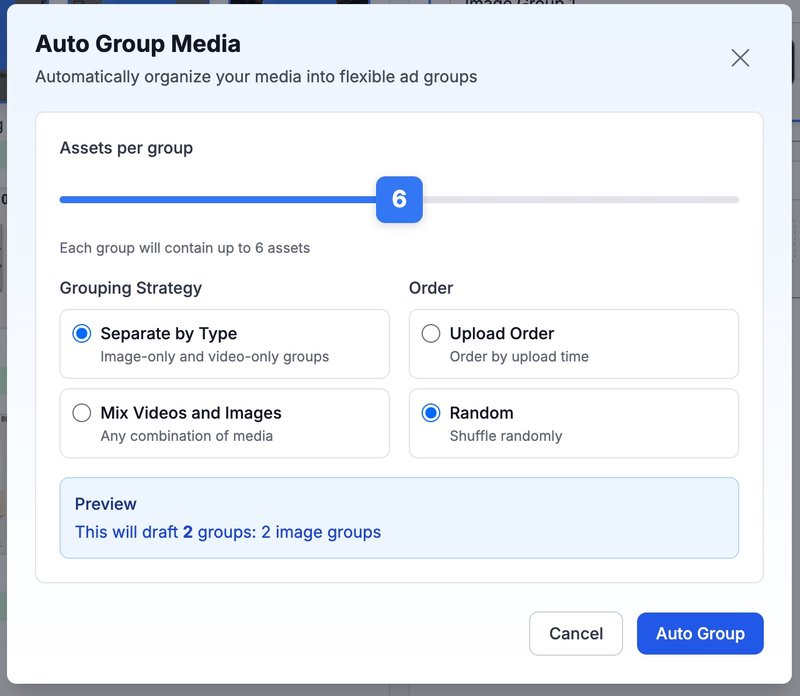
Batch creation. Configure text, URLs, and settings once, then create multiple Flexible Ads across ad sets with a single action.
API publishing. Skip the Ads Manager interface entirely. Flexible Ads publish directly via Meta's API, going live immediately or paused for review.
Both formats, side by side. Ads Uploader builds classic Flexible Ads and Meta's newer multi-media ads. The flexible API path still works even though the Ads Manager format picker changed, so you can keep launching flexible ads until Meta shuts that path off, and switch your workflow to multi-media ads whenever you're ready.
The workflow shift: 30 minutes of clicking in Ads Manager becomes 2-3 minutes in a purpose-built interface. For agencies managing multiple accounts or brands running seasonal campaigns with dozens of creative variations, this is the difference between viable and impractical.
Frequently Asked Questions
What is the flexible ad format in Meta?
Flexible Ads are a single ad container holding up to 10 images and videos where Meta automatically selects whether to show users a single image, video, or carousel format. Available for Sales and App Promotion objectives, they replaced Dynamic Creative for these campaign types in June 2024. Since March 2026, "Flexible" is no longer a standalone choice in the format list; the same capability now lives in the Flexible media toggle under Format display options inside Advantage+ creative.
Save Hours on Creative Testing
Stop uploading ads one by one. Bulk process unlimited creatives with automatic media matching and direct API publishing.
Try Ads Uploader FreeNo credit card required • 7-day free trial
How do you create flexible ads in Meta Ads Manager?
Create a Sales or App Promotion campaign with "Use a Catalog" toggled off. At the ad level, open Advantage+ creative and enable the Flexible media toggle under Format display options (before March 2026 this was a standalone "Flexible" choice in the Format list). Upload up to 10 images and/or videos, add your text and destination URL, then publish. Meta handles format selection automatically.
What's the difference between flexible ads and dynamic creative?
Dynamic Creative tests different element combinations (images, text, CTAs), while Flexible Ads optimize format selection (single image vs video vs carousel), auto-generate carousel versions, and support a single CTA. Both are now being consolidated into Meta's Advantage+ creative system, and a per-asset breakdown for Flexible Format started rolling out in 2026.
Can you use flexible ads with a product catalog?
No. Flexible Ads require manual creative uploads. If you're using the Sales objective with a product catalog, you must toggle off "Use a Catalog" to access the Flexible format option.
How many images can you use in flexible ads?
Up to 10 images and videos per Flexible Ad. You can mix formats freely - some images and some videos - and Meta will automatically select which to show each user based on placement and predicted response.
What objectives support flexible ads?
Only Sales and App Promotion campaign objectives support Flexible Ads. For Traffic, Leads, Awareness, Engagement, and other objectives, Dynamic Creative has historically been the alternative, but Meta is retiring it as everything consolidates into Advantage+ creative, so use it knowing it is sunsetting, or run standard single-format ads.
How do you see which creative performs best in flexible ads?
For most of the format's life you couldn't reliably see individual asset performance, because the creative breakdown didn't work for Flexible Ads. In 2026 Meta began rolling out a creative-level breakdown, and some accounts now see a "Media" option under the Creative breakdown that reports results per asset. If your account doesn't have it yet, use engagement in your Page Inbox as a proxy, or run separate ads when you need a true creative test.
Are flexible ads better than regular ads?
It depends on your goal. Flexible Ads are better for consolidation workflows, fighting fatigue in small audiences, and working around ad account limits. Regular ads are better when you need specific format control, detailed creative-level reporting, or CTA testing.
Do flexible ads preserve social proof when duplicated?
Reports from practitioners suggest that duplicating Flexible Ads across ad sets may preserve social proof (likes, comments, shares) similar to post ID duplication. This isn't officially documented, but multiple advertisers have observed shared engagement across duplicated Flexible Ads.
Can I use flexible ads for lead generation campaigns?
No. Flexible Ads are only available for Sales and App Promotion objectives. For Lead Generation campaigns, use Advantage+ creative enhancements for automated creative optimization (Dynamic Creative is being retired), or create separate ads for each format you want to test.
What does the "no valid formats" error (#1487569) mean?
Error #1487569 means at least one placement you selected can't render your creative, usually an aspect ratio or format mismatch. Fix it by changing the placements to match your creative, or by uploading multiple aspect ratios (1:1, 4:5, and 9:16) so every placement has a valid version to show. If the error persists with no obvious cause, duplicating or rebuilding the ad often clears a bad backend eligibility check.
What is flexible media in Meta ads?
Flexible media is the toggle that replaced the standalone Flexible format in March 2026. You find it under Format display options inside Advantage+ creative. It does the same job the old format did: you upload multiple images and videos, and Meta automatically adapts the format and aspect ratio to each placement instead of you choosing a single format up front.
Is the Flexible ad format being removed?
Meta removed Flexible as a standalone option in ad setup in March 2026 and moved the capability into the Flexible media toggle under Format display options in Advantage+ creative. Existing Flexible Ads keep delivering, but you can't edit one to add the new controls, so you have to duplicate and rebuild it in the Advantage+ creative workflow. The flexible format can still be created through the Marketing API, so API-based tools like Ads Uploader can keep building flexible ads until Meta shuts that path off. Meta hasn't published a formal deprecation notice, but the Ads Manager change is live.
What are Meta multi-media ads?
Multi-media ads are Meta's newer ad construct, documented in the Marketing API in May 2026. Like Flexible Ads, a multi-media ad holds up to 10 images and videos in a single ad, but it adds what Flexible never had: per-asset customization of text, destination URLs, placements, and cropping. It lines up with the creative workflow Meta has been testing as the eventual replacement for both Flexible Format and Dynamic Creative. API-based tools like Ads Uploader build both flexible ads and multi-media ads.
Conclusion
Flexible Ads aren't complicated once you understand their purpose. They're consolidation containers, not testing frameworks. You give Meta options. Meta picks formats. You get simpler campaign structures and potentially better format matching per impression.
When Flexible Ads make sense:
- Consolidating multiple creatives into one manageable ad
- Building "winners containers" from proven performers
- Fighting fatigue in smaller audiences
- Staying under ad account limits while maximizing creative volume
- Setting up low-maintenance evergreen campaigns
When to skip them:
- Finding winning creatives (use separate ads)
- Catalog/DPA campaigns (not supported)
- Needing detailed creative-level reporting (historically broken, per-asset breakdown now rolling out)
- Testing different CTAs (only one per ad)
The reporting limitation was real and frustrating, though Meta is finally addressing it with the per-asset breakdown rolling out in 2026. Either way, if you approach Flexible Ads as optimization containers rather than testing grounds, the missing data matters less than you'd expect.
Ready to test? Start with a winners container. Take your top 5-10 performing creatives from the past month and consolidate them into a single Flexible Ad. Let it run for a week alongside your existing separate ads. Compare total performance and creative lifespan. Most advertisers who try this approach don't go back.
For those running high-volume campaigns across multiple accounts, bulk ad launching tools like Ads Uploader eliminate the manual overhead of building Flexible Ads at scale. Configure once, create many, launch via API. The efficiency gain compounds quickly when you're managing dozens of campaigns.