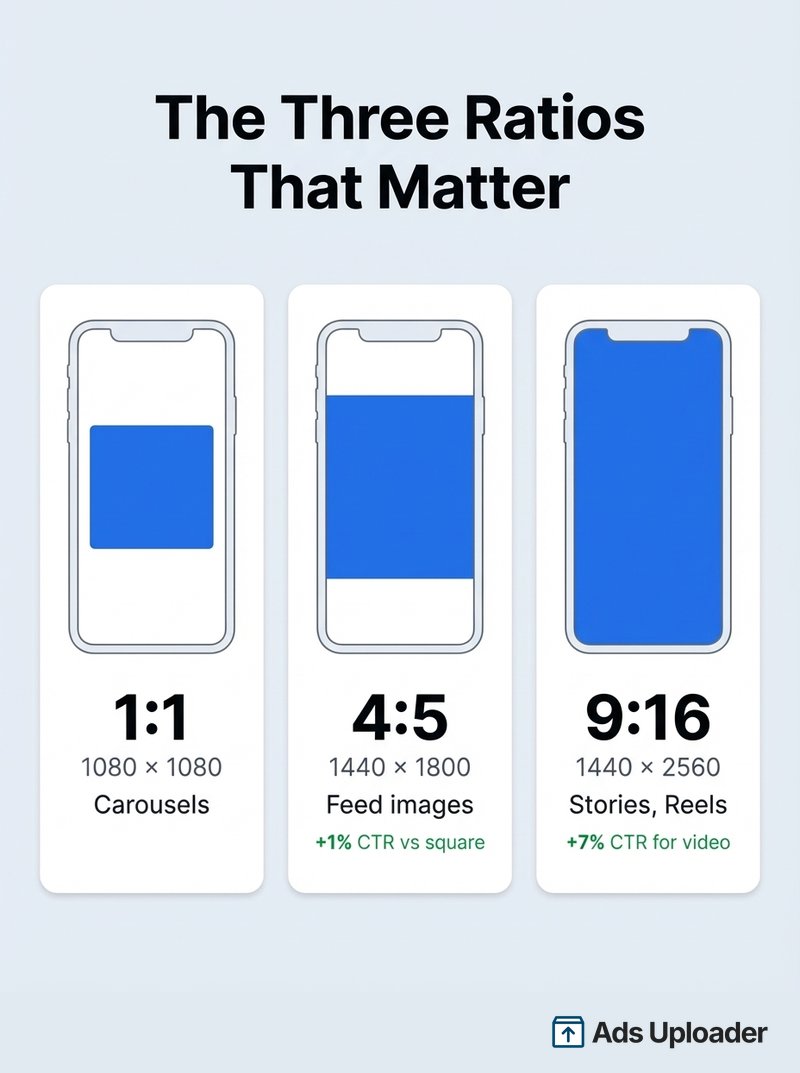
Meta ads aspect ratios vary by placement and format. The primary ratios are 4:5 (1080x1350) for Feed images and videos, 9:16 (1080x1920) for Stories and Reels, and 1:1 (1080x1080) for carousels. Meta's ad creation flow asks advertisers to upload 1:1, 9:16, and 1.91:1 creative, but its own placement guidance recommends 4:5 for most Feed surfaces - a conflict that causes many teams to unknowingly run suboptimal creative. Matching the correct ratio to each placement prevents auto-cropping, respects safe zones, and maximizes screen real estate.
Meta's upload flow asks you to provide three creative versions: 1:1, 9:16, and 1.91:1. Then it recommends 4:5 for most of the Feed placements it assigns that 1:1 creative to.
If that sounds contradictory, it is. And most advertisers never notice because the upload process gives the impression you've covered everything. Your ads still run. They just run with creative that doesn't match what Meta itself says works best for each placement.
This guide gives you the actual recommended ratio for every Meta ad placement, explains where the upload flow misleads you, and provides a framework for deciding how many creative versions your team should actually produce.
Why Meta Ads Aspect Ratios Matter More Than You Think
Aspect ratios control how much screen your ad occupies, how aggressively Meta crops or reframes your asset, and how native your creative feels in each placement.
The math is straightforward. A 4:5 Feed asset is 25% taller than a 1:1 square at the same width - extra screen real estate before any caption or UI chrome. Meta's own research backs this up: 4:5 images deliver approximately 1% higher CTR than 1:1, and 9:16 video generates a 7% higher CTR. Those numbers sound modest until you compound them across five- and six-figure monthly budgets.
This matters more than ever. Ad impressions across Meta's platforms grew 12% YoY in 2025, with 18% growth in Q4. Meta's own 10-K states that "substantially all" daily active users access via mobile, and the "substantial majority" of revenue comes from mobile advertising. The viewport is vertical, touch-based, and competitive. A mismatched ratio forces Meta to auto-crop your creative, potentially cutting off headlines, product shots, or CTAs.
The Meta Upload Conflict You Need to Know About
When you create an ad in Ads Manager, Meta asks you to provide creative in three aspect ratios:
- 1:1 - assigned to Feeds, In-stream, Search results
- 9:16 - assigned to Stories and Reels, Apps and sites
- 1.91:1 - assigned to Right column, Search results
Three versions, three placement groups, everything covered. Except Meta's own placement-level guidance contradicts this. According to Meta's best practices documentation, "Vertical 4:5 is recommended for single-image ads to be delivered to the ad placement Facebook Feed."
As Jon Loomer documented in his analysis of this mismatch, Meta's UI buckets Feed placements into a 1:1 group while its own guidance recommends 4:5. The result: teams unknowingly ship "compatible but non-optimal" creative across their highest-volume placements.
How to fix it: After uploading your initial creative, expand the Media section in your ad setup. Hover over individual placements within each group and click the edit icon to swap in placement-specific creative. It takes extra work manually, but it aligns your actual delivery with Meta's actual recommendations. Tools like Ads Uploader handle this automatically - you upload each aspect ratio variant and it assigns them to the correct placements for you.
Recommended Meta Ads Aspect Ratios by Placement
The tables below distinguish between supported ratios (the placement can accept it, often with cropping) and recommended ratios (Meta indicates it as the best fit for that placement). This distinction matters - supported means your ad will run; recommended means it should perform well.
Feed Placements
| Placement | Recommended (Image) | Recommended (Video) | Also Supported |
|---|---|---|---|
| Facebook Feed | 4:5 | 4:5 | 1:1, 1.91:1, 16:9 |
| Instagram Feed | 4:5 | 4:5 (or 9:16) | 1:1, 1.91:1, 16:9, 2:3 |
| Facebook Profile Feed | 4:5 | 4:5 | 1:1, 1.91:1 |
| Threads Feed | 4:5 | 9:16 | 1.91:1 to 9:16 (taller than 4:5 cropped to 4:5) |
| Facebook Marketplace | 1:1 | 1:1 | 16:9, 9:16 |
| Facebook Business Explore | 4:5 | 4:5 | 1:1, 1.91:1 |
| Instagram Explore Home | 4:5 | 9:16 | - |
| Facebook Right Column | 1.91:1 | - | 1:1 |
The Feed group is where the upload conflict hits hardest. If you're running single-image or single-video ads in Feed placements, 4:5 should be your default, not 1:1. The exceptions are Marketplace (1:1 recommended) and Right Column (1.91:1 recommended).
For Threads, note that images taller than 4:5 get cropped and vertically centered. If you provide 4:5 for Feed and 9:16 for vertical video, you're already close to Threads-compatible defaults.
Stories, Reels, and Full-Screen Placements
| Placement | Recommended | Resolution | Safe Zone |
|---|---|---|---|
| Instagram Stories | 9:16 | 1080x1920 (or 1440x2560) | Unified 9:16 safe zone |
| Facebook Stories | 9:16 | 1080x1920 (or 1440x2560) | Unified 9:16 safe zone |
| Messenger Stories | 9:16 | 1080x1920 | Unified 9:16 safe zone |
| Instagram Reels | 9:16 | 1080x1920 (or 1440x2560) | Unified 9:16 safe zone |
| Facebook Reels | 9:16 | 1080x1920 (or 1440x2560) | Unified 9:16 safe zone |
| WhatsApp Status | 9:16 | 1080x1920 | Unified 9:16 safe zone |
All full-screen placements recommend 9:16. Meta consolidated Facebook Stories, Facebook Reels, Instagram Stories, and Instagram Reels into a single unified 9:16 safe zone. One correctly designed vertical asset now works across all four placements without risk of UI obstruction.
Export at 1440x2560 for high-density screens when possible. The 1080x1920 minimum still works, but the higher resolution avoids upscaling artifacts on newer devices.
Reels and Stories 9:16, the Official Meta Recommendation
When people ask "what does Meta officially recommend for Reels," they want the spec straight from the source. Here it is, matching Meta's own help center guidance.
Meta officially recommends a 9:16 aspect ratio for both Reels and Stories, the full-screen vertical format, and the recommended production resolution is 1080 x 1920 px. Meta's help center lists 9:16 as the recommended ratio for these placements and supports a range down to 1.91:1 (Instagram Stories also accepts 4:5). One nuance worth knowing: Meta's hard technical minimum for Stories is lower than people assume (around 500 px on the short side), but 1080 x 1920 is the resolution you should actually produce at, because anything softer shows badly full-screen.
The official points worth quoting back to a client or teammate:
- Recommended ratio: 9:16 for Reels and Stories.
- Recommended resolution: 1080 x 1920 px.
- Why 9:16 specifically: it is the only ratio that fills the full mobile screen edge to edge; anything narrower gets bars or gets reframed.
- Source: Meta's Help Center pages "Aspect ratios supported by placements" and "Recommended minimum image pixel requirements across placements." When you need to settle a debate, those are the pages to cite.
If you produce a single vertical master at 1080 x 1920 in true 9:16, you are aligned with Meta's official recommendation for every full-screen placement at once.
In-Stream, Search, and Other Placements
| Placement | Recommended (Image) | Recommended (Video) | Notes |
|---|---|---|---|
| Facebook In-Stream Reels | 1:1 | 4:5 | Compact format, avoid text on images |
| Ads on Facebook Reels | - | 9:16 | Overlay format |
| Facebook Search Results | 1:1 | 1:1 | Also supports 1.91:1, 9:16 |
| Instagram Search Results | 4:5 | 9:16 | - |
| Audience Network | 9:16 | 9:16 | Native, banner, interstitial |
Landscape ratios (1.91:1 and 16:9) still appear in link-style contexts and in-stream video. Treat them as a selective optimization layer rather than a baseline requirement - unless you intentionally buy in-stream video inventory or want precision on desktop surfaces.
Aspect Ratios in Pixels: Quick Reference
| Ratio | Minimum | High-Res | Primary Use |
|---|---|---|---|
| 1:1 | 1080x1080 | 1440x1440 | Carousels, right column, multi-placement fallback |
| 4:5 | 1080x1350 | 1440x1800 | Feed images (Facebook, Instagram, Threads) |
| 9:16 | 1080x1920 | 1440x2560 | Stories, Reels, Feed video, full-screen placements |
| 3:4 | 1080x1440 | - | Instagram profile grid, carousels |
| 16:9 | 1920x1080 | - | In-stream video |
| 1.91:1 | 1200x628 | - | Right column, link previews |
Export at the high-res column when possible. The 1440-based dimensions avoid upscaling artifacts on high-density screens and are now Meta's stated recommendation for Feed images (1440x1800) and vertical placements (1440x2560). For exact dimensions, file weights, and length limits per placement, see our Meta ads size guide.
Which Ratios Do You Actually Need to Produce?
In practice, most advertisers don't produce all six ratios from the table above. You start with Feed and layer on from there.
Not sure which ratios your competitors actually commit to? See live Meta ad examples in our Meta Ads Library guide -- filter by media type and you can read their aspect-ratio strategy straight off the creative.
Launch More. Click Less.
Upload hundreds of creatives at once, auto-match thumbnails to videos, and publish straight to your ad accounts through Meta's API.
Try Ads Uploader FreeNo credit card required • 7-day free trial
Feed: 4:5
This is where most campaigns begin and where most impressions land. A single 4:5 image or video covers Facebook Feed, Instagram Feed, Threads, Profile Feed, Business Explore, and several other placements. If you only produce one ratio, make it 4:5.
Vertical: 9:16
Add this when you're running across Stories and Reels - which, if you're using Advantage+ placements, you almost certainly are. Tinuiti's 2025 benchmark data shows Stories accounting for 44% of Instagram ad impressions and Reels-related inventory hitting 31% on Facebook. That's too much volume to serve with a cropped Feed asset.
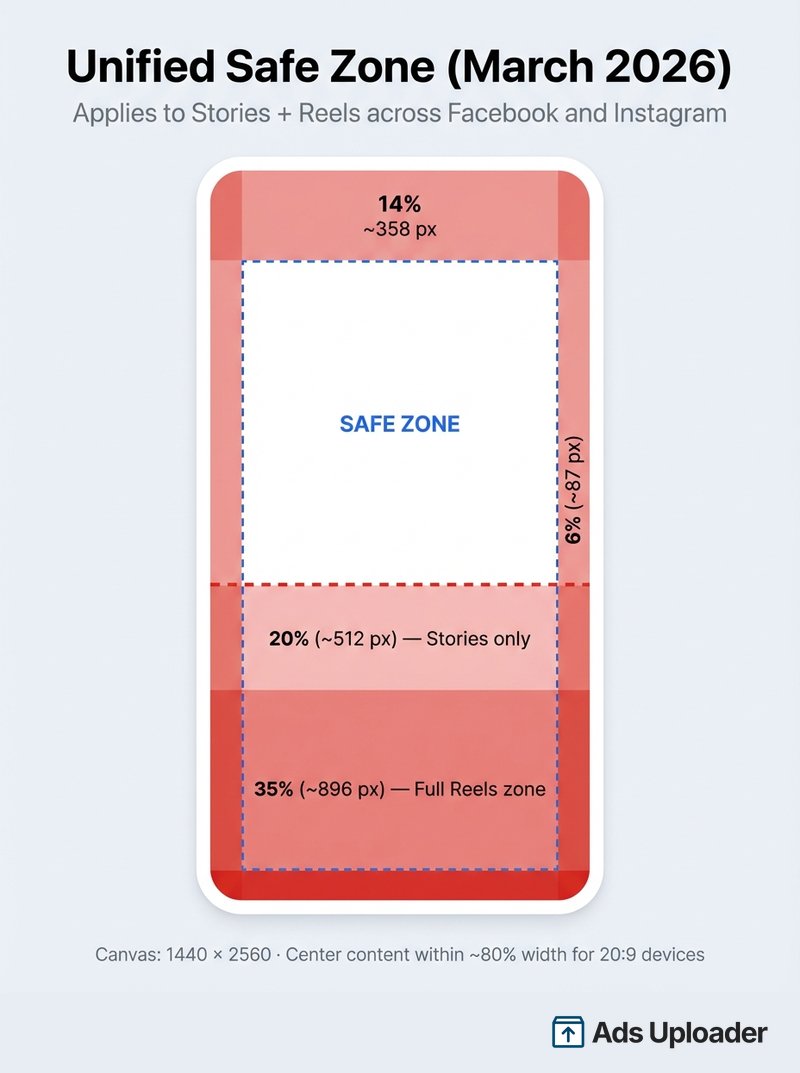
Design your 9:16 creative to the unified safe zone specs (top 14%, bottom 35%, sides 6%). If it's safe for Reels, it's safe for Stories.
Landscape: 1.91:1 or 16:9
Optional. Add landscape when you're intentionally buying in-stream video, right column, or desktop-heavy placements. Most performance campaigns can skip this entirely - Feed and vertical cover the placements that drive results.
Carousels
Carousels are their own format with their own rules, separate from the Feed/vertical/landscape decision. Meta supports 4:5 for carousel cards in Feed, but 1:1 remains the most predictable default, and the key constraint is consistency - keep all cards the same ratio. Rather than repeat the full walkthrough here, we keep the detailed per-placement carousel guidance in its dedicated home. See our Meta carousel ads guide for how to edit carousel aspect ratio by placement.
Scaling Multi-Ratio Production
The more ratios you produce, the more the upload process becomes the bottleneck. Manually swapping creative per placement across dozens of ad sets is where hours disappear.
In Ads Uploader, you handle this through filename conventions. Name your files with ratio suffixes - summer-sale_4x5.mp4, summer-sale_9x16.mp4 - and the tool auto-groups them, assigning each version to its correct placement group. You can customize the separator character to match your team's existing naming system. There's also a legacy method using _vertical and _horizontal suffixes that maps to the base feed creative. Either way, you upload your files and the tool handles the placement matching.
Safe Zones: The Unified 9:16 Spec
Getting the ratio right but placing copy inside a UI overlay is the most common creative failure in 2026. Meta addressed this by consolidating Stories and Reels into a single unified safe zone, so you no longer need separate specs for each placement. For the complete breakdown of safe zone dimensions by placement, see our Meta ads safe zones guide.
The Unified 9:16 Safe Zone
On a 1440x2560 canvas (the recommended export resolution), keep all critical elements outside:
- Top: 14%, approximately 358 pixels (profile icon, username, "Sponsored" label)
- Bottom: 35%, approximately 896 pixels (CTA buttons, engagement icons, captions)
- Each side: 6%, approximately 87 pixels (device edge variance)
The bottom 35% is the danger zone on every vertical placement, Stories included. Meta draws the same box for Instagram Stories as it does for Reels, so there is no looser Stories-only figure to design to.
Smart Zoom on Ultra-Tall Screens
There's one more variable most advertisers miss: what happens on 20:9 devices like Samsung Galaxy phones. A standard 9:16 ad doesn't fill these taller, narrower screens, so Meta handles the mismatch automatically:
- Smart Zoom (default): crops the left and right edges to fill the screen
- Letterboxing: keeps the full creative but adds thin black bars
You can't control which is applied. The fix: keep all critical content within the center ~80% of the horizontal canvas. Don't design edge-to-edge - pull key elements toward the center both vertically and horizontally.
Verifying Before You Publish
Toggle on the Safe Zone Guardrail in Ads Manager during ad setup. It overlays safe and unsafe regions directly on your creative. Cycle through Stories, Reels, and Feed previews individually using the placement dropdown. This check takes under two minutes per ad.
What Happens When Ratios Don't Match
Meta doesn't reject mismatched ratios - it auto-crops them. Instagram trims to supported bounds. Threads normalizes anything taller than 4:5 to a center crop. And when placements get redefined (Instagram Explore merged into the Reels viewer in January 2026), your ad sets may start delivering to surfaces with different ratio expectations entirely.
Save Hours on Creative Testing
Stop uploading ads one by one. Bulk process unlimited creatives with automatic media matching and direct API publishing.
Try Ads Uploader FreeNo credit card required • 7-day free trial
Frequently Asked Questions
Should I use 1:1 or 4:5 for Facebook feed ads?
4:5 for single-image and single-video ads. It's what Meta recommends and it takes up 25% more screen. Keep 1:1 for carousels and multi-placement fallback scenarios.
What is the best aspect ratio for Instagram Reels ads?
9:16 (1080x1920). It's the only ratio that fills the screen, and Meta's safe-zone guidance is built around it. Anything else gets cropped or letterboxed.
What does Meta officially recommend for Reels aspect ratio?
Meta recommends 9:16 for Reels and Stories, the only ratio that fills the full mobile screen with no letterboxing, and a recommended resolution of 1080 x 1920 px. Meta's help center lists 9:16 as the recommended ratio while supporting a range down to 1.91:1. Its absolute technical minimum is lower (around 500 px on the short side), but you should produce at 1080 x 1920 for quality.
Can I use one creative for all Meta ad placements?
Technically yes. Design a 9:16 master with your key content centered so it survives cropping to squarer formats. The trade-off is you lose the full-bleed impact of a dedicated 4:5 Feed version.
What happens if my aspect ratio doesn't match the placement?
Meta auto-crops to fit. Instagram trims to supported bounds. Threads normalizes anything taller than 4:5 to a 4:5 center crop. Your ad still runs, but key messaging may get cut.
Does aspect ratio affect ad performance?
Yes. Meta wouldn't publish placement-specific recommendations if it didn't matter. The shift toward Reels inventory on both Instagram and Facebook makes the penalty for non-vertical creative even steeper - mismatched ratios get auto-reframed, which hurts legibility. A/B test 1:1 vs 4:5 in your own account to quantify the lift.
What aspect ratio should I use for carousel ads?
Meta now supports 4:5 for carousel cards in Feed, and Instagram's profile grid updated to 3:4 previews in 2025, so taller cards display correctly. That said, 1:1 remains the safest default if your workflow depends on broad compatibility. Stories carousels use 9:16.
What are the safe zones for Meta ad placements?
Stories and Reels share a unified safe zone. On a 1440x2560 canvas: top 14% (~358px), bottom 35% (~896px), sides 6% (~87px). The same spec covers 9:16 Feed, and there is no looser Stories-only figure. Toggle the Safe Zone Guardrail in Ads Manager to verify.
What to Do Next
Three changes will get most accounts 90% of the way:
- Switch Feed creative from 1:1 to 4:5. Meta recommends it. The extra screen space is free. If you can only change one thing, change this.
- Design 9:16 assets to the full safe zone, Stories included. The 672-pixel bottom exclusion zone catches most teams off guard.
- Name your files by ratio. Whether you use Ads Uploader's
_4x5/_9x16suffixes or build your own system, a consistent naming convention turns multi-ratio production from a headache into a repeatable workflow.
The gap between knowing the right ratios and actually shipping them correctly across every ad set is where most teams stall. Ads Uploader closes that gap - drop your ratio-named files in, and each version lands on the right placement automatically.