The Meta Ads Library (formerly the Facebook Ad Library) is a free public database of every ad currently running across Facebook, Instagram, Messenger, and Audience Network. You reach it at facebook.com/ads/library with no account and no payment. It shows ad creative, start dates, platforms, and active status for any advertiser, plus impression ranges for all ads and spend ranges for political ads. Marketers use it to study competitor strategy, validate products, and build swipe files of proven creative. All of it is legal, and none of it needs a spy-tool subscription.
If you run Meta Ads in 2026, the Meta Ads Library is the single highest-leverage free tool you have. It shows you exactly what your competitors are testing, which creatives the system is actually pushing impressions behind, and how the best advertisers in your category structure their offers. The advertisers winning today aren't the ones with secret targeting hacks. They are the ones who study what works and then test creative at volume. This guide covers both halves of that loop.
After years of running Meta Ads across DTC and SaaS accounts, I have watched the platform shift from bidding tricks to a creative-first auction. Understanding why creative diversity matters in Meta's current algorithm is what turns the library from interesting into useful: it becomes a testing pipeline rather than a scrolling habit. Below, you'll learn how to search it like a professional, what it hides, the API, mobile workarounds, the spy tools worth knowing, and the exact workflow from "I found a winning angle" to "I launched 24 variants."
One framing note before the tactics. The goal is never to clone a competitor. If you're constantly copying, you're already a step behind whoever you're copying. Use the library as an inspiration feed instead: build a running shortlist of advertisers whose craft you genuinely admire, watch the styles and structures they keep returning to, and adapt those into your own brand or your clients'. Inspiration you metabolize beats imitation you ship.
60-Second TL;DR
- What it is: Meta's free, public archive of all currently active ads on Facebook, Instagram, Messenger, and Audience Network. No login, no cost.
- Where to find it: facebook.com/ads/library in any desktop or mobile browser. There is no app.
- Who it's for: Paid social specialists, in-house marketers, and agency media buyers doing competitor research, product validation, and creative inspiration.
- The filters you'll actually use: Country/region, Ad category (keep it on "All ads"), and Media type (image or video). Combining them is where the signal is.
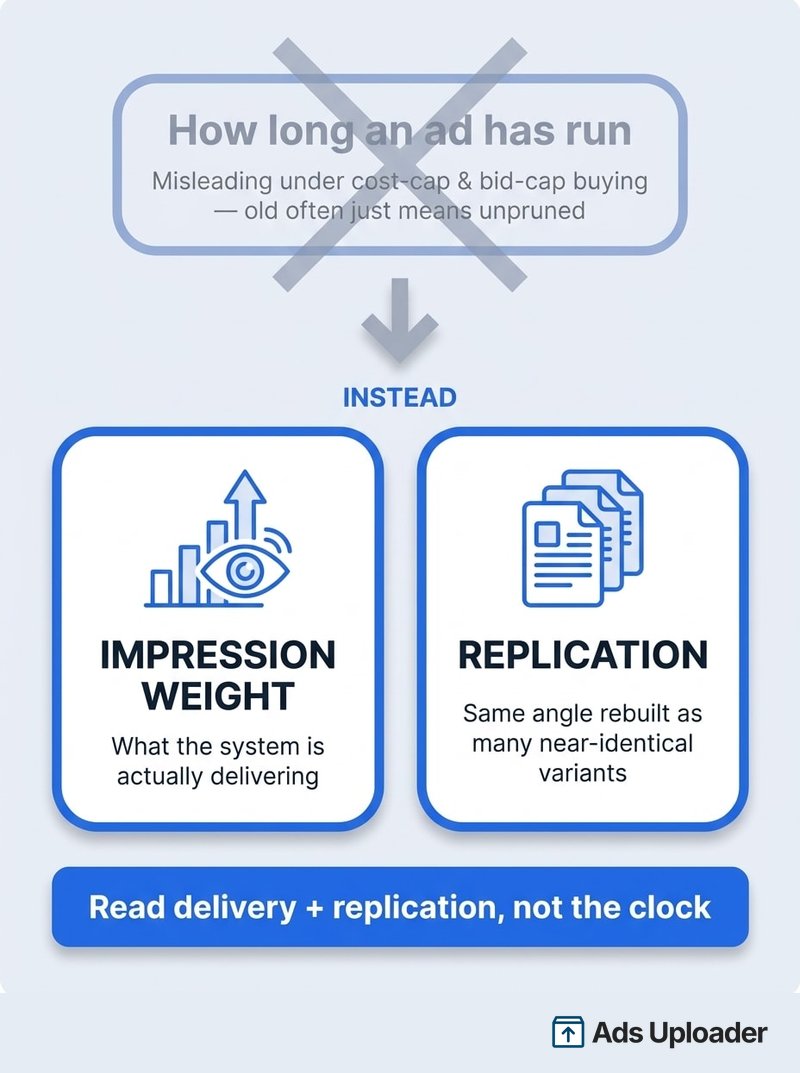
- The one thing 90% miss: It is not how long an ad has run. What matters is impression weight (what the system is actually delivering) plus replication (the same angle rebuilt as many near-identical variants). The "live for months means it works" rule breaks under cost-cap and bid-cap buying, where ads are left on and the auction decides, so age mostly measures neglect. Meta now exposes impression ranges for all ads natively, but the flow is clunky; the free Ad Library Helper extension sharpens it and adds the replication filter the native UI still lacks. Full breakdown below.
What Is the Meta Ads Library?
The Meta Ads Library is a free, searchable database of all ads running across Meta's platforms: Facebook, Instagram, Messenger, and Audience Network. It launched in 2019 as part of Meta's transparency initiative after concerns about election interference. Anyone, with or without a Facebook account, can view active ads alongside their creative, start date, platforms, and active status.
For political, electoral, and social-issue ads it goes further. Those are archived for seven years with "paid for by" funding disclosures and broad spend ranges. What began as a political transparency tool now indexes commercial ads in nearly every country where Facebook operates.
Why Meta Built It
Meta created the library to rebuild trust after criticism over hidden political influence campaigns. Making every ad publicly searchable, especially issue and electoral ads, was the regulatory price of operating a global ad platform. The EU's Digital Services Act later expanded the obligation, which is why ads delivered in the EU now carry far richer transparency data than ads anywhere else.
What You Can Actually Do With It
The official Meta Ads Library lets you search by advertiser name or by keywords appearing in ad text, then filter by country, platform, media type, and more. For each ad you can see:
- The full ad copy and creative (image, video, or carousel)
- The start date, meaning when the ad began running
- Which platforms it's delivering on
- Active or inactive status
- An impression-range bucket for every ad (under 1K up to 1M+), which you can sort and filter by
- For political and EU ads: spend ranges, tighter impression and reach ranges, and demographic breakdowns
Media buyers use it for three jobs: reverse-engineering competitor strategy, validating which products and offers are working in a category, and building a swipe file of proven creative angles. Think of it as a legal window into any advertiser's creative. Not their performance, but their bets.
Meta Ads Library vs Meta Ad Library vs Facebook Ad Library: What to Call It
This trips up more people than it should, so let's settle it. Meta Ads Library, Meta Ad Library, Facebook Ad Library, Facebook Ads Library, and "the ad library" all refer to the exact same tool at facebook.com/ads/library. There is no separate product behind any of these names.
The naming drifted because the tool predates the rebrand. It launched as the Facebook Ad Library in 2019. After Facebook became Meta in 2021, Meta gradually relabeled it the Meta Ad Library, and most marketers added an "s" out of habit ("ads library"). Search demand is now split across all variants, but the underlying product, URL, and data are identical.
| You search for | What you get |
|---|---|
| Meta Ads Library / Meta Ad Library | The current official name |
| Facebook Ad Library / Facebook Ads Library | The original name, still widely used |
| Ad library Meta / ads library Meta | Same tool, reversed phrasing |
| facebook.com/ads/library | The actual URL. Bookmark this one. |
Practical takeaway: it doesn't matter what you call it or which spelling a competitor's agency uses. One URL, one dataset. Use whichever name your team already says.
How to Access the Meta Ads Library (Step-by-Step)
Accessing the library takes seconds and never requires a login.
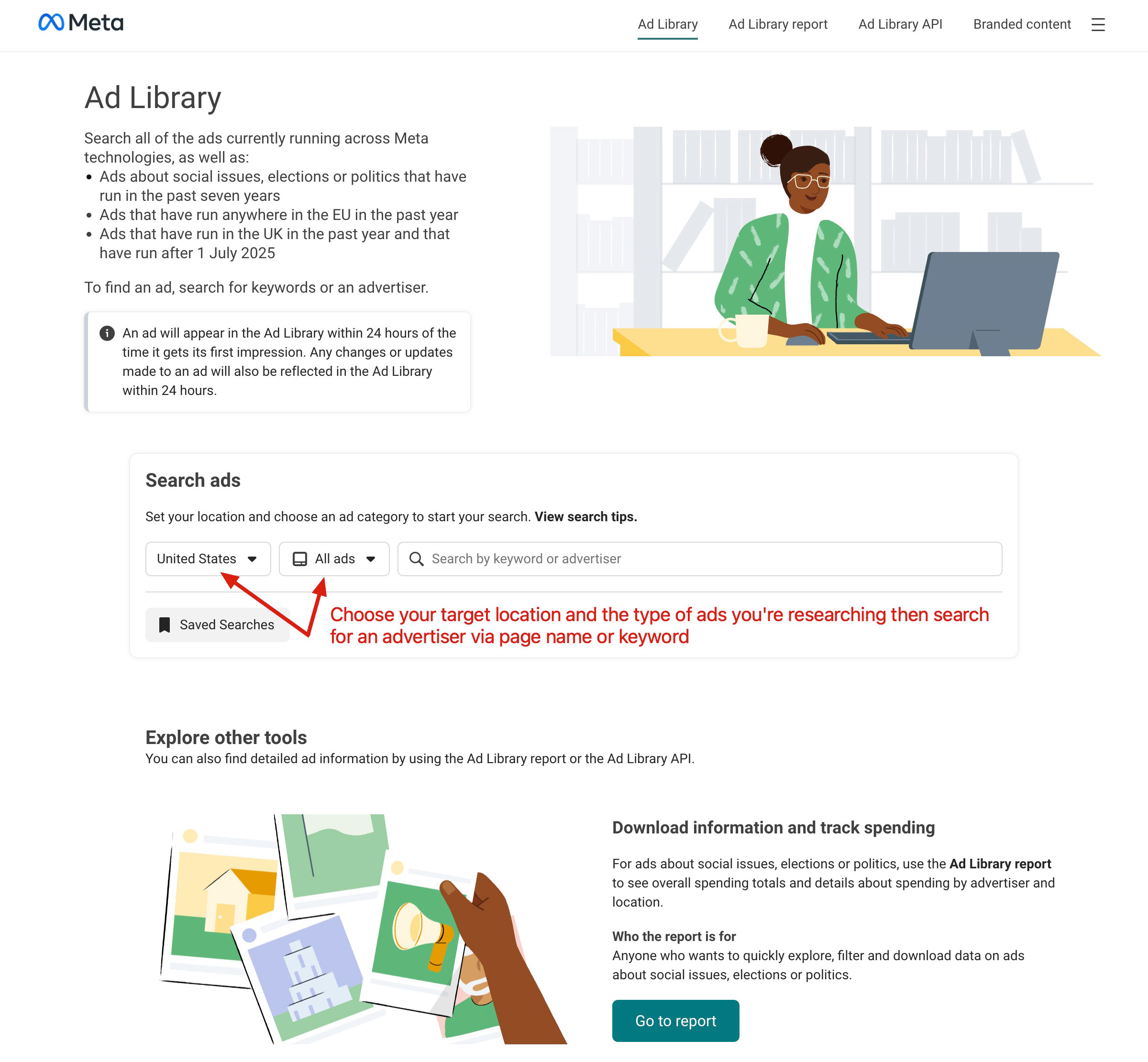
Step 1: Go to the Library
Open facebook.com/ads/library. This is the only official URL. It works in any modern browser on desktop or mobile, and there is no dedicated app. You'll see a search bar and a small set of filters.
Step 2: Select Your Country/Region
Set the country/region dropdown first, because it changes everything. The library shows ads delivered to the country you select. For global brands, check several markets, since advertisers run different creative per region. "All" returns a broader set but is noisier; a specific country is usually sharper. This single setting is the most common reason people "can't find" a competitor's ads.
Step 3: Choose Your Ad Category
The Ad Category dropdown offers three options:
- All ads for almost all commercial research
- Issues, elections or politics for ads with "paid for by" disclaimers and spend ranges
- Branded content for influencer "paid partnership" posts
For competitor and product research, keep it on All ads unless you're specifically studying political or issue advertising.
Step 4: Search by Keyword or Advertiser
Type either a Facebook Page name or words that appear in the ad copy:
- Search "Nike" to pull up Nike's page and ads
- Search "running shoes" to find any ad containing that phrase
Results appear instantly, no login.
Step 5: Refine With Filters
Once results load, narrow them:
- Platform: Facebook, Instagram, Messenger, Audience Network, Threads, and (since December 2025) WhatsApp
- Media type: Image or Video
- Impressions: Filter and sort by impression range. Since late 2025/early 2026 this works for all ads, not just political ones, in buckets from under 1K up to 1M+
- Active status: Active or Inactive (full range for political/EU only)
- Language: Filter by ad language
- Date range: Available for political/EU ads only
Ads with fewer than 100 impressions now carry a "Low Impression Count" badge, so obvious tests and duds are easy to skip. What's still missing natively: a one-click way to isolate replicated creative across an account, a carousel media-type filter, and any save, export, or bulk-download function. The native impression sort also lives across separate sections and is richest only in EU markets, so it's powerful but clunky in practice. That friction is exactly what the Ad Library Helper extension smooths over, covered in the advanced section below.
Step 6: Open Ad Details
Click "See ad details" or the thumbnail for the full creative, complete ad text, start date, platform icons, active status, and, for political/EU ads, the "paid for by" disclaimer and spend ranges. If "2 ads use this creative and text" appears, the advertiser is testing or scaling that asset.
Master Search: How to Find Any Ad in Seconds
The library's power is in how you search it, not just that you can.
Basic Search Techniques
By advertiser name: Type the Page name and select from the dropdown. Big brands run regional pages ("Nike Running UK"), so check the variants.
By keyword: Search words in the ad text. Multiple words use AND logic by default, so "luxury watch" needs both. Wrap exact phrases in quotes, like "50% off". Searches are case-insensitive with a roughly 100-character limit.
Known limitations: There is no fuzzy matching, so "headphone" may miss "headphones". There is no OR operator in the UI, and no OCR, so text baked into an image is not searchable. Search covers ad text and advertiser names only.
Advanced Filters Most People Skip
EU date-range manipulation: Set the country to an EU market such as France or Germany to unlock date filtering and a year of inactive ads. This is the single best trick for studying a competitor's past and seasonal campaigns. It is the closest thing to history you get for non-political ads.
Platform filtering: Isolate Instagram to see Reels-first strategies, or Audience Network to spot who's testing cheap placements.
Media type filtering: Filter to video or image to study one format at a time. Pairing that with the current Meta ads size specifications tells you which aspect ratios competitors are committing to. Carousel is not a filterable media type, so to study carousels you search the advertiser, then scan their detail views for multi-card creative.
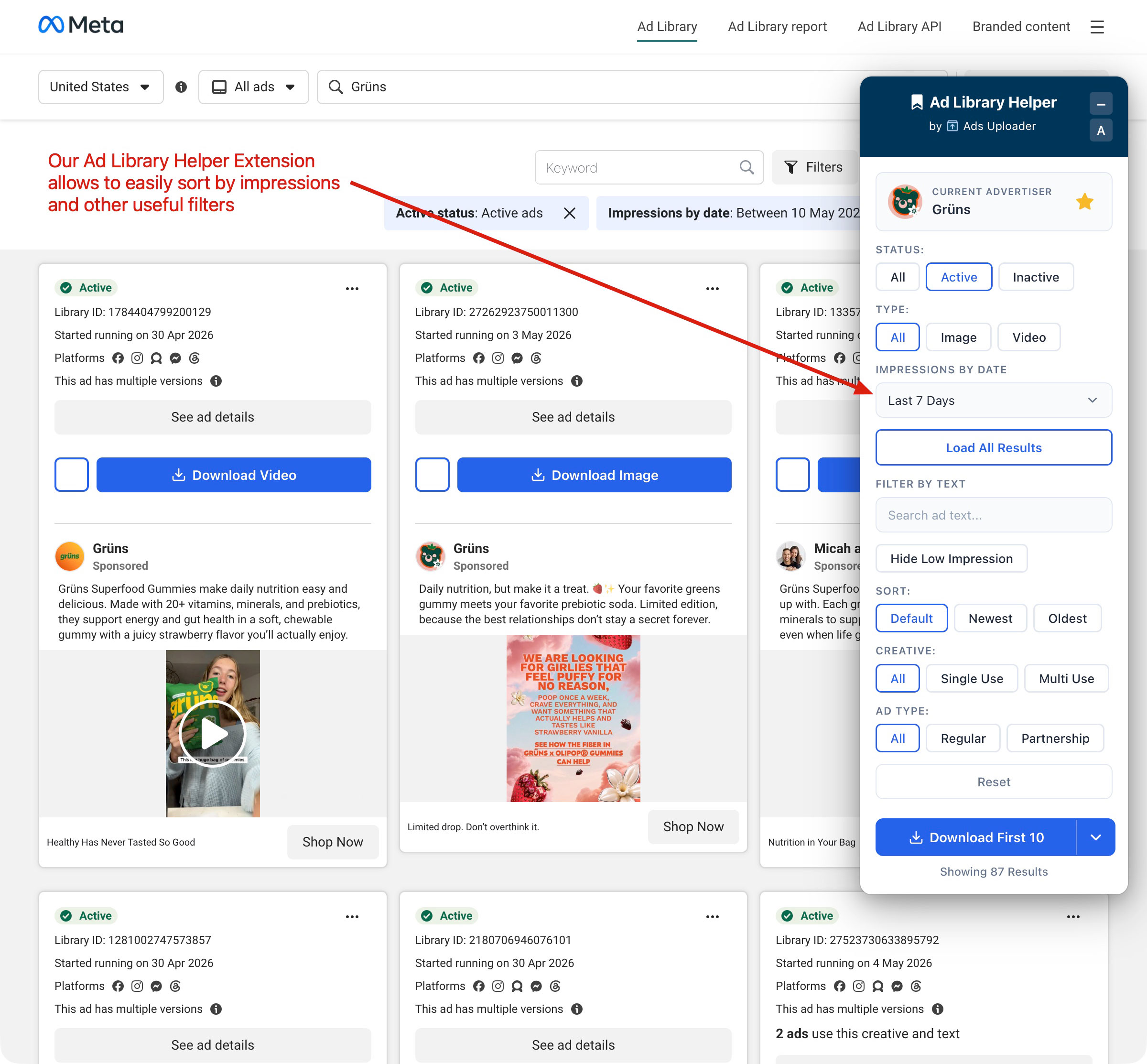
Where native filtering still falls short: Meta has closed real ground here. You can now sort by impression range and browse branded-content "paid partnership" posts natively. But the native flow is scattered: impression data is bucketed and richest only in EU markets, partnership ads sit in a separate section rather than alongside normal results, and there's still no way to isolate replicated creative, save, or bulk-export. The free Ad Library Helper extension sits on the same public data and collapses that friction into the controls a media buyer actually reaches for:
- Impressions by Date plus a Hide Low Impression toggle, so you read what's being delivered hardest over a chosen window without bouncing between EU markets and sort menus
- Single Use vs Multi Use creative, the cleanest read on replication and the one signal the native library still won't surface: Multi Use isolates the angles a competitor has rebuilt into many near-identical variants in a single click
- Regular vs Partnership ad type inline, so you split standard ads from creator collaborations without leaving your results
- Filter by text, status, and media type without fighting the native UI, a Newest/Oldest sort, and one-click download of any single ad or the entire visible set into a swipe file
Launch More. Click Less.
Upload hundreds of creatives at once, auto-match thumbnails to videos, and publish straight to your ad accounts through Meta's API.
Try Ads Uploader FreeNo credit card required • 7-day free trial
Search Operators and Shortcuts
- Quotes force exact-phrase matches, like "Just Do It".
- No-brand recall: Saw an ad, forgot the brand? Search a distinctive line of copy. Dropshippers reuse phrases like "Free Worldwide Shipping", so searching one surfaces the whole cluster.
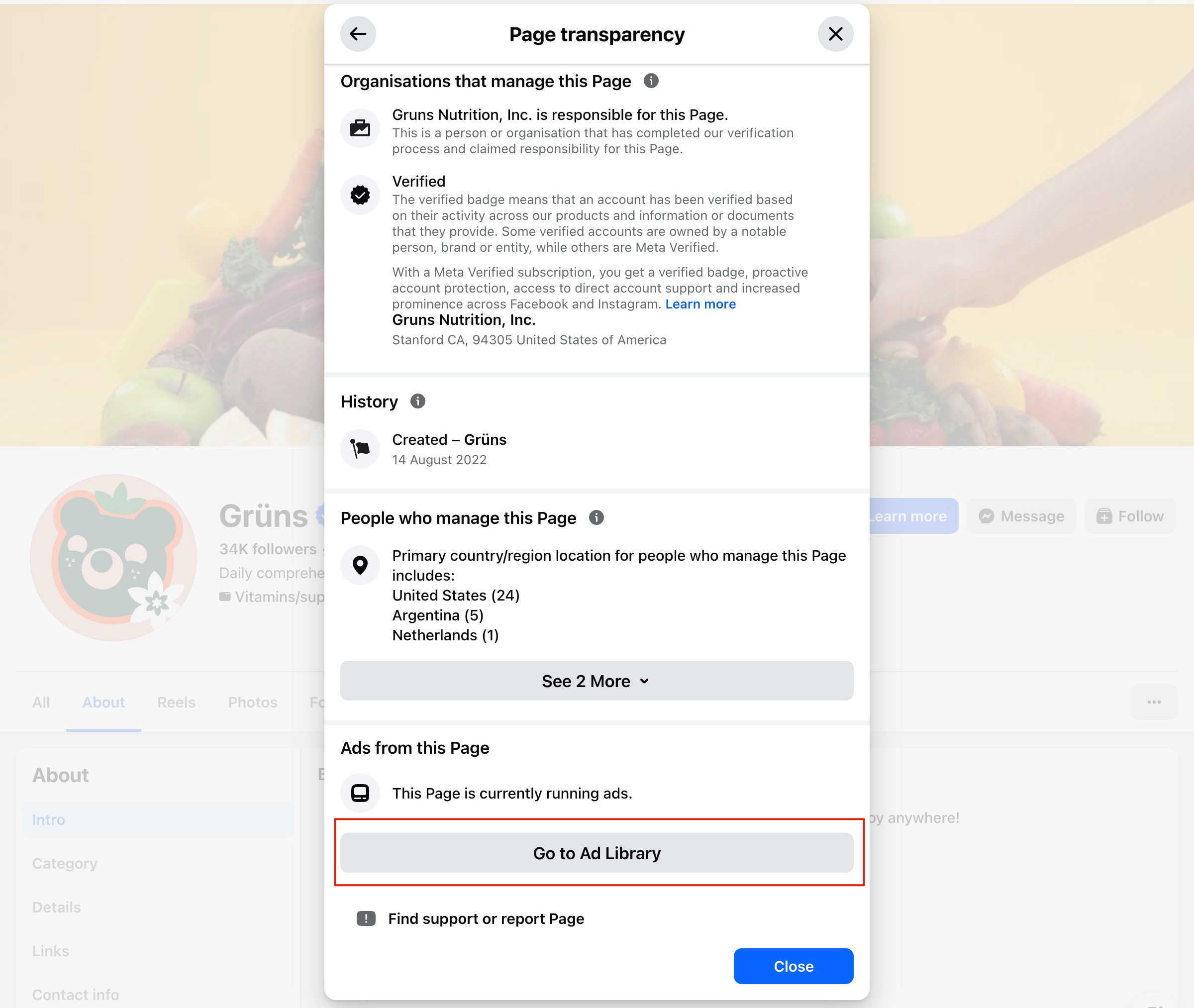
- Page Transparency shortcut: On any Facebook Page, scroll to "Page Transparency", then "See ad library". This bypasses search entirely and is the reliable way to pull every ad for a page with a generic name.
- Bulk competitor sweeps: The UI handles one advertiser at a time. The API queries up to 10 page IDs at once (see below).
What You Can See vs What's Hidden
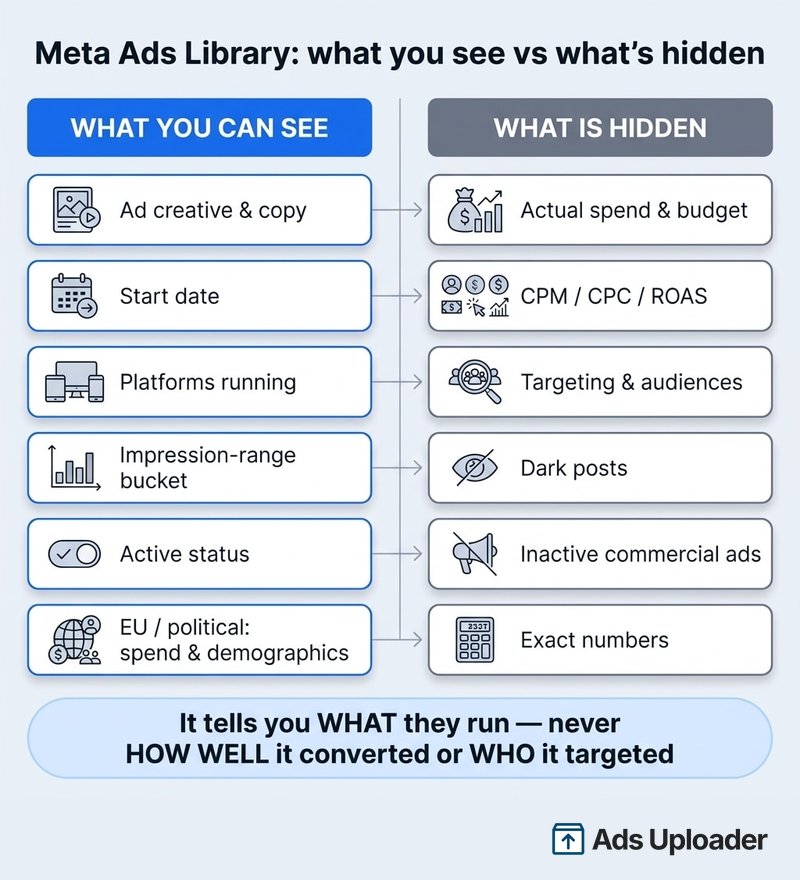
This is the question Reddit threads keep answering badly, so here's the clean version. The library is generous with creative and stingy with everything that would let you reverse-engineer a media plan.
What you can see
- Active status and start date (the start date alone is not a performance signal)
- Full ad creative: copy, image, video, and carousel cards
- Platforms the ad is eligible to run on
- Number of versions sharing a creative ("uses this creative and text")
- An impression-range bucket for every ad (since late 2025/early 2026), from under 1K up to 1M+, which you can sort and filter by
- For political/issue ads: "paid for by", spend ranges, impression ranges, demographics
- For EU-delivered ads: tighter impression and reach ranges, targeting parameters, demographic splits, plus a one-year archive of inactive ads
What's hidden
- Actual spend, budget, CPM, CPC, CTR, ROAS, or any precise performance metric for non-political ads
- Targeting, meaning interests, lookalikes, custom audiences, age, and geo precision
- The advertiser's audience size, or how many people they reached outside the EU
- Dark posts that were never published as an ad of the page
- Inactive commercial ads, because once a non-political ad stops, it's gone from the library
- Exact impression, spend, or performance numbers (you get a wide bucket, not a figure), and a native one-click way to isolate replicated creative, the signal that still matters most (native buries replication on each ad's detail card; the Ad Library Helper extension surfaces it directly)
The practical implication is simple. The library tells you what an advertiser is running and roughly how hard it's being delivered, never how well it converted or who it targeted. The closest free proxy is impression weight combined with how aggressively an angle is replicated, so lean on those two rather than the clock. Do not read longevity as success. Under cost-cap and bid-cap buying, advertisers leave ads switched on and let the auction decide, so an old ad is often just one nobody pruned, not a proven one.
Once you've found an angle worth testing, the next bottleneck isn't research. It's launching variants fast enough to actually learn from them. Try Ads Uploader free
Spy on Competitors: The Professional's Playbook
Competitive analysis is the highest-value use of the library. Here's how to extract intelligence instead of just scrolling.
Find Every Competitor Ad
Start with direct search, then go wider: regional pages ("Brand USA" vs "Brand EU"), product-specific pages, the parent company, and sister brands under the same umbrella. Reverse from creative using a distinctive line of copy. Map the category with generic product searches like "meal kit delivery" to surface new entrants you didn't know existed.
Read Their Strategy
Creative themes: What pain points lead? Lifestyle versus product shots? Video versus static ratio? Heavy social proof? If every ad screams price, they're competing on cost. If it's craftsmanship, they're defending margin.
Offers and CTAs: Log discount types and cadence, free trials, "Shop Now" versus "Learn More", and whether they show or hide price.
Testing patterns: Same image with different headlines (or the reverse) means active A/B testing. Don't count raw ad volume, because advertisers now run hundreds of ads by default. Watch whether volume is increasing over time and whether the same creative appears across multiple ad sets. Both signal a winner being scaled.
The impression-weight tell: Look at which creatives carry the most impressions, not which have been live longest. Those are the ones the system is spending delivery on, which is the closest thing to a public performance signal you get. Then look for replication, because a winning angle gets rebuilt as many near-identical variants (the Ad Library Helper extension's Multi Use filter isolates exactly these in one click). What you should not lean on is age. Under cost-cap and bid-cap buying, advertisers leave ads running and let the auction decide, so an old ad is usually an unpruned one, not a proven one. This reverses the most common piece of ad-library advice on the internet, and it's the single most important shift in how to read the tool in 2026.
Read Their Funnel
The creative tells you the angle; the destination tells you the strategy. Where do their ads point? Homepage links signal broad awareness spend. Direct product pages mean conversion-focused acquisition. Dedicated landing pages with a discount mean they're protecting a control offer. Lead-magnet CTAs like "download our guide" or "free audit" mean a content-led funnel where the ad isn't the conversion event; the email sequence behind it is. A competitor whose ads all push "Buy now, 20% off" is playing a different game than one running "Get the free playbook", and you'll waste weeks if you copy their creative without understanding which game it's part of.
Mini Case Study: DTC Skincare Brand
Picture a skincare challenger mapping its top three competitors weekly. Say one competitor's "dermatologist-tested in 14 days" UGC ad is carrying the heaviest impressions over the trailing 30 days and shows up as Multi Use creative with six near-identical variants. That combination, high delivery plus heavy replication, signals "proven angle" far more reliably than how long any single ad has been live. The play is to build your own version, different talent but the same 14-day claim structure, and run it as a 12-variant test. The library didn't invent the angle; it pointed at which one was already winning so you could adapt it rather than guess.
Track Changes Over Time
Keep a simple tracker: date observed, advertiser, ad summary, offer/CTA, creative type, start date, impressions rank, and takeaway. Check weekly, or daily during a competitor's known launch windows. Cross-reference with their PR and social, since new ad clusters usually coincide with launches. Over a quarter you'll see their rhythm, for example six-week campaigns with two-week breaks, and you can pre-empt it.
Meta Ad Library API for Power Users
For automation and bulk pulls, Meta exposes the Ad Library API.
Getting API Access
- Facebook Developer account at developers.facebook.com
- Create an app in the developer dashboard
- Identity verification with government ID and address, similar to political advertiser verification. Allow several days.
- Grant the
ads_archivepermission - Generate an access token, which is short-lived (1 to 2 hours) and extendable to roughly 60 days
Rate Limits
Meta doesn't publish a fixed ceiling. The endpoint enforces dynamic, app-and-token-scoped rate limiting, and aggressive querying triggers throttling and temporary blocks. Plan around it: request only needed fields, filter tightly, batch page IDs, and add backoff between calls.
Key Endpoint and Parameters
Primary endpoint: GET https://graph.facebook.com/v<VERSION>/ads_archive
search_termsfor keywords (space means AND, quotes for phrases)ad_active_statusset to ACTIVE, INACTIVE, or ALLad_typeset to ALL, POLITICAL_AND_ISSUE_ADS, HOUSING_ADS, and so onad_reached_countries, which is required, taking country codes or "ALL"search_page_idsfor up to 10 page IDs per callfieldsfor creative text, snapshot URLs, and spend/impression ranges (political/EU)
A practical example. To pull a single competitor's active ads in the US and write the creative bodies and snapshot links to a file:
curl -G "https://graph.facebook.com/v<VERSION>/ads_archive" \
  --data-urlencode "search_page_ids=1234567890" \
  --data-urlencode "ad_active_status=ACTIVE" \
  --data-urlencode "ad_reached_countries=['US']" \
  --data-urlencode "fields=ad_creative_bodies,ad_snapshot_url,ad_delivery_start_time" \
  --data-urlencode "access_token=$FB_TOKEN"
A trimmed response looks like this:
{
  "data": [
    {
      "ad_creative_bodies": ["Dermatologist-tested results in 14 days. See the proof."],
      "ad_snapshot_url": "https://www.facebook.com/ads/archive/render_ad/?id=...",
      "ad_delivery_start_time": "2026-01-08"
    }
  ],
  "paging": { "cursors": { "after": "..." } }
}
One important constraint: for non-political ads, full API data is only available for EU countries due to privacy restrictions. The API is the right tool for scheduled weekly competitor sweeps and feeding a dashboard; for a one-off look, the UI is faster.
What to Actually Automate
Don't build a "download every ad" script. You'll hit rate limits and drown in noise. The high-value automations are narrow. Run a weekly job that queries a fixed list of competitor page IDs and diffs the result against last week's pull, so you get a clean "these 4 ads are new, these 2 went inactive" report instead of re-reading their whole library by hand. Pair that with a creative-count trend per competitor (are they scaling or pulling back?) and an EU-market query for the spend and demographic ranges you can't get any other way. Everything past that, like tagging, swipe-file storage, and alerting, is workflow you can layer on top. The raw signal you want is new ads, dead ads, and direction of volume. That's three fields, not a data lake.
Download and Save Ads (Tools & Extensions)
There's no native download button, but a swipe file is non-negotiable for serious testing.
Save images: Right-click, then "Save image as" in detail view. Screenshot if it's disabled. The API's ad_snapshot_url returns original quality.
Download video: Open dev tools (F12), go to the Network tab, play the ad, find the .mp4, and copy the URL.
Capture copy: Highlight and copy the text. Record the advertiser and start date for context.
Browser extensions: This is where a good extension earns its keep. The free Ad Library Helper covers the capture side too: a one-click bulk download of every ad currently visible, straight into a swipe file, on top of the impression and replication filters described earlier. Other extensions exist for batch video download, automatic naming with ad IDs, and bookmarking with notes and team sync. Free tiers usually cover single downloads; paid tiers (around $10 to $50 a month) add bulk and organization. Use well-reviewed extensions from the official store, and remember that saved creative is for analysis, not for republishing someone else's work.
Meta Ads Library Mobile: Quirks and Workarounds
There is no Meta Ads Library app on iOS or Android. The library is web-only, and most competitors writing about it ignore mobile entirely, even though plenty of media buyers research from their phones between meetings.
Here is what actually happens on mobile:
- It works, in a browser. Go to facebook.com/ads/library in Safari or Chrome. Search and core results render fine.
- Filtering is cramped. The filter rail collapses behind menus, and comparing several ads side by side is painful on a small screen. Treat mobile as triage, not deep analysis.
- Request the desktop site. In your mobile browser's menu, choose "Request Desktop Site" (Safari uses the "aA" button in the address bar; Chrome and Edge use the three-dot menu). This restores the full filter layout and is the single best mobile fix.
- Video inspection is limited. The dev-tools
.mp4trick isn't practical on mobile, so bookmark the ad and pull the video on desktop later. - Use it for capture, not study. When you spot something interesting in your feed, jump to the library on mobile, confirm it's running, screenshot it, and log it. Do the real teardown on desktop.
The practical split: mobile is your capture device (spot, verify, screenshot, note), and desktop is your analysis device (filter, compare, download, decide what to test).
Hidden Features You're Missing (2026 Updates)
Save Hours on Creative Testing
Stop uploading ads one by one. Bulk process unlimited creatives with automatic media matching and direct API publishing.
Try Ads Uploader FreeNo credit card required • 7-day free trial
Reading Impression Weight
For years the library told you what was running but gave you no way to rank it, so everyone fell back on the unreliable "it's been live a while" heuristic. That changed in late 2025 and early 2026: Meta now attaches an impression-range bucket to every ad, lets you sort by it, and flags sub-100-impression ads with a "Low Impression Count" badge. Meta rolled this out quietly without formal documentation in its Transparency Center, so confirm it is live in the market you are searching before you lean on it. The catch is the native version is coarse and scattered, the buckets are wide and the richest data only surfaces when you switch into EU markets, so it tells you order of magnitude, not a clean ranking. The Ad Library Helper extension tightens it with an Impressions-by-Date filter and Hide Low Impression toggle that work in any market, turning a scroll-and-guess session into a ranked shortlist.
The EU Transparency Goldmine
Every ad now shows a coarse impression bucket, but EU-delivered ads expose far more under the Digital Services Act: tighter impression ranges like "100K to 125K", spend brackets like "$1K to $5K", age and gender splits, top regions by delivery, the targeting parameters the advertiser chose, plus a one-year archive of inactive ads. Even outside the EU, set the country to France or Germany occasionally to catch this on global campaigns. It is the most underused feature in the entire tool.
Branded Content
Search organic influencer posts carrying the "Paid partnership" label. You can filter by platform and search by creator or brand, currently limited to a recent window. It's the only way to see competitors' creator strategy without manually following every influencer in your niche. To split standard ads from creator collaborations across an advertiser's whole account, the Ad Library Helper extension's Regular vs Partnership ad-type filter does it in one click rather than reading each card by hand.
Political Archive (Even If You're Not Political)
Seven years of history, state-by-state US delivery, and "paid for by" search. This is useful for studying long-running corporate social-responsibility and issue campaigns from large brands.
Cross-Platform Coverage
The library now spans Audience Network and Messenger, with Threads filterable since April 2025 and WhatsApp added as a standalone placement filter in December 2025. That's six platforms you can isolate individually. Filter to the less-crowded ones to see who's testing them before everyone else does.
Industry-Specific Strategies
E-commerce & DTC
If one product dominates an advertiser's portfolio and carries the impression weight, that's their hero SKU and it's selling. Categorize creative (UGC versus studio versus lifestyle) to see what's working. If most of their ads started within roughly 10 days of each other, they're refreshing hard against fatigue, so match that pace. Use the EU archive to pull last year's Black Friday playbook and plan a counter-promotion.
B2B & SaaS
Read CTAs as a go-to-market tell. "Book a demo" versus "Start free" versus "Download the report" tells you how they qualify. Multiple webinar ads against one eBook ad means webinars convert better for them. A B2B ad that has run a long time and still carries impression weight is a high-performing evergreen lead magnet worth modeling. Longevity by itself proves nothing under cost-cap buying, so always confirm the impression weight (the Ad Library Helper extension's Impressions-by-Date view makes this quick) before treating an old ad as a winner.
Mini Case Study: B2B SaaS
Picture a workflow-automation SaaS team auditing a larger competitor. Say two ads, a "kill 8 hours of manual work a week" video and a ROI-calculator lead ad, carry the bulk of the competitor's impressions and show up as Multi Use creative with steady variant refreshes, while everything else in the account churns within weeks. The move is to treat those two as the proven spine, rebuild both with your own proof points, and make the ROI-calculator angle a primary acquisition test for the quarter. The library doesn't hand you the answer; it narrows forty ads down to the two worth adapting.
Local Businesses
Location-specific copy like "Serving Denver since 1999" reveals geo strategy, and new location mentions can signal expansion before it's announced. Track seasonal offers to time competitive promotions.
Common Mistakes That Waste Your Time
- "No ads found" does not mean not advertising. It's usually the wrong country, wrong category, or a misspelled page. Use the Page Transparency link instead of keyword search.
- Misreading date filters. Standard active ads have no history. For the past, use the EU-country trick or the political category.
- Searching outside scope. The library holds ads only. Not organic posts, company info, or performance.
- Missing multiple pages. Parent companies, sub-brands, and regional pages all run separately.
- Treating ad count as budget. Raw volume isn't spend. What an account pushes impressions to, and which angles it replicates, are the signals.
- Treating "still running" as "still winning". This is the big one. Under cost-cap and bid-cap buying, advertisers rarely prune aggressively, so a months-old ad is often just one nobody turned off. Read impression weight and replication instead of trusting age.
Free Tools & Resources
You don't need paid software to get 90% of the value. You need a system. Build these assets and you'll outresearch most agencies.
A filtering extension. Everything in this guide can be done by hand, but the impression-weight and replication reads are slow without help. The free Ad Library Helper adds those filters and a one-click bulk capture on top of the same public data, which is the difference between a 40-minute teardown and a five-minute one.
The competitor tracker. A single spreadsheet, one row per ad you care about: date observed, advertiser, ad summary, offer/CTA, creative type, start date, impression weight, single or multi use, and a "why it's winning" note. Rank by impression weight, not by how long an ad has run. Under cost-cap and bid-cap buying, longevity mostly measures what nobody bothered to turn off, while impression weight points at what the system is actually delivering. The top of that sheet is your ranked list of proven angles in the category.
The swipe file. A folder or board of screenshots and saved video, organized by angle rather than by brand: "social proof", "founder story", "problem agitation", "price anchor", "before/after". When you sit down to brief new creative, you're pulling from a library of proven structures instead of staring at a blank page.
The search cheat sheet. Pin the non-obvious moves so you actually use them: quotes for exact phrases, the EU-country trick for history and spend ranges, the Page Transparency to "See ad library" shortcut for generic page names, and the impression-weight and Multi Use filters for finding what's actually winning. Most people forget the EU trick exists, and a one-line note keeps it in your workflow.
The point of all of these is the same: turn scattered scrolling into a repeatable input for testing. Research that doesn't feed a test pipeline is just procrastination with extra steps.
When the Meta Ads Library Isn't Enough (and What to Use Instead)
The free library covers the 80% case. The gaps, like history for non-EU ads, organized swipe files, alerts, and landing-page capture, are what paid spy tools sell. Before you pay for any of them, the first thing to reach for is the free extension that already removes most of the friction. Honest rundown, free option first:
| Tool | What it adds | Watch-out | Price |
|---|---|---|---|
| Ad Library Helper (ours) | Sharper impression filtering than the clunky native sort, replication isolation (Single/Multi Use), and Partnership filters, plus one-click single or bulk capture, directly on the free library | A filter layer on the public data, not a separate ad database with history | Free |
| Foreplay | Defined this category. It created the swipe-file plus creative-brief workflow that most of these tools now copy, and that side is still strong | Adds workflow, not new ad data | $59 to $459/mo (from $49/mo billed annually) |
| Atria | A polished take on the same workflow, with AI tagging and cross-network discovery | Seat-based, and the spend cap matters on lower tiers | $159 to $329/mo (from $129/mo billed annually) |
| GetHookd | A 21M+ ad library across Meta, TikTok, and Google, plus AI tools to transcribe ads, generate hooks and scripts, and clone creatives | Credit-based, so heavy AI generation burns through a tier fast | $29 to $129/mo (Starter to Agency; ~35% off annual) |
| BigSpy | Huge multi-platform database, including TikTok | Data freshness and accuracy vary | Free tier; paid ~$9 to $249/mo |
| AdSpy | Strongest search and filter on a massive index | Highest entry price, agency-grade | $149/mo flat |
I'm deliberately not linking to any of these; check their own pricing pages before you buy, because tiers and trial terms change often. The honest read: every paid option here is a better front-end on data the free Meta Ads Library already exposes, plus history and alerts. Useful if research is the job. But for most advertisers, research isn't the bottleneck. Launching is. You don't need another spy tool to tell you what works. You need to ship the variants you already know work, fast.
Skip the spy-tool stack. Ads Uploader pairs with the free Meta Ads Library for everything you actually need: find the angle, then launch it at volume. See how
Workflow: From Meta Ads Library to Bulk Launch in Ads Uploader
This is the part that actually moves your numbers. Research only pays off when it becomes ads in the auction. Here's the literal loop, end to end.
1. Spot the winner. In the Meta Ads Library, find the angle that carries the most impression weight and shows multiple near-identical variants (the Ad Library Helper extension's Impressions-by-Date and Multi Use filters make this one pass instead of an afternoon). High delivery plus replication equals proven. Don't guess, and don't trust age.
2. Screenshot 3 to 5 variants. Capture the hook, the visual treatment, the offer, and the CTA across the variant set. You're not copying the creative. You're extracting the structure of why it works: the promise, the proof, the format.
3. Build your version as a matrix. Translate the angle into your brand. The mistake is making one "inspired" ad. Instead, build a test matrix: 3 hooks x 4 visuals x 2 CTAs = 24 variants. That's the volume that actually teaches you something, and it's why a single proven angle should produce dozens of ads, not one.
4. Configure once, in a spec. Set your campaign objective, budget, audience, and placements as a reusable preset. Get your ad copy and naming right once, because consistent ad naming conventions here are what make the results readable later.
5. Bulk-upload all 24 with Ads Uploader. This is the step that breaks in Ads Manager. Uploading 24 variants by hand is an afternoon of soul-destroying clicking, and it's why most teams test 3 ads instead of 24. Ads Uploader takes your configured spec and pushes all 24 variants (creative, copy, naming, structure) in minutes instead of hours.
6. Read the result, feed it back. Three weeks later you have a winner of your own. It goes in your swipe file. The loop repeats, and now you're the advertiser whose ad is carrying the heaviest impressions in someone else's library teardown.
The Meta Ads Library tells you what to test. The bottleneck was never finding the angle. It's that manual upload caps how many variants you can actually run, so you under-test and learn slowly. Remove that cap and the whole loop speeds up.
Stop uploading ads one by one. Start your first bulk launch in Ads Uploader
Frequently Asked Questions
Is the Meta Ads Library free?
Yes. The Meta Ads Library is completely free with no account, subscription, or payment required. You access it directly at facebook.com/ads/library in any browser. Meta runs it as a transparency tool, so there is no paywall, usage tier, or premium version. The only paid options are third-party extensions and spy tools that sit on top of the free public data.
Do you need a Facebook account to use the Meta Ads Library?
No. You can browse and search without logging in or even having an account. An account only helps in two cases. It sometimes lowers the "temporarily blocked" rate limit if you search rapidly, and it's required separately for API access, which has its own developer verification.
How far back does the Meta Ads Library go?
It depends on the ad type. Political, electoral, and social-issue ads are archived for seven years with funding disclosures. EU-delivered ads are retained for one year after their last impression. All other commercial ads only appear while they're currently active, and once they stop, they disappear entirely.
Can you see how much an advertiser spent on a Facebook ad?
Spend is only shown for political and social-issue ads, and only as a broad range, for example $1K to $5K. For standard commercial ads there's still no spend, budget, CPM, or precise impression number. What changed in late 2025/early 2026 is that every ad now carries a coarse impression-range bucket (under 1K up to 1M+) you can sort by. In the EU, the Digital Services Act forces tighter impression and reach ranges plus targeting data for all ads, which is why advertisers switch the country filter to an EU market for richer data.
Why are some Facebook ads not in the Meta Ads Library?
Usually one of four reasons: the ad is inactive and outside the archive window, the wrong country is selected, the page name differs from what you searched, or it's a dark post never published as an ad of the page. Try the advertiser's main market or the Page Transparency shortcut instead of keyword search.
Can you download videos from the Meta Ads Library?
There's no native download button. Capture video by opening browser dev tools, watching the Network tab for the .mp4 while the ad plays, and copying that URL. Images can be saved with right-click or screenshot. Several Chrome extensions automate bulk downloading. Downloaded creative is for analysis and swipe files, not republishing.
What's the difference between "Active" and "Inactive" status?
Active means the ad is currently running; Inactive means it has stopped. For standard commercial ads, the default view shows Active ads only, and the Inactive filter keeps recently stopped ads visible for a short window, typically a couple of weeks, before they leave the library. The exception is political and EU-delivered ads, where Inactive ads stay in the archive, which is what lets you study past and seasonal campaigns.Can you see Instagram-only ads in the Meta Ads Library?
Yes. The library covers Facebook, Instagram, Messenger, and Audience Network. Use the platform filter to isolate Instagram, including Reels and Stories. Note that an ad set to run across all placements still appears under the Instagram filter, because the filter shows ads eligible for that platform, not exclusively that platform.
How do I report a misleading ad in the Meta Ads Library?
Open the ad's detail view, click the three-dot menu on the card, and choose "Report ad". Pick a reason such as scam, misleading claims, or IP infringement. Reports go to Meta's review team. This is separate from transparency data and doesn't tell the advertiser you specifically reported them.
Is the Meta Ads Library accurate, and does it show every ad?
It's accurate for what it shows, but it isn't a complete record. It reliably shows currently active ads and archived political/EU ads. It does not show inactive commercial ads, dark posts, spend or conversion performance data, or targeting (a coarse impression-range bucket is the only delivery signal). Treat it as a directional creative-intelligence tool, not a precise media-spend audit.
What's the Meta Ad Library API rate limit?
Meta doesn't publish a fixed number. The ads_archive endpoint enforces dynamic rate limiting tied to your app and token, and heavy querying triggers throttling. Plan for it: request only the fields you need, filter tightly by country and page IDs, batch up to 10 page IDs per call, and add backoff between requests.
Can I track when a competitor launches a new ad?
Yes, with a routine. Bookmark their Page Transparency "See ad library" link, check it on a fixed cadence (weekly, or daily during known launch windows), and log new ads and start dates. The API can automate this with scheduled queries. The real payoff is acting on it, because spotting a new angle only helps if you can launch your own test fast.
Can you search ads by target audience?
No. You can't search or filter by targeting such as interests, lookalikes, age, or custom audiences. The library only searches advertiser names and words in the ad text, and targeting is deliberately hidden for standard commercial ads. The one exception is EU and UK ads, where the Digital Services Act forces Meta to show the targeting parameters the advertiser chose. Everywhere else you can infer audience from the creative and copy, but you can't see the actual setup.
The Power of Volume Testing
After years running Meta Ads across DTC and SaaS accounts, the lesson that stuck is that creative now carries most of the performance variance in 2026's auction. The winning advertisers aren't finding secret audiences. They're testing far more creative than their competitors and letting the auction sort it out.
Here's the trap. Meta Ads Manager wasn't built for bulk creative testing. Uploading 50 or 100 variations by hand is hours of work, so teams quietly cap themselves at 3 to 5 ads and learn slowly. The Meta Ads Library shows you a hundred winning angles you'll never properly test, because the upload step is the bottleneck.
That's the gap Ads Uploader closes. The library shows you what to test; Ads Uploader lets you test it at scale. Configure once, bulk-upload every variant, and turn an afternoon of clicking into a few minutes. The combination is the whole game: free intelligence in, high-volume testing out.
Conclusion
The Meta Ads Library levels the field. Competitive intelligence that used to cost thousands is free, public, and one URL away. Master the search, read impression weight and replication instead of trusting how long an ad has run, use the EU archive for history, and keep a disciplined swipe file.
But seeing what works is only half the loop. The advertisers who win are the ones who turn that intelligence into tests fast: find the proven angle, build the matrix, launch the volume, read the result, repeat. And resist the urge to clone. Constant copying just keeps you a step behind whoever you copy. The real use of the library is inspiration: keep a running shortlist of advertisers whose craft you admire, watch the structures they return to, and adapt those into something that's unmistakably yours. Find what's working in your niche, make it your own, and test relentlessly.
Happy ad spying, and more importantly, happy testing.