Meta Pixel standard events are a predefined set of website actions that Meta recognizes across its ad products, each fired with the fbq('track', ...) function. There are 17 standard events, including ViewContent, AddToCart, InitiateCheckout, Lead, CompleteRegistration, and Purchase, plus PageView, which fires automatically from the pixel base code. Every event can carry parameters such as value, currency, and content_ids that describe the action. Advertisers use these events to optimize ad delivery, measure conversions, build audiences, and power catalog ads.
Open Events Manager and you are met with a wall of event names: AddToCart, InitiateCheckout, Purchase, Lead. Meta documents what they mean, but the event list lives on one page and the parameters that go with each event live on another, so you end up bouncing between tabs to answer one question.
This guide pulls it all into one place. You will get every Meta Pixel standard event with the exact code that fires it, the parameters each one accepts, which parameters Meta actually requires, which events matter most for your funnel, and the mistakes that quietly wreck your data. It assumes you already have the Meta Pixel installed and want to use its events well.
What Are Meta Pixel Standard Events?
Standard events are predefined website actions that Meta recognizes by name. You report one by calling fbq('track', 'EventName') in your pixel code when the action happens. Because the names are predefined, Meta can use them across optimization, attribution, and audiences with no extra configuration on your side. A Purchase event means the same thing in your account as it does in everyone else's, which is exactly why the algorithm can act on it.
There are 17 of these track events. PageView is a special case: it is built into the pixel base code and fires automatically on every page that has the pixel, so you never write a separate track call for it. The other 17 you trigger yourself, either in code or through Meta's no-code Event Setup Tool.
Standard Events vs Custom Events
If your action does not match any standard event, you can send a custom event with fbq('trackCustom', 'YourEventName'). Custom events accept the same parameters, but Meta does not recognize the name out of the box, so you cannot optimize for it until you wrap it in a rule.
That rule is a custom conversion: a definition you build in Events Manager that counts or optimizes for events meeting criteria you set, such as a URL that contains /thank-you. Custom conversions are not extra pixel calls. They interpret the events you already send. The practical rule of thumb is simple: if a standard event fits the action, use it, because you get Meta's full optimization support for free. Reach for a custom event or a custom conversion only when nothing standard fits.
The Complete List of Meta Pixel Standard Events
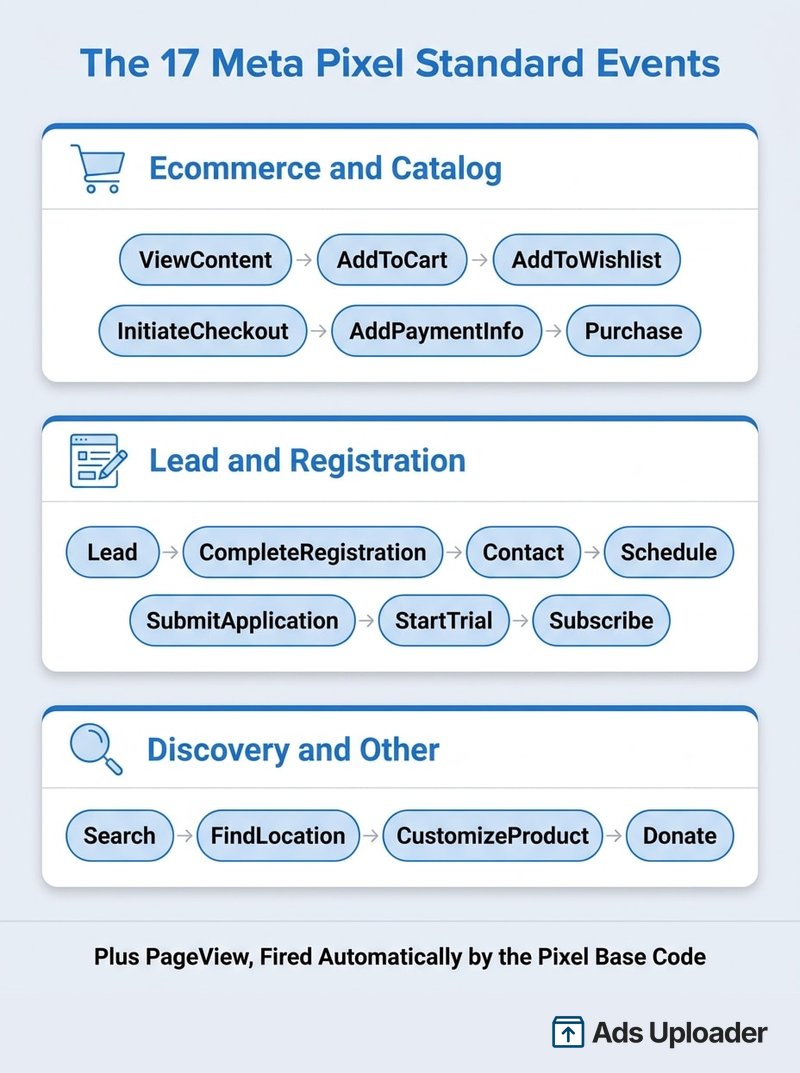
Here are all 17 standard events with the action each represents and the code that fires it. PageView is listed separately at the bottom because it behaves differently.
| Event | Website action | fbq code | Key parameters |
|---|---|---|---|
| AddPaymentInfo | Payment info added during checkout | fbq('track', 'AddPaymentInfo'); | Optional: value, currency, content_ids |
| AddToCart | Item added to a cart or basket | fbq('track', 'AddToCart'); | For catalog ads: content_ids, content_type. Recommended: value, currency |
| AddToWishlist | Item saved to a wishlist | fbq('track', 'AddToWishlist'); | Recommended: content_ids. Optional: value, currency |
| CompleteRegistration | A signup or registration form is submitted | fbq('track', 'CompleteRegistration'); | Optional: value, currency, status |
| Contact | A customer contacts the business (call, SMS, email, chat) | fbq('track', 'Contact'); | None |
| CustomizeProduct | A product is customized in a configurator | fbq('track', 'CustomizeProduct'); | None |
| Donate | A donation is made | fbq('track', 'Donate'); | Recommended: value, currency |
| FindLocation | A person looks up a physical store location | fbq('track', 'FindLocation'); | None |
| InitiateCheckout | The checkout flow begins | fbq('track', 'InitiateCheckout'); | Recommended: content_ids, value, currency, num_items |
| Lead | A lead is submitted (form, trial signup) | fbq('track', 'Lead'); | Recommended: value, currency (lead worth) |
| Purchase | A purchase is completed | fbq('track', 'Purchase', {value: 0.00, currency: 'USD'}); | Required: value, currency. For catalog ads: content_ids, content_type |
| Schedule | An appointment is booked | fbq('track', 'Schedule'); | None |
| Search | An on-site search is performed | fbq('track', 'Search'); | Recommended: search_string |
| StartTrial | A free trial begins | fbq('track', 'StartTrial', {value: '0.00', currency: 'USD', predicted_ltv: '0.00'}); | Recommended: value, currency, predicted_ltv |
| SubmitApplication | An application is submitted | fbq('track', 'SubmitApplication'); | None |
| Subscribe | A paid subscription starts | fbq('track', 'Subscribe', {value: '0.00', currency: 'USD', predicted_ltv: '0.00'}); | Recommended: value, currency, predicted_ltv |
| ViewContent | A key page is viewed (product, landing page) | fbq('track', 'ViewContent'); | For catalog ads: content_ids, content_type. Optional: value, currency |
PageView fires automatically from the base code and needs no track call. It tells Meta someone landed on a page that has the pixel, nothing more.
You do not need all 17. Most accounts use four to seven, chosen to match the path a visitor actually takes. Grouping them by job makes it easier to pick.
Ecommerce and Catalog Events
These six map the shopping funnel and are the events that feed dynamic product ads: ViewContent (someone views a product), AddToCart, AddToWishlist, InitiateCheckout, AddPaymentInfo, and Purchase. If you sell products, this is your core set, and Purchase is almost always your optimization event once you have enough volume.
Lead and Registration Events
These cover sites where the conversion is a contact rather than a sale: Lead, CompleteRegistration, Contact, Schedule, SubmitApplication, StartTrial, and Subscribe. A B2B site might fire Lead on a demo request and CompleteRegistration on account creation. A SaaS site leans on StartTrial and Subscribe.
Discovery and Other Events
The remaining events capture intent and niche actions: Search (on-site search), FindLocation (store locator), CustomizeProduct (configurator use), and Donate (nonprofits). These are supporting signals. They are useful for audiences and upper-funnel optimization, but they are rarely the primary conversion goal.
Launch More. Click Less.
Upload hundreds of creatives at once, auto-match thumbnails to videos, and publish straight to your ad accounts through Meta's API.
Try Ads Uploader FreeNo credit card required • 7-day free trial
Standard Event Parameters Explained
An event name tells Meta what happened. Parameters tell Meta how much, which product, and in what currency. That detail is what powers return-on-ad-spend reporting, value-based bidding, and catalog matching. A Purchase with no value is a bare count; a Purchase with value and currency is revenue Meta can optimize toward.
These are the object properties Meta supports, with their types and purpose:
| Parameter | Type | What it carries |
|---|---|---|
value | Number | The monetary value of the action (for example the order total) |
currency | String | ISO currency code for value, such as USD or EUR |
content_ids | Array of strings or integers | Product IDs or SKUs tied to the event |
contents | Array of objects | Items with id and quantity, e.g. [{id: 'SKU1', quantity: 2}] |
content_type | String | product or product_group, matching your catalog |
content_name | String | Human-readable name of the page or product |
content_category | String | Category of the page or product |
num_items | Integer | Number of items, used with InitiateCheckout |
search_string | String | The query a visitor typed, used with Search |
predicted_ltv | Number | Predicted lifetime value, used with Subscribe and StartTrial |
status | Boolean | Registration status, used with CompleteRegistration |
Required vs Optional Parameters
This is where the details get fuzzy, even in Meta's own help pages. Here is the accurate version.
Meta strictly requires only one combination: currency and value on the Purchase event. Leave them off and conversion value reporting and value optimization break. Every other parameter on every other event is technically optional.
There is a second tier of "required, but only in context." If you run Advantage+ catalog ads (dynamic product ads), Meta requires contents or content_ids on the product events those campaigns depend on: AddToCart, ViewContent, Search, and Purchase. Without product identifiers, Meta cannot tie the event to an item in your catalog, and the dynamic ad has nothing to show.
Beyond those two cases, the parameters are optional but strongly recommended. Sending value and currency on revenue-adjacent events like InitiateCheckout, Lead, and CompleteRegistration, even when the figure is an estimate, gives the algorithm something to optimize toward. search_string makes Search useful. num_items adds context to checkouts. Treat the optional list as best practice, not filler.
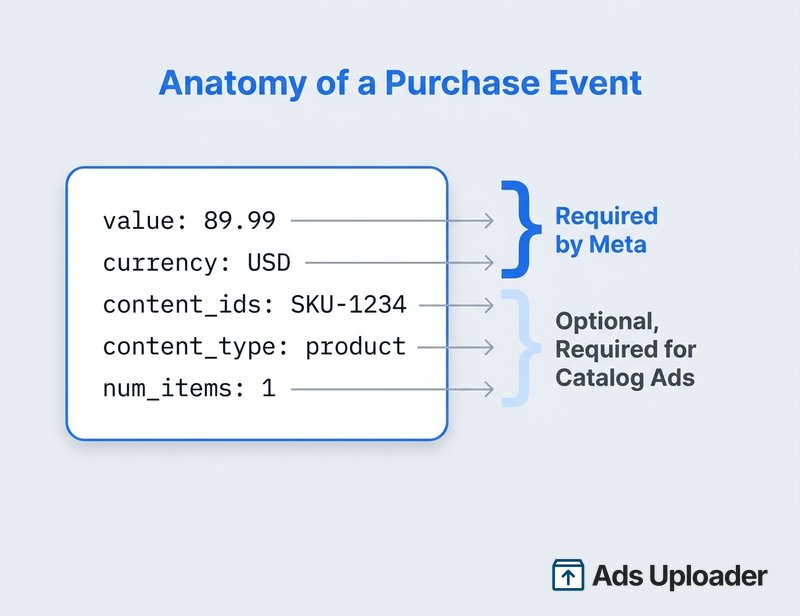
An Example Standard Event With Parameters
Here is a Purchase event carrying the parameters that make it worth tracking:
fbq('track', 'Purchase', {
  value: 89.99,
  currency: 'USD',
  content_ids: ['SKU-1234'],
  content_type: 'product',
  num_items: 1
});
value and currency are the required pair. content_ids and content_type let Advantage+ catalog ads match the sale to your product feed. num_items records how many units sold. Fire this on the order-confirmation page, never earlier.
How Standard Events Power Your Ads
Standard events are not just reporting labels. They feed four distinct jobs, and getting the right event flowing cleanly is what separates a campaign that learns from one that stalls.
Optimizing for Conversions
When you build a campaign, you pick a conversion event as the optimization goal. Meta's delivery system then looks for people likely to fire that event. Only standard events, or custom conversions built on them, can be selected directly as the goal. Meta has long pointed to a rough target of around 50 conversions per week on the optimization event for delivery to stabilize, so pick an event that happens often enough to clear the learning phase.
Measuring Conversions and Attribution
Every standard event you send is eligible for attribution reporting, credited to your ads within the attribution window you choose. If an event never fires, Meta cannot count it, no matter how many sales you actually made. When value and currency ride along, Meta calculates ROAS automatically, which is why revenue events without those parameters are a silent reporting hole.
Save Hours on Creative Testing
Stop uploading ads one by one. Bulk process unlimited creatives with automatic media matching and direct API publishing.
Try Ads Uploader FreeNo credit card required • 7-day free trial
Building Custom and Lookalike Audiences
Any standard event can seed an audience. Retarget visitors who fired AddToCart but never Purchase. Build a lookalike from everyone who fired Purchase in the last 180 days. The pixel adds people to these audiences as their events fire, so clean events mean clean, fresh audiences.
Powering Catalog and Advantage+ Ads
Dynamic product ads run on the product events: ViewContent, AddToCart, and Purchase, carrying content_ids or contents and content_type: 'product'. Those identifiers let Meta show a returning visitor the exact product they viewed or abandoned. Skip the product parameters and Advantage+ catalog ads cannot show the visitor the product they actually viewed or abandoned: the ad falls back to generic catalog items or stops delivering, and the retargeting premium you built the catalog for is gone.
How to Fire a Standard Event
There are three ways to get standard events onto your site, from most to least technical:
- In your pixel code. Add the
fbq('track', 'EventName', {...})call to the relevant page, below the base code, so it runs when the action happens (a button click or a confirmation-page load). - The Event Setup Tool. Inside Events Manager, this no-code tool lets you point and click on buttons and page URLs to map them to standard events, no developer required.
- A partner integration. Platforms like Shopify and WooCommerce, and tag managers like Google Tag Manager, can map and fire events for you through their built-in Meta integrations.
If you are writing the calls yourself, here is one complete, paste-ready example per funnel type:
// Ecommerce: order confirmation page
fbq('track', 'Purchase', {
  value: 89.99,
  currency: 'USD',
  content_ids: ['SKU-1234'],
  content_type: 'product'
});

// Lead gen: demo-request form submit
fbq('track', 'Lead', {
  value: 250.00,
  currency: 'USD',
  content_name: 'Demo Request'
});

// Discovery: on-site search
fbq('track', 'Search', {
  search_string: 'running shoes'
});
Note value is a number, not a string: send value: 89.99, not value: "89.99".
Whichever route you take, Meta recommends sending your important events through both the browser pixel and the server-side Conversions API using a shared event_id, so the two copies are deduplicated rather than double-counted. For the full install walkthrough, see the Meta Pixel guide linked earlier.
Once events are live, confirm they actually fire. The Meta Pixel Helper browser extension shows you, in real time, which events and parameters fire as you click through your own site, and it flags duplicates and missing values on the spot. Pair it with the Test Events tool in Events Manager to confirm Meta is receiving each event correctly.
Common Standard Event Mistakes to Avoid
The events themselves are simple. The damage comes from small implementation errors that pass unnoticed until your reporting drifts.
- Firing Purchase before the sale is done. A
Purchaseevent on the cart or checkout page instead of the order-confirmation page inflates reported revenue and trains delivery on people who never bought. Fire it only on the thank-you page. - Double-firing without deduplication. A pixel installed through both Google Tag Manager and your theme will fire every event twice, doubling your reported conversions and overstating ROAS. Check the network tab for duplicate requests to
facebook.com/tr, and deduplicate the pixel and Conversions API with a sharedevent_id. - Missing currency on revenue events. A
Purchasewithvalue: 89and nocurrencydefaults to USD. International accounts lose a meaningful slice of attributed revenue this way. - Using a custom event where a standard one exists. Naming your event
AddedToCartinstead ofAddToCartcosts you Meta's built-in optimization and catalog support. Match the standard names exactly. - Inconsistent parameter formats across sources. If the browser pixel sends
content_ids: ['1234']and your server sendscontent_ids: [1234], Meta may treat them as different events and deduplication breaks silently. Keep types identical on both sides.
A five-minute pass with that same extension, clicking through your real funnel, catches most of these before they cost you a month of skewed data.
Frequently Asked Questions
How many Meta Pixel standard events are there?
There are 17 standard events you fire with fbq('track', 'EventName'), plus PageView, which ships in the pixel base code and fires automatically. Depending on whether you count PageView, you will see the number quoted as 17 or 18.
What is the difference between standard and custom events?
Standard events use names Meta already recognizes and plug straight into optimization and reporting. Custom events use names you define with fbq('trackCustom', ...) for actions no standard event covers, and they need a custom conversion before you can optimize for them.
Is PageView a standard event?
Yes, but it fires automatically from the pixel base code on every page, so you do not add a separate track call for it. The other 17 standard events you trigger yourself.
Which parameters are required for a Purchase event?
Meta strictly requires currency and value. If you run Advantage+ catalog ads, also send contents or content_ids so the sale matches your catalog. Other parameters are optional but recommended.
What is the difference between a standard event and a custom conversion? A standard event is a signal your pixel sends from the page. A custom conversion is a rule in Events Manager that counts or optimizes for events meeting criteria you set. Custom conversions interpret events you already send rather than adding new pixel code.
How do I check my standard events are firing? Use the Meta Pixel Helper extension to watch events fire in real time, and the Test Events tool in Events Manager to confirm Meta receives each one with the right parameters. Diagnostics flags missing parameters and low Event Match Quality.
Do standard events still work without third-party cookies?
They do, but browser accuracy degrades as cookies and consent gating block some requests. Meta recommends sending the same events server-side through the Conversions API with a shared event_id, and using advanced matching to recover attribution.
Getting Your Standard Events Right
Standard events are the vocabulary Meta's algorithm speaks. There are 17 of them, plus the automatic PageView, and the ones you choose should mirror the real path a visitor takes through your site. The event name records what happened; the parameters, led by value and currency, record the detail that makes the event worth optimizing toward.
Start by mapping your funnel to the smallest set of events that captures it, fire each one on the right page with the right parameters, and confirm it fires before you spend against it. Layer in custom events and custom conversions only where the standard list leaves a gap. Get that foundation clean and everything downstream, optimization, attribution, audiences, and catalog ads, has accurate signal to work from. That is also the point where scaling creative testing makes sense, and a bulk ad launch workflow lets you put dozens of variations against that clean signal without the manual upload grind.
For the full event and parameter specifications, see the Meta Pixel developer documentation.
