The Meta Pixel is a snippet of JavaScript that businesses add to their website to track what visitors do and report it back to Meta. Once installed, it loads in the browser and sends events like page views, add-to-carts, and purchases to your Meta ad account. Advertisers use that data to optimize ad delivery, measure conversions, build retargeting and lookalike audiences, and power catalog ads. Meta now calls the pixel a dataset inside Events Manager, but it is the same tracking tool.
Almost everyone running Meta ads is told to "install the pixel." Far fewer can say what it actually is, what it does, or what happens when it fires, and that gap is exactly what makes tracking impossible to debug when it breaks.
That gap matters. The vocabulary is overloaded: pixel, dataset, Conversions API, events, standard events, custom conversions. Meta keeps renaming things, so even experienced media buyers get fuzzy on the fundamentals, and beginners install code they do not understand. When tracking breaks, they cannot reason about why.
This guide fixes that. You will get a plain, accurate explanation of what the Meta Pixel is, how it fires in the browser, the four jobs it does for your ads, a high-level look at getting one live, and where it sits next to the Conversions API in 2026. By the end, the whole Meta tracking stack should click.
What Is the Meta Pixel?
The Meta Pixel is a small piece of JavaScript you place on your website to collect data about visitor actions and send it to Meta. In plain terms, it lets actions on your site, like a purchase or a sign-up, be reported back to your Meta ad account.
It is free. There is no charge to create, install, or use the pixel. You only pay for the ads you run.
A quick note on naming, because it trips people up. The pixel used to be called the Facebook Pixel. The tool was renamed after Facebook's company rebrand to Meta in late 2021, but the code and behavior did not change. More recently, Meta has started presenting the pixel as a "dataset" inside Events Manager. It is the same tracking tool, renamed twice. The next two sections clear that up.
Meta Pixel vs Facebook Pixel
These are the same thing. "Meta Pixel" is simply the post-2021 name for what used to be the "Facebook Pixel." When Facebook became Meta, the marketing and Help Center terminology updated, but the underlying fbq code did not.
That means any older guide, plugin, or snippet that says "Facebook Pixel" is talking about the exact tool you now find under "Meta Pixel." There is no migration to do and no new code to install just because of the name. If you already have a working Facebook Pixel, you already have a Meta Pixel.
Pixel, Dataset, and Event: What's the Difference?
Three words get used loosely, so here is the clean version.
- Pixel (now called a dataset): the source, or container. It is identified by a unique numeric ID and represents one stream of tracking data, usually for one website. Meta has been gradually merging website, app, and offline events into a single view it calls a dataset, and as Meta's documentation puts it, "your new dataset ID is the same as your pixel ID." Same number, new label.
- Event: a single action the pixel reports, like
PageView,AddToCart, orPurchase. A dataset is made up of many events. - Parameter: the detail attached to an event, like the purchase
value, thecurrency, or the productcontent_ids.
So when you see "pixel" and "dataset" used interchangeably in 2026, they refer to the same thing. The dataset is just the modern container name; events are what flow into it.
How the Meta Pixel Works
This is the part worth slowing down on: what actually happens when the pixel fires. The chain is simpler than it sounds.
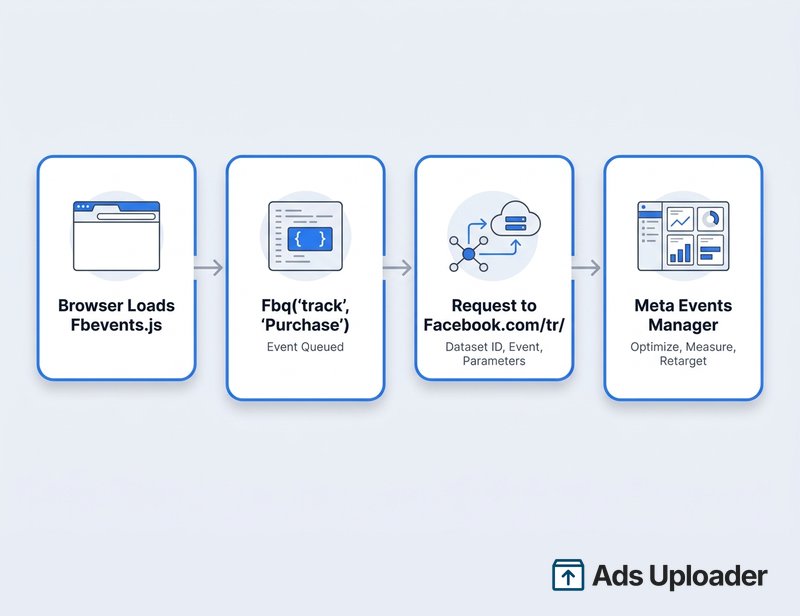
- The base code loads the library. When someone opens a page on your site, the pixel base code loads Meta's
fbevents.jslibrary fromconnect.facebook.netand callsfbq('init', '<your pixel ID>'). This tells the browser which dataset the events belong to. - Actions queue events. As the visitor does things, your code calls
fbq('track', 'Purchase', { value: 49.99, currency: 'USD' })or similar. Each call queues an event with its parameters. - The browser sends the event to Meta. The library packages that event and sends it as a request to
https://www.facebook.com/tr/, traditionally a tiny 1x1 pixel GET request, carrying the dataset ID, the event name, the parameters, and the pixel's first-party cookies (_fbpand_fbc). - Meta receives and uses it. Meta matches that activity to ad accounts and profiles, then makes it available in your ad reporting and in Events Manager for optimization, measurement, and audiences.
That is the whole mechanism. The "pixel" is really a JavaScript library plus a steady stream of small requests to a Meta endpoint.
What does it collect? By default, the pixel sends non-personal metadata: the page URL, the referrer, browser and device details, the IP address, its own cookies, and whatever event parameters you specify, such as revenue or content IDs. It does not quietly scrape form fields or send customer email and phone. Those personal fields are only included if you turn on Advanced Matching, and when you do, Meta hashes them with SHA-256 in the browser before they are sent, so raw contact details never leave the page in the clear.
Because all of this happens in the browser, you can watch it happen. The Meta Pixel Helper browser extension shows you which pixels and events fire on any page in real time, which makes it the first tool to reach for when you want to verify the pixel is on a page or work out why an event is not firing. For the full walkthrough of reading its output and fixing errors, see our guide to the Meta Pixel Helper.
Launch More. Click Less.
Upload hundreds of creatives at once, auto-match thumbnails to videos, and publish straight to your ad accounts through Meta's API.
Try Ads Uploader FreeNo credit card required • 7-day free trial
What the Meta Pixel Is Used For
People ask "what does the pixel do?" and get a vague answer about "tracking." Here are the four concrete jobs it does for your advertising.
Optimizing Ad Delivery
This is the big one. The events the pixel reports train Meta's delivery algorithm. When you run a conversion campaign, Meta uses your pixel events, like Purchase or Lead, to learn what a converting visitor looks like and then find more people likely to take that action. Without pixel data feeding it, the algorithm is flying blind, and optimization toward real outcomes is far weaker. Clean pixel data also pays off fastest when you test many creatives against it, which is where launching ad variations in bulk turns good signal into cheaper conversions.
Measuring Conversions and Attribution
The pixel logs the conversions that follow from your ads. When someone sees or clicks an ad and later triggers a pixel event on your site, Meta attributes that conversion back to the ad within its attribution windows. This is what populates your ROAS, cost-per-purchase, and cost-per-lead numbers in reporting. No pixel events, no on-site conversion reporting.
Building Custom and Lookalike Audiences
Every event is a signal you can build an audience from. Visited a product page but did not buy? Added to cart and abandoned? The pixel lets you collect those people into Custom Audiences for retargeting, and then seed Lookalike Audiences from them so Meta can find similar prospects. Website retargeting is built directly on pixel events.
Powering Catalog and Dynamic Ads
For ecommerce, the pixel feeds dynamic product ads, also called Advantage+ catalog ads. Events like ViewContent, AddToCart, and Purchase pass along the product IDs a visitor interacted with, so Meta can show each person the right items from your catalog. The pixel is the bridge between browsing behavior and the products in your ads.
Save Hours on Creative Testing
Stop uploading ads one by one. Bulk process unlimited creatives with automatic media matching and direct API publishing.
Try Ads Uploader FreeNo credit card required • 7-day free trial
Standard Events and Custom Events
Events are the actions the pixel reports, and they come in three flavors.
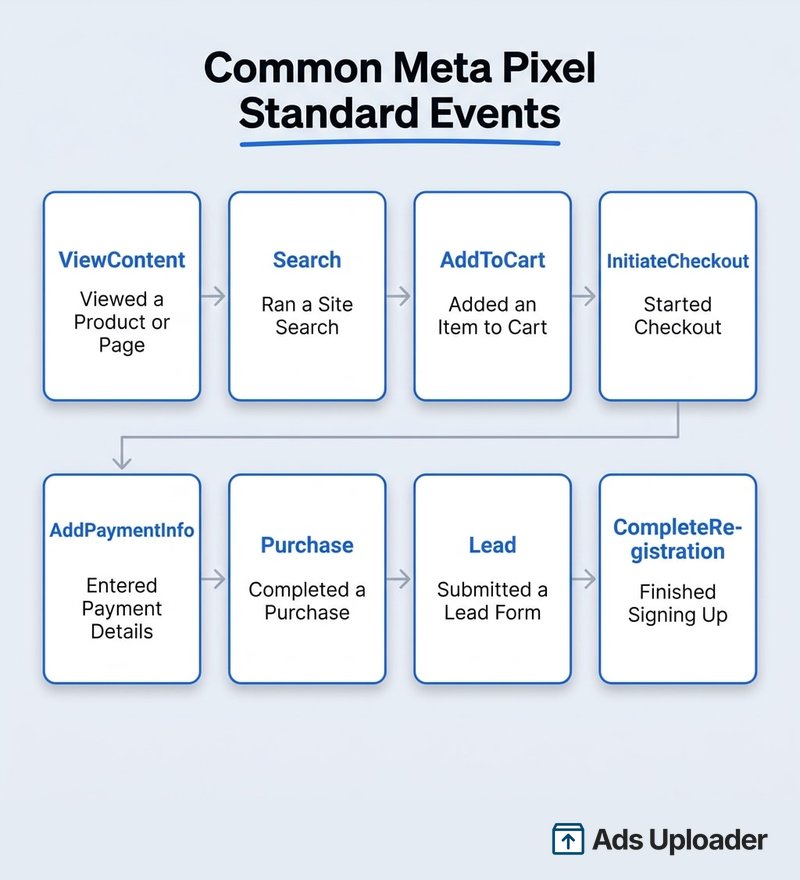
Standard events are Meta's predefined set of 17 named events, including ViewContent, Search, AddToCart, InitiateCheckout, AddPaymentInfo, Purchase, Lead, and CompleteRegistration. Because the names are predefined, Meta understands them out of the box for optimization and reporting. Add parameters like value, currency, and content_ids, and those events become far more useful for ROAS measurement and catalog matching. The complete standard events list with required parameters covers all 17 in one place.
Custom events are events you name yourself, sent with fbq('track', 'YourEventName', {...}) when no standard event fits. You manage their meaning.
Custom conversions are no-code rules you define in Events Manager, often based on a standard or custom event or a specific URL, that you treat as a conversion for reporting and optimization.
You do not configure events from the pixel code alone. You manage events, custom conversions, and event priorities inside Meta Events Manager, which is the dashboard where every dataset and its incoming events live.
How to Set Up the Meta Pixel (High-Level Overview)
Installing the pixel is its own project, so here is just the shape of it. Every method starts from the same place: a pixel, now a dataset, that you create in Events Manager, which gives you a unique numeric ID.
- Create the pixel and get your ID. In Events Manager you create a dataset and receive its ID, the number every event is tagged with. (More on finding and using your Meta Pixel ID.)
- Install the base code. Choose one route: paste the base code snippet into your site's
<head>manually, use a partner integration for a platform like Shopify or WordPress and WooCommerce, or deploy it through Google Tag Manager. - Add your events. Add standard events in code, use Meta's no-code Event Setup Tool to map clicks and URLs, or rely on a platform integration that wires common events for you.
- Confirm it is firing. Verify before you trust it.
That is the overview, not the manual. For the click-by-click version, including each platform and the exact snippet placement, follow our step-by-step guide to setting up the Meta Pixel.
The Meta Pixel and the Conversions API in 2026
The pixel runs in the browser, and the browser is a harder place to track than it used to be. Apple's App Tracking Transparency on iOS, Safari's tracking prevention, ad blockers, and consent banners all stop some events from ever reaching Meta. Estimates of browser-side signal loss vary widely by source and audience, but the direction is clear: a meaningful slice of conversions no longer makes it through the pixel alone.
That is exactly why the Conversions API exists. It sends the same events from your server directly to Meta, where ad blockers and browser restrictions cannot interfere. You run it alongside the pixel, and the two are matched using a shared event_id so the same action is not counted twice. Meta's own setup flow offers a combined "Conversions API and Meta Pixel" option, and running both is the recommended setup for resilient tracking. For how the server side works, see the Meta Conversions API, and for a full side-by-side of what each method catches and misses, our Conversions API vs Meta Pixel comparison settles the decision.
There is also a related constraint worth knowing: under Aggregated Event Measurement, each domain can prioritize only eight web conversion events for iOS users affected by ATT. That cap, introduced in 2021, is one more reason advertisers lean on server-side data to fill the gaps.
So is the Meta Pixel being deprecated, or "dead in 2026"? No. Meta has announced no deprecation and no end-of-life. The pixel is still documented, still offered in setup wizards, and still central to campaign optimization. What changed is that Meta renamed it a dataset in Events Manager and now pairs it with the Conversions API. The pixel is being complemented and rebranded, not retired. The clickbait headlines are wrong.
Frequently Asked Questions
Is the Meta Pixel the same as the Facebook Pixel?
Yes. Meta Pixel is the current name for the tool formerly called the Facebook Pixel, renamed after the 2021 company rebrand. The fbq code and behavior are unchanged, so old Facebook Pixel snippets still work and point to the same technology.
Is the Meta Pixel free? Yes. Creating, installing, and using the pixel is free. You only pay for the ads you run. The pixel is provided as part of the Meta Ads platform to help you measure and optimize.
What data does the Meta Pixel collect?
By default, page URL, referrer, browser and device details, IP address, its _fbp and _fbc cookies, and the event parameters you send, such as purchase value. It does not send customer email or phone unless you enable Advanced Matching, and even then those fields are SHA-256 hashed in the browser before they leave the page.
How do I know if my Meta Pixel is working? Use the Meta Pixel Helper extension to watch events fire on your live site, or open the Test Events tab in Events Manager, browse your site, and confirm events arrive in real time. Meta recommends verifying right after setup.
Is the Meta Pixel being deprecated in 2026? No. Meta has made no public plan to retire the pixel. It remains supported and actively documented. Meta continues to evolve it, including the rename to a dataset, but has announced no end-of-life.
Do I still need the pixel if I use the Conversions API? Yes. Meta recommends running both. The Conversions API supplements the pixel rather than replacing it. The pixel captures browser-side events, the API backs them up server-side, and deduplication keeps the totals honest.
How many Meta Pixels can I have? You can create multiple pixels, shown as datasets, in Events Manager, each with its own numeric ID. Most advertisers use one per website, but you can add more for separate domains, sub-brands, or testing. Meta does not enforce a strict one-per-account rule.
The Bottom Line
Everything the pixel does flows through one pipeline: it loads in the visitor's browser, queues events as people act, and sends them to Meta through requests to facebook.com/tr/. From that single stream, Meta optimizes your delivery, measures your conversions, builds your retargeting and lookalike audiences, and powers your catalog ads. Hold onto that mental model and every tracking problem becomes debuggable: something in the chain either fired, got blocked, or never loaded.
It is free, it has been renamed twice (Facebook Pixel to Meta Pixel to dataset), and it is not going away. Browser privacy changes have dented what it can capture on its own, which is why Meta now pairs it with the server-side Conversions API rather than retiring it.
From here, the path is straightforward: grab your pixel ID, install the base code, manage your events in Events Manager, and layer the Conversions API on top once the basics are solid. Each of those steps has its own guide, and together they turn a snippet you used to install on faith into a tracking stack you actually understand.