The GoMarble Alternative Built for Meta
GoMarble is an analysis agent for Meta and Google that can also propose changes, with write access from $399/month. Ads Uploader goes deep on Meta: bulk launches, approvals and every client account for $59/month.
Updated November 2026 · Pricing checked 12 November 2026
| Scorecard | Ads Uploader | GoMarble |
|---|---|---|
| Bulk Launch | Full | Partial |
| Review Before Live | Full | Full |
| Many Ad Accounts | Unlimited | Capped by Plan |
| Meta Formats | All Major | Image and Video |
| Saved Builds and Presets | Yes | Not Documented |
| Meta Integration | Deep, End to End | Analysis First |
| 10 Ad Accounts | $59 | $399 |
Why Meta Teams Choose Ads Uploader
Ads Uploader has a deep understanding of the Meta ecosystem, and it shows in every launch.
The Most Complete
Launch, duplicate, edit, read insights and approve changes, in one tool.
The Deepest Meta Integration
A deep, rich integration with the most complete understanding of Meta.
The Best Launch Workflow
Start from an ad you already run or a saved preset, save the build as you go, and launch it as one job.
Made for Agencies
Every client account across Business Managers, team seats, per-account permissions.
See What Your Agent Wants to Change
Claude, ChatGPT or Cursor propose the change. You see it in Agent Inbox and run it when you’re happy.
How the Ads Uploader MCP Works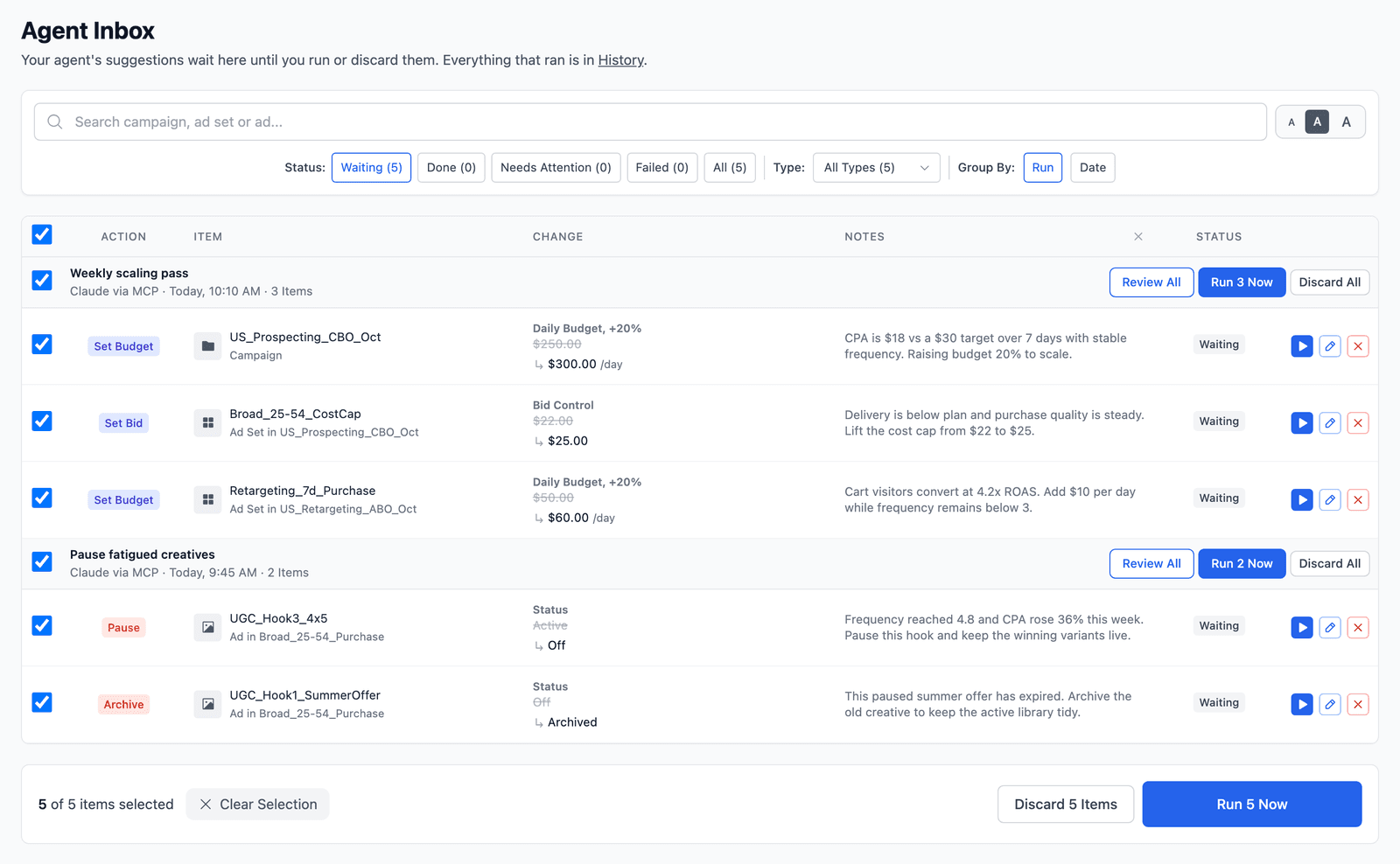
Feature Comparison
Ads Uploader results are tested in our own ad accounts. GoMarble results come from its documentation.
| Feature | Ads Uploader | GoMarble |
|---|---|---|
| Launching | ||
| Bulk Launch | Many ads across ad sets in one job | One Sales ad set with several ads per launch |
| Saved Builds and Presets | Save a build to finish later, or a preset to reuse your settings; both work in the web app, CLI and MCP | Recipes and playbooks; no saved launch builds or presets documented |
| Meta Ad Formats | Carousels, flexible ads, multimedia ads, partnership ads, product showcase and catalog extensions | Image and video; other formats not documented for MCP |
| Placements | 1:1, 4:5, 9:16 and 16:9 all supported, routed to the right Meta placements for every ad type | Not documented for MCP launches |
| Post ID Duplication | Duplicates keep the original post’s likes, comments and shares | Clones ads and creatives; Post ID flow not supported |
| Lead Forms | Lead ads launch with the source ad’s instant form already attached | Not documented |
| Auto Naming | Every campaign, ad set and ad your agent creates follows your naming pattern | Agent default names; no naming rules of your own documented |
| Advantage+ Controls | You decide which Advantage+ enhancements Meta may apply, on every launch | Not documented |
| Split Destinations | Test 2 to 5 landing pages in one launch, each in its own ad set so Meta optimizes each one | Not documented |
| Agents and Approvals | ||
| Review Before Live | Agent Inbox approval or run end to end, set per ad account | Proposals saved, then applied after you confirm |
| Undo and History | Undo reversible edits; one History for web and agent changes | Audit trail on Operator and up; no rollback documented |
| Ways to Work | Web app, CLI and MCP | Web app and MCP |
| Accounts and Teams | ||
| Ad Accounts | Unlimited, across Business Managers | 15 per connector on Operator, $25/month each extra |
| Team Seats | 2 to 20 seats, per-account agent permissions | 5 seats on Operator, 10 on Scale |
| Platforms | Meta, integrated end to end: launches, edits, approvals and History in one workflow | 5 ad platforms; writes on Meta, Google and TikTok (beta) |
Pricing Side by Side
Monthly plans in USD, checked 12 November 2026.
Ads Uploader
Unlimited Ad AccountsNo per-account fees. One price for 1 or 100 ad accounts.
- Solo
- $59/month · unlimited ad accounts
- Solo, Annual
- $44/month billed yearly
- Team
- $54 to $32 per seat · 2 to 20 seats
CLI and MCP included on every paid plan.
GoMarble
Priced by Account Limits- Free
- 1 account per connector · read-only
- Copilot
- $139 · 5 accounts per connector, read-only
- Operator
- $399 · 15 accounts per connector, 5 seats, writes with approval
- Scale
- $799 · 40 accounts per connector, 10 seats
Extra accounts on Operator are $25/month each.
Cost as You Add Ad Accounts
Ads Uploader stays at one price. GoMarble needs its Operator plan before an agent can make changes, and accounts past 15 cost extra.
1 Ad Account
10 Ad Accounts
25 Ad Accounts
Monthly plans in USD with write access; GoMarble’s Free and $139 Copilot plans are read-only. Ads Uploader Solo is one user; GoMarble Operator includes five seats.
When GoMarble Fits Better
If you want one agent to analyze and propose changes across both Meta and Google Ads, and launching at volume is not the main job. You can keep it for Google Ads and use Ads Uploader for Meta launches.
Frequently Asked Questions
What is the best GoMarble alternative for Meta ads?
Ads Uploader, if you launch on Meta every week. It builds every new launch from an ad you already run, launches many ads across ad sets in one job, and saves builds and presets to reuse. It costs $59/month with unlimited ad accounts, where GoMarble’s write access starts at $399.
Is Ads Uploader cheaper than GoMarble?
Yes, for anything an agent can change. GoMarble’s write access starts at $399/month, and its lower plans are read-only. Ads Uploader is $59/month with unlimited ad accounts, or $44/month billed annually.
Does GoMarble support Google Ads and TikTok?
GoMarble reads and writes Meta and Google Ads, has beta create and edit support for TikTok, and reads LinkedIn and Microsoft Ads. Ads Uploader focuses on Meta and goes deep on it.
Can the Ads Uploader MCP launch ads, and which AI clients work?
Yes. It turns a saved build or a full spec into many ads across ad sets in one launch job, and it works with Claude, ChatGPT, Cursor and other MCP clients. The MCP and the CLI are included on Ads Uploader’s paid plans and run on the same engine as the web app.
Can I use GoMarble and Ads Uploader together?
Yes. Keep GoMarble for Google Ads and cross-channel analysis, and give each tool a clear job so two agents don’t change the same campaign. Ads Uploader takes the Meta side: many ads across ad sets in one job, saved builds and Post ID duplication.
How do I switch from GoMarble?
Connect Meta in Ads Uploader, base a build on an ad you already run, add your next batch of media and copy, and launch a small first batch. GoMarble reports and policies are not imported, so treat Ads Uploader as a new workflow rather than a data migration.
Can an agent change my campaigns without asking?
Not in Ads Uploader, unless you allow it. GoMarble also saves each proposed change and applies it only after you confirm. In Ads Uploader you choose for each ad account whether agent launches and edits run end to end, wait for your approval in Agent Inbox, or stay off.
Is there a free trial?
GoMarble has a free plan that is read-only. Ads Uploader has a 7-day free trial of the web app with no credit card, and the MCP and CLI come with a paid plan.
How we compared: we make Ads Uploader. We checked GoMarble’s pricing and features on 12 November 2026. Plans change, so check current pricing before you buy.
Faster Meta Launches Start Today
7 days free, no credit card. Then $59/month with unlimited ad accounts.
Start 7-Day Free Trial