Ad naming conventions are standardized rules for labeling campaigns, ad sets, and ads using consistent fields separated by delimiters. A typical Meta Ads naming convention encodes the campaign objective, audience type, geo, creative format, and version into each name using underscores or pipes as separators, following the platform's campaign-to-ad-set-to-ad hierarchy. Core components include funnel stage, targeting method, creative concept, and launch date. Structured naming enables faster reporting, reliable creative analysis, cross-team consistency, and accurate UTM tracking across ad accounts.
Open Ads Manager right now. Can you tell what every campaign does just by reading the names?
If the answer involves clicking into each campaign to check settings, your naming conventions have failed. And you are not alone. Most ad accounts look like a graveyard of "Campaign Copy (2)" and "Test - Final v3 - NEW" and whatever someone typed at 11pm before a launch deadline. It works fine when you have five campaigns. It falls apart when managing 50 or 500.
Running Ads Uploader, I speak to a lot of different advertisers about how they set up their accounts. The range is wild. Some are immaculate - every campaign, ad set, and ad named with surgical precision. Others look like someone shook a bag of words and dumped them into Ads Manager. I can tell you this: when I see a beautifully organized account with consistent naming and clear structure, I know that advertiser really knows what they are doing. A well-groomed ad account is a thing of beauty, and it almost always correlates with strong performance.
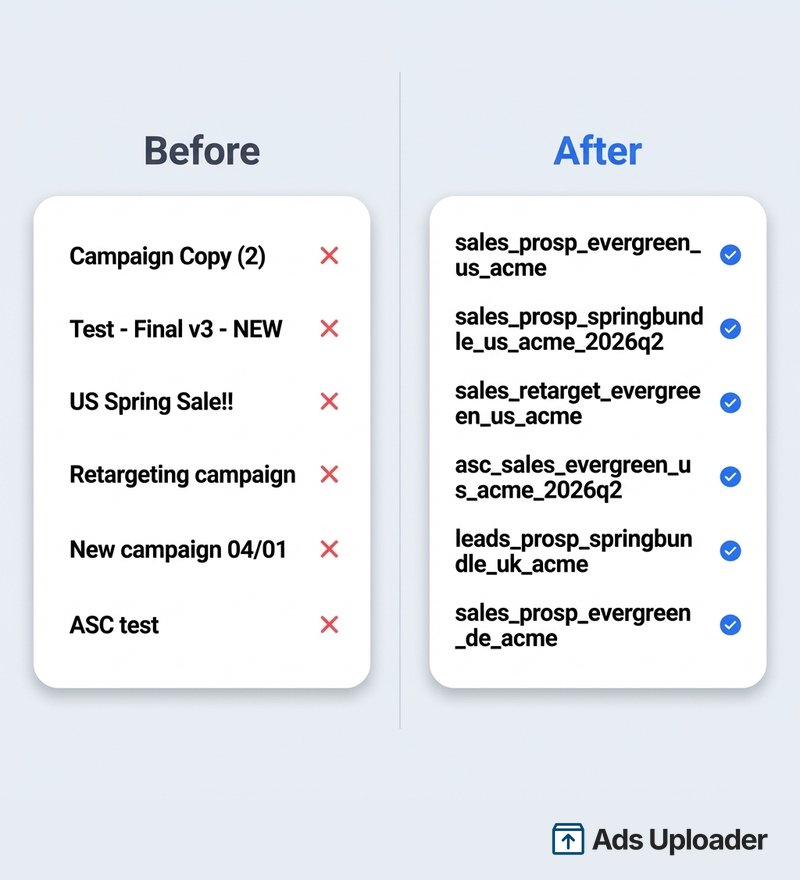
The fix is not complicated. You need a naming system that encodes the right information at every level of your account, uses consistent delimiters, and can be enforced through tooling rather than willpower. This guide gives you copy-paste naming templates for Meta Ads specifically, not generic cross-platform advice, plus the structure to adapt them for your team.
Why Ad Naming Conventions Matter
This is not organizational theater. Naming is infrastructure.
In Meta Ads Manager, reporting, search, filtering, exports, and downstream attribution tools all rely on string matching. When you filter campaigns by "Prospecting" or export performance by creative concept, you are parsing campaign names. If those names are inconsistent, every downstream system breaks.
Reporting becomes unreliable. If half your team uses "RTG" and the other half uses "Retarget" and someone else uses "Remarketing," you now have three separate audience segments in every pivot table. The data is not wrong. It is fragmented, which is worse because it looks right until someone spots the discrepancy.
Creative analysis becomes impossible. When you are testing 50+ creatives per month, the ad name is the only way to track which concept, hook, and format drove results. If names are inconsistent, you cannot roll up performance by creative theme. You are stuck opening every ad individually.
Team handoffs break. When a new media buyer joins or an agency takes over, can they understand the account structure from names alone? If the answer is no, you are building a knowledge-dependency bottleneck into your operation.
UTM tracking falls apart. Campaign names feed directly into UTM parameters. Inconsistent naming creates duplicate rows in GA4, "(not set)" traffic, and broken attribution. Google explicitly confirms that UTM values are case-sensitive, which means Spring_Sale and spring_sale become two different campaigns in your analytics.
And with AI coding tools now widely available, there is no excuse for messy file names. You can hand a tool like Claude Code your naming spec and have it rename hundreds of creative files to match your convention in seconds. The hard part is deciding on the system. The tedious part of actually applying it is solved.
The Three Levels of Meta Ad Naming
Meta Ads uses a three-level hierarchy. Each level answers a different question, and your naming convention should reflect that.
Campaign = strategy. What outcome are we buying, under what umbrella constraint? Campaign names should communicate the objective, funnel stage, market, and timeframe.
Ad set = distribution. Who is the algorithm spending to reach, and how? Ad set names should communicate audience type, targeting details, optimization event, and placement strategy.
Ad = creative hypothesis. What message or asset is being tested or scaled? Ad names should communicate the creative concept, format, hook, creator, and version.
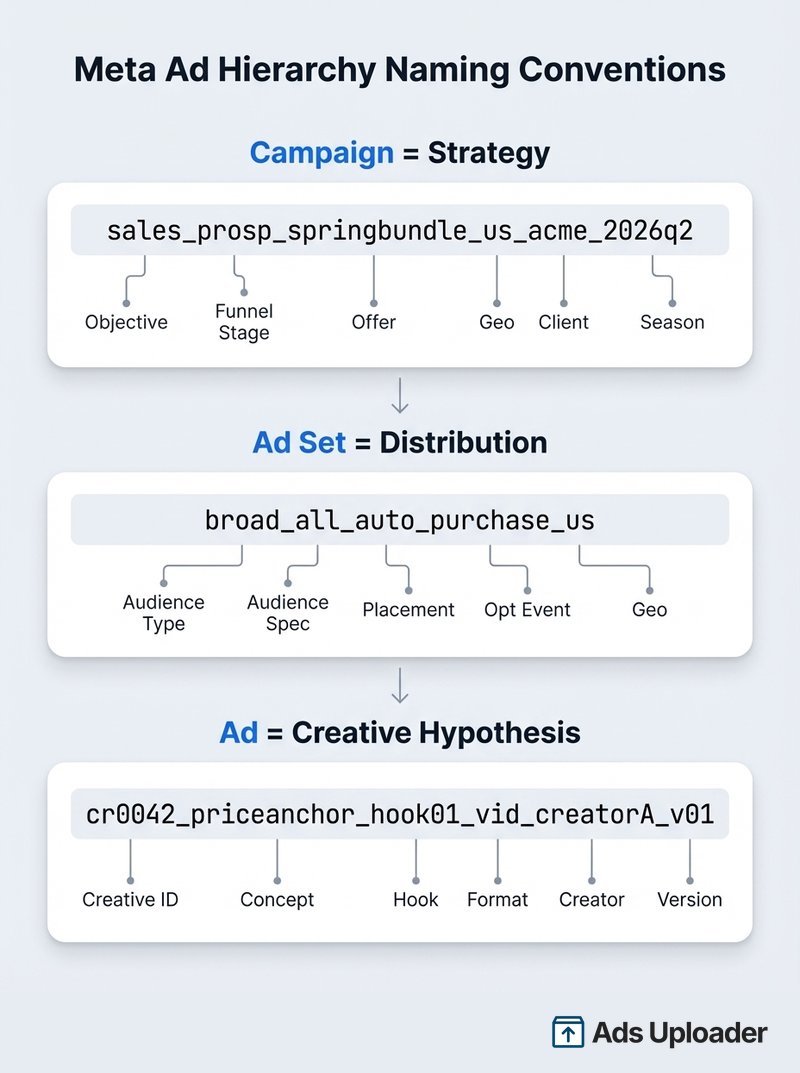
Some fields could live at multiple levels. Geo targeting could sit in the campaign name or the ad set name depending on your account structure. The key is picking a level and being consistent. If geo lives in the campaign name, it should live there across every campaign in the account.
What to Include in Your Ad Naming Convention
Core Fields
Not every field belongs in the name. Include what you actually filter, group, and report on. Everything else is metadata that lives in a spreadsheet or your project management tool.
| Field | Level | Example Values | Priority |
|---|---|---|---|
| Objective | Campaign | Sales, Leads, Traffic, Awareness | Required |
| Funnel stage | Campaign | Prosp, Retarget, Loyalty | Required |
| Geo / market | Campaign or Ad set | US, UK, EU, APAC | Required |
| Offer / promotion | Campaign | Evergreen, SpringSale, BFCM | When applicable |
| Audience type | Ad set | Broad, LAL, Interest, Retarget | Required |
| Audience detail | Ad set | 1pct_Purchasers, FitnessStack | Recommended |
| Optimization event | Ad set | Purchase, Lead, AddToCart | Recommended |
| Placement | Ad set | Auto, Manual | Optional |
| Creative concept | Ad | PriceAnchor, Testimonial, UGC | Required |
| Hook / angle | Ad | Hook01, HookDiscount | Recommended |
| Format | Ad | Vid, Sta, Car (video, static, carousel) | Required |
| Creator / source | Ad | CreatorA, Studio, UGC_Jane | Optional |
| Version | Ad | v01, v02, v03 | Required |
Fields to Leave Out
Some things do not belong in the name no matter how tempting:
- Detailed targeting lists - too long, changes often, clutters the name
- Full ad copy text - store it in your creative brief or project tool
- Budget amounts - these are visible in UTM URLs, which is a privacy risk
- Internal ticket or task IDs - no one filters by Jira ticket number in Ads Manager
Meta's own Marketing API documentation acknowledges that practitioners create "complicated naming schemes" at scale and warns that overly complex names often become unreadable. Encode only what you will actually query. Everything else is metadata.
Choosing Your Delimiter and Schema
Delimiter Options
Your delimiter separates fields within a name. Pick one and enforce it everywhere.
Underscore ( _ ) - URL-safe, works inside UTM values, survives CSV exports, spreadsheet formulas, and BI tools. The safest default.
Pipe ( | ) - Highly readable in Ads Manager tables. Fields visually pop. But pipes should not be reused inside UTM values and can cause issues in some export tools.
Hyphen ( - ) - Often confused with word connectors. Is "brand-awareness" one field or two? Hyphens create ambiguity that underscores and pipes avoid.
Recommendation: Use underscores as your standard. If you prefer pipes for readability in Ads Manager, use pipes there but switch to underscores for UTM values. Never mix delimiters within the same level.
Positional vs Key-Value Schemas
Positional schema puts fields in a fixed order separated by a delimiter. The position determines the meaning.
sales_prosp_us_springbundle_2026q2
Pros:
- Fast to scan, short, easy to teach
Cons:
- If someone omits a field, everything shifts and your parsing breaks
Key-value schema labels each field explicitly.
obj:sales_stage:prosp_geo:us_offer:springbundle_date:2026q2
Pros:
- Resilient to missing fields, self-documenting
Cons:
- Longer names, harder to scan visually
The practical answer: Use positional for ad platform names where readability matters and character space is valuable. Consider key-value only if you are parsing names programmatically in a data warehouse. For most Meta advertisers, positional wins.
Copy-Paste Naming Templates for Meta Ads
These are ready to use. Copy them, adapt the field values for your account, and start applying them this week.
Campaign Name Template
[objective]_[stage]_[offer]_[geo]_[clientOrBrand]_[season]
Examples:
sales_prosp_evergreen_us_acme_2026q2leads_prosp_springbundle_uk_acme_2026q1sales_retarget_evergreen_us_acmeasc_sales_evergreen_us_acme_2026q2(Advantage+ Shopping)
Keep campaign names under 90 characters. You want to see the full name in a standard Ads Manager column without horizontal scrolling.
Launch More. Click Less.
Upload hundreds of creatives at once, auto-match thumbnails to videos, and publish straight to your ad accounts through Meta's API.
Try Ads Uploader FreeNo credit card required • 7-day free trial
Ad Set Name Template
Prospecting:
[audType]_[audSpec]_[placement]_[optEvent]_[geo]
Examples:
broad_all_auto_purchase_uslal_1p_pur30d_auto_purchase_usinterest_fitnessstack_auto_purchase_us
Retargeting:
rt_[source]_[window]_[exclusions]_[placement]_[optEvent]_[geo]
Examples:
rt_vc_30d_excl_pur180d_auto_purchase_usrt_engagers_60d_excl_pur90d_auto_purchase_us
Ad Name Template
Standard (creative ID-anchored):
[crid]_[concept]_[hook]_[format]_[creator]_[version]
Examples:
cr0042_priceanchor_hook01_vid_creatorA_v01cr0043_testimonial_hook03_sta_studio_v02cr0058_ugc_hookunboxing_vid_jane_v01
Flexible Ads / DCO bundle:
[crid]_[bundleTheme]_[assetCount]_[formatMix]_[version]
Example:
cr0101_ugc_bundleA_08assets_mix_v03
This works because flexible formats let Meta recombine your assets. Your "unit of analysis" is the bundle, not individual combinations.
Controlled Vocabulary
Publish this table and make everyone use the same abbreviations:
| Field | Allowed Values |
|---|---|
| Stage | prosp, retarget, loyalty |
| Audience type | broad, lal, interest, rt (retarget) |
| Format | vid, sta, car (video, static, carousel) |
| Objective | sales, leads, traffic, awareness |
| Geo | ISO country codes: us, uk, de, au |
| Placement | auto, manual |
How to Name Advantage+ and Flexible Ad Campaigns
Advantage+ campaigns change the naming game because Meta automates parts of the delivery you used to control manually.
Advantage+ Shopping / Sales Campaigns: Prefix with asc_. Since audience targeting is largely automated, your ad set naming shifts from audience details to product set and optimization event. The campaign name carries more weight because it is the main container you still fully control.
Campaign: asc_sales_springcollection_us_acme_2026q2
Ad set: productset_bestsellers_purchase_us
Ad: cr0042_priceanchor_hook01_vid_studio_v01
Advantage+ Creative / Flexible Ads: Name the inputs you control, not what the algorithm does. When Meta is mixing your headlines, images, and videos dynamically, your ad name should track which creative assets went into the bundle. The ad name becomes a creative set identifier rather than a single-asset label.
Dynamic Creative Optimization (DCO): Same principle. Name the test, not the combination. Use the bundle template: cr0101_ugc_bundleA_08assets_mix_v03.
Meta's narrative around Advantage+ is consistent: simplify structure, let automation work. As account structure simplifies, clear naming becomes more important, not less. When you have fewer objects to manage, each name carries more analytical weight.
Connecting Ad Naming Conventions to UTM Tracking
Your naming convention is not finished until it maps cleanly to UTM parameters. UTMs are how your ad platform data connects to Google Analytics and your attribution stack.
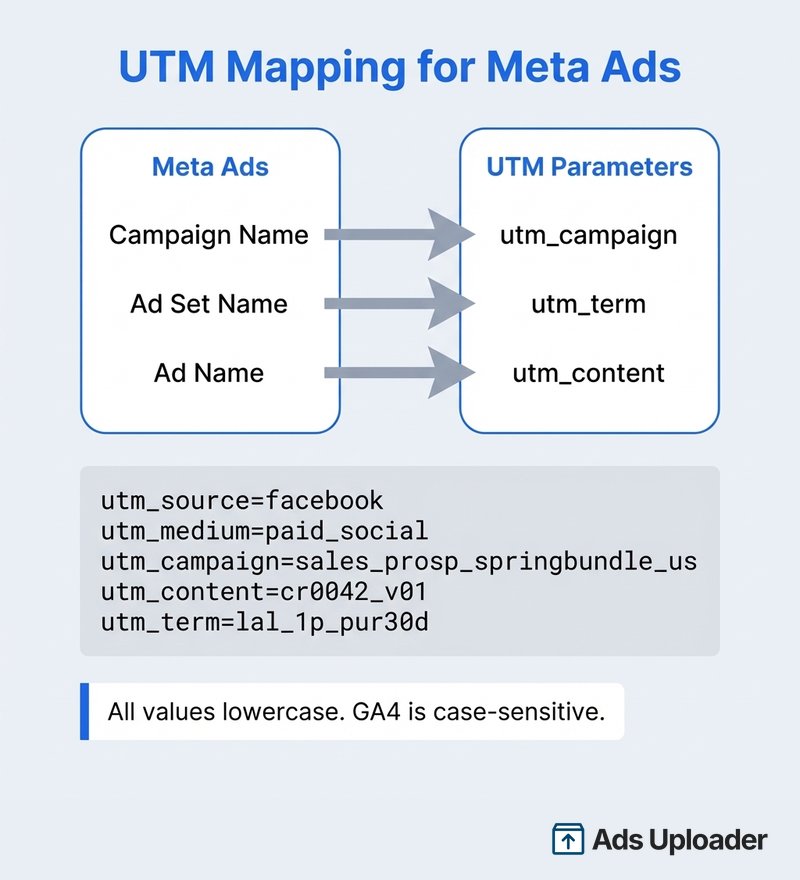
Recommended UTM Mapping
| UTM Parameter | Value | Source |
|---|---|---|
utm_source | facebook or instagram | Platform |
utm_medium | paid_social | Channel type |
utm_campaign | Mirror your campaign name (lowercase) | Campaign name |
utm_content | Creative ID + version | Ad name |
utm_term | Audience shorthand (optional) | Ad set name |
Full URL Example
https://yoursite.com/landing-page?utm_source=facebook
 &utm_medium=paid_social
 &utm_campaign=sales_prosp_springbundle_us_acme_2026q2
 &utm_content=cr0042_v01
 &utm_term=lal_1p_pur30d
Meta's URL Parameter Placeholders
Meta supports dynamic URL parameters that auto-fill values from your campaign structure. Instead of hardcoding names into every UTM, you can use placeholders like {{campaign.name}}, {{adset.name}}, and {{ad.name}} in your tracking URLs. Meta replaces them at serve time with the actual names from your account.
Common placeholders:
| Placeholder | Resolves To |
|---|---|
{{campaign.id}} | Campaign ID |
{{campaign.name}} | Campaign name |
{{adset.id}} | Ad set ID |
{{adset.name}} | Ad set name |
{{ad.id}} | Ad ID |
{{ad.name}} | Ad name |
{{placement}} | Where the ad was shown |
{{site_source_name}} | Platform (fb, ig, msg, an) |
This means your naming convention does double duty. Name your campaigns well and your UTMs populate themselves. A URL parameter like utm_campaign={{campaign.name}}&utm_content={{ad.name}} keeps your analytics in sync with Ads Manager without any manual string copying.
Critical UTM Rules
Lowercase everything. GA4 treats Spring_Sale and spring_sale as two separate campaigns. This is one of the most common causes of fragmented paid social reporting.
Use underscores in UTM values. Pipes and other exotic characters can break URL encoding. Underscores are explicitly recommended as URL-safe separators for campaign tracking.
Set all relevant parameters. Missing UTMs create "(not set)" values in GA4 that pollute your reports.
Understand fbclid vs UTMs. Meta's fbclid parameter is a platform click identifier for Meta-side attribution matching. UTMs are for your analytics and BI. You want both. UTMs give you stable, human-readable campaign taxonomy in GA4. The fbclid (stored as _fbc in browser cookies) provides technical linkage for Meta attribution and Conversions API event matching.
Note that Apple's Link Tracking Protection can strip certain parameters in Messages, Mail, and Safari Private Browsing. Keep UTMs short and standard. Rely on server-side measurement (CAPI) as your stable foundation, and treat click IDs as bonus fidelity where present.
Rolling Out Naming Conventions That Stick
A naming convention doc that sits in a Google Drive folder does not work. You need a system.
1. Write a one-page naming spec. Include the template for each level, the controlled vocabulary table, and 10 real examples. One page. If it requires scrolling through a 20-page wiki, nobody will reference it.
2. Turn on Meta's built-in naming templates. Meta Ads Manager supports name templates where you drag and drop fields and choose a separator. This is a UI guardrail that reduces manual typing errors. It does not replace your naming spec, but it enforces the structure at the point of creation.
3. Enforce through tooling. If you are launching ads in bulk, your bulk upload tool should generate names automatically from structured inputs. Campaign name, ad set name, ad name, and UTMs should all come from the same source data. This eliminates drift between Ads Manager and analytics.
Smart tooling can also use your naming conventions to do more than just label things. At Ads Uploader, we have built naming convention placeholders that let teams configure exactly how their campaigns, ad sets, and ads get named during bulk launches. But the real payoff is what structured naming unlocks downstream. For example, if you uniformly name your ads with a base concept and a hook suffix - priceanchor_hook01, priceanchor_hook02, priceanchor_hook03 - our tool can automatically group those variations into their own ad sets based on the shared base name. The same applies to preparing assets for Meta's aspect ratio requirements via file name suffixes. When your file names include _1x1, _4x5, or _9x16, Ads Uploader detects those patterns and assigns each asset to the correct placement automatically. No manual sorting. This is all configurable, and it is a direct result of having a uniform naming system. Naming conventions stop being just about organization and start becoming operational infrastructure that your tools can act on.
4. QA before every launch. Run a quick checklist: does every name follow the schema? Are all fields present? Is everything lowercase for UTMs? This takes 30 seconds and saves hours of reporting cleanup.
5. Version your convention. When your naming rules change, mark it. Append _nc2 for naming convention version 2. This way you can filter between campaigns named under the old system versus the new one.
Save Hours on Creative Testing
Stop uploading ads one by one. Bulk process unlimited creatives with automatic media matching and direct API publishing.
Try Ads Uploader FreeNo credit card required • 7-day free trial
What If Your Account Is Already a Mess?
Do not rename everything. Start forward-only.
Step 1: Define the new naming spec and controlled vocabulary. Apply it to every new campaign from today.
Step 2: Add a prefix to existing campaigns. Tag them LEGACY_ or MIGRATED_2026Q2_ so your filters can separate old from new without manually sorting through hundreds of campaigns.
Step 3: Do surgical renames on the objects causing the most reporting pain. Start with top spenders, evergreen campaigns, and core retargeting. Skip anything that is paused or ended. Avoid mass renames during peak revenue periods.
This lets you clean the account progressively without destabilizing operations.
Common Ad Naming Convention Mistakes
These are the mistakes that create real reporting pain:
- "Final_v2_FINAL.mp4" - If your versioning requires reading the creative brief to understand, it is not versioning. Use sequential numbers: v01, v02, v03.
- Mixing delimiters - Underscores in some campaigns, hyphens in others, pipes somewhere else. Pick one. Enforce it.
- Changing field order - If your campaign name is
objective_stage_geoin one campaign andstage_objective_geoin another, positional parsing breaks instantly. - Inconsistent abbreviations - "US" in some campaigns, "USA" in others, "United States" in a third. Same for "Retarget" vs "RTG" vs "Remarketing." Publish a vocabulary list and stick to it.
- Budget amounts in names - Campaign names appear in UTM URLs. UTM URLs appear in browser address bars. Your budget details are now visible to anyone who looks at the URL.
- Over-encoding everything - Meta's own documentation warns about "complicated naming schemes." If your name has 15 fields and 200 characters, nobody will read it. Six to eight fields is the sweet spot.
Frequently Asked Questions
What delimiter should I use for ad naming conventions?
Use underscores as your primary delimiter. They are URL-safe, survive CSV exports and spreadsheet parsing, and work inside UTM parameter values without encoding issues. Pipes are more readable in Ads Manager tables but should not be reused inside UTM values. Pick one delimiter and enforce it everywhere.
How long should Meta ad names be?
Meta's API documents a 400-character limit for ad set names. But the real constraint is readability. Target 60 to 90 characters for campaign names, 80 to 110 for ad set names, and 90 to 140 for ad names. If a name gets truncated in Ads Manager columns, it is too long.
Should I include dates in my campaign names?
Only when dates serve a workflow purpose: launch sequencing, seasonal offers, or reporting cohorts. Use ISO format (2026q2 or 2026-04) so sorting works correctly. Skip dates on evergreen campaigns. They add noise without value.
How do I handle naming for Advantage+ campaigns?
Prefix with asc_ and shift your focus. Campaign names carry more weight because the ad set layer is simplified. Name the control points: offer, geo, product set. At the ad level, name the creative inputs: concept, format, creator, version.
What if my ad account is already a mess?
Start forward-only. New naming spec for everything new. Tag existing campaigns with LEGACY_ prefix. Then surgically rename only the top spenders and evergreen campaigns causing the most reporting friction.
How do naming conventions work with bulk upload tools?
Bulk upload tools generate names programmatically from structured inputs. The tool becomes the single source of truth for naming, eliminating typos and inconsistencies. This is the most reliable enforcement method at scale, because naming rules are baked into the launch workflow rather than depending on human memory.
Positional or key-value - which naming schema is better?
Positional for most Meta advertisers. It is shorter, faster to scan, and easier to teach. Reserve key-value for programmatic parsing in data warehouses or when you need to handle frequently missing fields.
Make Your Ad Account Readable
A good naming convention does one thing: it makes your ad account readable without clicking into anything. Every campaign name tells you the strategy. Every ad set name tells you the audience. Every ad name tells you the creative.
The templates in this guide work out of the box. Copy them, adapt the vocabulary to your products and markets, and enforce them through naming templates or your launch tooling. If you are testing dozens of creative variations, consistent naming is the difference between creative analytics that drive decisions and a junk drawer you cannot audit.
Start this week. Define the spec. Publish the vocabulary. Apply it to the next campaign you launch. Your future self, the one building next quarter's performance report, will thank you.