Meta Conversions API (CAPI) is server-side tracking that sends conversion events directly from your server to your Meta dataset, bypassing browser restrictions like ad blockers and iOS privacy limits. Unlike the Facebook Pixel, which runs in the user's browser, CAPI provides reliable conversion data that tracking prevention cannot block. In 2026 the standard setup is to run both together and deduplicate them with a shared event_id, which recovers 20-30% of lost conversion data and improves attribution accuracy.
iOS 14.5 killed third-party tracking. Browser-based conversion data became unreliable overnight. Ad attribution broke. ROAS numbers stopped making sense.
Meta's answer? Server-side tracking via the Conversions API.
If you're running Facebook or Instagram ads in 2026, you need Meta Conversions API. Not because it's trendy, but because browser-based tracking alone leaves massive blind spots in your conversion data. This guide covers everything from basic setup to managing Meta Conversions API across dozens of ad accounts, including troubleshooting the issues nobody talks about.
What is Meta Conversions API?
Meta Conversions API (also called Facebook Conversions API or CAPI) is a server-to-server tracking method that sends conversion events directly from your server to Meta's servers. Unlike the Meta Pixel, which relies on browser-based tracking, Conversions API bypasses browser restrictions, ad blockers, and iOS privacy limitations.
Think of it this way: The Pixel is your eyes on the ground, watching what happens in the browser. CAPI is your secure backend channel, reporting what happened on your server. When you use both together (which you absolutely should), Meta gets the complete picture of your conversions through event deduplication.
Server-Side Tracking Explained
Traditional browser-based tracking (Facebook Pixel) runs JavaScript in the user's browser. When someone completes a purchase, the Pixel fires an event. Simple, fast, real-time.
The problem? That JavaScript can be blocked by:
- iOS 14.5+ App Tracking Transparency (users can opt out)
- Browser privacy settings (Safari's Intelligent Tracking Prevention)
- Ad blockers (uBlock Origin, AdBlock Plus)
- Corporate firewalls and VPNs
Server-side tracking sends conversion data directly from your server to Meta's Marketing API. The user's browser never touches it. No JavaScript to block. No cookies to clear. Just your server telling Meta, "Hey, this person just bought something."
How It Relates to Facebook Pixel
CAPI doesn't replace the Pixel. They work together.
The Pixel captures real-time browser events, page views, add-to-cart actions, immediate interactions. Meta Conversions API captures server-side events, completed purchases, subscription renewals, backend actions that the browser never sees.
When configured correctly with event deduplication, Meta counts each conversion once but receives it from two sources. If the Pixel fires but CAPI doesn't, Meta still gets the conversion. If CAPI fires but the Pixel is blocked, Meta still gets the conversion. Redundancy = better data.
If you haven't installed the Pixel yet, start with our guide on how to set up the Meta Pixel, then layer CAPI on top of it.
Why Meta Built Conversions API
Apple's iOS 14.5 update in 2021 introduced App Tracking Transparency. Users could opt out of cross-app tracking. Overnight, ad performance tanked for advertisers who relied entirely on browser-based measurement.
Third-party cookies are dying (Chrome's timeline keeps shifting, but the trend is clear). Privacy regulations like GDPR and CCPA restrict what data you can collect without explicit consent. Browser vendors like Apple and Mozilla actively block tracking scripts.
Meta needed a solution that respected user privacy while maintaining ad measurement accuracy. Server-side tracking became the answer - advertisers control the data, collect it with proper consent, and send it securely to Meta.
Why Use Meta Conversions API in 2026?
Privacy Compliance
GDPR requires explicit user consent for tracking. CCPA gives California users the right to opt out. Meta Conversions API lets you implement these requirements on your terms - you control what data you collect, hash PII before sending, and manage user consent properly.
First-party data collection (data you collect directly from users on your site) is less restricted than third-party tracking (data collected by external scripts). Meta Conversions API uses first-party data sent from your server.
Improved Data Accuracy
Browser-based tracking has signal loss. iOS 14.5+ users who opt out? Not tracked by Pixel. Safari's Intelligent Tracking Prevention? Breaks Pixel attribution. Ad blockers? Block the Pixel entirely.
Server-side tracking is immune to all of this. Your server captures the conversion regardless of browser settings. Event Match Quality (EMQ) measures how well Meta can match your server events to Facebook users, and with properly implemented customer information parameters (email, phone, etc.), you can achieve EMQ scores above 8.0, which significantly improves ad delivery.
Real-world example: A Shopify store running Pixel-only saw 30% attribution drop-off after iOS 14.5. After implementing CAPI, they recovered 23% of that lost signal. Not perfect, but substantially better.
Better Ad Performance
More reliable conversion data means Meta's algorithm can optimize better. When Meta knows which ads drive real conversions (not just clicks that disappear into attribution black holes), it can:
- Find more people similar to your actual buyers
- Bid more accurately on high-intent users
- Optimize faster during the learning phase
- Reduce wasted spend on low-quality traffic
This doesn't happen overnight. Expect 30-60 days for the algorithm to use the improved data effectively. But once it does, most advertisers see ROAS improvements of 10-25% compared to Pixel-only tracking.
Future-Proof Measurement
Cookies are dying. Browsers are blocking more tracking scripts. Privacy regulations are expanding globally. Conversions API positions you for a cookie-independent future.
Unlike browser-based tracking that depends on third-party cookies and permissive browser settings, CAPI relies on your direct relationship with your customers. As long as you collect data with proper consent and send it securely, you'll have conversion measurement regardless of what browsers or platforms decide to block next.
What Changed for the Conversions API in 2026?
The Conversions API still works the same way at its core: your server sends hashed events to Meta. What changed in 2026 is the tooling around it. Meta now organizes tracking around datasets, the API sits on a newer version, and there's a dedicated quality API for teams running CAPI at scale.
Everything Runs Through a Dataset
Events Manager now groups your website, app, and offline event sources under a single dataset, and your Conversions API calls post to that dataset ID (the endpoint is https://graph.facebook.com/v25.0/{DATASET_ID}/events). The dataset ID is the same numeric ID as your pixel, so existing integrations keep working, but the interface and docs increasingly say "dataset" where they used to say "pixel." For a full tour of the interface, see our guide to Meta Events Manager.
Graph API v25.0 Is the Current Version
Meta shipped Graph API and Marketing API v25.0 on February 18, 2026. Older versions get retired on a rolling schedule, so point your integration at a current version and plan to move to a newer one a few times a year. Sending events on a deprecated version is one of the quieter reasons CAPI traffic suddenly stops being accepted.
Dataset Quality API for Multi-Account Teams
If you manage CAPI across many brands, checking Event Match Quality dataset by dataset in Events Manager doesn't scale. Meta's Dataset Quality API (formerly the Integration Quality API) returns those metrics programmatically: Event Match Quality, Additional Conversions Reported, event coverage, deduplication, and data freshness. Agencies and partners use it to build quality dashboards and alerts instead of clicking through each account by hand.
Meta Conversions API vs Facebook Pixel: Decision Guide
Short version: this is not an either/or decision. The pixel captures real-time browser events, the Conversions API fills in what browsers and ad blockers drop, and running both gives Meta the most complete signal, deduplicated by event_id so each conversion counts once. For the full side-by-side comparison, the signal-loss numbers, and a decision framework for your setup, see our complete breakdown of the Conversions API vs the Meta Pixel.
How Meta Conversions API Works
Technical Architecture
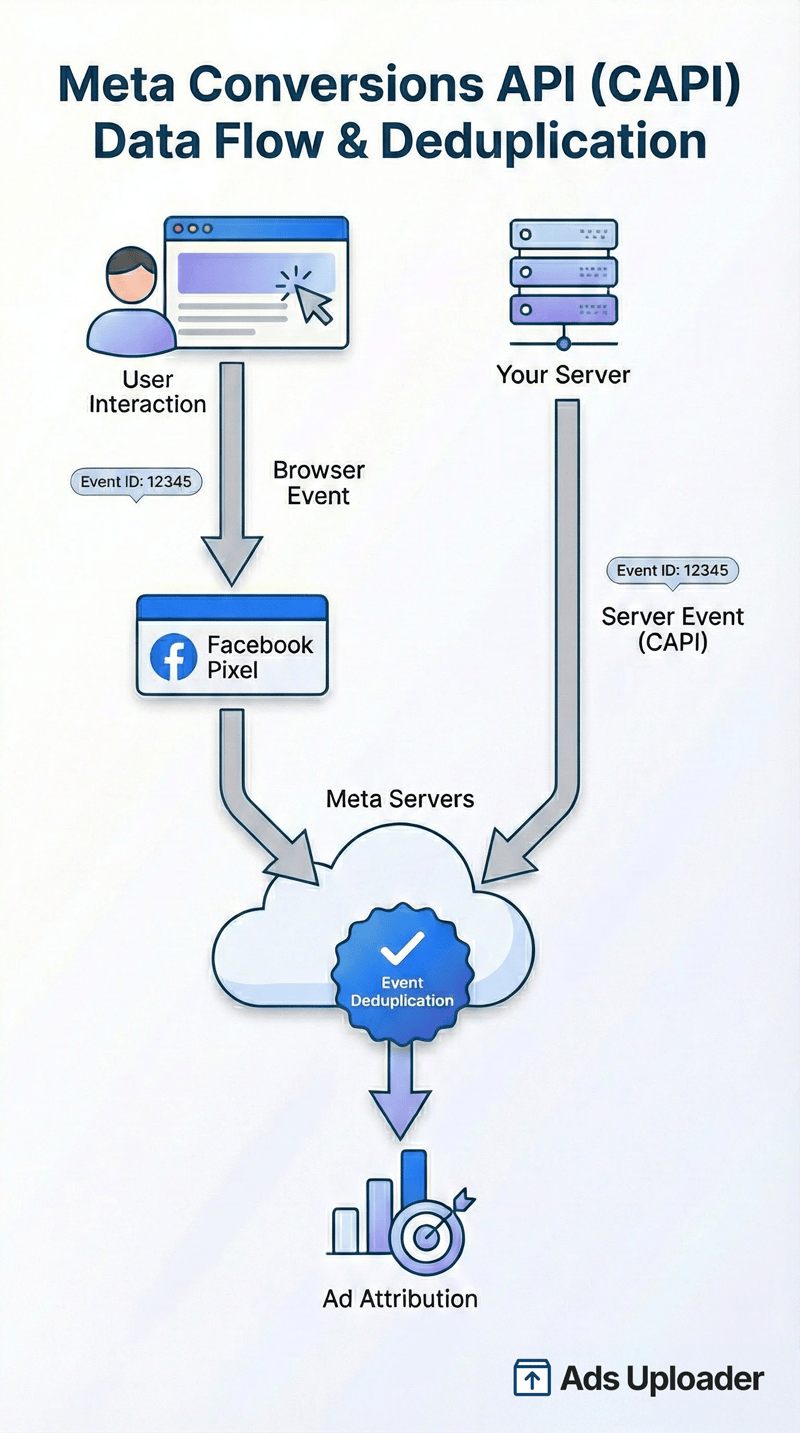
When a user completes a conversion tracked by Meta Conversions API (purchase, lead, etc.), here's what happens:
- Browser event: User clicks "Buy Now," completes payment
- Pixel fires (if not blocked): Sends event to Meta immediately
- Server confirms: Your backend processes the order, confirms payment
- Meta Conversions API fires: Your server sends conversion event to Meta Marketing API
- Deduplication: Meta checks
event_id, if same ID from Pixel and CAPI, counts as one conversion - Attribution: Meta attributes conversion to the ad that drove the click
The key difference: Meta Conversions API sends data after server-side confirmation. The Pixel sends data based on browser actions (which might not result in completed orders). Meta Conversions API is more accurate because it's based on actual completed transactions.
Event Types & Parameters
Standard Events (predefined by Meta):
Purchase- Completed transactionAddToCart- Item added to cartLead- Form submission, sign-upViewContent- Product page viewInitiateCheckout- Started checkout processAddPaymentInfo- Entered payment detailsCompleteRegistration- Account created
Standard events map to the same definitions the browser Pixel uses, so send the server event with the exact same name. Our reference on Meta Pixel standard events lists every event and the parameters each one expects.
Custom Events: You can define your own (e.g., StartTrial, UpgradePlan), but standard events work better with Meta's optimization because the algorithm understands them. You can also build Facebook custom conversions from rules on your events in Events Manager when you need to optimize for a narrower action.
Event Matching Parameters (critical for Event Match Quality):
em- Email (SHA256 hashed)ph- Phone (SHA256 hashed, E.164 format)fn/ln- First/last name (SHA256 hashed)ct/st/zp/country- City, state, zip, countryge- Genderdb- Date of birthexternal_id- Your CRM customer ID
More parameters = higher Event Match Quality = better ad delivery. Meta Conversions API makes it easy to send these matching parameters from your server.
Launch More. Click Less.
Upload hundreds of creatives at once, auto-match thumbnails to videos, and publish straight to your ad accounts through Meta's API.
Try Ads Uploader FreeNo credit card required • 7-day free trial
Event Match Quality (EMQ)
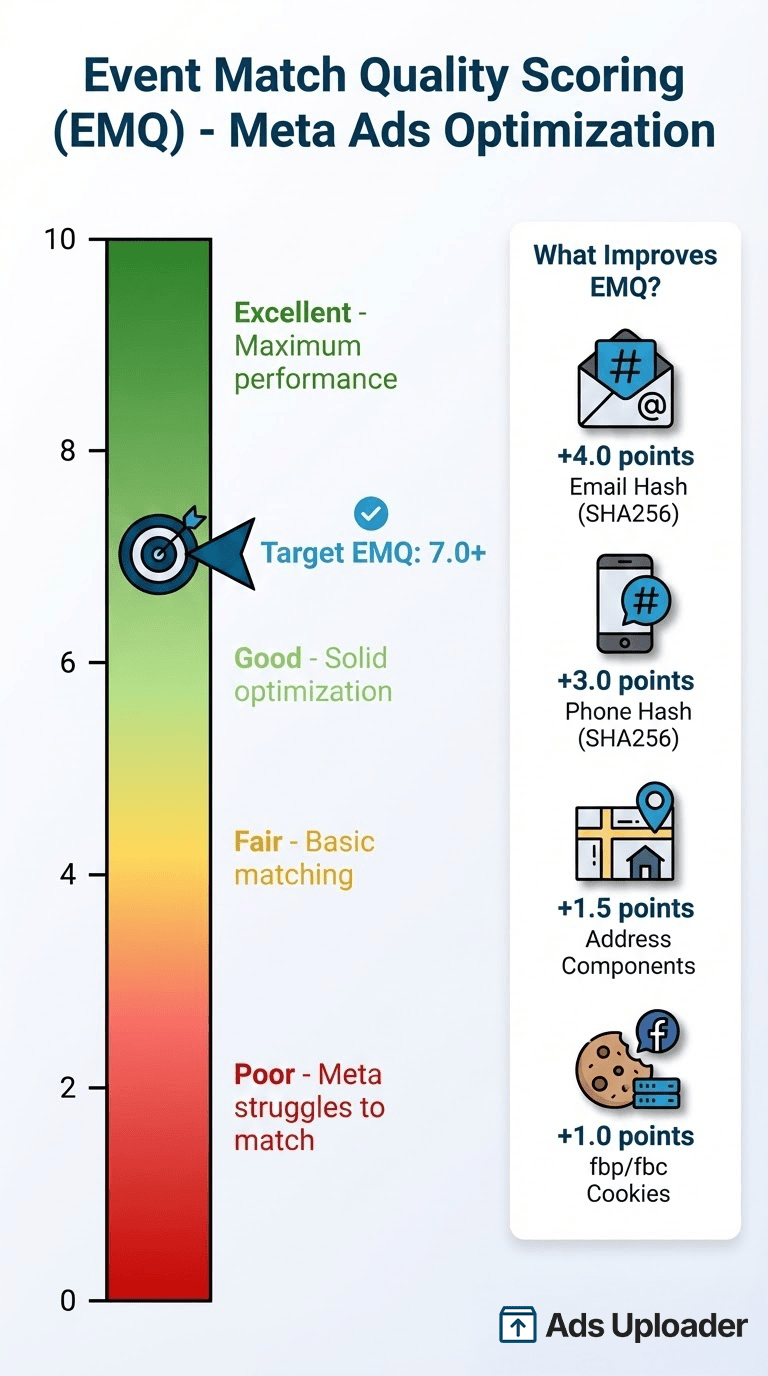
Event Match Quality (EMQ) is a 0-10 score measuring how well Meta can match your conversion events to Facebook users. Higher scores mean Meta can use your conversion data more effectively for targeting and optimization.
Score breakdown:
- 0-4: Poor (Meta struggles to match events to users)
- 4-6: Fair (basic matching, limited optimization)
- 6-8: Good (solid matching, effective optimization)
- 8-10: Excellent (maximum matching, optimal ad delivery)
How to improve EMQ:
- Add email hash (
em) - biggest impact (+4.0 points typically) - Add phone hash (
ph) - significant impact (+3.0 points) - Add address components - moderate impact (+1.5 points)
- Include
fbp(Facebook browser cookie) andfbc(Facebook click ID)
Check your Meta Conversions API Event Match Quality score in Events Manager under Data Sources → Your Dataset → Overview. If you're below 6.0, you're leaving money on the table.
Deduplication Process
Without deduplication, sending the same event from both Pixel and Meta Conversions API would double-count conversions. Meta would think you got 200 sales when you actually got 100.
Event deduplication uses the event_id parameter. Same event_id from Pixel and CAPI = Meta counts it once.
Implementation:
- Generate unique
event_idon your server (order ID, timestamp hash, etc.) - Pass
event_idto browser (via data layer, checkout page, etc.) - Pixel sends event with
event_id - Server sends same event with same
event_idvia Meta Conversions API - Meta receives both, sees matching IDs, counts as one conversion from two sources
48-hour deduplication window: Events with the same event_id received within 48 hours are deduplicated. After 48 hours, they're treated as separate events.
In Events Manager, deduplicated events from both Meta Conversions API and Pixel show as "1 event from 2 sources." If you see "1 event from 1 source," deduplication isn't working.
How Does Event Deduplication Work with the Conversions API?
Event deduplication is how Meta counts a conversion once when it arrives from both the browser Pixel and the server Conversions API. The recommended method matches two fields: the browser event's eventID must equal the server event's event_id, and the browser event name must equal the server event_name. When both match and the two events arrive within 48 hours of each other, Meta keeps the first one it received and drops the duplicate. Get this wrong and you either double-count conversions or lose the server event entirely.
The Two Ways Meta Deduplicates
Method 1: event_id + event_name (recommended). Generate one unique ID per conversion on your server (an order ID works well), pass it to the browser so the Pixel sends it as eventID, and send the same value as event_id from CAPI. The event names must also match: a browser Purchase pairs with a server Purchase. Both fields have to line up. "order_12345" and "12345" will not deduplicate, and neither will a browser Purchase against a custom server purchase_web.
Method 2: event_name + fbp or external_id (fallback). If you can't pass a shared event_id, Meta can also deduplicate on the event_name plus the fbp cookie and/or external_id. This only works when the browser event arrives first and the server event second, and it's less reliable than event_id, so treat it as a backup rather than your primary strategy.
Why fbp and fbc Still Matter
Even when you deduplicate on event_id, include the fbp (Facebook browser ID) and fbc (click ID) parameters on your server events. They raise Event Match Quality, they let Method 2 work as a safety net, and they help Meta tie the server event back to the original browser session and the ad that drove the click.
The 48-Hour Deduplication Window
Deduplication only applies to events Meta receives within 48 hours of the first event carrying that event_id. In practice this is rarely a problem, because your server should fire its event within minutes of the browser event. It becomes a problem with delayed or batched server jobs: if the Pixel fires on Monday and your backend sends CAPI on Thursday, Meta treats them as two separate conversions.
How to Verify Deduplication in Events Manager
Open Events Manager, go to your dataset, and use the Test Events tab. Trigger a conversion so both the Pixel and CAPI fire with the same event_id and event_name, then watch the test feed. A correctly deduplicated conversion shows as received from two sources rather than as two separate events. On the live Activity view, the same signal reads as "1 event from 2 sources." If you see "1 event from 1 source" or your totals look roughly doubled, your IDs or event names aren't matching.
Setup Methods Comparison
Important Note on Google Tag Manager: There are two different GTM products - don't confuse them:
- Regular GTM (Web Container): Free, runs in browser, what most people use. This alone won't work for CAPI.
- GTM Server-Side: Separate product, requires hosting your own server ($10-50/month for infrastructure). This works for CAPI but is more complex.
If you're on Shopify or similar platforms, use Method 1 (official app) instead of dealing with GTM Server-Side complexity.
Method 1: Partner Integrations (Recommended for E-Commerce)
Platforms like Shopify, WooCommerce, and BigCommerce have native CAPI integrations or official apps. On WordPress and WooCommerce, our Meta Pixel for WordPress guide covers the plugin route that wires up both the Pixel and CAPI.
Pros:
- Fastest setup (1-2 hours)
- No coding required
- Maintained by platform (updates handled automatically)
- Pre-configured event mapping
Cons:
- Limited customization (stuck with platform's event schema)
- Platform-dependent (if you migrate, you rebuild)
- May miss custom events specific to your business
Best for: E-commerce stores on supported platforms, non-technical marketers, businesses wanting quick implementation.
Example (Shopify):
- Install Meta official Shopify app
- Connect Facebook Business Manager
- Enable Conversions API in app settings
- Configure which events to track across all Meta ad placements and formats
- Test events in Events Manager
- Done in 1-2 hours
For a step-by-step walkthrough, see our guide to setting up the Meta Pixel on Shopify.
Method 2: Google Tag Manager Server-Side
GTM server-side container acts as a proxy between your site and Meta's API.
Pros:
- Flexible event configuration
- Marketer-friendly (no developer needed if you know GTM)
- Works across platforms (not tied to e-commerce platform)
- Can route multiple platforms (Google, TikTok, etc.) through same container
Cons:
- Requires server hosting ($10-50/month for Google Cloud Run, AWS, etc. - GTM itself is free, but you pay for the server infrastructure)
- More complex setup than partner integration
- Requires GTM knowledge
- Ongoing maintenance (server updates, tag debugging)
Best for: Advanced marketers with GTM experience, businesses tracking events across multiple platforms, agencies managing multiple clients.
Setup time: 4-8 hours initial setup, plus server configuration.
Method 3: Direct API Integration
Custom server implementation calling Meta's Marketing API directly.
Pros:
- Complete control over implementation
- Maximum flexibility for custom events
- No third-party dependencies
- Can integrate with complex backend systems
Cons:
- Requires developer (likely 20-40 hours for initial build)
- Ongoing maintenance (API changes, debugging)
- Need to handle retry logic, error handling, queuing
- Higher technical complexity
Direct integrations authenticate with a long-lived access token. The clean way to issue one is through a system user, and our walkthrough on creating a Conversions API system user token covers both the quick Events Manager path and the manual Business Settings flow.
Best for: Large enterprises with engineering resources, custom platforms, businesses with complex conversion tracking needs, SaaS companies tracking backend actions.
Setup time: 20-40 hours development time.
Method 4: Conversion API Gateway
Third-party services provide managed infrastructure for CAPI. Popular options include tools that specialize in server-side tagging and conversion tracking. Meta also offers its own version, a self-hosted relay you run in your own cloud account - our guide to the Conversions API Gateway walks through when it fits and how to deploy it.
Pros:
- Managed hosting (no server maintenance)
- Easy setup (similar to GTM but hosted for you)
- Pre-built templates for common platforms
- Support included
Cons:
- Ongoing cost ($20-400+/month depending on event volume - can get expensive at scale)
- Third-party dependency
- Less control than DIY implementation
Best for: Agencies managing multiple clients, businesses without server infrastructure, teams wanting managed solution.
Setup time: 2-4 hours.
Choosing Your Setup Method
| Factor | Partner Integration | GTM Server-Side | Direct API | Gateway Service |
|---|---|---|---|---|
| Setup Time | 1-2 hours | 4-6 hours | 20-40 hours | 2-4 hours |
| Technical Skill | None | Intermediate | Advanced | Basic |
| Ongoing Cost | $0 (included) | $10-50/mo hosting | $0 (DIY) | $20-400+/mo |
| Customization | Limited | High | Complete | Moderate |
| Best For | Simple e-comm | Marketers | Enterprises | Agencies |
Recommendation: Start with partner integration (Method 1) if you're on Shopify, WooCommerce, or BigCommerce - it's free and works great. Only consider GTM Server-Side or Gateway Services if you have custom requirements or aren't on a supported platform.
Key Considerations for Agencies & Multiple Accounts
If you're managing Meta Conversions API for multiple brands or clients, a few best practices help keep everything organized:
Use System User Tokens: Don't tie access tokens to personal accounts - create system users in Business Settings so tokens don't break when team members leave.
Standardize Event Names: Use consistent naming across all accounts (Purchase, Lead, AddToCart) rather than custom variations. This makes reporting and troubleshooting much easier.
Monitor Event Match Quality: Set up regular checks (weekly minimum) to ensure EMQ stays above 6.0 across all accounts. Low scores mean poor ad delivery.
Test Before Deploy: Always test CAPI changes in a test dataset before pushing to production. This prevents breaking live tracking.
Troubleshooting Common Meta Conversions API Issues
The setup guides tell you what to do. Nobody tells you what to do when it breaks. Here are the 15 most common issues and how to actually fix them.
Issue 1: Low Event Match Quality (EMQ Below 6.0)
Symptoms:
- EMQ score below 6.0 in Events Manager
- Poor ad delivery performance despite sending events
- High CPAs even with accurate tracking
Root causes:
- Missing customer information parameters (email, phone)
- PII not hashed correctly (wrong encoding, extra spaces)
- Email/phone formatting errors before hashing
Fixes:
-
Add email parameter - Biggest impact. If you have user email at checkout, hash it with SHA256 and include in
emparameter. Typical EMQ jump: +4.0 points. -
Add phone parameter - If available, format phone in E.164 format (e.g., "15551234567" for US numbers), hash with SHA256, include in
ph. Typical jump: +3.0 points. -
Verify hashing is correct - Common mistake: hashing "user@email. com " (with trailing space) instead of "user@email. com". Normalize before hashing:
- Trim whitespace
- Convert to lowercase
- Remove special characters from phone (keep only digits and country code)
- Then SHA256 hash
- Include fbp and fbc - Facebook browser cookie (
fbp) and Facebook click ID (fbc) help match server events to browser sessions. If available from Pixel, include them in CAPI events.
Check:
- Events Manager → Data Sources → Overview → Event Match Quality
- If still below 6.0 after adding email/phone, check Activity tab for specific parameter recommendations
Issue 2: Events Not Appearing in Events Manager
Symptoms:
- Test events not showing in Test Events tool
- Production events missing from Activity tab
- Zero CAPI events received (all events from Pixel only)
Root causes:
- Incorrect access token (expired, wrong permissions, regenerated)
- Wrong dataset ID (copy/paste error, using test instead of prod)
- Server-side tag not firing (GTM debugging issue)
- Network/firewall blocking Meta's servers
Fixes:
-
Regenerate access token - Events Manager → Settings → Conversions API → Generate Access Token. Copy new token, update your server config. Verify token has
ads_managementandevents_managementpermissions. -
Double-check the dataset ID - Events Manager → Data Sources → click your dataset → copy the ID from the overview or the URL. Your dataset ID is the same number as your pixel ID, so the usual mistake is grabbing the wrong one entirely: a test dataset instead of production, or a different property. Confirm you're sending to the exact ID your CAPI calls target. If you're not sure where to find it, see how to find your Meta Pixel ID.
-
Test GTM server-side tag - GTM Server Container → Preview mode → Trigger event manually → Check if Facebook Conversions API tag fires. If not, check triggering conditions.
-
Whitelist Meta's IP ranges - If running behind corporate firewall, you need to allow outbound HTTPS to Meta's API endpoints. Meta doesn't publish specific IPs, but uses standard AWS/cloud ranges. Allow outbound HTTPS (port 443) to
graph. facebook. com. -
Check server logs - Look for HTTP error codes in your server logs:
- 401: Access token invalid or expired
- 400: Malformed request (check event parameter formatting)
- 500: Meta's API having issues (rare, wait and retry)
Save Hours on Creative Testing
Stop uploading ads one by one. Bulk process unlimited creatives with automatic media matching and direct API publishing.
Try Ads Uploader FreeNo credit card required • 7-day free trial
Issue 3: Deduplication Not Working
Symptoms:
- Events Manager shows "1 event from 1 source" instead of "2 sources"
- Conversion counts double what they should be
event_idmissing from events in Activity tab
Root causes:
event_idnot matching between Pixel and CAPIevent_idformatted incorrectly (number instead of string)- Timing issues (events sent more than 48 hours apart)
Fixes:
-
Verify event_id matches exactly - Pixel event_id: "order_12345", CAPI event_id: "order_12345". Not "12345" and "order_12345". Not "Order_12345" and "order_12345" (case-sensitive).
-
Use string, not number -
event_idmust be a string. If you're using order ID 12345, send "12345", not 12345 (number). JSON format:"event_id": "12345", not"event_id": 12345. -
Send events within 48 hours - Deduplication window is 48 hours. If Pixel fires on Monday and CAPI fires on Thursday, they're counted as separate events. Ensure server-side events fire within minutes/hours of browser events.
-
Test with Debug Events - Events Manager → Test Events → Generate test code. Send test events with matching
event_idfrom both Pixel and CAPI. Check if "1 event from 2 sources" appears.
Monitor deduplication rate: Target 90%+ of browser events to have matching server events. If lower, investigate why some events aren't making it to your server.
Issue 4: Access Token Expired or Invalid
Symptoms:
- Events stopped sending suddenly (were working yesterday)
- 401 "Invalid OAuth access token" errors in logs
- Events Manager shows "Connection Interrupted"
Root causes:
- 90-day token expiration (system user tokens expire)
- User token tied to person who left company (their account deactivated)
- Token permissions revoked
Fixes:
-
Use system user tokens, not personal tokens - System users don't belong to a person, so they don't expire when someone leaves. Create system user in Business Settings → Users → System Users → Add. Generate token from system user.
-
Set calendar reminder for 90-day rotation - Even system tokens expire after 90 days. Add recurring calendar event every 85 days: "Rotate CAPI access tokens for all accounts."
-
Implement automated token refresh - If technically feasible, use Meta's API to generate long-lived tokens programmatically. Store them securely (not in code, use environment variables or secret management).
-
Document token management - Create runbook: which account has which token, where tokens are stored, how to regenerate, who has access. Critical for team continuity.
Issue 5: Data Discrepancies (Pixel vs CAPI Counts)
Symptoms:
- CAPI shows 20% fewer events than Pixel
- Mismatched conversion volumes between sources
- Attribution window differences
Root causes:
- Server-side tracking not capturing all conversions (incomplete implementation)
- Different event firing logic (Pixel fires on page load, CAPI fires after payment confirmation)
- Timezone differences between browser and server
- Deduplication accidentally removing unique events
Fixes:
-
Audit event triggering - Map every conversion point: Does Pixel fire? Does server have code to fire CAPI? Are conditions identical?
-
Normalize timezone handling - Use UTC for all timestamps. Don't mix browser local time with server time. Convert everything to UTC before sending to Meta.
-
Review deduplication logic - Ensure unique events have unique
event_id. Don't reuseevent_idacross different events. Each Purchase should have its own ID. -
Compare raw event logs - Export event data from Events Manager. Compare Pixel-only events vs CAPI-only events vs deduplicated events. Identify patterns in what's missing.
Some discrepancy is normal (Pixel captures attempted conversions, CAPI captures confirmed conversions). But if CAPI is missing more than 20% of confirmed conversions, something's broken.
Frequently Asked Questions
Do I need both Facebook Pixel and Conversions API?
Yes, for optimal performance. Pixel captures real-time browser events, CAPI provides server-side backup for conversions that complete. Together with deduplication, you get maximum data accuracy and ad performance.
Will Conversions API improve my ROAS?
Not directly, but better data accuracy leads to better optimization. Expect gradual ROAS improvement over 30-60 days as Meta's algorithm uses the enhanced conversion data to find better audiences and optimize bidding.
How much does Meta Conversions API cost?
Meta Conversions API itself is free. Costs come from implementation method: partner integration like Shopify's official app ($0, included), GTM Server-Side ($10-50/month for server hosting), gateway service ($20-400+/month depending on event volume), or custom development ($500-5000 one-time for developer time).
Can I use Conversions API without Facebook Pixel?
Yes, technically, but not recommended. You'd miss real-time browser context and immediate event tracking. CAPI-only works for mobile apps or backend-heavy scenarios, but for websites, use both.
What is Event Match Quality and why does it matter?
Event Match Quality (EMQ) measures how well Meta can match your conversions to Facebook users (0-10 scale). Higher EMQ (above 7.0) improves ad delivery, targeting, and optimization. Low EMQ means Meta can't effectively use your conversion data.
How long does it take to set up Conversions API?
Depends on method: Shopify integration (1-2 hours), GTM server-side (4-8 hours), direct API (20-40 hours), gateway service (2-4 hours). Plus 30 days recommended for testing and optimization.
Will Conversions API help with iOS 14.5 tracking limitations?
Yes. iOS 14.5 blocks browser tracking (Pixel), but server-side tracking (CAPI) is unaffected. CAPI recovers conversion data that Pixel-only tracking would miss due to iOS privacy restrictions.
What's the difference between Conversions API and Meta Pixel?
Pixel: Browser JavaScript, real-time, affected by ad blockers/iOS restrictions. CAPI: Server-to-server, reliable, privacy-compliant, not blocked. Best practice: Use both with deduplication.
How do I know if my Conversions API is working?
Check Events Manager: Events showing from 'Conversions API' source, Event Match Quality above 6.0, deduplication working ('1 event from 2 sources'), no errors in Diagnostics tab.
Can I use Conversions API for mobile app events?
Yes. Mobile app SDKs can send events server-side via CAPI. Useful for subscription events, in-app purchases, and post-install actions that happen in your backend.
How do I deduplicate Pixel and Conversions API events?
Send the same conversion from both sources with an identical event_id, and make sure the browser event name matches the server event_name. Meta keeps one event and drops the duplicate when both share an event_id and event_name and arrive within 48 hours of each other. As a fallback, Meta can also deduplicate on event_name plus fbp or external_id, but the event_id method is more reliable. Confirm it in Events Manager Test Events, where a matched conversion shows as received from two sources.
Is the Conversions API required for Meta ads in 2026?
It is not a hard platform-wide mandate, so your ads still run without it. But Meta strongly recommends it, some platform integrations now enable it by default, and Pixel-only tracking leaves roughly 20-30% of conversions unmeasured after iOS and browser privacy changes. In practice, competitive advertisers in 2026 treat CAPI as required rather than optional.
Is the Meta Conversions API free?
Yes. Meta does not charge for the Conversions API itself. Any cost comes from how you implement it: a partner app like Shopify's is included at no charge, GTM Server-Side runs about $10-50/month for hosting, a managed gateway runs $20-400+/month depending on event volume, and custom development is a one-time build cost.
Next Steps
You now understand Meta Conversions API – what it is, why you need it if you're running a serious business on Meta ads, and exactly how to implement it correctly.
Start implementing:
- Choose your setup method - Use your platform's native integration (Shopify, WooCommerce, etc.) if available. That's the simplest option. If not, use a partner integration or gateway service. GTM Server-Side is rarely the right choice unless you have specific custom requirements.
- Configure for Purchase events first (highest value)
- Test deduplication thoroughly (verify "1 event from 2 sources" in Events Manager)
- Monitor Event Match Quality (target above 7.0 for optimal ad delivery)
- Expand to other events once core tracking is solid
If you're managing a lot of media spend and need to scale creative testing efficiently, Ads Uploader provides bulk ad launching tools designed for performance marketers.
The advertisers who master Meta Conversions API in 2026 will have cleaner data, better attribution, and stronger ROAS than those still relying on Pixel-only tracking. It's not optional anymore – it's table stakes for serious Meta advertising.
