The Meta Pixel and the Conversions API are two ways to send the same conversion events to Meta. The pixel runs in the visitor's browser, while the Conversions API sends events server to server. The pixel is easy to install but loses data to ad blockers, browser restrictions, and iOS privacy rules; the API is more resilient but needs server-side setup. They are not rivals. Meta recommends running both together, deduplicated, so you capture the most complete and accurate conversion data without double counting a single action.
Search "conversions api vs meta pixel" and you expect to pick a winner. There isn't one, and the framing is part of the problem.
The two tools do the same job from different places. They report what people do on your site so Meta can optimize delivery, measure conversions, and build audiences. The pixel does it from the browser. The Conversions API does it from your server. Treating them as an either/or leads advertisers to under-track their campaigns and quietly hand Meta worse data than their competitors.
This article gives you the straight answer: run both, and here is exactly why. You will get a clear side-by-side comparison, a plain explanation of how deduplication stops double counting, what signal loss actually costs you, the one case where the pixel alone is defensible, and the misconceptions that keep tripping people up.
Conversions API vs Meta Pixel: The Short Answer
In 2026, almost everyone running Meta Ads on a website should use both the pixel and the Conversions API.
The pixel alone leaks data. Ad blockers, Safari and Firefox tracking prevention, iOS App Tracking Transparency, and consent banners all stop a meaningful share of browser events from ever reaching Meta. The Conversions API alone misses the real-time browser context the pixel captures so well, and it depends entirely on the data you feed it. Each tool has a blind spot that the other covers.
Meta itself frames them as partners, not alternatives. In the Events Manager setup flow, "Conversions API and Meta Pixel" is offered as a primary way to connect your data, and Meta's own pixel guidance says the API "works with your Meta pixel" to improve performance and measurement. The rest of this article proves why that is the right call.
This guide assumes you already know the basics of the Meta Pixel. If the pixel itself is still fuzzy, start there, then come back for the decision.
How Each One Works
Same events, two delivery paths. That is the whole mental model. Here is each path.
The Meta Pixel (Browser-Side)
The pixel is a snippet of JavaScript on your website. When a visitor loads a page or takes an action, the pixel fires an event to Meta from inside their browser, reading first-party cookies (_fbp for the browser ID, _fbc for the ad click ID) so Meta can match the activity to a person and an ad.
Its strength is context and speed. The pixel sees the live browser session: the page URL, the referrer, the user agent, the action as it happens. Its weakness is that it lives in an environment the user controls. If JavaScript is blocked, cookies are stripped, or an extension kills the tracker, the event never sends. The pixel can also only see online web events; it knows nothing about what happens in your back office.
The Conversions API (Server-Side)
The Conversions API, or CAPI, sends events from your server straight to Meta over HTTPS. Meta describes it as a way to "create a direct and more reliable connection between marketing data from your server, website platform, app or CRM and Meta." Because the event originates on your server, no browser sits in the way to block it.
That unlocks two things. First, resilience: an ad blocker or browser restriction on the user's side cannot intercept a call your server makes. Second, reach: the API can send events the pixel can never see, like an in-store purchase, a CRM lead, a subscription renewal, or a refund. It is not magic, though. The API can only send the data you actually collect, so if you do not capture an email or a click ID, it cannot invent one. Setting it up is its own project, covered in depth in the Meta Conversions API guide.
Meta Pixel vs Conversions API: Side-by-Side Comparison
Here is how the two stack up across the dimensions that actually drive the decision.
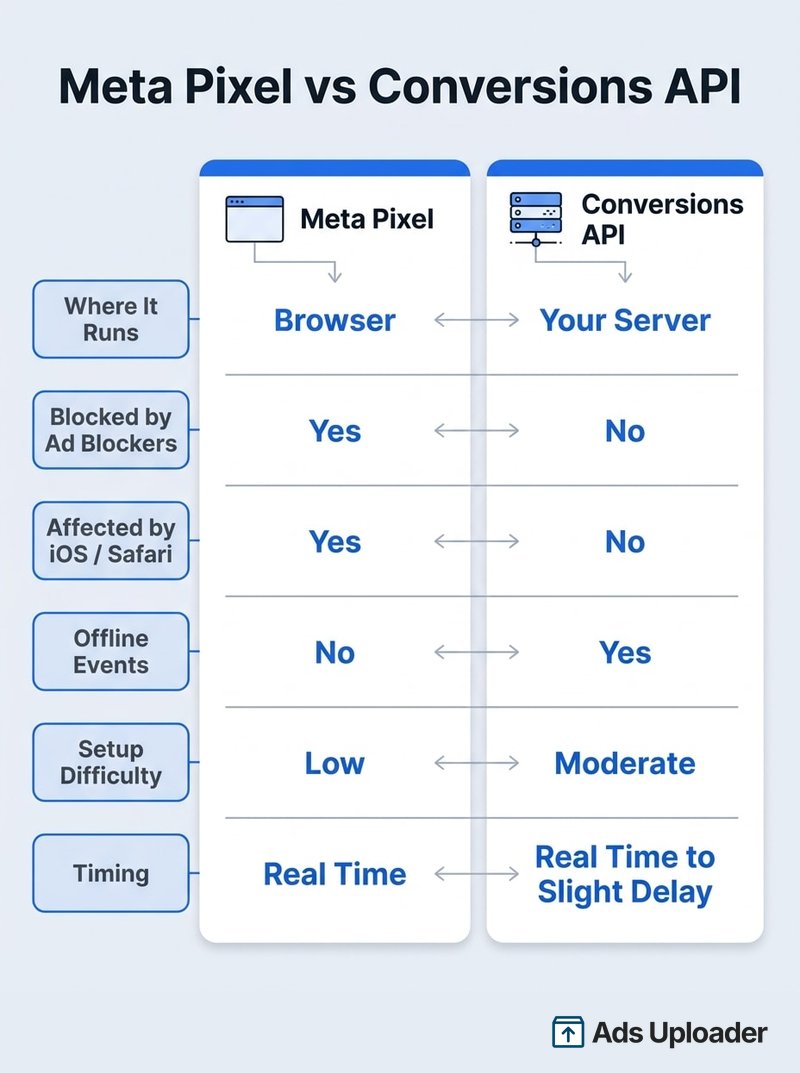
| Dimension | Meta Pixel | Conversions API |
|---|---|---|
| Where it runs | The visitor's browser | Your server |
| Data source | Live browser session | Server, website platform, app, or CRM |
| Blocked by ad blockers? | Yes | No |
| Affected by iOS ATT / Safari ITP? | Yes | Not at the delivery level |
| Offline and back-end events | No | Yes |
| Identifiers | Browser cookies (_fbp, _fbc) | Cookies if available, plus hashed customer data |
| Setup difficulty | Low (paste code or use a plugin) | Moderate (server, partner, or gateway) |
| Timing | Real time | Real time to slightly delayed |
| Event Match Quality | Depends on cookies surviving the browser | Higher: hashed email, phone, and name travel with the event |
| Cost | Free | Free (you pay only for implementation) |
The readout is simple. The pixel wins on ease and immediacy. The Conversions API wins on resilience and completeness. Neither is "better." They cover each other's blind spots, which is exactly why the answer is rarely one or the other.
Why You Should Use Both
This is the heart of it. Running both is not belt-and-suspenders paranoia; it is how you get the fullest, most accurate signal Meta can use.
Launch More. Click Less.
Upload hundreds of creatives at once, auto-match thumbnails to videos, and publish straight to your ad accounts through Meta's API.
Try Ads Uploader FreeNo credit card required • 7-day free trial
Coverage: Each Recovers What the Other Loses
The pixel captures events for visitors who allow browser tracking, including anonymous and pre-login activity the server may not know about yet. The Conversions API captures the events the browser drops, blocked sessions, plus the offline and back-end conversions the pixel structurally cannot see. Send a purchase from both the confirmation page (pixel) and your order system (API), and Meta still records the sale even if the browser blocked the pixel. The overlap is the point.
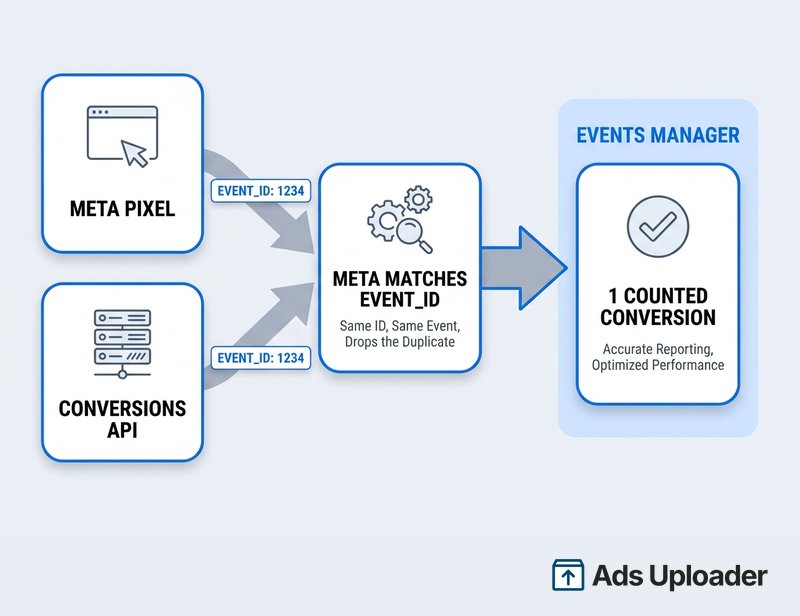
Deduplication Keeps Events From Double Counting
The obvious worry: if both tools send the same purchase, does Meta count two sales? No, as long as deduplication is configured.
You generate one unique event_id for each conversion and include it in both the pixel event and the matching server event. When Meta receives two events with the same event_id, the same event_name, and close timestamps, it recognizes them as one action, keeps a single copy, and drops the duplicate. The cookies (_fbp and _fbc) help confirm the match.
In practice the event_id is usually a value you already have. On a Shopify store, the order number does the job: the browser pixel fires Purchase with event_id: "order_10482" on the thank-you page, and your server (or the platform's CAPI integration) sends the same purchase with the same event_id once payment settles. Meta sees both, recognizes them as one sale, and counts it once - even if the browser copy never arrived because of an ad blocker. Double counting only happens when the IDs or names do not line up, which is a setup error, not an argument against running both. The exact implementation lives in the Conversions API guide already linked above.
Better Event Match Quality
Meta scores each event with an Event Match Quality rating from 0 to 10, reflecting how well it can match the event to a real person from the identifiers you provide. Higher is better for delivery and attribution. The pixel contributes browser signals; the Conversions API can add hashed customer data like email, phone, name, and location from your records. Feeding both raises the match quality of your events, which is one of the most direct ways to improve how well Meta optimizes your campaigns.
What Signal Loss Actually Costs You
"Signal loss" gets thrown around without much precision. It is not one problem; it is four, and they all hit the browser.
- iOS App Tracking Transparency. Since 2021, iOS apps must ask permission to track, and the large majority of users decline. That sharply reduced the conversions and audience data Meta can tie to iPhone users.
- Browser tracking prevention. Safari's Intelligent Tracking Prevention and Firefox's default cross-site blocking limit or delete tracker cookies, and Chrome's privacy changes continue to chip away at third-party cookies. On those browsers the pixel may not fire, or its cookies get ignored.
- Ad blockers. Privacy extensions specifically target known scripts like the Meta Pixel and stop them outright.
- Consent banners. Under GDPR, CCPA, and similar rules, the pixel should not fire at all when a user declines consent.
Every one of these is a browser-side problem, so every one of them hits the pixel and none of them blocks a server-side call. That asymmetry is the entire reason the Conversions API exists. As for how much you lose, be skeptical of precise figures: Meta has not published exact loss percentages, and the dramatic recovery numbers you see in vendor case studies are illustrative, not universal benchmarks. The summary is that pixel-only tracking under-reports, sometimes badly, and server-side data closes much of the gap. What the API does not do is override Apple's attribution rules; the Aggregated Event Measurement cap of eight prioritized web events per domain still applies to both tools.
When the Pixel Alone Might Be Enough
The exceptions are worth stating plainly. The pixel on its own is defensible when you are a brand-new or very low-traffic site still validating that tracking works at all, when you are running a quick test campaign before committing engineering time, or when you genuinely have no server access yet.
Even then, read this as a sequencing decision, not a permanent stance. Start with the pixel because it is fast to install, confirm it fires, then add the Conversions API as you scale and the leaked conversions start costing real money. "Pixel only, forever" is not a strategy in 2026; "pixel first, API soon" is.
Common Misconceptions
A few myths keep steering people wrong. Here is what the documentation actually says.
Save Hours on Creative Testing
Stop uploading ads one by one. Bulk process unlimited creatives with automatic media matching and direct API publishing.
Try Ads Uploader FreeNo credit card required • 7-day free trial
"The Conversions API Replaces the Pixel"
It does not. Meta's setup UI and help docs treat the API as an addition that "works with your Meta pixel," not a replacement. You can send server events without a pixel, but if you have a website, Meta still expects the pixel as your baseline and the API as the layer on top.
"CAPI Is Only for Big Ecommerce"
False. The Conversions API can send website events, app events, offline conversions, and messaging events. That covers lead-gen form submissions, service bookings, SaaS trials, in-store sales, and subscription renewals just as much as ecommerce purchases. Any advertiser with conversions the pixel might miss benefits.
"You Need a Developer for the Conversions API"
Not necessarily. Partner integrations for platforms like Shopify and WooCommerce, plus Meta's hosted Conversions API Gateway, give you lower-code paths that connect accounts instead of writing server code. Custom or CRM-based events can still need development work, but the barrier is far lower than people assume. The how-to lives in the Conversions API guide.
One practical note that cuts across all of this: after you wire up either path, verify it. The Meta Pixel Helper browser extension confirms the pixel is firing in the browser, and the Test Events tool in Events Manager shows both pixel and server events arriving live, including whether Meta deduplicated them. Trust the dashboards, not your assumptions.
How They Fit With Your Conversions and Audiences
Whichever path an event takes, it lands in the same place and feeds the same machinery: delivery optimization, conversion reporting, and your custom and lookalike audiences. The pixel and the API are just two pipes into one reservoir.
That reservoir is also what powers your conversion definitions. The events from either source are what you turn into Facebook custom conversions, the specific rules and outcomes you optimize toward and report on. More complete event data in means more reliable conversions to act on out.
Frequently Asked Questions
Do I need both the Meta Pixel and the Conversions API? In almost all cases, yes. Meta recommends running both. The pixel handles real-time browser events; the API covers server, CRM, and offline events and survives browser blocking. Together, deduplicated, they give the fullest signal, which is why Meta offers "Conversions API and Meta Pixel" as a primary setup option.
Does the Conversions API replace the Meta Pixel? No. Meta treats the API as a complement that works alongside the pixel. You can run server events without a pixel, but for any real website Meta expects the pixel as the baseline and the API as the addition.
Can I use the Conversions API without the pixel? Technically yes, for offline-only conversions or when you cannot edit the site. But you lose the pixel's live browser context and some automatic tooling, so most website setups still include the pixel.
Will running both double count my conversions?
No, not when deduplication is configured. Share a common event_id and event name across both, and Meta keeps one copy and drops the duplicate. Double counting is a sign of mismatched IDs, which is a fixable setup error.
Does the Conversions API fix iOS 14 signal loss? Partially. It recovers conversions that ad blockers and browser restrictions would block on the pixel, improving completeness. It does not override Apple's attribution limits, and the eight-event Aggregated Event Measurement cap still applies.
Is the Conversions API free? Yes. Both tools are free from Meta with no per-event fees. The only cost of the API is implementation time or a partner or gateway service.
Which is more accurate, the pixel or the Conversions API? Neither inherently. The pixel has full browser context; the API catches events the browser misses. Set up correctly, they converge, and the most accurate setup is both together rather than either alone.
The Bottom Line
"Conversions API vs Meta Pixel" is the wrong question. They are the same events sent through two different doors: the pixel from the browser, the API from your server. The pixel is easy and immediate but leaks data to privacy controls. The API is resilient and complete but needs server-side setup. Deduplication makes running both safe, and Event Match Quality plus broader coverage make it better than either alone.
So the decision is short. Run both. If you have to start somewhere, start with the pixel because it installs in minutes, then add the Conversions API as you scale and the lost conversions start to matter. From there, point those events at the conversions you care about and let Meta optimize against the cleanest signal you can give it. That is how you stop choosing between two tools that were always meant to work together.
