Facebook lead ads, also called lead generation ads or Meta lead ads, are a Meta advertising objective that collects a prospect's contact details inside Facebook or Instagram instead of on an external website. A user taps the ad, an instant form opens pre-filled from their profile, and they submit in a few taps. Conversion locations include instant forms, websites, calls, and click-to-message. Leads sync to a CRM or Meta's Leads Center. Lower friction means cheaper, faster lead capture, though quality controls decide whether those leads convert.
Facebook lead ads are the lowest-friction way to collect a contact on Meta, and the fastest way to fill your CRM with junk if you set them up lazily. The format is genuinely good: a prospect taps your ad, a form opens already filled with their name and email, and two taps later they are a lead, without ever leaving Facebook or Instagram. That low friction is the whole pitch. It is also the catch.
Here is the plain version of how the money works. Because nobody has to wait for a landing page to load, more people finish the form, so your cost per lead drops. Meta has shown campaigns cutting cost per lead by more than half after moving to lead ads. The flip side is that an easy form invites easy, sometimes worthless, sign-ups, so the real job is filtering for quality and following up fast.
After years running Meta lead gen across DTC and B2B accounts, the pattern never changes. The angle is easy to find. The bottleneck is shipping enough tests to learn from. That is why teams that bulk launch their Facebook ads out-learn teams clicking through Ads Manager one ad at a time. This guide covers what lead ads are, how the flow works, the honest pros and cons, the lead-quality problem and its fixes, and the decision most people get wrong: lead ads versus conversion ads.
What Are Facebook Lead Ads?
Facebook lead ads are ads built around the Meta "Leads" objective (the setting Ads Manager used to label "Lead Generation"). Instead of pushing a click to your website, the ad opens a form right where the user already is, inside the Facebook or Instagram app, and captures their information there.
The naming drifts, so let's settle it. Lead generation Facebook ads, lead gen ads on Facebook, lead ads on Facebook, Facebook lead generation ads, and Meta lead ads all describe the same thing: the Leads objective and the instant form that comes with it. There is no separate product hiding behind any of those phrases. Use whichever your team already says.
Lead ads can run in Facebook Feed and Stories, Instagram Feed, Stories and Reels, and inside Messenger. Not every placement supports an instant form (Marketplace and Audience Network do not), so in practice most lead ads show up in feeds and Stories across both apps.
How Facebook Lead Ads Work (The Flow)
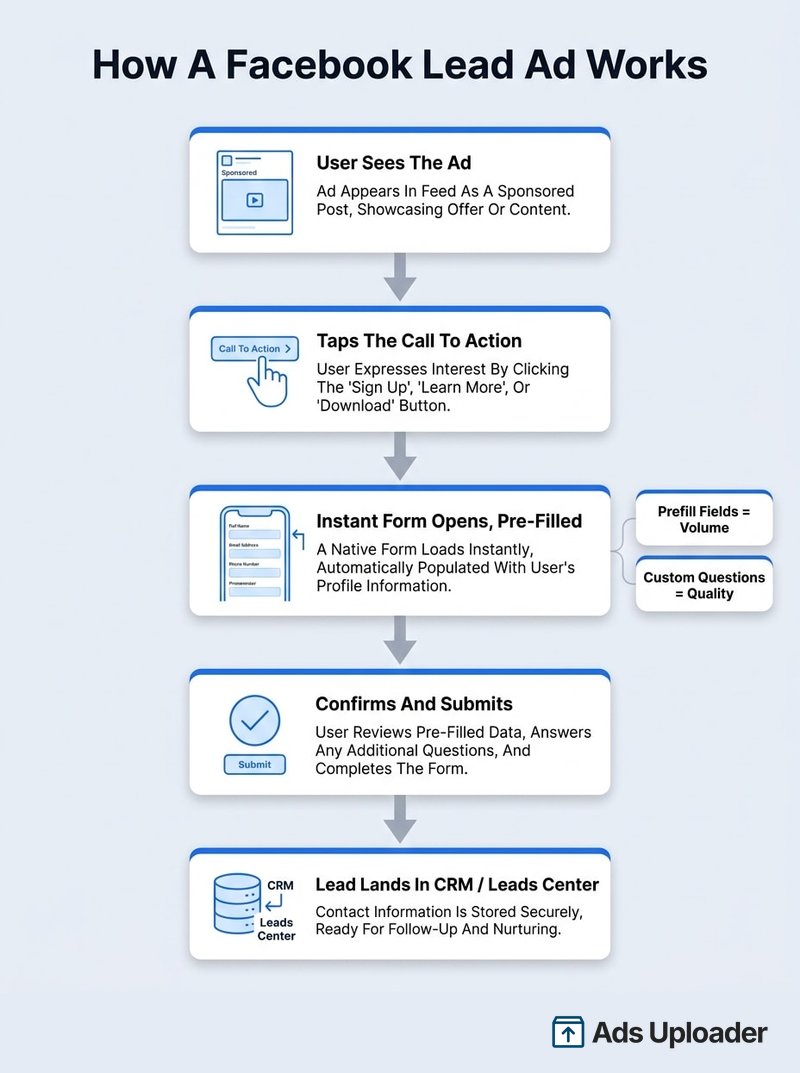
The mechanics are simple, which is the point. Here is the full path from impression to lead:
- The ad appears in a feed or Stories placement, looking like a normal sponsored post.
- The user taps the call to action (Sign Up, Get Quote, Learn More, and so on).
- An instant form opens in-app, pre-filled with the name, email, and phone number Meta already has from the user's profile.
- The user confirms or edits those fields, answers any custom questions, and taps submit.
- A thank-you screen shows next steps, often a button to your site or a confirmation message.
- The lead lands in Ads Manager, Leads Center, or your CRM, depending on how you have things wired up.
Two form ingredients decide what you actually capture. Prefill questions are the standard fields Meta auto-populates (name, email, phone). Custom questions are the ones you add: short answer, single or multiple choice (including multi-select), appointment requests, store-locator pickers, and conditional follow-ups that change based on a previous answer. The prefill fields drive volume. The custom questions drive quality. How you balance them is most of the game, and it is worth understanding how the Facebook instant form itself is structured before you build one.
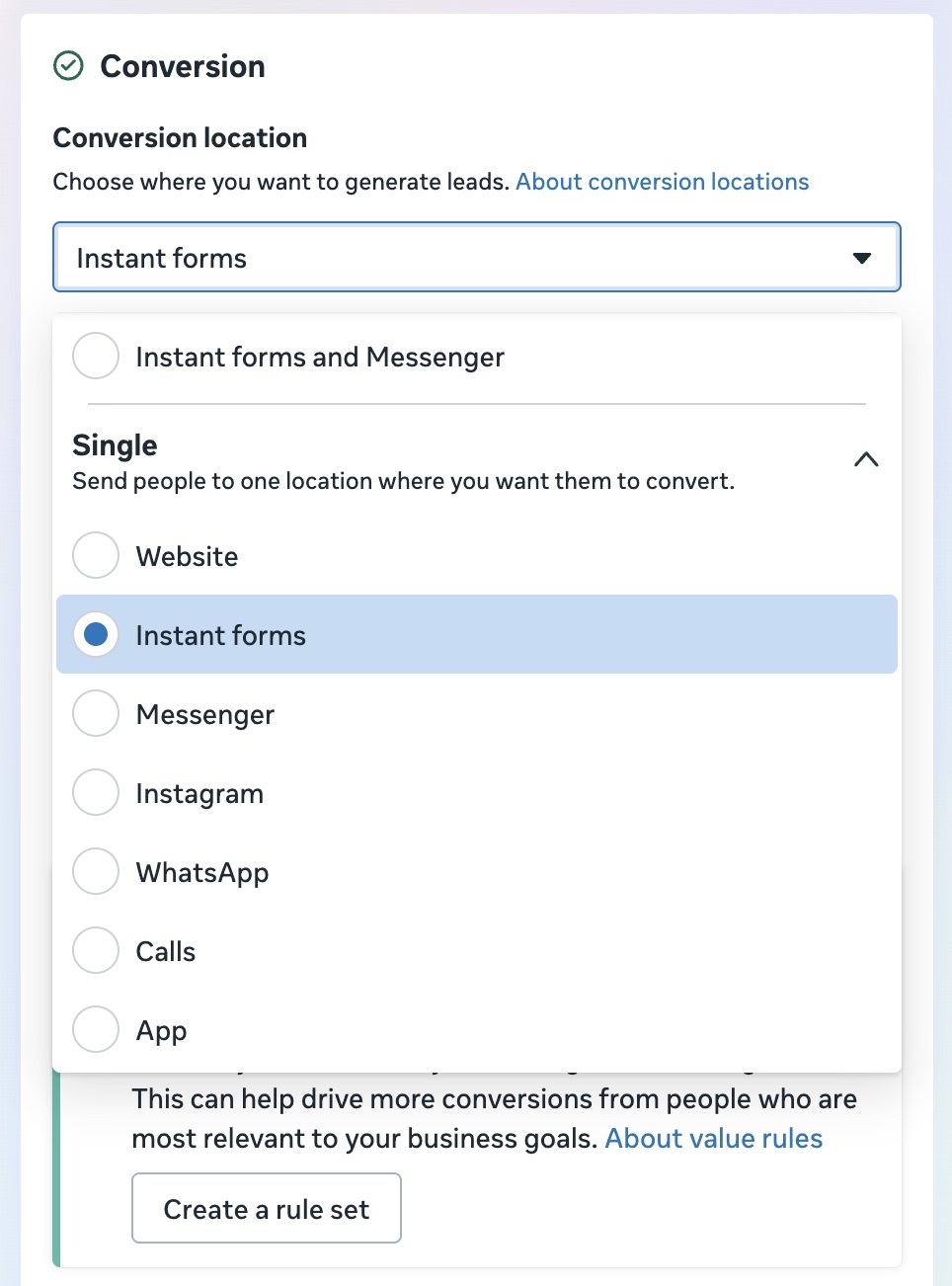
You are also not locked into a single destination. Meta calls the menu your conversion location, and the options now include:
- Instant form, the classic in-app form.
- Website, sending people to your own form or page.
- Calls, prompting a direct phone call.
- Click-to-message, dropping people into Messenger, Instagram Direct, or WhatsApp.
- Multiple, a hybrid where Meta serves each user the destination they are most likely to act on. One campaign can mix an instant form, a website, and a call button, and the system decides per person.
You set this in Ads Manager at the ad set level, under the Conversion section. The screenshot below shows the expanded conversion location menu with every option: Website, Instant forms, Messenger, Instagram, WhatsApp, Calls, and App, plus the combined "Instant forms and Messenger" choice at the top.
Facebook Lead Ads Pros and Cons
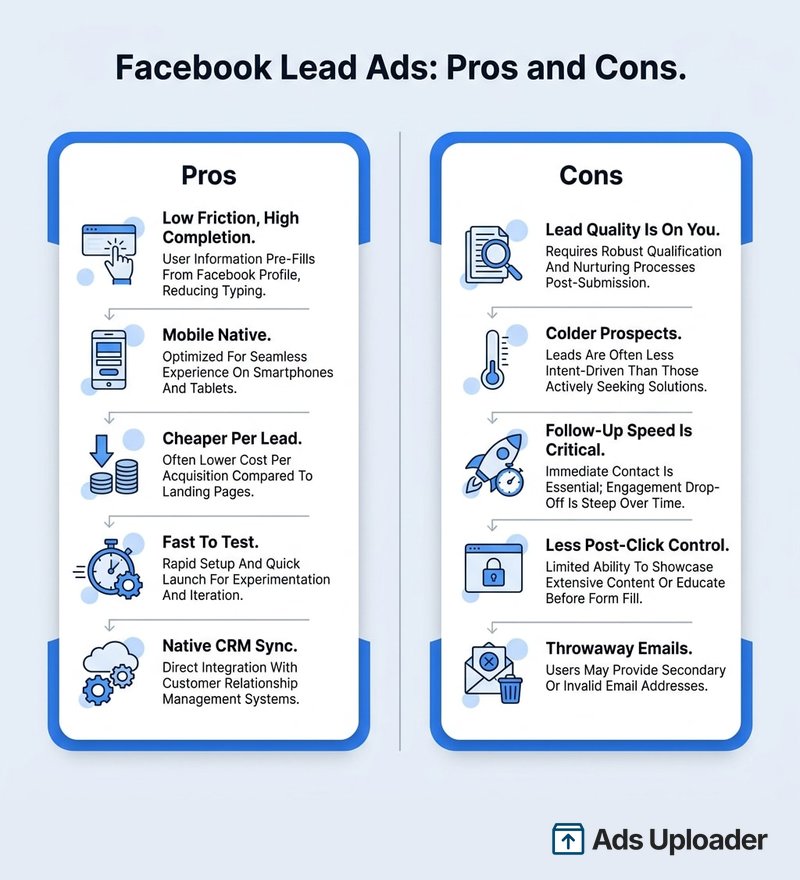
Lead ads are a tool, not a strategy. They are excellent at one job and quietly bad at another, so it helps to see both columns before you commit budget.
The pros
- Low friction, high completion. No landing page to load means fewer people drop off, which is the main reason completion rates beat off-site forms.
- Built for mobile. The form is native to the app, so it renders cleanly on the phones where most of your audience already is.
- Cheaper per lead. Fewer steps usually means a lower cost per submitted lead than driving traffic to a site.
- Fast to test. You can validate an offer without building or maintaining a landing page, so new angles ship in minutes.
- Native CRM sync. Leads can flow straight into your systems through integrations or the Conversions API.
The cons
- Lead quality is on you. An auto-filled form is effortless to submit, so a chunk of leads will be careless, half-interested, or fake.
- Colder prospects. People never visited your site or read your pitch, so they arrive less informed than a click-through lead.
- Follow-up speed is make-or-break. A lead ad with no fast follow-up is mostly wasted spend.
- Less control after the tap. You do not own the post-click experience the way you do with your own landing page.
- Throwaway emails. Profile data can be an address the person never checks.
Launch More. Click Less.
Upload hundreds of creatives at once, auto-match thumbnails to videos, and publish straight to your ad accounts through Meta's API.
Try Ads Uploader FreeNo credit card required • 7-day free trial
The Lead Quality Problem (And How to Fix It)
Ask anyone who has run lead ads at volume and you will hear the same complaint: a lot of the leads are garbage. That is not a flaw in the format, it is the predictable result of making submission too easy. The good news is that quality is a set of levers you control, not a coin flip.
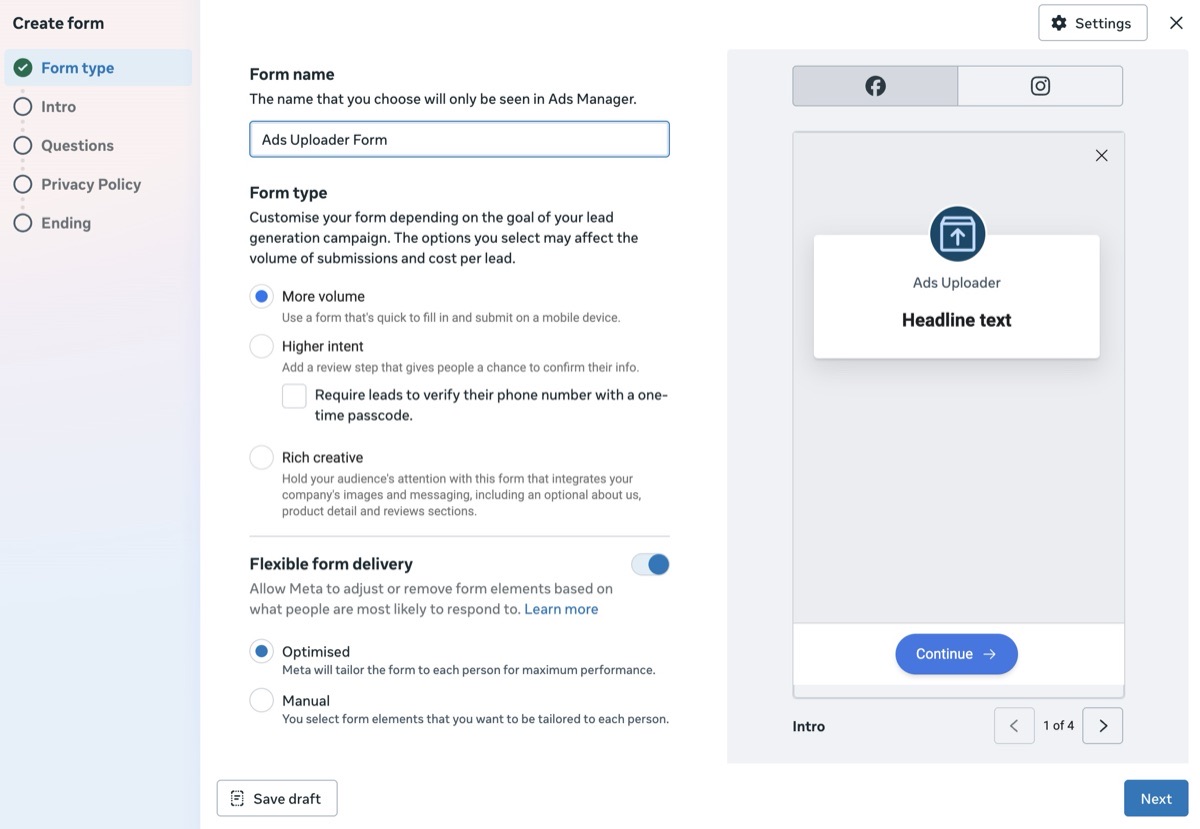
- Switch to Higher Intent forms. The default "More Volume" form pre-fills everything and lets users submit instantly. "Higher Intent" adds a review step so people confirm their details before sending. You get fewer leads, but each one is more deliberate.
- Add one or two qualifying questions. A single custom question like "What is your budget?" or "Which service do you need?" filters out the merely curious. It costs you some volume and buys you a lot of relevance.
- Turn on lead verification. Meta now offers an SMS one-time passcode step and a work-email requirement. Both cut down on spam and bot entries.
- Use the Conversion Leads goal. Connect your CRM or Conversions API and feed back which leads actually became customers. Meta then optimizes toward people who look like your real buyers, not just anyone who taps submit. Cost per lead usually rises, cost per quality lead usually falls.
- Tighten the targeting and offer. Broad, viral creative pulls in irrelevant sign-ups. Be specific about who the offer is for, in the ad itself.
One more lever sits outside the form entirely: speed. The classic Harvard Business Review research on lead response found the odds of qualifying a lead drop sharply when you wait an hour to reach out versus contacting within minutes. With lead ads, that means real-time alerts and a rep ready to call, not a CSV you check on Fridays. Before you spend anything, it is also worth running your form through the Facebook lead ads testing tool so you catch broken fields and bad routing before they cost you real leads.
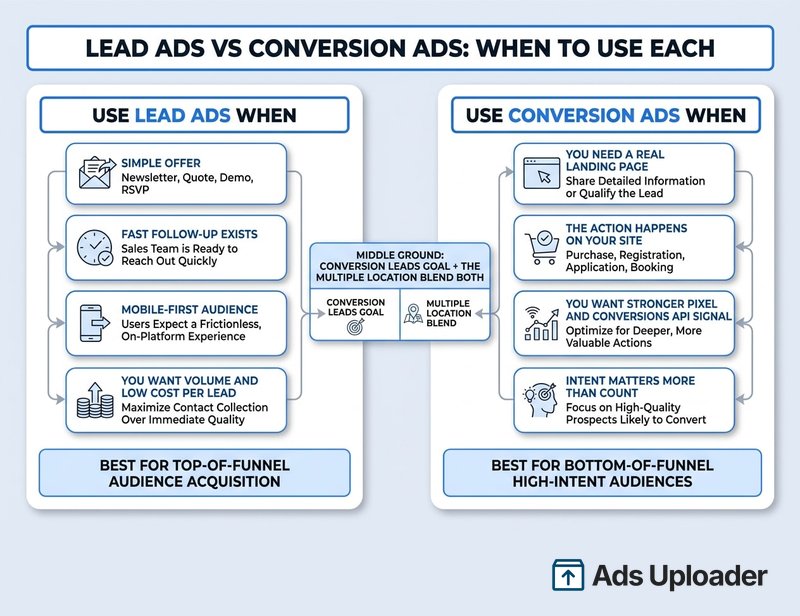
Facebook Lead Ads vs Conversion Ads: When to Use Each
This is the decision that actually moves your numbers, and most people make it on autopilot. The core difference is simple. Lead ads keep the user on Meta and capture data through an instant form. Conversion ads send the user to your website or landing page and track what they do there with the Meta Pixel and Conversions API.
That difference creates a clean trade-off. Instant forms are more convenient and generate more leads, but you give up the website visit and you have to watch lead quality closely. Conversion ads cost more per action and risk losing people during the click-out, but the users who do convert have seen your messaging and tend to be warmer.
Use lead ads when:
- The offer is simple (newsletter, quote, demo, event RSVP, gated download).
- You have a team or automation ready to follow up fast.
- Your audience is mobile-first and unlikely to load a slow page.
- You want volume and a low cost per lead, and you have a way to qualify.
Use conversion ads when:
- You need a real landing page to educate or sell (content-heavy or considered purchases).
- The action happens on your site (checkout, app install, account creation).
- You want stronger pixel and Conversions API signal for optimization.
- Higher upfront intent matters more than raw lead count.
There is a middle path too. The Conversion Leads goal, and the newer "Multiple" conversion location, blend the two by letting Meta route each user to the destination they are most likely to act on. Many strong accounts run both objectives in parallel: lead ads for broad capture, conversion ads to re-engage and upsell the people who land on the site.
Getting Your Leads Out: Leads Center, CRM, and the Conversions API
Capturing a lead is worthless if it sits stranded in Meta. There are three ways to get leads into hands that can act on them.
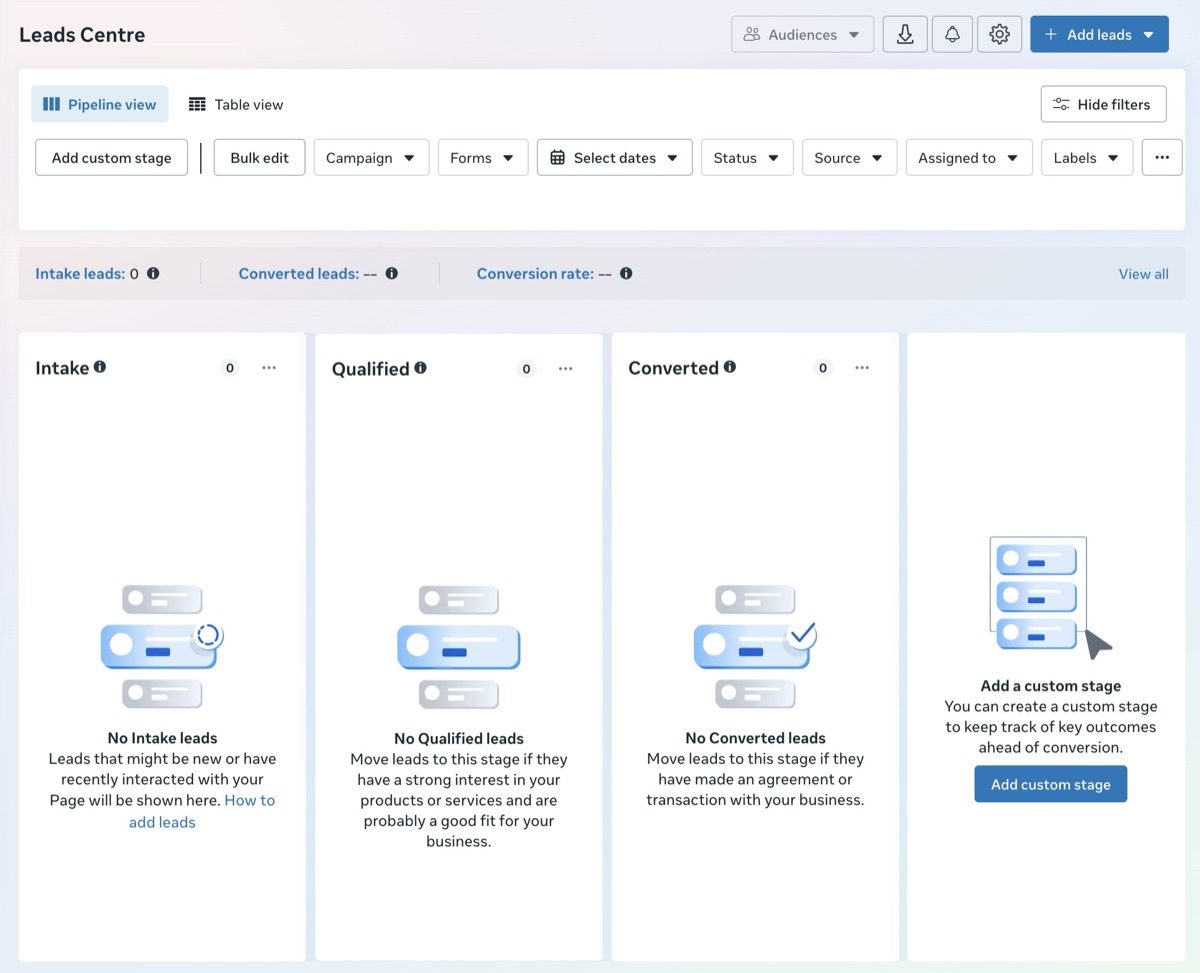
Manual download. In Ads Manager, open the lead ad, click the Leads count in the Results column, and export a CSV. Meta Business Suite's Leads Center centralizes every lead and sorts them into stages (a default funnel of Intake or New, Qualified or Contacted, Converted, and Unqualified or Lost) where you can label, assign, and add notes.
Real-time sync. Connect a CRM (HubSpot, Salesforce, Zoho, and most others offer native or Zapier-based Facebook lead integrations) so each submission lands instantly with no copy-paste. This is the setup you want, because manual downloads are slow and leads only live for so long.
Conversions API and webhooks. For the cleanest pipeline, push leads through Meta's Conversions API or a lead webhook. This delivers leads in real time and lets you send conversion status back to Meta, which is exactly what the Conversion Leads goal needs to optimize for quality.
One retention warning: Facebook only stores form submissions for roughly 90 days. After that, a manual download will not save you. The only way to retrieve older leads is through the API or a CRM sync that already captured them, so set up real-time delivery before you need it.
Save Hours on Creative Testing
Stop uploading ads one by one. Bulk process unlimited creatives with automatic media matching and direct API publishing.
Try Ads Uploader FreeNo credit card required • 7-day free trial
What's New in Facebook Lead Ads for 2026
The format is stable, but Meta keeps adding automation and quality controls. The ones worth knowing:
- Advantage+ leads campaigns. Meta's AI-driven campaign type automates audience and creative decisions to chase lead volume and quality with less manual setup. It is rolling out to more accounts and showing up by default in newer interfaces.
- The "Multiple" conversion location. One campaign can now combine an instant form, a website, calls, and messaging, with Meta serving each person the destination most likely to convert them. It effectively merges what used to be separate Leads and Traffic objectives.
- Lead verification (OTP and work email). Toggle on a phone one-time passcode or a work-email requirement to cut spam and fake entries.
- Form design changes. Meta removed full-screen background images from Facebook instant forms in mid-2024 to lift readability and completion (Instagram still allows a header image), and added a "Rich Media" form type plus an auto-fill reduction toggle that forces manual entry for higher accuracy.
- AI and privacy-first tooling. Expect more AI-generated form copy, deeper Messenger and WhatsApp follow-up, and contextual targeting options as Meta leans into privacy-safe delivery. Watch Meta's Business News blog for the 2026 specifics.
How to Actually Get the Most From Lead Ads
Here is the part that actually decides results. Lead ads are cheap and fast to launch, which means the constraint is never finding an angle. The constraint is how many creative, form, and offer combinations you can put into the auction to learn what works. One "inspired" ad is not a test. A matrix of variants is.
The trap is that Ads Manager makes building that matrix slow. Uploading a dozen creative and form pairings by hand is an afternoon of clicking, so most teams quietly cap themselves at three ads and learn slowly. The fix is to configure your campaign, audience, and form once, then bulk-launch every variant at once. That is the entire reason Ads Uploader exists: turn the upload step from a bottleneck into a non-event so you can test lead ads at the volume that actually teaches you something.
Find the angle, build the matrix, launch the volume, read the result, repeat. The teams that win at Facebook lead generation are not the ones with a secret targeting trick. They are the ones testing more, faster.
Frequently Asked Questions
Do Facebook lead ads actually work?
Yes, for the right use case. Because the form opens inside Facebook or Instagram with no landing page to load, completion rates are high and cost per lead is often lower than sending traffic off-platform. Meta has shown campaigns cutting cost per lead by more than half. The catch is that an easy form invites low-effort sign-ups, so "working" depends on how you qualify leads and how fast you follow up.
Why am I getting junk leads from Facebook lead ads?
Usually because you are running the default "More Volume" form, which lets anyone submit in two taps. Switch to "Higher Intent," add a qualifying question or two, and turn on SMS or work-email verification. Broad creative also pulls in irrelevant sign-ups, so tighten the offer in your copy. More friction means fewer leads, but the ones you keep are far more likely to be real.
How much do Facebook lead ads cost in 2026?
There is no single number. Cost per lead commonly lands around $20 to $70 depending on industry, audience, and region, with B2B and finance running higher. Your cost is set by Meta's auction, so run a controlled test and measure your own figure. Lead ads usually beat off-site conversion campaigns on cost per submitted lead, but those leads often need more vetting.
What is the difference between Facebook lead ads and conversion ads?
Lead ads collect contact details on-platform through an instant form. Conversion ads send people to your website and track actions with the Pixel and Conversions API. Lead ads win on volume and low cost per lead but skip the website visit. Conversion ads cost more per action but tend to attract higher-intent users and feed Meta richer optimization signals.
How do I download my leads from Facebook?
In Ads Manager, open the lead ad, click the Leads count in the Results column, and export a CSV. You can also pull leads from Leads Center in Business Suite. Facebook only stores submissions for about 90 days, so sync leads in real time with a CRM or the Conversions API for anything beyond a quick check.
Do I need a landing page for Facebook lead ads?
No. The instant form removes the need for an external page, which is why lead ads convert so well on mobile. Strong ad copy still helps, because informed prospects submit better information. If you would rather drive people to your own page and track on-site behavior, that is a conversion ad, and there a landing page with the Meta Pixel is required.
More Volume vs Higher Intent forms: which should I use?
More Volume pre-fills fields and lets users submit fast, maximizing sign-ups but inviting low-quality entries. Higher Intent adds a review step, so fewer but more deliberate leads. Use Higher Intent when a rep has to call every lead. Use More Volume when a nurture sequence can absorb and filter a larger, noisier list.
Are Facebook lead ads GDPR compliant?
They can be. Every form requires a privacy policy link, and Meta lets you add a custom consent checkbox or disclaimer for GDPR and CCPA. Implement those and the form meets the technical requirements. Handling the data lawfully afterward is your responsibility. Lead ads for housing, employment, or credit also fall under Special Ad Category rules that restrict targeting and questions.
Conclusion
Facebook lead ads are the easiest way to collect a contact on Meta, and that ease cuts both ways. The instant-form flow drives down friction and cost per lead, but it hands you the job of filtering quality and following up before the lead goes cold. Get the form type right, ask a qualifying question or two, verify where it counts, and wire leads into your CRM in real time, and lead generation Facebook ads become one of the most efficient channels you can run.
The strategic call is lead ads versus conversion ads: use lead ads for simple offers and fast follow-up, conversion ads when you need a real landing page and stronger on-site signal, and a blend when it fits. But the channel only pays off when research becomes tests in the auction. Find the angle, build the matrix, and launch the volume. That last step is where most teams stall, and it is exactly the step worth automating.