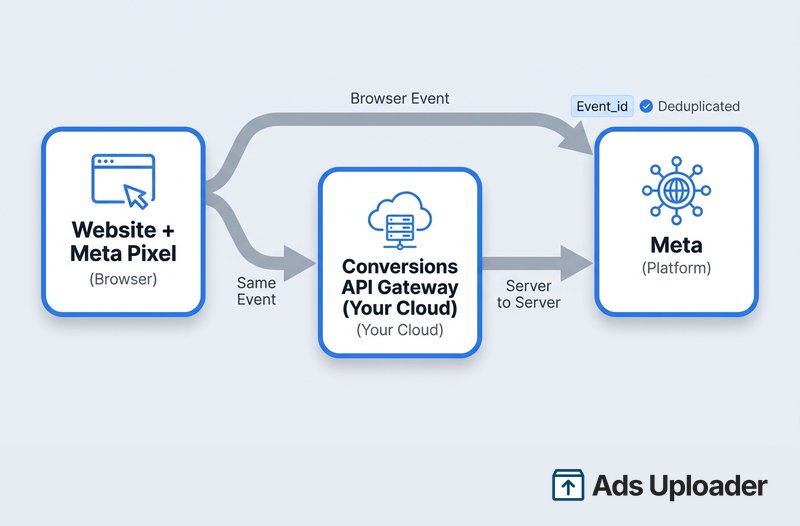
The Conversions API Gateway is a self-serve, no-code way to run Meta's Conversions API by provisioning a server in a cloud account you own. The Meta Pixel sends browser events to both Meta and the Gateway, and the Gateway forwards them server-to-server to the Conversions API, using an event_id to deduplicate the two. You configure it in Events Manager and host it on AWS or GCP, or have a partner host it. It brings server-side tracking live in hours instead of weeks, without a developer.
There are several ways to get server-side events to Meta, and they trade off effort, cost, and control differently. The Conversions API Gateway is the route that gets you there quickly, without writing code and without handing your event data to a third-party platform you do not control. It is a distinct setup method, not a separate kind of tracking, so it helps to know exactly where it fits before you commit.
This guide covers the Gateway specifically: what it is, how it works, who it suits, the two ways to deploy it, and how it stacks up against direct and native integrations. If you want the groundwork on what the Conversions API is and how deduplication works, start with the hub guide, then come back here to choose your setup method.
What Is the Conversions API Gateway?
The Conversions API Gateway is a standalone Meta product, offered as a self-serve configuration option inside Events Manager, that runs the Conversions API for you without any coding. It sends your website events through two channels at once: the Meta Pixel from the browser and the Conversions API from a server, in a redundant, deduplicated setup. Meta first launched it in 2021 and continues to maintain it, with updates landing through 2026.
The appeal is practical. According to Meta, the Gateway brings Conversions API integration time down from weeks to hours or even minutes, carries no software license fee of its own, asks for very little technical lift, and auto-updates with the host admin's consent so it stays current without manual maintenance.
The key thing to understand is ownership. The Gateway is not a Meta-hosted service that runs on Meta's servers. You, or a partner acting on your behalf, provision and own the server it runs on inside your own cloud account. That distinction shapes everything else: the cost model, the data control, and who is responsible for keeping it running.
How the Gateway Works
The data flow is straightforward once you picture it. A Meta Pixel that has been configured with your Gateway endpoint fires as usual in the browser, sending events to Meta. At the same time, it sends those same events to the Gateway. The Gateway receives the browser events, transforms them into Conversions API events, and forwards them server-to-server to Meta. An event_id is generated automatically and carried on both paths, so Meta can match the browser event and the server event and count them once rather than twice.
Under the hood, the Gateway is made of two parts. A middleware module does the work of receiving, transforming, and forwarding events. An admin portal, a web UI, lets you administer and monitor the instance. You reach that UI at your Gateway endpoint, on the /hub/capig path, where it shows your connected pixels, event activity, the Conversions API success rate, and product notifications.
One instance goes a long way. The Gateway supports multiple pixels and multiple domains at once, so an agency or a business running several sites can cover them all from a single deployment rather than standing up one per property.
Who the Conversions API Gateway Is For
The Gateway fits advertisers who want reliable server-side tracking quickly and without a development project. It is a good match when:
- You want server-side events live in hours, not after a multi-week build.
- You do not have, or do not want to tie up, developer resources.
- You would rather keep event data flowing through your own cloud than route it through a third-party platform.
- Your website platform has no clean native Conversions API integration.
- You manage several domains or pixels and want one instance to cover them.
- You want a predictable cost tied to cloud usage.
When to Consider Another Approach
The Gateway is not the right tool for every situation, and it is worth being honest about that. Larger or more regulated organizations often have needs it does not directly serve: a formal uptime guarantee and monitoring, a security review process for any self-managed infrastructure, server-side tracking across several ad platforms like Google, TikTok, and Snap from one place, or fine-grained control over exactly how each piece of customer data is hashed and sent. A customer data platform or a custom integration can be a better fit there.
And if your platform already offers a free native Conversions API integration, such as Shopify's app or a WooCommerce plugin, that path is usually simpler than deploying the Gateway at all.
Launch More. Click Less.
Upload hundreds of creatives at once, auto-match thumbnails to videos, and publish straight to your ad accounts through Meta's API.
Try Ads Uploader FreeNo credit card required • 7-day free trial
How to Deploy the Conversions API Gateway
Both deployment routes start in the same place. In Events Manager, open your dataset, go to Settings, find the Conversions API section, and click Get Started. From there you choose whether to host the Gateway yourself or have a partner host it.
Option A: Self-Host in Your Own Cloud
Self-hosting runs the Gateway inside a cloud account you own. Meta supports three services for this: AWS EKS, AWS ECS Express, and GCP. You do not build the infrastructure by hand. Meta provides templates that auto-deploy it, which is why no developer is required for a standard setup.
The one configuration step that always applies is DNS. You point a subdomain, something like capig.example.com, at your Gateway endpoint so the Pixel can reach it. You then connect your pixel or pixels and the domains you want to cover. Authentication to Meta runs through a Meta Business system user and an access token created during setup, which is the same credential pattern other server-side integrations rely on. If you want the detail on that piece, see how to set up the system user and access token.
With self-hosting, your only running cost is the cloud resource itself.
Option B: Host With a Partner
If you would rather not run any infrastructure, choose Host with a partner on the same Events Manager screen and pick a provider. Several partners offer this, such as Stape or Datahash, and they provision and maintain the Gateway instance for you. The trade-off is a recurring monthly fee that scales with your event volume (each partner publishes current plans on its pricing page), and the fact that your event data passes through the partner's infrastructure rather than only your own.
Verify the Gateway Is Firing
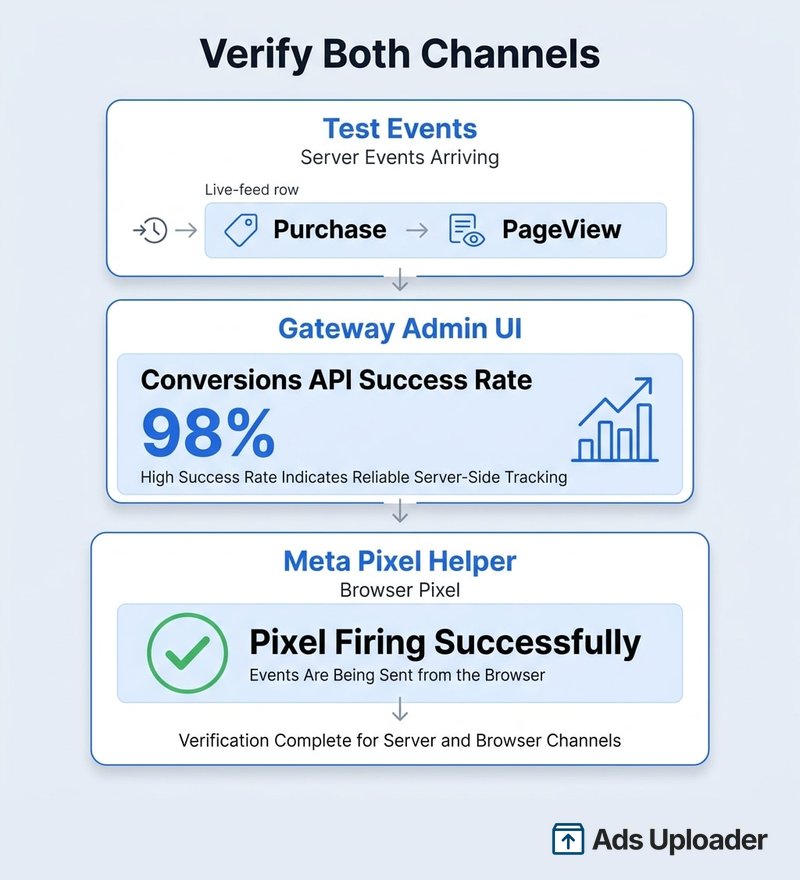
Once it is deployed, confirm both channels are working. Use the Test Events tool in Events Manager to watch server events arrive in real time, and open the Gateway admin UI to check the Conversions API success rate, which tells you what share of browser events are reaching Meta through the server path. Because the Pixel still fires client-side as the redundant half of the setup, you can confirm that side with the Meta Pixel Helper browser extension. A healthy setup shows events arriving on both channels and deduplicating cleanly on the shared event_id.
Save Hours on Creative Testing
Stop uploading ads one by one. Bulk process unlimited creatives with automatic media matching and direct API publishing.
Try Ads Uploader FreeNo credit card required • 7-day free trial
Gateway vs Direct Integration vs Partner Integration
The Gateway is one of a few ways to run the Conversions API. Choosing well is mostly about how much control you need versus how much effort you can spend.
- Direct integration: a developer writes the server-to-server code that sends events to the Conversions API. It offers the most control over every field and event, but it takes the most effort up front and the most ongoing maintenance.
- Conversions API Gateway: no code, self-provisioned in your own cloud, fast to deploy, low maintenance thanks to auto-updates, and the server stays under your ownership.
- Native or partner integration: a platform-native integration (Shopify, WooCommerce) or a fully managed partner. Simplest where available, with the least control over the implementation.
| Method | Setup Effort | Cost | Technical Lift | Data Control | Maintenance |
|---|---|---|---|---|---|
| Direct Integration | High | Developer time | High | Full | High |
| CAPI Gateway (self-host) | Low | Cloud resource only | Low | High (own cloud) | Low (auto-updates) |
| CAPI Gateway (partner-host) | Low | Monthly partner fee | Low | Medium (via partner) | Low (managed) |
| Native / Partner Integration | Lowest | Free to monthly | Lowest | Low | Low |
GTM server-side is a fourth route some teams use, and it is covered in the Conversions API hub guide rather than here.
Is the Gateway the Same as Signals Gateway?
No, though the names are close. The Conversions API Gateway is focused on one job: server-side conversion tracking for Meta. Signals Gateway is Meta's broader, newer first-party data hub. It handles web, app, business messaging, offline, and CRM data, uses the newer Signals Pixel, and can route data to destinations beyond Meta.
In 2026, Meta has been steering newer setups toward Signals Gateway as the more capable option. The Conversions API Gateway remains a valid, focused choice for advertisers who specifically want Meta server-side tracking, and the two can run alongside each other. If you are choosing today and expect to need multi-destination data routing later, it is worth reading up on Signals Gateway before you commit to a Gateway-only setup.
Frequently Asked Questions
What is the Meta Conversions API Gateway? It is a self-serve, no-code way to run Meta's Conversions API by provisioning a server in a cloud account you own. The Meta Pixel sends browser events to both Meta and the Gateway, and the Gateway forwards them server-to-server to the Conversions API. It is a standalone Meta product you configure in Events Manager, not a Meta-hosted service.
Is the Conversions API Gateway free? The Gateway software itself carries no Meta license fee. You pay for the infrastructure it runs on. If you self-host, that is your AWS or GCP cloud bill. If you host with a partner, it is a flat monthly partner fee that scales with event volume; check the partner's current pricing page. There is no per-event charge from Meta.
What is the difference between the Conversions API Gateway and a direct Conversions API integration? A direct integration means a developer writes server-to-server code to send events to the Conversions API. It gives the most control but takes the most effort and ongoing maintenance. The Gateway is a no-code alternative: Meta's templates provision a server in your cloud, and it converts and forwards Pixel events automatically, updating itself over time.
Do I need a developer to set up the CAPI Gateway? Usually no. The self-host flow uses Meta-provided templates to deploy the infrastructure automatically, and the partner-host flow is handled by the partner. The main technical task is a DNS change to point a subdomain at your Gateway endpoint. A developer or IT contact helps if your DNS or cloud access is locked down, but no custom code is required.
Should I self-host the Gateway or use a partner? Self-host when you want to keep data in your own cloud and pay only infrastructure costs, and you can manage a cloud account and DNS. Host with a partner when you would rather not run any infrastructure and prefer a managed instance for a monthly fee, accepting that data passes through the partner. Both are configured from the same Events Manager screen.
Is the Conversions API Gateway the same as Signals Gateway? No. The CAPI Gateway is focused on server-side conversion tracking for Meta. Signals Gateway is Meta's broader first-party data hub that handles web, app, messaging, offline, and CRM data using the newer Signals Pixel, and can route data to destinations beyond Meta. They are related products that can run together, and Meta has been steering newer setups toward Signals Gateway.
How do I verify the Conversions API Gateway is working? Use the Test Events tool in Events Manager to confirm server events arrive, and check the Conversions API success rate in the Gateway admin UI. Because the Pixel still fires in the browser as the redundant half of the setup, you can confirm that side with the Meta Pixel Helper Chrome extension. Healthy setups show events from both channels deduplicating cleanly.
Choosing the Gateway With Confidence
The Conversions API Gateway is the no-code, self-owned middle path to server-side tracking. It lives between a hand-coded direct integration and a fully managed native one: faster and lighter than building it yourself, more under your control than handing everything to a platform. You deploy it from Events Manager, either self-hosted on AWS or GCP or hosted by a partner, and it runs the redundant Pixel plus Conversions API setup with deduplication built in.
Choose it when you want speed and data ownership without a development project, and look at a native integration or a customer data platform when those fit your situation better. Whichever route you pick, make sure your Pixel is firing first, set up the system user the Gateway authenticates with, and keep an eye on event match quality as the server-side data starts flowing.
For Meta's cloud onboarding and DNS details, see the Gateway setup guide.
