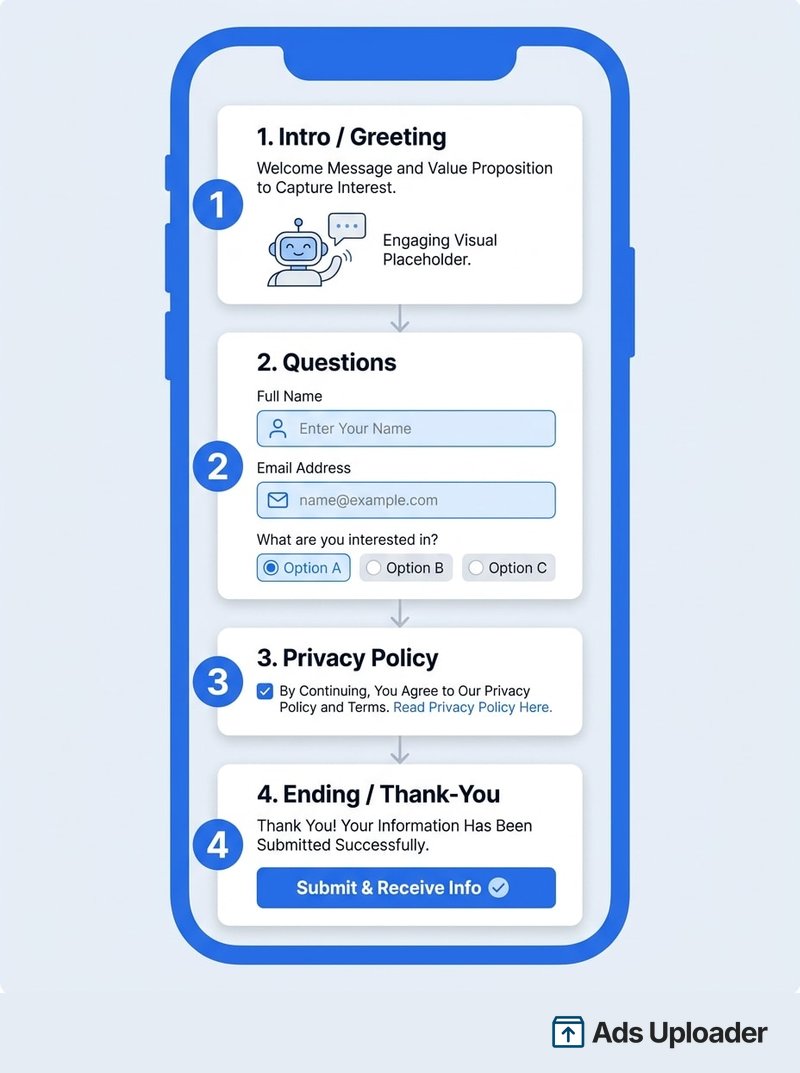
A Facebook instant form is the native lead form that opens inside Facebook or Instagram when someone taps a lead ad, so they never leave the app. It autofills name, email, and phone from the person's Meta profile, then submits in a couple of taps. Each form has four sections (intro, questions, privacy policy, ending) and three types: more volume, higher intent, and rich creative. You can add up to 15 custom questions and build it in Ads Manager, Business Suite, or your Page. Lower friction means more, cheaper leads.
Most advertisers pour all their energy into the creative and then ship whatever form Meta loads by default. That is backwards. The form is the conversion event. It is the exact moment someone decides to hand over their details or bounce, and it is where a campaign quietly bleeds budget into junk leads that no salesperson will ever close. Facebook's lead ad format keeps the entire transaction on-platform, and the instant form is the part of that transaction you actually control.
This guide is the complete reference for the form itself. You will get the anatomy (the four sections every form is built from), all three form types and when to use each, the exact build steps across all three places Meta lets you create one, the copy that makes a form convert, and the settings that engineer lead quality so you stop drowning in garbage submissions. Campaign and ad-set setup lives in its own guide; here we stay zoomed in on the form.
What Is a Facebook Instant Form?
A Facebook instant form (you will also see it called a lead form, a Facebook lead ads form, or just an instant form) is the in-app form that powers Meta's lead generation ads. When someone taps your lead ad on Facebook or Instagram, instead of being sent to a website, they stay on-platform and a form slides up. They confirm a few prefilled fields, answer any questions you added, tap submit, and they are now your lead.
The magic is friction removal. Meta prefills contact details like name, email, and phone number straight from the person's profile, so completing a form is closer to two taps than two minutes. People can edit those prefilled answers, but most do not bother, which is exactly the point. Because nobody leaves the app and nothing has to load, instant forms routinely produce a lower cost per lead than sending the same traffic to a landing page.
Meta favors advertisers who use them for the same reason: on-platform forms keep users inside Facebook and Instagram. One small naming note for 2026: Meta has been relabeling the old "Sponsored" tag on ads to simply "Ad," so the label above a lead ad may look different than you remember. The form behind it works the same way.
Anatomy of an Instant Form: The Four Sections
Every instant form is built from the same four building blocks. Learn these and the builder stops feeling like a maze, because each screen in the editor maps to one of them.
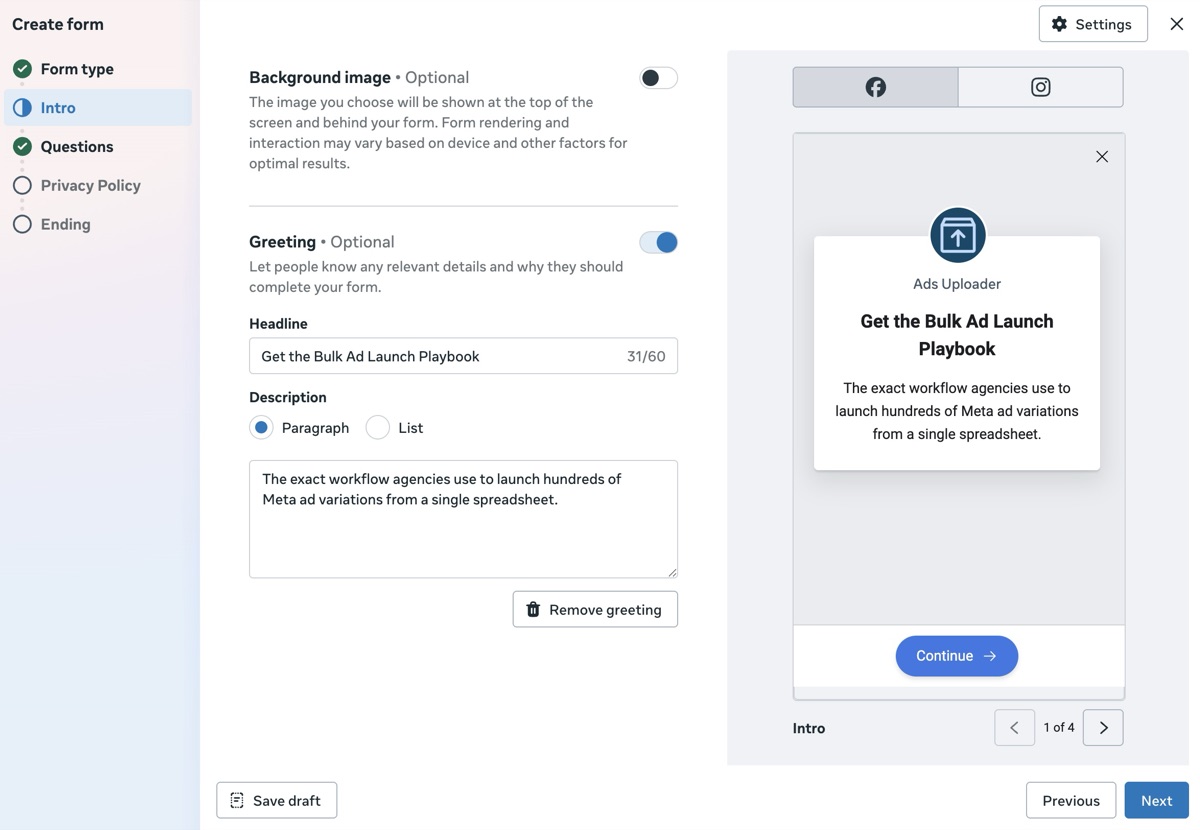
1. Intro (Greeting)
The intro, sometimes shown as the greeting, is the opening screen. You get a headline and a short description to tell people what they will get in return for filling out the form. It is optional for most forms, but it is mandatory if you choose the rich creative form type. You can also toggle on a background image, either reusing the image from your ad or uploading a new one.
2. Questions
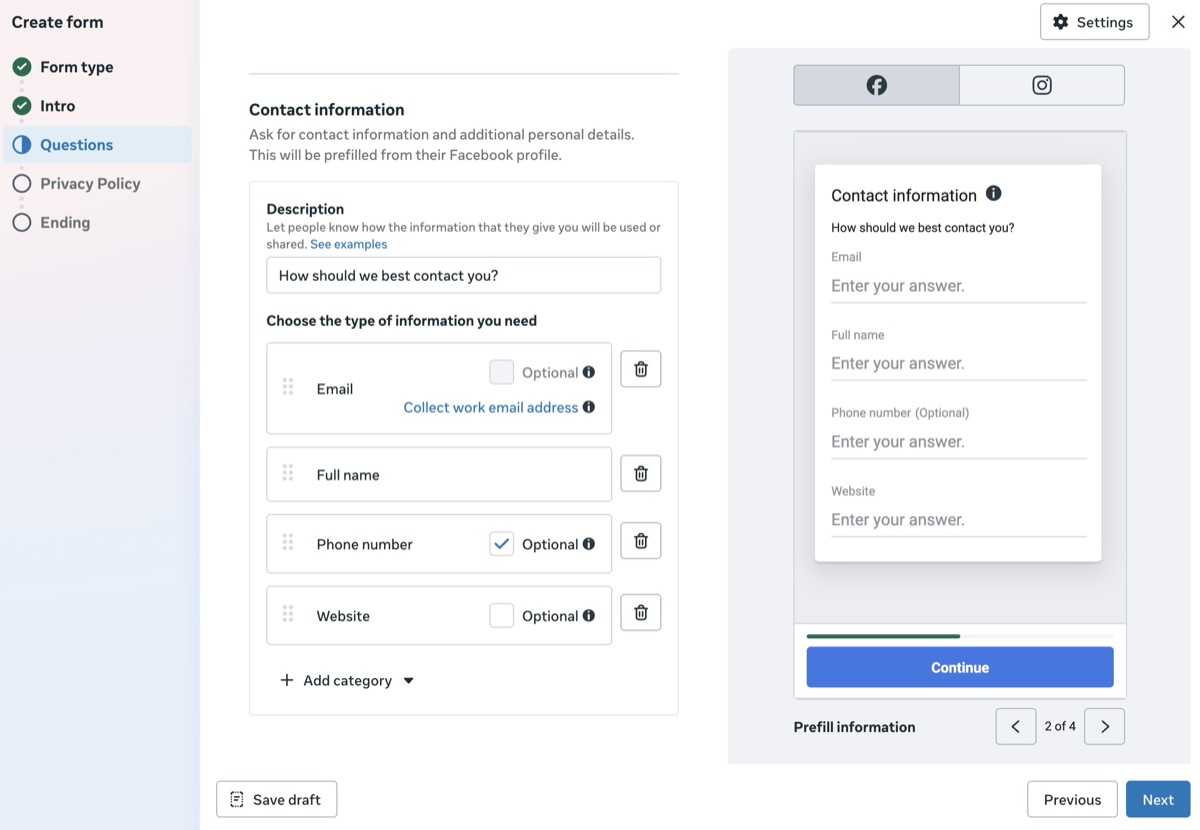
This is the heart of the form, and the only section that is genuinely required: every form needs at least one question. Two things happen here. First, you choose which contact fields Meta prefills from the person's profile (name, email, phone number, and more). Second, you add up to 15 custom questions of your own. Custom question types include:
- Multiple choice, with an option to let people select more than one answer
- Short answer (free text), with optional validation rules like minimum and maximum length
- Conditional, which changes later questions based on earlier answers
- Appointment request, for booking-style offers
- Store locator, to point people to your nearest location
3. Privacy Policy
A privacy policy URL is required to run instant forms. This section tells people what you will do with their information, which is both a legal requirement and a genuine trust signal. You can drop in an existing privacy policy URL from your website along with custom link text, and you can add a custom disclaimer for extra notices such as marketing opt-ins. The detail of what that policy needs to cover gets its own treatment in our Facebook lead ads privacy policy guide.
4. Ending (Thank-You Screen)
The ending, also called the message for leads, is the confirmation screen people see after they submit. You get a headline, a description, a link, and a call-to-action button. Use it to set expectations ("A specialist will call you within one business day"), hand over a promo code, link to gated content like a PDF, or send people to your site. You can also turn on the option to start a conversation in Messenger here.
One housekeeping limit worth knowing: you can only save up to 100 instant forms. Create a 101st and Meta keeps the most recent 100.
Launch More. Click Less.
Upload hundreds of creatives at once, auto-match thumbnails to videos, and publish straight to your ad accounts through Meta's API.
Try Ads Uploader FreeNo credit card required • 7-day free trial
The 3 Instant Form Types (More Volume vs Higher Intent vs Rich Creative)
When you start a new form, the first decision is the form type. It sets the entire experience, so choose it deliberately rather than clicking past the default.
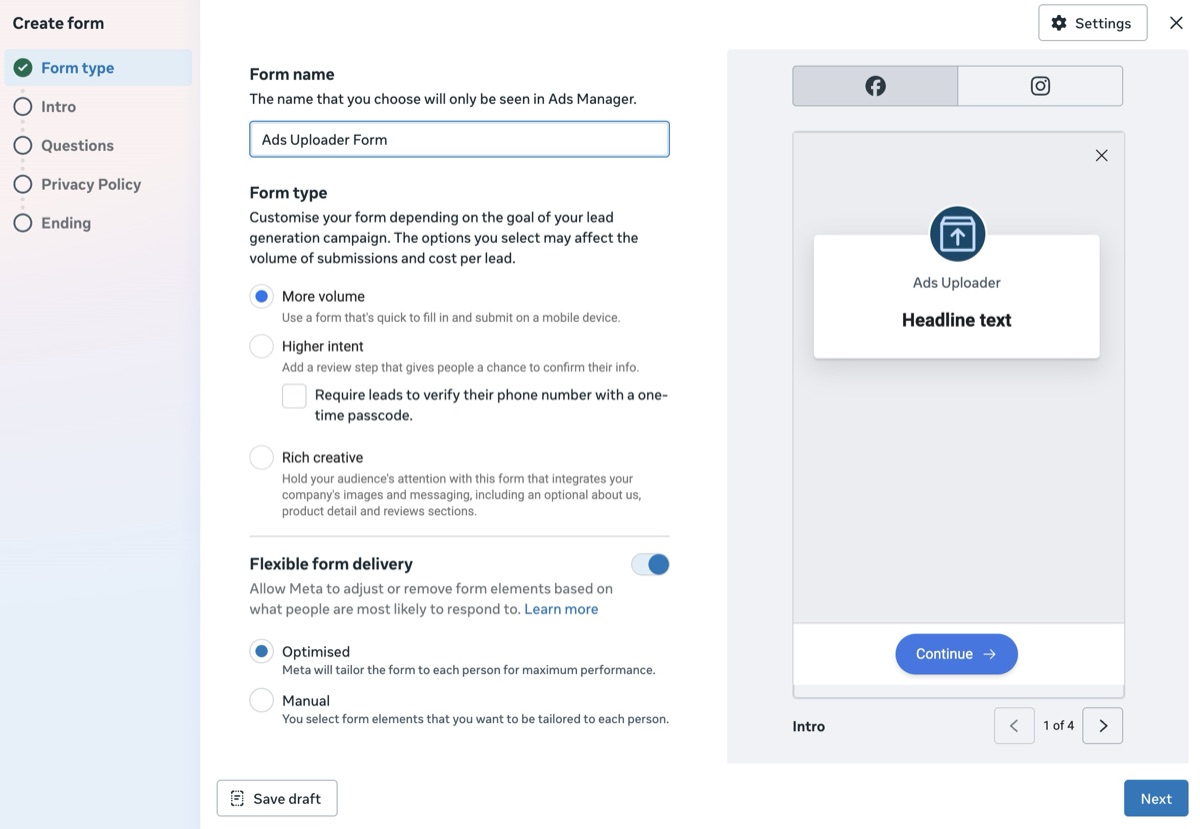
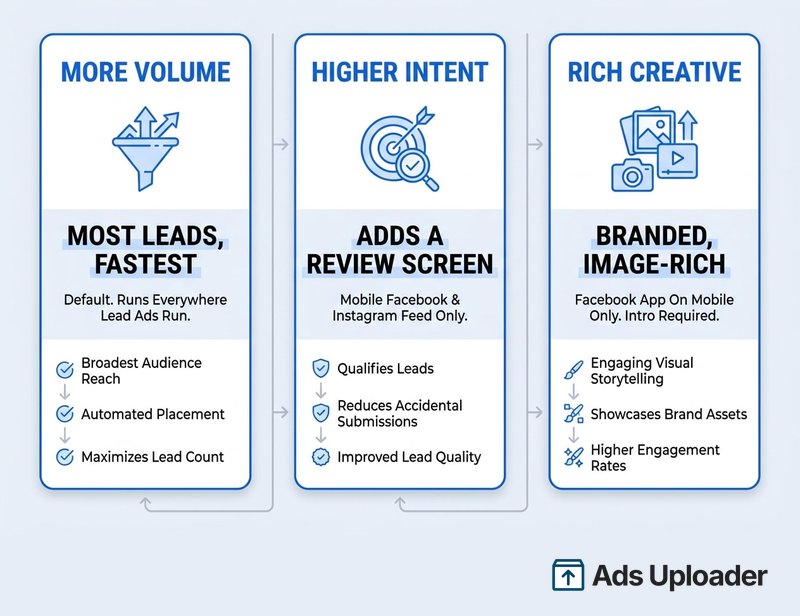
More volume (default). A fast, single-screen form designed to generate as many leads as possible. People fill it out and submit in one motion, with no extra steps. This is the right starting point for most campaigns, and it works across the placements where lead ads run.
Higher intent. This adds a review screen after the questions, giving people a chance to confirm their information before they submit. That one extra tap filters out accidental and half-interested submissions, so you trade some volume for cleaner leads. One placement limit to plan around: higher intent forms are only delivered on Facebook Feed and Instagram feed on mobile devices, so they do not appear on desktop.
Rich creative. This lets you bring your brand into the form itself: adjust the color scheme, add relevant images, and include extra product detail. The intro section becomes mandatory. The catch is reach, because rich creative features are only delivered in the Facebook app on mobile.
The practical call is simple. Start with more volume. If the leads coming through are low quality, switch to higher intent and let the review screen do some filtering. Reach for rich creative when brand presentation genuinely matters to the offer, accepting the narrower delivery.
How to Create a Facebook Instant Form (Step by Step)
There are three places to build an instant form, and they are not equal. Before any of this, you need a Leads campaign in place. The campaign, ad set, and ad creative setup is a guide of its own, so follow our walkthrough on how to create Facebook lead ads first, then come back here for the form editor itself.
In Meta Ads Manager (Full Control)
This is the canonical flow and the only one with the full feature set:
- In Ads Manager, create a campaign with the Leads objective.
- At the ad set level, select Instant forms as your conversion location.
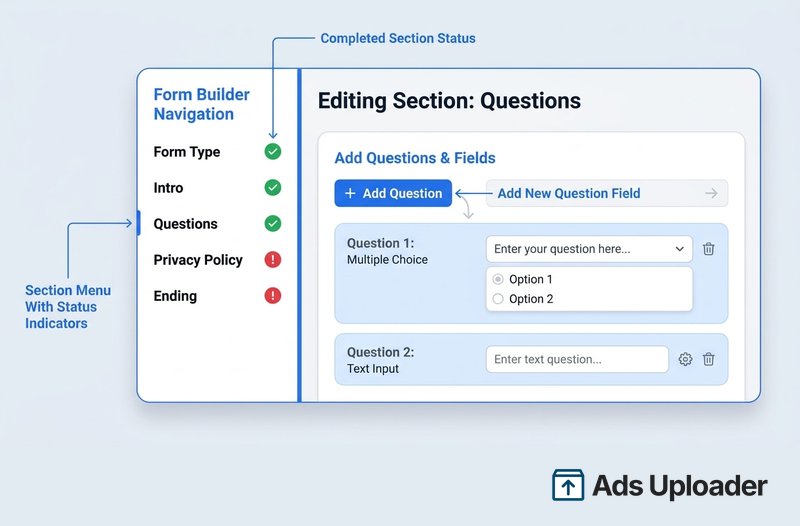
- At the ad level, click Create form (or pick an existing one). The form editor opens. A green check marks a completed section and a red exclamation mark flags an incomplete one, and you can click section names on the left to jump around.
- Choose your form type (more volume, higher intent, or rich creative) and click Next.
- Set up the intro and greeting: optionally add a background image, then write a headline and description.
- Build the questions: add up to 15 custom questions, toggle on conditional logic if you want a dynamic form, and choose which contact fields prefill from the profile.
- Add your privacy policy URL and link text, plus a custom disclaimer if needed.
- Write the ending screen: headline, description, link, and call-to-action. Optionally enable Messenger chat.
- If you want SMS verification, make phone number a required field and check Require SMS verification to submit form, then create the form.
From Your Facebook Page (Simple)
From your Page, click Advertise, then Create new ad, set the goal to Get more leads, and you can build a stripped-down form inline. The trade-offs: only short-answer questions are available, Advantage+ creative is on by default, and you cannot target people under 18.
In Meta Business Suite (Basic)
Business Suite offers a similar basic builder, good for collecting straightforward contact details and not much else.
Here is the rule that catches people out: the advanced features (conditional logic, rich creative, gated content, SMS verification, and work email validation) only exist when you build the form in Ads Manager. If you create from your Page or Business Suite, those options simply will not appear.
Editing and the One-Way Door
You cannot edit an instant form once it is published and live. Drafts are fully editable, but the moment a form is attached to a running ad it is locked. To change a published form, duplicate it, edit the copy, and attach the new version. Build carefully and test first, because there is no quick fix after launch.
Save Hours on Creative Testing
Stop uploading ads one by one. Bulk process unlimited creatives with automatic media matching and direct API publishing.
Try Ads Uploader FreeNo credit card required • 7-day free trial
Writing Instant Form Copy That Converts
It is easy to stop at "add a greeting." But the words inside the form do real work, and this is where the average advertiser leaves leads on the table.
Intro headline. State the offer and what the person gets back, plainly. "Get your free roof inspection quote" beats "Welcome to our form." Keep the description short so it does not truncate on mobile.
Question wording. Write each question to be short, specific, and unambiguous. Split compound questions into separate ones, label the answer format clearly, and prefer multiple choice over free text where you can, since structured answers are cleaner and easier to act on.
Ending CTA. Tell people exactly what happens next and when. "Thanks, we will text you a booking link within an hour" sets expectations and warms the lead for your follow-up. If you promised gated content, make the download obvious.
The deeper craft here, character limits, hooks, and the difference between copy that gets tapped and copy that gets scrolled past, is the same discipline as writing the ad itself. Our guide to Meta ad copy specs covers the limits and the writing principles that carry straight over to your form fields. As a rule, every extra field costs you completions, so ask only for what you will actually use.
Engineering Lead Quality (How to Stop Junk Leads)
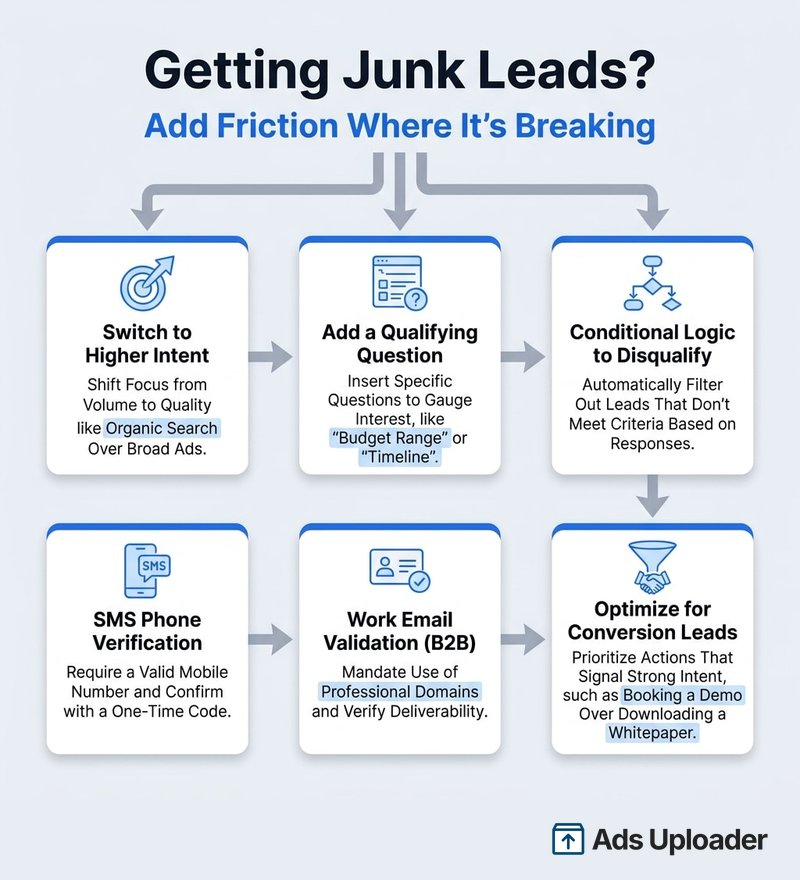
"I'm getting junk leads from my instant form" is the single most common complaint about this format, and it is usually self-inflicted. A two-tap form plus broad targeting is a machine for collecting people who do not really want what you sell. The fix is to add friction on purpose, in the right places. Think of it as a dial, not a switch.
- Switch to higher intent. The review screen alone weeds out a chunk of accidental and half-hearted submissions.
- Add a qualifying question. One sharp multiple-choice question ("What's your timeline to buy?") deters tire-kickers and tells your sales team who to call first.
- Use conditional logic to disqualify. Set an answer to end the form or route to a polite "this offer is for homeowners only" message, so the wrong people never enter your pipeline. A homeowner or budget filter is the classic example.
- Turn on SMS phone verification. Requiring a one-time code confirms the phone number is real. When Cosentino Group added it, they saw a 32% drop in invalid phone numbers and 2.2x more conversions versus campaigns without it.
- Validate work email for B2B. This forces a company domain instead of a throwaway Gmail address.
- Optimize for conversion leads. Connect your CRM through the Conversions API and let Meta optimize toward leads that actually convert, not just submit. It usually means fewer leads of noticeably higher quality.
You will rarely need all of these at once. Add one or two where quality is actually breaking, measure, and adjust. Stacking every filter onto a cold campaign can choke volume to nothing.
Where Your Leads Go: Testing, Download, and CRM
A form that collects leads into a void is worse than useless. Sort out delivery before you spend a dollar.
Test first. Meta's Lead Ads Testing Tool lets you generate a fake submission so you can confirm the form works and that leads land where they should. Note the quirk: you get one test lead per form at a time, so delete the existing test lead before creating another. You can read Meta's testing and troubleshooting docs for the exact steps. Because published forms cannot be edited, testing is your last chance to catch mistakes cheaply.
Download. You can pull leads as a CSV from Meta Ads Manager, your Facebook Page, or the Leads Center in Meta Business Suite.
Integrate. For anything beyond a hobby, push leads to your CRM in real time through a native integration, Zapier, or the Conversions API. Two reasons this matters: speed-to-lead is one of the biggest levers on conversion, and Meta only retains lead data for about 90 days. Export or sync promptly, or you will lose leads you already paid for.
Instant Form Examples and Benchmarks
The pattern across Meta's published case studies is consistent: native instant forms beat sending mobile traffic to a website form, and lead-quality features pay for the volume they cost.
- GymNation moved from website forms to Facebook and Instagram lead ads with instant forms and saw a 64% increase in leads at a 39% lower cost per lead.
- Phoenix Truck Driving School ran an instant form inside an Advantage+ leads campaign against their usual manual setup and got 36% lower cost per lead with 53% more total leads.
- Cosentino Group layered SMS verification onto their form and cut invalid phone numbers by 32% while more than doubling conversions.
- Aldar Properties connected their CRM through the Conversions API and optimized for appointment bookings, landing a 3x lower cost per booking and 6x more bookings.
Read these as templates, not trophies. The volume plays (GymNation, Phoenix) lean on the native form's low friction; the quality plays (Cosentino, Aldar) lean on verification and conversion optimization. Pick the lever that matches your bottleneck.
Frequently Asked Questions
What is a Facebook instant form?
It is the native form that opens inside Facebook or Instagram when someone taps a lead ad, letting them submit their details without leaving the app. It autofills name, email, and phone from the person's Meta profile, has four sections (intro, questions, privacy policy, and ending), and comes in three types. It is the standard way to collect leads using Meta's Leads objective.
What's the difference between more volume, higher intent, and rich creative?
More volume is the fast, default form built for the most leads. Higher intent adds a review screen to filter out weak leads but only runs on Facebook and Instagram mobile feeds. Rich creative adds branding, images, and a mandatory intro but only runs in the Facebook mobile app. Start with more volume and move to higher intent if quality slips.
How many questions can I add to a Facebook instant form?
Up to 15 custom questions, plus the prefilled contact fields. Custom types include multiple choice, short answer, conditional, appointment request, and store locator. At least one question is required, and fewer questions generally means a higher completion rate.
Can I edit a Facebook instant form after publishing?
No. A published form attached to a live ad is locked. Drafts are editable, but to change a live form you must duplicate it, edit the copy, and attach the new version. Test before publishing rather than fixing afterward.
Do I need a privacy policy for a Facebook instant form?
Yes. A privacy policy URL is required to publish an instant form. You can reuse an existing privacy policy URL from your website, and you can add a custom disclaimer for extra notices like marketing opt-ins.
Can I create a Facebook instant form without Ads Manager?
Yes, from your Facebook Page or in Meta Business Suite, but both are basic and only support simple contact details and short-answer questions. Advanced features like conditional logic, rich creative, SMS verification, and work email validation only appear in Ads Manager.
Why am I getting junk leads, and how do I fix it?
A frictionless form plus broad targeting invites careless sign-ups. Add a qualifying question, use conditional logic to disqualify, switch to higher intent, enable SMS or work email verification, and optimize for conversion leads with your CRM connected.
Where do instant form leads go and how do I download them?
They are stored in Meta and downloadable as a CSV from Ads Manager, your Page, or the Leads Center in Business Suite. Connect a CRM for real-time delivery, and export within roughly 90 days before Meta deletes the data.
Conclusion
The instant form is the part of a lead ad you have the most control over and the part most advertisers ignore. Get the fundamentals right and the rest of the campaign has something solid to stand on: understand the four sections, pick the form type that matches your goal, write copy that earns the tap, and engineer lead quality with the right filters instead of accepting whatever the default form hands you. A well-built Facebook instant form is the difference between a CRM full of buyers and a spreadsheet full of noise.
Once your form is converting, the bottleneck shifts. The constraint is no longer the form, it is how many ad and creative variants you can run against it to find what wins.