Meta ad guidelines are the official rules governing what advertisers can and cannot promote across Facebook, Instagram, Messenger, and Audience Network. Formally called Meta Advertising Standards, these policies cover prohibited content such as illegal products and misleading claims, restricted categories including alcohol and financial services, creative requirements for text and imagery, targeting limitations for special ad categories, and landing page standards. Meta enforces these guidelines through automated review that typically completes within 24 hours, rejecting non-compliant ads and restricting repeat violators' accounts.
Your ad just got rejected. Meta's explanation is a generic policy link that tells you nothing useful about what you actually did wrong.
This happens constantly because Meta's ad guidelines are scattered across dozens of pages in the Transparency Center, the Business Help Center, and the Community Standards. The official documentation is thorough but nearly impossible to use as a working reference when you're building ads and need a fast answer on whether something is allowed.
This guide distills the full Meta Advertising Standards into practical categories: what's always banned, what's allowed with restrictions, where most rejections actually happen, and a pre-launch checklist you can use before every ad submission. It's based on the current Meta Advertising Standards plus 2025-2026 enforcement data including Meta's reported removal of 159 million scam ads in 2025 alone.
Recent changes to Meta's ad policies (checked against the Advertising Standards on September 30, 2026):
- Health and wellness rewrite (July 2026). Before-and-after transformations for cosmetic products and procedures are explicitly allowed for 18+ audiences, and the blanket ban on weight-loss before/after images is gone. Review now turns on the claims. Details in the before/after section below.
- Prohibited Commercial Practices. Meta folded its separate fraud, scams and deceptive-practices ad rules into a single policy that applies to ads and organic content alike.
- Verification push. Meta wants verified advertisers to drive 90% of its ad revenue by the end of 2026, so expect more identity verification prompts, especially for financial services.
For platform changes as they land, see our running Meta Ads updates page.
What Are Meta Ad Guidelines?
Meta ad guidelines, officially called Meta Advertising Standards, are the policy framework that governs paid advertising across Facebook, Instagram, Messenger, Audience Network, and Threads. Every ad submitted to Meta is reviewed against these standards before it can start delivering.
In practice, staying compliant means aligning three layers of policy at once:
- Advertising Standards: What may be advertised, and how
- Community Standards: Baseline safety rules that apply to all Meta content (ad rules are often stricter)
- Business integrity and data terms: What data you can collect in lead forms, what you can infer or claim about people
Meta's advertising policies are built on four core principles: protecting people from unsafe and discriminatory practices, preventing fraud and scams, promoting positive user experiences, and ensuring ad transparency. These principles predict which policy areas get the most aggressive enforcement: deception, personal-attribute targeting, discrimination, and identity verification.
How the Ad Review Process Works
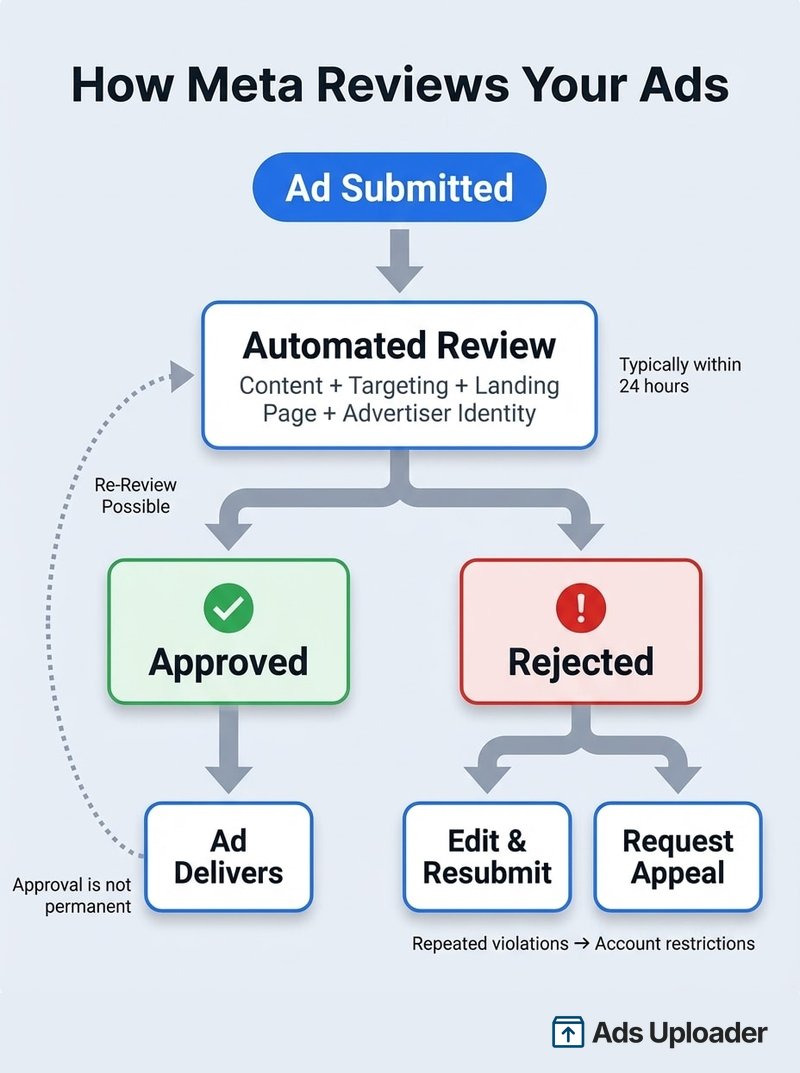
Meta's ad review is primarily automated and typically completes within 24 hours, though restricted categories may take longer. The system reviews your ad's content (text, images, video), targeting parameters, landing page, and your identity as an advertiser.
Two things most advertisers don't realize about the review process:
- Approval is not permanent. Meta's documentation states that "ads remain subject to review and re-review at all times, and may be rejected or restricted for violating our policies at any time."
- Initial review may be partial. An ad may not be reviewed against all policies before delivering impressions. This means an ad can run for days before a secondary review catches a violation.
If your ad is rejected, you can edit and resubmit it or request a review if you believe the rejection was incorrect. But repeated violations compound, eventually leading to account-level restrictions or disablement that are much harder to resolve than a single ad rejection.
Prohibited Content: What Will Always Get Rejected
Prohibited content is the "hard no" list. These categories cannot be advertised on Meta under any circumstances, regardless of targeting, disclaimers, or creative framing.
Unacceptable Content
- Illegal products or services: Anything illegal in the target jurisdiction
- Discriminatory practices: Ads that discriminate based on race, ethnicity, religion, age, sex, sexual orientation, gender identity, disability, or other protected characteristics, both in creative content and targeting
- Dangerous organizations and individuals: Praise, support, or representation of designated groups
- Misinformation: Content debunked by third-party fact checkers (repeated offenders face advertising restrictions)
- Vaccine discouragement: Ads must not discourage vaccination or advocate against vaccines
- Hateful conduct: Attacks based on protected characteristics
- Human exploitation and child safety: Content facilitating exploitation of any kind
Prohibited Commercial Practices (Fraud, Scams and Deception)
This category drives the most enforcement activity. In 2025, Meta removed over 159 million scam ads globally, with 92% taken down before anyone reported them.
Meta has since consolidated its fraud, scams and deceptive-commercial-behavior rules into one Prohibited Commercial Practices policy that applies to ads and organic content alike. The old Fraud, Scams and Deceptive Practices and Unacceptable Business Practices pages in the Transparency Center now redirect to it. What it covers:
- Misleading financial claims: Get-rich-quick offers of unrealistic reward for minimal effort, and investments promising guaranteed or risk-free returns
- Deceptive commerce: Products that materially differ from what was advertised, misleading or unreasonable pricing, unauthorized charges, subscriptions without clear disclosure, and refund policies that are not honored
- Celebrity and brand bait: Falsely using a public figure's name or likeness, or falsely claiming to represent an established business
Separately, circumventing review systems is still off-limits: cloaking landing pages, using redirects to hide true destinations, or creating multiple accounts to evade restrictions. Meta's standards state that helping anyone evade or circumvent its enforcement is prohibited.
Meta aims for verified advertisers to drive 90% of its ad revenue by the end of 2026, up from 70% when it announced the goal in March 2026, and industries adjacent to common scams, including finance, crypto, investment education, and work-from-home offers, face heightened scrutiny even when the advertiser is legitimate.
Restricted Content: What Needs Extra Care
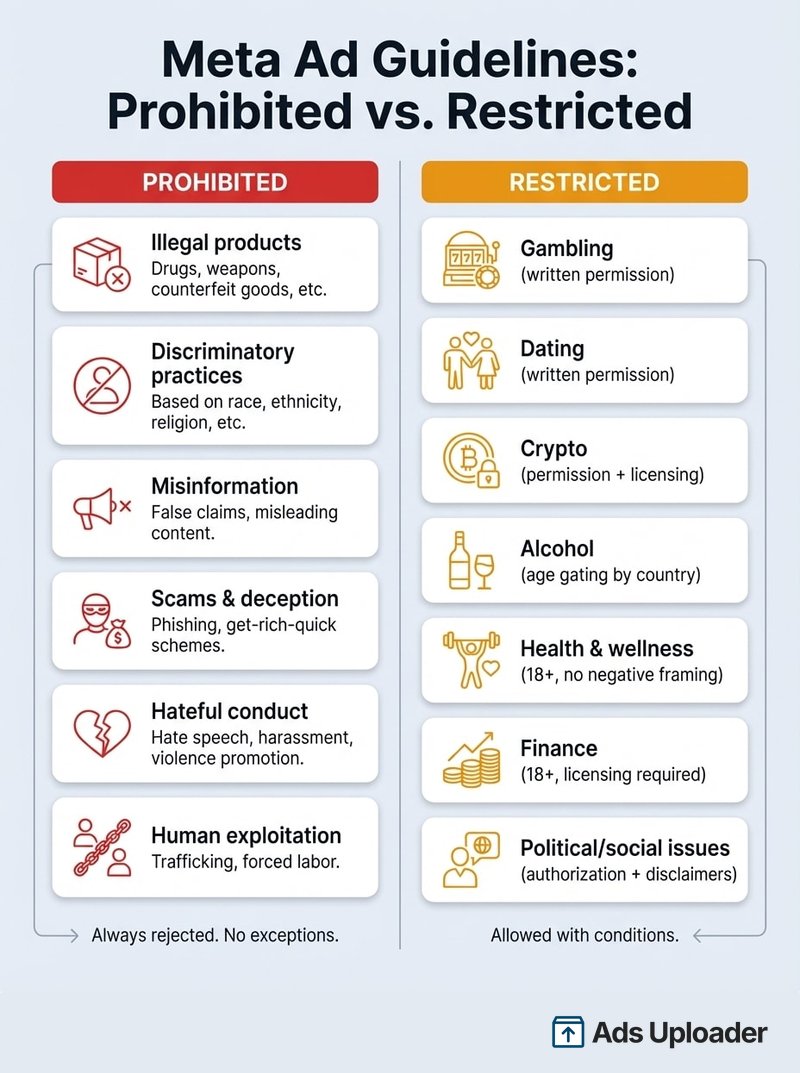
Restricted content is allowed but comes with conditions. This is where most unexpected rejections happen because advertisers don't realize their product or creative approach triggers additional requirements.
Categories Requiring Written Permission
These categories require Meta's prior written approval before you can run ads:
| Category | Key Requirement |
|---|---|
| Online gambling and games | Written permission + 18+ targeting + local law compliance |
| Dating services | Written permission + special targeting requirements |
| Cryptocurrency products | Written permission + regulatory licensing/registration |
| Drug and alcohol addiction treatment | LegitScript certification + Meta permission |
| CBD products | LegitScript certification + Meta permission + US only + 18+ + no health claims |
| Entertainment with mature content | Written permission + 18+ targeting |
Cannabis and CBD: THC and psychoactive cannabis ads are banned entirely. CBD is restricted to the US with LegitScript certification, Meta written permission, age gating, and no health claims. Hemp products (non-CBD) are limited to Canada, Mexico, and the US.
Categories With Targeting Restrictions
- Alcohol: Must comply with local laws and age restrictions. Minimums vary by country (18+ in most jurisdictions, 19+ in Canada, 20+ in Iceland, 21+ in Cameroon). Cross-border campaigns risk rejection if delivery leaks into countries with stricter rules.
- Health and wellness: Dietary, health, weight loss and weight gain products, and cosmetic products and procedures, must target 18+. General fitness services and equipment, general food and protein products, non-permanent cosmetics, and dental products such as teeth whitening are exempt from the age rule. Since the July 2026 rewrite of the Health and Wellness policy, review turns on claims: no "statements of inferiority about physical appearance," no pinched-fat close-ups, no cure claims for incurable diseases, and no clickbait promising a specific outcome in a set timeframe without disclaimers or qualifiers. Practical tip: if you sell a supplement or topical product, lead with neutral demonstrations and ingredient explanations, and keep any result claim qualified.
- Financial and insurance products: Must target 18+, must not directly request personally identifiable information in ads. Advertisers may need licensing verification in the country they're targeting. Lead-gen funnels for lending, credit repair, and insurance face higher risk-scoring, especially if copy implies a viewer's financial distress.
- Political and social issue ads: Require authorization and a "paid for by" disclaimer outside the EU. Ads are stored in Meta's Ad Library for seven years. As of October 6, 2025, political, electoral, and social issue ads are not deliverable in the EU due to the Transparency and Targeting of Political Advertising regulation.
Special Ad Categories
If your ads relate to housing, employment, or financial products and services (the category that replaced Credit), you must self-identify as a Special Ad Category when creating the campaign. This is required for US advertisers and those targeting the US, Canada, or parts of Europe.
Special Ad Categories come with restricted targeting: you cannot exclude audiences by age, gender, or zip code, and detailed targeting options are limited. These restrictions exist to prevent discriminatory advertising practices in these sensitive areas.
Personal Attributes: Health Conditions and Disability
Meta's personal attributes policy is one of the most misunderstood rules in ad review, and it rejects more copy than almost anything else. The rule is simple to state and easy to break: your ad cannot assert or imply that you know something personal about the individual seeing it. That includes a health condition, a disability, a mental health status, a medical treatment, age, sexual orientation, financial status, or membership in any sensitive group.
The trap is the word "you." The moment your copy implies "we know you, specifically, have this," it fails. Meta does not care that your targeting or your product is legitimate. It cares about the second-person assertion.
The fix is almost always a shift from "you have" to "people who want." You reframe the same message as aspiration or interest rather than diagnosis.
- Not allowed: "Are you struggling with diabetes?"
Allowed: "Resources for people managing diabetes." - Not allowed: "Living with anxiety? This helps."
Allowed: "Support for people who want calmer days." - Not allowed: "Your hearing loss doesn't have to slow you down."
Allowed: "Hearing support designed for everyday life." - Not allowed: "Tired of your acne?"
Allowed: "A skincare routine for clearer-looking skin."
A good gut check before you publish: read the headline back and ask whether it accuses the reader of a condition. If a stranger would feel "how do they know that about me," rewrite it. Keep the condition in the third person, keep the verb about wanting or looking, and you will clear review.
Misleading Claims, Deceptive Practices, and Unrealistic Outcomes
Meta prohibits ads that are likely to deceive, including exaggerated results, fake urgency, and outcomes a typical user will not get. This is enforced by both automated review and human reviewers, and repeat violations damage your account's standing, not just the single ad.
The most common ways advertisers trip this rule, with concrete fixes:
- Unrealistic results. "Lose 30 pounds in 30 days." Fix: describe the product and the realistic mechanism, not a guaranteed number. "A meal-planning app built around sustainable, gradual weight loss."
- Fake countdowns and false scarcity. A timer that resets on refresh, or "only 3 left" that never changes. Fix: only use urgency that is real, and let the landing page back it up.
- Phantom functionality. A creative that shows a feature your product does not have, or a play button drawn onto a static image to bait a tap. Fix: only show what the product actually does.
- Bait pricing. "Free" when there is a mandatory shipping or subscription charge. Fix: state the real cost or the real condition in the ad itself.
- Before/after style transformations presented as typical. Covered in its own section below.
The principle reviewers apply: would a reasonable person feel misled after clicking. If the answer is maybe, soften the claim and move the proof to a landing page you control.
Business Opportunity and Income Claims
Money-making offers are one of the most heavily scrutinized categories on Meta, because they overlap with scams. The line runs between specific guaranteed earnings (banned) and substantiated, realistic descriptions of an opportunity (allowed).
Banned outright:
- Specific income promises like "make $500 a day from your phone" or "replace your salary in 30 days."
- Get-rich-quick framing, "passive income on autopilot," "guaranteed returns."
- MLM and recruitment angles that lead with earnings rather than the product, or that promise downline income.
- "No experience, no work, guaranteed money" combinations, which read as deceptive on their face.
Allowed with care and substantiation:
- Describing a legitimate business model in realistic terms: "Learn the bookkeeping skills to start freelancing."
- Education and tools where the outcome depends on the user's effort, stated honestly.
- Testimonials that are real and not presented as typical results, paired with a clear sense that outcomes vary.
The practical test: if you removed the dollar figure and the guarantee, does the ad still make sense as a description of a real product or skill. If it collapses without the income promise, it will not pass review. Lead with what the person learns or builds, not what they will earn.
Launch More. Click Less.
Upload hundreds of creatives at once, auto-match thumbnails to videos, and publish straight to your ad accounts through Meta's API.
Try Ads Uploader FreeNo credit card required • 7-day free trial
Before/After Photos
Before/after creatives used to be one of the most reliable rejection triggers. That changed in July 2026, when Meta rewrote its Health and Wellness policy (the policy's change log is dated July 23, 2026). The current version explicitly allows "general cosmetic products, procedures, surgeries depicting before and after transformation" for audiences 18 and older, and the old blanket ban on weight-loss before/after images is no longer in the policy. Weight loss and weight gain products themselves are allowed with 18+ targeting. The image is no longer the trigger; the claims around it are.
What still gets rejected:
- Statements of inferiority about physical appearance: copy or questions that attack someone's appearance, specific body parts, or hygiene.
- Pinched-fat close-ups: a close-up on a specific body area by pinching fat is still prohibited.
- Clickbait in a health or weight context: sensational or extreme claims, or a specific outcome in a set timeframe without disclaimers or qualifiers ("lose 20 pounds in two weeks").
- Wearable-only results: claiming a result comes solely from using a wearable product.
- Transformations presented as typical: a before/after framed as the result everyone gets still collides with the misleading-outcomes rule above.
How to run one without a rejection:
- Target 18+ for weight loss, weight gain, and cosmetic products or procedures.
- Present the transformation as one person's result, with a qualifier that results vary, rather than a guaranteed timeline.
- Keep the copy on the product and the routine, not on what is wrong with the viewer's body. Second-person framing like "tired of your belly fat?" also breaks the personal attributes rule.
- Keep longer case studies and multiple reviews on your own landing page, which Meta reviews too, so hold it to the same standard.
The rule in one line: before/after is allowed again for 18+ audiences, but inferiority framing, pinched-fat close-ups, and timed-outcome promises still fail review.
Restricted Product Categories in Depth
Some products are not banned but are restricted, which means they run only under specific conditions, in specific regions, or with prior written permission. Three categories worth understanding in depth, because the rules changed and keep changing through 2025 and 2026:
- Cannabis and CBD. Ads promoting THC or psychoactive cannabis are prohibited. CBD is not a blanket ban, but it is tightly gated: Meta allows certain CBD ads only with prior written permission, an active LegitScript certification, sale targeting limited to the US, 18+ targeting, and full legal compliance. Ingestible and inhalable forms face the heaviest restrictions. Without that certification and permission, do not promote the sale of CBD directly; advertise brand or education and route purchase intent to your own site.
- Nicotine pouches and other tobacco-adjacent products. Tobacco and tobacco-adjacent products, including nicotine pouches and vaping products, cannot be advertised for sale on Meta, and US regulators (the FDA) treat non-tobacco nicotine pouches as regulated tobacco products. Brand awareness with no purchase path and strict age-gating is the most you can attempt, and many regions block it entirely. Treat nicotine pouches as effectively un-advertisable for direct sale.
- Caffeine pouches and energy supplements. Pure caffeine pouches (no nicotine) are not tobacco, so they are not auto-blocked the way nicotine pouches are. But Meta has no published category that classifies caffeine pouches as "supplements," so they fall under general unsafe-substances and health review at reviewer discretion, and automated review may still flag them if the creative resembles a nicotine pouch ad. In practice you can usually run them, but treat approval as case-by-case: avoid energy and performance claims that read as unrealistic outcomes, avoid targeting that implies a health condition, and age-gate where required.
These interact with special ad categories and health-condition targeting. If your product touches health, you cannot target or exclude audiences based on a health condition, and you cannot imply the viewer has one (see the personal attributes section above). Special ad categories (financial products and services, employment, housing, and social issues, elections or politics) further restrict targeting and are unrelated to product category, so a health supplement is not in a special ad category, but it is still bound by the personal-attributes and unsafe-substances rules.
Creative and Format Guidelines
Text and Copy Rules
- No profanity in ad text
- No personal attribute assertions: This is a top rejection trigger. Ads must not assert or imply personal attributes including race, religion, age, sexual orientation, disability, health conditions, or financial status. The most common mistakes are second-person phrases like "Are you diabetic?" or "People like you who are over 60..." or copy that implies financial distress.
- No misleading claims or unsupported promises
- No clickbait tactics designed to generate clicks through deceptive framing
- Text overlay: The old 20% text-in-image rule was officially retired, but Meta still recommends minimal text for optimal delivery. Ads with heavy text overlays can see reduced reach and higher costs.
Policy is only half the battle with ad text; the other half is fitting your message inside Meta's truncation points, which we break down placement by placement in our guide to ad copy character limits.
The fastest way to calibrate what passes review in your niche is to study live, currently-running ads from compliant competitors -- our Meta Ads Library guide covers how to find and analyze them.
Image and Video Requirements
- No excessive nudity or sexually suggestive content (enforcement considers the combination of imagery, posture, language, and implied solicitation)
- No shocking, sensational, or excessively violent content
- Before-and-after images allowed for cosmetic and weight-related products only with 18+ targeting and without inferiority framing or pinched-fat close-ups (see the before/after section above)
- Video ads must not use flashing screens or overly disruptive tactics
Landing Page Requirements
Your landing page is part of the ad review. Meta explicitly states it reviews landing pages during ad review, and this is a common, avoidable rejection trigger.
- Content must match your ad's promises: No bait-and-switch. If your ad mentions a discount, the discount must be visible on the landing page.
- All links and forms must work: Broken functionality triggers rejection
- Mobile-optimized: Page must render correctly on mobile devices
- Fast loading: Slow pages hurt both compliance and ad performance
- Privacy policy accessible: Updated privacy policies must be easily found
- No prohibited products on landing page: Even if your ad is compliant, a landing page that sells or links to prohibited products (common with advocacy pages that also sell) will cause rejection
Targeting and Data Rules
Meta's automated review scans targeting parameters alongside creative content. Discriminatory targeting combinations can trigger rejection even when individual parameters seem fine.
- No discriminatory targeting: Cannot use audience selection tools to wrongfully target or exclude groups based on protected characteristics
- Custom audiences: Must comply with applicable data terms when building custom audiences
- Lead ads: Extensive restrictions on what information you can request without prior permission, including criminal history, financial information, health information, government IDs, political affiliation, race/ethnicity, religion, sexual orientation, insurance details, and trade union membership
- EU transparency (DSA): Ads targeting EU audiences must include beneficiary and payor information in the designated fields. Failure to provide complete, accurate information can result in ad disapproval.
- Data use restrictions: Do not share Meta advertising data with third parties, do not build user profiles from ad data, do not transfer ad data to ad networks or data brokers
What Happens When Your Ad Gets Rejected
Immediate Steps
- Check Account Quality: Go to your Account Quality dashboard to see the specific policy violation cited
- Read the rejection reason: Look for the exact policy line referenced, not just the category
- Fix the trigger: Edit the ad's creative, copy, or landing page to address the specific violation
- Resubmit or create new: Edited ads go through review again as new submissions
Appealing a Rejection
If you believe your ad was incorrectly rejected:
- Go to Business Support Home
- Navigate to the account containing the rejected ad
- Select the specific ad, ad set, or campaign
- Click Request review and follow the prompts
The most effective recovery approach is mechanical, not rhetorical: identify which policy you triggered (usually personal attributes, health framing, or restricted products), fix the creative or landing page to remove the trigger, and then request re-review. If you're in a permissioned category, complete the required authorization first rather than repeatedly resubmitting the same ad.
When Rejections Become Account Problems
Repeated policy violations don't just get individual ads rejected. They trigger account-level consequences:
- Elevated scrutiny: Your future ads face more sensitive review
- Account restrictions: Limited features, spend caps, or blocked capabilities
- Permanent disablement: Severe or repeated violations can result in permanent ad account disablement with unused prepaid funds potentially forfeited after six months
Meta's enforcement is not limited to ad content. It monitors landing pages, Page quality, user feedback, and the behavior of all users connected to your business assets. Account restrictions don't just come from ad content. How ads are created matters too, especially as more teams connect AI tools and automation to Meta's Marketing API. The API itself isn't the risk, but poor implementation is. I wrote about this in detail in my article on using Claude and other LLM tooling with Meta's API, including the recent ban waves that followed teams connecting AI agents directly to their ad accounts without proper safeguards.
If you're dealing with an account that's already been restricted, use the appeal workflow outlined above to start the recovery process.
Meta Ad Guidelines Compliance Checklist
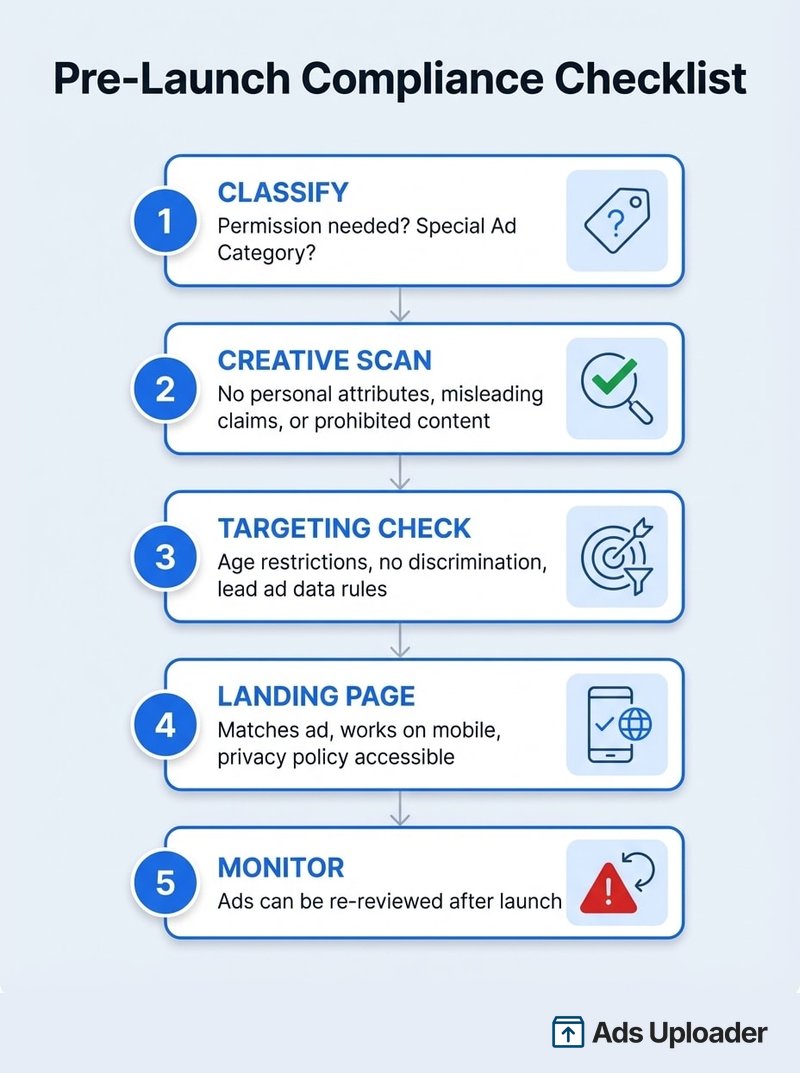
Use this as a pre-flight check before every ad submission. The five-step framework is: classify your category, scan your creative, check your targeting, verify your destination, then monitor after launch.
1. Category classification
- Does my product require written permission? (gambling, dating, crypto, addiction treatment, CBD)
- Does my product fall under a Special Ad Category? (housing, employment, financial products and services)
- Am I in a sensitive vertical with extra restrictions? (alcohol, health, finance, political)
2. Creative risk scan
- No personal attribute assertions (second-person phrasing + sensitive traits)
- No negative self-perception framing (health, weight, appearance, financial distress)
- No misleading claims, unsupported promises, or clickbait
- No prohibited content (profanity, nudity, violence, discrimination)
- Minimal text overlay for optimal delivery
3. Targeting and data check
- Age restrictions met for restricted categories (18+ minimum, higher in some countries)
- Special Ad Category selected if applicable (with restricted targeting enabled)
- No discriminatory targeting combinations
- Lead form questions comply with data collection restrictions
- EU ads include beneficiary and payor information
4. Landing page verification
- Content matches ad promises (no bait-and-switch)
- Page loads quickly and works on mobile
- Privacy policy and terms accessible
- No prohibited or restricted products not mentioned in the ad
- All links and forms functional
5. Account health and monitoring
- Business verification current
- Two-factor authentication enabled
- No outstanding policy violations in Account Quality
- Plan for post-launch monitoring (ads can be re-reviewed after going live)
When you're launching dozens of ads at once with bulk tools, systematizing this checklist becomes the difference between a smooth launch and a wave of rejections that puts your account at risk.
Save Hours on Creative Testing
Stop uploading ads one by one. Bulk process unlimited creatives with automatic media matching and direct API publishing.
Try Ads Uploader FreeNo credit card required • 7-day free trial
Frequently Asked Questions
How long does Meta ad review take?
Meta's automated ad review typically completes within 24 hours, though restricted categories like gambling, health, and financial services may take longer due to additional checks. Ads are not always fully reviewed against every policy before they start delivering impressions, which is why an approved ad can later be rejected during re-review.
Can the same ad get approved then rejected later?
Yes. Meta's own documentation states that ads remain subject to review and re-review at all times, and may be rejected or restricted for violating policies at any time. An ad may not be reviewed against all policies before delivering impressions, so initial approval does not guarantee ongoing compliance.
Do Meta ad guidelines apply to Instagram and Threads too?
Yes. Meta Advertising Standards apply across all Meta platforms including Facebook, Instagram, Messenger, Audience Network, and Threads. The same prohibited and restricted content rules, targeting limitations, and creative requirements apply regardless of which platform your ad appears on.
What is a Special Ad Category and do I need to use one?
Special Ad Categories are required designations for ads related to housing, employment, or financial products and services (the category that replaced Credit). US advertisers or those targeting the US, Canada, or parts of Europe with ads in these categories must self-identify and use approved targeting options. These options limit age, gender, and geographic exclusions to prevent discriminatory practices.
Can I advertise CBD or cannabis products on Meta?
THC and psychoactive cannabis ads are not allowed. CBD product ads are permitted only in the United States, require LegitScript certification and prior written permission from Meta, must target users 18 and older, and cannot make health or medical claims. Hemp products (non-CBD) can be advertised in Canada, Mexico, and the US only.
Does Meta review my landing page during ad review?
Yes. Meta explicitly states that its review process looks at the ad's content, targeting, landing page, and the identity of the advertiser. Landing pages must match the ad's promises, function properly on mobile, and not contain misleading information or prohibited products not mentioned in the ad.
How do I check my ad account's compliance health?
Use the Account Quality dashboard in Meta Business Suite. It tracks suspended ads, policy violations, and enforcement actions against your account. With Meta expanding advertiser verification and tying it to compliance history, weekly compliance checks are increasingly a requirement rather than an optional habit.
Are caffeine pouches restricted on Facebook ads?
Caffeine pouches with no nicotine are not banned the way nicotine pouches are, because they are not tobacco. Meta does not publish a specific category for them, so they are reviewed under its general unsafe-substances and health rules at reviewer discretion, and automated review can still flag them if the creative looks like a nicotine pouch ad. You can usually run them, but treat it as case-by-case: avoid performance and energy claims that read as unrealistic, avoid health-condition targeting, and age-gate where required.
Can I run before/after photos on Meta?
Yes, with conditions. Since Meta rewrote its Health and Wellness policy in July 2026, cosmetic products, procedures and surgeries depicting a before-and-after transformation are explicitly allowed for audiences 18 and older, and the old blanket ban on weight-loss before/after images is no longer in the policy. What still gets rejected is the framing: statements of inferiority about someone's appearance, close-ups that pinch fat, and clickbait such as a specific result in a set timeframe without disclaimers or qualifiers.
Can I make income claims in Facebook ads?
Specific income promises (make $500 a day, replace your salary in 30 days) and get-rich-quick framing are banned. You can describe a legitimate business, skill, or tool in realistic terms where the outcome clearly depends on the user's effort. A good test: if removing the dollar figure makes the ad meaningless, it will not pass review.
Stay Compliant, Stay Running
Meta ad guidelines boil down to three things that matter most for day-to-day compliance:
- Know the difference between prohibited and restricted. Prohibited content is a hard stop. Restricted content is allowed with conditions. Most rejections happen in the restricted zone because advertisers miss the conditions.
- Your landing page is part of your ad. Meta reviews it during ad review. A compliant ad with a non-compliant landing page still gets rejected.
- Rejections compound. A single rejected ad is a minor inconvenience. A pattern of rejections triggers account-level restrictions that affect every campaign you run.
The compliance checklist above covers the minimum before every ad submission. Bookmark it and use it, especially if you're scaling creative testing across multiple campaigns. If you're building reporting workflows around your campaigns, understanding how to export your Facebook Ads data helps you track compliance status and performance across accounts. When you're running dozens of ad variations at scale, a systematized pre-launch review is what keeps your account healthy and your campaigns delivering.