Meta incremental attribution is an attribution setting in Ads Manager that uses machine learning to predict which conversions were caused by your ads rather than those that would have happened without ad exposure. It applies counterfactual modeling trained on Meta's Conversion Lift data to estimate incremental lift, optimizing delivery toward genuinely ad-driven outcomes. Available for campaigns with eligible objectives and website conversion locations, it requires the maximize conversions or maximize value performance goal. In Meta's tests, campaigns optimized for incremental conversions saw a 46% lift over business-as-usual.
Every Meta advertiser has asked the same question at some point: "How many of these conversions would have happened anyway?"
Standard attribution doesn't answer that. It counts any conversion that happens after someone clicks or views your ad within a set window - regardless of whether the ad had anything to do with it. Someone sees your ad, gets an email from you two days later, clicks the email, and buys. Meta credits the ad. Your ROAS looks great. But did the ad actually drive that sale?
Meta incremental attribution is designed to answer that question. Instead of counting all post-exposure conversions, it uses machine learning trained on years of Lift study data to estimate which conversions your ads actually caused. The result is typically fewer reported conversions but a more honest picture of what your advertising is doing.
This guide covers how the model works under the hood, exact setup requirements, real-world performance data, and a practical framework for deciding whether incremental attribution is the right move for your account.
What Is Meta Incremental Attribution?
Meta incremental attribution is an attribution setting that isolates ad-driven conversions from conversions that would have happened organically. Rather than crediting your ad for every conversion that occurs within an attribution window, it estimates the incremental lift - the additional conversions directly caused by ad exposure.
The key distinction: this is not an attribution window change. Standard attribution lets you adjust windows (7-day click, 1-day view, etc.), but it still counts all conversions within that window. Incremental attribution changes what gets counted. It filters for causation, not just correlation. Practitioners have a blunter name for the placements it strips out: vampire ads, the ones that claim credit in Meta but do not actually drive incremental sales.
It also changes how Meta delivers your ads. When you enable incremental attribution, Meta's algorithm optimizes toward users it predicts are more likely to convert because of your ad, not users who are likely to convert regardless. This creates two separate effects worth understanding:
- Reporting effect: Your credited conversion count drops because non-incremental conversions are filtered out. CPA and ROAS can look worse in Ads Manager even if actual business outcomes haven't changed.
- Optimization effect: Meta's delivery shifts toward genuinely ad-influenced users, which can improve real-world incremental outcomes. In Meta's tests, this optimization shift drove a 46% lift in incremental conversions versus business-as-usual.
Here's how the two models compare:
| Standard Attribution | Incremental Attribution | |
|---|---|---|
| What it counts | All conversions after click/view | Only ad-caused conversions |
| Attribution basis | Interaction within time window | ML-modeled causation |
| Optimization target | Maximize total conversions | Maximize incremental conversions |
| Typical conversion volume | Higher | 10-30% lower |
| Cost per conversion | Lower (inflated by organic) | Higher (but more accurate) |
| Best insight | Scale and reach | True ad impact |
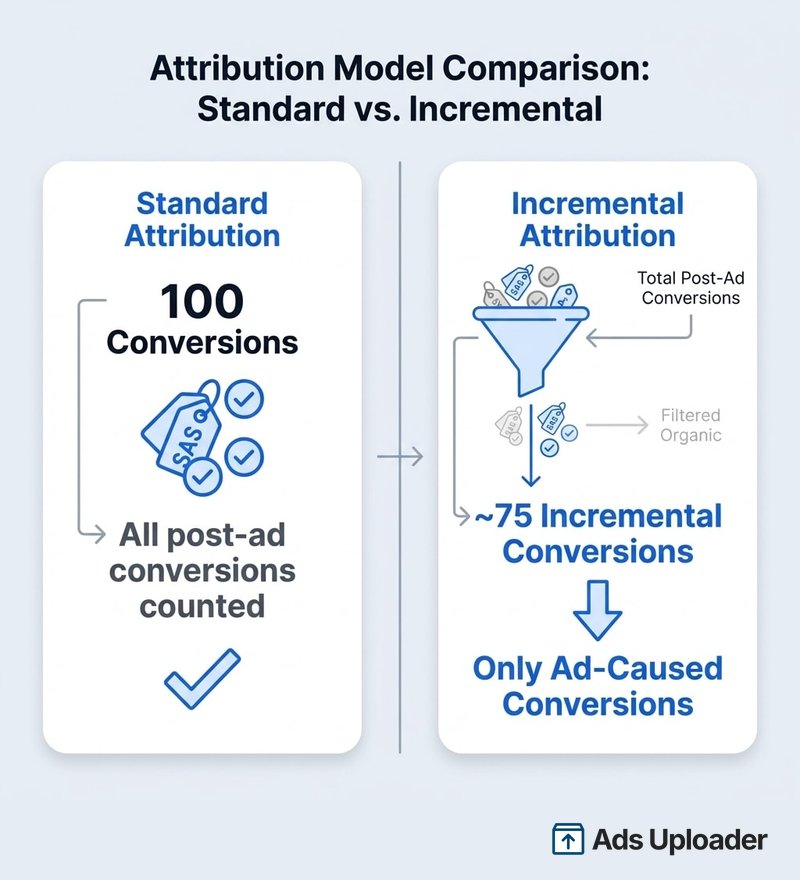
How Incremental Attribution Works
A common misconception: incremental attribution does not run a live holdout experiment on every campaign. It uses counterfactual modeling - machine learning that predicts what would have happened without your ad.
The distinction matters:
- Conversion Lift tests (Meta's existing tool) are true experiments. A portion of your audience is held out from seeing ads, and Meta compares conversion rates between exposed and unexposed groups. These are the gold standard for measuring incrementality, but they require dedicated setup, sufficient budget, and weeks to run.
- Incremental attribution is an always-on model trained on data from Meta's extensive library of Conversion Lift experiments across thousands of advertisers. It applies those patterns to your campaigns in real time, predicting which conversions are incremental without requiring you to run a separate experiment.
Meta's investor communications describe it as "modeling... conversions that would not have occurred without the ad being shown." It optimizes for and reports on incremental conversions in real time - changing both how your ads are delivered and how results are measured.
This is a platform model-based incrementality estimate, not a fully transparent experiment where you can inspect every assumption. Meta does not publicly specify the exact statistical techniques or holdout percentages used in the model. What it has published: the system uses "models" to decide incremental conversions, and the models are trained on Meta's Conversion Lift data.
What the Numbers Actually Look Like
Meta has published progressively stronger performance claims as the product has scaled:
Meta Performance Marketing Summit 2025: A set of 37 conversion lift studies run July-October 2024 across 30 advertisers and 8 verticals showed a 46% lift in performance when campaigns were optimized for incremental conversions versus business-as-usual. Meta explicitly warns that performance isn't guaranteed - results vary by account and vertical.
Meta Q1 2025 earnings call (April 2025): Meta told investors advertisers were seeing an "average 46% lift" in incremental conversions, and the company expected to make it available to all advertisers in the coming weeks.
Meta Q4 2025 model update (January 2026): Meta reported a 24% increase in incremental conversions from the latest model rollout compared to their standard attribution model. The product had reached "a multi-billion-dollar annual run-rate" seven months after launch. Meta keeps refreshing this model, so the exact figures move over time; we log each model and measurement change as it ships in Meta's ongoing ad platform updates.
Seer Interactive's independent test (April 2025, $1.05M in ad spend across 6 accounts): Meta reported that 87% of conversions were incremental - meaning only 13% would have happened without ads. When Seer cross-referenced against GA4, the number dropped to 67% incremental (33% would have happened regardless). Seer's takeaway: "Don't blindly trust Meta's numbers... deserve scrutiny."
That 20-percentage-point gap between Meta and GA4 matters. The two platforms are answering fundamentally different questions. Meta asks: "Did the ad cause this conversion?" (counterfactual estimate). GA4 asks: "Which touchpoints deserve credit?" (path-based attribution). Different epistemologies, different answers - even before accounting for practical gaps like consent, cross-device visibility, and view-based influence.
Practitioner reports from the advertiser community are mixed. Some accounts see strong improvement on incremental attribution. Others perform better on standard models. The pattern: results depend heavily on your product, AOV, and funnel strategy.
How to Measure Incremental Conversions in Meta Ads
To measure incremental conversions in Meta Ads, add incremental attribution columns to your existing reports first, then compare them against your standard attribution columns. You do not need to change a single campaign to start. Meta makes the incremental numbers available retroactively from April 1, 2025, so you can measure the gap on data you have already collected before deciding whether to optimize toward it.
Here is the practical workflow:
- Turn on incremental columns in reporting. In Ads Manager, open the Columns dropdown, select Custom, then click Compare Attribution Settings. Check Incremental Attribution under Advanced Options and apply. Your table now shows incremental conversions beside your standard attributed conversions. This is measurement mode - it changes nothing about delivery.
- Compare against your standard attribution columns. Line up incremental conversions next to your usual click and view attribution windows (7-day click, 1-day view). The difference between the two is the set of conversions Meta's model does not believe your ads actually caused.
- Read the gap. A small gap means most of your reported conversions look genuinely ad-driven. A large gap means a big share of the credit is going to conversions that would likely have happened anyway - the vampire ads claiming credit in Meta without driving incremental sales. Retargeting and brand campaigns usually show the widest gaps.
- Optimize once the gap is worth acting on. If the measurement gap is meaningful and the campaign has volume to spare, switch a duplicate to the Incremental Conversions attribution setting (see the setup steps below) so Meta also optimizes delivery toward incremental outcomes rather than only reporting on them.
- Graduate to a conversion lift study when the stakes are high. Modeled incremental attribution is an estimate built from other advertisers' data. When you need to defend a budget decision or measure a specific channel's true lift, run a Meta conversion lift study - a live holdout experiment on your own account - or a third-party incrementality test. The next section breaks down when each is worth the effort.
The measurement-first path is the safest way to answer "how many of these conversions are incremental?" without risking your existing delivery. It gives you the honest number before you decide whether it is worth optimizing for.
Incremental Attribution vs Conversion Lift Studies vs Holdout Testing
There are three distinct ways to measure incrementality on Meta, and they trade rigor against effort. Incremental attribution is a modeled, always-on reporting and optimization setting. A conversion lift study is a live holdout experiment inside Meta. Third-party incrementality testing, usually geo-based holdout testing, measures lift across every channel rather than Meta alone. Most advertisers use the always-on setting for day-to-day reads and reach for a study only when a decision is expensive enough to justify it.
| Incremental Attribution | Conversion Lift Study | Third-Party / Geo Holdout Testing | |
|---|---|---|---|
| What it measures | Modeled estimate of ad-caused conversions | Directly measured lift on your account | Cross-channel lift, including offline and marketplace halo |
| Method | ML trained on Meta's aggregate Lift data | Randomized in-platform holdout group | Ads paused in control geos vs test geos |
| Setup effort | Minutes (a columns toggle or one setting) | Moderate (experiment setup, minimum spend) | High (geo design plus an external tool) |
| Cost | Free, built into Ads Manager | Free, but a holdout consumes reach | Paid tool plus withheld spend in control geos |
| Time to answer | Instant, retroactive to April 1, 2025 | Typically a few weeks | Weeks per test |
| Scope | Meta ecosystem only | Meta ecosystem only | All channels (Meta, Google, Amazon, retail) |
| Best for | Ongoing directional reads, spotting over-credit | Validating one campaign or audience's true lift | Budget and channel-mix decisions |
Incremental attribution and conversion lift both only see conversions that touch Meta's own tracking, so their accuracy depends on healthy pixel and Conversions API data. If your Events Manager shows event gaps or your Conversions API setup is incomplete, every incrementality read on this list inherits those gaps. For anything beyond Meta - the branded search or marketplace sales an ad quietly sparks - only cross-channel holdout testing captures the full picture.
How to Set Up Meta Incremental Attribution in Ads Manager
Setting up incremental attribution takes about 30 seconds. The eligibility requirements are the part that trips people up.
- Open Meta Ads Manager and create a new campaign
- Select an eligible campaign objective - Sales and Leads are the most widely supported; some accounts also see Engagement and App promotion
- Set the conversion location to Website (some accounts may also support Website + App)
- Set your performance goal to Maximize number of conversions or Maximize value of conversions
- Click Show more options under the performance goal section
- Select Incremental Conversions as your attribution setting
- Complete the rest of your campaign setup as normal and launch
Once running, your results column in Ads Manager will show incremental conversions rather than total attributed conversions.
Eligibility Requirements
Meta limits incremental attribution to certain performance objectives and conversion locations. The exact set can vary by rollout phase and account, but here's what's consistently reported:
Compatible:
- Campaign objectives: Sales, Leads (most widely available). Some accounts also see Engagement and App promotion as eligible.
- Conversion locations: Website, and in some accounts Website + App
- Performance goals: Maximize number of conversions, Maximize value of conversions
Not compatible:
- Campaign objectives: Traffic, Awareness
- Conversion locations: Instant forms, Messenger, calls
- Performance goals: Landing page views, link clicks, daily unique reach, impressions
If you don't see the incremental option in your account, check back. Meta has been expanding access progressively since the April 2025 launch, and as of mid-2026 it is widely available for Sales and Leads objectives while still rolling out to other objectives and conversion locations. Availability still varies by account and rollout phase.
Pro Tip: You don't have to switch your campaigns to see incremental data. In Ads Manager, click the Columns dropdown, select Custom, then click Compare Attribution Settings. Check Incremental Attribution under Advanced Options. This adds incremental conversion columns alongside your standard data - retroactively available from April 1, 2025 onward.
When to Use Incremental Attribution (and When Not To)
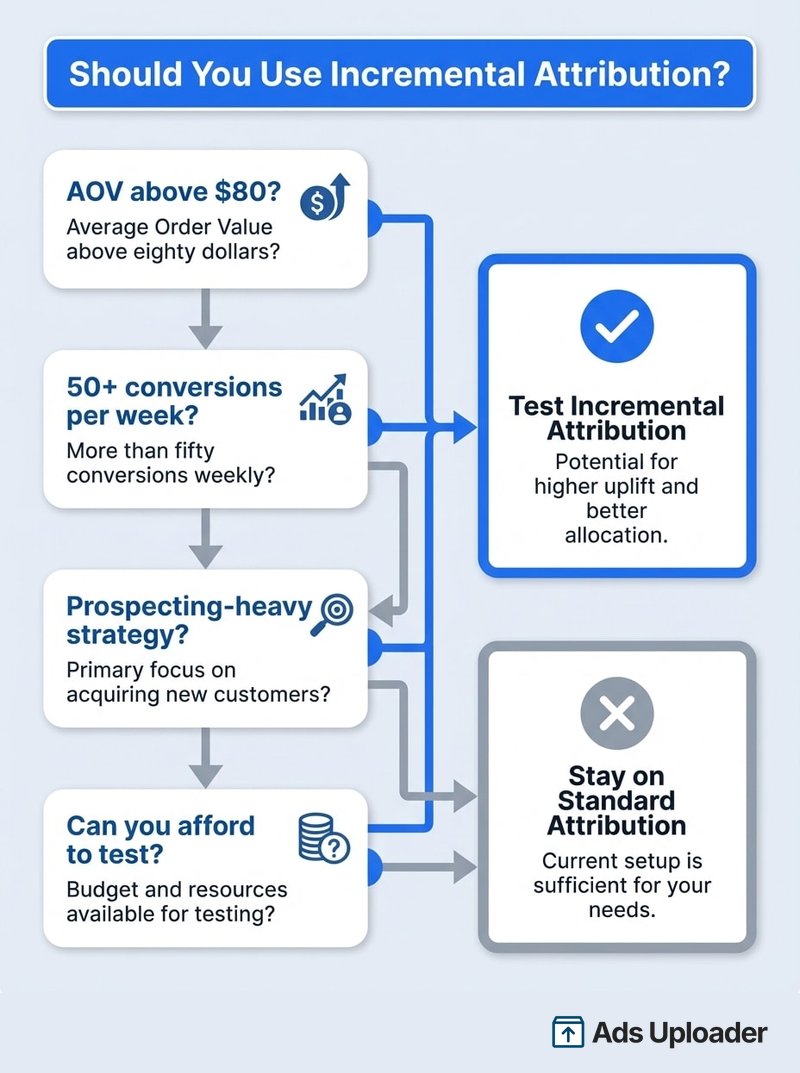
Knowing what incremental attribution is doesn't tell you whether it's right for your specific account. Here's a practical framework.
Launch More. Click Less.
Upload hundreds of creatives at once, auto-match thumbnails to videos, and publish straight to your ad accounts through Meta's API.
Try Ads Uploader FreeNo credit card required • 7-day free trial
Use It When
You sell higher-AOV products ($80+). Higher-priced items involve more decision-making, which gives Meta's model more signal to distinguish ad-driven purchases from organic ones. Lower-AOV impulse purchases generate weaker attribution signals.
You have sufficient conversion volume. Incremental attribution will reduce your reported conversion count. If your campaigns are already generating barely enough conversions to exit the learning phase (~50 per week per ad set), switching could starve Meta's algorithm of the data it needs to optimize effectively.
Your strategy leans toward prospecting. Mid-funnel and prospecting audiences show the highest incremental lift. These users weren't already in your funnel - the ad genuinely introduced them to your product. Seer Interactive's data confirmed this: refined mid-funnel audiences showed the clearest incremental impact.
You need to validate budget to stakeholders. Incremental attribution gives you a defensible answer to "are our ads actually driving growth?" Standard attribution can't answer that question honestly.
You're launching new campaigns. New campaigns are the safest place to test. No risk of disrupting existing performance, and you get clean comparative data.
Don't Use It When
You're relying heavily on retargeting. Retargeting audiences are the least likely to show incremental lift because many of those users would convert anyway. Switching to incremental attribution on retargeting-heavy accounts can make your results look dramatically worse without changing actual business outcomes.
Your campaigns are performing well and you can't afford disruption. Changing attribution settings on a winning campaign can reset the learning phase and disrupt delivery optimization. If something works, don't break it to get better measurement.
Your conversion volume is low. If you're seeing 20-30 conversions per month, switching to incremental attribution could drop that to 15-20. At that volume, Meta's algorithm doesn't have enough signal to optimize, and performance may degrade. Wait until you have more headroom.
You need to understand your current attribution baseline first. If you haven't mapped out how your conversions split across click-through, engage-through, and view-through attribution, start there before layering on incremental measurement.
How to Test Incremental Attribution Without Risking Performance
The safest approach: run incremental attribution alongside your existing campaigns rather than switching. Before you start, make sure your Meta Pixel is firing correctly - no attribution model can compensate for broken tracking.
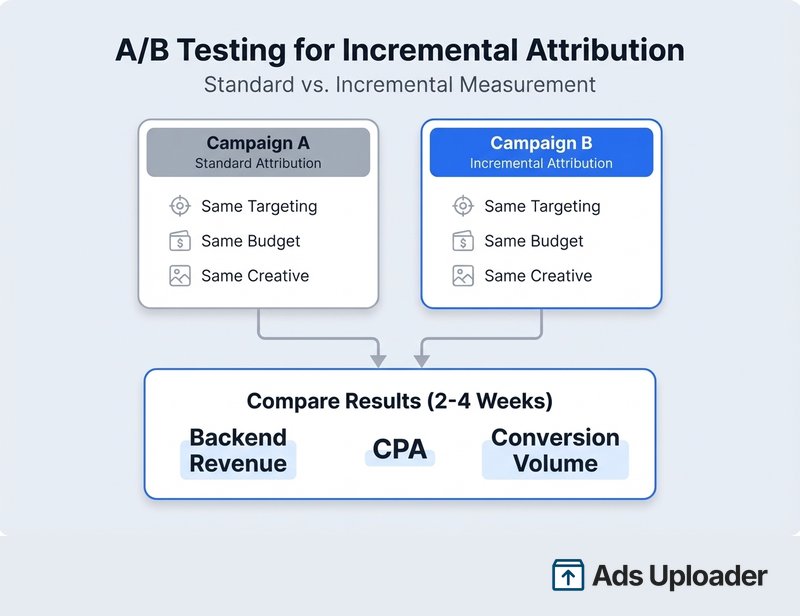
Step 1: Duplicate your best-performing campaign. Keep the original running on standard attribution. Set the duplicate to incremental attribution with identical targeting, budget, and creative.
Step 2: Run both for at least two to four weeks. You need enough data to compare meaningfully. Shorter tests produce noisy results.
Step 3: Compare the right metrics. Don't just compare conversion counts - check actual backend revenue. Platform-reported conversions still diverge from collected revenue by 20-40% regardless of attribution model. Compare CPA against actual revenue per conversion across both campaigns.
Step 4: Check your audience overlap. Running two campaigns with identical targeting creates auction overlap. Monitor frequency and adjust budgets if you see one campaign cannibalizing the other.
Limitations and What to Watch For
Incremental attribution is a meaningful step forward, but it has real limitations you should understand before committing.
It's Meta grading its own homework. The model estimates incrementality using Meta's own data and algorithms. When Seer Interactive cross-referenced Meta's 87% incremental rate against GA4, it dropped to 67%. That gap isn't just bias - Meta and GA4 use fundamentally different methodologies (counterfactual modeling vs path-based credit allocation). But the structural incentive is real: Meta benefits when its platform shows higher incrementality. Treat it as a directional decision input, not a final source of truth. Always cross-validate with GA4, post-purchase surveys, or a third-party tool.
The model uses aggregate data, not your specific lift. Meta's ML model is trained on Lift study data from thousands of advertisers. It applies patterns from that aggregate dataset to your campaigns. Your actual incrementality could be higher or lower than what the model predicts.
Retargeting gets undervalued. Because retargeting audiences have high baseline conversion rates, the model attributes less incremental lift to those campaigns. This is directionally correct - retargeting does include more people who would buy anyway - but it can swing too far. Some retargeting genuinely nudges fence-sitters to convert.
Conversion count drops affect the learning phase. Fewer reported conversions means less signal for Meta's optimization engine. Campaigns that were comfortably above the ~50 weekly conversion threshold could drop below it after switching, entering "learning limited" status and reducing delivery efficiency.
It only measures Meta's ecosystem. Incremental attribution tells you whether your Meta ads drove conversions above what would have happened without Meta exposure. It says nothing about how Meta compares to Google, email, organic, or other channels. For cross-channel incrementality, you still need a separate measurement framework.
Frequently Asked Questions
What is incremental attribution in Meta Ads?
Incremental attribution is an attribution setting that uses machine learning to identify conversions caused by your ad, filtering out those that would have happened without ad exposure. It replaces the standard click-and-view attribution window with a model trained on Meta's Lift study data to estimate incremental lift.
How do I enable incremental attribution in Ads Manager?
Create a new campaign with an eligible objective such as Sales or Leads. Set the conversion location to Website. Choose Maximize number of conversions or Maximize value of conversions as your performance goal. Click Show more options under the performance goal section and select Incremental Conversions. Eligible objectives and conversion locations can vary by account and rollout phase.
Will my conversion numbers drop with incremental attribution?
Your credited conversion count will drop because non-incremental conversions are filtered out. CPA and ROAS can look worse in Ads Manager. However, Meta's delivery also shifts to prioritize genuinely ad-influenced users - in Meta's tests, this optimization shift drove a 46% lift in incremental conversions versus business-as-usual. The reporting looks worse but actual incremental outcomes can improve.
Save Hours on Creative Testing
Stop uploading ads one by one. Bulk process unlimited creatives with automatic media matching and direct API publishing.
Try Ads Uploader FreeNo credit card required • 7-day free trial
Does incremental attribution work for retargeting campaigns?
It works technically, but retargeting campaigns typically show the lowest incremental lift. Retargeting reaches people already near the bottom of the funnel who may convert regardless of seeing your ad. Prospecting and mid-funnel campaigns tend to show the highest incremental performance.
Can I view incremental attribution data without switching my campaigns?
Yes. In Ads Manager, click the Columns dropdown, select Custom, then click Compare Attribution Settings. Check the Incremental Attribution box under Advanced Options and click Apply. You can view incremental data from April 1, 2025 onward, even on campaigns using standard attribution.
How does incremental attribution differ from a Meta lift test?
Both use holdout methodology, but lift tests are manual experiments you run on specific campaigns with defined start and end dates. Incremental attribution is a continuous, automated setting that uses Meta's historical Lift study data and machine learning to estimate incrementality across your campaign's lifetime without requiring manual setup.
Should I use incremental attribution with Advantage+ campaigns?
You can, but test carefully. Advantage+ campaigns already use Meta's AI for broad delivery optimization. Adding incremental attribution on top changes the optimization signal, which may reduce reported conversion volume. Start with a duplicate campaign to compare results before switching your primary Advantage+ campaigns.
How do you measure incremental conversions in Meta Ads?
The fastest way is to add incremental attribution columns to your existing reports without changing any campaigns. In Ads Manager, open the Columns dropdown, choose Custom, click Compare Attribution Settings, and check Incremental Attribution under Advanced Options. This shows incremental conversions next to your standard attributed conversions, with data available retroactively from April 1, 2025. To also optimize delivery toward incremental conversions, set a campaign's attribution setting to Incremental Conversions during setup.
What is the difference between incremental attribution and a conversion lift study?
Incremental attribution is an always-on modeled setting: Meta's machine learning estimates which conversions your ads caused using patterns learned from thousands of past Conversion Lift experiments. A conversion lift study is a live experiment on your own account, where Meta holds out a randomized control group that never sees your ads and compares conversion rates between the exposed and holdout groups. The study measures your specific lift directly but needs dedicated budget and weeks to run, while incremental attribution gives you an instant estimate with no test setup.
Why do my incremental conversions look lower than standard attribution?
Standard attribution credits your ad for every conversion within the attribution window, including conversions that would have happened anyway. Incremental attribution filters those out and counts only the conversions the model estimates your ad actually caused, so the number is almost always lower. The gap between the two is roughly the share of your reported conversions that were not truly incremental, and a wide gap often points to retargeting or brand-heavy campaigns claiming credit for sales that were already coming.
Getting Started with Meta Incremental Attribution
Here's what to take away:
- Incremental attribution measures causation, not correlation. It filters for conversions your ads actually drove, not every conversion that happened after someone saw an ad.
- Your numbers will drop, and that's the point. Fewer reported conversions but a more honest picture of your ad impact.
- It's not for every account. Higher AOV, sufficient volume, and prospecting-heavy strategies see the best results. Low-volume and retargeting-heavy accounts should test carefully or wait.
- Always cross-reference. Meta's model is directionally useful but not gospel. Validate against GA4 and your own revenue data.
The best approach: start by adding incremental attribution columns to your existing reporting without changing anything. Compare incremental numbers against standard attribution across your campaigns for a few weeks. That alone will tell you whether there's a meaningful gap in your current measurement - and whether switching is worth testing.
If you're running dozens of campaigns and want to test incremental attribution across your account efficiently, Ads Uploader helps you manage campaign creation and duplication at scale - making A/B attribution tests faster to set up and easier to track across your entire portfolio.