La atribución de clics de Meta ahora cuenta solo los link clicks hacia las conversiones click-through para campañas de sitio web y en tienda. Antes, cualquier interacción con el anuncio, incluidos likes, shares, saves y comentarios, contaba como clic para fines de atribución. Las interacciones que no son link clicks caen ahora bajo una categoría renombrada llamada atribución engage-through, que reemplaza al anterior modelo engaged-view y conlleva una ventana de conversión de un día. Meta también redujo el umbral de engaged-view de video de 10 segundos a cinco. La facturación no se ve afectada. Solo cambian las etiquetas de reporte y la distribución de las conversiones.
Tus números de conversiones click-through de Meta están a punto de caer. Antes de empezar a troubleshootear o recortar presupuestos, lee esto primero. No es un problema de rendimiento. Es un cambio de definición.
Durante años, Meta contaba likes, shares, saves y comentarios como "clics" para fines de atribución. Si alguien tocaba el icono de corazón de tu anuncio y luego compraba tu producto tres días después, Meta reportaba eso como una conversión click-through. La mayoría de los anunciantes no tenía idea de que esto estaba pasando. El resultado era una brecha persistente entre lo que reportaba Ads Manager y lo que mostraba Google Analytics, y un montón de conversaciones confusas con clientes.
El 3 de marzo de 2026, Meta anunció que está arreglando esto. La atribución click-through ahora requiere un link click real. Todo lo demás se mueve a una nueva categoría llamada atribución engage-through. El cambio se despliega este mes para campañas de conversión en sitio web y en tienda.
Esta guía desglosa exactamente lo que cambió, modela cómo se verán tus números y te da los pasos para actualizar tu reporte antes de que el cambio te tome por sorpresa.
Qué cambió con la atribución de clics de Meta
El cambio de atribución de clics de Meta es directo en principio: Meta redujo lo que cuenta como "clic" para la atribución click-through.
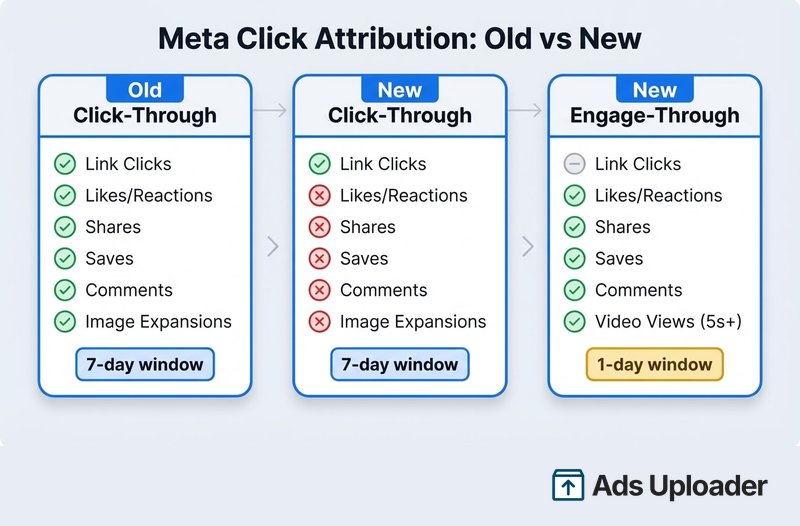
La definición antigua: Cualquier clic en tu anuncio contaba. Likes, reacciones, shares, saves, comentarios, expansiones de imagen, reproducciones de video. Todos calificaban. Si cualquiera de estos ocurría y el usuario convertía dentro de siete días, Meta lo reportaba como una conversión click-through.
La nueva definición: Solo cuentan los link clicks. Una conversión debe seguir a un clic que realmente envíe al usuario a algún lugar: un sitio web, tienda de apps, formulario de lead u otro destino.
Meta lo dijo directamente: "De ahora en adelante, estamos cambiando la definición de atribución click-through para conversiones en sitio web y en tienda para incluir exclusivamente los link clicks."
Aquí está la comparación antes-y-después:
| Click-through antiguo | Click-through nuevo | Engage-through nuevo | |
|---|---|---|---|
| Link clicks | Contaba | Cuenta | N/A |
| Likes/reacciones | Contaba | No cuenta | Cuenta |
| Shares | Contaba | No cuenta | Cuenta |
| Saves | Contaba | No cuenta | Cuenta |
| Comentarios | Contaba | No cuenta | Cuenta |
| Expansiones de imagen | Contaba | No cuenta | Cuenta |
| Visualizaciones de video (5s+) | N/A | N/A | Cuenta |
| Ventana de atribución | 7 días | 7 días | 1 día |
Qué cuenta como link click
La definición de Meta de "link clicks" es más amplia que solo clics a sitios web externos. Incluye:
- Clics a sitios web y landing pages
- Clics a tiendas de apps o deep links de apps
- Click-to-call y click-to-message
- Clics a mapas e indicaciones
- Clics dentro de Meta Shops
- Aperturas de formulario de lead
- Interacciones en Marketplace
- Clics al perfil de Instagram (para anuncios de vista de perfil)
- Interacciones con experiencia playable
- Videos que lanzan la experiencia de watch and browse
Para la mayoría de los anunciantes que corren campañas de conversión en sitio web, los link clicks relevantes son los que envían a los usuarios a tu sitio. Los otros tipos de esta lista son casos de borde que no aplicarán a campañas de conversión estándar.
Vale la pena destacar: Meta podría haber ido más allá y restringido la atribución click-through solo a link clicks salientes. No lo hizo. Pero para campañas de conversión en sitio web, la diferencia práctica es mínima.
La atribución engage-through reemplaza a engaged-view
Meta no solo está renombrando una columna. La atribución engage-through es una categoría más amplia y significativa que el antiguo engaged-view.
Qué era engaged-view: Una métrica solo para video. Si alguien miraba al menos 10 segundos de tu anuncio en video y convertía dentro de un día, contaba como una conversión engaged-view. Solo aplicaba a formatos de video.
Qué es engage-through: Todas las interacciones sociales que ya no califican para click-through (likes, shares, saves, comentarios) más la antigua métrica engaged-view de video, ahora con un umbral de cinco segundos en lugar de 10. Y aplica a cada formato de anuncio, no solo a video.
La nueva configuración de atribución por defecto se convierte en: 7-day click, 1-day engage-through, 1-day view.
Aquí está el detalle crítico que la mayoría de la cobertura entierra: engage-through tiene una ventana de atribución de un día, no de siete.
Esto importa porque algunas conversiones desaparecerán por completo. Bajo el sistema antiguo, si alguien daba like a tu anuncio y luego convertía cinco días después, Meta contaba eso como una conversión click-through (ventana de siete días). Bajo el nuevo sistema, esa conversión no califica para click-through (no hay link click) y no califica para engage-through (fuera de la ventana de un día). Desaparece de tu reporte.
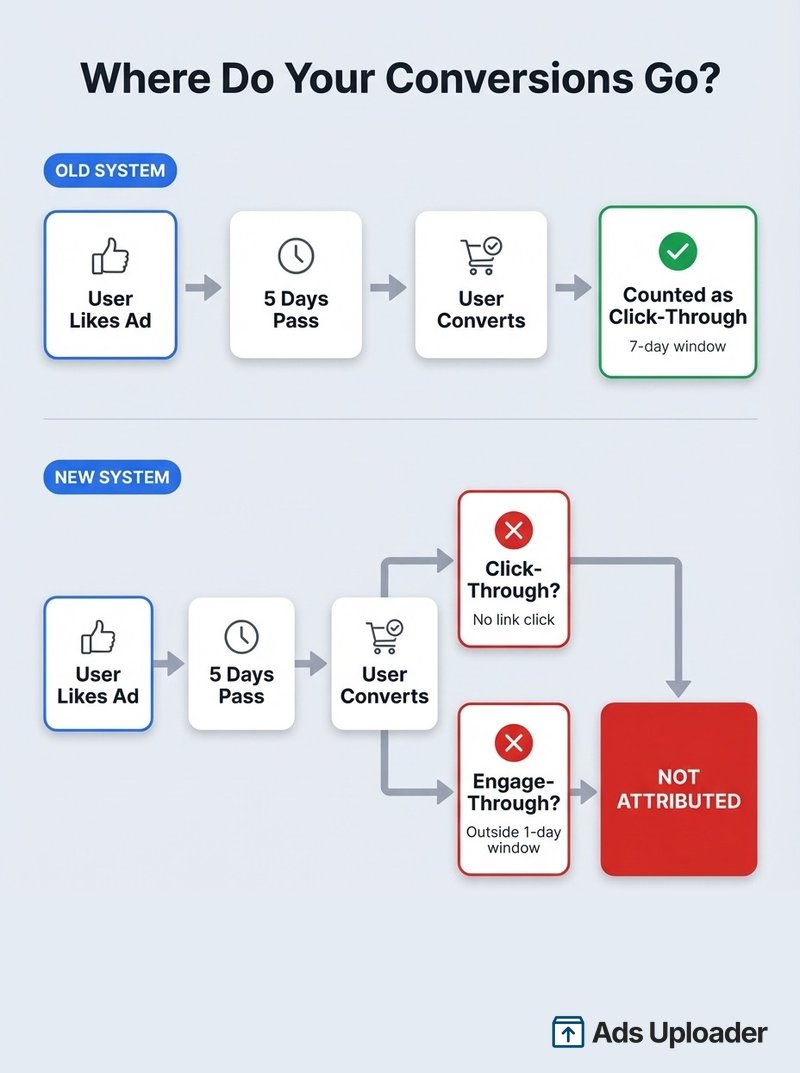
No son conversiones fantasma. Fueron compras o leads reales. Pero eran esencialmente conversiones view-through a las que se les había dado una ventana de siete días. Podrías llamarlas conversiones de relleno. Hacían que tus números se vieran mejor de lo que tus anuncios realmente rendían en aislamiento.
La regla de los 5 segundos de video para Reels
Junto con la reestructuración de click/engage-through, Meta redujo a la mitad el umbral de engaged-view de video, de 10 segundos a cinco.
¿Por qué el cambio? Los propios datos de Meta muestran que el 46% de las conversiones de compra en Reels ocurren dentro de los primeros dos segundos de atención del usuario. El comportamiento del consumidor en video de formato corto es fundamentalmente más rápido de lo que el antiguo estándar de 10 segundos asumía.
Para videos de menos de cinco segundos, el umbral es el 97% de la longitud total del video.
Qué significa esto para tus campañas: Más visualizaciones de video corto calificarán ahora para atribución engage-through. Si corres campañas cargadas de Reels, espera que los números de engage-through aumenten. No porque estén ocurriendo más conversiones, sino porque más visualizaciones de video ahora alcanzan el umbral.
Qué significa esto para lo creativo: Tus primeros dos a cinco segundos cargan más peso que nunca. El reconocimiento de marca, el gancho del producto y la propuesta de valor necesitan aterrizar antes del scroll. Esto ya era cierto para la atención, pero ahora también es cierto para la medición de atribución.
Cómo cambiará tu reporte
Una vez que la actualización de atribución de clics de Meta impacte tu cuenta, espera que dos cosas pasen simultáneamente:
Las conversiones click-through bajarán. Esto no es una caída de rendimiento. Las conversiones impulsadas por link clicks reales siguen ahí. Las conversiones antes atribuidas a likes, saves y shares se han movido a engage-through o desaparecido (si cayeron fuera de la ventana de un día).
Las conversiones engage-through aparecerán o aumentarán. Si has estado usando la configuración de atribución por defecto, verás una nueva columna poblarse con datos. Si tenías engaged-view desactivado, no verás nada aquí hasta que actives engage-through.
La facturación se mantiene igual. Meta ha sido explícito: no hay cambio en cómo se cobra a los anunciantes. Esta es una reclasificación de reporte, no un cambio de facturación.
Quién recibe el mayor impacto
Los anunciantes enfocados en remarketing probablemente verán el mayor impacto. Aquí está el escenario que crea las conversiones que desaparecen:
- Una persona ve tu anuncio de remarketing y le da like o save
- No hace clic en el enlace porque ya conoce tu marca
- Recibe un email tuyo o busca tu marca directamente
- Dos a siete días después, convierte
Bajo el sistema antiguo, esa conversión se atribuía a tus resultados click-through (cualquier clic + ventana de siete días). Bajo el nuevo sistema, desaparece. No hay link click, así que no hay click-through. El like ocurrió hace más de un día, así que tampoco hay engage-through.
Los anunciantes que desactivaron engaged-view también lo sentirán más. Con engaged-view (ahora engage-through) desactivado, las conversiones que se mueven desde click-through no tienen a dónde ir. Simplemente desaparecen de tu atribución por completo.
Las campañas con alto engagement social pero pocos link clicks verán el cambio más dramático entre columnas. Piensa en contenido de brand awareness como Carousel Ads que genera muchos saves y shares pero pocos clics directos.
Qué hacer ahora mismo
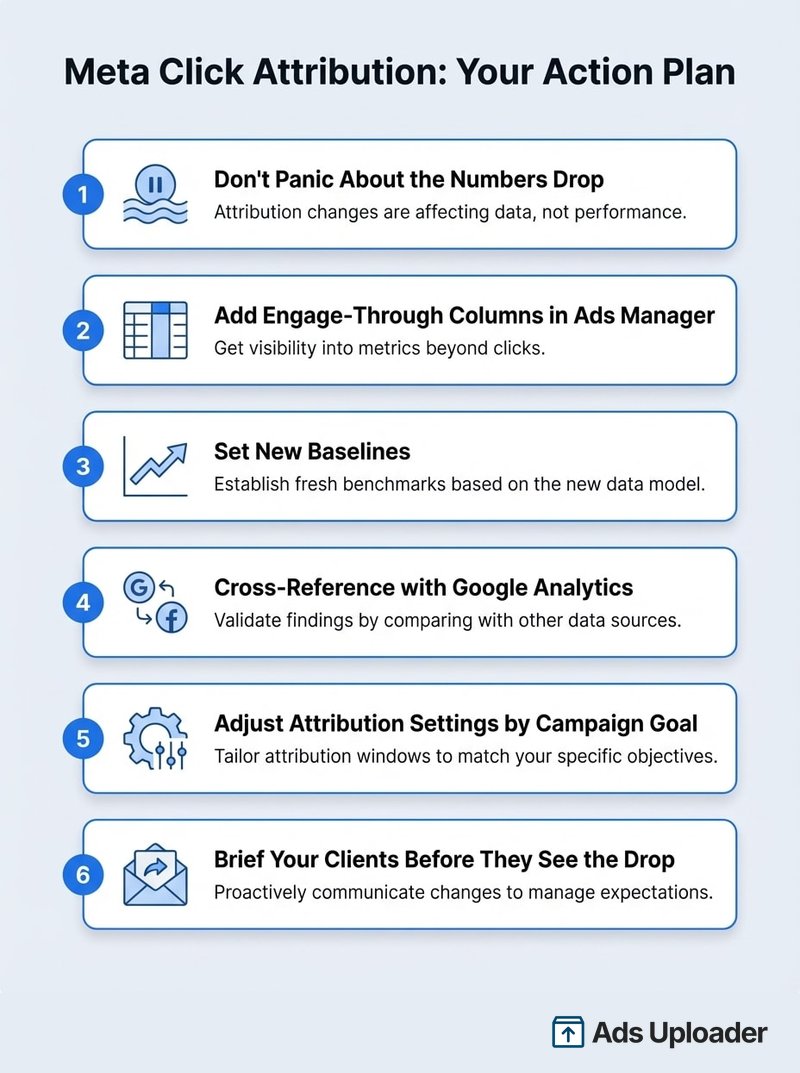
1. No entres en pánico por la caída de números
Lo más importante: no hagas cambios en las campañas basados en la caída inicial de los números click-through. La actualización de atribución de clics de Meta es una reclasificación, no una caída de rendimiento. Tus anuncios no dejaron de funcionar de la noche a la mañana.
Date al menos de dos a tres semanas para entender la nueva línea base antes de tocar bids, presupuestos o segmentación.
Lanza más. Haz menos clics.
Sube cientos de creatividades a la vez, empareja miniaturas con vídeos automáticamente y publica directamente en tus cuentas publicitarias a través de la API de Meta.
Prueba Ads Uploader gratisSin tarjeta de crédito • 7 días de prueba gratis
2. Añade columnas engage-through en Ads Manager
Si aún no lo has hecho, añade la atribución engage-through como una columna visible en tu reporte de Ads Manager. Necesitas ver tanto click-through como engage-through para ver el panorama completo.
También verifica si la función Desglose por atribución está disponible en tu cuenta. Esto te permite generar filas separadas que muestran cómo se distribuyen las conversiones entre click-through, engage-through y view-through. Útil para entender la composición de tus resultados.
3. Establece nuevas líneas base
Tu tasa de conversión click-through histórica ahora es inválida para comparación. La definición cambió, así que comparar el CVR click-through posterior a la actualización con datos anteriores es comparar métricas diferentes.
Marca la fecha en que el cambio impacta tu cuenta. Usa eso como tu nueva línea de partida para benchmarks.
4. Cruza datos con Google Analytics
El objetivo explícito de este cambio es la alineación con Google Analytics. Después del despliegue, los números de conversión click-through en Ads Manager deberían correlacionarse más de cerca con lo que GA4 registra para sesiones y conversiones originadas en Meta.
Corre una comparación de reconciliación en ambas plataformas una vez que el cambio esté activo. Si los números son más cercanos que antes, eso es el cambio funcionando como se pretendía. Si todavía son radicalmente distintos, puedes tener otros problemas de tracking que vale la pena investigar.
5. Ajusta tu configuración de atribución según el objetivo de campaña
No todas las campañas deberían usar la misma configuración de atribución. Aquí tienes un marco práctico:
- Compras: Quédate con el predeterminado 7-day click, 1-day engage-through, 1-day view. Las compras requieren deliberación. La gente investiga, consulta con su pareja y a menudo convierte días después de ver un anuncio por primera vez.
- Lead magnets gratuitos: Usa solo 1-day click. Si alguien ve tu anuncio de un ebook gratuito y no actúa de inmediato, el anuncio probablemente no impulsó la conversión. Mantener la ventana estrecha te da números más honestos.
- Remarketing: Presta mucha atención a cuánto de tus resultados venía de engage-through y view-through. Si esos representaban una gran parte de tus conversiones atribuidas, tu ROAS de remarketing probablemente estaba sobreestimado.
6. Informa a tus clientes antes de que vean la caída
Si gestionas anuncios para clientes, adelántate a esto. Envía una nota explicando:
- Meta cambió su definición de clic para coincidir con Google Analytics
- Los números click-through bajarán; los números engage-through aparecerán
- Las mismas conversiones, etiquetas más precisas
- Ve ambas columnas juntas para el panorama completo
- Esto no es un problema de rendimiento de campaña
Las agencias que informan proactivamente se ven competentes. Aquellas cuyos clientes descubren la caída por su cuenta se ven como si no estuvieran prestando atención.
Por qué Meta hizo este cambio
Tres fuerzas impulsaron esta actualización:
La brecha con GA era insostenible. Meta contaba likes y saves como "clics". Google Analytics solo contaba link clicks. Los números nunca coincidían, y los anunciantes pasaban horas intentando reconciliarlos. Al alinear la definición, Meta elimina la fuente más común de discrepancia en los reportes.
Lo social superó al search. Según WARC, la publicidad en redes sociales ha superado al search como el canal publicitario más grande del mundo por gasto. Pero los marcos de atribución se construyeron para el comportamiento de búsqueda: un tipo de clic, recorrido lineal. Las plataformas sociales necesitaban una atribución que refleje cómo las personas realmente interactúan con los anuncios a través de saves, shares, visualizaciones de video y caminos de conversión no lineales.
Integración con terceros. Meta se está asociando con Northbeam y Triple Whale para incorporar tanto clics como vistas en sus modelos de atribución. Limpiar lo que significa "clic" es un prerrequisito para que estas integraciones produzcan datos cross-platform creíbles.
También hay un incentivo estructural que vale la pena reconocer: la atribución engage-through alimenta más señales de conversión al algoritmo de Meta. Cuando más conversiones se atribuyen, incluso vía interacciones sociales, el sistema tiene más datos contra los que optimizar. Al crear una categoría separada y visible para estas señales, Meta anima a los anunciantes a mantener engage-through activado, lo cual beneficia la optimización de entrega de Meta.
Ambas motivaciones son reales. El cambio produce datos más limpios para los anunciantes y más señal para el algoritmo de Meta. Esas no son mutuamente excluyentes.
Atribución web-to-app en Meta Ads
Un escenario que los cambios de atribución de clics de 2026 no abordan del todo por sí solos es el web-to-app: qué pasa cuando alguien hace clic en tu anuncio en un navegador pero convierte dentro de tu app, o se mueve entre las dos durante el recorrido. Aquí es donde la atribución se vuelve más turbia.
Cómo maneja Meta la atribución web-to-app:
- Se encuentran dos sistemas de medición distintos. Las conversiones web las mide el Meta Pixel y la Conversions API; las conversiones de app las mide el SDK o un mobile measurement partner (MMP) a través de los eventos de app de Meta. La atribución web-to-app consiste en coser un clic medido de una forma con una conversión medida de la otra.
- El traspaso de señal es el punto débil. Cuando un usuario toca un anuncio en el navegador in-app y luego abre o instala tu app nativa para convertir, los identificadores de clic basados en el navegador no se trasladan automáticamente al entorno de la app. Sin una configuración deliberada, esa conversión puede quedar sin atribuir o acreditarse a una fuente distinta.
- El deferred deep linking es el puente. Para conectar un clic en un anuncio web con una conversión dentro de la app, necesitas deferred deep linking más una configuración de eventos consistente en ambas superficies, de modo que la app sepa qué clic trajo al usuario aunque haya instalado primero y convertido después.
- iOS añade una capa. En iOS, App Tracking Transparency y SKAdNetwork / la medición agregada de app de Meta limitan y retrasan lo que puede vincularse a un clic individual, así que los caminos web-to-app en iOS se reportan de forma más tosca y con retraso.
- Espera subatribución, no sobreatribución. Por los huecos en el traspaso, los recorridos web-to-app tienen más probabilidad de quedar subcontados que inflados. Si las conversiones de app se ven bajas en relación con los clics web, sospecha de la medición antes de culpar al creativo.
Qué hacer al respecto:
- Implementa tanto el Pixel/CAPI para web como los eventos de app (SDK o MMP) para app, y asegúrate de que compartan nombres de eventos y parámetros consistentes.
- Configura deferred deep linking para que un clic web que termina en instalar-y-luego-convertir igual pueda vincularse de vuelta.
- Al leer los reportes, trata web y app como un solo embudo que está parcialmente ciego en la costura, y apóyate en pruebas de holdout o incrementalidad en lugar de last-click para el panorama entre superficies.
La versión corta: Meta puede atribuir web-to-app, pero solo si construyes el puente (eventos web y app consistentes más deferred deep linking), e incluso entonces las limitaciones de privacidad de iOS significan que estos caminos se reportan de forma más tosca que el web-to-web puro.
Preguntas frecuentes
Ahorra horas probando creatividades
Deja de subir anuncios de uno en uno. Procesa creatividades ilimitadas en masa con emparejamiento automático de archivos y publicación directa vía API.
Prueba Ads Uploader gratisSin tarjeta de crédito • 7 días de prueba gratis
¿Cuál es la diferencia entre atribución click-through y engage-through en Meta?
La atribución click-through ahora cuenta solo las conversiones que siguen a un link click en tu anuncio. Eso significa un clic que envía al usuario a un sitio web, tienda de apps, formulario de lead u otro destino. La atribución engage-through cuenta conversiones que siguen a interacciones que no son link clicks, como likes, shares, saves y comentarios, así como visualizaciones de video de al menos cinco segundos. Click-through tiene una ventana de siete días. Engage-through tiene una ventana de un día.
¿Mis números de conversión caerán después de esta actualización?
Tus números de conversión click-through probablemente bajarán, pero esto es una reclasificación, no una caída de rendimiento. Las conversiones que antes se contaban como click-through por un like o save aparecerán ahora bajo atribución engage-through. Sin embargo, algunas conversiones desaparecerán por completo. Las interacciones que no son link clicks seguidas de una conversión entre el día dos y siete caen fuera de la ventana de un día de engage-through.
¿Este cambio afecta cómo se me factura en Meta Ads?
No. Meta ha confirmado que la facturación no se ve afectada. No se te cobrará de manera diferente. Los cambios aplican solo a cómo se clasifican y reportan las conversiones dentro de Ads Manager. Sin embargo, hay otros cambios de facturación en marcha, como las nuevas tarifas por ubicación de Meta, así que no confundas ambos.
¿Cuándo entra en vigor el cambio de atribución de clics de Meta?
El despliegue comienza en marzo de 2026 para campañas que optimizan hacia conversiones en sitio web o en tienda. Diferentes anunciantes pueden ver el cambio en distintos momentos a medida que Meta lo despliega progresivamente en las cuentas. Seguimos el despliegue junto con otros cambios de la plataforma en nuestro resumen de actualizaciones de Meta Ads.
¿Debería activar la atribución engage-through si la tenía desactivada?
Sí, reconsidera activarla. La atribución engage-through ahora cubre una categoría más amplia que el antiguo engaged-view. Incluye conversiones desde interacciones sociales en todos los formatos de anuncios, no solo visualizaciones de video. Desactivarla significa perder visibilidad de esas conversiones por completo.
¿Cómo afecta esto al reporte de Google Analytics?
Los números click-through en Ads Manager ahora deberían alinearse más de cerca con GA4, ya que ambas plataformas cuentan link clicks en lugar de tipos de interacción mixtos. Las conversiones engage-through no aparecerán en GA4, porque las interacciones sociales no crean sesiones web. Este es el comportamiento esperado, no un error de tracking.
¿Qué debo decirles a los clientes sobre la caída en conversiones click-through?
Tres puntos a comunicar: (1) Meta cambió lo que significa "clic" para coincidir con cómo GA y las herramientas de terceros lo definen. Ahora solo cuentan los link clicks. (2) Las conversiones desde likes, shares y saves ahora aparecen en una columna separada de engage-through. (3) Las mismas conversiones, mejores etiquetas. Muestra ambas columnas juntas.
¿Cómo maneja Meta la atribución web-to-app?
Los clics web los mide el Meta Pixel y la Conversions API, mientras que las conversiones de app las mide el SDK o un mobile measurement partner, así que la atribución web-to-app cose ambos sistemas. El traspaso es el punto débil: los identificadores de clic del navegador no se trasladan automáticamente a una app nativa, así que necesitas deferred deep linking y una configuración de eventos consistente en ambas superficies para conectarlos. En iOS, App Tracking Transparency y la medición agregada reportan estos caminos de forma más tosca y con retraso, y el error típico es la subatribución, así que usa pruebas de incrementalidad en lugar de last-click para la vista entre superficies.
Qué significa esto de cara al futuro
El cambio de atribución de clics de Meta es un neto positivo para los anunciantes que se preocupan por los datos precisos. Los números click-through que realmente significan link clicks hacen que el reporte cross-platform sea menos confuso. La categoría engage-through captura la influencia social sin inflar las métricas de clic.
Los puntos clave:
- Solo link clicks para atribución click-through (campañas de sitio web y en tienda)
- Engage-through reemplaza a engaged-view con un alcance más amplio, todos los formatos y una ventana de un día
- Regla de video de 5 segundos para Reels y anuncios de video (bajada desde 10)
- Algunas conversiones desaparecerán porque los clics que no son link clicks entre el día 2-7 caen fuera de ambas ventanas
- La facturación no cambia: las etiquetas de reporte cambian, pero los costos no
Los anunciantes que navegarán esto sin sobresaltos son los que ya triangulan entre Ads Manager, Google Analytics y sus propios datos de ingresos. Si has estado tratando a Ads Manager como tu única fuente de verdad, este es un buen momento para construir un enfoque de medición más completo. Para equipos listos para ir más allá de las ventanas de atribución por completo, la atribución incremental de Meta usa machine learning para estimar qué conversiones realmente causaron tus anuncios.
Configura tus columnas engage-through ahora, informa a tus clientes, marca tu nueva fecha de línea base y deja que los datos se asienten por unas semanas antes de tomar cualquier decisión de campaña. Los números se verán distintos. Tus resultados reales de negocio no han cambiado.