A Facebook access token is an opaque credential that tells Meta's Graph API and Marketing API which app, person, Page or system user is making a request and what it may do. It is issued after someone grants an app permissions such as ads_read or ads_management, and is sent with every call. User tokens last one to two hours, or about 60 days once extended; system user tokens last 60 days or never expire. Picking the right type keeps ads tools connected.
Every reporting dashboard, Marketing API script and AI agent that touches your ad accounts runs on a Facebook access token. When the token is the wrong type, has the wrong permissions or quietly dies, the tool stops working, usually on a Monday morning when the client report is due.
Meta documents tokens thoroughly, but the rules are spread over several developer pages written for people building Facebook Login into apps. Media buyers and agency ops leads need a narrower answer: which token does my tool need, how do I get it, how long will it last, and why did it stop working?
This guide answers those questions for ads work. It covers the token types and which ads tools use each, how to connect AI agents and the command line to your ad accounts without handling a token at all, and, for anyone building their own integration, how to get a token in Graph API Explorer and as a system user, read the Access Token Debugger and stop tokens expiring early. We connect to the Marketing API every day to launch ads in bulk, so the advice comes from running it, checked against Meta's current docs.
What Is a Facebook Access Token?
A Facebook access token (also called a Meta access token or Graph API access token) is a long string that identifies who is calling Meta's APIs. Meta's access token documentation describes it as "an opaque string that identifies a user, app, or Facebook Page," which also records when it expires and which app generated it.
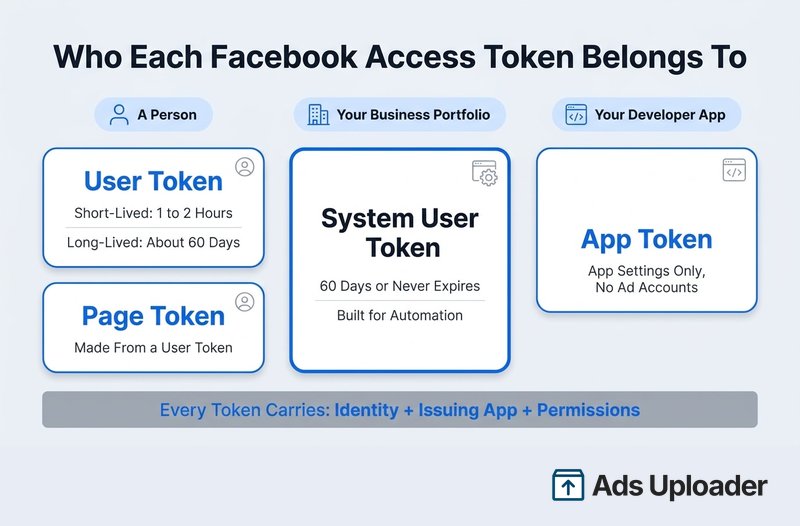
Think of it as a signed permission slip rather than a password. It carries three things:
- An identity: a person, a Page, an app or a system user.
- An issuing app: the Meta developer app the token was created for.
- Scopes: the permissions that were granted, such as
ads_readfor reporting orads_managementfor creating and editing campaigns.
A token on its own doesn't guarantee access. For an ads request to succeed, the token must be valid, carry the right permission, come from an app allowed to use that permission, and belong to an identity that has been assigned the ad account. Most "the API is broken" moments are one of those four not lining up.
Tokens are how every tool reaches the advertising side of the Graph API. Our guide to the Meta Marketing API covers the API itself: access levels, App Review, rate limits and versions.
Facebook Access Token Types
Meta issues five kinds of token. Ads teams mostly deal with two of them: user tokens and system user tokens.
| Token Type | How You Get It | How Long It Lasts | What It's For |
|---|---|---|---|
| User (short-lived) | Facebook Login or Graph API Explorer | About 1 to 2 hours | Testing, and exchanging for a long-lived token |
| User (long-lived) | Exchanging a short-lived token on a server | About 60 days | Tools a person signs into |
| Page | Requested with a user token that has a role on the Page | No set expiry when made from a long-lived user token | Acting as a Facebook Page |
| System user | Business Settings in your business portfolio | 60 days or never expires | Unattended automation, scripts, server-to-server work |
| App | Your app ID plus app secret, server side | Not a fixed lifetime | App settings and token inspection, not ad account access |
There's also a client token, which identifies an app inside mobile or desktop software. Meta says it isn't secret, and it can't reach an ad account.
Which Token Each Ads Tool Needs
| Tool or Job | Token It Uses |
|---|---|
| Ads Uploader web app, CLI and MCP | None to handle: connect Meta once, then sign in with your Ads Uploader account |
| Testing a call in Graph API Explorer | Short-lived user token |
| A reporting connector you sign into with Facebook | User token from the connector's sign-in flow |
| Nightly reporting script or data warehouse sync | Employee system user token with ads_read |
| Your own campaign automation | Employee system user token with ads_management |
| Meta's Ads CLI | System user token (Admin or Employee) |
| Meta's Ads MCP | Facebook Login for Business sign-in, or your own app's user or Employee system user token |
The pattern is simple. If a person signs in through a browser, the tool handles the credential for you. If something you built runs on a schedule or from a terminal without anyone present, it needs a system user token. And if the tool keeps its own approved connection to Meta, as Ads Uploader does, there's no Meta token on your side at all.
Connect AI Agents to Meta Ads Without Handling Tokens
Most media buyers looking up access tokens don't want a token. They want Claude, ChatGPT, Cursor, Codex or a script to read and launch ads, and the token is the obstacle. Everything later in this guide (developer apps, system users, the Debugger, 60-day rotation) is the work you take on when you build that connection yourself.
Ads Uploader is an approved Meta app. You connect your Meta account to the web app once, and the CLI and MCP server ride that same connection, so there's no developer app, no system user, no App Review and no Meta token to paste anywhere. There's also no per-ad-account rollout gate: if an ad account works in the web app, your agent can reach it, within the permissions you set.
How to Connect
- Chat apps (Claude, ChatGPT, Cursor, Codex): add
https://adsuploader.com/api/mcpas a custom connector, finish the Ads Uploader sign-in and consent screen in your browser, then ask the agent to list your ad accounts to check it works. - Claude Code and other coding agents: run
claude mcp add --transport http ads-uploader https://adsuploader.com/api/mcp, or add the same URL as a remote MCP server, and complete the browser sign-in. - Command line: install with
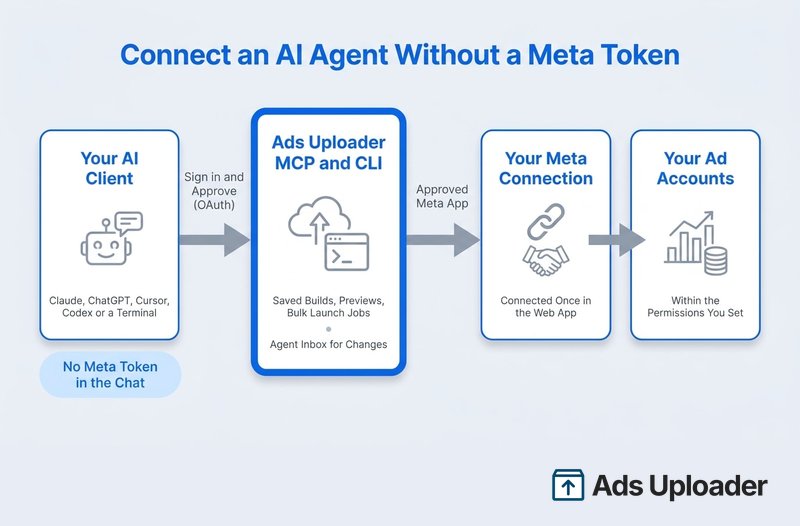
npm install -g @adsuploader/cli, then runads login, which signs you in through your browser. A local MCP server (ads-mcp) uses that same login when an agent needs to upload files straight from your disk.
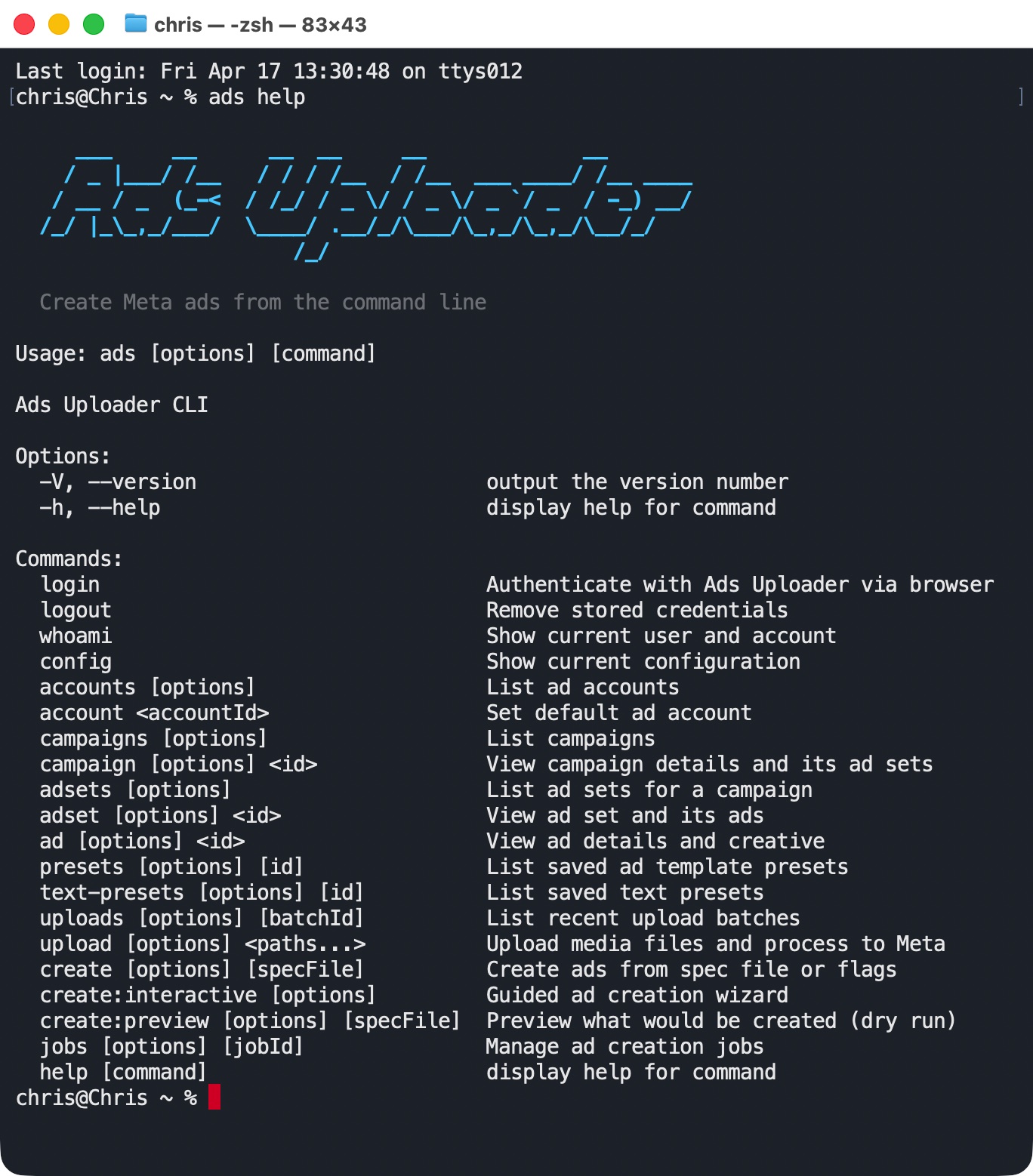
The hosted server signs you in with OAuth. The access token it issues lasts an hour, and in apps that support refresh tokens it renews in the background for up to 30 days. That token is an Ads Uploader credential, scoped to your account, and it never puts a Meta access token into your chat.
What Your Agent Can Do Once Connected
- Launch in bulk from saved builds and presets, with 4:5 and 9:16 placement pairing, custom ad names and duplicate-launch protection. The agent previews exactly what will be created first, and the launch runs as a job on Ads Uploader's servers that it can track.
- Read performance with breakdowns, period comparisons and plain metrics such as purchases, cost per lead and ROAS, check campaign health, and pull insights across up to 5 ad accounts in one call.
- Propose changes through the Agent Inbox. By default, the agent's proposed changes wait in your Agent Inbox with the current and proposed values side by side, and you approve what goes live. Every launch and change lands in History, reversible changes can be undone, and per-account permissions decide what agents may do.
- Duplicate campaigns, ad sets and ads the way Ads Manager does, or duplicate by Post ID to keep an ad's likes and comments.
Because builds are shared, you can set up media in the web uploader, hand the build reference to an agent for copy or ad set settings, and open the link in your browser to check everything before any ads are created.
Ads Uploader is $59/month flat with unlimited ad accounts. MCP access is on paid plans and isn't part of the web app's 7-day trial.
If you're building your own integration instead, the rest of this guide covers getting, checking and protecting a token yourself.
How to Get a Facebook Access Token in Graph API Explorer
The Graph API Explorer is the fastest way to get a token for testing. You'll need a Meta developer account, a Meta app with the Marketing API added through its use cases, and a Facebook profile with access to the ad account.
- Open Graph API Explorer and pick your app in the Meta App menu. It only lists apps where you're an admin, developer or tester.
- In User or Page, choose User Token.
- Under Permissions, add only what you need:
ads_readfor reporting,ads_managementif you'll create or edit anything, andbusiness_managementonly if the tool must list business assets. - Click Generate Access Token and approve the Facebook login dialog.
- Test it with
me?fields=id,name, thenme/adaccounts?fields=id,name,account_statusto confirm the ad accounts you expect come back.
That token lasts an hour or two. To stretch it to about 60 days, exchange it for a long-lived token. Developers do this with a server-side call that includes the app secret, and the Access Token Debugger has historically offered an Extend Access Token button for eligible user tokens. You can't extend a token that has already expired, though. Meta's rule is that you go through login again and start from a fresh short-lived token.
An Explorer token is fine for checking whether a call works. It's the wrong credential for production. It belongs to one person, so their password change, logout or departure takes your reporting down with it.
Wary of Wiring AI Straight to Meta?
Ads Uploader is loved by power media buyers and agencies, and trusted to launch hundreds of thousands of Meta ads every month.
See the MCP for Meta AdsNo credit card required • 7-day free trial
How to Get a System User Access Token for the Marketing API
For anything that runs unattended, use a system user. A system user is a non-human identity that lives in your business portfolio, so its token isn't tied to anyone's Facebook login. Meta describes system user tokens as letting an app "perform programmatic, automated actions on Ad objects or Pages without requiring input from an app user or re-authentication."
First, pick the role. Employee system users can only reach assets you assign to them one by one. Admin system users get everything owned by or shared with the business portfolio by default. Meta advises using regular (Employee) system users for asset access, and a business can only have one Admin system user, so choose Employee unless you have a specific reason not to.
Then, in Meta Business Suite:
- Go to Business Settings > Users > System Users and click Add.
- Give it a descriptive name, such as "Reporting Warehouse" or "Ads CLI," and choose the Employee role.
- Under Apps, assign the system user to your Meta app. The app and the system user must belong to the same business.
- Assign the assets the tool will touch: each ad account it manages, plus any Pages, datasets (pixels) and catalogs it needs.
- Back on the system user, click Generate Token, select the app and choose an expiry.
- Tick only the permissions the job needs, then generate the token.
- Copy it straight into the tool's secure settings or your secrets manager. Treat it as something you'll only see once.
- Paste it into the Access Token Debugger to confirm the type, scopes and expiry, then run a read-only call before allowing any writes.
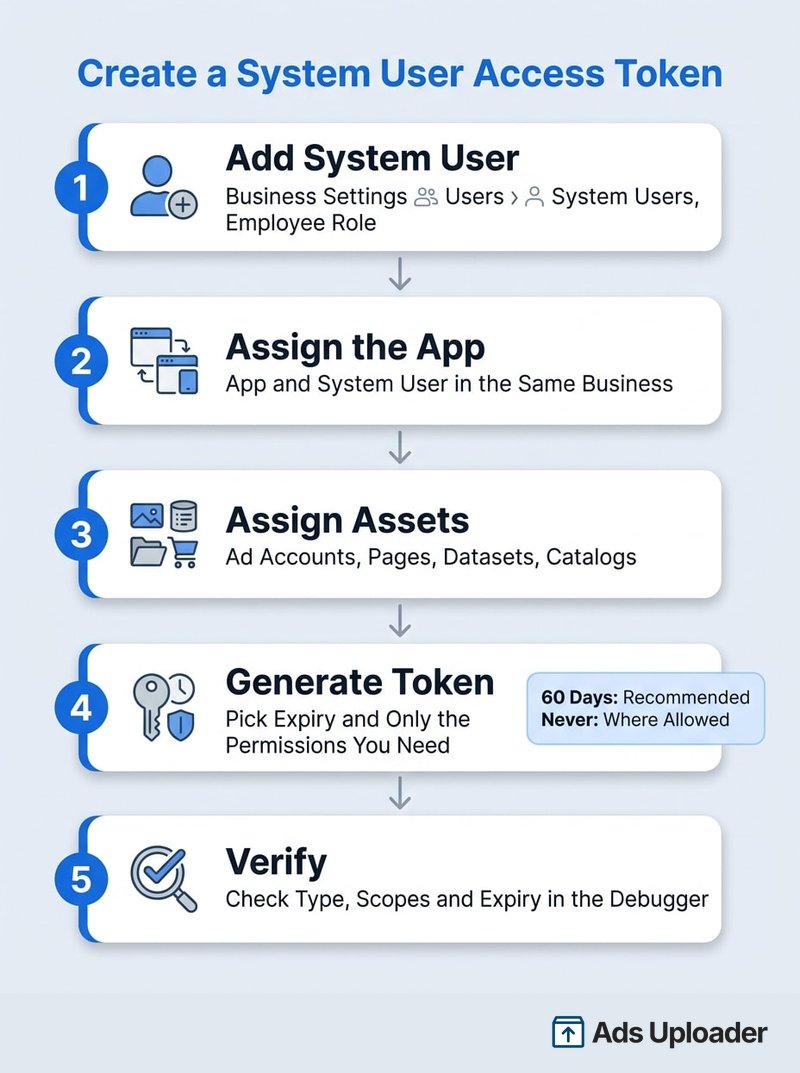
On expiry, Meta's system user token guide now recommends 60-day tokens and says "All integrations should adopt expiring tokens." A never-expiring option is still offered to many businesses, but some are required to use expiring tokens. A 60-day token can be refreshed while it's still valid, so you can rotate it without downtime: refresh, deploy the new token, then revoke the old one.
There are also limits on how many you can create. With Limited Access to the Marketing API, a business gets one regular system user. Full Access raises that to 10. Agencies working on client ad accounts also need the client to share those accounts with the agency's business, and the app needs Advanced Access to the ads permissions through App Review.
If you're setting this up for Meta's command-line tool, our Meta Ads CLI deep dive lists the exact scopes and environment variables it expects.
User Token vs System User Token
| User Token | System User Token | |
|---|---|---|
| Who it represents | A real Facebook user | Your business portfolio |
| Where you get it | Facebook Login or Graph API Explorer | Business Settings, under System Users |
| Lifetime | 1 to 2 hours, or about 60 days once extended | 60 days (refreshable) or never expires |
| Breaks when | That person logs out, changes their password, removes the app or loses access | The system user, app or asset assignment is removed, or the token is revoked |
| Best for | Tools people sign into interactively | Scheduled scripts, server-to-server automation, the Ads CLI |
| Ad account access | Whatever that person can reach, within the granted permissions | Only assigned assets (Employee) or everything in the portfolio (Admin) |
The practical difference shows up when someone leaves. A reporting job built on a media buyer's personal token stops the day their access is removed. A system user keeps working because it never belonged to them.
How to Check a Token in the Facebook Access Token Debugger
Meta's Access Token Debugger answers "is this token fine?" in one step. Paste the token, click Debug and read the fields:
- App ID: the app the token was issued for. If it isn't the app your tool uses, you have the wrong token.
- Type: User, Page, App or System User. A User token in a nightly job is a problem waiting to happen.
- Valid: whether Meta currently accepts it.
- Expires: when the token itself stops working. "Never" means no scheduled expiry, not that it can't be revoked.
- Data Access Expires: a separate 90-day clock on reading user data after the person was last active. Meta exempts the core ads permissions (
ads_read,ads_management,business_managementand the main Page ads permissions) from it, so it rarely bites ads tools. - Scopes: the permissions actually granted. People can decline some during login, so this list can be shorter than what you asked for.
- Granular Scopes: which specific Pages or assets a permission applies to. This is where you spot a token that has the right permission but not for the asset that's failing.
Only paste tokens into Meta's own debugger. A third-party "token checker" is just another place your credential gets copied.
How Long Does a Facebook Access Token Last?
Here are the documented lifetimes:
- Short-lived user token: about one to two hours.
- Long-lived user token: about 60 days.
- Page token from a long-lived user token: no set expiry.
- System user token: 60 days from generation or refresh, or never expires where Meta allows it.
Meta's own caveat is worth repeating: "Do not depend on these lifetimes remaining the same." They can change without warning, and tokens can die early.
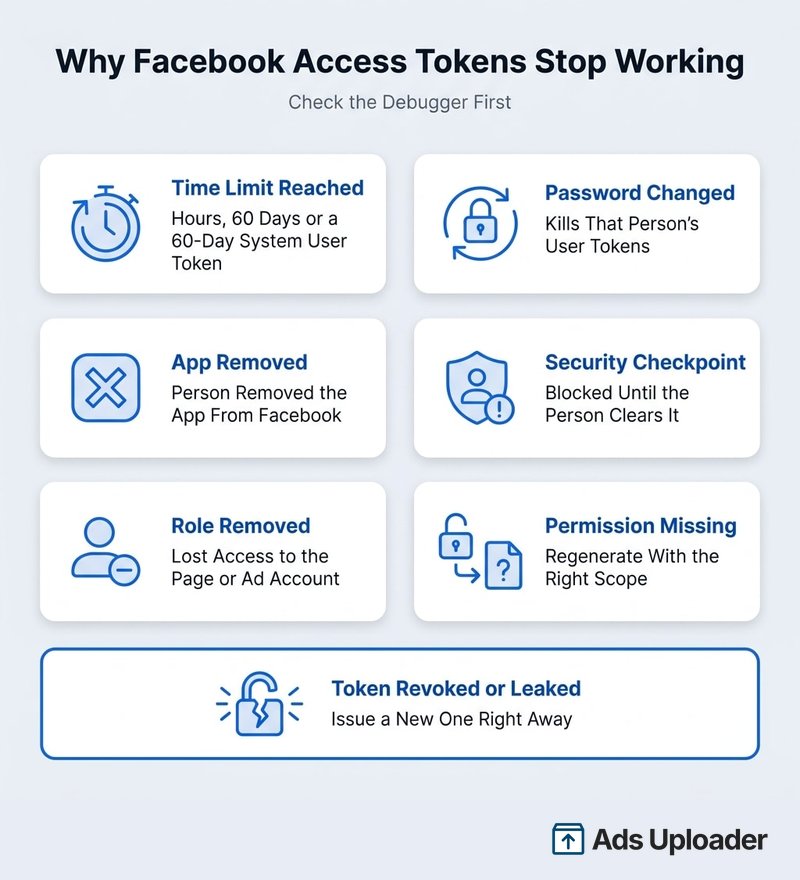
Why Did My Facebook Access Token Expire?
If a token stopped before its expiry date, one of these is usually the reason:
| What Happened | What It Does | The Fix |
|---|---|---|
| Time ran out | Short-lived (hours), long-lived (60 days) or 60-day system user token lapsed | Generate a new one, or refresh system user tokens before day 60 |
| The person changed their Facebook password or logged out | Invalidates their user tokens immediately | They sign in again and you replace the token |
| The app was removed from their Facebook settings | Token stops authorizing | Reconnect through the tool's sign-in |
| Facebook put the account through a security checkpoint | Token blocked until it's cleared | The person logs in to Facebook and resolves it |
| Someone lost their role on the Page or ad account | Calls to that asset fail, even if the token looks valid | Restore the role or assignment in Business Settings |
| A permission was removed or never granted | Specific actions fail with permission errors | Regenerate with the missing permission |
| The token was revoked or leaked | Meta or an admin invalidated it | Issue a new token and find where it leaked |
Meta doesn't notify you when a token becomes invalid. Your tool finds out when a call fails, usually with error 190 for an expired or invalid token. That's why Meta recommends checking token validity at least daily for anything that runs unattended.
Keep Your Facebook Access Token Safe
A token with ads_management can create, edit and pause campaigns on every account it reaches. Meta's rule is that access tokens are sensitive and must stay confidential.
- Never paste a token into a chat, prompt or ticket. That includes AI assistants,
CLAUDE.mdfiles, Slack, email, spreadsheets, screenshots and screen recordings. Once a token is in a transcript, you no longer control who sees it. - Store it as an environment variable or in a secrets manager, not in code or a command you type. Keep
.envfiles out of version control. - Use the least privilege that does the job.
ads_readfor reporting,ads_managementonly when the tool writes. Assign only the ad accounts it needs. - One system user per tool. A separate token for reporting, for the CLI and for each automation makes it easy to revoke one without breaking the rest. Separate tokens don't buy extra API capacity, though: most of Meta's limits attach to the app and ad account, as our guide to Meta Ads API rate limits explains.
- Prefer 60-day tokens and rotate them. A token that expires limits the damage if it leaks.
- Avoid browser extensions that pull tokens from your cookies. Meta has documented fake ad tools and malicious extensions used to hijack sessions and run unauthorized ads.
- Revoke on exposure. If a token ends up anywhere it shouldn't, revoke it and issue a new one right away.
Tokens With Meta's Ads CLI and Ads MCP
Meta's Ads CLI runs on your machine with nobody signing in, so it needs a token. Meta's setup guide says: "Ads CLI requires a system user access token to authenticate for programmatic access." You generate it in Business Settings and pass it through an environment variable.
Meta's Ads MCP server is the free, first-party option. Added to a chat app as a connector, it signs you in with Facebook Login for Business, with no developer app or token to copy. Developers can also connect their own Meta app and pass a token, in which case Meta's Ads MCP setup guide requires the ads_mcp_management permission plus ads_read or ads_management, and only accepts system user tokens from Employee-role system users. Its strengths are breadth: catalogs, pixels and datasets, A/B and lift tests, benchmarks and Opportunity Score. Meta is switching it on ad account by ad account, and its creation tools work one object per call.
Our Meta Ads MCP vs CLI comparison covers when to use each, and the Meta Ads MCP setup guide walks through connecting Meta's server. To weigh every option side by side, see our roundup of the best Meta Ads MCP servers.
Give Your AI Agent a Safety Net
Launch across every client account with an MCP and CLI built for power media buyers and agencies.
See the MCP for Meta AdsNo credit card required • 7-day free trial
Frequently Asked Questions
How Do I Get a Facebook Access Token for the Marketing API?
For a quick test, open Graph API Explorer, select your Meta app, choose User Token, add ads_read or ads_management and click Generate Access Token. For anything that runs unattended, create an Employee system user in Business Settings, assign it the app and your ad accounts, then click Generate Token. If you only need an AI agent or CLI to work with your ads, a tool like Ads Uploader that manages the Meta connection means you never handle a token.
Can I Get a Facebook Access Token That Never Expires?
Yes, with conditions. System user tokens can be generated with no expiry where Meta allows it, and a Page token derived from a long-lived user token has no set end date. Both can still be revoked or invalidated, and Meta now recommends 60-day system user tokens that you refresh. Some businesses are required to use them.
What's the Difference Between Graph API Explorer and the Access Token Debugger?
Graph API Explorer creates test user and Page tokens and sends API requests with them. The Access Token Debugger inspects a token you already have: which app issued it, its type, whether it's valid, when it expires and which permissions and assets it covers. Use Explorer to make a token and the Debugger to diagnose one.
Which Permissions Does a Facebook Ads Token Need?
Use ads_read for reporting and ads_management when the tool creates or edits campaigns. Add business_management only if the tool must list or manage business assets, and Page permissions only for Page-dependent work. Meta's Ads MCP also needs ads_mcp_management. Client accounts need Advanced Access to those permissions through App Review.
Is It Safe to Share a Facebook Access Token?
No. Meta treats access tokens as confidential, and anyone holding a valid token can act within its permissions on the assets it reaches. Give a token only to the service that uses it, through its secure settings or a secrets manager. Never send one in chat, email, a support ticket, a screenshot or an AI prompt.
What Is the Difference Between a User Token and a System User Token?
A user token represents a real person and comes from Facebook Login or Graph API Explorer, so it breaks when that person logs out, changes their password or loses access. A system user token belongs to your business portfolio, is built for automation and lasts 60 days or never expires, so it survives staff changes.
Conclusion
A Facebook access token is a small string that carries a lot of responsibility. Get the type and permissions right once, and your reporting and automation keep running without anyone babysitting them.
The key takeaways:
- Match the token to the job. User tokens for tools people sign into, system user tokens for anything that runs on its own.
- Default to an Employee system user with only the ad accounts and permissions the tool needs.
- Expect tokens to end. Plan for 60-day rotation, and check the Debugger first when something breaks.
- Keep tokens out of chats and prompts. Environment variables and secrets managers, never a transcript.
- Skip the token when you can. A tool that keeps its own approved Meta connection, like Ads Uploader's MCP and CLI, lets your agent read, launch and propose changes without a Meta token ever reaching your chat.
Your next step: open the Access Token Debugger, paste the token your current tools use, and check its type, expiry and scopes. If a scheduled job is running on someone's personal user token, move it to a system user before it breaks.