Facebook ads automation is the use of Meta's built-in tools, automated rules and outside software to run parts of a Facebook and Instagram campaign without manual work. Advantage+ automates audience, placement, budget and creative decisions at auction time, while automated rules act when a metric crosses a set threshold. Bulk launch tools build many ads from one template, and AI agents connected through Meta's Ads MCP server read accounts and draft changes. Together they save hours, while people keep strategy, creative judgment and approval over budgets and status.
Most of a media buyer's week doesn't go on strategy. It goes on checking dashboards, nudging budgets, pausing losers and building the next batch of ads one placement at a time.
That's the work facebook ads automation is supposed to take off your plate. The catch is that "automation" now covers four very different things, from Meta's Advantage+ settings to an AI agent with write access to your ad account. They aren't interchangeable, and using the wrong one for a job is how automation ends up costing money instead of saving time.
This guide covers what each layer does, what to automate and what to keep human, a starter stack for a solo buyer and for an agency, and the guardrails that matter once software can touch spend. I run Ads Uploader and launch Meta ads every week, and the platform facts below are checked against Meta's own documentation as of late 2026.
What Is Facebook Ads Automation?
Facebook ads automation means handing repeatable advertising work to a system: Meta's delivery algorithm, a rule you wrote, a launch tool or an AI agent. The work can be an auction decision (who sees this ad), a guardrail (pause this ad if it spends twice the target CPA with no sale), a production task (build 60 ads from this folder) or an analysis (why did CPA jump on Tuesday?).
It doesn't remove your responsibility for the offer, the target CPA, measurement, policy compliance or what an AI-edited image says about your product. Those stay with you whatever you automate.
The Four Layers of Meta Ads Automation
It helps to think of Meta ads automation as four layers that stack on top of each other:
- Delivery automation. Advantage+ audience, placements, campaign budget and creative. Meta makes these decisions inside the auction.
- Automated rules. If-then controls in Ads Manager that alert, pause or change budgets when metrics cross thresholds.
- Bulk launching. Tools like Ads Uploader that turn a saved build or a folder of creative into many correctly built ads.
- AI agents. Assistants like Claude or ChatGPT connected to your ad account through MCP, reading data, proposing changes and launching with your approval.
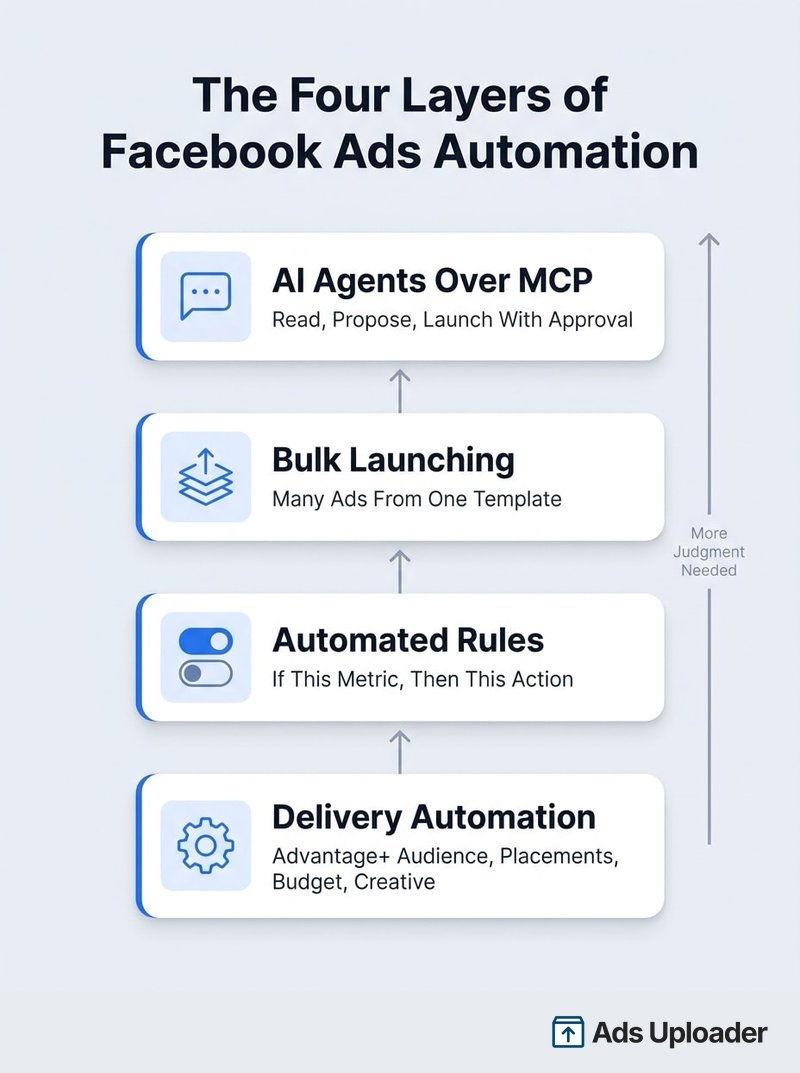
The higher you go, the more judgment the layer needs from you. Advantage+ needs good inputs. An agent needs clear limits.
One naming note: Meta's old Page-based product called "Automated Ads" is a different thing. Meta's help center says Automated Ads will be going away in 2026, and you may already be unable to create new ones. That product is retiring. Facebook automated ads in the wider sense, Advantage+ and rules, are not.
What Parts of Facebook Ads Can Be Automated?
Almost every repeatable task can be automated by at least one layer. The question is which layer, and where a person still signs off.
| Job | Best Layer | Keep a Human On |
|---|---|---|
| Choosing who sees each impression | Advantage+ audience | Exclusions and any legal targeting limits |
| Choosing placements | Advantage+ placements | Placements your creative doesn't fit |
| Splitting budget between ad sets | Advantage campaign budget | The total budget |
| Creative variations and resizing | Advantage+ creative | Which enhancements are allowed |
| Spend, CPA and tracking alerts | Automated rules | Thresholds and who gets alerted |
| Pausing clear losers | Automated rules | The stop-loss threshold |
| Scaling budgets | Rules or an agent, capped | Increases above a set cap |
| Building ads in bulk | Bulk launch tool such as Ads Uploader | The approved launch spec |
| Daily summaries and anomaly checks | AI agent | Nothing, if it's read-only |
| Drafting the next launch or edits | AI agent with an approval step | Approving before anything goes live |
If a task is deterministic, a rule usually beats an agent. If it needs auction-time data, leave it to Advantage+. If it's repetitive production, use a bulk workflow. If it needs interpretation across several data points, that's where an agent earns its keep.
Automating Launches and Approvals With Ads Uploader
The slowest part of most weeks isn't optimization, it's building ads. A batch of 20 videos with 9:16 and 4:5 cuts means matching each file to the right placement, toggling off the creative enhancements you don't want, naming every ad, adding UTMs and copying settings from an ad set that already works. Do it by hand in Ads Manager and a careless click puts the wrong cut in Reels.
Bulk launching is the part of facebook advertising automation that handles this production work, and it's the layer Ads Uploader is built for: tried and tested by thousands of media buyers and agencies, with the web app, CLI and MCP running the same launch engine.
Bulk Launching From Saved Builds
- Set it up once. In the web app you configure the campaign and ad set, naming, URL parameters, creative enhancement settings and ad text. That configuration autosaves as a build, and settings you reuse become presets.
- Pair the cuts. Point the build at a folder and each 4:5 file is paired with its 9:16 version, so Feed gets one and Stories and Reels get the other. Custom names follow your convention, and one launch can carry hundreds of ads.
- No double launches. If the same launch is requested twice, you get the existing job back instead of a second set of ads.
- Duplicate without rebuilding. Copy campaigns, ad sets and ads the way Ads Manager does, or duplicate by Post ID to keep a winner's likes and comments.
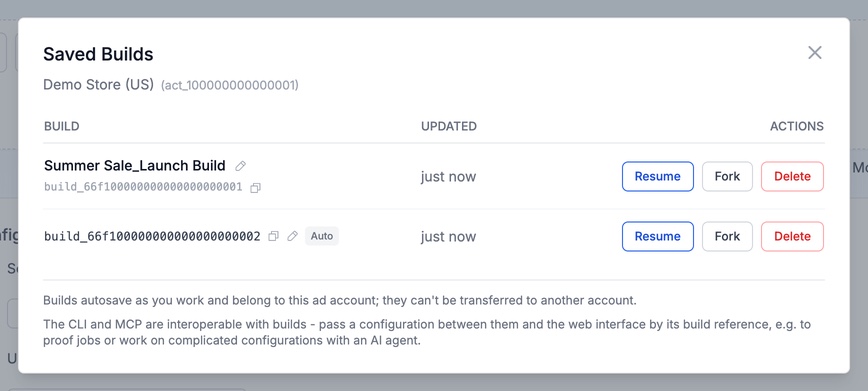
Letting an AI Agent Run It
The same engine is open to AI agents. Add the hosted MCP at https://adsuploader.com/api/mcp as a custom connector in Claude, ChatGPT, Cursor or Codex and sign in, with no token to paste. A local MCP, which can upload files straight from your disk, and the CLI work from the same saved builds. Because the MCP rides your existing Ads Uploader connection to Meta, there's no separate switch to wait for on each ad account.
A typical week with an agent looks like this:
- Read. You ask how last week went. The agent pulls performance with breakdowns and a comparison with the week before, in plain metrics like cost per lead and ROAS, checks each campaign's health, and can cover up to five ad accounts in one call.
- Propose. It suggests pausing two fatigued ads and a capped budget increase. By default, each proposal waits in the Agent Inbox with current and proposed values side by side and the agent's reason.
- Approve. You approve the lines you want and watch each one apply. Every change is read back from Meta, reversible changes can be undone, and agent and web app activity share one History.
- Launch. The agent copies last week's build into a new draft, swaps in the new creative, shows you a preview, and launches the batch as one job you can watch.
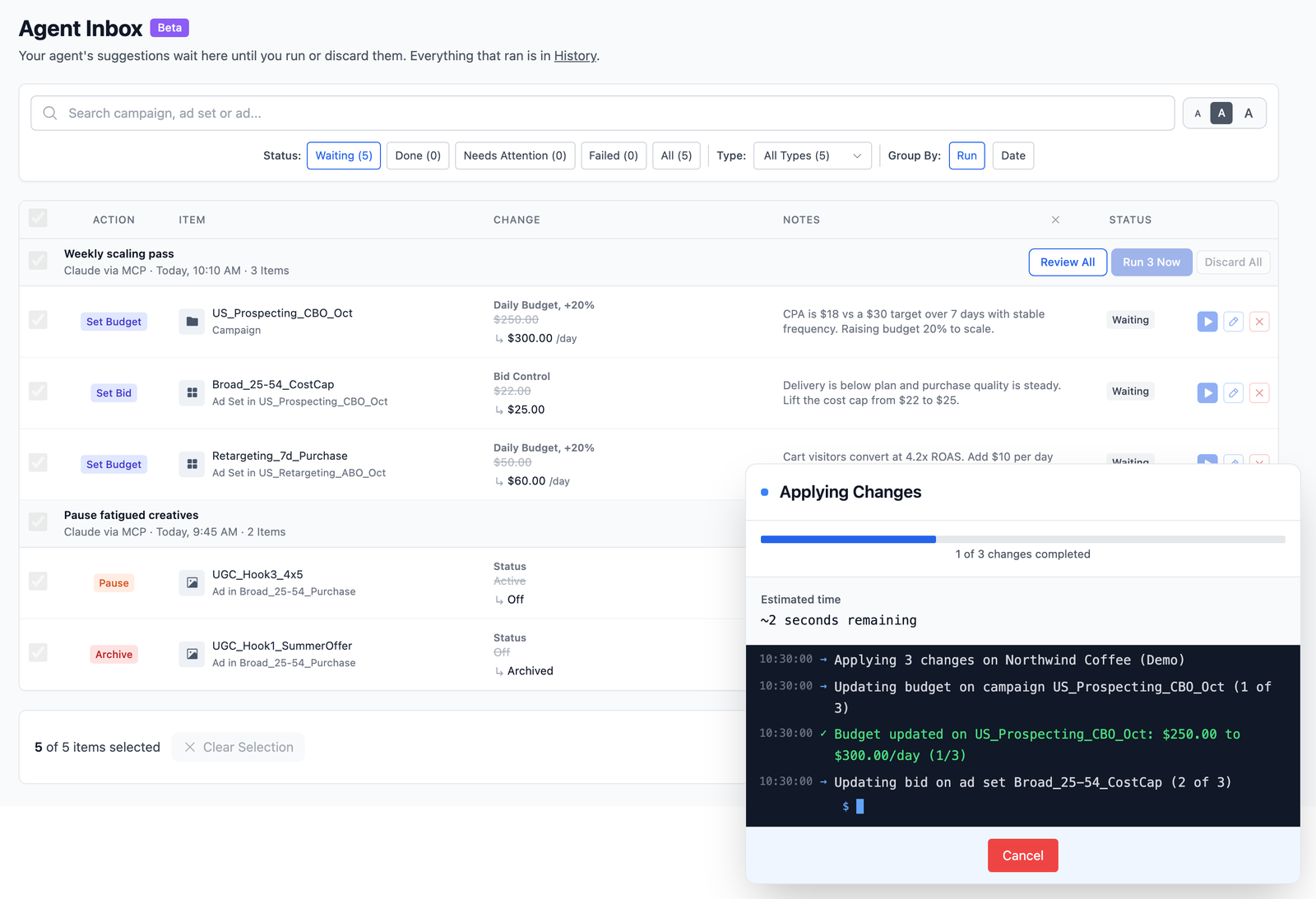
Per-account permissions decide what agents may do in each ad account and whether launches and edits need approval. Ads Uploader costs $59 a month flat with unlimited ad accounts; MCP access is on paid plans and isn't part of the web app's 7-day trial.
Meta's Built-in Automation
Meta's own automation is the base of the stack. It's free, it sees auction data nothing else can, and in 2026 most of it is on by default.
Advantage+ Campaigns
During 2025 Meta replaced the old choice between a manual campaign and a separate Advantage+ campaign type with one unified setup for sales, app and leads objectives. Ads Manager now shows "Advantage+ on" when a campaign's budget, audience and placement settings meet Meta's Advantage+ criteria. Advantage+ shopping campaigns became Advantage+ sales campaigns.
Manual controls remain; Advantage+ is simply the recommended state. Meta says its end-to-end Advantage+ solutions passed a $75 billion annual run-rate in Q2 2026.
Advantage+ Creative and Enhancements
Advantage+ creative is a set of enhancements, not one switch. Depending on format and rollout, it can add text variations, visual touch-ups, image expansion, generative backgrounds, overlays, music and, since October 2026, static-image-to-video generation.
Some are preselected in Ads Manager, and each ad can show a different set. Checking every enhancement on every ad, and turning off the ones that change your product's look, price or claims, is one of the most underrated chores in Meta advertising. Decide your enhancement policy once, then preview important ads before they go live.
Advantage+ Audience, Placements and Campaign Budget
- Advantage+ audience treats most of your targeting inputs as suggestions and searches beyond them when Meta predicts better results. Meta reports a 28% lower median cost per click, lead or landing page view from a 2023 study. Account-level controls, such as age and location exclusions, still apply.
- Advantage+ placements spreads delivery across Facebook, Instagram, Messenger and Audience Network. Go manual when a placement doesn't suit your brand or creative, or a test needs fixed exposure.
- Advantage campaign budget (formerly CBO) sets one budget at campaign level and shifts spend between ad sets. Tight ad set minimums and maximums reduce its freedom, and stacking budget rules on top can make the controls fight each other. Give each campaign one budget authority.
Wary of Wiring AI Straight to Meta?
Ads Uploader is loved by power media buyers and agencies, and trusted to launch hundreds of thousands of Meta ads every month.
See the MCP for Meta AdsNo credit card required • 7-day free trial
Automated Rules in Ads Manager
Automated rules are the oldest and most predictable layer. A rule checks selected campaigns, ad sets or ads and acts when every condition is true.
To create one, select the objects in Ads Manager, open Rules, choose Create new rule, then set:
- Action: turn on, turn off, send a notification only, increase or decrease a budget, or adjust a manual bid
- Conditions: spend, results, cost per result, ROAS, frequency, impressions, time since creation and more (all conditions must be met)
- Time range and attribution: today, the last 3 or 7 days, and the attribution setting the rule reads
- Schedule: continuously (checked roughly every 30 minutes), daily or custom
- Notifications: who gets told when the rule fires
Meta allows up to 250 rules per ad account, inactive ones included.
Four starter rules most accounts can use (illustrative thresholds, not Meta presets):
| Rule | Conditions | Action |
|---|---|---|
| Early stop-loss alert | Spend above 1.5x target CPA, zero purchases | Notify only |
| Mature stop-loss | Spend above 2x target CPA, zero purchases, ad older than 72 hours | Turn off ad |
| Controlled scaling | 3-day CPA below target, at least 5 purchases | Raise budget 15% once daily, up to a hard ceiling |
| Tracking alert | Spend today, zero conversions reported | Notify only |
Run new rules in notification-only mode for one to two weeks and compare them with the calls you would have made. Then switch on the actions you trust.
AI Agents for Facebook Ads Automation
AI facebook ads automation is the newest layer. The Model Context Protocol (MCP) is an open standard that lets an AI assistant call tools in another system, so Claude or ChatGPT can read and work in your ad account instead of you copying numbers into a chat. The most useful jobs today are the boring ones: daily summaries, alerts when spend or CPA moves unusually, explaining why delivery dropped, and drafting launches and capped edits for you to approve.
Meta's Official Ads MCP
Meta launched its own Ads MCP server and Ads CLI in open beta on April 29, 2026. It's free during the beta, first-party, and strong on reading an account, with tools for catalogs, pixels and datasets, A/B and lift tests, benchmarks and Opportunity Score. It creates objects one per call, with new objects created paused and activation as a separate step, and edits to live objects apply straight away. Meta switches it on account by account during its rollout, and portfolio admins can set Ads MCP server rules to block status changes or cap budget edits (still in limited availability). Our Meta Ads MCP setup guide walks through connecting it.
Plenty of media buyers run both: Meta's server for catalog, pixel and experiment work, and Ads Uploader's for launches, approved edits and reporting across client accounts.
Can an AI Agent Launch and Manage Your Facebook Ads?
Yes, as long as the approval sits in the right place. "Manage" is realistic for reading, proposing and preparing work. Unattended control of live spend isn't something I'd hand to any agent yet, so whichever server you use, make budget increases and status changes wait for a person.
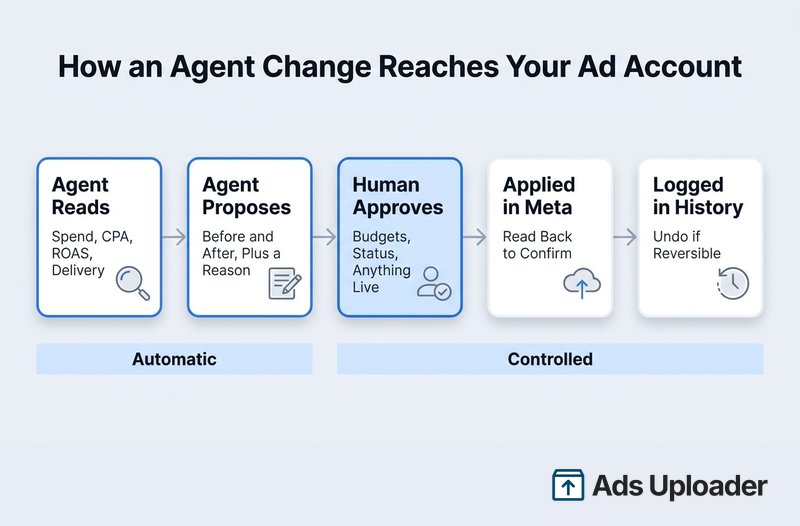
If you're choosing a server, you can compare Meta Ads MCP servers on bulk launching, review before live and multi-account support. For the bigger picture of where agents fit in a media buying team, see our guide to agentic media buying.
Zapier, Make and n8n: Where Workflow Tools Fit
Workflow tools connect apps with triggers and actions you design: when this happens, do that. Around Meta ads they're good at the plumbing: sending new leads from lead ads to a CRM or sheet, posting alerts to Slack, exporting reports on a schedule and syncing customer lists.
- Make has a Facebook Ads campaign management app that can watch for new campaigns, ad sets and ads, update them by ID, list ad sets and ads, and pull reach estimates.
- Zapier focuses on lead ads. Its business admin version adds finding an ad, requesting a statistics report and creating a single lead ad, and Zapier's MCP server exposes those actions to AI clients.
- n8n lets you build your own workflows against Meta's API, which is flexible, but you bring your own Meta app and access token and maintain it yourself.
MCP vs Zapier for Facebook Ads
| Workflow Tools (Zapier, Make, n8n) | Ads MCP Server | |
|---|---|---|
| How it runs | Fixed trigger and action steps you design in advance | An AI agent picks the tools for each request |
| Best for | Lead routing, alerts, scheduled exports, data sync | Analysis, diagnosis, launches and edits inside the ad account |
| Building ads | One object per step at most, with no placement pairing; Zapier's MCP creates one lead ad per call | Depends on the server; Ads Uploader launches from a saved build as one job |
| Approvals | Whatever you build into the flow | Built into some servers, such as Ads Uploader's Agent Inbox; Meta's relies on client confirmation and server rules |
| Cost model | Per task or operation (each Zapier MCP call uses two tasks) | Free during Meta's beta, or a flat or usage price set by the server |
They combine well: a Make or Zapier flow routes leads and alerts while an agent handles the weekly analysis and launch.
Automated Rules, Advantage+ or an AI Agent: Which Should You Use?
You'll usually use all three, because they answer different questions.
| Advantage+ | Automated Rules | AI Agent | |
|---|---|---|---|
| Decides | Who sees the ad, where, with which variation | Whether a threshold was crossed | What the data means and what to do next |
| Best for | Auction-time optimization | Alerts, stop-losses, capped scaling | Summaries, investigation, drafting launches and edits |
| Inputs it needs | Clean conversion signal, good creative | Your target CPA and sensible windows | Read access, clear limits, an approval step |
| Weak at | Business context, brand safety | Context (a tracking outage looks like a bad ad) | Unattended money decisions |
| Cost | Included in Meta | Included in Meta | AI client plan, plus any MCP server fee |
A shortcut that holds up well: use Advantage+ for prediction, rules for thresholds, bulk tools for volume, agents for interpretation and people for accountability.
The layers also work best together. A rule notices tracking has dropped to zero. An agent checks the change history, the pixel and the landing page, then tells you what it found. You decide whether to pause.
What to Automate and What to Keep Human
The simplest policy is to automate anything that is repeatable and bounded, and keep a person on anything that can materially change spend, delivery or what customers see.
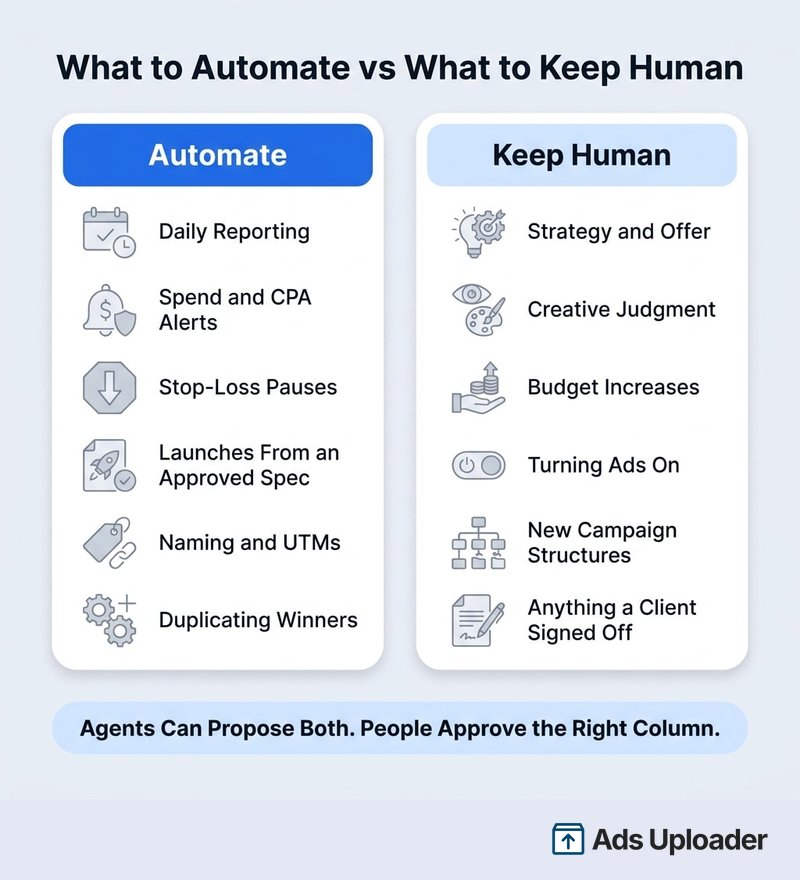
Automate reporting, alerts, stop-loss notifications, launches from a spec you approved, naming, UTMs, placement matching and duplicating proven ads. Keep strategy, creative judgment, budget increases above a cap, turning ads on, new campaign structures and anything a client signed off with a person.
An agent can propose changes in both columns. The point is that the right-hand column never applies without someone saying yes.
A Practical Facebook Ads Automation Stack
Here's how I'd set up each layer, depending on who's running the account.
For a Solo Media Buyer
- Foundation: one reliable pixel and Conversions API setup, the right conversion event with correct values, and a written target CPA, break-even CPA and maximum daily spend.
- Delivery: Advantage+ audience and placements unless you have a documented reason not to, Advantage campaign budget across related ad sets, and an enhancement policy you check per ad.
- Rules: the four starter rules above, notification-only for the first two weeks, with a hard budget ceiling on any scaling rule.
- Launching: one saved build for names, URLs, placement pairing and enhancement settings, so every batch of creative goes out the same way.
- Agent: connected through Ads Uploader's MCP with Agent Edit set to Off at first, giving you a morning summary and anomaly alerts. Once you trust it, set Agent Edit to Approval and let it draft launches and changes into the Agent Inbox.
If you automate facebook ads from a coding agent like Claude Code instead of a chat app, a command-line tool fits better. Our Meta Ads CLI guide covers that route, and MCP vs CLI explains when each one fits.
For an Agency
- Governance: a sheet per client with the ad account ID, currency, timezone, objective, target CPA, maximum spend and the person who approves changes.
- Templates: campaign templates per objective, and rule templates for sales and leads with thresholds set in each account's currency.
- Launching: a saved build per client for each week's creative, with Page, Instagram identity, dataset and destination checked before anything is created.
- Agent permissions: set per ad account. In Ads Uploader, choose what agents may do in each account and require approval for launches and edits; on Meta's server, use its Ads MCP server rules to block status changes and cap budget edits. Either way, name the approver for each client.
- Audit: review what the agent proposed, who approved it and what Meta returned, using Ads Uploader's History alongside Meta's activity log each week.
Keep one rule of thumb across clients: every campaign has exactly one budget authority, whether that's Advantage campaign budget, a scaling rule or a person.
Give Your AI Agent a Safety Net
Launch across every client account with an MCP and CLI built for power media buyers and agencies.
See the MCP for Meta AdsNo credit card required • 7-day free trial
Risks and Guardrails
Facebook ads automation mistakes are rarely dramatic. They're small and repeated, and they compound over a weekend.
- Reporting delay. Conversions arrive late, so a zero-purchase rule can pause a good ad. Use longer windows, a minimum ad age and spend, and start notification-first.
- The learning phase. Meta treats targeting, creative, optimization event and some budget and bid changes as significant edits that can send an ad set back into learning, whoever makes them. Batch changes and leave a cooldown after scaling. The popular "20% rule" for budget increases is a practitioner habit, not a Meta guarantee.
- Runaway scaling. A good three-day window triggers raise after raise. Scale once daily, cap the percentage and set an absolute ceiling.
- Creative drift. Enhancements that alter a product shot, price or claim. Review previews before launch.
- Wrong account. An agent working in the wrong client account or currency. Confirm the account ID in every approval.
- Duplicates. A retried job launching the same ads twice. Use tools that recognize a repeat request.
On bans: there's noise on X about accounts restricted after people connected automation, and every case is different, so I can't comment on specific ones. Meta says connecting through its official Ads MCP server is unlikely to get an account banned by itself, as its ads AI connectors help page puts it. What an automation does still matters. An ad built by a rule, a script or an agent goes through the same review and the same advertising policies as one you built by hand.
Frequently Asked Questions
What Parts of Facebook Ads Can Be Automated?
Audience expansion, placements, budget allocation, creative variations, alerts, stop-loss pauses, capped scaling, reporting and bulk ad creation can all be automated. AI agents can also read accounts and draft changes. Strategy, offer, unit economics and final creative approval should stay with people.
Should I Use Automated Rules, Advantage+ or an AI Agent?
Use each for its own job. Advantage+ handles auction decisions, rules handle explicit thresholds like a stop-loss, and an agent handles interpretation, such as explaining a CPA spike or drafting a launch for you to approve.
Can an AI Agent Launch and Manage My Facebook Ads?
Yes. Through an MCP server such as Ads Uploader's or Meta's official one, or a CLI, an authorized agent can read performance and create or edit campaigns, ad sets and ads. Ads Uploader launches from saved builds as one job and holds edits in its Agent Inbox for approval; Meta's server creates one object per call. Keep budget increases and status changes behind an approval.
Should I Use Zapier or an MCP Server for Facebook Ads Automation?
Use Zapier, Make or n8n for plumbing around your ads, like lead routing and alerts, and an MCP server for work inside the account, like analysis, launches and approved edits.
Are Facebook Automated Ads Going Away?
Yes. Meta's help center says the Page-based Automated Ads product is going away in 2026. Existing automated ads keep running for now. Advantage+ and automated rules are not affected.
How Often Do Facebook Automated Rules Run?
Continuous rules are checked roughly every 30 minutes; daily and custom schedules also exist. Data lags, so add a minimum spend or ad age before a rule pauses anything.
Will Automation Reset the Learning Phase?
It can. A significant edit counts the same whether you, a rule, the API or an agent makes it. Batch changes and avoid repeated budget changes within a day.
Can Automating Facebook Ads Get My Account Banned?
Meta says connecting through its official Ads MCP server is unlikely by itself to get an account banned. The risk is in what the automation does: non-compliant ads, resubmitting rejected creative or abusive request volumes. Automated ads face the same review as manual ones.
Conclusion
Facebook ads automation works best as a stack, not a single switch, and each layer earns its place by doing one job well.
- Let Meta handle the auction. Advantage+ audience, placements and campaign budget see data you can't.
- Use rules for thresholds. Start with alerts, then turn on stop-losses and capped scaling once they've proven themselves.
- Automate the build. Bulk launching from saved builds removes the slowest, most error-prone part of the week.
- Bring in agents for interpretation. Summaries, investigations and drafted launches, with you approving anything that touches spend or status.
- Keep people accountable. Strategy, creative judgment and money decisions stay human.
A good first step this week: write down where your hours actually go, automate the two most repetitive tasks, and put an approval step in front of every budget increase and every ad that goes live.