To connect Claude to Meta Ads, add a Meta Ads MCP server as a custom connector in Claude, or with one command in Claude Code, then sign in. Ads Uploader's MCP launches saved builds of many ads as one job and holds proposed edits for approval; Meta's official server, mcp.facebook.com/ads, builds campaigns, ad sets and ads one object per call. Claude then reports, launches and edits through plain-language requests. Access follows your sign-in and tool permissions. It turns repetitive Ads Manager work into requests you review and approve.
A year ago, getting Claude anywhere near an ad account meant an unofficial script, a pasted token and a slightly nervous feeling. Now you paste one URL into Claude, sign in through your browser, and Claude can answer questions about your account the way a sharp junior buyer would, then build the next launch when you ask.
The setup takes two minutes. The decisions around it take longer: which Claude app to use, which server to connect, and how much you let Claude change without a human yes. This guide covers all of it, from connecting to launching a batch, approving changes, running scheduled checks in Cowork and knowing when Claude Code plus a CLI is the better route. I run Meta ads every week and built Ads Uploader's MCP for exactly this work, so the focus is on what holds up in a real account.
Claude Chat, Claude Desktop or Claude Code?
Use Claude chat for questions, reports, approvals and launching builds, and Claude Code when the work lives in files on your computer. Claude Desktop sits in between: it shares the same connectors as the web app and adds local tools of its own.
| Claude.ai (web) | Claude Desktop | Claude Code | |
|---|---|---|---|
| How you add a Meta Ads server | Custom connector | Same custom connector (synced from your account) | claude mcp add, or the synced connector |
| Best for | Reporting, audits, approvals, launching saved builds | The same, plus Cowork tasks and local extensions | Launches from folders, specs and scripts |
| Reads files on your computer | No | Only through separate local extensions | Yes |
A custom connector is a remote server, so the calls come from Anthropic's cloud even when you're in Claude Desktop. Connectors you add on the web also show up in Claude Code under /mcp when it's signed in with the same Claude subscription.
The bigger choice is which server to connect, because that decides what Claude can actually do in your account. Meta's official server is free and broad for reading an account, and builds things one object at a time. Ads Uploader's MCP is built for the media buyer's week: launching batches of creative as one job, approving changes before they reach Meta, and working across many ad accounts from one connection. Plenty of teams connect both. If you want the full field, our guide to the best Meta Ads MCP servers compares them on bulk launching, review before ads go live and multi-account work. Using ChatGPT instead? See how to connect ChatGPT to Meta Ads.
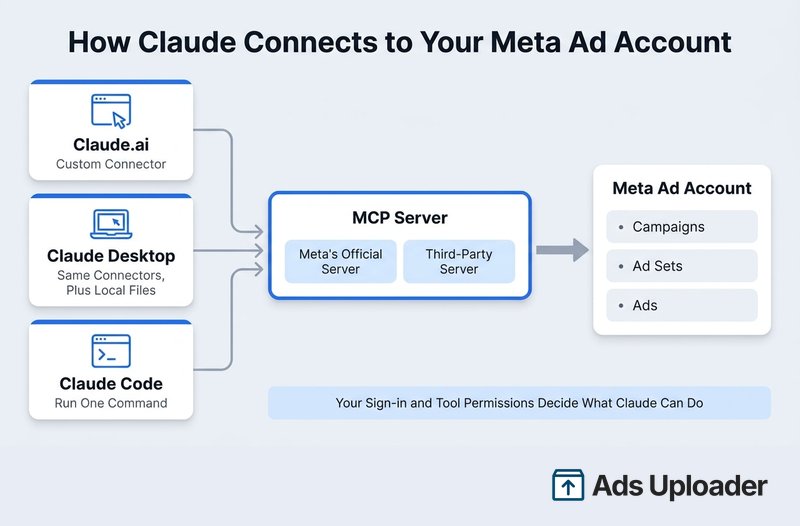
How to Connect Claude to Meta Ads (Step by Step)
You need a Claude plan that allows custom connectors (Free, Pro, Max, Team and Enterprise all do, though Free allows only one) and a login that already has access to the ad accounts you want Claude to touch.
Connect Ads Uploader in Claude.ai or Claude Desktop
- Open Claude and go to Customize → Connectors. (Some accounts still show Settings → Connectors; it's the same place.)
- Click +, then Add custom connector.
- Name it "Ads Uploader" and paste
https://adsuploader.com/api/mcp. - Click Add, then Connect, and finish the Ads Uploader sign-in and consent screen in your browser. There's no token to copy or paste.
- Start a new chat, open the + menu, choose Connectors and switch Ads Uploader on.
- Ask: "Which Ads Uploader user are you signed in as? List my ad accounts."
The MCP rides your existing Ads Uploader connection to Meta, so every ad account you already use in the web app is there, with no separate switch to wait for on each one.
Connect Ads Uploader in Claude Code
Add the hosted server, then sign in from inside Claude Code:
claude mcp add --transport http ads-uploader https://adsuploader.com/api/mcp
claude
/mcp
Pick ads-uploader, authenticate in your browser, and you're in. Add --scope user to make it available in every project.
If you want Claude reading media straight from your disk, run the server locally instead. It needs Node.js 18 or later:
npm install -g @adsuploader/cli @adsuploader/mcp
ads login
Then add the ads-mcp command to your agent's MCP settings. The local server and the CLI use the login saved by ads login, and they work on the same saved builds as the web app.
For Codex, Cursor and other coding clients, our guide to the Meta Ads MCP in Codex and Cursor covers the setup.
Team and Enterprise Plans
An Owner or Primary Owner goes to Organization settings → Connectors, clicks Add, hovers over Custom, selects Web, then names the connector and pastes the server URL. Members then open Customize → Connectors, find it and click Connect, each signing in with their own login. For agencies, that means each person's access follows their own permissions.
Connect Meta's Official Server
The flow is the same with a different URL and sign-in. Add a custom connector named "Meta Ads" with https://mcp.facebook.com/ads, click Connect and sign in with Facebook. If you're offered every current and future business, choose current ones only. In Claude Code, the command is claude mcp add --transport http meta-ads https://mcp.facebook.com/ads, then /mcp to sign in.
One thing to expect: Meta is switching its server on account by account. Sign-in can work while an account comes back as not enabled, with a note that it's "gradually being rolled out." On our own login in October, 19 of 20 ad accounts were enabled and one active account wasn't. There's no admin switch to force it, and reconnecting won't change it.
Launch, Approve and Report With Ads Uploader in Claude
Here's what the main jobs look like once Ads Uploader is connected: which tools Claude uses, what happens, and what you see.
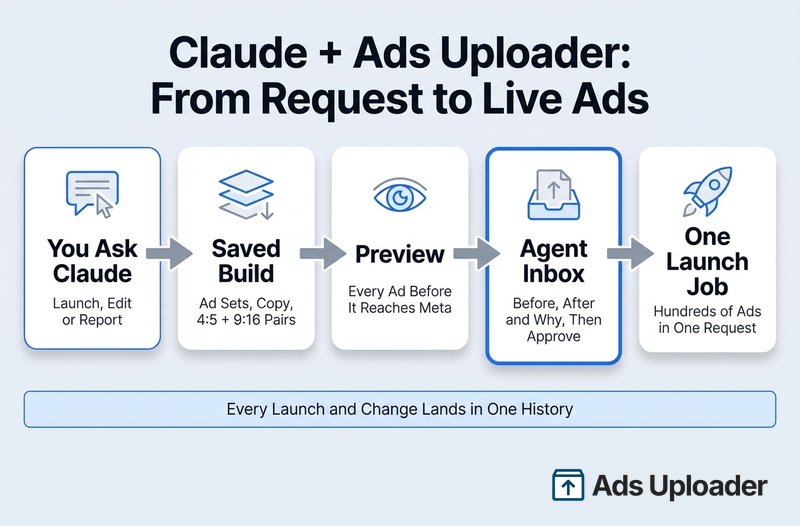
Bulk Launches From Saved Builds
You ask: "Take the 12 videos in this Drive folder, pair each 4:5 with its 9:16 cut, and set up three ad sets using the settings from my best prospecting ad. Name the ads by file name."
Claude imports the media with ads_upload (a public Drive folder or file links on the hosted server, or straight from disk on the local one), copies settings from a proven ad or a saved preset, and saves the whole launch as a build. You get a build link. Open it in the Ads Uploader web app and you see exactly what you'd see if you'd built it yourself: every ad set, every ad, the copy, the placement pairing and the creative enhancement settings. Change anything there, or tell Claude to.
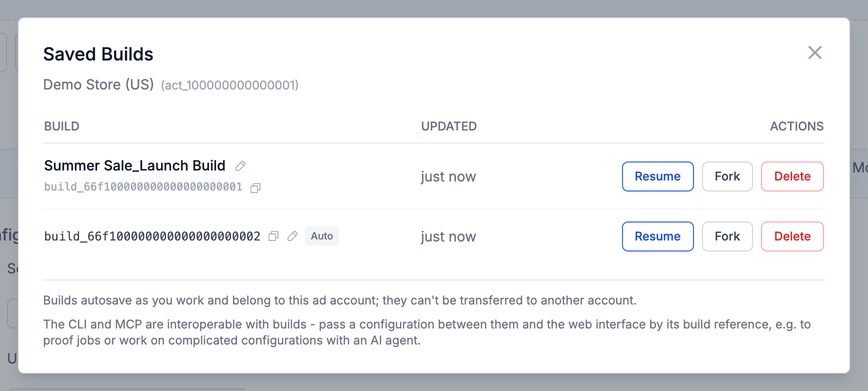
When you're happy, Claude runs ads_preview to show what will be created, ad by ad and ad set by ad set, then ads_create launches it as one server-side job. That's one request for hundreds of ads, not a chain of single calls. Jobs carry on if the chat drops, a repeat request returns the existing job rather than launching twice, and custom names follow your conventions. If your account requires approval for launches, the saved launch waits in your Agent Inbox instead, and you open it in the Uploader to review and launch.
Approvals in the Agent Inbox
You ask: "Cut budgets 20% on ad sets with CPA more than 30% over target in the last 14 days, and tell me why for each."
Claude reads performance, then calls ads_edit_preview. Nothing reaches Meta yet. By default, edits go to your Agent Inbox: a table of every proposed change with Before, After and the agent's Why note side by side. You can adjust an After value, select the lines you want and click Approve, then watch each one apply. Meta still accepts or rejects each change as it lands.
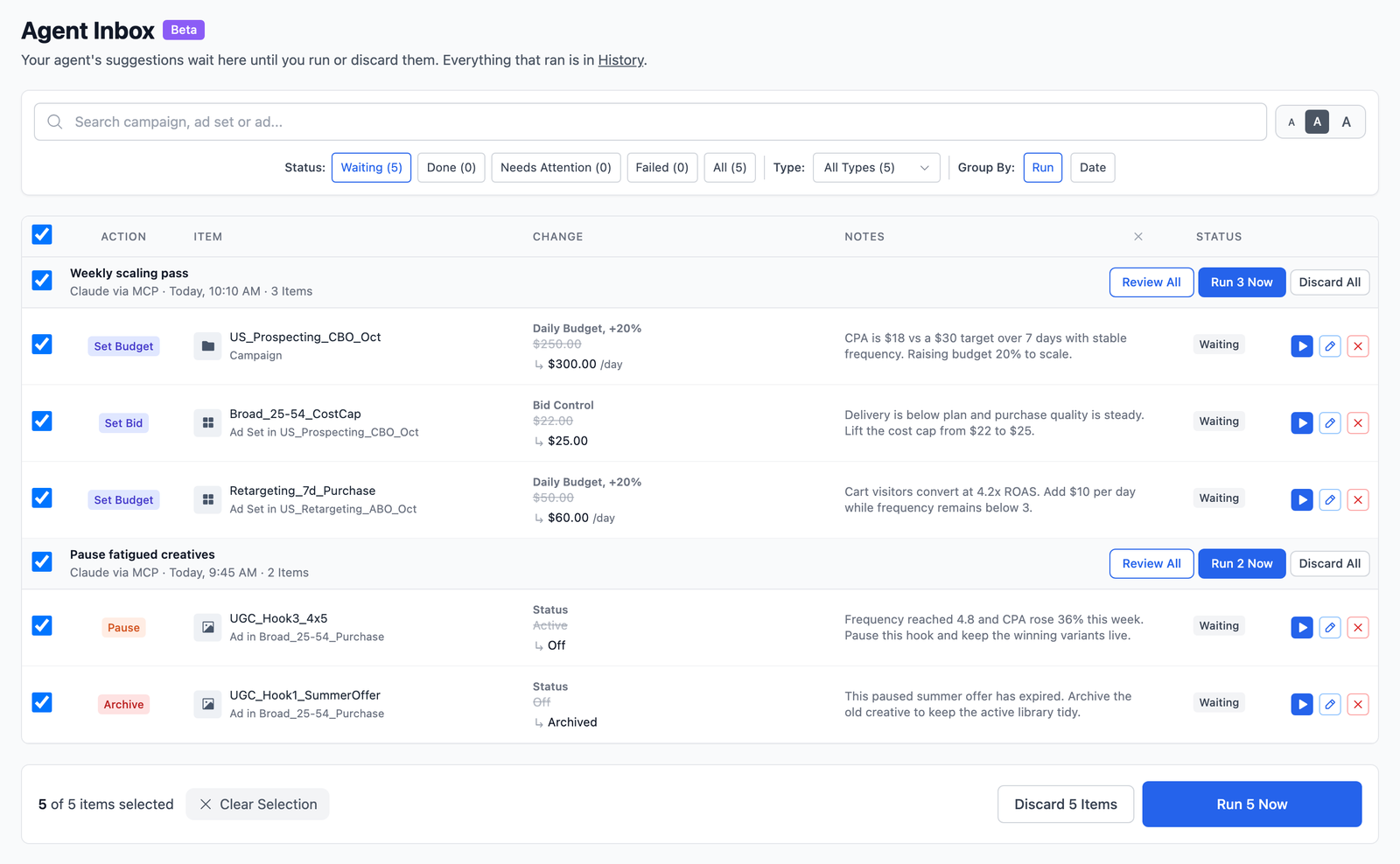
Every launch and change, from the web app or from an agent, shows up in one History, and reversible changes can be undone with ads_edit_undo. You choose per ad account what agents may do and whether they need approval, so a client account can be read-only while your own runs looser.
Wary of Wiring AI Straight to Meta?
Ads Uploader is loved by power media buyers and agencies, and trusted to launch hundreds of thousands of Meta ads every month.
See the MCP for Meta AdsNo credit card required • 7-day free trial
Reports Across Accounts
You ask: "Compare last week with the week before for these three client accounts: spend, leads, cost per lead and ROAS."
Claude calls ads_query_insights, which covers performance by account, campaign, ad set or ad with breakdowns, filters and period comparisons, in plain metrics like purchases, leads, cost per lead and ROAS. It reads up to five ad accounts in one call and reports each separately rather than adding totals across accounts or currencies. ads_campaign_health answers "how is this campaign doing?" using Meta's own result for the campaign's goal, plus delivery issues and rejection reasons.
Duplicates That Keep Their Likes
You ask: "Duplicate my three best ads by ROAS from the last 30 days into the retargeting ad set, keeping their engagement."
Claude previews and runs ads_duplicate_by_post, which reuses the same post so likes, comments and shares come along. For an ordinary copy of a campaign, ad set or ad, it uses ads_duplicate, which works like Ads Manager's Duplicate, children included. Agent duplications follow the same approval mode as edits, so they can wait in your Agent Inbox too.
What It Costs
Ads Uploader is $59 a month flat with unlimited ad accounts, and the MCP and CLI are included on paid plans. MCP access isn't part of the web app's 7-day trial.
Meta's Official MCP in Claude: Where It Fits
Meta's own server is free during its open beta, first-party, and the broadest option for reading and configuring an account. It covers things Ads Uploader doesn't: catalogs and product feeds, pixel and dataset diagnostics, A/B and lift tests, custom audience creation, auction and industry benchmarks, Opportunity Score and Ad Library search. On our connection in October it exposed 98 tools.
Where it's thinner is launching and change control:
- One object per tool call. A campaign, then an ad set, then a creative, then an ad. Twenty ads across three ad sets is a long chain of calls, and a failure halfway leaves half a launch.
- Paused, with drafts still rolling out. New objects are created paused, with a separate tool to set them live. Meta announced Ads Manager drafts on October 6, but on our account on October 19 a create still made a real, paused campaign.
- Edits apply directly. There's no approval queue or undo; approvals happen call by call in the chat, and the activity log shows what changed afterwards.
- Creatives can't be edited. New copy means a new ad, and the old ad's likes and comments stay behind.
- The account-by-account rollout. Accounts work only once Meta has switched them on.
A sensible split: Meta's server for catalog, pixel and experiment work, and Ads Uploader's for launching, editing with approval and multi-account reporting. Our Meta Ads MCP guide goes deeper on the official server.
Your First Five Prompts
Name the account ID and date range every time, and say whether Claude may change anything.
- Access check. "Which Ads Uploader user are you signed in as? List my ad accounts with ID, currency and timezone. Change nothing."
- Cross-account report. "For act_111, act_222 and act_333, compare the last 7 days with the previous 7 on spend, leads, cost per lead and ROAS. Report each account separately and tell me which attribution setting you used."
- Launch preview. "Open build build_123, preview it and tell me how many ad sets and ads it will create, any warnings, and anything that differs from the build summary. Don't launch."
- Edits for approval. "In act_111, find ad sets with 20+ leads in the last 14 days and cost per lead at least 30% above $40. Propose a 20% budget cut for each, with a one-line reason, for my Agent Inbox. Don't apply anything."
- Diagnose a stalled ad. "Ad 120201234567 isn't spending. Check its status, Meta's review feedback, delivery issues and recent changes, and tell me the likely cause. Don't edit anything."
The reporting and diagnosis prompts work on Meta's server too. If a number looks off, ask which fields, dates and attribution window Claude used; mismatched windows and summed reach or frequency cause most bad answers.
Set Up Safety Before You Let Claude Write
Meta's ads AI connectors help page says it's unlikely an account would be banned simply for using its official server. What Claude does in the account still has to follow Meta's advertising policies, so the real risk is an unreviewed change. Three layers stack up:
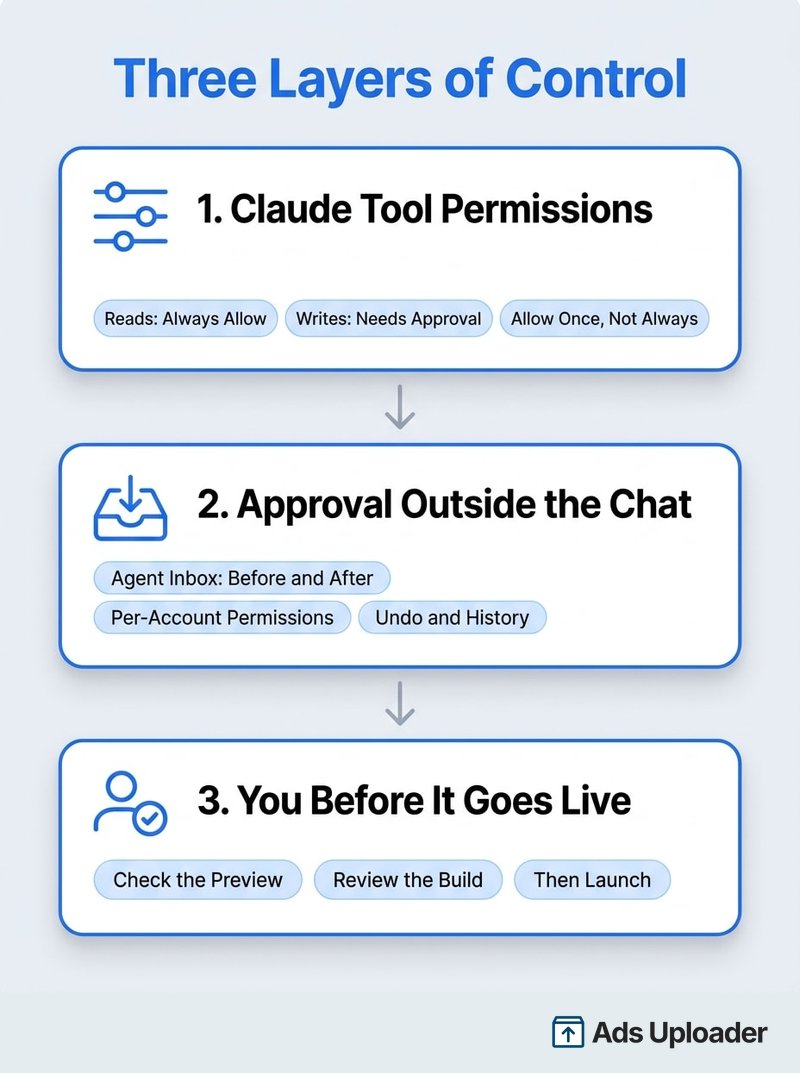
1. Claude's tool permissions. Each connector has per-tool settings: Always allow, Needs approval and Blocked. Let reads run on Always allow, keep anything that creates or changes on Needs approval, and prefer Allow once over Always allow when an approval card appears for a write. In Claude Code, the same policy goes in settings.json as allow, ask and deny rules.
2. An approval step outside the chat. With Ads Uploader, edits and agent duplications wait in your Agent Inbox, you set per-account permissions, and History records everything. With Meta's server, a portfolio admin can set Ads MCP server rules in Meta Business Suite under Settings → Integrations → Ads MCP server to block actions or cap budgets per ad account; Meta's rules guide lists every option.
3. You, before it goes live. Check the preview or the build in the web app before anything launches, and treat Claude's recommendations as hypotheses with evidence attached. One more habit: if a tool is missing, don't fill the gap with browser automation clicking through Ads Manager. It's harder to audit and easy to point at the wrong account.
Run Scheduled Meta Ads Checks in Claude Cowork
Cowork is Claude's mode for longer, multi-step work, available on Pro, Max, Team and Enterprise. Its scheduled tasks can use your connectors and run on a schedule, even with your computer off, which makes it a good home for the Monday account check:
"Every Monday at 8:00, use Ads Uploader to compare the last 7 days with the previous 7 for act_111 and act_222 on spend, leads, cost per lead and ROAS. Flag any ad set more than 30% over its CPA target. Don't change anything."
Keep scheduled tasks read-only. If you want the task to suggest fixes, have it propose them as edits for your Agent Inbox: nothing reaches Meta until you open the inbox and approve. Skills a scheduled task relies on need to live in your Claude account, not only in a local folder.
Teach Claude Your Account With a Skill
A Skill is a folder with a SKILL.md file of instructions that Claude loads when it's relevant. Put your house rules there so you don't paste them into every chat: account IDs and which client each belongs to, the attribution setting and KPI per account, your naming conventions, and change rules such as "budget changes need my approval". Add it under Customize → Skills in Claude, or in .claude/skills/ in a Claude Code project. Keep tokens and customer data out of it.
When Claude Code Plus a CLI Is the Better Route
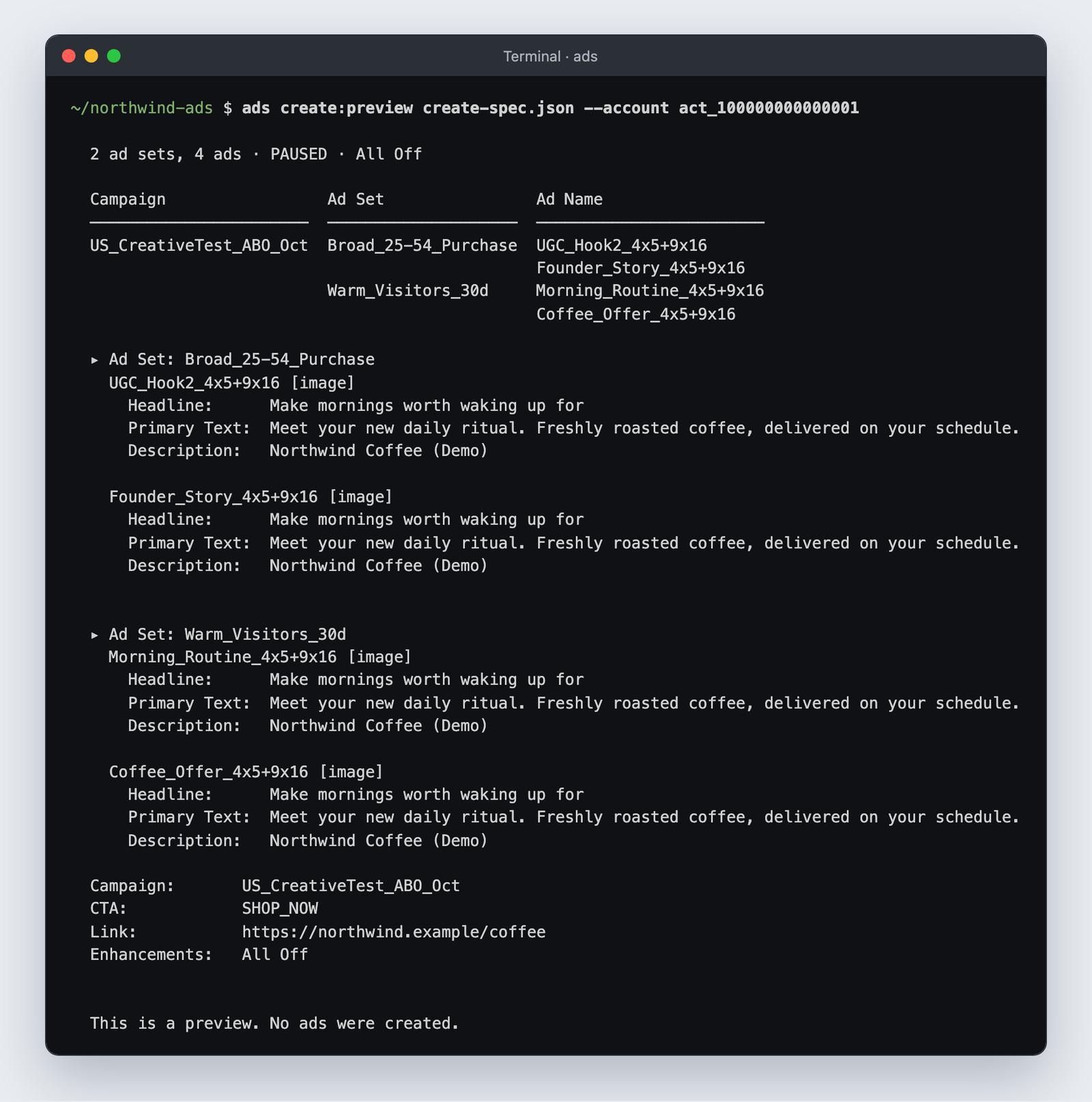
Chat is great for questions and for launching a build you've reviewed. When the work is "turn this folder of 40 videos and their 9:16 cuts into ads across three ad sets, and do it again next week", Claude Code with a command-line tool earns its setup time. Claude reads the files and your copy sheet, writes a launch spec you can review, previews it, and only then creates anything.
With the Ads Uploader CLI, that's ads upload for the folder, ads create:preview for the dry run and ads create for the launch, all on the same engine and saved builds as the web app and MCP. Meta's own Ads CLI is the first-party option: it needs Python 3.12 or later and a system user token, and creates one object per command, so a big batch means a script looping over files. Our Meta Ads MCP vs CLI comparison goes deeper on the trade-off.
Give Your AI Agent a Safety Net
Launch across every client account with an MCP and CLI built for power media buyers and agencies.
See the MCP for Meta AdsNo credit card required • 7-day free trial
Frequently Asked Questions
How Do I Connect Claude to My Meta Ad Account?
Add a Meta Ads MCP server under Customize → Connectors → + → Add custom connector: https://adsuploader.com/api/mcp for Ads Uploader, signing in to Ads Uploader, or https://mcp.facebook.com/ads for Meta's server, signing in with Facebook. In Claude Code, run claude mcp add --transport http with the same URL.
Can Claude Create and Launch Meta Ads, or Only Read Them?
Both. With Ads Uploader, Claude launches a saved build of many ads as one job after a preview, and proposed edits wait in your Agent Inbox. With Meta's server, it creates one object per call, paused, with a separate step to go live.
Should I Use Claude Chat or Claude Code for Meta Ads?
Chat for reporting, audits, approvals and launching builds. Claude Code for files on your computer, saved specs and repeatable batches, usually with a CLI.
Is It Safe to Connect Claude to Meta Ads? Can It Get My Account Banned?
Meta says a ban simply for using its official server is unlikely. Claude's actions still have to follow Meta's policies, so keep writes on Needs approval and route edits through an approval step.
Which Claude Plan Do I Need to Connect Meta Ads?
Any plan can add a custom connector; Free allows one. On Team and Enterprise an owner adds it first. Claude Code, Cowork and scheduled tasks need a paid plan.
Why Does Claude Say My Ad Account Isn't Enabled for the Ads MCP?
That's Meta's official server, which Meta is switching on account by account. There's no switch to force it. Servers that run through their own Meta connection aren't tied to that rollout.
Can Claude Run Scheduled Meta Ads Checks in Cowork?
Yes, on paid plans. Keep the task read-only, or have it propose changes for your Agent Inbox to approve later.
Can Claude Manage Multiple Ad Accounts or Client Accounts?
Yes. Ads Uploader reads up to five ad accounts in one call and covers unlimited accounts for $59 a month. Name the account ID in every prompt.
The Takeaway
Connecting Claude to Meta Ads is a two-minute job. Choosing what it's allowed to do is the real decision.
- Add
https://adsuploader.com/api/mcpas a custom connector, or withclaude mcp addin Claude Code, to launch saved builds as one job, approve edits in the Agent Inbox and report across accounts. - Add Meta's official server too if you need catalogs, pixels, experiments or benchmarks.
- Keep writes on Needs approval in Claude and put an approval step between the agent and Meta.
- Use Cowork for scheduled read-only checks, and Claude Code plus a CLI for launches from folders.
If you're setting it up this week: connect one account, run the five prompts above, then let Claude build its first launch and review it in the web app before it goes live.