A Facebook custom audience exclusion tells Meta not to show an ad to people in a specific custom audience, such as current customers, recent purchasers, or recent site visitors. You set it at the ad set level under exclusions or Audience Controls. Custom audience exclusions still work in 2026, including inside Advantage+ Audience, where they act as hard constraints rather than suggestions. Detailed targeting exclusions on interests and behaviors are different: Meta stripped those from active campaigns on March 31, 2025.
You set the exclusion. You published the ad set. And your existing customers still saw the ad anyway.
That experience sends a lot of media buyers down the wrong path. Some assume Meta quietly broke exclusions during the 2025 targeting overhaul. Others assume the algorithm just ignores them. Both are usually wrong, and the confusion is costing accounts real money, either on wasted impressions or on exclusions that get ripped out in a panic.
Two different things are happening, and only one of them is an actual Meta change. Detailed targeting exclusions, the kind built on interests and behaviors, are gone. Custom audience exclusions, the kind built on your own customer data and website traffic, are alive and working. If you are still building those audiences from a CRM export, the mechanics of custom audiences haven't changed, and neither has your ability to suppress them.
This guide covers what a custom audience exclusion actually does, the one distinction that trips up nearly everyone, the exact 2026 click-path for both Advantage+ Audience and original audiences, and the real reason your exclusions "leak" plus how to make them airtight.
What a Facebook Custom Audience Exclusion Actually Does
Exclusion targeting does one job: it prevents a defined audience from seeing your ad. You build a custom audience, then tell Meta to hold those people out of delivery instead of including them. It happens at the ad set level, alongside your normal audience setup.
The audiences you exclude are almost always groups you have a clear reason to suppress:
- Current customers, when the campaign is built to acquire new ones.
- Recent purchasers, so you stop paying to sell something to people who just bought it.
- Recent site visitors, when prospecting should reach fresh prospects, not people already in the funnel.
- Email subscribers, when you are already reaching them for free and don't want to pay twice.
- Existing leads, so a lead-gen campaign doesn't re-collect the same names.
The reason this matters comes down to economics. If you run an introductory offer that only new customers can claim, showing it to existing customers annoys them and burns budget. If two prospecting ad sets overlap heavily, excluding one audience from the other stops you from bidding against yourself. Exclusions are how you keep spend pointed at the people a campaign is actually for.
Custom Audience Exclusions vs Detailed Targeting Exclusions
Here is the distinction that causes most of the panic, stated plainly.
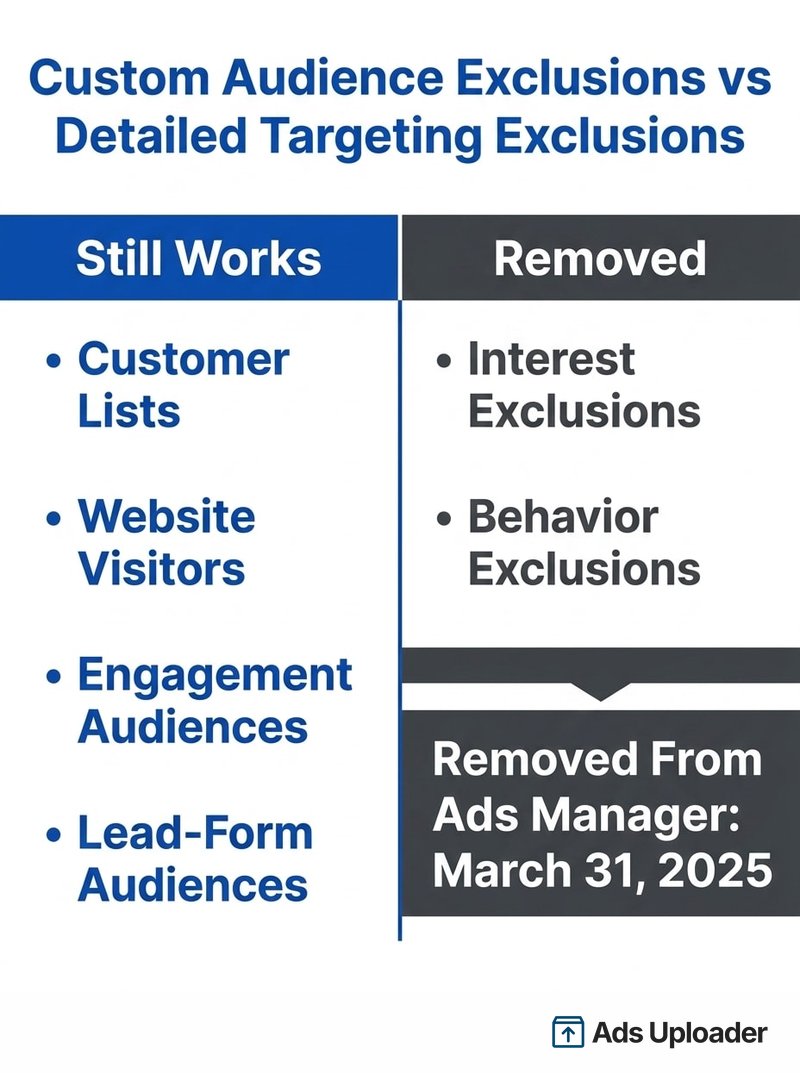
Still works: custom audience exclusions. Anything built from your own signal, customer lists, website visitors, engagement audiences, lead-form audiences, can still be excluded.
Removed: detailed targeting exclusions. You can no longer exclude people based on interests and behaviors (the "exclude people who match: [interest]" controls).
Meta removed detailed targeting exclusions in stages. New ad sets lost the option first, on July 29, 2024, and on March 31, 2025 Meta stripped the exclusions from active existing campaigns in Ads Manager. For boosted posts on Facebook and Instagram, the same change landed on June 10, 2025. After those dates, you cannot add an interest or behavior exclusion to a new ad set, you cannot duplicate or edit an ad set that still has one without removing it first, and Ads Manager shows a warning banner on affected ad sets.
Meta's stated rationale was performance. In its own advertiser test, the median cost per conversion was 22.6% lower when advertisers did not use detailed targeting exclusions versus when they did. The argument is that hard interest exclusions fence the delivery system out of pockets of users who would have converted cheaply.
What survived at the interest level is narrow. You can still set employer and brand-protection exclusions through account-level controls, but those are account-wide settings, not the flexible per-ad-set interest exclusions advertisers used to rely on.
None of this touches custom audiences. If your suppression list is a customer file, the way you assemble it from a customer list is unchanged, and so is your ability to exclude it. The mental shortcut to carry forward: exclude people by who they are to your business (custom audiences), not by what they are interested in (detailed targeting).
How to Exclude a Custom Audience in 2026 (Step by Step)
Where the exclude control lives depends on which audience mode you are in and which objective you picked. Here are the paths that matter.
Original Audiences (Manual Setup)
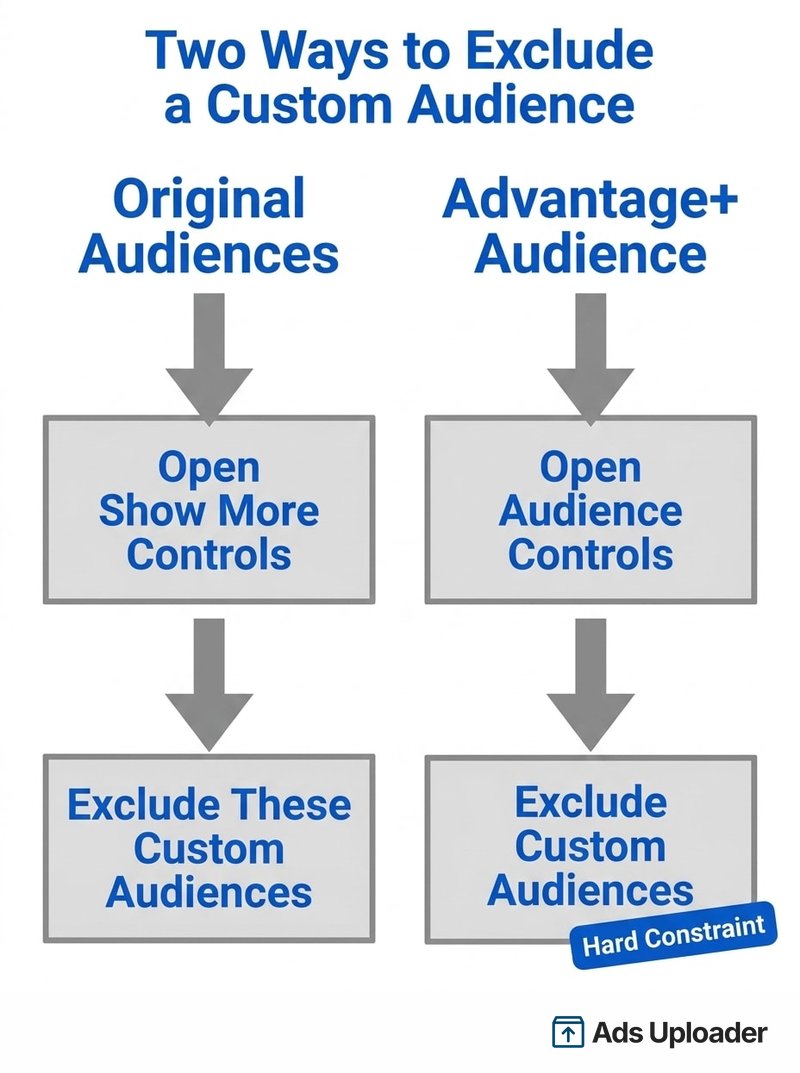
In an original-audience ad set, scroll to the audience section and open Show more controls. You will find the option to exclude these custom audiences. Add the customer list, website audience, or engagement audience you want held out, and finish the ad set as normal. This is the most direct, most predictable path, and the exclusion behaves as a firm rule.
Advantage+ Audience
Advantage+ Audience splits your inputs into suggestions (soft hints the AI can deliver beyond) and Audience Controls (hard limits it must respect). Excluded custom audiences sit in Audience Controls. That placement matters: it means your exclusion is a constraint, not a suggestion. The system will not deliver to an excluded custom audience even when it predicts those people would convert. If you have avoided Advantage+ Audience because you feared it would override your suppression list, that fear is misplaced. Detailed targeting exclusions never applied inside Advantage+ Audience in the first place, so the 2025 removal changed nothing about how it treats your suppression lists.
By Objective
The exact menu wording shifts with the objective. For Awareness, Traffic, and Engagement, where the classic audience selector still appears, you reach exclusions through the audience section and "Show more controls." For Sales, Leads, and App promotion, where Advantage+ Audience is on by default, the exclusion entry sits inside Audience Controls. The control is always there; only the label and nesting change.
Account-Level Controls and the Existing Customer Budget
Two account-level tools complement per-ad-set exclusions. Account controls let you apply employer and brand-protection exclusions consistently across the whole account. Separately, Advantage+ Shopping campaigns offer an Existing Customer Budget cap, which limits how much you spend reaching existing customers rather than excluding them outright. The "Existing Customers" segment that cap relies on is defined once at the account level, so it is worth setting up carefully.
One caveat that catches people: if an ad set still carries an old detailed targeting exclusion, Meta will not let you duplicate or edit it without stripping that exclusion out. Custom audience exclusions carry over on a duplicate, but it is still worth re-checking them on any copied ad set before it goes live.
Launch More. Click Less.
Upload hundreds of creatives at once, auto-match thumbnails to videos, and publish straight to your ad accounts through Meta's API.
Try Ads Uploader FreeNo credit card required • 7-day free trial
Why Your Exclusions Still Leak (and How to Tighten Them)
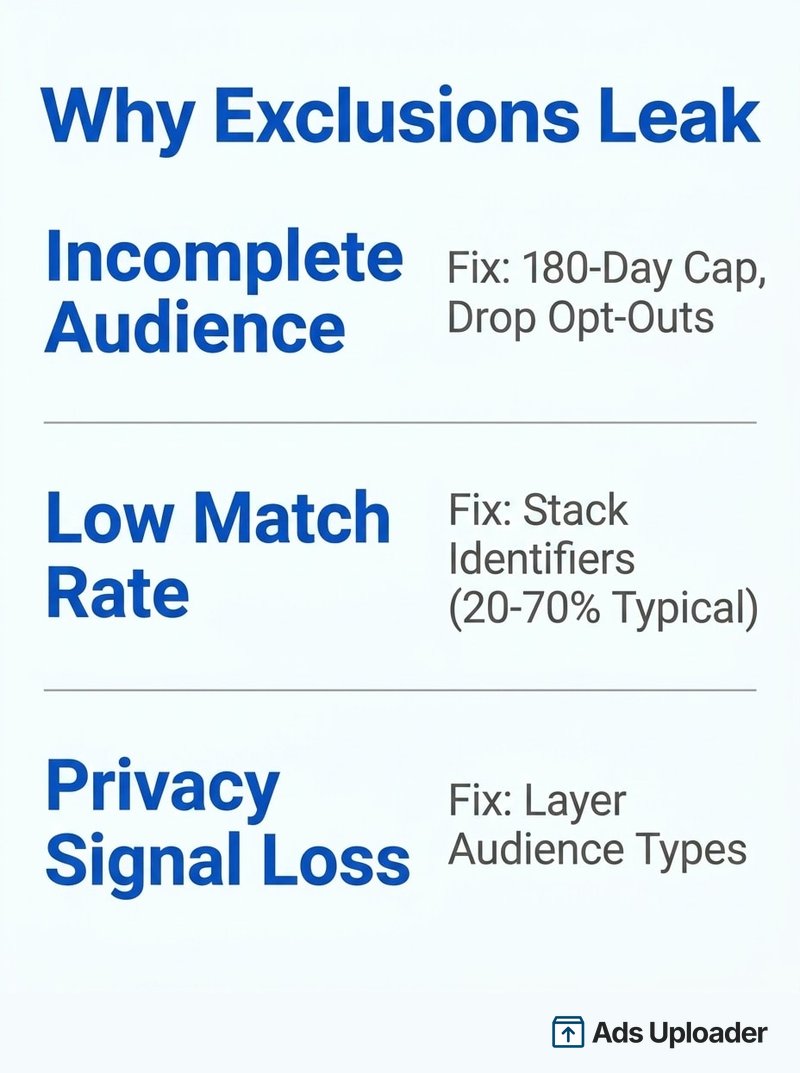
This is the part most guides skip. You did everything right, and excluded customers still show up in delivery. Before blaming Meta, understand that the vast majority of "leaks" are data problems on your side, not delivery bugs. There are three real causes.
1. Incomplete Audience Definition
To exclude every customer, your custom audiences have to contain every customer, and that is harder than it sounds. Website custom audiences are capped at a 180-day retention window, so if your business is older than six months, a website-based exclusion is structurally incomplete. Customer-list audiences only hold the contacts you actually uploaded, and Meta's Custom Audience terms require you to drop people who opted out, which can leave paying customers you are not allowed to include. Every gap in the source audience is a person who can still be served.
2. Match Rate Limits
A customer list is only useful for exclusion if Meta can match your contacts to real profiles. Match rates on customer-list audiences commonly land somewhere between 20% and 70%, never 100%. If you upload email addresses alone and a customer registered their profile with a different address, that person won't match and won't be excluded. Stacking more identifiers, email, phone, first and last name, and address, raises the match rate and closes holes.
3. Privacy and Signal Loss
iOS App Tracking Transparency opt-outs and cookie blocking shrink website custom audiences directly. Meta has said plainly that opt-outs result in smaller audiences. Fewer matched users in the source audience means more excluded-in-theory people who are invisible to the exclusion in practice.
What about the persistent theory that Advantage expansion ignores exclusions? It is largely a myth. Excluded custom audiences are respected even with Advantage Detailed Targeting or Advantage Lookalike turned on, and the cleanest proof is Advantage+ Audience itself, where exclusions live in the hard-constraint controls. When people still leak through, the explanation is almost always cause 1 or 2 above, not expansion.
To tighten exclusions: refresh customer lists on a schedule so they don't go "outdated" (Meta flags lists older than 30 days), stack as many identifiers as you can, layer multiple audience types together (customer list plus website plus engagement plus lead-form) so each covers the others' gaps, and confirm every audience shows Ready before you rely on it.
Exclusion Strategy for Agencies and Scaled Accounts
At scale, exclusions are less about a single ad set and more about a repeatable suppression stack. Most accounts settle on a standard set: all customers, recent purchasers, and active leads, applied consistently so prospecting budget stays pointed at genuinely new people.
Consistency is the hard part across dozens of ad sets. Account-level controls help where they apply, and a documented exclusion stack keeps every campaign aligned. Teams managing this through the Marketing API should note a 2025 change: custom audiences were deprecated in the exclusions field, and the supported field is now excluded_custom_audiences. That change shipped in Marketing API v22, with developers able to implement from January 21, 2025 and a deadline around April 21, 2025. If you build or script ad sets in a browser app plus CLI workflow, that field name is what keeps exclusions intact at scale.
A final warning: do not over-exclude. Every layer you suppress shrinks the addressable pool, and Meta repeatedly warns that audiences that get too small raise costs and trigger learning-limited delivery. Exclude the people who genuinely shouldn't see the ad, and stop there. A tight, well-matched exclusion list beats a sprawling one that starves delivery.
Frequently Asked Questions
Do Custom Audience Exclusions Still Work in 2026?
Yes. Custom audience exclusions still work in 2026 across campaign types, including inside Advantage+ Audience, where they sit in Audience Controls and act as hard constraints. The 2025 targeting changes removed detailed targeting exclusions on interests and behaviors, not custom audience exclusions.
Save Hours on Creative Testing
Stop uploading ads one by one. Bulk process unlimited creatives with automatic media matching and direct API publishing.
Try Ads Uploader FreeNo credit card required • 7-day free trial
What Is the Difference Between a Custom Audience Exclusion and a Detailed Targeting Exclusion?
A custom audience exclusion suppresses people based on your own data, such as a customer list, website visitors, or engagement. A detailed targeting exclusion suppressed people based on Meta's interests and behaviors. The first still works; the second was phased out, blocked in new ad sets from July 2024 and stripped from active campaigns on March 31, 2025.
Why Am I Still Reaching Customers I Excluded?
Almost always because the exclusion audience is incomplete or unmatched, not because Meta ignored it. Website audiences are capped at 180 days, customer-list match rates run roughly 20% to 70%, and privacy opt-outs shrink audiences. Refresh lists, add more identifiers, and layer audience types to close the gaps.
Can You Still Exclude Interests or Behaviors on Facebook?
No, not at the ad set level. Meta blocked detailed targeting exclusions in new ad sets from July 2024, stripped them from active campaigns on March 31, 2025, and removed them from boosted posts on June 10, 2025. The only interest-level exclusions left are employer and brand-protection controls applied at the account level.
Does Advantage+ Audience Respect Custom Audience Exclusions?
Yes. In Advantage+ Audience, excluded custom audiences are placed in Audience Controls, which are hard constraints the delivery system must respect, not suggestions it can override. People in an excluded custom audience will not be served even if the AI predicts they would convert.
How Do I Exclude Recent Purchasers From a Meta Ad Campaign?
Build a custom audience of recent purchasers (from your customer list or a purchase-event website audience), then add it under "Exclude these custom audiences" in an original-audience ad set or under Audience Controls in Advantage+ Audience. Keep the source audience current so newly converted buyers are actually included in it.
How Big Should an Exclusion Audience Be?
The source custom audience should be complete, well-matched, and ideally in the thousands. Meta generally requires at least 1,000 people in a custom audience for it to be usable, and flags lists not updated in 30 days as outdated. Just avoid over-excluding, since shrinking the deliverable pool too far raises costs.
The Bottom Line on Facebook Custom Audience Exclusions
Custom audience exclusions are not going anywhere. The 2025 change that scared everyone removed detailed targeting exclusions on interests and behaviors, with March 31, 2025 as the date that actually matters in Ads Manager. Your ability to suppress current customers, recent purchasers, recent visitors, and existing leads is fully intact, and inside Advantage+ Audience those exclusions are treated as hard constraints.
When an exclusion seems to fail, the fix is usually on your side, not Meta's: complete the source audience, stack identifiers to lift the match rate, layer audience types to cover the 180-day and opt-out gaps, and keep lists fresh. Build the exclusion right, exclude only who genuinely shouldn't see the ad, and your prospecting budget goes where it belongs.
