Meta ad copy specs define character limits for three text fields: primary text (125 characters recommended), headline (40 characters) and description (25 characters). These limits vary by placement. Facebook Feed recommends 27-character headlines while Reels Overlay allows only 10. Text beyond the recommended length gets truncated behind a "See More" link, with roughly 125 characters visible on mobile. Meta supports up to five variations per text field for delivery optimization and offers AI-powered Text Generation to create additional options from your original inputs.
You've written what you think is the perfect ad. Then you preview it on mobile and half your primary text is hiding behind "See More." Your headline is cut off mid-word. And your carefully crafted description? It's not showing at all.
This happens because meta ad copy specs vary by placement, device and format, and most spec guides bury the character limits inside articles about image dimensions. You end up scrolling past pixel counts and aspect ratios just to find out how many characters your headline can be.
This guide covers nothing but meta ad copy specs. Every character limit, every text field, every placement. Keep it open next time you're building ads in Ads Manager.
The Three Meta Ad Text Fields
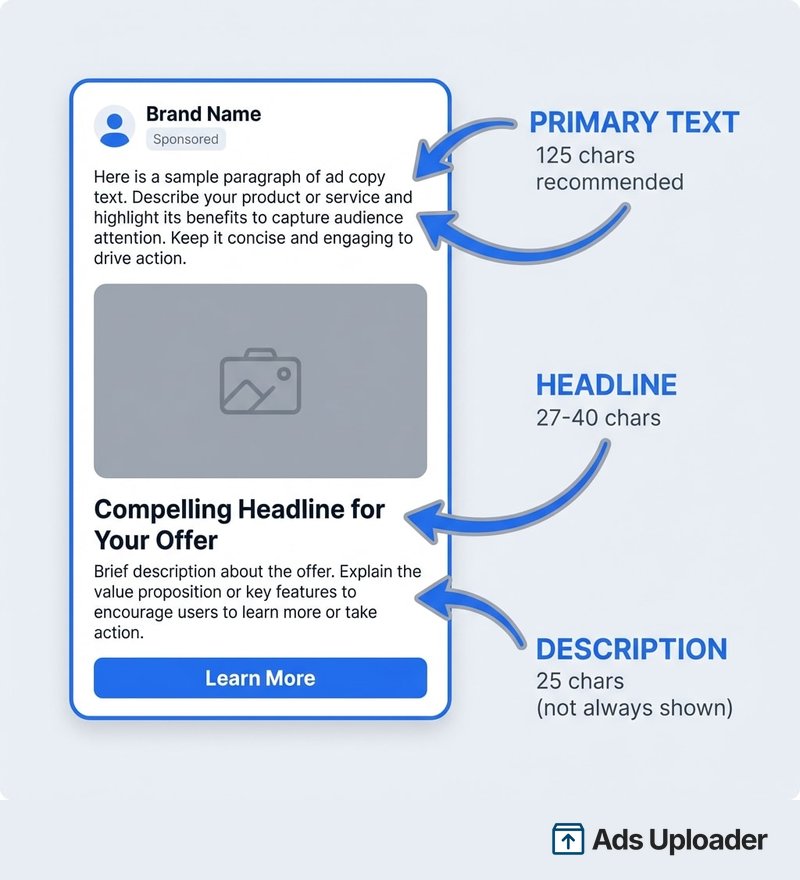
Every Meta ad has up to three text fields. Understanding what each one does, and where it actually appears, is the foundation for working with meta ad copy specs effectively.
Primary Text
Primary text is the main copy block that appears above your ad creative in Feed placements. It's where your hook lives.
You can technically enter up to 2,200 characters (the API maximum varies by workflow, with some supporting up to 4,096). But here's what matters: only about 125 characters show on mobile before the "See More" link appears. Everything after that is hidden unless the user actively taps to expand.
Meta's own guidance is blunt: "Primary text should span 1-3 lines at most." They recommend 125 characters for most placements, and their best practices page frames this as the amount "that may be displayed on smaller screens."
Meta lets you add up to five primary text options per ad. The ad system tests different versions with different people and optimizes for performance, it's delivery optimization, not equal rotation.
Headline
The headline appears below your creative, typically above the call-to-action button. Think of it as a caption for the visual, not a traditional headline.
Meta recommends 40 characters for most placements, but this varies more than any other field. Facebook Feed specifically recommends 27 characters. Reels Overlay drops to just 10. The API accepts up to 255 characters for the title field, but anything beyond the recommended length risks getting cut off.
Like primary text, you can add up to five headline variations per ad.
Description
Description is the least visible and most misunderstood text field. It appears below the headline, when it appears at all.
Meta recommends 25 characters for most placements, but the field is only reliably displayed in a handful of locations: Marketplace, Audience Network, Facebook Search Results and In-Stream Video. It's frequently absent from Meta's own Ads Guide pages for Stories, Reels, Explore and Instagram Feed placements.
Like primary text and headline, you can add up to five description options per ad. The practical rule: write it for placements where it shows, but never put critical information here.
Meta Ad Copy Character Limits by Placement
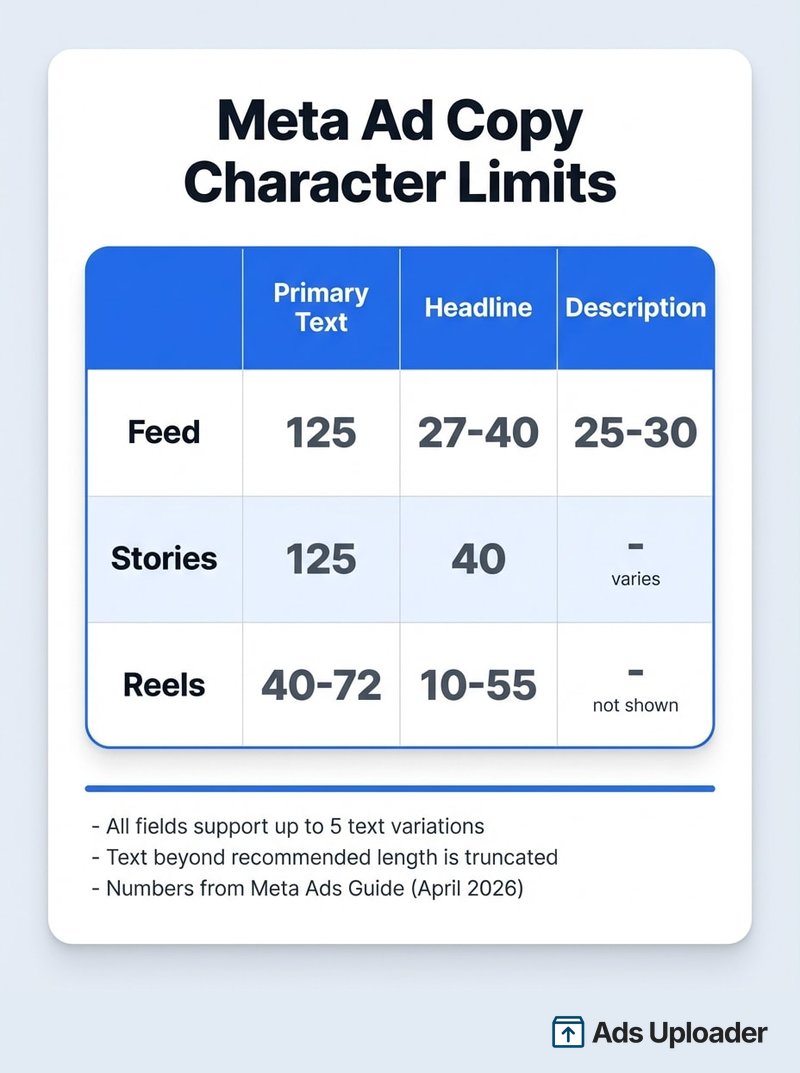
This is the master reference table for meta ad copy specs. These are Meta's recommended character counts from the Ads Guide, the lengths designed to avoid truncation, not the hard input maximums.
Feed Placements
| Placement | Primary Text | Headline | Description |
|---|---|---|---|
| Facebook Feed | 50-150 | 27 | -- |
| Instagram Feed | 125 | 40 | -- |
| Instagram Explore (grid) | 125 | -- | -- |
| Instagram Explore Home | 125 | 40 | -- |
| Facebook Marketplace | 125 | 40 | 30 |
| Facebook Search Results | 125 | 40 | 30 |
| Facebook In-Stream Video | 125 | 40 | 30 |
| Audience Network | 125 | 40 | 30 |
| Facebook Right Column (image) | -- | 40 | -- |
"--" means Meta's Ads Guide does not list the field for that placement. It may still accept input, but display is not guaranteed.
A few things worth noting. Facebook Feed is the only placement where Meta gives a range (50-150) for primary text rather than a single number. The description field reliably shows in just four placements: Marketplace, Search Results, In-Stream Video and Audience Network. And Right Column is headline-only, don't rely on primary text or description being visible there.
Stories Placements
| Placement | Primary Text | Headline | Description |
|---|---|---|---|
| Facebook Stories | 125 | 40 | -- |
| Instagram Stories | 125 | 40 | -- |
| Messenger Stories | 125 | 40 | -- |
Stories are consistent: 125/40 across Facebook, Instagram and Messenger. No description field listed.
Reels Placements
Reels is where meta ad copy specs get restrictive. If you're writing the same copy for Feed and Reels, you're probably getting truncated.
| Placement | Primary Text | Headline |
|---|---|---|
| Facebook Reels | 40 | 55 |
| Instagram Reels (Awareness) | 44 | -- |
| Instagram Reels (Traffic) | 72 | -- |
| Reels Overlay (Facebook) | 60 | 10 |
| Collection on Facebook Reels | 72 | 10 |
Notice that Instagram Reels recommendations can change based on your campaign objective, 44 characters for Awareness versus 72 for Traffic. Facebook Reels flips the usual relationship: the headline (55 chars) gets more space than primary text (40 chars). And Reels Overlay is the most restrictive placement in all of Meta advertising: 10 characters for your headline.
Threads Ads
Threads has its own copy regime, it's not simply "another Feed."
| Field | Recommended |
|---|---|
| Primary text | 80-160 |
| Headline | 40 |
| Hashtags | Up to 30 |
The wider primary text range (80-160) reflects the platform's text-first format. If you're running ads across Threads and Feed, use placement asset customization to write separate copy.
Carousel Ad Copy Specs
Carousel ads have a tighter copy set than single image or video ads. The important distinction: primary text is ad-level, while headline and description are per-card metadata.
| Field | Characters | Scope |
|---|---|---|
| Primary text | 80 | Entire carousel |
| Headline | 45 | Per card |
| Description | 18 | Per card |
Each card can have its own landing URL, headline and description. But primary text applies to the whole ad, it's the copy above the creative, shared across all cards.
Launch More. Click Less.
Upload hundreds of creatives at once, auto-match thumbnails to videos, and publish straight to your ad accounts through Meta's API.
Try Ads Uploader FreeNo credit card required • 7-day free trial
Collection Ad Copy Specs
Collection ad character limits vary by placement:
| Placement | Primary Text | Headline |
|---|---|---|
| Facebook Feed | 125 | 40 |
| Instagram Feed | 125 | 40 |
| Facebook Marketplace | -- | 25 |
| Facebook Reels | 72 | 10 |
Collection ads in Facebook Reels can only be created when you select Advantage+ catalog as your creative source.
How Meta Truncates Your Ad Copy
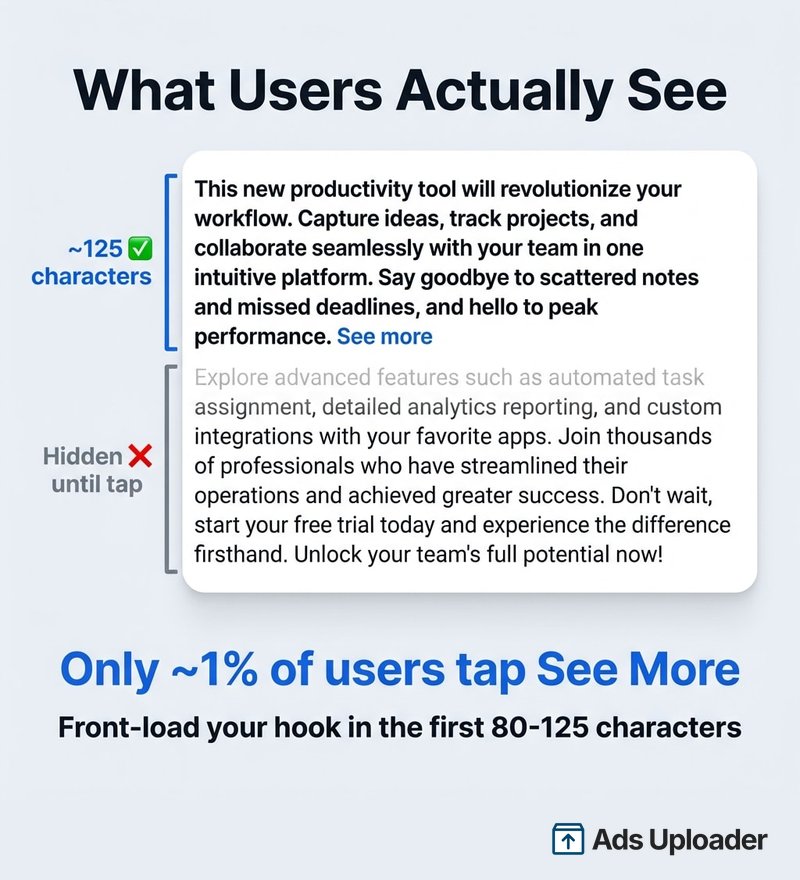
The meta ad copy specs above are recommendations. What actually happens when your copy is longer?
The "See More" Threshold
In Feed placements, primary text beyond roughly 125 characters gets hidden behind a "See More" link. This isn't a hard rule, Meta says truncation varies by "device/screen context" and is driven by how many lines fit, not a fixed character count. But 125 characters is the widely observed threshold, with some sources reporting truncation at around 115 characters.
Here's the number that should change how you write: roughly 1% of users click "See More." A third-party performance report benchmarked the "See More Rate" at approximately 1.05%. That means 99 out of 100 people who see your ad will only read the text visible before truncation.
The takeaway is simple. Write the first 80-125 characters as if they are the entire ad. Front-load your hook, your value proposition or your offer. Everything after "See More" is bonus copy for the 1% who tap.
Where Truncation Doesn't Apply
For Reels and Reels Overlay placements, Meta sidesteps the truncation problem entirely by recommending very short copy, 40-72 characters for primary text, 10 characters for Overlay headlines. There is no "See More" at these lengths. Your copy either fits or it doesn't.
The Description Visibility Problem
Description is the most confusing field because it's conditionally displayed. Meta's own Ads Guide pages list it for some placements (Marketplace, Audience Network, Search Results) and omit it entirely from others (Stories, Reels, Explore, Instagram Feed).
The practical rule: write your description for the placements where it shows, but design your ad so it works without it.
Multiple Text Options and Text Generation
Meta gives you two ways to test more copy without creating more ads.
Manual Text Options
You can add up to five options each for primary text, headline and description within a single ad - these are known as flexible texts. Meta's system then shows different versions to different people, this is delivery optimization, not A/B testing. The system learns which variation performs best for different audience segments and optimizes toward it.
To see which variation is performing:
- Navigate to your ad results in Ads Manager
- Use Breakdown > By asset > Text to view distribution and performance by variant
When writing multiple options, vary the actual hook, not just the phrasing. Test a question versus a statement. Test short (one line) versus medium (two lines). Test different calls to action. Five versions of the same message in different words won't teach you much.
Ads Uploader supports flexible texts natively - upload up to five options per field and let Meta's algorithm find the winning combinations. If you'd rather test specific copy pairings instead, its separate ads function creates unique variations for each primary text, headline and description combination, giving you full control over which copy runs together. In most cases, flexible texts and Meta's delivery optimization will outperform manual combinations, but the separate ads approach is useful when you need to guarantee exact messaging pairings.
Text Generation (AI Variations)
Meta's Text Generation feature automatically creates up to five primary text variations and up to five headline variations based on your original inputs. These are AI-generated rewrites, Meta produces alternatives from your copy, not from scratch.
The feature is available for single image and video ads. Certain industries, including Financial Services, Pharma/Health and ads in Special Ad Categories, may have restricted access, though Meta does not maintain a public exclusion list.
Advantage+ Creative and Your Copy
Advantage+ creative is Meta's umbrella for AI-driven creative optimizations. Several features can modify how your written copy is presented or even rewrite parts of it.
Text improvements are AI-generated modifications designed to surface key information about your ad. This is not just reformatting, it can change how your message reads.
Optimize text per person is the most important one for copywriters to understand. This feature can swap text between fields: your headline might be shown as primary text, or your description moved to the headline position. Meta does this when it predicts better performance for a specific user. The practical implication: each text field should make sense independently, because any of them could appear in any position.
Placement asset customization lets you write different copy for different placements within the same ad. This is how you handle the gap between Feed (125-character primary text) and Reels Overlay (10-character headline). Write your full copy for Feed, then create a shorter variant for Reels.
How to Turn Off Advantage+ Text Modifications
If you want full control over your copy:
- In Ads Manager, go to the ad level
- Under Advantage+ creative, toggle off the enhancements you want to disable
- To turn off optimize-text-per-person specifically, check your advertising settings in Ads Manager
Note that some enhancements are turned on by default, and if you've opted in to test new optimizations, test enhancements may be applied regardless of your ad-level settings.
Save Hours on Creative Testing
Stop uploading ads one by one. Bulk process unlimited creatives with automatic media matching and direct API publishing.
Try Ads Uploader FreeNo credit card required • 7-day free trial
Meta Ad Copy Best Practices
These meta ad copy specs best practices are built around the character limits above, specifically, around how truncation and field visibility actually work.
Front-load your message. With only about 125 characters visible before "See More" and roughly 1% of users tapping to expand, your first sentence is your ad for 99% of viewers. Lead with the hook, the offer or the value proposition.
Write for the most restrictive placement. If you're using Automatic Placements, your copy needs to work at both 125 characters (Feed) and 40 characters (Facebook Reels). Use placement asset customization to write separate versions rather than compromising with medium-length copy that works nowhere. The same logic applies to creative dimensions - matching the right aspect ratio to each placement prevents auto-cropping that can cut off your carefully written text overlays.
Treat headline as a caption. The headline sits below the creative. It should reinforce the visual, not repeat the primary text. Keep it benefit-driven and short, even if Meta allows 40 characters, the tighter placements (27 for Facebook Feed, 10 for Reels Overlay) are more forgiving targets.
Don't rely on the description. It's hidden on most placements. Use it as optional reinforcement for Marketplace and Search Results, but never put your call-to-action or key offer in this field.
Use all five text options. Adding multiple variations gives Meta's system more to optimize with. Write genuinely different hooks, not paraphrases of the same message.
Write each field independently. With optimize-text-per-person enabled, any field can appear in any position. Your headline should make sense as primary text, and vice versa.
Text on images: the 20% rule is gone. Meta officially removed the text-on-image limit. Their best practices page now states: "There is no longer a limit on the amount of text that can exist in your ad image." That said, ads with minimal image text still tend to perform better. Move your message to the copy fields and let the creative do visual work. If you do use text overlays, make sure they fall within safe zones so they're not obscured by platform UI elements.
Frequently Asked Questions
What is the character limit for Meta ad primary text?
Meta's recommended baseline is 125 characters for most placements. The API input maximum is much higher, 1,024 to 4,096 characters depending on the creation workflow, but text beyond roughly 125 characters gets hidden behind "See More" in Feed placements. Reels recommendations drop to 40-72 characters.
How many characters show before "See More" on Facebook ads?
Roughly 125 characters in Feed placements, though Meta says this varies by device and screen size. Truncation is layout-driven, not a fixed character count. Some sources report truncation at approximately 115 characters. Front-load your hook in the first 80-100 characters to be safe.
What is the headline character limit for Meta ads?
Meta's recommended baseline is 40 characters for most placements. Facebook Feed recommends 27. Reels Overlay is the most restrictive at 10 characters. The API accepts up to 255 characters, but anything beyond the recommended length risks truncation.
Does the description text show on all placements?
No. Description is listed in Meta's Ads Guide for Marketplace, Audience Network, In-Stream Video and Facebook Search Results. It's absent from Stories, Reels, Explore and most Instagram placement pages. Treat it as a conditional field.
How many text variations can I add to a Meta ad?
Up to five options each for primary text, headline and description. Meta's Text Generation feature can also create up to five AI-generated variations of your primary text and headline from your original inputs.
Are Meta ad copy specs the same as Facebook ad copy specs?
They overlap but are not identical across every placement. The baseline recommendations (125/40/25) apply to "most placements," but the Ads Guide publishes placement-specific numbers that differ, for example, Facebook Feed recommends 27 for headlines while Instagram Feed recommends 40.
What are the copy specs for Instagram Stories ads?
Primary text: 125 characters. Headline: 40 characters. Description is not listed. These are the same recommendations as Facebook Stories and Messenger Stories.
Does Advantage+ change my ad copy?
Yes. Text improvements can rewrite how your copy reads. Optimize-text-per-person can swap text between fields, showing your headline as primary text or vice versa. Both features can be turned off in Ads Manager under Advantage+ creative enhancements.
The Copy Specs That Matter
Three numbers to remember: 125, 40, 25, the baseline for primary text, headline and description across most Meta placements. But the real skill is knowing when those numbers change.
Reels cuts your primary text to 40-72 characters. Reels Overlay gives your headline 10 characters, barely enough for a CTA. Description disappears entirely on most placements. And with optimize-text-per-person, any of your fields could appear in any position.
Write for the truncation point, not the input maximum. Use all five text options to give Meta's system room to optimize. Use placement asset customization to write separate copy for Feed, Stories and Reels instead of forcing one version everywhere.
When you're scaling creative testing, consistent ad naming conventions make it possible to track which copy variations drove results across campaigns. And when you're testing dozens of copy variations across campaigns and ad sets, scaling the upload is what tools like Ads Uploader are built for, so you can spend your time writing better ads instead of uploading them.