La facturación mensual de Meta Ads es una configuración de pago que consolida el gasto publicitario en una única factura mensual pagada mediante línea de crédito, en lugar de cargos automáticos a la tarjeta de crédito. A partir del 1 de abril de 2026, Meta exige que ciertas cuentas publicitarias - probablemente las que superan un umbral de gasto - cambien a facturación mensual o débito directo. La facturación con tarjeta de crédito parece seguir disponible para cuentas más pequeñas. Los negocios solicitan el cambio a través de Facturación y pagos en Meta Business Suite, reciben una línea de crédito tras la aprobación y pagan las facturas en un plazo de 30 días mediante pago automático o transferencia bancaria. El cambio solo afecta la facturación y no altera la entrega de anuncios ni la mecánica de la subasta.
Meta está implementando su mayor cambio de facturación en años. A partir del 1 de abril de 2026, algunas cuentas publicitarias estarán obligadas a cambiar de pagos con tarjeta de crédito a facturación mensual o débito directo.
El detalle clave que la mayoría de la cobertura pasa por alto: no se trata de un cambio generalizado para todos los anunciantes. Los pagos con tarjeta de crédito no están desapareciendo por completo de Meta Ads. Según los avisos que se están enviando y la documentación de Meta, el requisito parece aplicarse por encima de cierto nivel de gasto. Las cuentas más pequeñas pueden seguir usando tarjetas de crédito con normalidad. El umbral exacto no está documentado públicamente y Meta no ha publicado un desglose claro de quién se ve afectado y quién no.
Lo que sí está claro: si recibiste el aviso, tienes que actuar. La comunidad de anunciantes está calculando las recompensas perdidas de tarjetas de crédito, los dueños de agencias están reestructurando la facturación de clientes, y el plazo es ajustado - menos de 30 días desde los primeros avisos a principios de marzo de 2026.
La propia documentación de Meta sobre facturación mensual está fragmentada en más de una docena de páginas del centro de ayuda, ninguna de las cuales aborda directamente el mandato de abril de 2026. Esta guía consolida todo en un único recorrido: qué es la facturación mensual, a quién afecta, cómo solicitarla y configurar los pagos, y qué significa para tu flujo de caja.
¿Qué es la facturación mensual de Meta Ads?
La facturación mensual es una configuración de pago que permite a los negocios elegibles pagar los costos publicitarios mediante una línea de crédito. En lugar de que Meta cobre a tu tarjeta de crédito cada vez que alcanzas un umbral de gasto, tu gasto publicitario se acumula a lo largo del mes y se consolida en una única factura.
Así funciona la mecánica:
- Línea de crédito: Meta asigna a tu negocio una línea de crédito con un límite de gasto. Este es el máximo que puedes gastar en todas las cuentas publicitarias y cuentas de WhatsApp Business que usen facturación mensual.
- Ciclo de facturación: Los periodos de facturación van del primer al último día de cada mes. Meta emite facturas al inicio del mes siguiente una vez cerrado el periodo de facturación.
- Condiciones de pago: Tienes 30 días naturales desde la fecha de emisión de la factura para pagar. Es el estándar Net 30, similar a cómo Google Ads y TikTok Ads estructuran sus programas de facturación.
- Límite de crédito: Si alcanzas tu límite de crédito, las cuentas publicitarias y de WhatsApp Business pueden pausarse hasta que se realice el pago o se aumente el límite. Meta aclara que tu límite de crédito "no es una forma de crédito o financiamiento".
Esto es fundamentalmente distinto de cómo han estado pagando la mayoría de los anunciantes. La configuración predeterminada con tarjeta de crédito usa umbrales de pago: un monto de gasto que activa un cargo automático a tu tarjeta. Con la facturación mensual no hay umbrales. Gastas durante el mes, recibes una factura y la pagas.
Detalle importante sobre plazos: Hay un periodo de bloqueo tras el cierre de mes durante el cual pueden no ser posibles los cambios en la configuración de facturación mensual. Normalmente termina el día 5 del mes siguiente. Si necesitas reestructurar grupos de facturas, actualizar entidades legales o hacer otros cambios de facturación, evita la ventana del cierre de mes y principios del mes siguiente.
Línea de crédito de Meta y línea de crédito de agencia
La facturación mensual y una línea de crédito están relacionadas pero no son lo mismo. La facturación mensual es cómo pagas (una factura al final del ciclo en lugar de un cargo a la tarjeta por adelantado). Una línea de crédito de Meta es cuánto se te permite gastar antes de que venza esa factura. Las agencias en particular necesitan entender ambas.
Qué es una línea de crédito de Meta. Una línea de crédito es un límite de gasto que Meta extiende a un negocio en facturación mensual, permitiéndote ejecutar anuncios ahora y pagar después hasta ese techo. A medida que gastas de forma fiable y pagas a tiempo, Meta sube el límite con el tiempo. Se concede al negocio que mantiene la relación de facturación, normalmente a través de un portafolio de negocio.
Línea de crédito de agencia. Una línea de crédito de agencia es una única línea de crédito que mantiene la agencia y que puede repartirse entre las cuentas publicitarias de cliente que la agencia gestiona. Este es el mecanismo que permite a una agencia adelantar el gasto en medios de muchos clientes bajo una sola relación de facturación, en lugar de que cada cliente configure su propia facturación.
Cómo funcionan los límites. Tu límite inicial depende de la evaluación que Meta hace del negocio y su historial de gasto. Crece con un pago constante y puntual y un gasto estable. Si te acercas al límite a mitad de ciclo, Meta puede cobrar automáticamente a tu método de pago de respaldo o pausar la entrega hasta que se pague el saldo, así que monitorea el crédito disponible, no solo el gasto.
Cómo solicitarla. Las líneas de crédito se solicitan a través de la configuración de facturación en un portafolio de negocio que ya califica para la facturación mensual, o a través de tu representante de Meta o partner manager si tienes uno. La aprobación no es instantánea y puede requerir verificación de negocio.
Cómo compartir o asignar una línea de crédito de Meta con otro negocio
Esta es la pregunta que más hacen las agencias: cómo comparto mi línea de crédito con un cliente. Meta llama a esto compartir el acceso a una línea de crédito de facturación mensual, y hay tres maneras de hacerlo:
- Compartir parcial de la línea de crédito: establece un tope de gasto para el negocio receptor. El tope limita su gasto y no reduce tu propio límite restante.
- Compartir fija de la línea de crédito: asigna una cantidad fija de tu límite que solo el negocio receptor puede gastar.
- Compartir total de la línea de crédito: concede al negocio receptor acceso a toda tu línea de crédito.
Antes de empezar, necesitas control total del portafolio de negocio con acceso para gestionar finanzas, y tu negocio debe ser propietario de la línea de crédito. El negocio receptor no puede volver a compartirla con otros.
Los pasos:
- Ve a Facturación y pagos y haz clic en Líneas de crédito.
- Haz clic en la línea de crédito que quieres compartir.
- Ve a Acceso a la línea de crédito y haz clic en Conceder acceso.
- Bajo "invitar a un negocio a usar la línea de crédito", introduce el ID del portafolio de negocio del negocio receptor, luego haz clic en Siguiente y Enviar.
- El negocio receptor recibe una notificación en Meta Business Suite bajo Solicitudes en la configuración. Una vez que acepta, la línea de crédito compartida aparece bajo sus Líneas de crédito, y puede establecerla como su método de pago predeterminado, crear cuentas publicitarias en facturación mensual y recibir sus propias facturas.
Puedes editar la cantidad compartida o eliminar el negocio receptor en cualquier momento desde la misma pantalla de Acceso a la línea de crédito.
Dos cosas que confunden a las agencias:
- Coincidencia de país. Si tu negocio está en EE. UU., Brasil, Francia, India o México, solo puedes compartir con un negocio del mismo país. Los negocios fuera de esos países solo pueden compartir con otros negocios fuera de ellos.
- Quién recibe la factura y quién es responsable no son lo mismo. En EE. UU., Brasil y México, el negocio receptor es la parte facturada. En Francia puedes elegir la parte facturada. Fuera de esos países, tú (el negocio que comparte) sigues siendo la parte facturada. En todos los casos la responsabilidad es secuencial: si las facturas quedan impagas, el solicitante original de la línea de crédito sigue siendo el responsable último. Así que incluso donde se factura directamente al cliente, la agencia que posee la línea sigue respondiendo si el cliente no paga.
Por qué Meta está exigiendo la facturación mensual en 2026
Al 3 de marzo de 2026, múltiples anunciantes reportan haber recibido avisos en la plataforma indicando que la facturación mensual se vuelve obligatoria el 1 de abril de 2026. Un extracto ampliamente compartido del aviso dice: "Todas las cuentas publicitarias conectadas al portafolio de negocio necesitarán usar facturación mensual para pagar anuncios a partir del 1 de abril de 2026".
Algunas aclaraciones sobre este mandato:
Lo que está confirmado: La facturación mensual es una configuración de pago formal y compatible, no un truco ni un atajo. El contenido de ayuda de Meta indica explícitamente que algunos negocios "pueden estar obligados a cambiar a facturación mensual".
A quién afecta probablemente: Los avisos parecen dirigirse a cuentas y portafolios de negocio con mayor gasto. Los pagos con tarjeta de crédito siguen documentados como método de pago compatible en Meta, y es posible que los anunciantes más pequeños no reciban el mandato. El umbral exacto de gasto que activa el requisito no está documentado públicamente: Meta no ha publicado un límite claro ni un único anuncio que cubra todos los países y segmentos.
Lo que sigue sin estar claro: Si el umbral se basa en gasto mensual, gasto histórico, antigüedad de la cuenta, región o alguna combinación. Los reportes de anunciantes sugieren que el despliegue no es universal, pero es lo bastante amplio como para generar debate en toda la industria. Llevamos un registro continuo de cómo evolucionan este mandato y otros cambios de la plataforma en las últimas actualizaciones de Meta Ads.
Tus dos opciones si te afecta: Facturación mensual (línea de crédito con factura mensual) o débito directo (Meta cobra el pago directamente desde tu cuenta bancaria).
¿Por qué está haciendo esto Meta?
Probablemente hay dos motores detrás del cambio.
Comisiones de procesamiento: Meta ahorra entre un 1,5 % y un 3,5 % estimado en comisiones de procesamiento de tarjetas de crédito en cada transacción. Para una empresa que procesa decenas de miles de millones en pagos publicitarios al año de cuentas con alto gasto, mover esas cuentas a métodos de pago bancarios es una reducción significativa de costos.
Integridad de la plataforma: Vincular los pagos a entidades empresariales verificadas y cuentas bancarias, en lugar de tarjetas de crédito desechables, eleva el listón para los actores maliciosos. Las líneas de crédito requieren documentos de verificación empresarial y la liquidación bancaria expone información real de la cuenta. Esto dificulta ejecutar la jugada de "añadir tarjeta, lanzar anuncios, ser baneado, repetir" que ha plagado la plataforma. Las demandas de Meta a principios de 2026 contra anunciantes engañosos sugieren que esto encaja en un esfuerzo de limpieza más amplio.
Cómo solicitar la facturación mensual
Para verificar la elegibilidad y solicitar, ve a Facturación y pagos en Meta Business Suite (o directamente en business.facebook.com/billing_hub). Si ves un banner arriba invitándote a solicitar, eres elegible. Si no lo ves, es posible que tu cuenta no se vea afectada: sigue usando tu método de pago actual o configura débito directo.
Antes de empezar, asegúrate de tener control total del portafolio de negocio con permisos financieros, una licencia comercial o documento fiscal para subir si se solicita, y acceso a un equipo de escritorio (Meta recomienda escritorio para la solicitud).
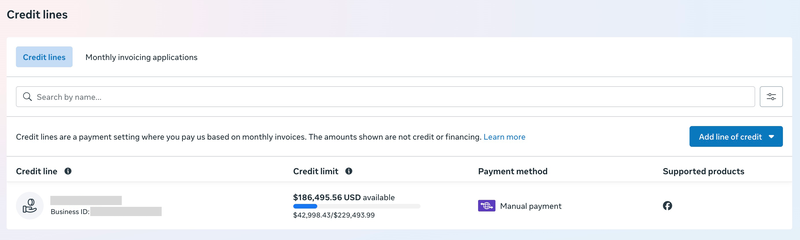
Solicitud paso a paso
- En Facturación y pagos, haz clic en Comenzar en el banner.
- Usa el menú desplegable para elegir una entidad legal bajo la cual quieres solicitar. La información debe coincidir con lo registrado ante tu gobierno.
- Introduce tu información de negocio: país, correo electrónico de negocio, URL del sitio web y número de teléfono con código de país.
- Introduce tu información legal de negocio: nombre legal y dirección del negocio.
- Introduce tu dirección de facturación (o marca "Igual que la dirección legal del negocio").
- Selecciona las cuentas publicitarias que quieres asignar a esta línea de crédito.
- Revisa los Términos y condiciones y haz clic en Enviar. Si tu entidad legal no ha sido aprobada previamente, se te pedirá que subas un documento legal que muestre el nombre y la dirección de tu negocio.
- Verás una confirmación de que tu línea de crédito fue creada o está pendiente de revisión. Haz clic en Listo.
Después de solicitar: La aprobación puede ser instantánea si tu entidad legal puede verificarse a través de registros estatales o nacionales. Si no es posible la verificación automática, podrían contactarte en tres días hábiles. Una vez aprobada, tu línea de crédito aparece en Facturación y pagos bajo Líneas de crédito.
Lanza más. Haz menos clics.
Sube cientos de creatividades a la vez, empareja miniaturas con vídeos automáticamente y publica directamente en tus cuentas publicitarias a través de la API de Meta.
Prueba Ads Uploader gratisSin tarjeta de crédito • 7 días de prueba gratis
Configuración del pago automático
Si estás en EE. UU. o en un país SEPA, configura el pago automático inmediatamente. Meta advierte explícitamente que incumplir plazos puede pausar cuentas publicitarias, y el pago automático lo evita.
El pago automático usa débito directo para cobrar automáticamente el monto de la factura desde tu cuenta bancaria vinculada en la fecha de vencimiento. Esto no es lo mismo que el "débito directo" como método de pago independiente para anuncios: ese es un concepto separado donde Meta cobra a tu cuenta bancaria en función de los presupuestos. Asegúrate de saber cuál estás configurando.
Para activar el pago automático, ve a tu línea de crédito en Facturación y pagos y sigue el flujo de configuración para vincular tu cuenta bancaria. Fuera de EE. UU. y SEPA, tendrás que pagar mediante transferencia bancaria a la cuenta bancaria de Meta que figure en tu factura.
Cómo ver, descargar y gestionar tus facturas
Una vez estés en facturación mensual, la gestión de facturas ocurre en Facturación y pagos bajo la pestaña Facturas.
Ver facturas: Selecciona "Facturas" en el menú desplegable y elige tu rango de fechas. Verás el número de factura, fecha de emisión, monto y estado. Haz clic en cualquier número de factura para un resumen detallado y la lista de campañas.
Descargar facturas: Haz clic en el icono de descarga en las facturas individuales, o usa Descargar todo para exportar facturas de un rango de fechas. Puedes elegir cómo agrupar las descargas.
Crear informes: Usa Crear informe para generar un Estado de Cuenta (solo facturas impagas, formato CSV) o un informe de Factura y Campaña (desglose detallado de gasto y rendimiento de campaña). Ambos están disponibles en Facturación y pagos bajo la pestaña Facturas.
Cada factura incluye la fecha de emisión, la fecha de vencimiento del pago, las condiciones de pago y cualquier impuesto aplicable (IVA, GST).
Grupos de facturas para agencias
Si gestionas varias cuentas publicitarias, los grupos de facturas te permiten consolidar la facturación de varias cuentas en menos facturas. Esta es la función clave para agencias: en lugar de conciliar facturas individuales de cada cuenta publicitaria de cliente, obtienes facturas combinadas por grupo.
Puedes crear, editar o eliminar grupos de facturas en Facturación y pagos. Esto es estratégicamente importante bajo el nuevo mandato: las agencias deben decidir si cada cliente solicita su propia línea de crédito o si la agencia comparte su línea de crédito con los clientes (centralizando la responsabilidad de pago y el riesgo).
Números PO y etiquetas de campaña
Para seguimiento interno y contabilidad:
- Números PO: Añade números de orden de compra a las cuentas publicitarias facturadas. Aparecen en facturas futuras para la conciliación.
- Etiquetas de campaña: Añade etiquetas a las campañas publicitarias que aparecen en las facturas. Puedes configurarlas como opcionales u obligatorias en el Centro de Seguridad. Útil para hacer coincidir las líneas de factura con centros de costo internos.
Nota: La información de facturación no puede editarse desde dos días antes del cierre de mes hasta cuatro días después. Planifica tus cambios de facturación en consecuencia.
Facturación mensual vs. tarjeta de crédito vs. débito directo
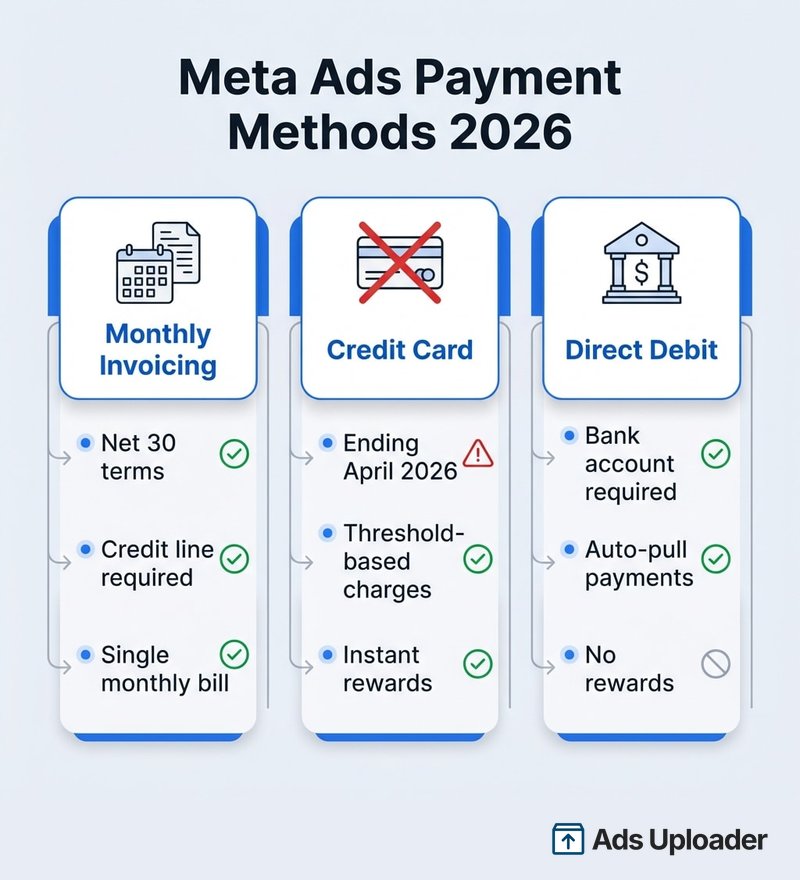
Una tarjeta de crédito de Meta Ads (facturación con tarjeta) cobra automáticamente a medida que gastas, mientras que la facturación mensual consolida todo en facturas de Meta periódicas que puedes descargar, conciliar y pagar a plazos. Los cargos regionales como los que cubrimos en nuestra guía de tarifas por ubicación de Meta aparecen en esas mismas facturas de Meta. Así se comparan los tres métodos de pago:
| Característica | Facturación mensual | Tarjeta de crédito (antes de abril 2026) | Débito directo |
|---|---|---|---|
| Cómo funciona | Línea de crédito, una sola factura mensual | Cargos automáticos al alcanzar el umbral de gasto | Meta cobra desde la cuenta bancaria |
| Tiempo de pago | Net 30 desde la fecha de factura | Inmediato al alcanzar el umbral | Inmediato o basado en presupuesto |
| Recompensas de tarjeta de crédito | No | Sí (1,5-3 % de devolución) | No |
| Verificación de negocio | Requerida (documentos, entidad legal) | No requerida | Requerida (verificación bancaria) |
| Flujo de caja | ~45 días de retraso promedio (ventaja) | Cargo inmediato (desventaja) | Cargo inmediato |
| Disponible después de abril 2026 | Sí | Probablemente solo para cuentas de menor gasto | Sí |
| Mejor para | Grandes gastadores, agencias, flujo de caja Net 30 | Cuentas más pequeñas por debajo del umbral de gasto | Configuración más simple, menos fricción |
La matemática de las recompensas de tarjeta de crédito
La queja más común es la pérdida de recompensas. Esto es lo que realmente estás renunciando, según la tasa de recompensa de tu tarjeta:
| Gasto publicitario mensual | Recompensas al 1,5 % | Recompensas al 2 % | Recompensas al 3 % |
|---|---|---|---|
| $50K/mes | $9.000/año | $12.000/año | $18.000/año |
| $100K/mes | $18.000/año | $24.000/año | $36.000/año |
| $500K/mes | $90.000/año | $120.000/año | $180.000/año |
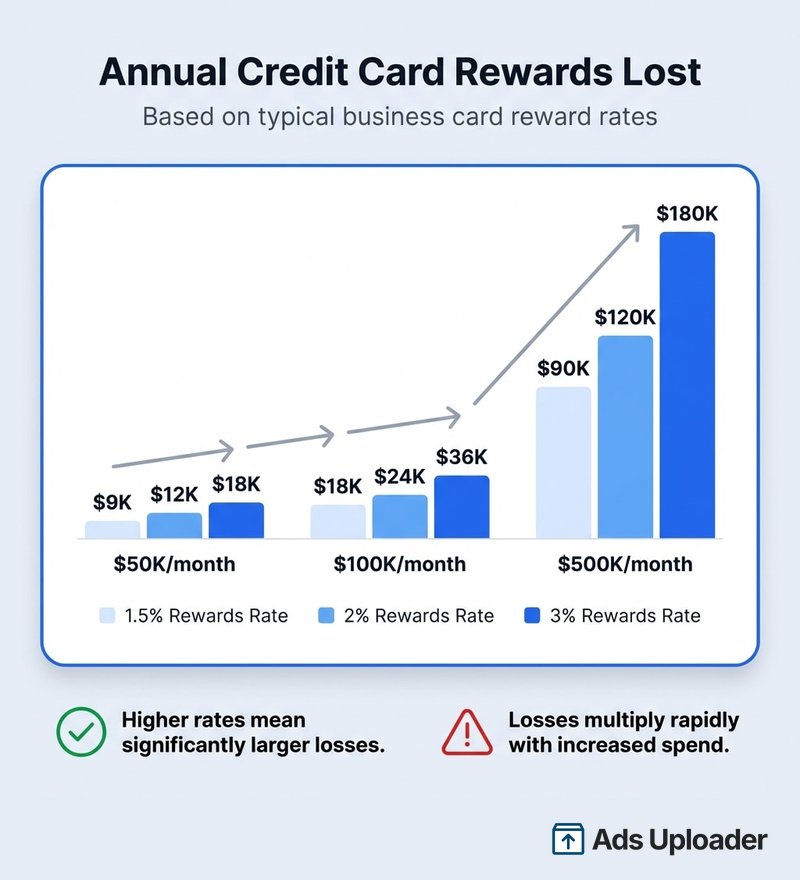
Son cifras reales. Pero considera el otro lado: los plazos de pago Net 30 significan que tu dinero se queda en tu cuenta aproximadamente 45 días más en promedio (el gasto ocurre durante el mes, la factura llega después del cierre y luego tienes 30 días). Para negocios que gastan más de $100K al mes, el beneficio de flujo de caja de retener ese dinero más tiempo puede compensar parcialmente las recompensas perdidas, especialmente si estás usando ese capital flotante de forma productiva.
Y Meta ahorra entre un 1,5 % y un 3,5 % estimado en comisiones de procesamiento de tarjetas de crédito en cada transacción. Para una empresa que procesa decenas de miles de millones en pagos publicitarios al año, es una reducción masiva de costos. No están haciendo esto solo por prevención de fraude.
Problemas comunes y cómo solucionarlos
"No veo el banner de facturación mensual". Verifica que tienes permisos financieros y control total del portafolio de negocio. Si los permisos están correctos, es posible que tu cuenta aún no sea elegible: configura el débito directo como alternativa. Algunos anunciantes reportan problemas de discrepancia de país o verificación en el backend que requieren escalamiento con soporte.
"Mi límite de crédito es demasiado bajo". Meta establece los límites de crédito según tu historial. Construye historial de gasto con el tiempo, mantén un buen estado de pagos y contacta al soporte de Meta para solicitar un aumento. Meta no publica criterios exactos, pero Google y TikTok vinculan los límites a la revisión de crédito y el historial de pagos: la misma lógica probablemente aplica aquí.
"Los anuncios se pausaron tras alcanzar el límite de crédito". Realiza el pago de inmediato o solicita un aumento del límite. Alternativamente, configura el pago automático para que las facturas se paguen a tiempo y tu línea de crédito se mantenga al día.
"La factura no aparece". Las facturas se emiten al inicio del mes siguiente al periodo de facturación. Hay un periodo de bloqueo (normalmente hasta el día 5) durante el cual los datos de la factura pueden seguir procesándose. Espera hasta después del día 5 antes de asumir que algo anda mal.
"No puedo editar la información de facturación". El periodo de bloqueo de facturación va desde dos días antes del cierre de mes hasta cuatro días después. Simplemente no puedes hacer cambios durante esta ventana. Planifica con anticipación.
"El pago automático no funciona". Verifica que tu cuenta bancaria esté correctamente vinculada. El pago automático por débito directo solo está disponible en EE. UU. y países SEPA. Si estás fuera de estas regiones, la transferencia bancaria es tu método de pago.
Preguntas frecuentes
Ahorra horas probando creatividades
Deja de subir anuncios de uno en uno. Procesa creatividades ilimitadas en masa con emparejamiento automático de archivos y publicación directa vía API.
Prueba Ads Uploader gratisSin tarjeta de crédito • 7 días de prueba gratis
¿Meta realmente está eliminando los pagos con tarjeta de crédito para anuncios?
No para todos. La facturación con tarjeta de crédito sigue siendo un método de pago documentado en Meta, y Meta incluso da instrucciones para volver de la facturación mensual a la tarjeta una vez pagados los saldos. El mandato de abril de 2026 parece dirigirse a cuentas por encima de cierto umbral de gasto: si recibiste el aviso, tendrás que cambiar a facturación mensual o débito directo. Las cuentas más pequeñas que no recibieron el aviso pueden seguir usando tarjetas de crédito con normalidad. El límite exacto no está documentado públicamente.
¿Qué pasa si no cambio antes del 1 de abril de 2026?
La documentación de facturación de Meta advierte que incumplir los plazos de pago puede provocar la pausa de las cuentas publicitarias. Si la facturación mensual se vuelve obligatoria para tu cuenta, el riesgo práctico es que los anuncios dejen de publicarse hasta que se corrija la facturación.
¿Puedo seguir usando una tarjeta de crédito con débito directo?
No. Tanto el pago automático por débito directo (para pagar facturas) como el débito directo como método de pago independiente se basan en cuenta bancaria. Ninguno usa tarjeta de crédito.
¿Cómo comparto mi línea de crédito de Meta con un cliente?
En Facturación y pagos, haz clic en Líneas de crédito, selecciona tu línea de crédito, abre Acceso a la línea de crédito y haz clic en Conceder acceso. Introduce el ID del portafolio de negocio del negocio receptor, luego envía, y ellos aceptan bajo Solicitudes en su configuración. Puedes compartir Parcial (un tope de gasto), Fija (una asignación establecida) o Total (toda tu línea). En EE. UU., Brasil y México se factura directamente al cliente, pero como propietario de la línea de crédito sigues siendo responsable de forma secuencial si las facturas quedan impagas. Consulta el recorrido completo en Cómo compartir o asignar una línea de crédito de Meta con otro negocio más arriba.
¿La facturación mensual afecta la entrega o el rendimiento de los anuncios?
El método de pago no cambia la mecánica de la subasta. Pero los fallos de facturación sí afectan la entrega: los pagos incumplidos pausan las cuentas publicitarias. Tu Meta Pixel Helper seguirá rastreando conversiones de la misma manera, y tus carousel ads seguirán entregándose con normalidad. La facturación mensual se presenta en realidad como una forma de reducir las interrupciones de pago en comparación con la facturación basada en umbrales, que puede fallar cuando las tarjetas expiran o son rechazadas.
¿Qué límite de crédito obtendré y cómo lo aumento?
Meta establece los límites de crédito "según tu historial". No publican la fórmula exacta. Para comparar, Google Ads revisa abiertamente el historial de crédito antes de establecer límites, y TikTok determina los límites caso por caso según la antigüedad de la cuenta, el estado, el historial de pagos y las certificaciones empresariales. Espera un enfoque similar de Meta. Construye historial de gasto y mantén pagos puntuales para calificar para aumentos.
¿Cómo gestiono la facturación mensual para fines fiscales y de IVA?
Cada factura mensual incluye los impuestos aplicables (IVA, GST). Puedes descargar facturas individualmente o en bloque desde Facturación y pagos. Meta también tiene contenido de ayuda dedicado a impuestos específicos para anunciantes con facturación mensual. El formato mensual consolidado de hecho simplifica el reporte fiscal en comparación con el seguimiento de docenas de cargos basados en umbrales.
Qué significa esto para tu negocio
Si recibiste el aviso, el mandato de facturación mensual de abril de 2026 es disruptivo en el corto plazo. Perderás recompensas de tarjeta de crédito, eso es dinero real. Tendrás que reestructurar los flujos de trabajo de pago. Las agencias enfrentan decisiones sobre la propiedad de la línea de crédito y la facturación a clientes.
Pero para las cuentas con mayor gasto, los cambios estructurales tienen ventajas reales:
- Los plazos Net 30 mejoran el flujo de caja al dejar que el dinero se quede más tiempo en tu cuenta
- La facturación predecible reemplaza el caos de los cargos basados en umbrales y los rechazos aleatorios de tarjeta
- Las facturas consolidadas simplifican la contabilidad comparado con decenas de cargos individuales al mes
Esto es lo que debes hacer ahora mismo:
- Verifica tu elegibilidad en Facturación y pagos hoy
- Solicita una línea de crédito antes de que la avalancha de abril genere retrasos en el procesamiento
- Configura el pago automático inmediatamente después de la aprobación (si estás en EE. UU. o SEPA)
- Crea grupos de facturas si gestionas varias cuentas publicitarias
- Actualiza tu flujo de contabilidad para esperar facturas mensuales en lugar de cargos por umbral
Los anunciantes que migren temprano y de forma limpia apenas notarán la transición. Los que esperen hasta el 31 de marzo estarán corriendo. No seas parte del segundo grupo.