AI media buying, also called agentic media buying, is when an AI agent does media buying work itself, such as reading performance, proposing changes and building or launching ads, instead of only answering questions. On Meta, an AI media buyer connects to ad accounts through an MCP server and calls tools that read, edit and create campaigns. Agents already handle reporting, pacing checks and campaign setup well. Strategy, creative judgment and approval of budgets and launches still belong to people, so the approval layer decides how safe it is.
"Agentic" is on every ad tech deck this year. Most of that talk is about programmatic: buyer agents and publisher agents negotiating deals with each other. If you run Meta ads, the question in front of you is more practical. An AI agent can now connect to your ad account in a few minutes. What should it be allowed to do once it's in there?
This guide covers what AI media buying means on Meta, how to run an AI media buyer with approvals in place, what an agent can do in your account today, which decisions should stay with a person, and why the approval layer matters more than the model. There's also a weekly creative-test workflow you can copy and a section for agencies.
A quick disclosure: I run Ads Uploader, which has its own MCP server, and I launch Meta ads every week. I've run the same jobs through Meta's official server and ours on the same ad account, and where Meta's tools do the job better, I'll say so.
What Is AI Media Buying?
An assistant answers. An agent acts.
Ask a chatbot why your cost per purchase rose last week and it lists possible causes. Ask an AI media buyer and it pulls the numbers from your ad account, compares placements and creatives, finds the ad set that went back into learning after a budget edit, and proposes a fix. With write access, it can make the change too.
That ability to plan steps and call real tools is what "agentic" means, which is why you'll also see this called agentic media buying. It doesn't mean the agent understands your margins or your brand. It means it can do work in your account.
Here's how an agent compares with the automation Meta buyers already use:
| Automated Rules | Advantage+ | AI Agent | |
|---|---|---|---|
| What it is | Fixed if-then conditions you write | Meta's machine learning inside a campaign | A model that plans steps and calls account tools |
| Takes plain-language goals | No | No | Yes |
| Investigates context | No | Within delivery only | Yes, across the account |
| Changes the account | Only the action you defined | Delivery, audience, placement, budget choices | Whatever its permissions allow |
| Best at | Simple guardrails | Auction and delivery optimization | Analysis, setup and multi-step operations |
An agent doesn't replace Advantage+. Meta's systems still run the auction; the agent works around them, much like a buyer in Ads Manager. If you're weighing rules, Advantage+ and agents against each other, our guide to Facebook ads automation breaks down which layer to use for what.
Two Meanings of Agentic Advertising
You'll see "agentic advertising" used for two different things:
- Agent-to-agent programmatic buying. Buyer agents find inventory and negotiate with seller agents through shared protocols. Holding companies and publishers are testing it with small budgets while standards bodies write the protocols.
- Agents operating a walled-garden ad account. An agent works inside your Meta account through an API or MCP server. This is the version Meta media buyers can use today, and the one this article covers.
How an AI Media Buyer Connects to Meta Ads
The connection runs through MCP, the Model Context Protocol. Anthropic released it as an open standard in November 2024. An MCP server exposes tools (such as "get insights" or "create ad set") to an AI app like Claude or ChatGPT. The app discovers the tools, the model picks one, and the server runs it against your account.
With Ads Uploader. Add the hosted MCP at https://adsuploader.com/api/mcp as a custom connector in Claude, ChatGPT, Cursor or Codex, then finish the Ads Uploader sign-in in your browser, with no token to copy. A local MCP, which can upload files straight from your disk, and the CLI use the same saved builds. The MCP rides your existing Ads Uploader connection to Meta, so there's no separate switch to wait for on each ad account.
With Meta's official server. On April 29, 2026, Meta launched its Ads AI Connectors in open beta: a Meta-hosted Ads MCP server for chat apps and an Ads CLI for coding agents. It's free during the beta and strongest on catalogs, pixels and datasets, A/B and lift tests, benchmarks and Opportunity Score. Meta switches it on account by account during its rollout: on my own login in October 2026, 19 of 20 ad accounts had it, and there's no admin toggle to force the last one on. Our guide to Meta's official Ads MCP walks through setup.
If you're choosing between servers, you can compare the best Meta Ads MCP servers on bulk launching, review before changes go live and multiple ad accounts. And if you're unsure whether you want a chat connector or a command-line tool, our breakdown of the Meta Ads MCP vs CLI covers that choice.
Running an AI Media Buyer With Ads Uploader
Ads Uploader's MCP started on the bulk-launch engine of our web app, which has been tried and tested by thousands of media buyers and agencies, and has since been updated to read, analyze, edit and duplicate as well. Here's what the agent uses, what happens and what you see.
Reading the account. The agent asks for performance with breakdowns and a comparison with the previous period, in plain metrics like purchases, cost per lead and ROAS. It checks each campaign's health (its result against goal, delivery issues and learning status), reads Meta's rejection reasons for ads that aren't running, and can cover up to five ad accounts in one call, reported per account rather than summed across currencies.
Proposing changes. By default, every change the agent proposes waits in your Agent Inbox instead of being applied. Each row shows the object, its current value, the proposed value and the agent's note on why. You can adjust a value or the note, approve the lines you agree with and watch each one apply. Each change is read back from Meta, archive and delete need a separate confirmation, and reversible changes can be undone later.
Launching. The agent works from saved builds and presets, the same ones you use in the web app. It pairs each 4:5 file with its 9:16 version so Feed and Stories and Reels get the right cut, follows your naming convention, previews the batch and launches it as one job. A repeated launch request returns the existing job instead of creating duplicates. It can also duplicate campaigns, ad sets and ads the way Ads Manager does, or duplicate by Post ID so a winner keeps its likes and comments.
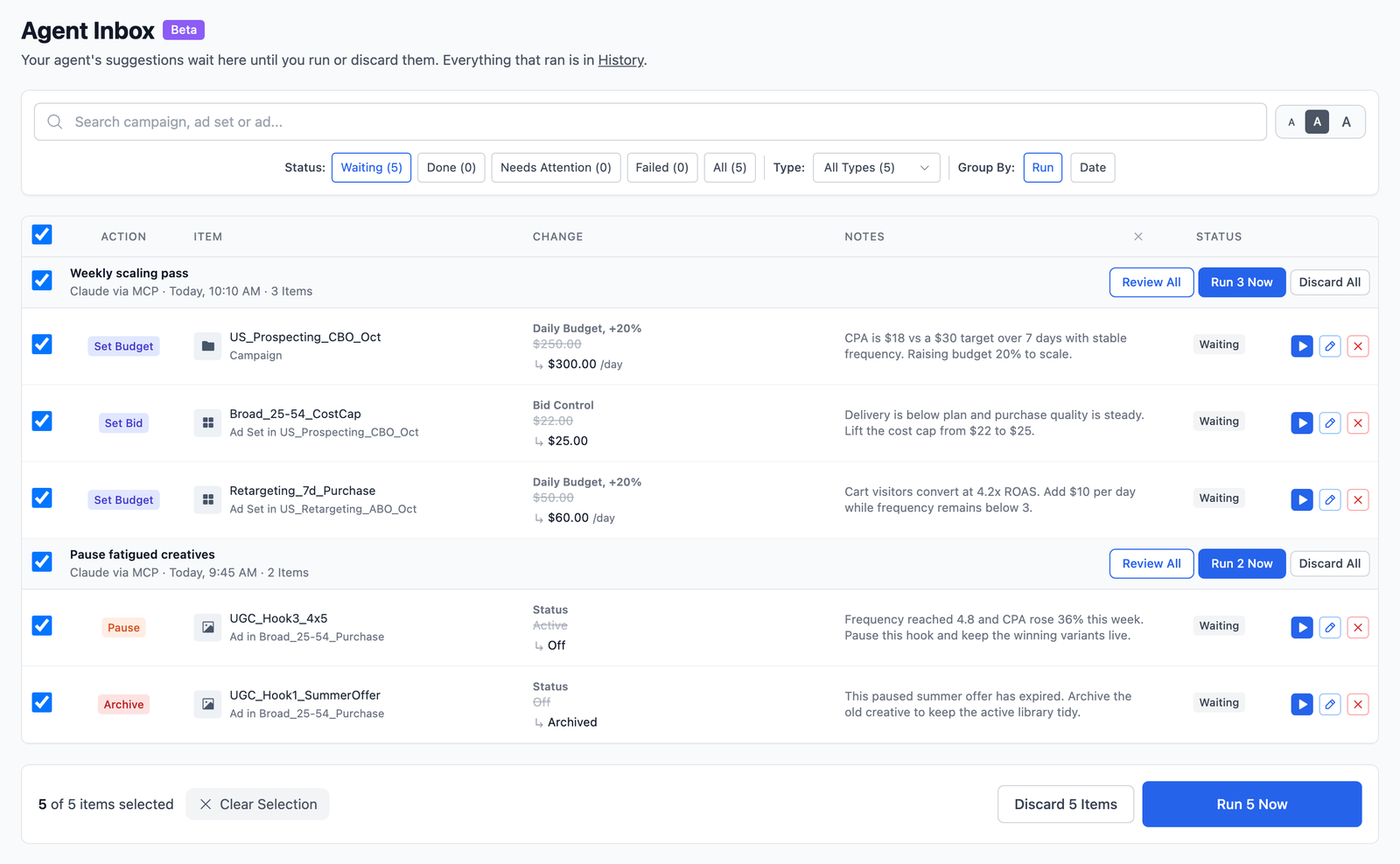
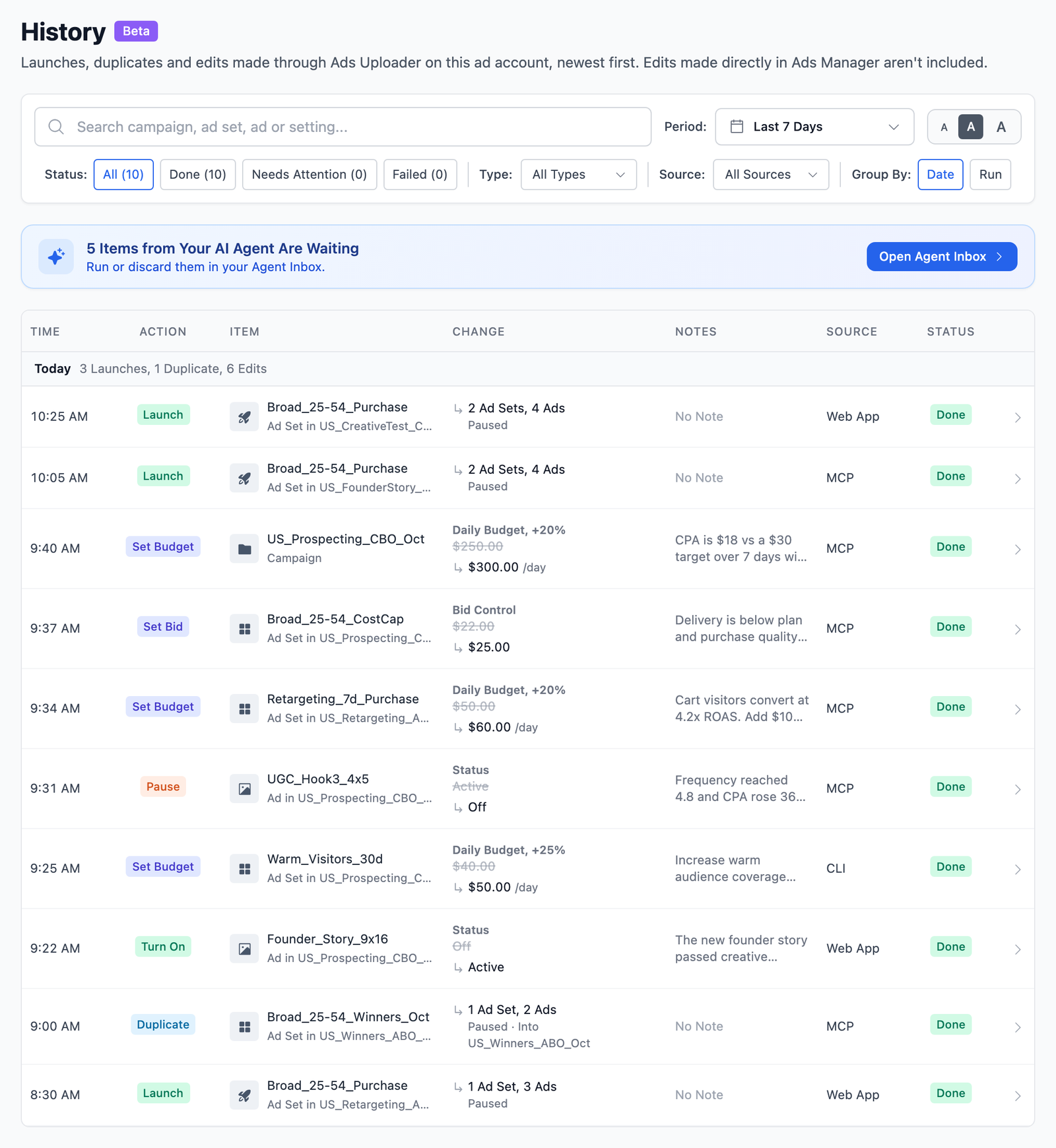
Keeping a record. Permissions are set per ad account, so a reporting-only client and a mature account with approved edits can sit side by side. Everything lands in History: launches and changes from the web app, CLI, MCP and API in one timeline with readable before and after values, which the agent can read before proposing its next change.
It costs $59 a month flat with unlimited ad accounts, and MCP access is on paid plans (it isn't part of the web app's 7-day trial). It covers Meta only, and it doesn't do catalogs, pixel setup or A/B and lift tests, which Meta's own server handles.
What an AI Agent Can Do in Meta Ads Today
The useful way to think about this is in permission levels. Each one carries more risk than the last.
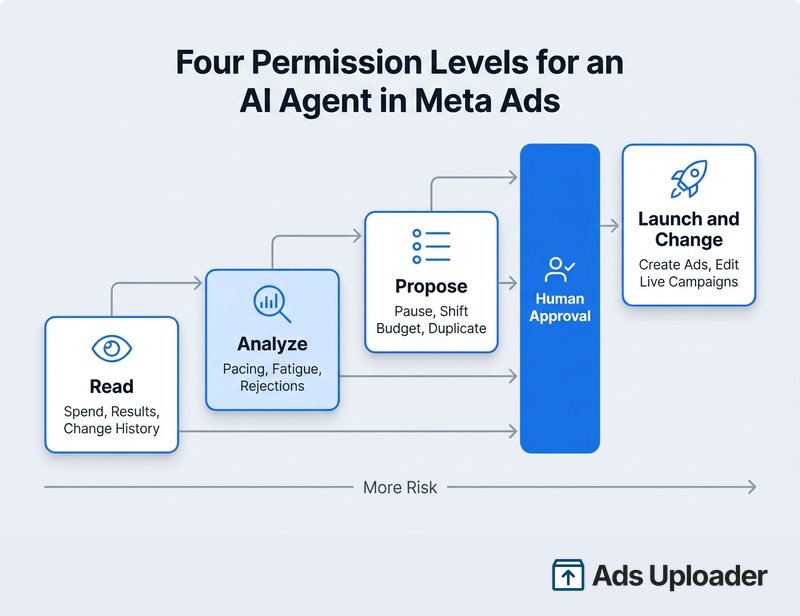
Read and Analyze
This is where agents earn their keep first. An agent can:
- Pull spend, results, cost per result and ROAS by campaign, ad set or ad
- Compare periods and break results down by placement, age or platform
- Check pacing and project month-end spend
- Find disapproved or non-delivering ads and explain Meta's rejection reasons
- Spot creative fatigue from rising frequency and falling click-through rate
- Read the account's change history and summarize who changed what
None of this changes your account, which is why it's the right starting point.
Propose
Next, the agent turns analysis into specific suggestions: pause these four ads, move budget between two ad sets, duplicate this winner into the scaling campaign. A good proposal comes with evidence (spend, results against your target, how long since the last edit) and waits for a person.
Wary of Wiring AI Straight to Meta?
Ads Uploader is loved by power media buyers and agencies, and trusted to launch hundreds of thousands of Meta ads every month.
See the MCP for Meta AdsNo credit card required • 7-day free trial
Launch and Change
With write access, an agent can create campaigns, ad sets and ads, upload creative, and edit budgets, bids, schedules, targeting, status and ad text.
How that works depends on the server. A launch-focused server takes a saved build or spec and creates the whole batch as one job. Meta's own MCP creates one object per call, so a test of 40 videos with 9:16 cuts across three ad sets becomes a long chain of upload and create calls, any of which can fail halfway.
Where Agents Still Stumble
- Creative edits aren't edits. On Meta, changing an ad's copy attaches a new creative, so the likes, comments and shares stay with the old post. A good agent warns you; a careless one quietly resets your social proof.
- Learning resets. Meta says an ad set needs about 50 optimization events in the week after its last significant edit to stabilize. Targeting, creative, optimization event and new ads all count. An agent that "optimizes" daily can become the cause of the volatility it's trying to fix.
- Wrong account, right name. Agencies reuse campaign names across clients, so every write should name the account ID.
- Partial failures. A build that fails at step three leaves steps one and two behind, and retrying blindly creates duplicates.
Can an AI Agent Replace a Media Buyer?
No. An AI media buyer can take over a large share of the busywork, but not the job.
Here's how the work splits today:
| Task | AI Agent Today | Human |
|---|---|---|
| Pulling reports and comparisons | Yes | Reviews the exceptions |
| Pacing checks and spend projections | Yes | Sets the targets |
| Spotting fatigue and anomalies | Yes, first pass | Confirms the cause |
| Building campaigns from an agreed spec | Yes | Approves before launch |
| Writing copy variations | Drafts | Judges brand, claims and policy |
| Choosing what to test next | Suggests | Decides |
| Judging creative | Weak | Owns it |
| Offer, landing page and margin strategy | No | Owns it |
| Budget increases and going live | Proposes | Approves |
| Client communication and accountability | No | Owns it |
The survey data points the same way. An IAB study of 205 US buy-side decision-makers, run from November 2025 to January 2026, found 96% were aware of agentic buying and 66% planned to spend more time on it in 2026. The use cases people expected to adopt were analysis (93%), creative testing (91%) and planning recommendations (84%), well ahead of executing deals on their own. A later IAB discussion found 40% of buyers wanted humans kept in the loop.
So the job shifts: less time touching settings, more time writing briefs, setting limits, designing tests and approving what the agent prepares. Somebody still has to know when reported ROAS is lying.
The Approval Layer Is the Real Design Decision
Model quality matters less than people think. What decides whether AI media buying is safe is what happens between "the agent proposes" and "Meta changes".
A good approval layer has five parts:
- Preview. Every change shows current and proposed values before anything is sent to Meta, including warnings like "this resets learning" or "this loses post engagement".
- Hold for approval. Proposed changes wait in a queue a person works through, rather than being applied and announced afterwards.
- Per-account permissions. You decide what the agent may do on each ad account: read only, propose, or change directly.
- Undo. Reversible changes (budgets, status, targeting, text) can be rolled back from the recorded before values. Archive and delete can't, so they need their own confirmation.
- One history. Agent changes and human changes show up in the same timeline, with who approved what and when.
Ads Uploader's Agent Inbox, per-account permissions, undo and History, covered above, are built around exactly these five parts.
What Meta Provides Natively
Meta's server has its own controls. Your AI client asks for confirmation before activation, though edits to live campaigns can take effect straight away. Portfolio admins can set Ads MCP server rules per ad account to block creation, cap budget increases or block targeting, creative or status edits, and an agency's partner business can set its own rules on a shared client account. The rules are still in limited availability, and they deny actions rather than routing them to a reviewer, so blocking status edits also stops the agent from pausing a runaway ad.
Meta is moving toward a fuller review step. In October 2026 it announced that agent-prepared work can land in Ads Manager as a draft, starting with large advertisers and agencies. When I tested it on October 19, a campaign created through the MCP came back as a regular campaign rather than a draft, and reading drafts returned a message that the tool was "being gradually rolled out".
What a Human Should Still Approve
If you only take one section from this article, take this one.
Always approve:
- Budget increases, plus any large budget change in either direction
- Anything going live, including reactivating paused ads
- Targeting, audience exclusions and location changes
- The optimization event, pixel or dataset, and attribution setting
- Bid strategy and cost or ROAS controls
- New creative, its claims, offer, landing page and call to action
- Copy edits on ads with social proof worth keeping
- Archive and delete, which can't be undone
- Anything in a special ad category (housing, employment, credit, politics)
- Any action on a client account outside the agreed brief
Fine to hand over first:
- Read-only reporting and summaries
- Pacing calculations and anomaly flags
- Account health checks and rejection reasons
- Naming and UTM drafts
- Proposals that come with evidence and wait for approval
Hand over only with a written rule: pausing clear losers or making small budget moves. Write the rule down first: minimum spend or conversions before judging, which window, how much it may change, and when it must leave things alone. For emergency spend containment, a plain automated rule is often safer than an agent interpreting a vague instruction.
A Realistic Agent Workflow for a Weekly Creative Test
Here's how a week looks with an AI media buyer doing the legwork in Ads Uploader and a buyer making the calls. The example tests three new hooks against a current control ad.
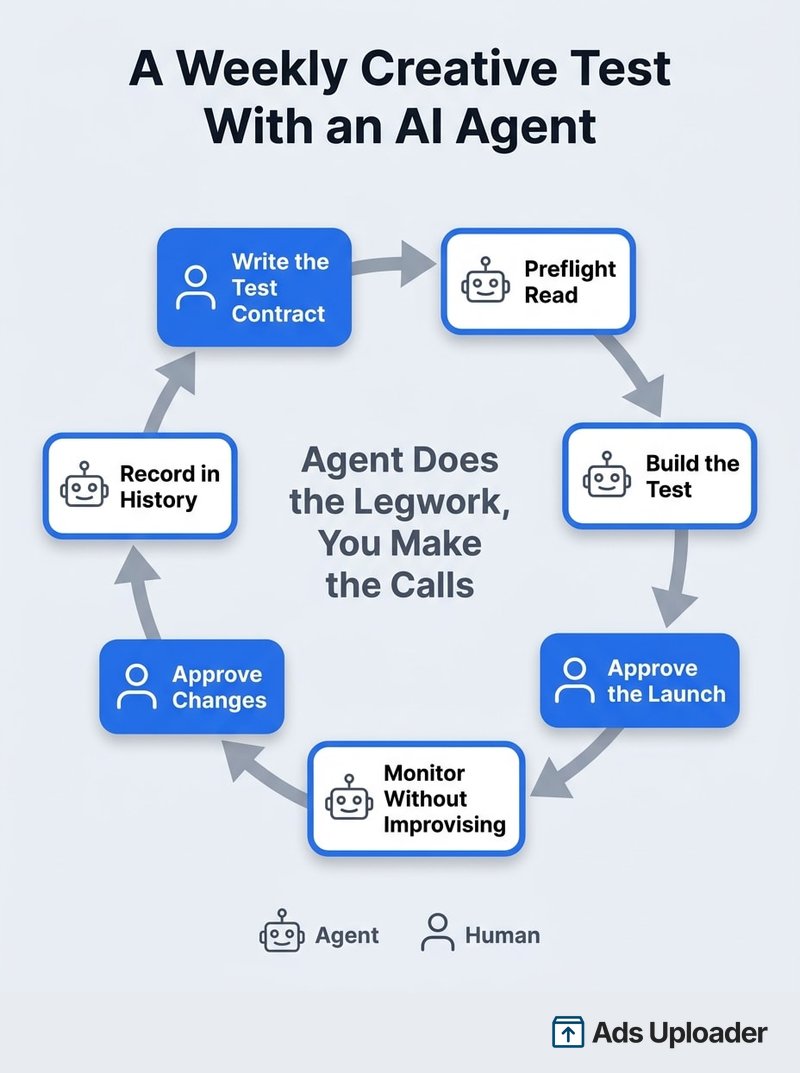
- Monday: write the test contract (human). One paragraph: the hypothesis, what stays fixed, the budget ceiling, the stop rule, the winner rule and what the agent may touch. For example: "Test three hooks against the control. Keep the offer, landing page, audience and optimization event the same. Spend no more than $1,500. Don't change budgets on live ad sets. Prepare the launch for my approval."
- Preflight read (agent). The agent confirms the account ID, currency, time zone, optimization event, attribution setting, current spend, learning status and any significant edits in History. If the account or event is unclear, it stops and asks.
- Build (agent). The agent copies last week's saved build into a new draft and adds the three hooks, each with a 4:5 feed version and a 9:16 Stories and Reels version, named to your convention, in a new ad set. A coding agent using a Meta Ads CLI can work straight from a folder on disk.
- Approve the launch (human). Check the preview: right account, Page and Instagram identity, placements, copy, links and tracking parameters, budget and schedule. Then the batch launches as one job you can watch.
- Midweek: monitor without improvising (agent). The agent reports daily but doesn't change the test because one hook leads after a day. It only acts on hard stops you agreed: spend over the ceiling, a rejected ad, broken tracking or a dead landing page.
- Decision point (agent proposes, human approves). Once the minimum spend is reached, the agent reports results by variant with its caveats and proposes next steps in the Agent Inbox: pause the two losing hooks, duplicate the winner by Post ID into the scaling campaign so it keeps its likes and comments. You approve the lines you agree with.
- Close the loop (both). History now shows what was created, who approved the launch, what changed midweek and why. Next Monday's preflight starts from that record.
The agent saves you the report pulls, setup clicks and duplication chores. You still make the four decisions that matter: what to test, whether it's ready, what counts as a win, and what gets more money.
AI Media Buying for Agencies
With one ad account, an agent mistake costs you money. With 30 client accounts, it can cost you a client. Agencies need a few extra things.
Per-account authority. Not every client should get the same agent. A simple matrix keeps it straight, and in Ads Uploader each row maps to that account's permissions:
| Client Situation | Agent Mode | Who Approves |
|---|---|---|
| New or high-risk client | Read only | Client or account lead |
| Established client | Reports plus proposals, launches held for approval | Account lead |
| Mature account with written rules | Limited direct changes within caps | Senior buyer |
Access lives on each account. The client owns its ad account, Page and pixel and grants your business partner access. With Ads Uploader, the MCP works on any account your connection can already reach. With Meta's server, each client account also has to be enabled in Meta's rollout, the client's admins can set MCP rules alongside yours, and an agency building its own app needs App Review and Advanced Access for the MCP permission.
Audit for client conversations. When a client asks why their budget changed on Tuesday, "the agent did it" isn't an answer. You want the proposal, the reason, the approver and the time, per client, which is what the Agent Inbox and History record.
One account at a time. Reporting across a few accounts at once is fine. Writing across them in one breath is how mistakes travel, so have the agent change one client account at a time and keep each client's data separate.
Pricing changes with scale. Some tools charge per ad account, some per call, some flat. Check what your bill looks like at 10 accounts and at 30.
Give Your AI Agent a Safety Net
Launch across every client account with an MCP and CLI built for power media buyers and agencies.
See the MCP for Meta AdsNo credit card required • 7-day free trial
Frequently Asked Questions
What Is AI Media Buying?
AI media buying, also called agentic media buying, is when an AI agent does media buying work itself instead of only answering questions. On Meta, the agent connects to an ad account through an MCP server, such as Ads Uploader's or Meta's official Ads MCP, and can read performance, propose changes and build or launch campaigns within the permissions it has been given.
Can an AI Agent Replace a Media Buyer on Meta?
No. An AI media buyer can take over much of the repetitive work, such as report pulls, pacing checks, campaign setup and first-pass diagnosis. It can't own the strategy, the creative judgment, the offer, measurement choices or accountability for spend, so the media buyer's job shifts toward briefing, deciding and approving.
What Should a Human Still Approve When an AI Agent Runs Meta Ads?
Budget increases and large budget changes, anything going live, targeting and optimization event changes, new creative and its claims, bid strategy changes, archive and delete, and any action on a client account outside the agreed brief. Read-only reporting and proposals that wait for approval are the safest things to hand over first.
Is AI Media Buying the Same as Advantage+?
No. Advantage+ is Meta's own machine learning, which decides delivery, audiences, placements and budget inside a campaign. An AI agent sits above it: it can set up, inspect or adjust an Advantage+ campaign, but Meta's systems still run the auction and delivery.
Is It Safe to Connect an AI Agent to My Meta Ad Account?
It can be, if you start with reporting only, limit what the agent may change on each account, and keep a person approving budgets and launches. Meta's Business Help Center says using its official Ads MCP server alone is unlikely to get an account restricted, but everything the agent does is still subject to Meta's advertising policies. You'll see posts on X from advertisers whose accounts were restricted after automating; every case is different, and the ads themselves are what Meta reviews.
How Is an AI Agent Different From Meta's Automated Rules?
An automated rule runs a fixed if-then condition, such as pausing an ad when cost per result passes a threshold. An agent interprets a plain-language goal, investigates the account and chooses which steps to take. That makes it more useful for analysis and setup, and riskier without approvals.
Conclusion
AI media buying on Meta doesn't remove the media buyer. It moves the buyer up a level, from doing every action in Ads Manager to deciding what the agent may do and checking what it prepares.
Key takeaways:
- An agent acts; an assistant answers. On Meta, an AI media buyer works through an MCP server, such as Ads Uploader's or Meta's official one.
- Agents are strongest at reading, analyzing and building to a spec. Strategy, creative judgment and accountability stay human.
- The approval layer is the real decision: preview, hold for approval, per-account permissions, undo and one shared history.
- Keep a person on money, launches, targeting, creative and anything irreversible.
- Agencies need per-account authority and an audit trail, not one agent with the keys to every client.
Start with reporting only on one low-stakes ad account. Once the agent's reports match what you see in Ads Manager, set Agent Edit to Approval so its proposals land in your Agent Inbox. When its proposals are consistently the ones you'd have made, let it build your weekly test from a saved build, and keep approving the launch yourself.