Codex connects to Meta ads through a remote MCP server added with codex mcp add. Servers with a standard browser sign-in, such as Ads Uploader's, connect in one step and handle bulk launches, reporting and approved edits. Meta's official Ads MCP server refuses Codex's automatic sign-in, so it needs an access token from a user or Employee-role system user, or your own Meta developer app as the OAuth client. Once connected, Codex can report on and change campaigns from the same folder as your launch files.
If you landed here, you've probably seen this already:
Error: Registration failed: Dynamic registration failed: Registration failed: HTTP 400 Bad Request:
{"error":"invalid_client_metadata","error_description":"Dynamic registration is not available for this client."}
You added Meta's server to Codex, Codex tried to sign in, and Meta said no. Meta's setup guide has commands for Claude Code and ChatGPT, not Codex. We hit exactly this on Codex CLI 0.163.0 in October 2026.
There are two ways forward: connect a server Codex can sign in to normally, or route around Meta's sign-in. This guide covers both. First, Ads Uploader's MCP and CLI, which we built for launching and which connect to Codex in one command. Then Meta's official server: why the sign-in fails, the token setup that works today and the own-app setup with the one config line that makes it workable. Finally, when a CLI with saved launch specs beats an MCP inside a coding agent.
Can Codex Connect to Meta Ads?
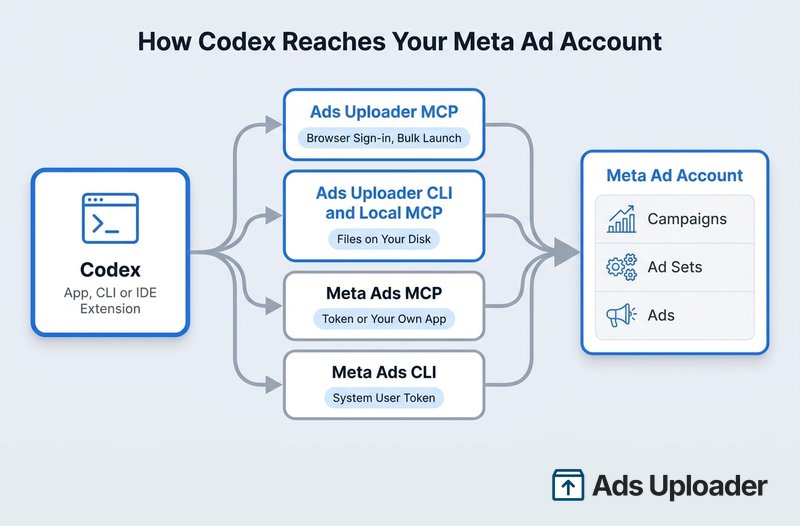
Yes, through five routes that differ in how Codex signs in and how much each call does.
| Route | How Codex signs in | Best for | Watch out for |
|---|---|---|---|
| Ads Uploader MCP (hosted) | Browser sign-in, one command | Bulk launches, approvals, multi-account reads | Paid plans only |
| Ads Uploader CLI and local MCP | ads login in the browser | Launches from spec files and folders on disk | Node.js 18 or later |
| Meta's Ads MCP, access token | Bearer token from an environment variable | Meta's first-party reads and single edits | Token handling; per-account rollout |
| Meta's Ads MCP, your own app | OAuth with your app ID as the client ID | A browser sign-in to Meta's server | Redirect URL setup; open token-exchange reports |
| Meta's Ads CLI | System-user token | Scripts that create a few objects | One object per command |
Pick by the job. For launching ads and approving changes at volume, start with Ads Uploader. For Meta's first-party extras, such as catalogs, pixel and dataset health, A/B and lift tests, benchmarks and Opportunity Score, add Meta's server alongside it; Codex happily runs both. If you're comparing more servers, our guide to the best Meta Ads MCP servers scores them on bulk launching, review before ads go live and multi-account work.
How to Connect Ads Uploader's MCP to Codex
Ads Uploader's server uses the standard sign-in flow that Codex expects, so there's no developer app, token or redirect URL to set up.
- Add the server:
codex mcp add ads-uploader --url https://adsuploader.com/api/mcp
- Codex opens the Ads Uploader sign-in and consent screen in your browser. Approve it. There's no token to copy, and Codex stores the sign-in itself.
- Codex writes this to
~/.codex/config.toml:
[mcp_servers.ads-uploader]
url = "https://adsuploader.com/api/mcp"
- Start Codex and ask it to list your ad accounts. If they come back, you're connected.
The MCP uses the same account and Meta connection as the Ads Uploader web app. That means no per-ad-account rollout flag to wait for: if an ad account works in the web app, Codex can use it.
Want Codex to work from files on your disk? Install the local server and CLI (Node.js 18 or later), sign in once, and add the local server as a command:
npm install -g @adsuploader/cli @adsuploader/mcp
ads login
codex mcp add ads-uploader-local -- ads-mcp
The local server uses the login saved by ads login, which lasts 30 days. If you run Codex with a network sandbox and the agent uploads files itself, allow *.adsuploader.com in its network allowlist.
Launch, Approve and Report From Codex With Ads Uploader
Once connected, Codex works through the same build workflow as the web app. You describe the job in plain language, and Codex picks the tools.
| Job | Tools Codex calls | What you see |
|---|---|---|
| Bring in media | ads_upload, ads_get_upload | Upload progress and a batch ready to use |
| Assemble the launch | ads_save_build, ads_get_build | A saved build you can open in the web app |
| Check before launch | ads_preview | Every ad set and ad that would be created, with names |
| Launch | ads_create, ads_get_job | One job creating the whole batch, with progress |
| Change live campaigns | ads_edit_preview | Proposed changes waiting in your Agent Inbox |
| Copy what works | ads_duplicate_preview, ads_duplicate_by_post | A preview of the copy tree, then the copies |
| Report | ads_query_insights, ads_campaign_health | Plain metrics, comparisons and campaign health |
| Check what happened | ads_list_history, ads_get_launch | One timeline of launches and changes |
A Bulk Launch, Step by Step
Say you ask: "Launch these 12 videos, each with a 4:5 and 9:16 cut, into three ad sets, named by our convention." Here's what happens.
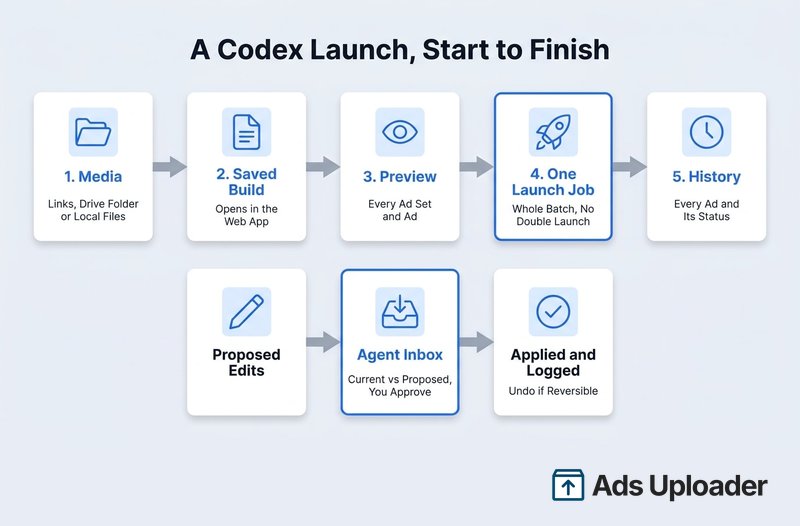
- Media. The hosted server takes public links or a public Google Drive folder and processes them in the background. Because Codex has a shell, it can also request a short-lived upload script and push a local folder straight from your disk.
- The build. Codex writes the campaign, ad sets, per-ad copy and naming pattern into a saved build, pairing each 4:5 feed version with its 9:16 Stories and Reels version so the right cut lands in the right placement. Every build has a link that opens it in the web app, so you can check it there before anything is created.
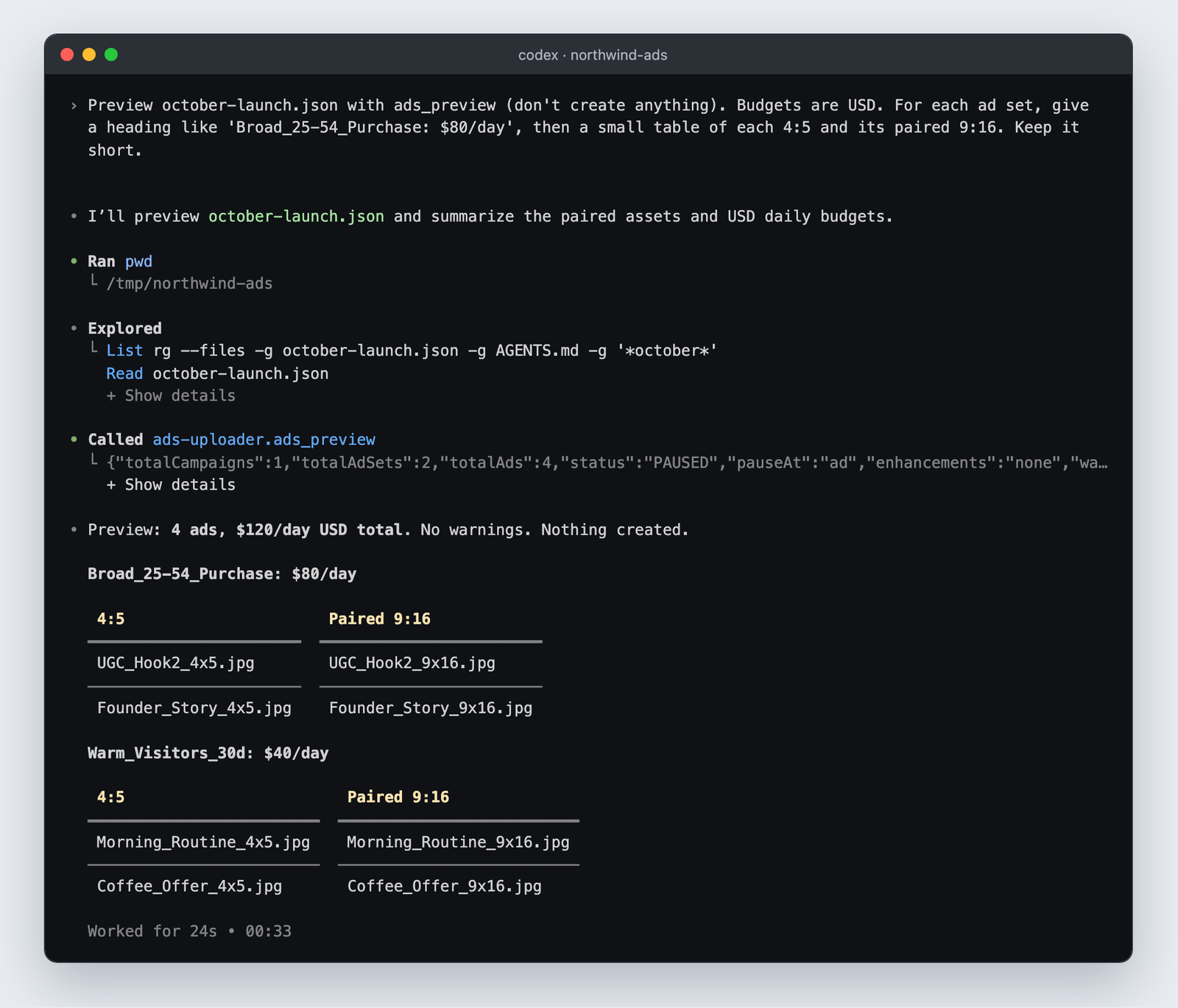
- Preview.
ads_previewshows exactly what would be created: ad sets, ads per ad set and their custom names. - Launch.
ads_createruns the whole batch as one server-side job, hundreds of ads per launch if you need them. The job keeps running if Codex's connection drops, and repeating the exact same request returns the existing job instead of launching twice. - Read back. Codex checks History for the launch and lists each ad with its status, so any failure shows up with Meta's reason.
Changes Through the Agent Inbox
In Ads Uploader, edits need approval by default, and you choose what agents may do in each ad account. With approval on, a budget change, pause, targeting tweak or ad text rewrite that Codex proposes doesn't touch Meta. It waits in your Agent Inbox with current and proposed values side by side. You approve the lines you want and watch each one apply, Meta checks each change as it lands, and reversible changes can be undone later. Archive and delete can't be undone, and the preview says so.
Duplication works the same way. Codex can copy campaigns, ad sets or ads like Ads Manager's Duplicate, or duplicate by Post ID so the new ad keeps the original's likes and comments, and agent copies wait for your approval when review mode is on.
Reports Across Accounts
Ask Codex "which ads spent the most last week and what was their ROAS?" and it reads performance with breakdowns, filters and period comparisons, in plain metrics such as purchases, leads, cost per lead and ROAS. It can query up to five ad accounts in one call, keeping each account's numbers separate rather than adding them up, and check a campaign's health using Meta's own result for its goal, delivery issues and learning status.
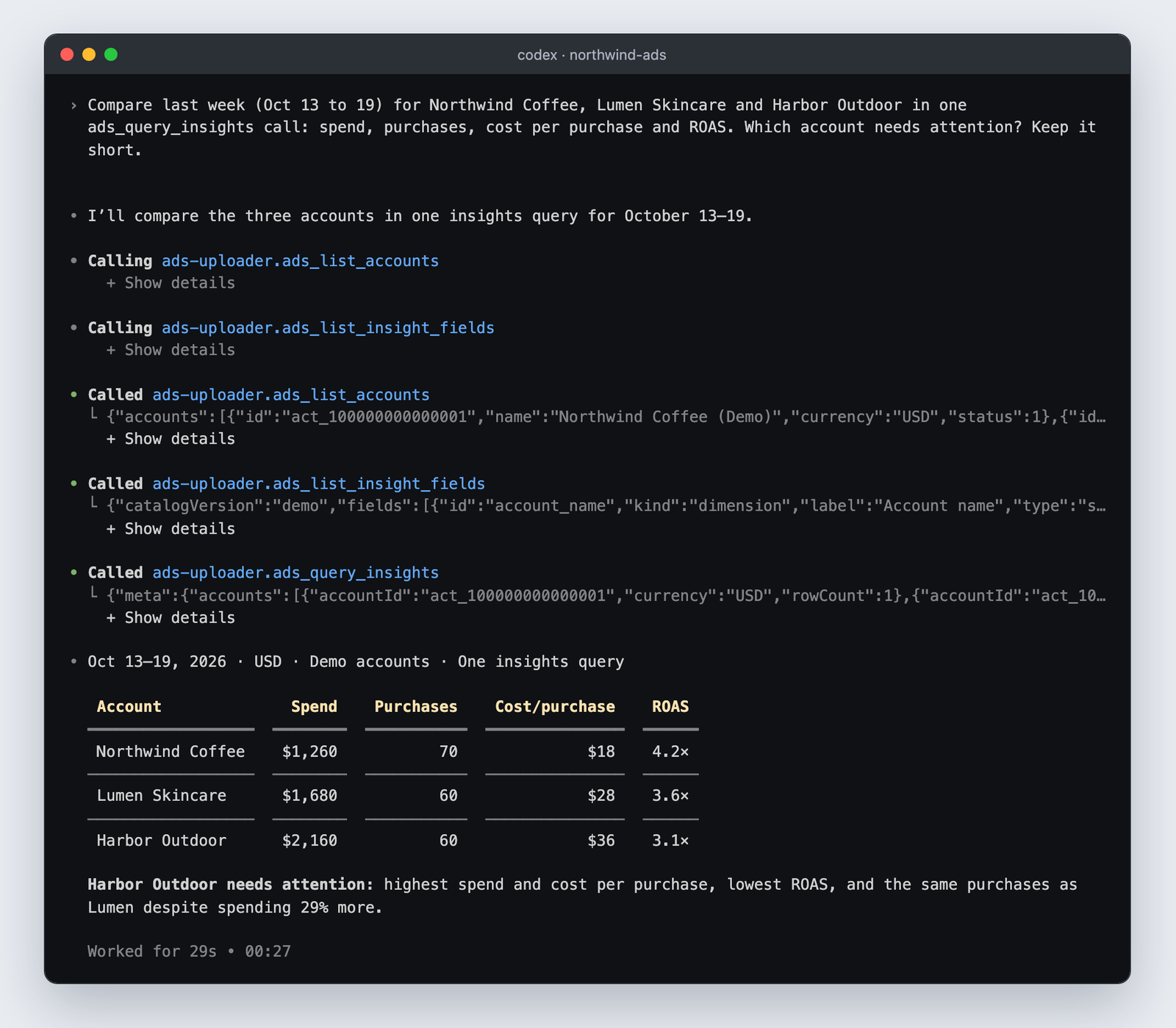
Every launch and change, from the web app or from an agent, lands in one History that Codex can read. MCP access is on paid plans and isn't part of the web app's 7-day trial; Ads Uploader costs $59 a month flat with unlimited ad accounts.
Meta's Official Ads MCP in Codex
Meta's server is free to connect during its open beta and first-party, and it reaches parts of Meta that a launch tool doesn't: catalogs and product feeds, pixel and dataset diagnostics, A/B and lift tests, auction and industry benchmarks, Opportunity Score and the account activity log. Many Codex users add it next to a launch server for exactly those reads. Getting it connected takes a workaround.
Why Meta's Sign-in Fails in Codex
Meta's support picture is mixed. Its Business Help Center guide to ads AI connectors lists ChatGPT, Claude, Claude Code and Perplexity for its no-app sign-in. A broader Meta developer page lists "Codex App" and "Codex CLI" among validated clients, yet the Ads MCP setup guide only gives commands for Claude Code and ChatGPT.
When you add a server without a client ID, Codex has to register itself before it can open a login window. Meta refuses Codex's dynamic registration with the error above and doesn't offer the other automatic method, client ID metadata documents. So nothing is wrong with your ad account; the block happens before Meta asks who you are. The fix is to give Codex a client ID Meta already knows (your own developer app) or an access token. Bug reports on Codex's GitHub were still open in mid-October 2026, including one where a pre-registered app got through the browser sign-in and then got no access token back, so the token route is the more reliable of the two today.
Option 1: Use an Access Token
Meta's server accepts a bearer token from a user (Graph API Explorer, quick but it expires) or a system user. Meta's setup guide says only Employee-role system-user tokens work; Admin-role ones are refused. The token needs ads_mcp_management plus ads_read or ads_management, so start with ads_read.
export META_ADS_MCP_TOKEN='paste-token-here'
codex mcp add meta-ads --url https://mcp.facebook.com/ads --bearer-token-env-var META_ADS_MCP_TOKEN
Codex writes the server with bearer_token_env_var = "META_ADS_MCP_TOKEN", and codex mcp list should show Bearer token in the Auth column. There's no login step. One catch: the variable must be visible to the Codex process, and the desktop app launched from the Dock may not see variables exported in your shell profile.
Wary of Wiring AI Straight to Meta?
Ads Uploader is loved by power media buyers and agencies, and trusted to launch hundreds of thousands of Meta ads every month.
See the MCP for Meta AdsNo credit card required • 7-day free trial
Option 2: Use Your Own Meta Developer App
Meta has documented this route for any MCP client since July 16, 2026.
- At Meta for Developers, create or open an app, go to Use cases, then Add use cases, choose Ads and monetization, select Create & manage ads with ads MCP server and save. Meta's developer announcement walks through the same clicks.
- Pin Codex's callback port. Codex listens on
http://127.0.0.1:<port>/callback/<id>and picks a random port each time unless you fix it, and Meta needs the exact redirect URL registered in advance. Addmcp_oauth_callback_port = 5555near the top of~/.codex/config.toml, outside any server table. - Add the server with
codex mcp add meta-ads --url https://mcp.facebook.com/ads --oauth-client-id YOUR_META_APP_ID, then cancel the sign-in it starts. - Run
codex mcp login meta-ads --no-browser. Codex prints the Facebook authorization link; theredirect_uriinside it is the exact address to add under Facebook Login for Business, Settings, Valid OAuth Redirect URIs. Don't swap127.0.0.1forlocalhost. - Run
codex mcp login meta-ads, sign in and choose only the businesses Codex needs.
Meta's docs don't say clearly whether a plain http://127.0.0.1 address is accepted for every app, and if Codex reports a missing access token after the browser step, switch to Option 1. Agencies reaching other businesses' ad accounts through their own app also need App Review and Advanced Access for ads_mcp_management.
What It Does Once Connected
Codex gets reporting with breakdowns, trends and placement previews, plus creating and editing campaigns, ad sets, ads, creatives, audiences, catalogs and tests. Our Meta Ads MCP guide covers the tools in depth. The limits that matter in a coding agent:
- One object per tool call. A campaign, an ad set, a creative and an ad are four calls, so 20 ads is a long chain, and a failure halfway leaves half a launch.
- Paused, then activated. Going live is a separate call. Meta announced Ads Manager drafts in October, but when we checked on October 19, creates still made real paused objects.
- No disk access. Media has to come from a public URL.
- Rollout per ad account. Some accounts aren't enabled yet, and there's no admin switch for it.
A portfolio admin can set Ads MCP server rules in Meta Business Suite, under Settings, Integrations, Ads MCP server, to block campaign creation or cap budgets for each ad account, whatever Codex is told.
Codex App, CLI and IDE Extension
You set servers up once per computer. OpenAI's Codex documentation says the desktop app, CLI and IDE extension share MCP configuration on the same machine, from ~/.codex/config.toml. A trusted project can carry its own .codex/config.toml to share a server definition with your team, as long as no token goes in it. In the desktop app, servers live under Settings (add a Streamable HTTP server with the same URL); in the CLI, /mcp shows what's connected.
Before you let Codex write, use its per-tool controls. Codex can prompt before MCP tool calls and allow or block tools by name with enabled_tools and disabled_tools on a server entry. For example, blocking Meta's activation tool means Codex can build paused objects on Meta's server but never switch them on:
[mcp_servers.meta-ads]
url = "https://mcp.facebook.com/ads"
bearer_token_env_var = "META_ADS_MCP_TOKEN"
disabled_tools = ["ads_activate_entity"]
Check exact tool names with /mcp first. The desktop app can also run scheduled tasks, which suits a daily report; keep those read-only, because a scheduled run can't stop and ask you before it acts.
MCP or CLI Inside Codex?
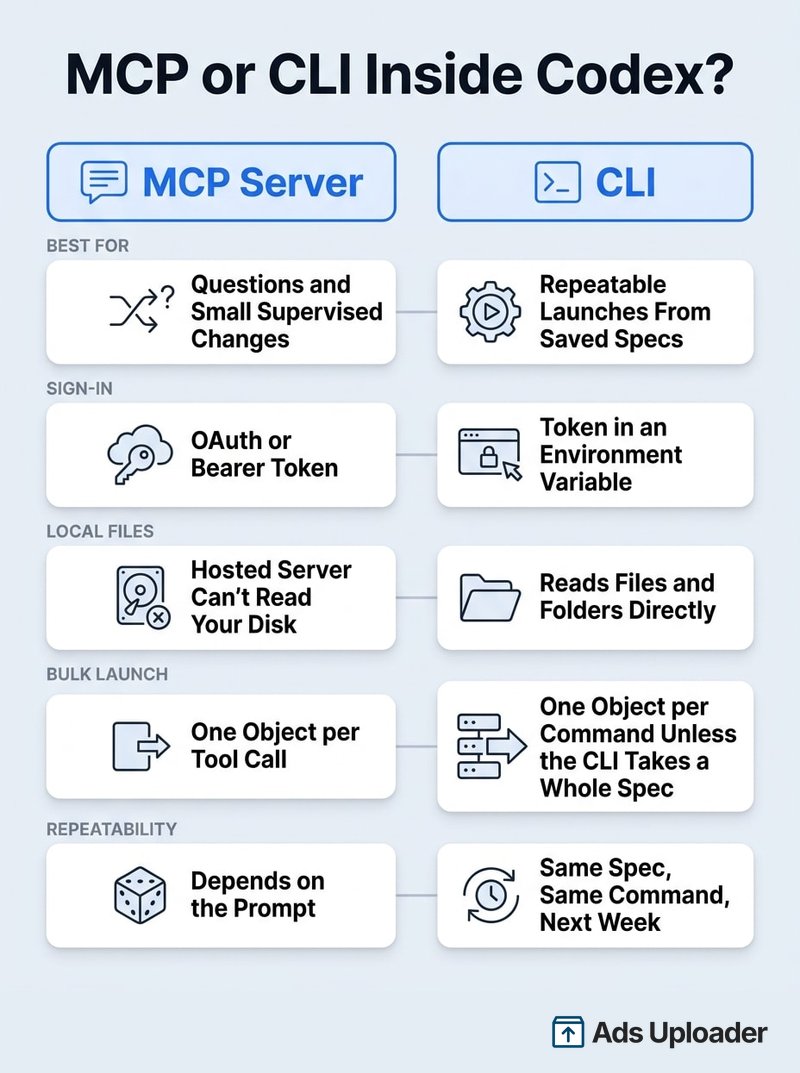
A chat app only has the conversation. Codex has a folder: your launch sheet, creative files, last week's spec and your instructions. An MCP server suits questions and supervised changes ("which ad sets lost efficiency this week, and why?"). A CLI suits repeatable work: Codex writes a launch spec to a file, you review it, and the same command runs it again next week. Our Meta Ads MCP vs CLI comparison goes deeper on the trade-off.
Hosted vs Local MCP Servers
A hosted server runs on someone else's machine and only sees what Codex sends it, which is safer for your laptop but means no direct folder access. A local server runs on your computer, so it can read files from disk and use local credentials. Codex supports both: a url entry for hosted servers and a command entry for local ones. Ads Uploader ships both on the same saved builds, so you can start a build from a chat app and finish it from Codex.
Ads Uploader's CLI for Repeatable Launches
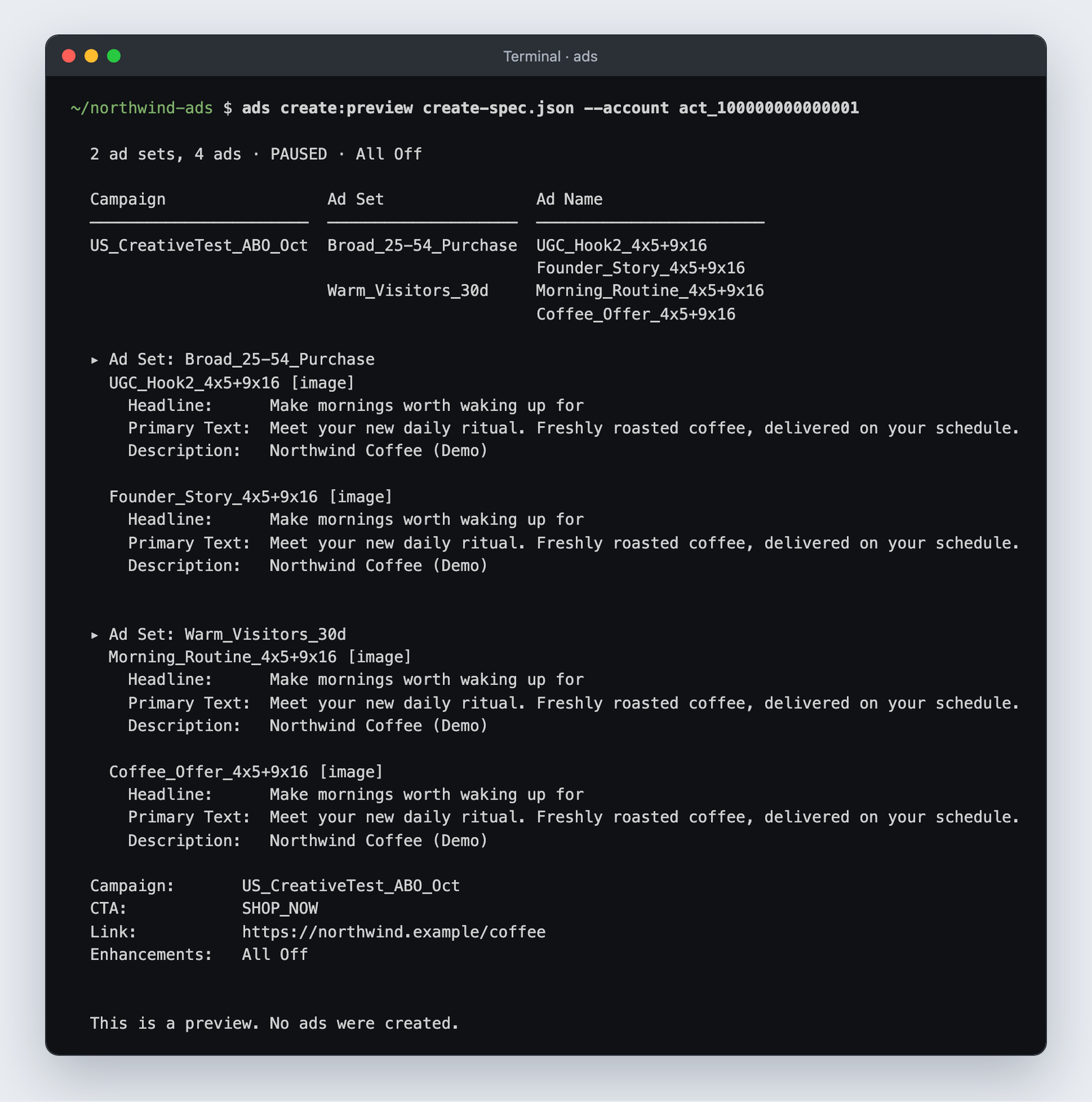
The Ads Uploader CLI is built for exactly this loop. Codex runs ads upload on a folder, writes a spec file, runs ads create:preview as a dry run so you can read what would be created, then ads create launches the whole spec as one job. The spec stays in your repository, so next week's launch starts from this week's file, and the CLI, MCP and web app share builds, so a launch can move between them without retyping anything.
Is Meta's Ads CLI Good Enough for Bulk Launching?
Meta's official Ads CLI is built for scripts and agents too. It installs with pip install meta-ads (Python 3.12 or later) or Homebrew on macOS and Linux, signs in with a system-user token in ACCESS_TOKEN, returns JSON with --output json and runs unattended with --no-input. For a handful of ads, that's plenty. For bulk launches it's a primitive rather than a launcher:
- Each create command makes one object, so 60 ads means a loop the agent writes and you trust.
- Placement-specific creatives (a 4:5 feed version and a 9:16 Stories version) need raw JSON specs.
- There's no batch manifest, resumable job, duplicate-launch protection, approval step or undo.
If you launch dozens or hundreds of ads at a time across client accounts, a launch CLI that takes a whole spec as one job saves you building that layer yourself.
Give Codex House Rules With AGENTS.md
Codex reads AGENTS.md files automatically: a global one in ~/.codex/, one at the repository root and any in subfolders, with closer files taking precedence. That's where your Meta rules belong:
# Meta Ads rules

- Say which ad account ID you're using before every call. Never guess an ID.
- Before any launch, save a build or spec and show me the preview. Stop for my review.
- Never activate anything or raise a budget without my approval in this conversation.
- Read back created IDs and their status after every write.
- Tokens live in environment variables. Never write one to a file.
Codex also supports skills, folders with a SKILL.md file, for repeatable procedures like a Monday account review or a launch checklist. Our guide to Meta ads skills for Claude Code and Codex has worked examples. Instructions guide the agent; they don't limit it. Sign-ins, tool approvals and your Agent Inbox or Meta's rules are the real boundaries.
Cursor, Gemini CLI and Other Coding Agents
The pattern is the same everywhere: add a remote server URL, then sign in.
- Ads Uploader. Its docs cover Claude, ChatGPT, Claude Code, Claude Desktop and Cursor with the same
https://adsuploader.com/api/mcpURL and browser sign-in. An agent that only runs local servers can bridge to it withnpx mcp-remote https://adsuploader.com/api/mcp. - Meta's server in Cursor. Meta's developer page lists Cursor App and Cursor CLI as validated, but the Ads MCP setup guide has no Cursor instructions. User reports say an Employee system-user token works for reads, while own-app OAuth depends on which callback address your Cursor version uses.
- Meta's server in Gemini CLI. Not listed by Meta. Gemini CLI can send an
Authorization: Bearerheader from itssettings.json, so the token route is plausible, but we found no confirmed end-to-end report. - Claude Code. Meta documents it directly. Our guide to connecting Claude to Meta Ads covers Claude, Claude Desktop and Claude Code.
Whatever the client, run the same first test: connect, ask for a read-only list of ad accounts, and only then let it write.
Give Your AI Agent a Safety Net
Launch across every client account with an MCP and CLI built for power media buyers and agencies.
See the MCP for Meta AdsNo credit card required • 7-day free trial
Frequently Asked Questions
Can I Connect OpenAI Codex to My Meta Ad Account So It Can Create and Launch Ads?
Yes. Run codex mcp add ads-uploader --url https://adsuploader.com/api/mcp, sign in, and Codex can preview and launch ads from saved builds in one job. Meta's official server also works with an access token or your own developer app, one object per call.
Why Does the Meta Ads MCP OAuth Fail in Codex?
Codex tries to register itself automatically, and Meta refuses with "Dynamic registration is not available for this client." Give Codex your own app's ID as the OAuth client ID, or use an access token instead.
Do I Need a Meta Developer App to Use the Meta Ads MCP in Codex?
For Meta's server with a browser sign-in, yes; otherwise use a user or Employee-role system-user token. Servers with a standard sign-in, like Ads Uploader's, need neither.
Where Does Codex Store MCP Server Settings?
In ~/.codex/config.toml, with optional per-project .codex/config.toml files. The Codex desktop app, CLI and IDE extension share that configuration on the same machine.
Is Meta's Ads CLI Good Enough for Bulk Launching Facebook Ads With an AI Agent?
For a handful of ads, yes. For bulk, it creates one object per command with no batch job, approval step or undo; a launch CLI like Ads Uploader's runs a whole spec as one job after a preview.
Does the Meta Ads MCP Work in Cursor or Gemini CLI?
Ads Uploader's MCP documents Cursor with the same URL. For Meta's server, Cursor is listed as validated and users report the token route working; Gemini CLI hasn't been confirmed end to end.
Is It Safe to Give Codex Write Access to My Meta Ad Account?
With limits. Keep approval prompts on and tokens out of your repository. Ads Uploader holds edits in your Agent Inbox for approval by default; on Meta's server, set Ads MCP server rules.
The Takeaway
Codex can run your Meta ads from the same folder as your launch files, as long as the server lets it sign in.
- Ads Uploader's MCP connects with one
codex mcp addcommand and a browser sign-in, then launches whole batches from saved builds, routes edits through your Agent Inbox and reports across up to five accounts per call. - Meta's official server refuses Codex's automatic sign-in; an access token in an environment variable is the most reliable fix today, and your own Meta app with a pinned callback port gives you a browser sign-in.
- Meta's server builds one object per call, paused, and is strongest for first-party reads such as catalogs, pixels, tests and benchmarks.
- For repeatable launches, a CLI and a saved spec in your repository usually fit a coding agent better than chat-style calls.
If you're setting it up this week: connect Ads Uploader, add an AGENTS.md with your account rules, have Codex save and preview a small launch, and approve its first edits in the Agent Inbox before you widen what it can do.