Gestire catalog ads su larga scala significa utilizzare un grande product feed affinché il sistema di distribuzione di Meta ripartisca la spesa sull'inventario che può davvero generare risultati, invece di concentrarla su pochi articoli già noti. L'approccio usa un unico catalogo come fonte di riferimento, suddiviso in product set dimensionati in base al volume di conversioni che ciascuno può sostenere. I controlli principali sono il dimensionamento del gruppo centrale, i limiti di spesa per product set, la precisione della disponibilità e il raggruppamento delle varianti. Se lo fai bene, mantieni il budget sulle scorte vendibili invece che su SKU improduttivi.
Hai caricato 4,000 SKU. Il report del mese scorso mostra che la maggior parte della spesa è finita su una trentina di questi, e non riesci a capire se l'algoritmo sia intelligente o semplicemente pigro.
Questa domanda è il cuore di tutto il lavoro. Nei catalog ads, operare su larga scala non è un problema di budget, ma di dimensioni del catalogo. I meccanismi che rendono semplice la distribuzione dei prodotti guidata dal product feed con 40 SKU, collegare un feed e lasciare che il sistema scelga il prodotto, sono gli stessi che la rendono opaca con 4,000. Non si rompe nulla. Perdi soltanto la capacità di vedere cosa sta succedendo, mentre il feed diventa silenziosamente il luogo in cui il tuo margine va a morire.
I team che gestiscono bene cataloghi di grandi dimensioni trattano il feed come una superficie operativa, non come un passaggio di configurazione. Vedremo perché la spesa si concentra, come strutturare il catalogo di conseguenza, come dimensionare il gruppo di lavoro, come fermare le perdite senza azzerare l'apprendimento e come mantenere affidabili scorte e varianti. L'altra parte del lavoro, cioè caricare prodotti in grandi volumi, è trattata nella guida ai caricamenti in blocco dei catalog ads.
Cosa significa davvero "su larga scala" per i catalog ads
Qui la scala riguarda le dimensioni del catalogo, non la spesa. Un brand che investe 200,000 dollari al mese su 60 SKU ha un lavoro operativo più semplice rispetto a uno che ne investe 20,000 su 6,000 SKU. Il primo ha un problema di merchandising che può vedere. Il secondo ne ha uno che non può vedere.
La soglia non corrisponde a un numero di SKU. È il punto in cui stato dell'inventario, economia dei prodotti, concentrazione della distribuzione e reporting non possono più essere gestiti SKU per SKU. Alcuni cataloghi da 800 prodotti la superano, altri da 5,000 prodotti no, perché l'assortimento è uniforme. Sotto quella soglia puoi leggere ogni riga di prodotto. Sopra, la maggior parte degli SKU non riceve mai impression significative e il controllo manuale smette di essere fattibile.
Prima di tutto, tieni presente questo: il sistema di distribuzione di Meta tratta i tuoi input come segnali anziché come istruzioni, e questo vale per la selezione dei prodotti tanto quanto per il targeting. Capire come il sistema attuale interpreta i tuoi input spiega quindi gran parte di ciò che segue. Un product set limita il gruppo di candidati, ma non promette nulla sulla distribuzione al suo interno.
Il resto si divide in quattro attività: consolidare i dati, dimensionare il gruppo centrale, fermare le perdite e mantenere affidabile il feed.
Perché Meta spende sempre sugli stessi pochi prodotti
Parti da ciò che Meta documenta davvero, perché è nello spazio tra queste informazioni e ciò che le persone danno per scontato che nascono quasi tutte le decisioni sbagliate.
Meta afferma che le raccomandazioni del catalogo usano interessi, intenzioni e azioni di una persona. Questo è tutto. Non esistono un'equazione pubblica di ranking a livello di SKU, una quota destinata all'esplorazione, un minimo garantito di impression per prodotto o una dichiarazione che indichi il prezzo come fattore di ranking. L'approfondimento tecnico di Meta su Andromeda, il suo motore di recupero degli annunci, descrive come milioni di annunci candidati vengano selezionati prima del ranking. Parla di annunci, non di quale prodotto venga scelto all'interno di un catalog ad.
La concentrazione è comunque strutturalmente prevedibile, perché il meccanismo è un ciclo di feedback. Alcuni prodotti partono con tassi di azione previsti più alti, grazie a domanda, prezzo, traffico sulla pagina o storico degli acquisti. Ottengono più distribuzione, che produce più dati sui risultati e aumenta la fiducia del sistema nei loro confronti. I prodotti ancora non comprovati ricevono meno opportunità, quindi non accumulano mai i dati necessari a cambiare il verdetto.
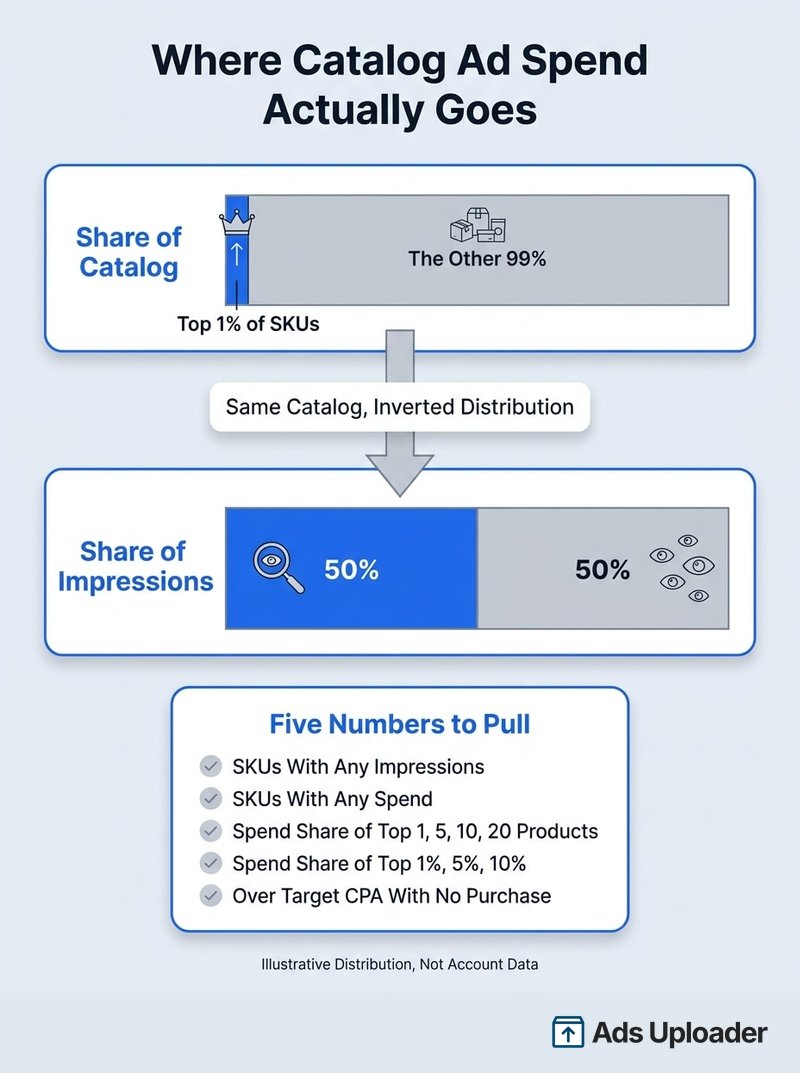
Quanto può diventare sbilanciata la distribuzione? La migliore misurazione specifica per Meta e quantificata disponibile viene da un'analisi di ROI Hunter su 120 ad set di prospecting dinamico con un catalogo mediano di 4,500 prodotti: il primo 1 percento dei prodotti ha ricevuto il 50 percento delle impression, mentre i primi 200 ne hanno ricevuto il 70 percento. Considerala una prova che una concentrazione estrema è plausibile, non un benchmark attuale. Risale al 2018, precede Andromeda, è pubblicata da un fornitore e misura le impression anziché la spesa.
Sentirai anche dire che Meta favorisce i prodotti meno costosi. Questa affermazione risale a un'unica fonte professionale e non è confermata né dalla documentazione di Meta né da uno studio controllato. La versione sostenibile è questa: con l'ottimizzazione al costo più basso, gli articoli meno costosi potrebbero semplicemente produrre più eventi di acquisto per ogni dollaro. È un effetto indiretto, non una distorsione documentata. Dal punto di vista commerciale è comunque importante, perché uno SKU che vince sul CPA può perdere nettamente sul margine di contribuzione.
Esegui la diagnosi della concentrazione
Non dare per scontato che tutto questo valga anche per il tuo account. Misuralo. Ads Manager offre un'analisi della distribuzione per Product ID nelle campagne catalogo, mentre la Marketing API offre analisi per product_group_content_id e product_set_id. Esporta i dati dettagliati a livello di prodotto e calcola cinque valori:
- Percentuale di SKU idonei che hanno ricevuto almeno un'impression
- Percentuale che ha ricevuto una parte della spesa
- Quota di spesa assorbita dai tuoi primi 1, 5, 10 e 20 prodotti
- Quota assorbita dal primo 1 percento, 5 percento e 10 percento del catalogo
- Prodotti che hanno superato il CPA target senza registrare acquisti
Un avvertimento che ti evita analisi inutili: lo SKU mostrato non è necessariamente lo SKU acquistato. Una persona può vedere un prodotto, fare clic e acquistarne un altro. Mantieni separati i campi del prodotto mostrato, cliccato e acquistato e unisci i dati di distribuzione di Meta con i dati degli ordini, invece di affidarti all'attribuzione delle conversioni a livello di prodotto in Ads Manager, che resta incompleta e disponibile in modo incoerente.
La concentrazione non è un bug da eliminare. Diventa un problema solo quando il gruppo su cui si concentra la spesa è stato scelto per caso anziché da te.
Un catalogo, molti product set
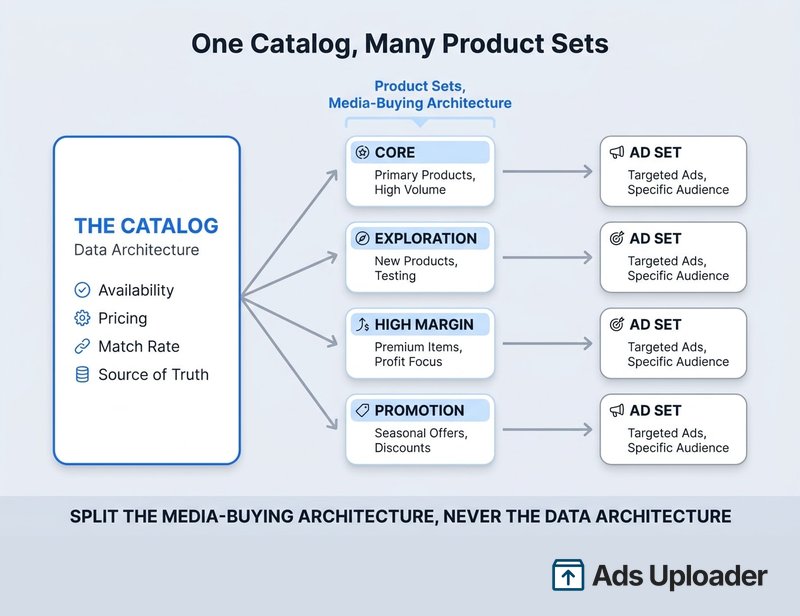
Ecco la contraddizione che mette in difficoltà quasi tutti i team. L'indicazione documentata di Meta è mantenere tutto in un unico catalogo: consolida i dati del pixel e di coinvolgimento, migliora il tasso di corrispondenza e rende i prodotti disponibili per l'account commerciale collegato. L'indicazione letterale è creare product set invece di più cataloghi. Allo stesso tempo, qualsiasi operatore esperto ti dirà di non riversare l'intero catalogo in un unico ad set.
Hanno ragione entrambi, perché descrivono oggetti diversi.
Il catalogo è l'architettura dei dati. È la tua fonte di riferimento per disponibilità, prezzi e tasso di corrispondenza, e dividerlo frammenta il segnale che fa funzionare il retargeting. Il product set è l'architettura di acquisto media. È la sezione a cui indirizzi un ad set ed è il modo in cui dirigi il budget. Quindi: un catalogo, molti product set. Più cataloghi sono giustificabili solo quando governance, proprietà del brand, account commerciali o sistemi backend davvero incompatibili impediscono di avere una fonte di riferimento condivisa.
I product set possono essere selezioni statiche o filtri basati su regole che si aggiornano quando cambiano i campi. Su larga scala ti servono quelli basati su regole, perché un gruppo statico diventa obsoleto appena cambia l'assortimento.
Lancia di più. Clicca di meno.
Carica centinaia di creatività in un colpo solo, abbina automaticamente le thumbnail ai video e pubblica direttamente sui tuoi account pubblicitari tramite l'API di Meta.
Prova Ads Uploader gratisNessuna carta di credito richiesta • 7 giorni di prova gratuita
Come suddividere i product set
Vale la pena usare quattro criteri, in questo ordine di priorità:
- Fascia di margine. È la suddivisione più preziosa e quella che quasi nessuno applica per prima. I campi nativi del feed non includono il margine di contribuzione, quindi devi inserirlo in un'etichetta personalizzata partendo dai tuoi dati.
- Ciclo di vita. Comprovati, in esplorazione, inattivi. Ti consente di proteggere il gruppo centrale continuando al tempo stesso a testare.
- Categoria. È la scelta predefinita che fanno tutti. Utile per la logica di merchandising e per abbinare un gruppo a un'angolazione creativa specifica.
- Fascia di prezzo. Serve soprattutto a controllare la fuga di spesa verso gli SKU economici descritta sopra.
Quasi tutti i team iniziano dalla categoria perché è il criterio già presente nel feed. Il margine è una suddivisione iniziale migliore: la categoria ti dice cos'è un prodotto, il margine ti dice se vuoi venderlo.
Prima di segmentare in modo aggressivo, considera un contrappeso: Meta ha testato l'ampliamento della distribuzione oltre il product set selezionato, e uno studio su 18 inserzionisti avrebbe prodotto un ROAS superiore del 14 percento e un costo per acquisto inferiore dell'11 percento quando l'idoneità è stata ampliata. È un campione ridotto, ripreso da un partner Meta anziché da una pagina proprietaria, quindi prendilo con cautela. La direzione è però reale. La posizione dichiarata da Meta a Cannes nel giugno 2026 era che i dati di prodotto sarebbero diventati un input essenziale per tutte le campagne Sales. L'eccessiva segmentazione ha un costo, e sta aumentando.
Assegna ai tuoi gruppi nomi che rendano leggibile il report anche tra sei mesi. Convenzioni di denominazione coerenti trasformano la struttura dei product set in qualcosa che puoi analizzare.
Come dimensionare il product set principale
"Inizia dai tuoi bestseller" è il consiglio che danno tutti e che nessuno rende utilizzabile. Ecco la versione pratica.
Il vincolo determinante è il volume di conversioni, non il numero di SKU. Secondo le indicazioni di Meta, le prestazioni in genere si stabilizzano quando un ad set riceve circa 50 eventi di ottimizzazione in una finestra di sette giorni. Questa soglia si applica all'ad set, non a ogni prodotto. Non servono 50 acquisti per SKU.
Dimensiona quindi la struttura in base alle conversioni che il budget può acquistare:
Expected weekly purchases = (7 x daily budget) / target CPA
Learning-capable ad sets   = expected weekly purchases / 50
Con 1,000 dollari al giorno e un CPA target di 50 dollari, ottieni 140 acquisti settimanali, sufficienti per due ad set che superino la soglia con un piccolo margine di sicurezza. Tre richiederebbero una distribuzione quasi perfettamente uniforme e non lascerebbero alcun margine. Questo calcolo dimensiona i tuoi gruppi di ottimizzazione. Non ti dice quanti prodotti devono contenere.
Per la scelta dei prodotti, parti dai dati economici anziché da un numero tondo: crea il gruppo centrale con i prodotti che generano circa dal 70 all'80 percento dei ricavi recenti da prodotto o del profitto di contribuzione, poi elimina tutto ciò che ha una copertura di scorte ridotta, una redditività negativa sui resi o una landing page che non converte. Ciò che rimane è il tuo gruppo centrale.
Sii onesto sui limiti. Il CPA cambia quando aumenti la scala, il budget della campagna Advantage non distribuisce le conversioni in modo uniforme, il ritardo dell'attribuzione distorce i dati recenti e 50 eventi sono un'indicazione, non un interruttore. Vedrai anche affermare che i cataloghi con più di circa 600 SKU non possono uscire dalla fase di apprendimento. Nessuna fonte Meta lo conferma, quindi non pianificare in base a quel numero.
Come inserire il resto del catalogo
Aggiungi i prodotti a ondate, non tutti insieme, e assegna all'esplorazione un ad set separato con un proprio budget, così la spesa destinata alla scoperta non compete con quella sui prodotti comprovati nello stesso gruppo di ottimizzazione. Diventa una decisione di separazione del budget più che di targeting, e rientra direttamente nella questione ABO rispetto a CBO: il budget a livello di campagna troverà sempre l'opzione efficiente, ed è proprio per questo che l'esplorazione ha bisogno di un contenitore dedicato. Sposta i prodotti fuori dall'esplorazione in base ai dati, al successivo ricalcolo mensile, non in base all'entusiasmo.
Regole di stop-loss che non azzerano l'apprendimento
Ora veniamo alla parte che quasi nessun altro contenuto su questo tema tratta: come fermi un prodotto in perdita senza compromettere la campagna che funziona?
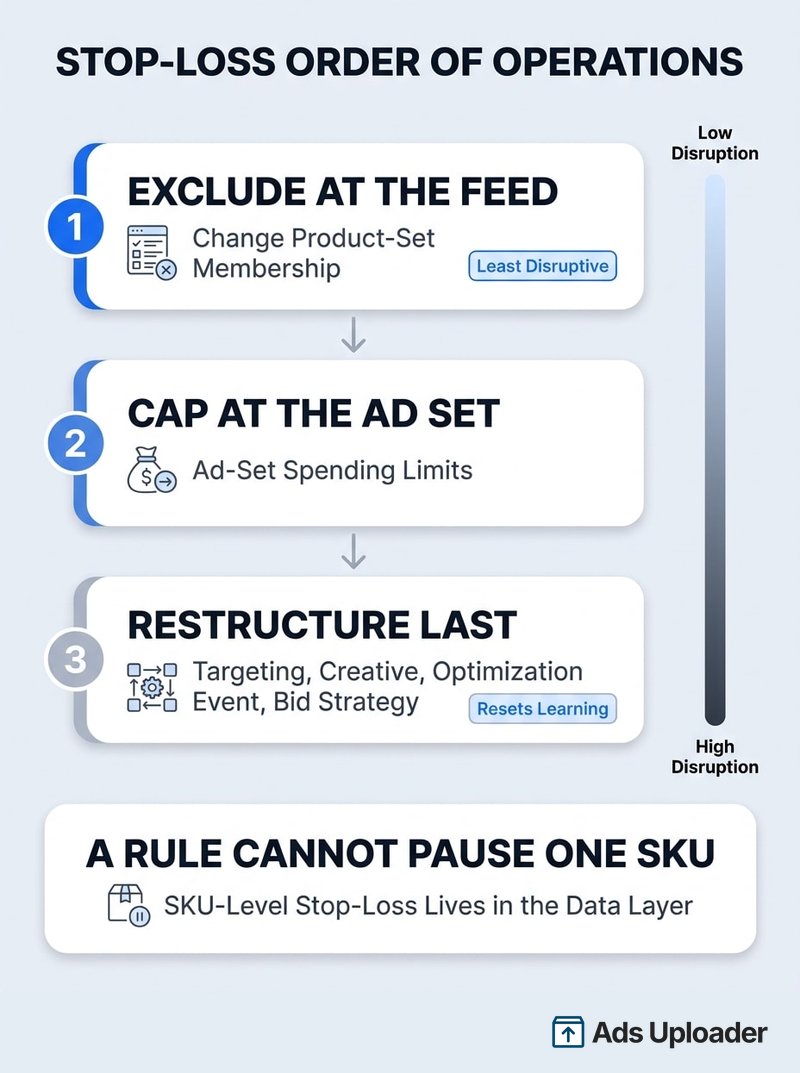
Il vincolo decisivo è architetturale. Le regole automatizzate di Meta agiscono su campagne, ad set e annunci. Una regola non può mettere in pausa un singolo SKU. Un product set non è un'entità di distribuzione che puoi mettere in pausa in modo indipendente. Lo stop-loss a livello di SKU deve quindi avvenire nel livello dati, tramite etichette del catalogo, filtri dei product set, disponibilità o un processo API.
Questo ti dà un chiaro ordine operativo:
- Escludi prima nel feed. Modificare l'appartenenza a un product set cambia l'input senza ristrutturare la campagna, e l'appartenenza al feed non compare nell'elenco pubblicato da Meta delle modifiche significative. Sii preciso su questo punto: riduce le modifiche dirompenti alla campagna. Meta non promette che le modifiche dei product set siano neutrali per l'apprendimento.
- Imposta poi un limite a livello di ad set. I limiti di spesa dell'ad set esistono ancora insieme al budget della campagna Advantage, anche se le interfacce attuali potrebbero descriverli come limiti medi anziché rigidi. È il tuo meccanismo di contenimento quando il budget è impostato a livello di campagna.
- Ristruttura come ultima opzione. Le modifiche significative documentate da Meta includono variazioni del targeting, modifiche alle creatività, cambiamenti dell'evento di ottimizzazione, aggiunta di un nuovo annuncio, pausa di un ad set per sette giorni o più e cambiamenti nella strategia di offerta. Non esiste una regola ufficiale secondo cui una variazione di budget del 20 percento è sempre sicura.
A volte una ricostruzione è necessaria, e farla a mano su decine di product set è il modo in cui gli account perdono intere giornate. È questo il motivo per effettuare le modifiche strutturali in blocco.
Esprimi le soglie come multiplo del CPA target, mai come importo fisso in dollari:
| Spesa senza un acquisto | Azione |
|---|---|
| 0.5x CPA target | Contrassegna e limita l'azione al monitoraggio |
| 1.0x CPA target | Controlla clic, landing page, prezzo, scorte e integrità della corrispondenza |
| Da 1.5x a 2.0x CPA target | Escludi o sposta in un gruppo di esplorazione con budget più basso |
Aggiungi due regole di protezione. Prima di intervenire, richiedi un numero minimo di clic o visualizzazioni della landing page, altrimenti il rumore generato da una spesa bassa produce continue esclusioni errate. Inoltre valuta finestre mobili di tre e sette giorni, mai i dati dello stesso giorno, perché l'attribuzione non è ancora maturata.
Imposta una soglia di esclusione generosa. Uno studio sugli annunci di feed Google relativo a 1.4 milioni di prodotti ha rilevato che, tra gli articoli che raggiungevano 500 dollari di spesa senza vendite, il 35.4 percento alla fine generava una conversione, con un ritardo mediano di circa due mesi. È una piattaforma diversa, ma illustra il rischio: uno stop-loss aggressivo non elimina solo i prodotti in perdita, interrompe anche i prodotti a conversione lenta prima che i risultati vengano registrati.
Una nota sulla parola automazione. Una routine è automatizzata solo se qualcosa la esegue secondo una programmazione. Con poche centinaia di SKU basta un promemoria sul calendario. Con diverse migliaia, l'esportazione, l'unione con i dati di margine e l'aggiornamento delle etichette devono avvenire senza che una persona debba ricordarsene.
Gestire prodotti esauriti e proliferazione delle varianti
Questo livello è per lo più automatico, ed è esattamente per questo che i suoi problemi passano inosservati per mesi.
I catalog ads recuperano la disponibilità dal feed, quindi gli articoli esauriti smettono di essere distribuiti. Il problema è la latenza: l'intervallo tra il momento in cui il tuo negozio esaurisce un articolo e quello in cui il feed lo registra. In questa finestra il budget va su prodotti che nessuno può acquistare, e il problema cresce con la velocità di vendita.
Per un esaurimento temporaneo, imposta availability su out of stock. Meta consiglia specificamente di conservare l'articolo anziché eliminarlo, perché il record mantenuto conserva il suo storico e consente a Meta di fare retargeting su quegli acquirenti con prodotti simili disponibili. Elimina solo per rimozioni permanenti. I meccanismi sono diversi: out of stock indica un'idoneità commerciale temporaneamente sospesa, lo stato archiviato o di staging applica un'esclusione più forte su annunci e shop, mentre l'assenza da un feed di sostituzione completa elimina del tutto il record.
I feed programmati di Meta distinguono gli aggiornamenti incrementali, che creano e aggiornano gli articoli forniti, dalle sostituzioni complete, che rimuovono anche quelli assenti. Per cataloghi che cambiano spesso, la raccomandazione documentata è un aggiornamento incrementale ogni ora abbinato a una sostituzione completa giornaliera. La frequenza oraria è il limite minimo, perché i feed programmati non possono essere eseguiti più spesso. Se è troppo lenta, ti servono la Catalog Batch API o aggiornamenti diretti degli articoli, e nessuna documentazione pubblica promette uno SLA di propagazione. "Quasi in tempo reale" non è un numero.
Il tasso di corrispondenza collega il catalogo al livello dei segnali: misura quanti content ID provenienti dalla tua sorgente di eventi corrispondono agli articoli del catalogo collegato. Il materiale di Meta Business Engineering classifica il 90 percento o più come valore alto quando è collegato un solo catalogo. Il dato del 75 percento ampiamente diffuso proviene da indicazioni di fornitori per la risoluzione dei problemi, non da una policy Meta. Per mantenerlo alto, il livello degli eventi deve inviare ID che corrispondano al feed. Questo dipende dall'attivazione di eventi standard con i content ID corretti e dall'affidabilità aggiunta dal tracciamento lato server.
Risparmia ore nei test creativi
Smetti di caricare inserzioni una alla volta. Elabora in massa creatività illimitate con media matching automatico e pubblicazione diretta via API.
Prova Ads Uploader gratisNessuna carta di credito richiesta • 7 giorni di prova gratuita
Perché le tue 16 varianti compaiono come due schede
Ogni variante deve avere un proprio id univoco, mentre le varianti di un unico prodotto principale condividono un item_group_id. Meta considera ogni riga del feed come una singola variante di taglia o colore.
È il comportamento di visualizzazione a sorprendere. Nessuna documentazione di Meta promette che ogni variante in un item group compaia in una scheda separata del carosello. Un carosello dinamico del catalogo è un'unità di raccomandazione, non un selettore completo di varianti, quindi il raggruppamento comunica a Meta che queste righe sono un unico prodotto e il sistema potrebbe mostrarne solo una rappresentativa. Di solito è ciò che vuoi: un carosello che mostra la stessa borsa a tracolla in sedici colori è un annuncio peggiore rispetto a uno che mostra sedici prodotti diversi. Decidi consapevolmente:
- L'immagine principale di una variante proviene dal relativo
image_link, e il raggruppamento non la sostituisce. Se continua a comparire il colore sbagliato, correggi il campo di quella variante. - Per le varianti che differiscono solo per la taglia, indirizza ogni riga alla stessa immagine del prodotto principale.
- Archivia o escludi le varianti che non dovrebbero mai comparire.
- Se una serie specifica di colori deve davvero comparire in un ordine fisso, crea un carosello manuale. Compromettere il corretto raggruppamento delle varianti per forzare più schede danneggia tracciamento, deduplicazione e comportamento dello shop, un pessimo compromesso per un singolo risultato creativo.
Il panorama degli strumenti per catalog ads
La maggior parte delle pagine che competono su questo argomento appartiene a fornitori che vendono la propria soluzione, quindi ecco una mappa delle categorie senza alcun verdetto. Prima di acquistare, individua la categoria in cui si trova il tuo collo di bottiglia, perché comprare quella sbagliata è l'errore costoso più comune.
| Categoria | Cosa fa | Quando acquistarla |
|---|---|---|
| Acquisizione e distribuzione | Sposta i dati di prodotto dai sistemi ecommerce, ERP o PIM verso Meta e altri canali | I tuoi dati si trovano in sistemi diversi che non concordano |
| Normalizzazione e QA del feed | Mappatura dei campi, tassonomia, localizzazione, rilevamento degli errori, convalida degli URL | Errori e rifiuti del feed sono un problema ricorrente |
| Logica di merchandising | Etichette personalizzate, regole su margini e inventario, esclusioni, code di esplorazione | Non riesci a esprimere margine o copertura delle scorte nel feed |
| Arricchimento creativo | Cornici, sovrapposizioni di prezzo, promozioni, modelli, video dinamici | I tuoi catalog ads mostrano prodotti su sfondo bianco |
| Creazione e QA delle campagne | Creazione in blocco, denominazione, convalida delle destinazioni, anteprime, controlli prima del lancio | Creare gli ad set a mano è il collo di bottiglia |
| Analisi a livello di prodotto | Reporting sui prodotti mostrati, unione con le righe degli ordini, analisi di margini e tasso di reso | Non sai rispondere alla diagnosi della concentrazione descritta sopra |
Uno strumento per sovrapposizioni creative non risolve un problema di concentrazione, e uno strumento per feed non risolve creatività noiose. Quasi tutti i team acquistano la quarta categoria quando il loro vero problema è la sesta.
Anche il confine tra sviluppo interno e acquisto si è spostato. Meta ora offre nativamente più feed per catalogo, feed programmati e regole per i feed, product set, etichette personalizzate, campi dinamici per nome, brand e prezzo, cornici e sovrapposizioni di base, video prodotto per il catalogo e un reporting Product Insights in espansione. Alcune di queste funzioni costituivano in passato l'intera proposta commerciale di uno strumento a pagamento. Gli strumenti di terze parti restano validi per la governance dei feed su più canali, la logica del margine di contribuzione, l'attribuzione del profitto a livello di prodotto e la creazione in blocco su molti account o mercati.
In particolare per le creatività, prova l'automazione creativa nativa di Meta prima di pagare per un livello di sovrapposizione. Un'avvertenza sui numeri citati in questo mercato: non esiste uno studio neutrale e credibile sulle quote di mercato di questi strumenti. I numeri dei clienti dichiarati dai fornitori non indicano l'adozione della categoria.
Una routine operativa per cataloghi di grandi dimensioni
Su larga scala, l'istinto è intervenire ogni giorno sull'account. Resistigli. Ecco una routine in linea con l'effettiva frequenza di aggiornamento dei dati.
| Frequenza | Cosa fai davvero |
|---|---|
| Ogni giorno | Errori di elaborazione del feed, rifiuti, variazioni improvvise nel numero di articoli del catalogo, tasso di corrispondenza, anomalie di spesa a livello di campagna. Nessuna valutazione degli SKU. |
| Due volte alla settimana | Esporta i dati di distribuzione per Product ID, ricalcola la concentrazione e la copertura senza distribuzione, unisci i dati di margine e scorte, controlla i superamenti delle soglie |
| Ogni settimana | Eventi di ottimizzazione su sette giorni per ad set, consolida i gruppi che non riescono a raggiungere il volume, aggiorna le etichette, controlla profondità delle scorte e qualità della landing page per i prodotti con più spesa |
| Ogni mese | Ricalcola il gruppo centrale in base a ricavi o profitto di contribuzione, confronta la distribuzione ampia con i test sui product set, verifica la coerenza degli ID variante tra feed, pixel e ordini |
| Ogni trimestre | Test di incrementalità o holdout quando il volume lo consente, rivaluta se la segmentazione crea valore o si limita a frammentare l'apprendimento, rivedi la spesa per gli strumenti |
Due controlli settimanali vengono ignorati di continuo. Prima di tutto, verifica che i prodotti su cui spendi di più abbiano scorte sufficienti a sostenere la distribuzione, perché aumentare la scala fino a esaurirli spreca un'intera buona settimana. Poi controlla le creatività sul product set centrale: un product set concentrato significa che gli stessi articoli raggiungono ripetutamente pubblici sovrapposti, quindi la stanchezza pubblicitaria arriva prima di quanto accadrebbe con una rotazione dell'intero catalogo.
La guida Performance 5 di Meta segnala che gli inserzionisti che hanno mantenuto meno del 20 percento della spesa complessiva nella fase di apprendimento hanno ridotto il costo per acquisto fino al 68 percento. Questo è il motivo per adottare una routine lenta: ogni modifica inutile è una tassa.
Domande frequenti
Quanti prodotti dovrebbe contenere una campagna di catalog ads su Meta? Il numero di SKU è l'unità di pianificazione sbagliata. Dimensiona gli ad set in base al volume di conversioni settimanale e alla linea guida di circa 50 eventi di ottimizzazione alla settimana, poi riempili con i prodotti che generano dal 70 all'80 percento dei ricavi recenti da prodotto.
Dovrei usare un solo catalogo o più cataloghi? Usa un solo catalogo ogni volta che i prodotti possono condividere proprietà, dati degli eventi e infrastruttura commerciale. L'indicazione di Meta è creare product set anziché più cataloghi, perché il consolidamento migliora il tasso di corrispondenza e riunisce i dati di coinvolgimento.
Perché i miei catalog ads mostrano sempre gli stessi pochi prodotti? Meta ottimizza per i risultati previsti, non per un'esposizione uniforme, quindi i primi prodotti vincenti amplificano il proprio vantaggio in termini di dati. Non esiste una quota di esplorazione pubblicata. Esegui la diagnosi della concentrazione prima di concludere che qualcosa non funzioni.
Gli Advantage+ catalog ads sono uguali ai dynamic product ads? Nella sostanza, sì. Sono il successore rinominato dei dynamic ads, e Meta li descrive ancora come precedentemente chiamati dynamic ads. Il cambio di nome del 2025 da Advantage+ Shopping Campaigns ad Advantage+ sales campaigns è stata una modifica distinta che non ha interessato il nome dei catalog ads.
Advantage+ Shopping è l'equivalente Meta di Google Performance Max? L'analogia più vicina è Advantage+ sales, e resta approssimativa. Performance Max opera su Search, Shopping, YouTube, Display, Discover, Gmail e Maps, con i gruppi di schede di Merchant Center come struttura sottostante. Meta opera all'interno delle proprie superfici, senza alcun livello di intento legato alle query di ricerca da ereditare.
Come posso impedire ai catalog ads di mostrare prodotti esauriti?
Imposta availability su out of stock nel feed o tramite API, e conserva l'articolo anziché eliminarlo. Usa aggiornamenti incrementali ogni ora insieme a una sostituzione completa giornaliera e passa alla Batch API quando un'ora di latenza è troppo lenta.
Perché le varianti dei miei prodotti compaiono come due sole schede del carosello?
Le varianti che condividono un item_group_id sono un unico prodotto principale per Meta, e nulla garantisce una scheda per ciascuna variante. Correggi un'immagine sbagliata nel relativo image_link della variante e crea un carosello manuale se una serie precisa di colori deve comparire in ordine.
Quanto dovrei aspettare prima di valutare le prestazioni dei catalog ads? Almeno sette giorni quando il volume lo consente, più a lungo per gli account con volumi bassi. Controlla se l'ad set può raggiungere un volume sufficiente per stabilizzarsi prima di incolpare i prodotti, e non prendere mai decisioni sugli SKU in base ai dati dello stesso giorno.
Conclusione
Gestire catalog ads su larga scala si riduce a cinque aspetti:
- La concentrazione è prevista, non è un malfunzionamento. Il problema nasce solo quando il gruppo su cui si concentra la spesa è stato scelto per caso. Misurala prima di cambiare qualsiasi cosa.
- Un catalogo, molti product set. Dividi l'architettura di acquisto media, mai l'architettura dei dati.
- Dimensiona il gruppo centrale in base al volume di conversioni, non al numero di SKU. Il vincolo è cinquanta eventi di ottimizzazione per ad set alla settimana; ricavi e margine dei prodotti decidono cosa riempie il gruppo.
- Escludi nel feed, limita a livello di ad set, ristruttura come ultima opzione. Le regole automatizzate non possono mettere in pausa uno SKU, quindi lo stop-loss appartiene al livello dati.
- Disponibilità e raggruppamento delle varianti sono attività operative, non di configurazione. Latenza e comportamento di
item_group_idcostano denaro vero senza farsi notare.
Il prossimo passo di maggior valore è la diagnosi descritta sopra. Esporta i dati dettagliati a livello di prodotto, calcola quale quota della spesa va a quale quota del catalogo e uniscila ai dati di margine. La maggior parte degli operatori che gestisce catalog ads su larga scala non ha mai visto questo dato per il proprio account, e quel numero cambia il modo di valutare tutte le altre decisioni di questo elenco.
