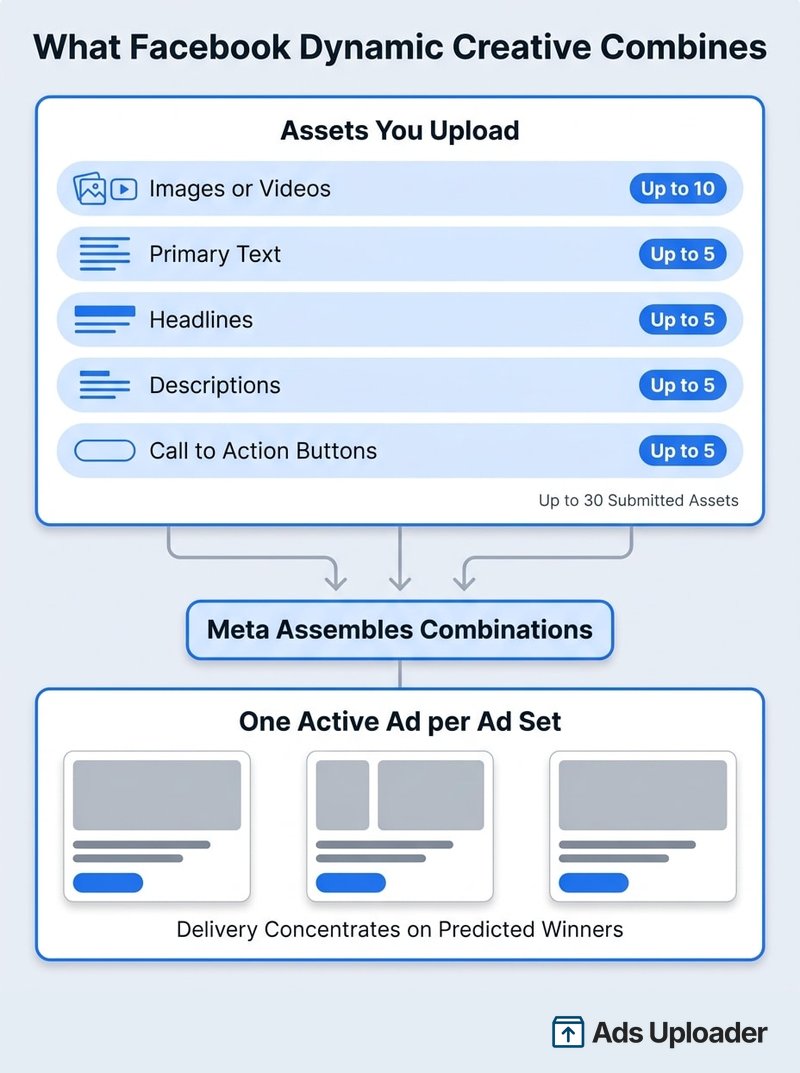
Facebook Dynamic Creative is an ad set level setting in Meta Ads Manager that combines the assets you upload into multiple variations of a single ad. You supply up to 10 images or videos plus five options each for primary text, headlines, descriptions and call to action buttons. Meta assembles the combinations and serves whichever it predicts will perform. Reporting breaks results down by element, not by combination. Since June 2024 it has been unavailable for Sales and App promotion, so it scales variation only on the remaining objectives.
There is a toggle sitting in your ad set called "Dynamic creative", and a decent share of the people who flip it are thinking of something else entirely. They have read a post about dynamic ads for ecommerce, or a vendor page about dynamic creative optimization that opens with weather triggered banners, and they assume the toggle is how you get that. It is not. Meta uses the word "dynamic" for at least three different products, and the advice online mixes them freely.
This guide separates them: what the toggle actually does, which objectives still offer it as of August 2026, how the carousel path differs from a catalog carousel, what the reporting will and will not tell you, and when the honest answer is to build separate ads instead. Every availability claim here is dated and tied to a Meta source, because this feature's status has shifted twice since 2024 and most of the guidance online is still a 2024 snapshot.
What Is Facebook Dynamic Creative?
Dynamic Creative is a setting at the ad set level. Turn it on, build one ad, and give that ad a pool of assets rather than a single fixed arrangement. Meta then assembles combinations from the pool and decides which to show each person, using the same delivery prediction that drives everything else in the auction.
The mechanic dates to 2017 and has barely changed. Everything around it has: Advantage+ creative absorbed most of the automatic enhancements, the flexible ad format took over two objectives, and Meta's newer workflow is moving format decisions elsewhere. The toggle survived all of it, narrower than before.
One structural rule matters more than people expect. A Dynamic Creative ad set holds one active ad. You are not testing five ads against each other; you are giving one ad a wardrobe.
What Meta Actually Varies
You submit assets in five buckets, and Meta mixes across them:
| Element | Documented limit |
|---|---|
| Images and videos combined | 10 |
| Primary text options | 5 |
| Headlines | 5 |
| Descriptions | 5 |
| Call to action buttons | 5 |
| Maximum submitted assets | 30 |
These limits were last independently verified in March 2025, and Meta has published nothing since that contradicts them. An older reported ceiling of 1,000 dynamic creative ads per account also circulates widely; it could not be confirmed in current Meta documentation or the v26 API reference, so treat it as a legacy figure rather than a live constraint you need to plan around.
Combinations are not served evenly, and that is the point of the feature rather than a bug in it. Meta predicts which eligible combination is most likely to hit your optimization goal for each impression opportunity, so spend concentrates fast. A perfectly good asset that starts slowly can end up with too little delivery to judge.
Dynamic Creative vs Dynamic Product Ads
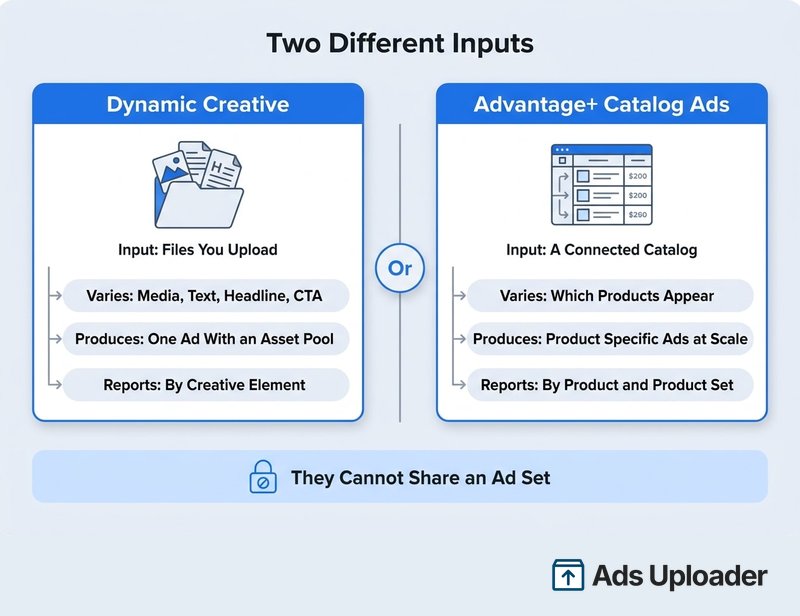
This is the distinction that trips up most of the advice on this topic, including two of the three commercial guides currently ranking for it. They are different products with different inputs.
Dynamic Creative takes a finite pool of files and copy that you uploaded by hand. It varies the creative elements of one ad.
Dynamic product ads, which Meta now officially calls Advantage+ catalog ads, take a connected product catalog. They vary which products a person sees, rendering product specific ads from feed data such as image, title, price and availability. Meta's automation page describes them directly as "formerly dynamic ads", which is why the older name is still everywhere.
| Dynamic Creative | Advantage+ catalog ads | |
|---|---|---|
| Asset source | Files and copy you upload | A connected catalog or feed |
| What varies | Media, text, headline, description, CTA | Which products appear, and how product data renders |
| Ads produced | One ad containing an asset pool | One construction rendering many product specific ads |
| Carousel source | Up to 10 images you supplied | Products drawn from a product set |
| Reporting focus | Creative elements | Products, product sets, catalog segments |
| Typical job | Find efficient combinations of a fixed asset set | Show the right products at catalog scale |
There is a clean practical tell. The two cannot coexist: turning on Dynamic Creative deactivates the catalog option in that ad set. If your campaign needs the feed to decide what people see, Dynamic Creative is the wrong tool and no amount of asset uploading will get you there.
The Three Things People Call "Dynamic"
All three are worth naming, because search results mix them constantly:
- Meta's Dynamic Creative toggle. Mixes a finite pool of uploaded assets inside one ad.
- Advantage+ catalog ads. Selects products from a Meta catalog and renders them.
- Industry DCO. The broader ad tech process where a design template plus a content feed plus decision rules produce creative on the fly, often keyed to location, weather, price or inventory. Third party platforms sell this, and it predates Meta's current naming. It is not what the Ads Manager toggle does.
When a guide starts talking about serving a rain themed ad to someone in a wet city, it has left Meta's toggle and moved to definition three.
Is Facebook Dynamic Creative Still Available in 2026?
As of 23 August 2026, Meta has published no platform-wide sunset or formal deprecation notice for Dynamic Creative. The help centre pages are live, the Marketing API still exposes the fields that define it, and Meta's current Advantage+ creative instructions still tell advertisers to find the "Dynamic creative" section and switch it off before following that setup path. A control that does not exist does not need switching off.
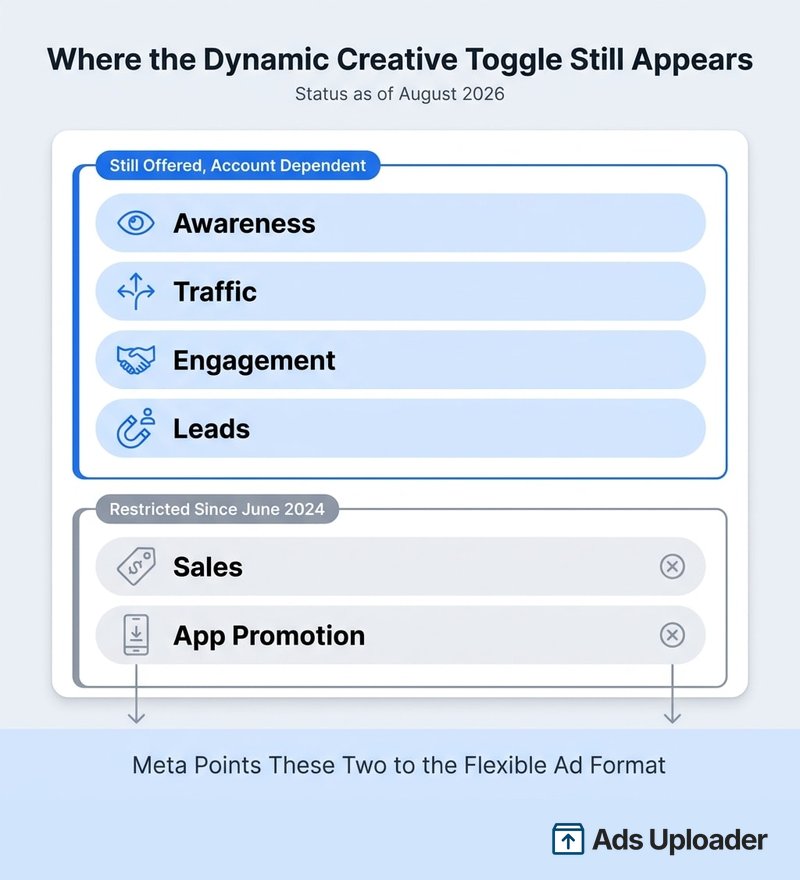
What did happen is narrower and specific. In Meta's own words, "Starting in June 2024, you may no longer be able to use dynamic creative" when the objective is Sales or App promotion. Existing campaigns kept delivering. Meta pointed advertisers to the flexible ad format instead.
| Objective | Status, August 2026 |
|---|---|
| Awareness | Available in the legacy workflow, account dependent |
| Traffic | Available in the legacy workflow, account dependent |
| Engagement | Available in the legacy workflow, account dependent |
| Leads | Available in the legacy workflow, account dependent |
| Sales | Generally not selectable for new ad sets since June 2024 |
| App promotion | Generally not selectable for new ad sets since June 2024 |
"Account dependent" is doing real work in that table. No later Meta notice widens the restriction beyond Sales and App promotion, but availability is no longer uniform, because Meta is rolling out a different creative building workflow by account, region and campaign configuration. Through 2026 the old top level format picker has been giving way to Format display options and Flexible media, with the flexible capability folded into Advantage+ creative. Meta named the flexible ad format as the replacement, and the automatic optimizations moved into Advantage+ creative. On the catalog side, the equivalent automation is the set of price and offer labels Meta draws over product media.
Two accounts can show different controls on the same afternoon, so treat any screenshot of this workflow as one account's view rather than a universal spec.
How to Set Up a Dynamic Creative Ad
The path below reflects the best supported flow as of August 2026. Section names are more reliable than positions, since Ads Manager moves controls around by objective and rollout.
- In Ads Manager, click Create.
- Choose an objective that still supports the legacy workflow, normally Awareness, Traffic, Engagement or Leads.
- Set your buying type, Special Ad Category declaration and budget at campaign level.
- Move to the ad set and find the section labelled Dynamic creative. Toggle it on.
- Set your performance goal, conversion location, budget, schedule, audience and placements.
- Continue to the ad level and pick your Facebook Page and Instagram account.
- Choose Manual upload, then select Single image or video or, where offered, Carousel.
- Add up to 10 images or videos. Mixing both is allowed in the single media path.
- Add your text options: up to five primary texts, five headlines, five descriptions and five call to action buttons.
- Read every possible pairing before you publish. This is the step people skip.
- Open Advanced preview and check how the assets render across placements.
- Finish destination and tracking settings, then Publish.
Step 10 deserves a moment. Meta will pair any text with any image. A primary text that says "watch the two minute demo" will eventually appear beside a static product shot, and a headline built around one offer will land on a creative showing another. Write copy that survives every pairing, or shrink the pool until it does. Meta's own best practice guidance makes the same point from the other direction: two strong assets beat six you are unsure about.
Advanced preview is worth the sixty seconds. The legacy workflow gives you far less per placement control than a standard ad build. So a crop that clips a subject's head is something you fix by adjusting the asset or excluding the placement, not by swapping in a different file for that slot. Uploading assets that already work at 1:1, 4:5 and 9:16 removes most of the problem before it starts.
Dynamic Carousel Ads on Facebook
If you select Carousel under the Dynamic Creative toggle, you get a carousel built from up to 10 images you supplied. Video is not supported in that path. Meta varies the cards and the accompanying copy options, and delivery decides what each person sees.
This is not a catalog carousel, and the difference is worth stating precisely because the two get searched interchangeably. A Dynamic Creative carousel never fetches anything: no products, no prices, no stock status. Every card came off your hard drive. An Advantage+ catalog carousel does the opposite, selecting products and product fields from a connected catalog and personalizing which ones appear.
Launch More. Click Less.
Upload hundreds of creatives at once, auto-match thumbnails to videos, and publish straight to your ad accounts through Meta's API.
Try Ads Uploader FreeNo credit card required • 7-day free trial
The Limits Worth Knowing Before You Toggle It On
Some of the constraints attached to this feature online are stale or were never Meta rules. Here is what holds up, and what does not:
Confirmed:
- Catalog conflict. Dynamic Creative and catalog ads cannot share an ad set. Turning the toggle on deactivates the catalog option.
- One active ad per ad set. Meta's validation still enforces this, and it surfaces as a platform error when tools try to add a second.
- Carousel is images only in the legacy path, up to 10 cards.
- Unequal delivery by design. Assets do not get equal impressions or equal spend.
Widely repeated, but not currently verifiable:
- A 1,000 dynamic creative ads per account cap. Historically reported, not confirmed in current documentation.
- A blanket ban across every Special Ad Category, or a blanket ban on political content. No current Meta source establishes either as universal.
- A WhatsApp Status placement incompatibility. Appears in older guidance; no current Meta rule found.
- A flat "no placement customization ever" rule. The legacy Ads Manager workflow restricted it, but the API exposes asset customization rules and the newer multi-media workflow supports media and placement associations, so the true answer depends on which build path you are on.
If Ads Manager blocks you, read the actual eligibility message rather than reaching for one of the folk rules. The common real causes are objective restrictions, an existing catalog selection, an unsupported conversion location or format, or an account that has already been moved to the newer workflow.
How to Read Dynamic Creative Reporting
Select the ad, open the Breakdown menu and choose By Dynamic Creative Element. You can then split results by image, video and slideshow, primary text, headline, description, call to action or website URL. Reporting connectors and API documentation sometimes call these "assets" instead, and the Insights API exposes them as fields like image_asset, body_asset and title_asset, but the Ads Manager menu wording is the element phrasing.
Now the part that changes how you use it. The breakdown scores one element at a time. It never gives you a combination. There is no supported report that says image 3 plus primary text 2 plus headline 5 produced 17 purchases at a given ROAS. You can see that headline 2 is associated with cheaper results than headline 4, and you cannot see what it was paired with when that happened.
That has a direct consequence for arithmetic: do not add results across breakdown tables. A single purchase appears once in the image view, once in the body view and once in the headline view. Those are three angles on one conversion, not three conversions.
When to Run a Real Test Instead
Meta is unusually blunt here. Its guidance states that dynamic creative "should not be used as a substitute for split testing". The reasoning is structural rather than cautious: delivery is deliberately unequal, Meta optimizes during the run instead of holding exposure constant, results are aggregated by element, and there is no control group. The system is built to find efficient delivery, not to measure cause.
So use the element breakdown for what it is: a signal about which directions to keep building in, and which to stop producing. When the decision carries real money, say a quarter's production budget going into one creative concept, run separate ads or a proper A/B test and get an answer you can defend.
When Facebook Dynamic Creative Is the Right Call
It fits when:
- Your objective and account still offer the toggle.
- You have a finite set of images, videos and copy and no strong prior about which will win.
- Every possible pairing of your text and media is accurate and compliant.
- You want delivery efficiency, not a statistically defensible winner.
- Budget is thin enough that funding eight separate ads would starve all of them.
It is the wrong tool when:
- Products need to come from a feed. That is a catalog job.
- Copy is tightly coupled to one specific visual, or contains claims that must not be recombined.
- You need per placement asset control.
- You need combination level ROAS.
- The account has already moved to Meta's newer multi-media or Flexible media workflow, in which case you are maintaining a strategy you cannot reproduce elsewhere.
One caveat about what variation buys you. Meta's Andromeda retrieval system was built to search a much larger pool of ad candidates. In its December 2024 write-up Meta reported roughly a 6% improvement in retrieval recall and an 8% ad quality improvement in selected segments. That is a strong argument for feeding the system genuinely diverse candidates, and it is not evidence that shuffling four headlines against three images improves anything. The Andromeda explainer covers why creative variety now matters more than targeting precision. Recombining the same idea in 30 ways is still one idea, which is also why Dynamic Creative rarely rescues an ad set that is already suffering from creative fatigue.
Frequently Asked Questions
What Is Dynamic Creative on Facebook?
Dynamic Creative is an ad set level setting in Meta Ads Manager. You upload several images or videos plus multiple options for primary text, headlines, descriptions and call to action buttons, and Meta combines them into variations of a single ad, then optimizes delivery toward the combinations it predicts will hit your performance goal.
Is Facebook Dynamic Creative Still Available in 2026?
Yes, but not everywhere. As of August 2026 Meta has published no platform-wide sunset notice, and the Dynamic Creative help pages and API fields are still live. Since June 2024 Meta has warned that the toggle may no longer be selectable for Sales and App promotion. It remains best supported for Awareness, Traffic, Engagement and Leads, subject to account level rollout.
What Is the Difference Between Dynamic Creative and Dynamic Product Ads?
Dynamic Creative mixes files and copy you upload to one ad. Dynamic product ads, which Meta now calls Advantage+ catalog ads, pull products from a connected catalog and render product specific ads from feed data. One varies your creative elements; the other varies which products a person sees.
Save Hours on Creative Testing
Stop uploading ads one by one. Bulk process unlimited creatives with automatic media matching and direct API publishing.
Try Ads Uploader FreeNo credit card required • 7-day free trial
How Many Assets Can You Add to a Dynamic Creative Ad?
The documented limits are 10 images and videos combined, plus five options each for primary text, headlines, descriptions and call to action buttons. That is up to 30 submitted assets. These limits were last independently verified in March 2025 and no contradictory Meta figures have been published since.
Can You Use Dynamic Creative With a Product Catalog?
No. Turning on Dynamic Creative deactivates the catalog option for that ad set. The two systems take their assets from different places, so they cannot run in the same ad set. If products must come from a feed, use Advantage+ catalog ads instead.
Can You Create a Dynamic Carousel on Facebook?
Yes, where the carousel path is still offered under the Dynamic Creative toggle. It accepts up to 10 manually uploaded images and does not support video in that path. This is not the same as a catalog carousel, which selects products, prices and availability from a connected catalog.
How Do You See Which Asset Performed Best?
Select the ad in Ads Manager, open the Breakdown menu and choose By Dynamic Creative Element. You can then break results down by image, video and slideshow, primary text, headline, description, call to action or website URL. The report scores one element at a time, not whole combinations.
Is Dynamic Creative the Same as A/B Testing?
No. Meta states plainly that dynamic creative should not be used as a substitute for split testing. Delivery is deliberately unequal, Meta optimizes during the run rather than holding exposure constant, and results are aggregated by element. Use Meta's A/B test or Experiments tools when you need a defensible winner.
Why Is the Dynamic Creative Toggle Missing From My Ad Set?
The most common causes are a Sales or App promotion objective, a catalog already selected in that ad set, an unsupported conversion location or format, or an account that has been migrated to Meta's newer Format display options and multi-media workflow. Ads Manager rollouts are staged, so two accounts can show different controls on the same day.
What Replaced Dynamic Creative for Sales Campaigns?
Meta pointed advertisers to the flexible ad format when it restricted Dynamic Creative for Sales and App promotion in June 2024. Through 2026 that flexible functionality has been moving into Format display options, Flexible media and Advantage+ creative, alongside a newer multi-media ad construct in the Marketing API.
The Bottom Line
Facebook Dynamic Creative is a narrow, still functional legacy feature, not the automated creative engine that vendor pages describe when they use the same words. Four things are worth carrying out of this guide:
- It mixes assets you uploaded into one ad. It never touches a product feed. If you need feed driven products, you want Advantage+ catalog ads, which Meta itself labels "formerly dynamic ads".
- It is still available in August 2026 with no sunset announced, but not for Sales or App promotion, and not identically in every account.
- Its reporting is per element and never per combination, which makes it a direction finder rather than a test.
- Delivery concentrates fast and unevenly, so a slow starting asset may simply never get its chance.
Decide what question you are asking before you touch the toggle. If it is "which of these directions deserves more production budget", Facebook Dynamic Creative will point at an answer cheaply. If it is "which creative caused the lift", build separate ads and test properly. The toggle was never designed to answer the second question, and Meta has said so in writing since well before the feature started shrinking.
