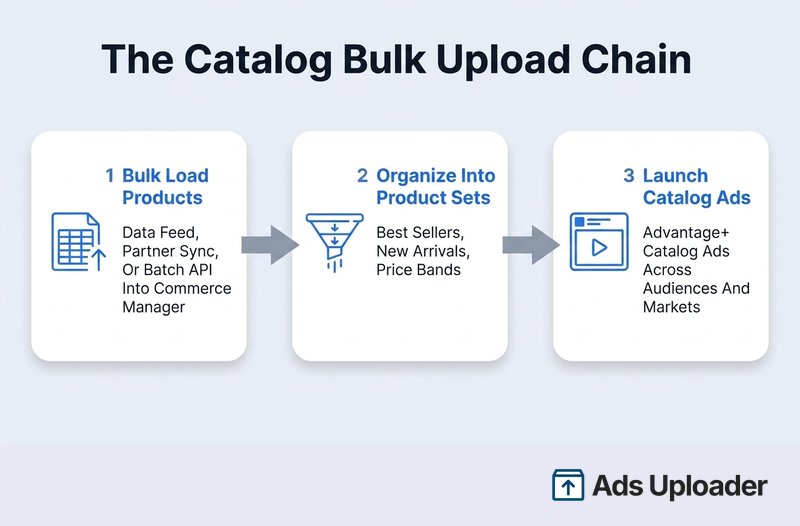
Facebook catalog bulk upload is the process of adding or updating many products in a Meta catalog with a data feed, then launching ads from them. You upload a spreadsheet, XML, or Google Sheets file in Commerce Manager, organize items into product sets, and point Advantage+ catalog ads at those sets. Feeds accept CSV, TSV, XML, and Google Sheets up to 100 MB through Business Manager, uploaded once or on an hourly, daily, or weekly schedule. It keeps large inventories accurate and scales catalog ads without manual work.
Facebook catalog bulk upload is really two jobs, not one. Getting thousands of products into a Meta catalog is the first, and if you have not built that catalog yet, start with setting one up in Commerce Manager. Turning that catalog into ads that scale across audiences and markets is the second. Meta documents each step on a different help page and never connects them, which is why a task that should take an afternoon turns into a week of tab-hopping.
This guide is the whole chain in one place: how to bulk load products with a data feed, the formats and limits that actually apply in 2026, how to organize the catalog into product sets, and how to launch Advantage+ catalog ads at volume from those sets. Where a widely repeated number is wrong or unverified, this guide states the current figure with its source instead.
What Facebook Catalog Bulk Upload Actually Means
The phrase covers two connected operations, and knowing which one you are doing keeps you out of the wrong tool.
Loading products into the catalog. A catalog holds product data: IDs, titles, prices, availability, links, and images. You add or update those records in bulk with a data feed, a partner platform sync, or the Catalog Batch API. This happens in Commerce Manager.
Launching ads from the catalog. Advantage+ catalog ads (Meta's current name for what the industry still calls dynamic product ads or DPA) render products pulled live from the catalog. One ad can show different products to different people. This happens in Ads Manager or the Marketing API.
The bridge between them is the product set: a filtered slice of the catalog that each ad set points at. The full operating chain reads product source, then catalog diagnostics, then event matching, then product sets, then ad sets, then a bulk ad launch. Meta recommends using a single catalog wherever possible, because splitting inventory across catalogs fragments the signals that make catalog ads perform.
Ways to Bulk Add Products to Your Catalog
Commerce Manager exposes seven ways to feed products into a catalog. The right one depends on how many products you sell and how often the data changes.
| Method | Best for | Main limitation |
|---|---|---|
| Manual entry | A handful of stable products, or testing | Impractical for large or changing catalogs |
| Data feed | Hundreds to millions of SKUs on a schedule | Needs a disciplined schema, unique IDs, and diagnostics |
| Partner platform | Shopify, WooCommerce, or similar as source of truth | Editable fields and sync behavior depend on the connector |
| Facebook Page | AI detection of products in Page content | Availability by account and language is not clearly documented |
| Website crawl | Eligible sites with structured product data | Coverage and refresh timing vary by site |
| Catalog Batch API | High-volume programmatic price and inventory updates | Requires engineering, tokens, and error handling |
| Meta Pixel with microdata | Building items from website traffic and metadata | Depends on page traffic and correct schema markup |
For a large advertiser-critical catalog, a data feed or a partner platform connector should be the system of record. Page detection, website crawling, and pixel-derived items are better treated as discovery or fallback methods, because you have less direct control over what they include and how quickly they refresh.
If you already run Shopify or WooCommerce, the native Meta connector usually wins: it keeps one source of truth and syncs changes for you. The one rule that matters across all of these is that a single product ID should be owned by one primary source. Do not let two unrelated feeds fight over the same SKU.
How to Bulk Upload a Data Feed
The data feed is the default for medium to large catalogs. Here is the process and the specs that govern it.
Before You Start
You need full control of the catalog, and a feed file that contains the required fields for every product. At minimum, the current product data reference requires id, title, description, availability, condition, price, link, image_link, and brand. A few field rules worth memorizing:
idmust be unique and 100 characters or fewer. If the same ID appears twice, Meta ignores every instance, so duplicates silently drop products.priceis a number, a space, then a three-letter currency code, like49.99 USD. Use a period as the decimal separator and no currency symbol.image_linkmust be a JPEG or PNG, at least 500 by 500 pixels, up to 8 MB. When you change an image, publish it at a new URL, because Meta caches the old one.titleallows 200 characters but Meta recommends staying near 65 to avoid truncation.descriptionallows up to 9,999 characters of plain text.
Launch More. Click Less.
Upload hundreds of creatives at once, auto-match thumbnails to videos, and publish straight to your ad accounts through Meta's API.
Try Ads Uploader FreeNo credit card required • 7-day free trial
Feed Formats and Size Limits
This is where stale numbers cause real damage. The verified 2026 picture:
| Question | Verified answer |
|---|---|
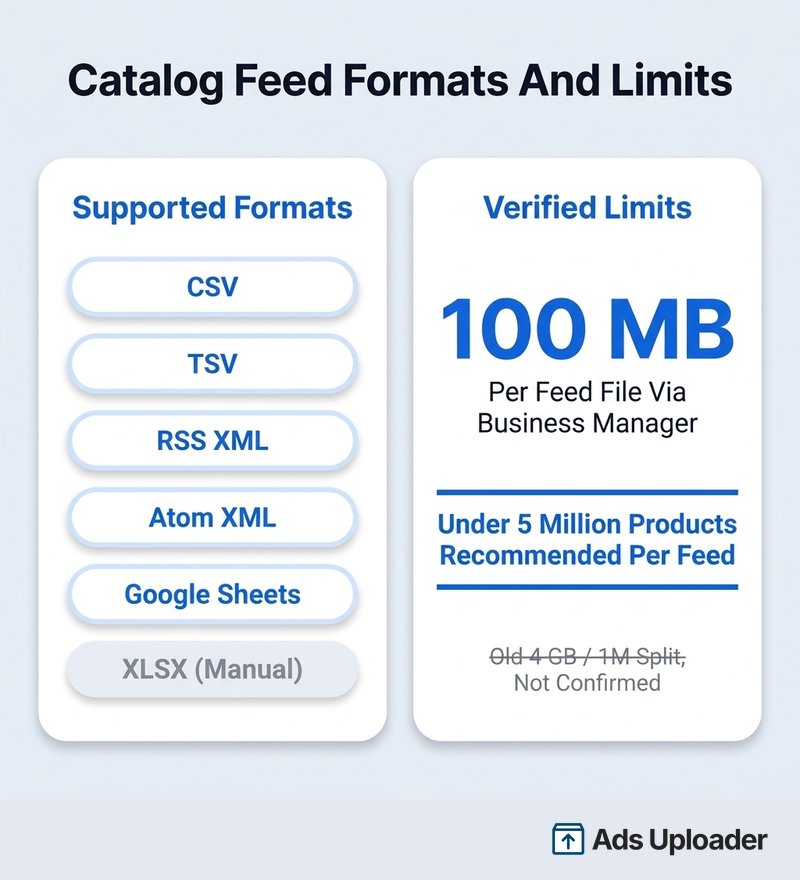
| Officially supported formats | CSV, TSV, RSS XML, Atom XML, Google Sheets |
| XLSX | Accepted in the manual upload workflow, inconsistently documented for automation |
| Compression accepted | ZIP, GZIP, BZIP2 |
| One-time upload via Business Manager | 100 MB per feed file |
| Recommended products per feed | Fewer than 5 million |
| Is 4 GB an official limit? | Not confirmed in current Meta docs |
| Must you split at 1 million items? | No current official threshold found |
Standardize production feeds on UTF-8 CSV, TSV, or XML, and treat XLSX as a human-operated import format rather than the canonical scheduled contract. The often-quoted 4 GB scheduled-feed limit and 1-million-item split cannot be verified in current primary Meta documentation, and older sources conflict on the number. State the limit your own Commerce Manager shows, and split very large feeds conservatively by stable boundaries: SKU range, product family, or geography. For the authoritative field list, see Meta's catalog data feed reference.
The Upload Steps
- Go to Commerce Manager and select your catalog.
- Open the Catalog tab, then Data sources, click Add, and choose Data file.
- Under the format question, leave Commerce Manager selected for a Meta-formatted file, or pick Google Merchant Center if your file uses Google's schema. This only tells Commerce Manager how to parse the file; it does not create a live sync with Google.
- Choose your upload method. Provide a URL or Google Sheets link, or upload from your computer. A feed URL must begin with
http://,https://,ftp://, orsftp://, must point directly at the file, and should open or download when you test it in a browser. - Match fields. If your column names differ from Meta's, map them. Commerce Manager saves these as data rules and reuses them on future uploads from that source.
- Name the feed, set a default currency for rows that omit one, and choose a schedule if you provided a link.
- Upload, then read the summary: items detected, persisted, invalid, and deleted, plus error and warning counts. Fatal errors block a product, or sometimes the whole file. Warnings can let a product through while dropping the bad attribute. Review this after every production upload.
If your file is a Google Sheet, put the catalog data in the first tab and set sharing to Anyone with the link with viewer access, so Commerce Manager can read it without an interactive login.
Scheduled Feed Uploads: Keep a Large Catalog Current
A one-time upload is a snapshot. Inventory that changes needs a scheduled feed, where Commerce Manager fetches your hosted file on a cadence. The standard choices are hourly, daily, and weekly, and the current Business SDK also exposes monthly. The hard rule is that scheduled feeds cannot run more often than once per hour. For faster updates, use direct uploads or the Batch API.
Two behaviors are worth understanding because they change what a feed does:
- Update schedule creates or updates the items in the file without deleting items you left out. Good for incremental changes.
- Full schedule replaces the catalog with the feed, so items missing from the file are removed. Good for a nightly source of truth.
Meta's own recommended pattern combines the two: frequent incremental updates through the day, plus one daily full replacement. When a product goes out of stock, mark it out of stock rather than deleting and recreating it, so you keep its history and match signals.
Two more feed types cover common scaling needs:
- Supplementary feeds enrich products that a primary source already created. They can add or overwrite attributes like internal labels or campaign-specific descriptions, but they cannot add or delete products, and each
idmust match an existing item. Each primary feed connects to at most one supplementary feed. - Country and language feeds override titles, descriptions, links, prices, and currencies per market while keeping the same base product ID. Price, availability, and status overrides belong in country feeds, not language-only feeds.
Product Sets: The Unit That Makes Bulk Ads Possible
A product set is a saved filter over the catalog, defined by a name and a rule. It is the single most important concept for running catalog ads at scale, because a set is what each ad set targets.
Filters can use availability, brand, product category, product type, condition, price, retailer_id, and custom_label_0 through custom_label_4. Those five custom labels are merchant-controlled text fields, each up to 100 characters, and they are how you encode merchandising logic that Meta does not know about: margin tier, bestseller status, season, lifecycle stage, or an agency campaign grouping. Meta now also supports internal_label for segmentation, with far higher limits, though the label field you filter on should be confirmed in Commerce Manager before you build automation around it.
The reason this unlocks bulk launching is the mapping. At the ad set level, the catalog configuration is promoted_object.product_set_id, meaning one ad set promotes exactly one product set, and the ads underneath draw eligible items dynamically. So the scaling matrix becomes:
- one catalog,
- several commercial product sets,
- one or more audiences or markets,
- an ad set for each product set and audience combination that genuinely differs,
- dynamic ads under each ad set.
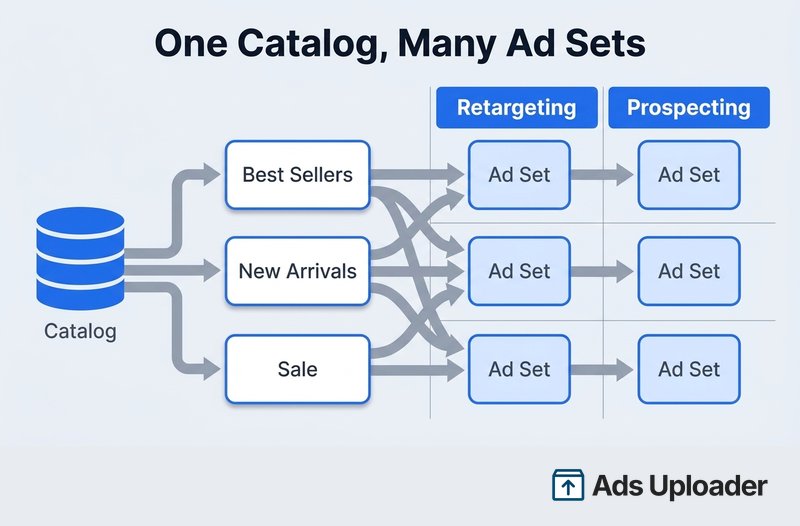
A sensible baseline set list is All active products, Best sellers, High margin, New arrivals, Sale, Seasonal, Price bands, Category, Country availability, and Clearance. Resist the urge to mirror every website collection as a set. Split only when the advertising treatment actually changes.
When a Product Set Says "Not Enough Items"
There is no universal minimum number of catalog products per set. The documented minimum of 20 refers to audience members for dynamic product audiences, not to catalog items. A set warns or fails to deliver when its filters leave too few eligible products after Meta removes items that are archived, out of stock, expired, missing required data or images, policy-rejected, unavailable in the target country, or incompatible with the creative format. The fix is to inspect the eligible item count and repair eligibility, not to invent an arbitrary threshold.
Save Hours on Creative Testing
Stop uploading ads one by one. Bulk process unlimited creatives with automatic media matching and direct API publishing.
Try Ads Uploader FreeNo credit card required • 7-day free trial
Bulk Launching Catalog Ads at Scale
With products loaded and product sets built, the ad layer is where volume happens. Advantage+ catalog ads need a Page, an ad account with a payment method, and a catalog. A connected pixel, dataset, or app event source is technically optional for showing products to a broad audience, but it is effectively required for anything useful: product-view and add-to-cart retargeting, excluding recent purchasers, matching site actions to exact catalog items, and diagnosing match rate. If you have not connected one, start with the pixel.
The matching mechanism is worth stating plainly, because it is the most common reason catalog ads misfire. Each product's feed id becomes its catalog retailer_id, and your website and app events must send that exact same value in their content_ids. When the IDs match, Meta connects a viewed or purchased SKU to the right catalog item. When they do not, retargeting breaks.
You can run two kinds of catalog campaign:
- Retargeting uses event rules: viewed a product but did not buy, added to cart but did not buy, or bought from one product set and is eligible for a cross-sell from another.
- Broad, or prospecting lets Meta pick products for people who never touched those specific SKUs. This can run without a dynamic product audience, though a connected dataset still improves measurement.
For creative, the catalog can drive a carousel that dynamically selects cards from the set, a single image or video forced into one product, or a collection that pairs a lead asset with a catalog-backed product grid. The carousel format from a catalog is the workhorse.
The bulk-launch workflow that survives an audit looks like this:
- Validate the catalog upload and clear fatal errors.
- Confirm the count of active, in-stock, policy-approved items.
- Associate the correct pixel, dataset, or app source.
- Check that event
content_idsmatch catalogretailer_idvalues. - Create the reusable product sets.
- Build one proven campaign, ad set, and ad configuration.
- Duplicate it across the audience, market, and product-set matrix you need.
- Preview every generated combination.
- Publish paused, inspect the catalog and product-set assignments on each ad set, then activate in controlled batches.
That "publish paused, then verify" step is not optional at scale. When you clone one ad set into fifty, a single wrong product_set_id, optimization event, or country setting multiplies fifty times before you notice.
Catalog Feed vs Ads Manager Bulk Upload
These two get conflated constantly, and the confusion wastes hours. They are separate systems that do opposite jobs.
| Catalog data feed | Ads Manager bulk upload | |
|---|---|---|
| Purpose | Add or update products | Create or edit campaigns, ad sets, ads |
| Destination | Commerce Manager catalog | Ads Manager |
| Formats | CSV, TSV, XML, Google Sheets, XLSX | XLSX or CSV |
| Cited UI size | 100 MB via Business Manager | Approximately 2 MB |
| Scheduling | Hourly, daily, weekly, monthly | None |
| Adds products? | Yes | No |
| Launches ads? | No | Yes |
A large-catalog advertiser uses both in sequence: load the products into Commerce Manager with a feed, then bulk-create the catalog campaigns and ad sets through an Ads Manager import, the Marketing API, or an automation tool. The native Ads Manager spreadsheet is a genuinely good tool for the ad layer, and its column glossary and error handling are documented in our native XLSX bulk upload guide. Just remember that its roughly 2 MB import limit is an ad-configuration limit, not a catalog spec.
When the Manual Workflow Stops Scaling
The Commerce Manager UI plus manual ad building is fine up to a point. Past it, three tools take over. For product data, the Catalog Batch API handles high-volume partial updates: it accepts up to 5,000 records per request (Meta recommends staying under 3,000), caps payloads at 28 MB, and is the endpoint Meta steers new integrations toward. For feed freshness, scheduled feeds and partner syncs remove the manual step entirely. For the ad layer, teams launching dozens or hundreds of catalog ad sets a week move to the Marketing API or a dedicated bulk launcher rather than cloning by hand; the trade-offs live in our roundup of the best bulk ad launch tools for Meta ads.
The payoff for getting this right is measurable. In a Meta analysis of more than one million ad sets running Advantage+ catalog ads, sets that used catalog product video averaged about 20% more conversions per dollar than comparable sets without it, and catalog product video on Reels drove roughly 33% more incremental conversions in Meta's conversion-lift studies. Those are observational findings, not guarantees, but they point the same direction: the advertisers who load rich catalogs and launch them at scale are the ones capturing the upside.
Troubleshooting Catalog Bulk Uploads
| Symptom | Likely cause | Fix |
|---|---|---|
| Whole upload fails | Bad encoding, delimiter, XML structure, unreachable URL, or oversized file | Download the error report, validate the raw file and URL, split the file |
| Some products missing | Missing required fields, bad price or currency, duplicate IDs, broken URLs | Compare detected, persisted, and invalid counts, then fix and re-upload |
| Duplicates vanish | Duplicate id values | Make IDs unique; Meta ignores every instance of a repeated ID |
| Products exist but do not show in ads | Out of stock, archived, rejected, no usable image, or absent from the set | Check status, policy, country availability, and product-set filters |
| Images do not update | Meta cached the old URL | Publish the new image at a new URL |
| Wrong product after a site event | Event content_ids do not match catalog retailer_id | Normalize IDs and variant handling across feed, pixel, and CAPI |
| Low match rate | Missing IDs, wrong case or prefixes, group IDs sent as product IDs | Use catalog event statistics to isolate unmatched IDs and sources |
Catalog match rate deserves its own note, because it silently caps retargeting. Meta's signal-quality reporting breaks down matched, unmatched, and wrong-catalog events by source, but it does not publish an official "good" benchmark. Practitioners treat above 75% as healthy and 90% or higher as the target for core commerce events, with any sudden drop worth investigating. Do not confuse catalog match rate with Event Match Quality, which scores the customer identifiers used to match events to people, not products.
Conclusion
Facebook catalog bulk upload only feels complicated because Meta scatters it across a dozen pages. The chain itself is short: load products with a data feed, keep them current with a schedule, organize them into product sets, and point Advantage+ catalog ads at those sets. Get the IDs matching between your feed and your events, keep one catalog as the source of truth, and build product sets that mirror how you actually merchandise.
Do that, and the ad layer stops being the bottleneck. One validated catalog ad structure, duplicated across the product sets, audiences, and markets that genuinely differ, is what turns a five-thousand-SKU catalog into a campaign you can launch in an afternoon instead of a week. The bulk catalog upload work you do once in Commerce Manager is what makes every catalog ad after it fast.
