Facebook dynamic product ads (DPAs) are catalog-powered ads that automatically show each shopper the products they are likely to buy, instead of one ad per item. A product feed connects to signals from the Meta Pixel or app SDK, and Meta matches catalog items to browsing and purchase behavior across Facebook, Instagram, and Messenger. They render as single image, carousel, or collection ads and now run under Meta's Advantage+ catalog ads branding, formerly dynamic ads. This lets a store advertise its entire inventory and retarget or prospect at scale.
You still type "dynamic product ads" into a search bar, open Ads Manager, and find the button renamed. The format did not disappear. The name moved. Over a decade it went from Dynamic Product Ads to Dynamic Ads to Advantage+ catalog ads, and along the way it picked up a lookalike feature, Dynamic Creative, that sounds identical and does something completely different. That is why DPAs are probably the most mislabeled format on Meta.
This guide clears it up. You will get a plain definition, the name decode in one place, the honest difference between DPAs and Dynamic Creative, the current 2026 setup flow, the Shopify path, broad-audience prospecting, worked examples by funnel stage, and the ordered checklist for when your ads refuse to spend. Everything here is grounded in Meta's own documentation as it reads in 2026.
What Are Facebook Dynamic Product Ads?
A dynamic product ad is built from a single template. Instead of hard-coding one product into the creative, you connect a catalog, and Meta fills the template with product-level fields (image, title, price, availability, and destination link) chosen per person. One ad definition can therefore show a running-shoe brand's trail line to one shopper and its road line to another, drawn from the same feed.
The mechanism has two halves. The catalog is the product database. The signal layer is the Meta Pixel or app SDK, which reports what people view, add to cart, and buy. Meta joins the two, then decides which catalog items to surface to each viewer based on their behavior, your campaign settings, and the product set you selected. Because the feed refreshes, the ad always reflects current pricing and stock rather than whatever was true the day you launched.
Dynamic product ads render in familiar formats: single image, carousel, and collection. What makes them dynamic is not the layout. It is the catalog-plus-signal engine underneath. This article stays focused on the DPA query and everything downstream of it, rather than the wider catalog-ads category.
DPA, Dynamic Ads, Advantage+ Catalog Ads: One Format, Several Names
The naming has changed enough times to cause real confusion, so here is the timeline in one place.
| Name | Era | What it means today |
|---|---|---|
| Dynamic Product Ads (DPA) | Launched Feb 2015 | The original catalog-driven product ad |
| Dynamic Ads | Renamed May 2016 | Same format, shorter name |
| Advantage+ catalog ads | Mapped 2022, current | The live product name in Ads Manager |
| Facebook product ads | Informal, any era | Loose shorthand, not an official product |
Meta's current automation pages describe the format as "formerly dynamic ads," which is the cleanest link between what advertisers still call DPA and the button you actually click now. "Facebook product ads" is useful in conversation but risky in practice, because it can also describe a manually built single-product or carousel ad that is not catalog-driven at all.
One more distinction worth keeping straight: an Advantage+ Sales campaign is not the same thing as an Advantage+ catalog ad. The first automates campaign-level decisions. The second is the catalog-fed ad capability. You can run a catalog ad inside a Sales campaign, but the two names describe different layers. For the official current wording, see Meta's About Advantage+ catalog ads help page.
Dynamic Product Ads vs Dynamic Creative
This is the confusion that costs people the most time, so here is the correct fact once, plainly.
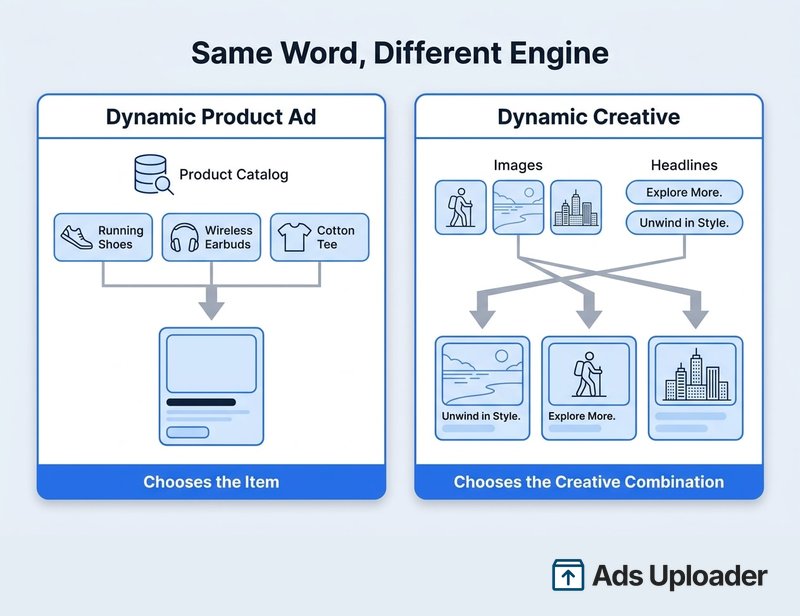
A dynamic product ad chooses which item to show from your catalog. Dynamic Creative chooses which combination of creative components to show from assets you upload. They are different systems that happen to share the word "dynamic."
Dynamic Creative accepts multiple images or videos, headlines, descriptions, and calls to action, then tests combinations to find the version most likely to perform. It does not require a catalog and it does not select products. Starting in June 2024, Meta began limiting Dynamic Creative for the Sales and App Promotion objectives and pointed advertisers toward the flexible ad format instead. That change was objective-specific and phased, not a wholesale removal, but the direction is clear: creative-combination automation now lives inside Advantage+ creative, while catalog-item selection lives inside Advantage+ catalog ads. You can read Meta's own description on the About Dynamic Creative help page.
Practical rule: if the automation is picking products from a feed, it is a catalog ad. If it is remixing images and headlines you supplied, it is creative automation. When both are in play, name the ad by its product engine.
Launch More. Click Less.
Upload hundreds of creatives at once, auto-match thumbnails to videos, and publish straight to your ad accounts through Meta's API.
Try Ads Uploader FreeNo credit card required • 7-day free trial
How to Set Up Facebook Dynamic Product Ads (2026 Flow)
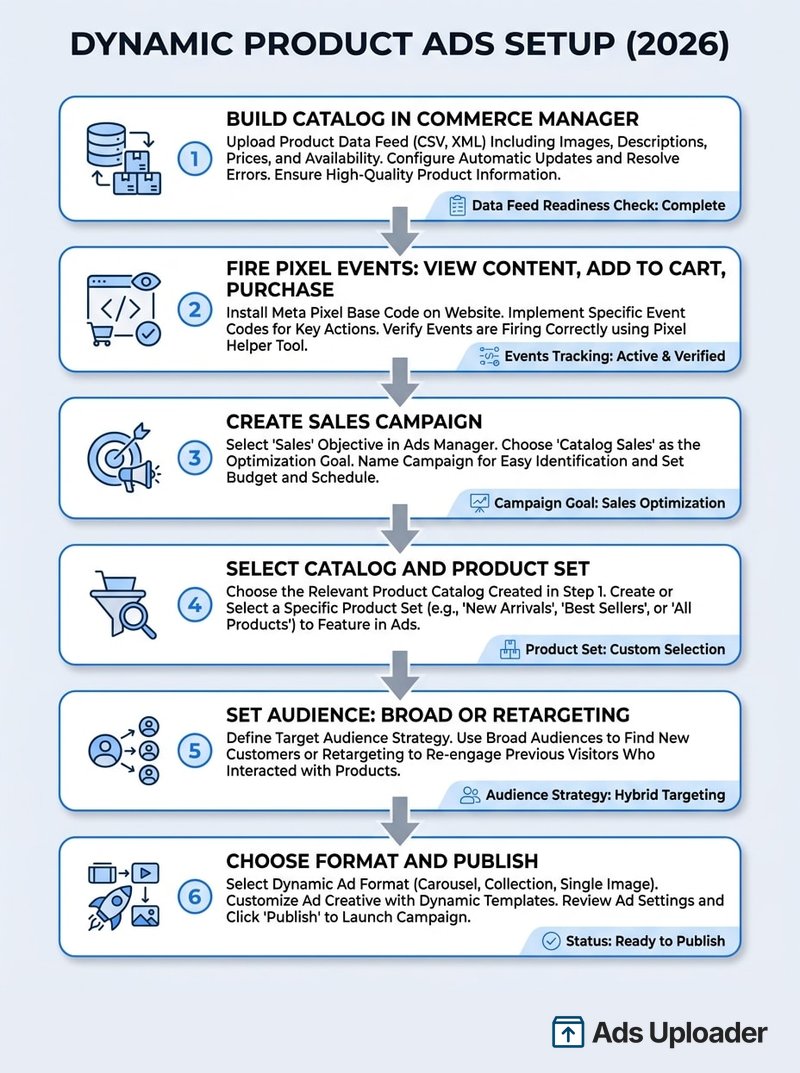
The written guides floating around the SERP still describe the retired "Catalog Sales" objective. The current flow is different. Here is what it looks like in 2026.
Before you build anything, get the prerequisites in place:
- A catalog in Commerce Manager containing eligible, approved inventory, with feed creation and product sets configured.
- A connected Meta Pixel or app SDK firing the required product events. Meta names ViewContent, AddToCart, and Purchase as the standard events for website catalog ads, and each must carry a
content_typeplus eithercontent_idsorcontents. - Access to the relevant ad account, business portfolio, Page or Instagram identity, catalog, and dataset.
Then create the campaign:
- In Ads Manager, click Create and choose the Sales objective. For ecommerce product sales, this is the normal choice; Meta's Sales flow routes catalog advertisers straight to Advantage+ catalog ads.
- During campaign setup, select your catalog. Meta calls choosing the catalog at campaign creation the "new experience." Depending on your account's rollout, the control may read "Use a catalog," "Advantage+ catalog ads," or a more general product-data option.
- At the ad-set level, set the conversion location, the connected dataset, your performance goal, budget, schedule, and bid strategy, then choose all products or a filtered product set.
- Set the audience. Use broad or Advantage+ audience controls for prospecting, or a catalog or site custom audience for retargeting. Keep hard controls such as location, minimum age, and exclusions.
- At the ad level, pick the Page and Instagram identity, the product set, the format (single image, carousel, or collection), your template text, destination, and CTA.
- Review every enabled Advantage+ creative enhancement, preview the ad with real catalog items, and publish.
A note on objectives: Advantage+ catalog ads can also run under App Promotion, Leads, Engagement, and Traffic, but the catalog-selection step and available formats shift by objective, so do not assume the Sales workflow maps identically to the others.
Facebook Dynamic Product Ads on Shopify
Shopify is the shortest path from products to a live catalog ad, which is why "facebook dynamic product ads shopify" is such a common search. The connection runs through the Facebook & Instagram by Meta sales channel.
Once you connect the channel, Shopify links your Meta account and business assets and creates or connects a product catalog shared across Meta's commerce and marketing surfaces. Products you make available to the channel sync automatically, and Shopify says later product changes usually propagate within minutes. Publishing status and product errors surface right in Shopify, which flags issues like missing titles, descriptions, images, or required variant attributes.
Data sharing has three levels. Standard uses the Meta Pixel. Enhanced and Maximum use the Pixel plus the Conversions API, with Maximum applying Meta's latest matching technology where supported. For catalog retargeting, lean toward Enhanced or Maximum so server-side events back up the browser Pixel.
The one thing to verify by hand is product-ID matching. The native channel can track ViewContent, AddToCart, and Purchase, but installation alone does not guarantee that the IDs in those events match the IDs in your catalog. A custom Pixel, tag manager, app, or theme can emit a variant ID where the catalog stored a parent product ID, or vice versa. Open Test Events, fire a real ViewContent, and compare the payload's identifier against the catalog item's id and item_group_id, including any prefixes or variant suffixes. Fix mismatches before you scale spend, because they quietly cap your match rate. The habits that hold up once budget concentrates are covered in running catalog ads at scale.
Shopify is not required to run DPAs. It is one integration option alongside scheduled feeds, partner platforms, and direct catalog APIs. It just happens to be the least manual one.
Retargeting vs Broad Audiences (DABA)
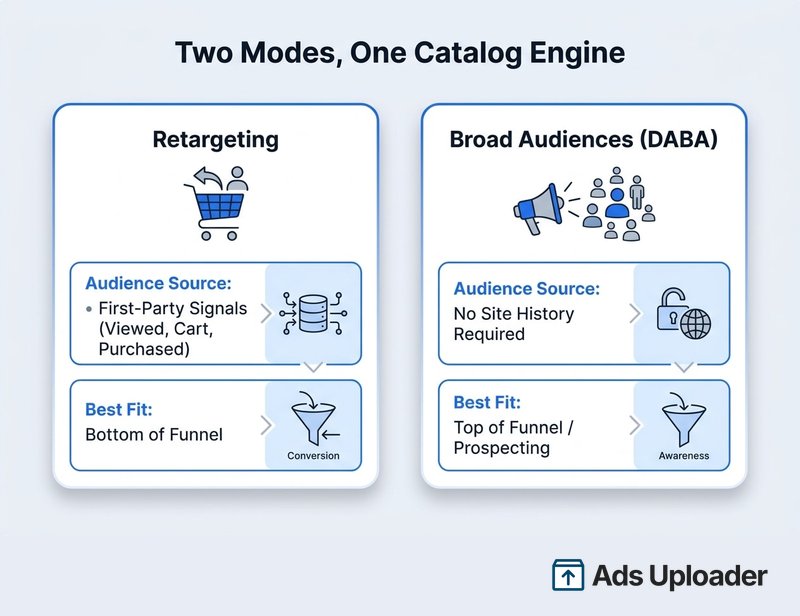
Catalog ads run in two modes, and the difference is entirely about audience source.
Retargeting uses first-party signals. You reach people who viewed a product, added to cart, or purchased, and Meta shows them those items or related ones. This is the classic high-return play, because you are talking to demand that already exists. The caveat is attribution: retargeting concentrates spend on people close to buying, so it reports strong attributed ROAS, but attributed conversions are not automatically incremental conversions the ad caused. Meta's own tooling, like Conversion Lift and incremental-attribution optimization, exists precisely to separate the two.
Dynamic ads for broad audiences (DABA) is the prospecting mode. Instead of retargeting known visitors, Meta recommends catalog products to a broad audience that has shown relevant interest or intent but may never have touched your site. Meta introduced broad-audience dynamic ads back in 2017 and now frames it simply as reaching a broad audience with Advantage+ catalog ads. In some 2026 accounts the explicit audience-type selector is less visible than it used to be, but the capability remains: hand Meta a wide eligible audience, keep your hard controls, and let delivery find buyers. Our Meta audience targeting guide covers how broad and Advantage+ audiences behave.
Why does broad prospecting work at all when you are not narrowing by interest? Because Meta's retrieval and delivery systems evaluate an enormous eligible-ad pool per impression and match products to people using far more signal than manual targeting ever could. Advantage+ audience treats your inputs as suggestions and searches wider when its models predict a better result, while still honoring location, minimum age, language, and custom-audience exclusions.
Save Hours on Creative Testing
Stop uploading ads one by one. Bulk process unlimited creatives with automatic media matching and direct API publishing.
Try Ads Uploader FreeNo credit card required • 7-day free trial
Dynamic Product Ads Examples by Funnel Stage
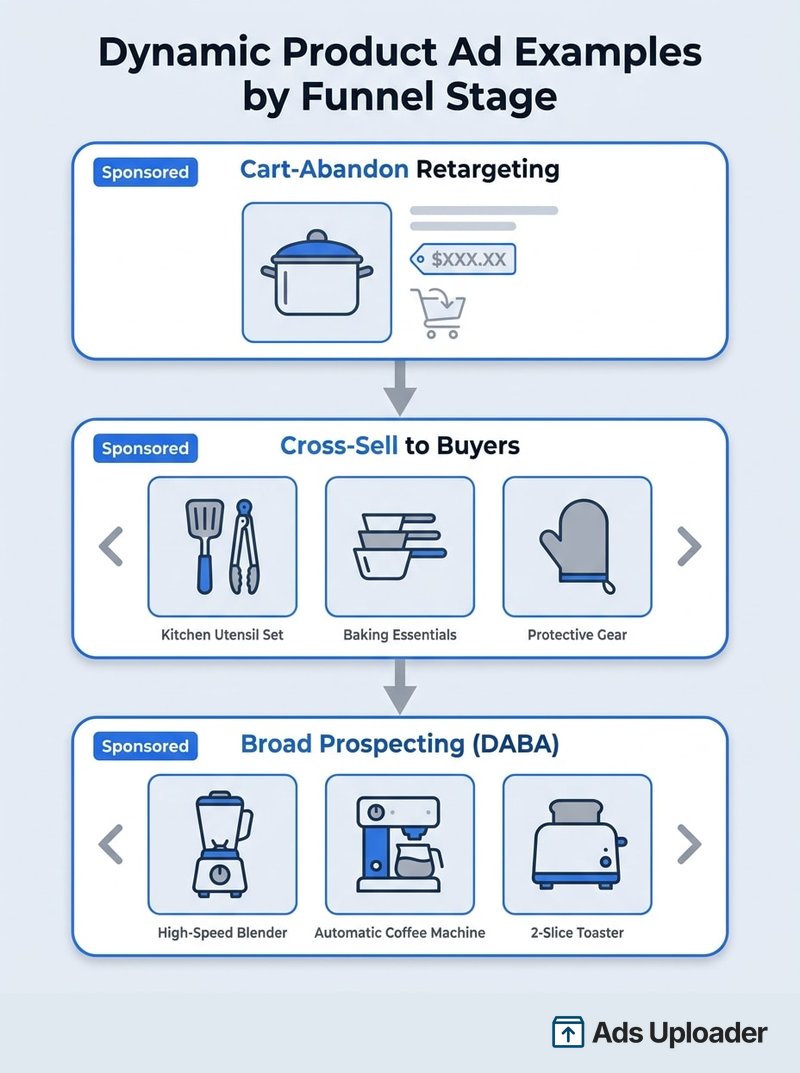
The fastest way to understand DPAs is to see the same engine configured for three different jobs. None of these require new creative per product; the feed does the work.
Example 1: Cart-abandon retargeting. A cookware store targets people who fired ViewContent or AddToCart in the last few days without purchasing. The product set is the viewed items or their category. The ad shows the exact pan someone left behind, at its current price and stock. Keep the set to approved, in-stock items, and avoid manual urgency copy like "only 2 left," because feed-derived availability does not validate a scarcity claim you typed by hand.
Example 2: Cross-sell to recent buyers. A coffee-subscription brand targets customers who bought in the last cycle, with a product set of complementary items such as filters, grinders, or accessories. Exclude already-owned products where reliable purchase identifiers allow it. The creative should explain the complementary use case rather than repeat a cart-abandon message to someone who already checked out.
Example 3: Broad prospecting (DABA). A home-office furniture store runs a broad, age- and geo-controlled audience against a varied set of bestsellers, high-margin items, and new arrivals. There is no site-history requirement. Discovery-oriented creative works best here, and you let Meta's delivery choose the product and person.
Across all three, catalog creative can do more than show a flat product photo. Meta supports catalog product video and a range of Advantage+ creative enhancements: image expansion, background generation, text variations, overlays, animation of static images, and automatic music. Not every enhancement is available for every ad type, so preview before you rely on one. As of a 2026 Meta announcement, product titles, prices, availability, and descriptions are increasingly treated as creative inputs the system can assemble, which makes clean catalog content part of your creative quality rather than just feed plumbing.
Why Your Dynamic Product Ads Are Not Delivering
When catalog ads refuse to spend, resist the urge to rebuild everything. Work through this order, because the fix is usually near the top.
- Check delivery status at campaign, ad-set, and ad level: disabled toggles, scheduled start dates, review or rejection status, account restrictions, payment failures, and spending limits.
- Inspect the product set for eligible inventory. Rejected, archived, expired, or out-of-stock items, or over-restrictive filters, can leave the set empty or nearly empty.
- Verify asset permissions and connections, especially the catalog, ad account, Page or Instagram identity, business portfolio, and the Pixel or dataset assigned to the campaign.
- Check feed health and freshness: recent upload or sync, valid product URLs, publicly retrievable image URLs, and required fields like title, price, availability, and image.
- Test the events. Use Events Manager and the Meta Pixel Helper to confirm ViewContent, AddToCart, and Purchase fire on the right pages and actions.
- Inspect the identifiers. Make sure
productIDs match the catalogidandproduct_groupIDs matchitem_group_id, exactly. Meta's catalog-ad Pixel documentation spells out the parameters. - Review catalog match rate after its processing delay. The match rate is the share of received content IDs Meta can map to catalog items, and Commerce Manager can lag by roughly 24 hours, so it is not a real-time diagnostic. Meta's in-product warning flags a match rate below 90% as limiting the products available, which makes 90% a sensible operational floor to aim for even though it is not published as a universal benchmark.
- Check deduplication and dataset choice so duplicate Purchase events are not double-counted and valid events are not landing in a dataset other than the one connected to your catalog.
- Relax narrow eligibility and give it a workable budget. Tight audiences and placements give the auction fewer chances to find a result.
- Review bid controls, especially a minimum-ROAS goal. A target Meta cannot predictably hit can throttle or block delivery entirely.
Nine times out of ten, the culprit is an empty product set or an ID mismatch that tanks match rate. Fix event correctness first.
Conclusion
Facebook dynamic product ads never went away. The format that launched as DPA in 2015 is the same catalog-plus-signal engine you now run as Advantage+ catalog ads, and knowing that one mapping saves you from half the confusion online. Keep the other half straight too: a dynamic product ad selects items from your feed, while Dynamic Creative remixes creative you supply. They are not the same tool.
From there it is mechanics. Build a clean catalog, fire ViewContent, AddToCart, and Purchase with IDs that match your feed, choose the Sales objective, select your catalog, and pick the mode that fits the job: retargeting to recover demand, or broad audiences (DABA) to create it. Shopify makes the catalog and signal setup nearly automatic, and the current creative system will assemble product images, price, and copy for you. When ads stall, the fix is almost always product-set eligibility or ID matching, not the creative. Get those foundations right and Facebook dynamic product ads become the most efficient way to advertise an entire inventory at once.
