Meta catalog ads are automated product ads that pull items from a catalog and show each shopper the products they are most likely to buy. The system links a product feed to signals from the Meta Pixel, Conversions API, or app SDK, then matches products to browsing and purchase behavior across Facebook, Instagram, Messenger, and Audience Network. Now branded Advantage+ catalog ads and formerly called dynamic product ads, they run as carousel, single image, collection, or video, letting a store advertise its whole inventory without building an ad per product.
If you sell products online, you have hit the wall this format was built for: you carry hundreds or thousands of SKUs, and there is no realistic way to hand-build, launch, and manage a separate ad for every one. Meta catalog ads solve that by connecting your catalog once and letting the delivery system generate personalized product ads on its own. The catch is that the format has collected five different names over a decade, and the setup flow changed in 2025, so it is easy to misconfigure before you ever get to creative.
After years running Meta ads across DTC and ecommerce accounts, I will walk you through what catalog ads actually are, decode every name in one table, show you the setup step by step, and cover the handful of levers that decide whether they quietly drain budget or become your most efficient channel.
What Are Meta Catalog Ads?
Meta catalog ads, which Meta now brands Advantage+ catalog ads, are ads that use a connected catalog plus Meta's delivery system to select and display products dynamically for each impression. Instead of you choosing which product goes in which ad, the system decides per person, pulling the image, title, price, and availability straight from your feed.
Here is the classic example. Someone lands on your furniture store, views a Scandinavian 3-seater sofa priced at 899 dollars, adds it to cart, then leaves without buying. Your catalog already holds that sofa's title, image, price, sale price, and stock status. Meta combines that catalog data with the browsing signal captured by your Pixel, and the next time the shopper opens Facebook or Instagram, it shows them that exact sofa, with the sale price and "only 3 left" surfaced automatically. You never built that specific ad. The catalog and the signal built it.
Catalog ads run across Facebook Feed, Marketplace, Stories, and the right column, Instagram Feed, Stories, and Reels, Messenger, and the Meta Audience Network. They can appear as a carousel, a single image or video, or a collection. Which product shows, and often which product media, is chosen at delivery time rather than fixed when you build the ad.
Meta Catalog Ads vs Facebook Product Ads vs Dynamic Product Ads
This is where most confusion lives, so let us settle the naming before anything else. The format has been renamed repeatedly, and search demand is now split across every era's label.
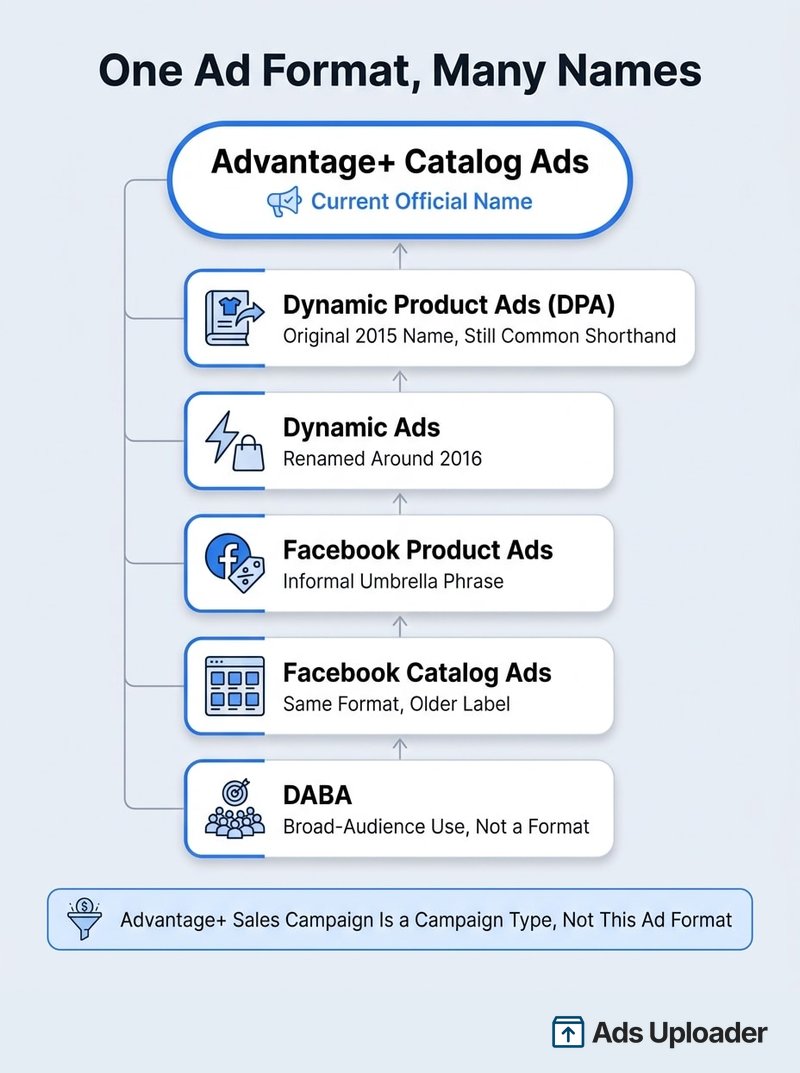
The timeline is straightforward once you see it. Facebook launched the format as Dynamic Product Ads in February 2015. It shortened the name to Dynamic Ads around 2016 as the system expanded beyond retail. In March 2022, Meta folded dynamic ads into its Advantage automation suite and rebranded them Advantage+ catalog ads, which is the current official name. Meta's own automation page today reads "Advantage+ catalogue ads, formerly dynamic ads."
So when you see "dynamic product ads," "DPA," "dynamic ads," "facebook product ads," "facebook catalog ads," and "Advantage+ catalog ads," they all point at the same feed-powered format. The one caveat: "facebook product ads" is an informal umbrella phrase, not a precise Meta product name, so it sometimes gets used loosely for any manually built product ad too. Use the current term, and treat the rest as legacy search language.
A few related terms are worth pinning down so you do not mix layers:
- Product catalog: the database that holds your item IDs, titles, prices, availability, links, and images. It is an asset, not an ad.
- Product set: a filtered subset of items inside a catalog.
- DPA: the legacy name, often used as shorthand for catalog-based dynamic retargeting.
- DABA (Dynamic Ads for Broad Audiences): the prospecting application Meta introduced in 2017. It was never a separate format, just catalog ads pointed at cold audiences.
- Advantage+ sales campaign: the automated campaign type, renamed from Advantage+ Shopping Campaign in 2025. This is a campaign wrapper, not the catalog ad itself.
The last one trips up a lot of people, so it gets its own note below. First, how the format works under the hood.
How Meta Catalog Ads Work
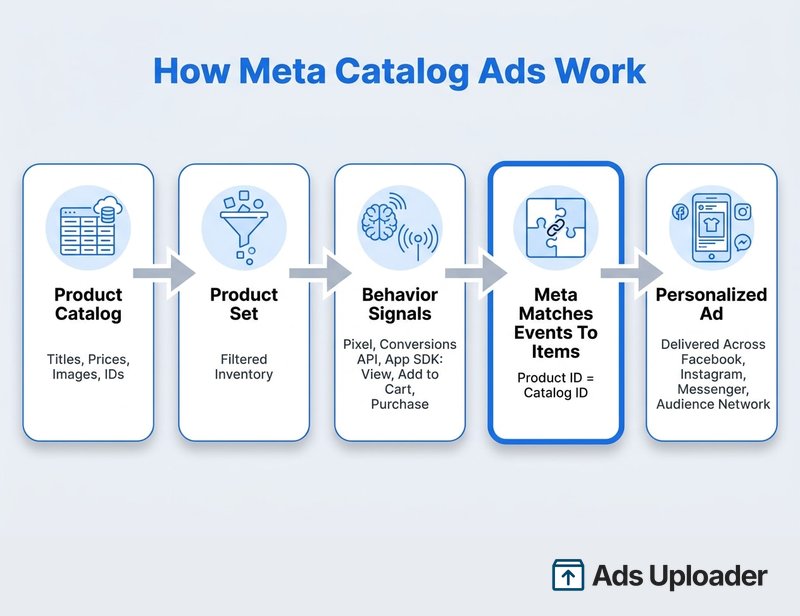
The delivery loop has a few clean steps:
- Your catalog defines the items Meta is allowed to advertise.
- A product set can narrow that eligible inventory.
- Signals from the Meta Pixel, Conversions API, app SDK, your shop, and on-platform engagement give Meta behavioral context.
- Meta maps those commerce events to catalog items using the product IDs.
- The system predicts which eligible product and presentation are most likely to drive your chosen outcome.
- Meta renders the ad from catalog fields, your chosen creative, and any enabled enhancements.
- The click sends the person to the product URL, app, or shop. Catalog items can also be surfaced without the dynamic machinery, as tappable product tags placed directly on the creative.
The catalog fields do real work here. Your product title, price, sale price, availability, and image link each become a visible ad element. That is why, later on, feed quality turns out to be creative quality.
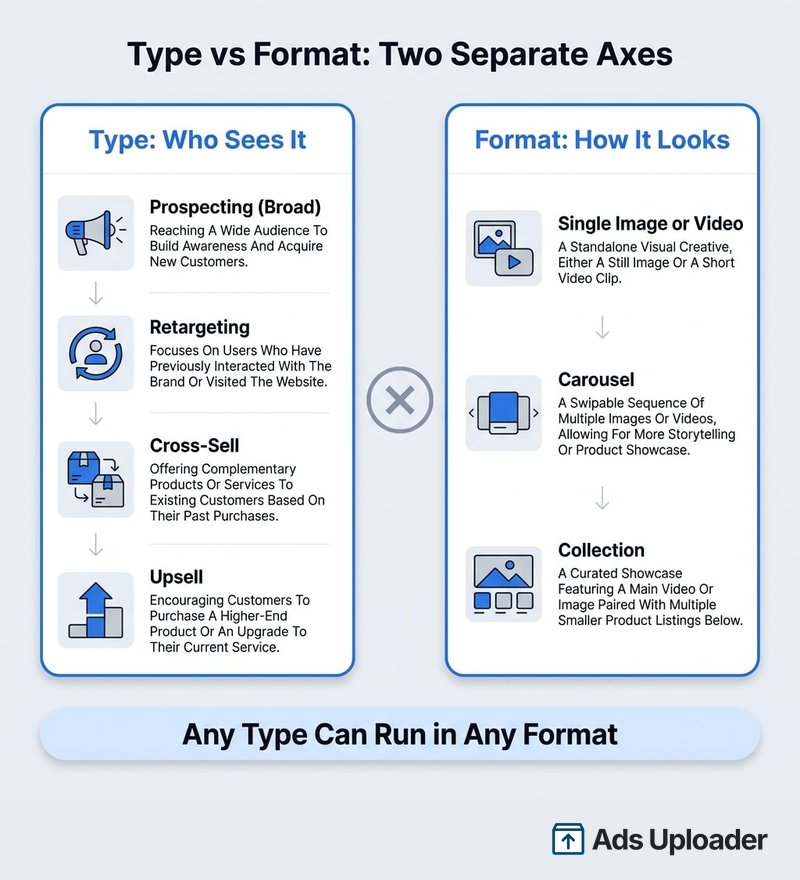
There is one mental model worth carrying through the whole rest of this guide, because it removes most of the confusion around catalog ads: type is who sees the ad, format is how the ad looks. A prospecting campaign in carousel format and a retargeting campaign in collection format are the same underlying catalog ad, configured differently on two separate axes. Keep those axes separate and setup stops feeling tangled.
To feed the system the intent signals it runs on, you connect a data source and fire the right events. That is the next piece.
What You Need Before You Start
Catalog ads have a short list of prerequisites, but each one matters more than it looks:
- A product catalog in Commerce Manager, with valid, approved items that have titles, images, prices, availability, and working URLs.
- A data source: the Meta Pixel, and preferably the Conversions API alongside it, or the app SDK for mobile. Meta now recommends running CAPI with the Pixel rather than treating it as a fallback.
- The right events firing. For product retargeting you need standard events ViewContent, AddToCart, and Purchase, each sending the catalog parameters (content_ids, content_type, value, currency) defined in Meta's Pixel reference.
- A business account, Page, and Instagram identity in good standing, plus the correct catalog, dataset, and domain permissions.
The single most important detail is the ID-matching rule. The product ID your events send must equal the item ID in your catalog. If your catalog row uses id=SKU-481-BLUE, your ViewContent event needs to send content_ids: ["SKU-481-BLUE"]. When they do not match, you get the classic silent failure: Ads Manager still reports the event, so tracking "looks fine," but Meta cannot map it to a catalog item, your retargeting pools stay incomplete, and delivery quietly underperforms.
That mapping is measured by your catalog match rate, the share of product-event IDs Meta can connect to items in your catalog. Aim for at least 90 percent. Meta's own engineering material treats 90 percent or higher as a high match rate on a single catalog. You will see "75 percent minimum" repeated across vendor blogs, but that is a troubleshooting floor, not an official Meta recommendation. Treat 90 percent as the target and anything under it as a signal problem to fix.
How to Set Up Meta Catalog Ads (Step by Step)
The mechanics are more approachable than the naming. Here is the flow end to end, with the longer version, including platform integrations and the errors that block approval, in our guide to setting up a Facebook catalog.
Step 1: Create Your Catalog in Commerce Manager
Go to Commerce Manager, add a catalog, and choose the type (Online Products for most stores; Travel, Auto, and Real Estate have their own). Then add inventory. Meta supports manual entry, direct file upload, a scheduled feed URL, connected Google Sheets, and ecommerce-platform integrations like Shopify. Meta's canonical feed formats are CSV, TSV, RSS XML, and Atom XML. Some upload flows accept XLSX, but for repeatable automation, stick to CSV, TSV, or XML.
A practical tradeoff: a platform integration is the fastest to set up, while a scheduled CSV or XML feed gives you more control over exactly which fields and values reach Meta. Whichever you choose, keep your item IDs stable across refreshes. Replacing IDs resets the relationship between past events, catalog items, and product-level learning.
Step 2: Build Product Sets
Inside the catalog, the default "all products" set is created for you. Create additional product sets when you want to advertise groups separately, for example cross-body bags, a sale collection, or a price band. You build them with filters (title contains, product type, price, availability, brand, and the custom_label fields), and only that fixed list of fields is filterable, so plan your feed's custom labels accordingly.
Launch More. Click Less.
Upload hundreds of creatives at once, auto-match thumbnails to videos, and publish straight to your ad accounts through Meta's API.
Try Ads Uploader FreeNo credit card required • 7-day free trial
Step 3: Create a Sales Campaign in Ads Manager
Create a campaign and choose the Sales objective. In the newer 2025 setup, you select the catalog during campaign setup itself, which is the context behind Meta's wording that the catalog is chosen "only during campaign setup." If your account still shows the older split, pick a manual sales campaign rather than a fully automated one so you retain control over the catalog ad specifically.
Step 4: Select Your Catalog and Product Set
Enable the catalog for the campaign or ad, then pick the catalog and the product set you want to promote. The largest sensible set usually performs best because it gives the system the most options to match a product to a person. Narrow it only when you have a specific merchandising reason.
Step 5: Set Budget, Audience, and Optimization
Set your budget and choose your audience approach, broad or retargeting (covered in detail below). Optimize for a lower-funnel event like Purchase rather than ViewContent or AddToCart, so Meta chases actual sales.
Step 6: Build the Creative and Publish
Choose your format (carousel is the most common), connect your Page and Instagram identity, add primary text, headline, and any CTA, then preview more than one product and placement before publishing. The first preview card is not the whole story, since the system renders different products for different people.
Broad Audiences vs Retargeting: Choosing the Right Type
Type is the "who sees it" axis, and it is where most of your economic decisions live.
Prospecting (Broad Audiences)
Broad, or prospecting, delivery, historically called DABA, points catalog ads at people who have not necessarily visited your site. You hand Meta light guardrails such as location, minimum age, language, and exclusions, and let the system find likely buyers using its conversion, engagement, and product-interest signals. This is how you create new demand rather than just recapture it. Broad does not mean irrelevant: Meta still ranks products and buyers, it just works from platform signals rather than your first-party visits. Give the system room by keeping filters light. Stacking narrow interest layers on top of the AI usually starves it.
Retargeting
Retargeting re-engages people who already interacted: product viewers who did not buy, cart abandoners, and people who engaged with a product on Meta. Because these shoppers already have intent, it is usually your most efficient and lowest-cost type. It also leans hardest on the plumbing, since it needs good event coverage, correct content IDs, a high match rate, and sensible recency windows.
Save Hours on Creative Testing
Stop uploading ads one by one. Bulk process unlimited creatives with automatic media matching and direct API publishing.
Try Ads Uploader FreeNo credit card required • 7-day free trial
Cross-Sell and Upsell
Cross-selling and upselling are retargeting applications aimed at past buyers. Cross-sell shows a complementary product (a lens to someone who bought a camera body), while upsell shows a premium version or bundle. Encode this logic in your product sets so buyers of one item become eligible for the right adjacent set, not the item they already own.
The Budget Trap
Retargeting will happily consume your whole budget if you let it, because warm audiences convert easily and inflate reported ROAS without growing your customer base. The reliable controls are structural: exclude customer and purchase audiences from acquisition ad sets, separate acquisition and retargeting into different budgets, and use ad-set spending limits where available. A note on the old existing-customer budget cap: Meta removed it from the newer Advantage+ sales flow in 2025, so do not assume every account still has that toggle. There is also no official Meta percentage for the new-versus-returning split, so the "10 to 25 percent" figures you see around are vendor convention, not policy.
Formats and Creative That Actually Convert
Format is the "how it looks" axis. Meta's current options are single image or video, carousel (minimum two cards), and collection (a mobile presentation backed by an Instant Experience). Carousel is the default for a reason: it lets one ad show a slideshow of products a person is likely to want.
The thing most advertisers miss is that the feed is the creative. Your product image, title, current price, sale price, availability, and brand all become visible ad elements at scale. A truncated title, a bad crop, or a stale price is not a data problem, it is a creative problem that ships to thousands of impressions. Clean the feed and you have improved the ads.
On top of the catalog asset, Meta layers Advantage+ creative enhancements: automatic sizing, background generation, text moved between fields, catalog overlays for price, strikethrough pricing, percentage-off, and free shipping, and dynamic selection among your available product media. Meta expanded these overlays in April 2025, and from September 2025 made dynamic media on by default for newly created catalog ads via the API.
That default is worth a warning. Enhancements can change what a person actually sees. Meta may crop or expand your image, place text over it, generate a background, choose a product video instead of your still, or render a different layout, and it will not always show that in the preview. So preview multiple products and placements, check discount and price overlays against the real landing page, and disable any enhancement that creates a brand, compliance, or offer-accuracy risk.
Third-party analysis backs up the "put the useful information on the creative" instinct. In a 2024 study of roughly 3,000 catalog designs across 6.5 billion impressions, feed tool Confect found ads that showed an on-sale indicator, a savings message, price, brand, or additional product assets were associated with materially higher ROAS, while showing the product name added little (the shopper can already see the product). Treat those as testing hypotheses rather than laws, since category and offer strength explain part of every difference, but the direction is clear: relevant information on the image tends to help.
One more advantage: catalog ads resist ad fatigue better than static creative, because they rotate through many products rather than showing the same image repeatedly. That does not eliminate fatigue, though. If every SKU uses one white-background packshot in one template, you have many products but little real creative diversity.
Optimizing Meta Catalog Ads
Once you are live, most of your gains come from a handful of habits rather than daily tinkering.
- Fix the feed first. Clean titles, quality images, correct prices and availability, working URLs, and stable unique IDs. Broken feed data drags down everything downstream.
- Raise your match rate toward 90 percent or higher. A low match rate is almost always a tracking problem, and it quietly caps how well Meta can personalize.
- Use one catalog and the largest sensible product set. More options let the system match the right product to the right person.
- Optimize for Purchase, not ViewContent or AddToCart, so delivery chases real sales.
- Respect the learning phase. Meta's guidance describes roughly 50 optimization events within a maximum of seven days to stabilize an ad set, and significant edits (targeting, creative, optimization event, bid strategy) can reset it. Give campaigns at least seven days of budget before you judge them. If you cannot hit the event volume, consolidate ad sets rather than fragmenting them.
- Feed it genuine creative variety. You will see "20 to 50 ads per product" cited as a Meta recommendation, but there is no primary Meta source for that number. The defensible goal is enough materially different images, videos, layouts, and offers that one template is not carrying the whole account, prioritized by the products that actually get spend.
- Watch the full funnel, not just ROAS. Follow ViewContent to AddToCart to Purchase and read the drop-offs. Strong views but weak add-to-cart points at the product or offer; strong add-to-cart but weak purchase points at checkout, shipping, or price.
On expected returns, be careful with benchmarks. There is no audited industry number that cleanly separates prospecting from retargeting across category, country, and margin. Vendor ranges exist, but even one vendor publishes conflicting figures, so treat any ROAS range as orientation, not a target. The honest calculation is your own break-even: 1 divided by your contribution margin. A 40 percent margin means a 2.5x break-even before overhead. Everything else is adjustment for refunds, shipping, attribution, and incrementality.
When you do find a winning product angle, the bottleneck shifts from research to production. Giving the system that creative variety at catalog scale is exactly where manual ad building breaks down, and where bulk uploading earns its keep. For the catalog-specific version of that workflow, see how to launch catalog ads in bulk.
Catalog Ads vs Advantage+ Shopping (ASC)
Since these two get conflated constantly, here is the clean separation. A catalog ad is an ad and media system: it uses catalog inventory to select and show products dynamically. An Advantage+ sales campaign (renamed from Advantage+ Shopping Campaign in 2025) is a campaign configuration that automates audience expansion, placements, budget distribution, and creative options.
They are different layers, and they compose. You can run catalog ads inside an Advantage+ sales campaign. Think of the catalog as the inventory and creative engine, and the Advantage+ sales campaign as one automated way to deliver it. When you want tight control over catalog ads specifically, a manual sales campaign gives you more levers; when you want maximum automation, the Advantage+ sales campaign hands more of the decisions to Meta.
Common Mistakes to Avoid
- Messy feed or mismatched IDs. The number-one silent killer. If event content IDs do not match catalog IDs, retargeting breaks while tracking still "looks fine."
- Over-targeting. Stacking interests and narrow filters on top of the AI starves its optimization. Use light guardrails and let it work.
- Not excluding recent buyers where a repeat purchase makes no sense. The exact window depends on your product; the "last 10 days" rule is convention, not a Meta policy, and can be wrong in both directions.
- Same creative for prospecting and retargeting. Cold audiences need context and benefits; warm audiences respond to urgency and the specific product they left behind.
- Editing during the learning phase. Constant changes reset the clock and keep performance unstable.
- Letting retargeting eat the budget. Separate it structurally so warm demand does not absorb your acquisition spend.
- Trusting old setup advice. Manually ranking eight AEM web events and relying on the existing-customer budget cap are both outdated. Meta changed both.
Frequently Asked Questions
Are Meta catalog ads the same as dynamic product ads or Facebook product ads?
Advantage+ catalog ads are the current successor to dynamic ads and dynamic product ads. Meta's own mapping reads "Advantage+ catalogue ads, formerly dynamic ads." DPA remains common shorthand, especially for dynamic retargeting, and "facebook product ads" is an informal phrase that can also mean manually built product ads. They largely describe the same feed-powered format under different-era names.
What is the difference between catalog ads and Advantage+ Shopping (ASC)?
Catalog ads are an ad and media system that uses your catalog to select and display products dynamically. Advantage+ Shopping Campaigns, renamed Advantage+ sales campaigns in 2025, are an automated campaign configuration. Catalog ads can run inside an Advantage+ sales campaign. One is the inventory and creative engine, the other is the campaign wrapper.
What is the difference between a product catalog and catalog ads?
The catalog is the database, a business asset holding item IDs, titles, prices, availability, links, and images. Catalog ads are the advertisements that pull from it. Updating the catalog can change what many ads show at once, without rebuilding each ad.
Do Meta catalog ads work for prospecting or only retargeting?
Both. Meta introduced broad-audience dynamic ads (DABA) in 2017 to reach prospective customers beyond known site visitors, and current Advantage+ audiences can use catalogs in acquisition campaigns as well as retargeting. Retargeting reports higher returns because it captures warmer demand, but prospecting creates new demand.
What do I need to set up Meta catalog ads?
An eligible Meta business account, a Page and Instagram identity, an ad account, and a catalog with valid items. For strong website optimization and retargeting, add the Meta Pixel and preferably the Conversions API, firing ViewContent, AddToCart, and Purchase with product IDs that match your catalog IDs. Then choose Sales and select the catalog during campaign setup.
Why are my catalog ads not spending or delivering?
Check, in order: the ad is off, rejected, or in review; catalog items are rejected, out of stock, or missing fields; the product set is nearly empty; permissions or image URLs are broken; Pixel or CAPI events are missing or deduplicated wrong; event content IDs do not match catalog IDs; match rate is low; or a minimum-ROAS bid is too aggressive for Meta to reach.
What is a good ROAS for Meta catalog ads?
There is no universal number. Start from break-even, 1 divided by your contribution margin, so a 40 percent margin means 2.5x before overhead. Then adjust for new versus returning customers, refunds, shipping, attribution inflation, and incrementality. High retargeting ROAS is not proof of incrementality.
How do I stop retargeting from eating my whole budget?
Exclude customer and purchase audiences from acquisition ad sets, separate acquisition and retargeting budgets, and use ad-set spending limits where available. Shorten retargeting windows if they exceed your buying cycle. Do not rely on the legacy existing-customer budget cap, which Meta removed from the newer flow in 2025.
What is the difference between carousel ads and catalog ads?
Carousel describes how an ad looks, multiple swipeable cards. Catalog ads describe where the product data comes from and how products get selected. A catalog ad can appear as a carousel, but a manual carousel with fixed cards is not automatically a catalog ad.
Is there a minimum number of products for catalog ads?
No current public Meta source sets a universal minimum. A carousel normally needs at least two cards, but a small catalog can still be eligible. A larger catalog gives Meta more options to match a product to a person, though size is not a substitute for relevance, signal quality, or creative quality.
Conclusion
Meta catalog ads reward clarity more than cleverness. Once you hold the mental model, type is who sees the ad and format is how it looks, the five names stop being confusing and the setup stops feeling arbitrary. Connect a clean catalog, fire ViewContent, AddToCart, and Purchase with IDs that match, keep your match rate near 90 percent, choose broad or retargeting deliberately, and optimize for purchases.
From there, the two levers you actually control are feed quality and creative variety. The feed is the creative, so a clean, complete, current catalog is doing more work than any bid tweak. And because catalog ads reward genuine creative diversity across your best products, the real ceiling is usually how fast you can produce and launch that variety, not how much the algorithm can do. Get those pieces right and Meta catalog ads become the most efficient, most scalable format in your account.
