Facebook collection ads specs cover a cover image or video plus product tiles drawn from a catalog. Meta recommends JPG or PNG images, MP4 or MOV video, and at least 1080 x 1080 pixel resolution, with aspect ratios set per placement: 1.91:1 to 1:1 in Feed and 9:16 in Instagram Reels. Hard limits are 30MB per image and 4GB per video. An Instant Experience is required, the product set needs at least four valid products, and collection ads run on mobile placements only.
Collection is the one Meta format where the spec you need is never on the page you are looking at. Cover media recommendations sit in the Ads Guide. The rule about where your headline actually renders sits on a Business Help Center page. The four-product minimum sits on a third page, and the changes that shipped in March 2026 sit on a fourth.
Four tabs later, you still cannot answer the two questions that matter when you are sizing an asset: which Facebook collection ads specs does Meta actually require, and which are only recommendations?
This page separates those two things. Every figure below is Meta's current published value, with hard technical requirements marked as requirements and design recommendations marked as recommendations. It also covers what changed in 2026, including why the collection format may have vanished from your Ads Manager.
One correction up front, because it wastes more time than anything else in this format: you do not upload a cover image. The cover is inherited from your Instant Experience.
Facebook Collection Ads Specs at a Glance
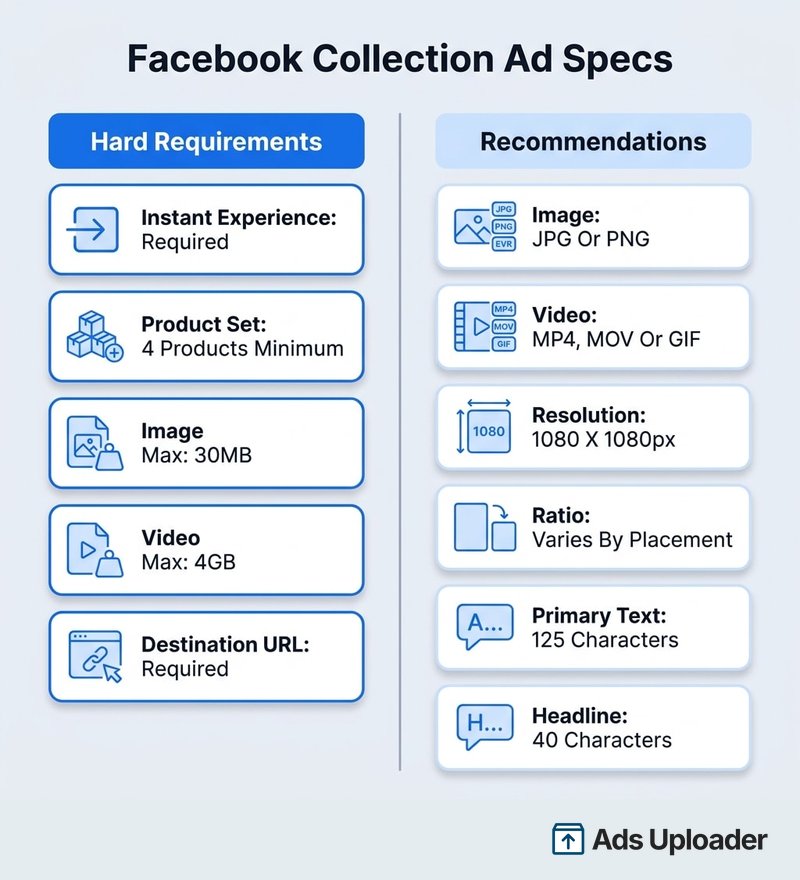
Meta splits the collection ad specs into two categories. Anything under Technical Requirements is a hard rule that blocks your ad. Collection is one presentation of a catalog ad. Anything under Design Recommendations is a production target, where overshooting causes cropping or truncation rather than a rejection. The feed-side rules that govern the product tiles sit in the catalog ads specs reference.
| Spec | Value | Type |
|---|---|---|
| Instant Experience | Required | Hard requirement |
| Product set minimum | 4 unique, valid products | Hard requirement |
| Image maximum file size | 30MB | Hard requirement |
| Video maximum file size | 4GB | Hard requirement |
| Destination URL | Required | Hard requirement |
| Minimum media dimensions (Instagram Feed and Stories) | 500 x 500 px | Hard requirement |
| Image file type | JPG or PNG | Recommendation |
| Video file type | MP4, MOV or GIF | Recommendation |
| Resolution | At least 1080 x 1080 px | Recommendation |
| Aspect ratio | Varies by placement | Recommendation |
| Primary text | 125 characters (Feed) | Recommendation |
| Headline | 40 characters (Feed) | Recommendation |
Those figures come from Meta's collection format page in the Ads Guide.
Cover Media Specs by Placement
Of all the collection ad specs, aspect ratio is the one that stopped being a single number. Meta used to publish a single ratio on a generic collection page; the live guide is now placement-specific, and the placements disagree with each other.
Aspect Ratio and Resolution by Placement
| Placement | Recommended ratio | Recommended resolution | Product tiles rendered |
|---|---|---|---|
| Facebook Feed | 1.91:1 to 1:1 | At least 1080 x 1080 px | 3 |
| Facebook video feeds | 1.91:1 to 1:1 | At least 1080 x 1080 px | 3 |
| Facebook Reels | 9:16 to 1:1 | At least 1080 x 1080 px | Not published |
| Facebook Marketplace | 1:1 | At least 1080 x 1080 px | 1 to 2 |
| Instagram Feed | 1.91:1 to 1:1 | At least 1080 x 1080 px | 3 |
| Instagram Stories | 1.91:1 to 1:1 | At least 1080 x 1080 px | 2 |
| Instagram Reels | 9:16 cover, 1:1 product images | At least 500 x 888 px | Up to 3 |
| Instagram Explore | 9:16 | At least 1080 x 1080 px | At least 3 |
Two entries in that table tend to surprise people. Instagram Stories still carries a 1.91:1 to 1:1 recommendation on Meta's collection page despite Stories being a full-screen placement, and Facebook Reels collection ads can only be built when Advantage+ catalog is the creative source.
If you are producing to a single ratio, 1:1 is the pragmatic choice. It sits inside the recommended range for Feed, video feeds, Marketplace and Facebook Reels, which covers most delivery. Vertical placements need a separate 9:16 asset.
File Types and Size Limits
Images should be JPG or PNG and stay under 30MB. Video should be MP4 or MOV and stay under 4GB. GIF appears on most placement pages but is absent from the Instagram Reels listing, so treat it as unsupported there.
Worth separating from the 30MB cover ceiling: catalog product images have their own limit, and a product image over 8MB is treated as invalid and drops the product from your set.
Cover Video Duration
Meta publishes no minimum or maximum duration for a collection cover video on any of its eight placement pages. It publishes file size and stops there.
The 1 second to 240 minute range quoted in some spec sheets comes from Meta's video and carousel documentation, not the collection pages, so it is not a collection cover spec. The one adjacent figure Meta does publish is a recommendation to keep Instant Experience videos under two minutes, which is about viewing completion rather than an upload limit.
Safe Zones in Vertical Placements
For Facebook Reels and Instagram Explore, Meta recommends keeping roughly 14% of the top, 35% of the bottom and 6% of each side clear of text, logos and anything else critical. That is the same guardrail Meta applies across its vertical formats.
The Cover Media Inheritance Rule
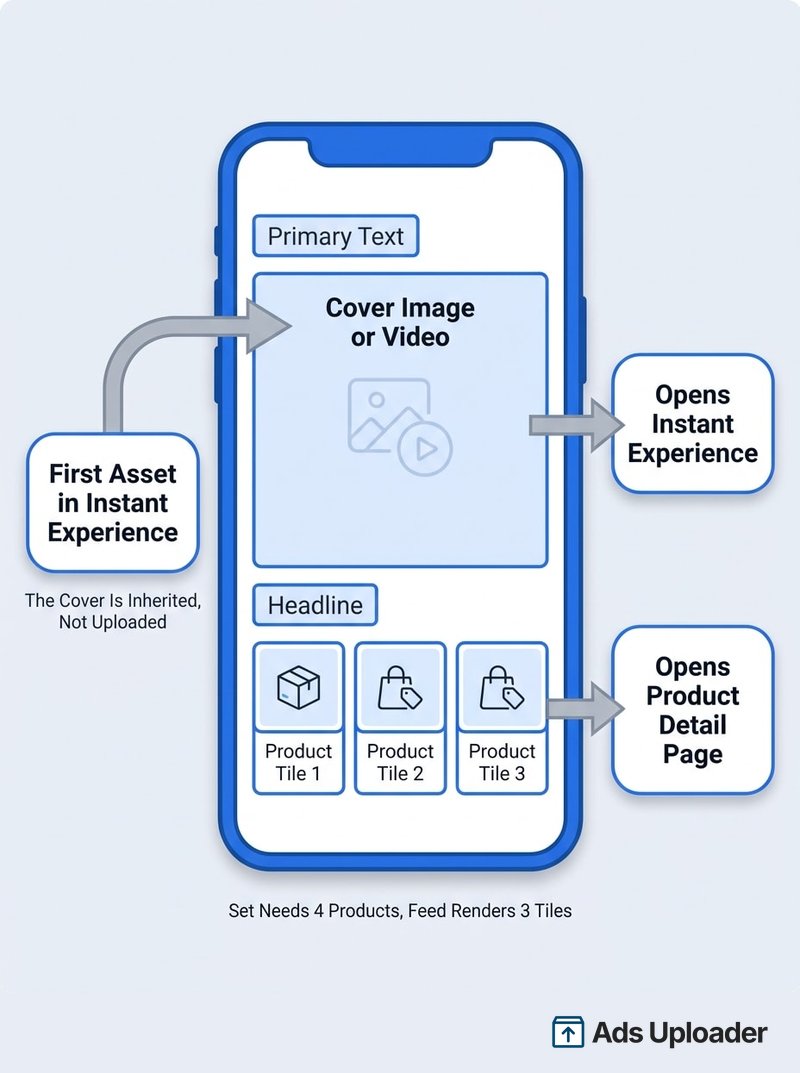
The most misread item in the Facebook collection ads specs is the cover. The cover image or video shown in your collection ad uses the first media asset from your Instant Experience. There is no separate cover upload field, and Meta does not document an independent override for a conventional collection ad.
So changing your cover means changing the first asset inside the attached Instant Experience, then checking the placement preview. This catches teams who build the Instant Experience first, treat it as the landing page, and then hunt for a cover field that does not exist.
There is a second wrinkle: once an Instant Experience is finished, it cannot be edited in place. Meta's instruction is to duplicate and rebuild. Testing three cover variants for a furniture retailer therefore means three Instant Experiences, not one with three covers swapped in.
Meta's Marketing API follows the same structure. A collection creative requires an Instant Experience, and its first element determines whether the creative is handled as image or video.
Product Tile Specs and the Four-Product Minimum
Two numbers get conflated constantly here, and they do different jobs.
Four is the eligibility minimum. Your product set needs at least four unique, valid products. Drop below that and Meta may pause the affected ads.
Three is what Facebook Feed actually draws. The rendered tile count varies by placement: three in Facebook and Instagram Feed, two in Instagram Stories, one or two in Marketplace, up to three in Instagram Reels.
So four products in the set never means four tiles on screen. It means the format has enough inventory to be eligible. Meta's Marketing API makes this explicit in an odd way: its collection_thumbnails implementation requires four thumbnail definitions even though only three normally render in Feed.
What Counts as a Valid Product
Products drop out of the count when they are out of stock, archived, rejected under Meta's policies, or missing required catalog fields such as title, description, price, availability, product link, condition or image link. Broken or non-product-specific destination URLs disqualify an item too, and product links must start with HTTP or HTTPS.
Variants are the quiet one. Only one variant displays per ad, and products sharing the same image may be counted as a single product. A footwear brand with four colourways of one shoe, all shot on the same background, may not clear the four-product bar even though the catalog technically lists four items.
Meta recommends keeping more than 50 products in the underlying set so delivery has replacements when items sell out and more relevance to work with.
Launch More. Click Less.
Upload hundreds of creatives at once, auto-match thumbnails to videos, and publish straight to your ad accounts through Meta's API.
Try Ads Uploader FreeNo credit card required • 7-day free trial
Order Dynamically vs a Specific Order
Order dynamically lets Meta's delivery system select 2 to 4 products ranked by popularity or likelihood of purchase. Meta recommends it, particularly when the same ad runs across Facebook and Instagram, and it pairs naturally with Advantage+ creative enhancements.
Choose a specific order lets you enter product names or IDs and set the sequence yourself. Meta publishes no maximum for manual selection, only the four-item floor.
Where Each Tap Goes
Tapping the cover opens the Instant Experience. Tapping a product tile opens that product's detail page on your site. Two destinations, one ad unit. Meta notes this can vary by placement, and Marketplace in particular documents only the Instant Experience destination.
Instant Experience Requirements
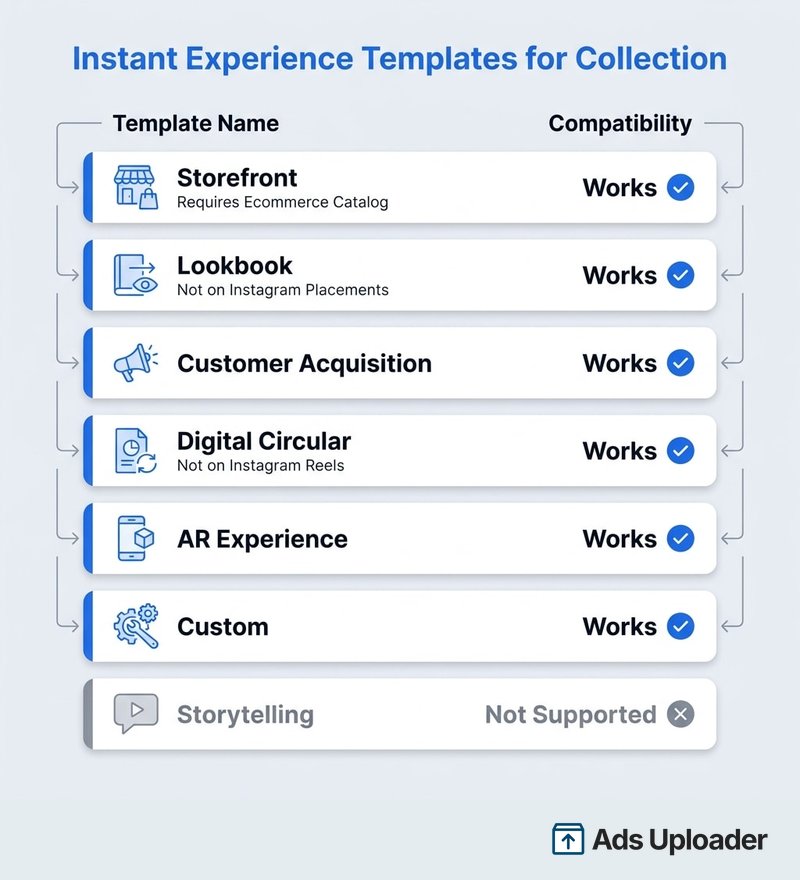
Instant Experience sits in the collection ad specs under Technical Requirements as Required, which makes it a spec rather than an optional extra. It is a full-screen, mobile-first destination that opens inside Facebook or Instagram.
Which Templates Work With Collection
Not every Instant Experience template is collection-compatible, and this is where third-party spec sheets go wrong most often.
| Template | Collection-compatible | Notes |
|---|---|---|
| Storefront | Yes | Requires an ecommerce catalog |
| Lookbook | Yes | Not compatible with Instagram placements |
| Customer acquisition | Yes | Works with all objectives except app promotion |
| Digital circular | Yes | Not compatible with Instagram Reels |
| AR experience | Yes | Availability varies by account and objective |
| Custom | Yes | Build from components |
| Storytelling | No | Meta states it works with all formats except collection |
Storytelling is worth calling out because it appears on several spec sheets as a collection template. It is a current Instant Experience template, but Meta explicitly excludes collection from the formats it supports.
Specs Inside the Instant Experience
Assets inside the experience have their own guidance. Fit-to-width images should be 1080px wide, tap-to-expand images want at least 1080px of height, and tilt-to-pan images want 1920px. Video should be MP4 or MOV at 720px or better. Carousels hold 2 to 10 cards, you get one header fixed at the top, and Meta recommends 5 to 7 components in total, with products shown after a tap capped at 50.
Videos autoplay muted and loop, so captions matter, and only the first of two onscreen videos will play.
One measurement change: since June 2025, Instant Experience opens no longer count as landing page views. Switch to the Instant Experience view time and view percentage metrics instead.
Character Limits by Placement
The text side of the collection ad specs is not uniform across placements, and the gap between the loosest and tightest is large.
| Placement | Primary text | Headline |
|---|---|---|
| Facebook Feed | 125 characters | 40 characters |
| Facebook video feeds | 125 characters | 40 characters |
| Facebook Reels | 72 characters | 10 characters |
| Facebook Marketplace | Not listed | 25 characters |
| Instagram Feed | 125 characters | 40 characters, does not render |
| Instagram Stories | 125 characters | Not listed |
| Instagram Explore | 125 characters | 40 characters |
Facebook Reels is the constraint that decides your copy. A 10-character headline is roughly two words, so if a campaign includes Reels, write to that limit first and let the Feed placements carry the longer version.
These are recommended display lengths rather than documented hard field maxima, and Meta warns that truncation depends on placement and device.
Where Text Appears
Meta's design specifications for collection ads put primary text above the cover on Facebook Feed, with the headline between the cover and the product tiles. On Instagram Feed, only the primary text renders, though Meta still recommends supplying a headline so the same ad works on Facebook.
That asymmetry has a practical rule attached: never put load-bearing information in the headline alone. A coffee subscription running "First Box Half Price" as its headline shows that offer on Facebook and hides it entirely on Instagram.
Meta does not publish precise text-position diagrams for Stories, Reels, Marketplace or Explore, so use the Ads Manager preview for those rather than assuming Feed behaviour.
There is no description field on any current collection placement page. Do not rely on one.
Supported Placements and Objectives
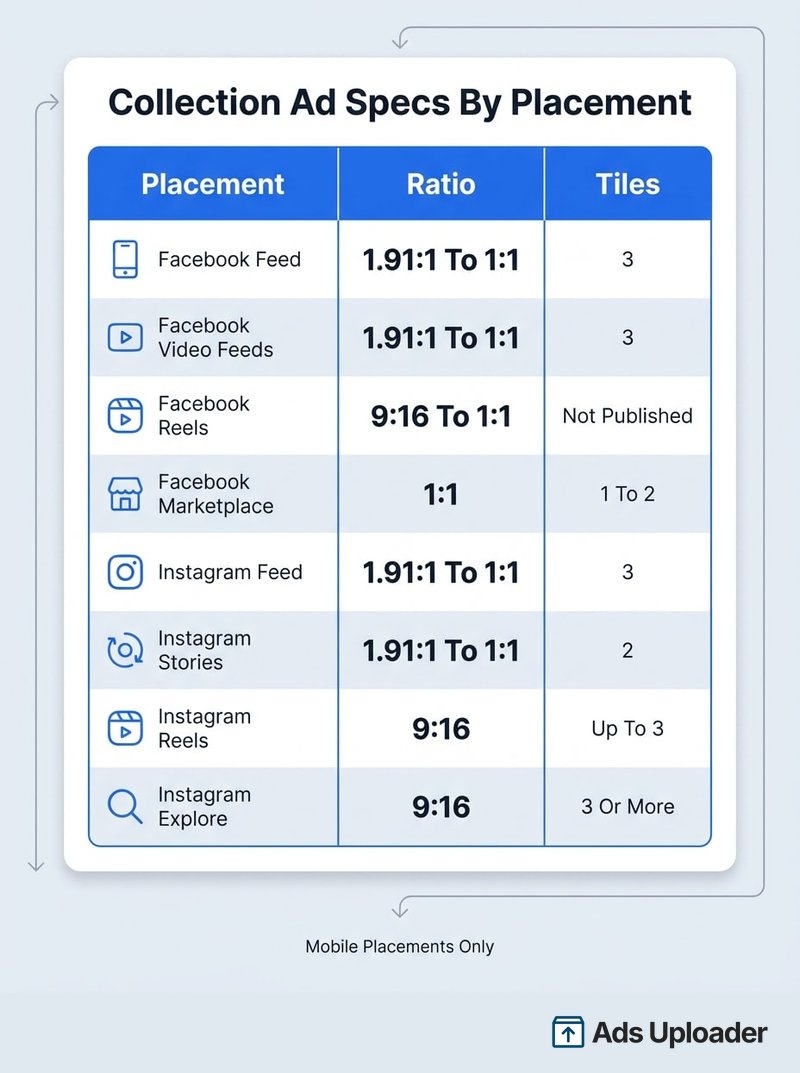
Meta's live Ads Guide exposes eight selectable placements for collection: Facebook Feed, Facebook video feeds, Facebook Reels, Facebook Marketplace, Instagram Feed, Instagram Stories, Instagram Reels and Instagram Explore.
Meta's Supported objectives help page lists a slightly different set, including Facebook Stories, which has no collection spec page in the Ads Guide. Where the two disagree, trust the live Ads Guide selector, since it is what Ads Manager is built against.
Supported objectives are Awareness, Traffic, Engagement, Leads and Sales. The Ads Guide also exposes App promotion for Marketplace, Instagram Reels and Instagram Explore, so treat that as placement and account dependent. Facebook Reels does not offer Awareness for collection at all.
Collection is mobile-only, for two independent reasons: Meta states it appears only in mobile placements, and the required Instant Experience is unavailable on desktop. Messenger and Audience Network are not collection placements.
What Changed for Collection Ads in 2026
Five changes landed in March 2026. None of them altered the core Facebook collection ads specs, but the first explains the most common support question about this format.
Collection moved out of Ad setup. It is no longer a standalone format choice there. You start with Single media or Carousel, configure your creative and destination, then enable Collection under Ad creative in Format display options. Meta's own page still warns the feature may not be available in every account yet, so if you cannot find it in either place, that is why.
Facebook Feed no longer shows a footer URL. Single media and Advantage+ catalog collection ads on Facebook Feed stopped displaying the URL in the ad footer. The destination URL is still required, and the tap destination is unchanged. Only the visible display of it went away, which matters mainly for client approval screenshots.
The "Sponsored" label became "Ad." Creative specs are untouched, but review checklists and approval screenshots should expect the new wording.
Facebook Feed now includes the Friends tab. This is additional inventory inside the existing Feed placement, not a separately selectable placement with its own specs.
Site links lost their text overlay. Site links now show media thumbnails only, unless you use a text-only site link design. Collection variants generated from site links look more image-led as a result.
Meta does not publish completion percentages for any of these rollouts, so preview every format display option before publishing rather than assuming your account is current. The About collection ads page carries the current notices.
Pre-Launch Spec Checklist
Run this before you publish:
- Objective, conversion location and placement are an eligible combination
- Collection selected under Ad creative in Format display options, not Ad setup
- Instant Experience built, attached and finished
- First media asset in the Instant Experience is the intended cover
- Cover matches the placement ratio from the table above
- Images under 30MB, video under 4GB, correct file type
- Instagram Feed and Stories media is at least 500 x 500 px
- At least four unique, valid products or images in the set
- Catalog items in stock, with required fields and working product page links
- Product images under 8MB and accessible
- Copy within the tightest placement recommendation in the campaign
- Nothing load-bearing in the headline alone
- Pixel or SDK connected when using Advantage+ catalog or the Sales objective
- Every selected placement previewed individually
That last item is the one people skip, and it is the one that catches ratio and tile-count surprises.
Save Hours on Creative Testing
Stop uploading ads one by one. Bulk process unlimited creatives with automatic media matching and direct API publishing.
Try Ads Uploader FreeNo credit card required • 7-day free trial
Frequently Asked Questions
What Are the Specs for Facebook Collection Ads?
The Facebook collection ads specs differ by placement. For Facebook Feed, Meta recommends JPG or PNG images or MP4, MOV or GIF video, a 1.91:1 to 1:1 ratio, and at least 1080 x 1080 pixels. Hard limits are 30MB per image, 4GB per video, and a required Instant Experience. Recommended text is 125 characters of primary text and a 40-character headline.
What Size Should a Collection Ad Cover Image Be?
Use at least 1080 x 1080 pixels. The ratio depends on placement: 1.91:1 to 1:1 for Facebook and Instagram Feed, 9:16 for Instagram Reels, 1:1 for Marketplace, and 9:16 to 1:1 for Facebook Reels. These are design recommendations rather than hard upload dimensions.
How Many Products Do You Need for a Collection Ad?
At least four unique, valid products or images. The ad renders fewer than that: three tiles in Facebook and Instagram Feed, two in Instagram Stories, one or two in Marketplace, and up to three in Instagram Reels. Four is an eligibility floor, not a display count.
Is an Instant Experience Required for Collection Ads?
Yes. Meta lists Instant Experience as Required under Technical Requirements for every collection placement. The cover image or video shown in the ad is also inherited from the first media asset inside that Instant Experience.
What Is the Character Limit for a Collection Ad?
Facebook and Instagram Feed recommend 125 characters of primary text and a 40-character headline. Facebook Reels is much tighter at 72 and 10, and Marketplace recommends a 25-character headline. These are truncation-oriented recommendations, not hard API maximums.
Why Can't I Find the Collection Format in Ads Manager?
Since March 2026, collection no longer appears as a standalone option in Ad setup. Choose Single media or Carousel, configure the creative and destination, then open Ad creative and select Collection under Format display options. Meta notes the feature may not have reached every account yet.
Do Collection Ads Run on Desktop?
No. Meta describes collection as mobile-only, and the required Instant Experience is unavailable on desktop. There is no desktop placement for this format.
What Aspect Ratio Should a Collection Ad Cover Video Be?
Match the placement: 1.91:1 to 1:1 for Facebook and Instagram Feed, 9:16 to 1:1 for Facebook Reels, 9:16 for Instagram Reels, and 9:16 for Instagram Explore. Meta publishes no minimum or maximum duration for a collection cover video.
What to Do Next
The facebook collection ads specs that actually gate your ad are short: an Instant Experience, four valid products, 30MB and 4GB ceilings, and a destination URL. Everything else on this page is a recommendation, which means it shapes how your ad looks rather than whether it publishes.
Three details are worth committing to memory. The cover is inherited from the first asset in your Instant Experience, not uploaded separately. Four products is an eligibility floor while Feed renders three tiles. And since March 2026, the format lives under Ad creative in Format display options rather than Ad setup.
Aspect ratio is the piece most likely to catch you out now that Meta publishes it per placement. Produce a 1:1 asset for Feed, video feeds, Marketplace and Facebook Reels, add a 9:16 for Instagram Reels and Explore, then preview each placement rather than trusting one ratio to survive everywhere. Tile count, crop and text rendering all shift between placements, and the preview is the only place you see what the ad will really look like.
