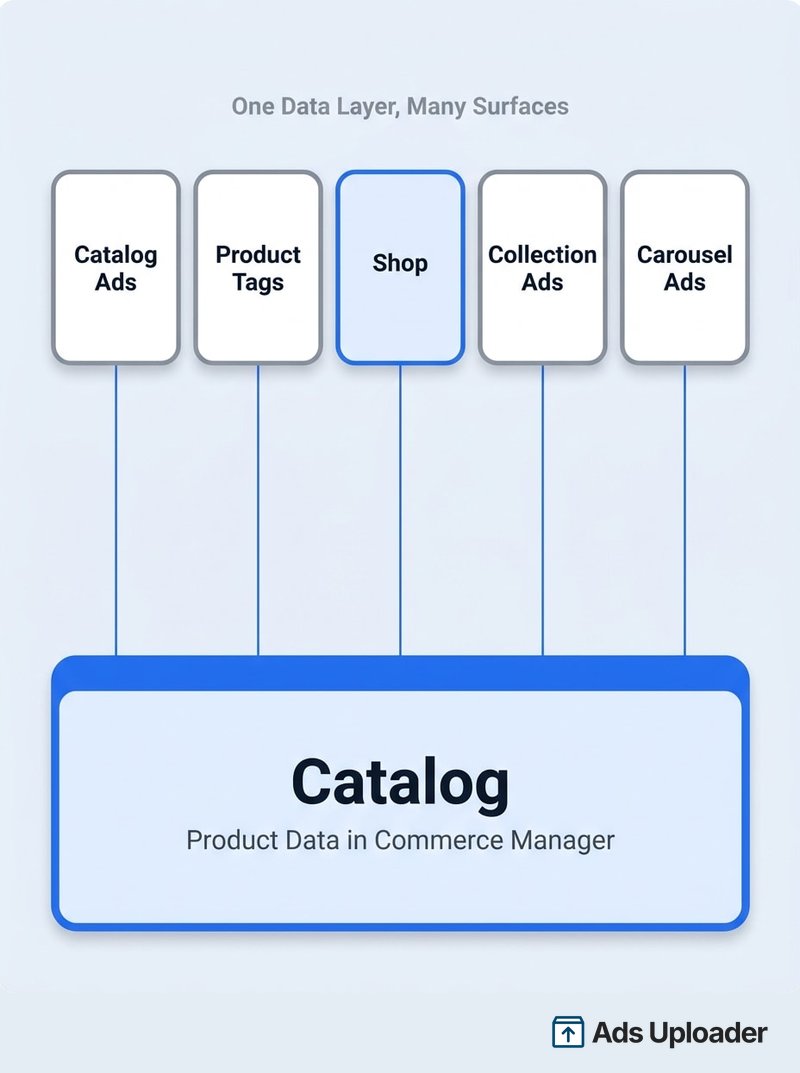
A Facebook catalog and a Facebook Shop are two different layers, not two competing products. The catalog is a product database in Commerce Manager holding titles, images, prices and availability. The Shop is an optional storefront on Facebook and Instagram that displays products from that catalog. A catalog can run ads with no Shop attached, but a Shop cannot exist without a catalog. Catalogs feed ads, product tags and other commerce surfaces, while Shops add collections, shipping details and a review process.
The search itself is the tell. People type "facebook shop vs catalog" because Commerce Manager presents both as things you set up, without ever saying how they relate. So you end up trying to pick one.
You cannot pick one, and the wrong mental model has a real cost. Advertisers regularly discover that turning a Shop on quietly changed where their catalog ads send people, and that traffic they paid for is landing on a half-finished storefront showing "Sold Out" on items that are actually in stock on their website.
This guide covers the relationship between the two, a straight comparison of what each one does, what Meta changed in September 2025 when it stopped processing Shop payments, and how to control exactly where your catalog ads land. It also answers the questions that cluster around this one: whether Meta Shops is a different product, whether you can sell on Instagram without a Facebook Page, and how shoppable posts actually get their data.
Facebook Shop vs Catalog: The Short Answer
The catalog is the data. The Shop is one of the places that data can show up.
Think of the catalog as a spreadsheet Meta can read: every product you sell, with an ID, a title, a price, a stock status and a link to the product page on your site. Nobody browses your catalog. It exists so Meta's systems know what you sell.
A Shop is a storefront built on top of that data. It is customer-facing, it lives on your Facebook Page and Instagram profile, and it needs approval before anyone can see it.
| Catalog | Shop on Facebook and Instagram | |
|---|---|---|
| What it is | A structured product database | A customer-facing storefront |
| Where it is managed | Commerce Manager, a platform integration or the Marketing API | Commerce Manager's Shop tools |
| Who sees it | Nobody directly | Shoppers |
| Required for catalog ads | Yes | No |
| Can it exist on its own | Yes | No, it needs a catalog |
| Does it process payments | No | No, not since September 2025 |
| Where checkout happens | Wherever the ad destination points | Normally your own website |
| Extra setup required | Product data via feed, manual entry or sync | Shipping profile, returns policy, checkout URL, review |
| Review period | None | Meta advises allowing up to four weeks |
| Main organising tool | Product sets | Collections |
| Cost to create | No Meta fee | No Meta fee |
The row that matters most is "required for catalog ads." A Shop is optional. If your only goal is running ads that send people to product pages on your own site, you need a catalog and nothing else.
What a Facebook Catalog Actually Is
A catalog is an asset in Commerce Manager containing structured records for everything you sell. Each record can carry an identifier, a title, a description, a product URL, images, a price, stock status, brand and variant details.
Meta's catalog reference marks nine fields as required: id, title, description, availability, condition, price, link, image_link and brand. Everything else, including sale_price, item_group_id and the five custom_label fields, is recommended rather than mandatory.
One field deserves particular attention. Your id values need to match the content_ids your Meta Pixel and Conversions API send. If a visitor views a product and your site reports an ID that does not exist in your catalog, Meta cannot connect the two, and item-level retargeting quietly stops working. It is worth checking against your Meta Pixel standard events before you blame creative.
How Products Get Into a Catalog
There are several routes, and the right one depends on how many products you have and where they already live:
- Manual entry in Commerce Manager. Fine for a handful of items, painful past a couple of dozen.
- A one-time data feed upload, as CSV, TSV, RSS XML, Atom XML or Google Sheets.
- A scheduled feed fetch, where Meta pulls your file hourly, daily or weekly.
- A platform integration, so Shopify, WooCommerce or BigCommerce push updates automatically.
- Pixel-based item creation, where available, built from website microdata.
- The Marketing API or Catalog Batch API, for programmatic control.
Multiple feeds can contribute to one catalog, but each product ID should have a single authoritative source. Supplementary feeds update selected attributes without fighting your main feed for ownership. If you sync from Shopify, the sales channel handles catalog creation and keeps products current.
What Having a Catalog Unlocks
This is the list that settles the "vs" question. According to Meta's own documentation, a catalog powers:
- Advantage+ catalog ads, which show each person the most relevant products based on their behaviour
- Product tags in Instagram and Facebook content
- Products displayed alongside your ad creative
- Product video in ads
- Shops
- Shops ads
- Collection ads, which show four catalog products beneath a hero image or video
- Carousel ads filled dynamically from the catalog
- Collaborative ads, where a retail partner shares a segment of their catalog with you
- Catalog-powered shopping features in Messenger, in selected markets
Shops appears once, as a single item on a list of ten. That is the clearest possible statement of the relationship: the Shop is not the point of the catalog, it is one thing the catalog can do.
Meta recommends keeping one catalog per inventory type. Splitting products across several catalogs fragments your audience signals, lowers event-to-item match rates and makes diagnostics harder. Use product sets, which are rule-based subsets of a catalog, to segment campaigns instead of duplicating inventory.
What a Shop on Facebook and Instagram Adds
A Shop adds a browsing and merchandising layer on top of a catalog. Depending on your country and account eligibility, that includes a shop surface on your Page or Instagram profile, product detail pages, collections, featured products, product tagging and Shops ads.
What it does not add is a second inventory database. Everything the Shop displays comes from the catalog underneath it.
What You Have to Set Up for a Shop
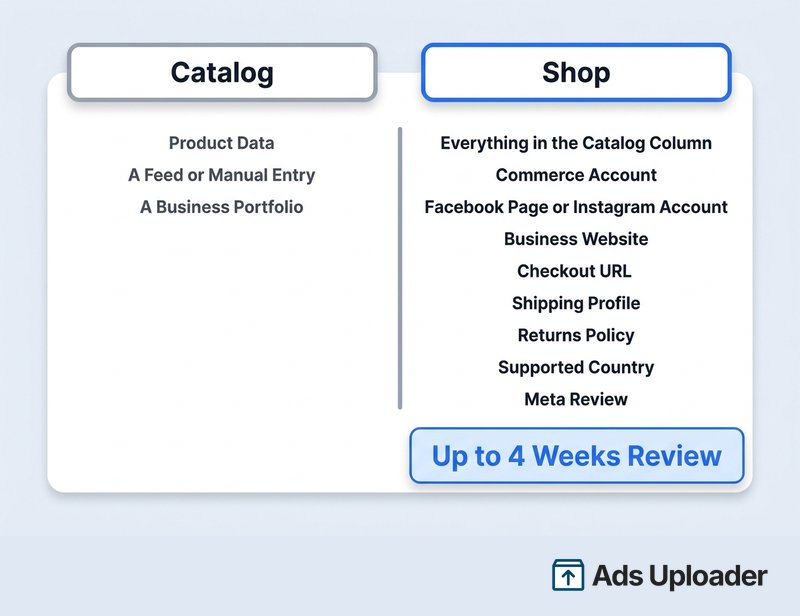
The catalog asks for product data. The Shop asks for considerably more:
- A Meta commerce account
- A catalog containing eligible online products
- A Facebook Page, an Instagram professional account, or both
- Full control of the relevant business portfolio
- A business website with working product URLs
- A checkout URL, without which your shop will not be visible at all
- A supported country
- Compliance with Meta's commerce policies
Meta's commerce eligibility requirements add a further set of conditions: you must represent your business and domain accurately, operate from a supported location, and demonstrate account trustworthiness. Approval is not automatic, and Meta advises allowing up to four weeks for review.
Then there is the operational setup a catalog never requires: a shipping profile (standard delivery typically shown as 5 to 8 days, expedited 3 to 5, rush 2 to 3, all including handling), a returns policy, and choices about ratings display, per-visitor layout personalisation and whether Meta may crawl your site for offers.
Availability is also narrower than it once was. Meta splits Shop support into three tiers: the United States gets the full experience with Shops ads; Australia, Canada, Japan, Mexico, South Korea, Taiwan and the United Kingdom sit in an open beta of it; and thirteen further markets including Brazil, France, Germany, Italy, the Netherlands and Spain get limited functionality without Shops ads. Everywhere else has none. Meta reads your location from the commerce account, so a VPN will not make an ineligible merchant eligible.
What Changed in September 2025
If you read an article about Facebook Shops written before late 2025, one of its central claims is now wrong.
Meta's supported countries page currently opens with a notice that some features related to Shops and checkout are no longer supported. Behind that notice is a substantial change: on 4 September 2025, Meta discontinued native checkout on Facebook and Instagram. Partner documentation from BigCommerce, Adobe and Salesforce all record the same date and the same migration.
What went away was everything that depended on Meta being the payment processor:
- Native checkout inside Facebook and Instagram
- New Shop order processing in Commerce Manager
- Meta payouts and payment records for new orders
- Meta-managed returns, disputes and chargebacks
- Checkout-specific reporting metrics, including Meta purchases and Meta checkouts initiated
Shops themselves were not discontinued. Meta still documents them, still lists supported countries, and still runs Shops ads in eligible markets. What a Shop is now is a discovery and merchandising surface that hands the customer to your website to pay.
Two practical consequences follow. First, the old 5% selling fee per shipment, or 40 cents on shipments of $8 or less, no longer applies to ordinary Shops, because Meta is not processing the transaction. Your costs are your normal ecommerce platform and payment provider fees. Second, if you are reading Meta's own developer documentation, be aware that the catalog reference still contains a section on required fields for checkout on Facebook and Instagram. That section is stale. Fields such as quantity_to_sell_on_facebook relate to a system that was retired.
One qualification, because it causes confusion. Shopify launched a limited-release Meta channel in 2026 letting eligible US customers complete a Shopify-powered checkout on Meta surfaces, with Shopify as merchant of record. That is a partner checkout path, not the return of Meta's native checkout.
How the Catalog and the Shop Connect
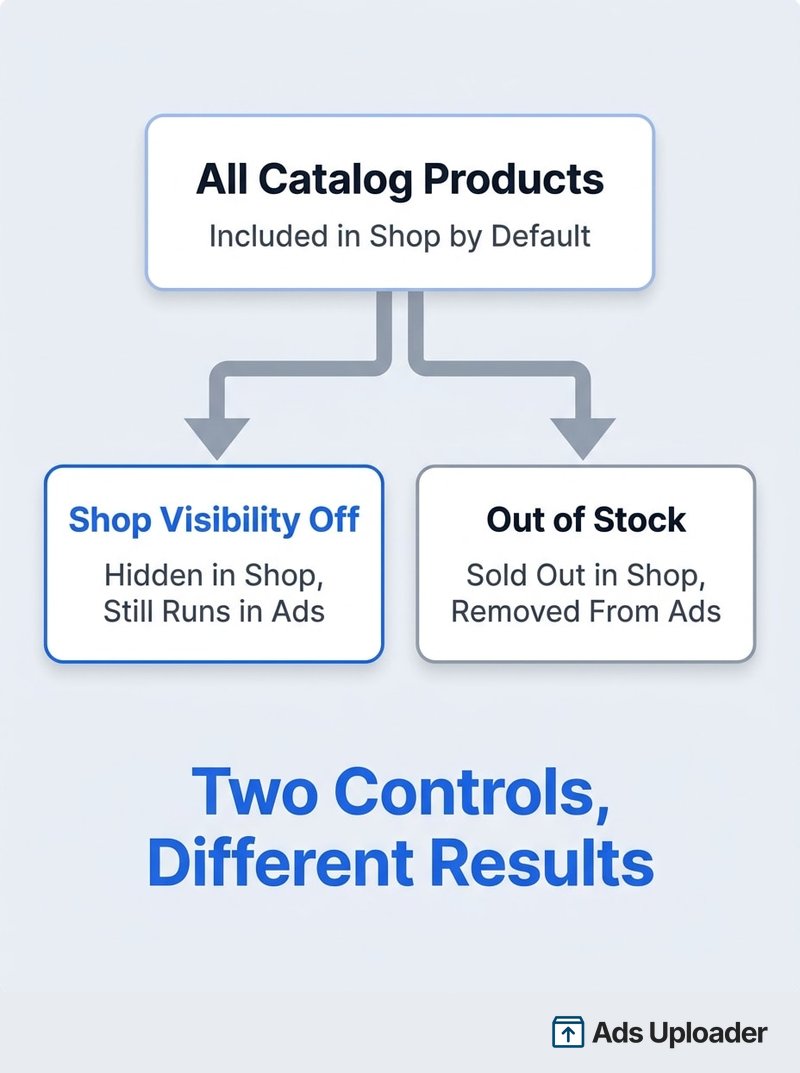
Here is the behaviour that surprises people: every product in your catalog is included in your Shop by default. Publishing a Shop does not ask you to choose which items to feature. It takes everything and shows it.
For a clean catalog, that is convenient. For a catalog built purely to feed ads, it is a problem: placeholder imagery, wholesale-only lines and variants you never photographed properly all become a public storefront the moment the Shop goes live. There is a control for this, and it is not where most people look.
How to Hide a Product From Your Shop but Keep It in Ads
Each catalog item has its own Shop visibility setting, separate from its overall status:
- Open Commerce Manager and select your catalog.
- Go to Items and select the product.
- Open its Shops tab or Shop channel section.
- Disable Shop use for that item, or disable the specific Shop.
- Confirm it now appears under the Hidden in Shops filter in your items list.
- Leave the item active and in stock.
That last step matters. There are four other ways to make a product stop appearing in your Shop, and all four also remove it from your ads: archiving it, deleting it, removing it from the feed, or marking it out of stock.
The availability field is the trap. Meta's specification is explicit that in stock lets an eligible item appear, while out of stock shows the item as sold out in a Shop and stops it displaying in catalog ads entirely. So if you set a slow-moving desk lamp to out of stock to tidy up your storefront, you have also pulled it from every ad it was running in. Use the Shop visibility toggle for storefront curation, and reserve the availability field for actual stock levels.
It is also worth separating two things that sound alike. Product sets are rule-based subsets of your catalog used to target specific products in ads. Collections are curated merchandising groups inside your Shop, with a title, cover image and product order. They do not convert into one another, and building one does not give you the other.
Launch More. Click Less.
Upload hundreds of creatives at once, auto-match thumbnails to videos, and publish straight to your ad accounts through Meta's API.
Try Ads Uploader FreeNo credit card required • 7-day free trial
Where Your Catalog Ads Actually Send People
This is the part that costs advertisers money, and it changed along with everything else in September 2025.
The old model was straightforward. Ads Manager offered a conversion location at the ad set level with three choices: Website, Shop, or Website and Shop. That third option let Meta pick whichever it predicted would convert better.
That description is now outdated, which is exactly why advertisers go looking for a setting they cannot find. In the current structure:
- Website is the conversion location, set at the ad set level.
- Shop-assisted routing is controlled separately, at the ad level, under Destination.
- The control is usually labelled Use shop to personalize buyer journey, though some accounts show equivalent wording such as Personalized destination.
Shopify's own guidance states plainly that the Website and Shop conversion location is being discontinued for ads, and directs advertisers to the ad-level control instead.
The Shop control generally appears only when you have an eligible, visible Shop, the selected Page or Instagram identity is connected to it, the campaign uses the relevant catalog, and your country and account support Shop-assisted routing. If you have no Shop, you will never see it, which is another way of saying that advertisers without a Shop have nothing to worry about here.
How to Force Website-Only Catalog Ads
If you want a published Shop for organic discovery but want every paid click landing on your own site:
- Create or edit a Sales campaign.
- Select your catalog if the campaign flow asks for it.
- At the ad set level, set Conversion location to Website.
- Select your dataset and optimisation event, normally Purchase.
- Open the individual ad.
- Find Destination or the buyer journey section.
- Turn off Use shop to personalize buyer journey.
- If the interface shows destination checkboxes, remove Shop and keep the website.
- Confirm the destination URL resolves to the right product page.
- Check every ad individually, because the setting does not always propagate across duplicated or migrated ads.
Two things to watch. Migrated ads can keep legacy routing embedded in their creative configuration even when the ad set clearly says Website, so if an older ad does not expose the toggle, rebuild it rather than assuming it is fine. And if you create ads through the Marketing API or a bulk tool, the ad set setting alone may not be enough: the creative needs to explicitly opt out, using the website-only destination type, or eligible Shop-connected creatives can default to website-and-shop routing. The Meta Ads updates log tracks these API-level destination changes as they ship.
Advertisers turn Shop routing off for practical reasons: a feed without real inventory data makes a storefront look broken, attribution gets muddier when a click can land in either of two places, and a Shop-assisted path is a support problem if your fulfilment assumes orders arrive through your own platform.
Do You Actually Need a Facebook Shop?
For most e-commerce advertisers, the catalog is not optional. If you want Advantage+ catalog ads, item-level retargeting, product sets, dynamic carousels or product tags, you need one.
The Shop is a genuine choice. Publish one if you want a branded browsing surface inside Facebook and Instagram, if you tag products in organic posts and Reels, if you want Shops ads in an eligible country, or if letting Meta run Shop-assisted discovery before sending people to your site is worth testing.
Skip it if your only objective is catalog ads pointing at your own product pages, if you do not need organic product tagging, if your country has no Shop support, or if maintaining a second storefront offers nothing you can measure. Meta's commerce review is also a real gate, so factor in Meta's advertising and commerce policies before committing to a launch date.
Nothing here is permanent. A Shop can be published later without rebuilding the catalog, and unpublishing a Shop does not delete the catalog underneath it. They are separate assets. Just read any deletion confirmation carefully, because removing a commerce account is a broader action than unpublishing a storefront.
Meta Shops, Instagram Shopping and Shoppable Posts
Four related questions come up constantly around this topic, and each has a short answer.
Is Meta Shops the Same as Facebook Shops?
Yes. Meta launched the product as Facebook Shops in May 2020. Current Meta documentation generally calls it "Shops on Facebook and Instagram," or simply a shop. "Meta Shops" is industry shorthand rather than an official product name, but it refers to the same thing. There is no separate Meta Shops product to evaluate.
Two other renames are worth knowing, because stale terminology is the fastest way to follow instructions that no longer match your screen. Catalog Manager became Commerce Manager. Business Manager became the business portfolio. And Advantage+ Shopping campaigns were renamed Advantage+ Sales campaigns in 2025, which is part of why destination guidance written before that rename sends people hunting for menus that have moved.
Can You Use Instagram Shopping Without Facebook?
Through Meta's native setup, yes. Meta's help documentation states that you do not need to create or provide a Facebook business Page if you only want to sell using a shop on Instagram. You do need an Instagram professional account inside your business portfolio, and since September 2025 you also need a website for checkout.
The caveat is that partner integrations can impose their own requirements. Shopify's Facebook and Instagram channel currently requires a published Facebook Page and an associated business portfolio. So the honest answer is that Meta does not require a Page for an Instagram-only shop, but your ecommerce platform might.
How to Update an Instagram Shop Catalog
Update the catalog, not the shop. The Instagram product card is a display of catalog data, not a separate record you can edit in place.
Depending on how products got in, that means editing the item in Commerce Manager, updating your data feed, waiting for the next scheduled fetch, changing the product in Shopify or WooCommerce, or pushing it through the API. Shopify reports most changes sync within a few minutes, with some category details taking around fifteen.
There is no universal propagation guarantee. Meta still needs to ingest the change, fetch new images and sometimes re-review the item, so treat "usually within minutes" as typical rather than promised. If a price change matters commercially, verify it on the live surface.
Shoppable Facebook and Instagram Posts
Product tags in posts, Reels and Stories pull from the same catalog. That is what makes a post shoppable: a clickable tag pointing at a catalog item, which opens a product detail page.
Tagging is not catalog-only, though. You generally need an Instagram professional account, commerce policy eligibility, a supported country, an approved shop or shopping setup, and active approved products in the connected catalog. So shoppable organic content is one of the genuine reasons to publish a Shop even if all your paid traffic goes to your website.
One correction worth making, because it circulates widely: Instagram removed its dedicated Shop tab from the main navigation back in February 2023, and some articles treat that as the end of Instagram Shopping. It was not. Catalogs, shops, product tags and Shops ads all continued. Only the navigation entry point went away.
Frequently Asked Questions
Save Hours on Creative Testing
Stop uploading ads one by one. Bulk process unlimited creatives with automatic media matching and direct API publishing.
Try Ads Uploader FreeNo credit card required • 7-day free trial
What Is the Difference Between a Facebook Shop and a Catalog?
A catalog is the product database in Commerce Manager holding titles, images, prices and availability. A Shop is an optional storefront on Facebook and Instagram that displays products from that catalog. The catalog can run ads with no Shop. The Shop cannot exist without a catalog.
Can I Have a Facebook Catalog Without a Shop?
Yes. You can create a catalog and run Advantage+ catalog ads straight to your website without ever publishing a Shop. A Shop is one of about ten surfaces a catalog can power, not a prerequisite for advertising.
Can I Run Catalog Ads to My Website Instead of My Shop?
Yes. Set conversion location to Website at the ad set level, then open each ad and turn off the Shop personalization control under Destination. For ads built via the API or a bulk tool, confirm the creative itself opts out of website-and-shop routing.
Do I Need a Facebook Page to Sell on Instagram?
Not for Meta's native Instagram-only shop setup, which explicitly does not require a Facebook business Page. You do need an Instagram professional account in your business portfolio. Partner integrations may differ, and Shopify's channel currently does require a Page.
How Do I Hide a Product From My Shop but Keep It in Ads?
Open the item in Commerce Manager, go to its Shops tab, and disable Shop use for that product. Keep it active and in stock. Archiving, deleting or marking it out of stock will also remove it from your catalog ads.
How Many Catalogs Should I Have?
Usually one per inventory type. Use multiple feeds, product sets and country or language feeds within it rather than splitting products across catalogs. Add a second catalog only for a real ownership, legal entity, market or source system boundary.
Does a Facebook Shop Cost Money?
There is no Meta setup or subscription fee. Since Meta stopped processing Shop payments in September 2025, orders complete on your website and carry your normal platform and payment processing costs. The old 5% selling fee applied to the retired native checkout.
Is DPA the Same as Advantage+ Catalog Ads?
Effectively yes. DPA is legacy shorthand for Dynamic Product Ads. Meta now calls the family Advantage+ catalog ads, formerly dynamic ads. The name changed; the catalog-driven personalization did not.
How Long Does Facebook Shop Approval Take?
Meta advises allowing up to four weeks for commerce account review. Many complete sooner, but there is no guaranteed turnaround, so avoid building a campaign launch date around fast approval.
Conclusion
The reason "facebook shop vs catalog" is such a common search is that Commerce Manager never explains the relationship. Once you see it, the decision gets simple.
- The catalog is the data layer. It holds your products and feeds ads, tags, collections and shops. For e-commerce on Meta, it is effectively mandatory.
- The Shop is one surface among about ten. It is optional, it needs approval, and it is only available in a limited and shrinking list of countries.
- September 2025 changed what a Shop is. Meta no longer processes payments, so a Shop is now a discovery surface that sends people to your website to buy. The old 5% selling fee went with it.
- Publishing a Shop changes your ads. Every catalog product is included by default, and Shop-assisted routing is now controlled at the ad level rather than the ad set.
- The two visibility controls are not interchangeable. Use the per-item Shop toggle to curate your storefront, and the availability field only for genuine stock levels.
The practical next step is an audit rather than a rebuild. Open Commerce Manager and check which catalog is powering which surface, confirm your product IDs match what your pixel sends, and then open a few live catalog ads and look at the ad-level destination setting. If you have a Shop you forgot you published, that is where you will find out what it has been doing to your traffic.
