Instagram partnership ads are paid Meta ads that run from a creator's Instagram handle, with the creator's name (and your brand's, if you choose) in the ad header. The creator grants permission, either for one post with a partnership ad code or for the whole relationship through account-level approval, and you build, fund and target the ad in your own Ads Manager. They run in Instagram Feed, Reels, Stories and Explore, using the creator's existing post or your own media under their handle.
Creator posts often get a reaction your brand handle can't. People stop for a face they follow, not for a logo. Partnership ads let you put budget behind that face without asking the creator to run ads from their own account.
Meta's numbers make the case for testing them. In a June 2025 experiment across roughly 2,400 advertisers, adding partnership ads to business-as-usual campaigns produced 19% lower CPA and 13% higher CTR on average.
This guide stays on the brand side and on Instagram. If you also run creators on Facebook, or you're still deciding whether the format fits, start with our guide to Meta partnership ads.
How Partnership Ads Work on Instagram
A partnership ad is a normal Meta ad with two identities attached: your brand's account and the creator's. Meta uses signals from both accounts for ranking, which is part of why these ads can reach people your brand handle alone would miss. Meta called the format branded content ads until a 2023 rename.
Control splits cleanly:
- You control the ad. Objective, budget, audience, placements, destination, tracking and reporting all live in your ad account.
- The creator controls permission. They decide whether you can use their handle and their content, and they can withdraw that permission.
Which account sits in the first identity slot depends on how you build. With a partnership ad code, the creator's account fills the first identity and you add your brand as the second. When you build from your own media under account-level permission, your brand normally sits first and you add the creator.
You get full paid reporting in Ads Manager. The creator sees insights for their own content and which partnership ads are active, but not your spend, ROAS or conversion data unless you share it.
Where They Show Up: Feed, Reels and Stories
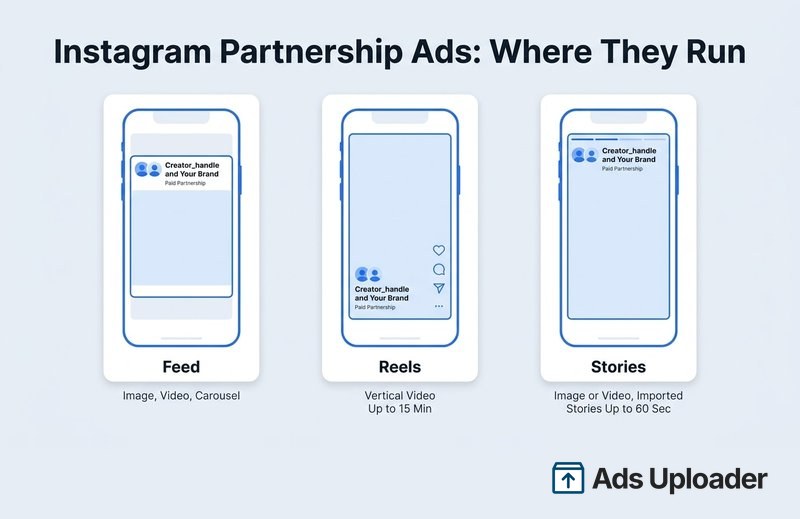
Instagram partnership ads run across the app's main ad inventory, and each placement has its own rules for imported creator content.
Feed. Single image, single video or carousel. Imported Feed posts run as they appear on the creator's profile, though reshared photo posts and posts with interactive elements Meta can't serve in an ad may be ineligible. If you're supplying your own media, a 4:5 or 1:1 version suits Feed.
Reels. Video only. An imported Reel has to be 15 minutes or shorter and published after October 15, 2021. Original audio and tracks from Meta's Sound Collection are the safe choices, because trending or licensed music that's fine organically may not be cleared for paid ads. GIFs, face effects and third-party camera effects can also block an import. In a Meta analysis of 15 A/B tests run in 2022 and 2023, adding partner-enabled Reels (9:16, sound on, inside the safe zone) to business-as-usual campaigns cut cost per result by 5% and lifted conversion rate by 11%.
Stories. Image or video, either an eligible creator Story or a new Story-format ad. An imported Story can run up to 60 seconds with no more than five supported stickers or tappable text elements, such as location, hashtag and mention stickers and a single countdown. Link stickers, product tags, reminder and GIF stickers, polls and third-party camera effects can block the import. A longer video or a poll may still work as a new Story ad built in Ads Manager.
Explore. Explore feed inventory is included in Meta's supported placements.
Meta lists supported objectives as Awareness, Traffic, Engagement, Leads, App promotion and Sales, though not every conversion location inside each objective works. Check Meta's supported objectives and placements for partnership ads before you lock a campaign structure.
Reels and Stories feel the most creator-native, and they also put the most interface on top of the video. If you're supplying your own 9:16 media, keep text, product shots and the creator's face clear of the handle, caption and buttons. Our guide to Meta ads safe zones has the exact margins.
Paid Partnership Label vs Partnership Ad
The paid partnership label is an organic disclosure the creator adds to a post when a brand has given them payment, product or commission. A partnership ad is paid media you create and fund from your ad account, and it also carries Meta's standard "Sponsored" disclosure.
Neither one creates the other. A labelled post can go unadvertised forever, and labelling a post doesn't give you the right to advertise it. It works the other way too: a creator can share an ad code for a post they never labelled, but if they were paid, they still owe the disclosure.
What You Need Before You Start
Line these up before anyone opens Ads Manager.
On the brand side:
- A Meta ad account where you can create and publish ads
- An Instagram professional account connected to your business portfolio and the Facebook Page the ad account uses
- A destination that fits your objective (website, app, lead form or messaging)
On the creator side:
- A public Instagram professional account (Creator or Business), not a personal or private one
- An authentic, established presence that meets Meta's eligibility requirements for partnership ads and branded content. Meta doesn't publish a follower threshold, and political entities face extra restrictions.
In writing between you:
- Usage rights covering the content, the creator's name and likeness, the duration, the territory and any spend cap
- Rights to the audio. Music a creator can use organically isn't always cleared for paid ads.
- Who moderates comments. Meta's help guidance says only the creator can delete comments on a partnership ad.
None of this needs the creator's login. Permission is granted from the creator's own account, so don't collect passwords.
Instagram Permissions: Post-Level Codes vs Account-Level Approval
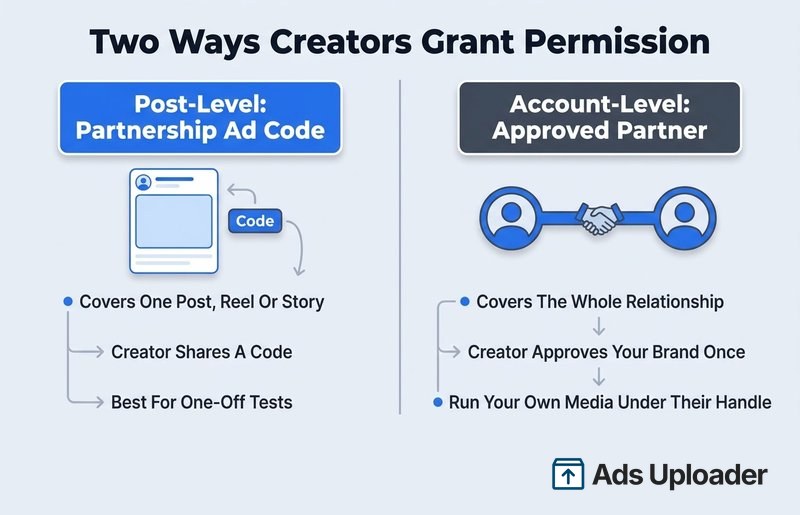
Every Instagram partnership ad rests on one of two permission models. The difference is scope: one post, or the whole relationship.
| Post-level (content) permission | Account-level permission | |
|---|---|---|
| What it covers | One specific post, Reel or Story | The relationship between the two accounts |
| How the creator grants it | Shares a partnership ad code, or turns on boosting for your brand on a labelled post | Approves your brand as an ad partner |
| Run the creator's existing post | Yes, that post only | Yes, eligible posts that tag or mention you |
| Run your own media under their handle | No | Yes |
| Creator audience targeting | No | Yes, where available |
| Best for | One-off tests and single deliverables | Ongoing creator programs |
Post-Level: The Partnership Ad Code
On Instagram, the creator opens the post's options menu, goes to the partnership label and ads settings, and turns on the option to get a partnership ad code. They copy the code and send it to you. The other content-level route needs no code: when the creator adds the paid partnership label, tags your brand and switches on permission for you to boost the post, it appears in your partner content in Ads Manager.
A code covers one piece of content. If the creator turns the code off, you can't build new ads with it, though Meta notes ads already running may continue. Deleting the post ends its use.
Account-Level: Approving the Brand as a Partner
Account-level permission is a standing relationship. You send a request from Meta's creator marketing tools (Creator Marketing Hub, which is replacing Creator Marketplace and the Partnership Ads Hub), and the creator approves it in the Instagram app under their partnership ads settings, where pending and approved ad partners are listed. Menu names vary by account while Meta migrates everything into Creator Marketing Hub, but the model is the same: one approval covers repeated campaigns, with no code per asset.
Marketers often call this arrangement creator whitelisting; on Meta, it runs through partnership ads. It's the route you need to run your own creative from the creator's handle and to build audiences from people who engage with the creator. Meta's guide to partnership ad permissions covers both models from the creator's side.
Two things to know before you rely on it:
- The creator can revoke it. Removing you as an ad partner can pause ads that depend on that permission.
- Only the creator can grant it. Reconnecting your own Facebook account doesn't create permission. The approval has to come from the creator's side.
Launch More. Click Less.
Upload hundreds of creatives at once, auto-match thumbnails to videos, and publish straight to your ad accounts through Meta's API.
Try Ads Uploader FreeNo credit card required • 7-day free trial
How to Set Up Partnership Ads on Instagram
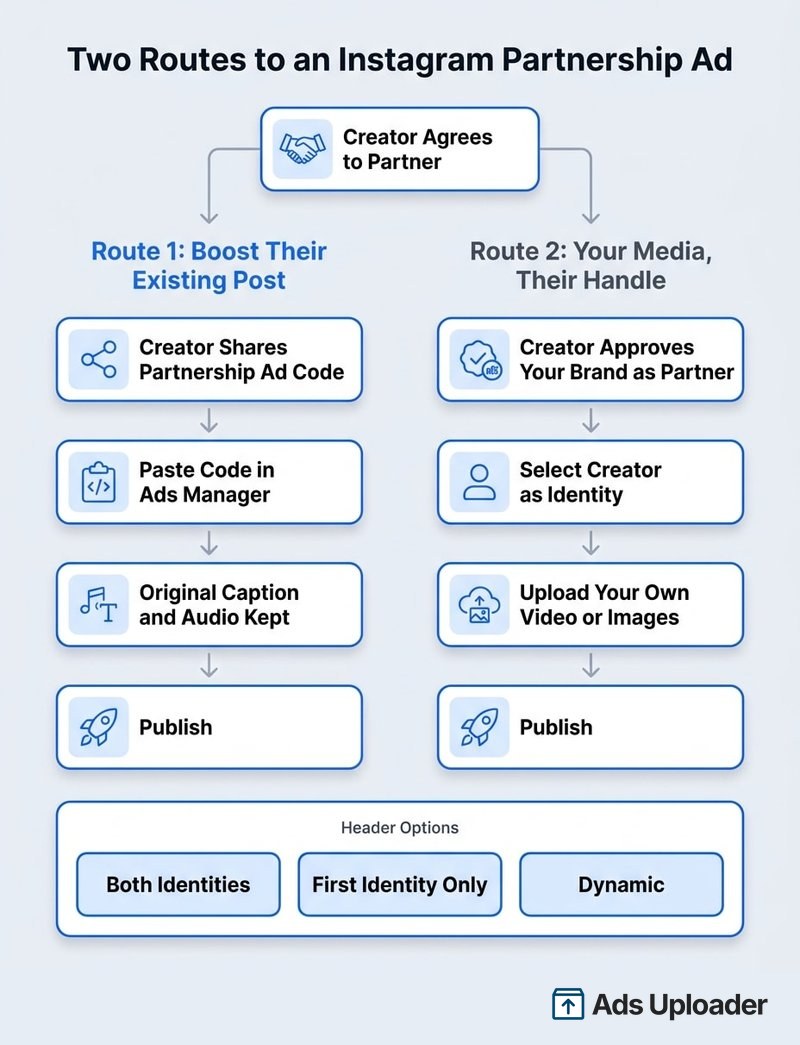
There are two routes. A code or boost permission opens Route 1; account-level approval opens both.
Route 1: Boost the Creator's Existing Instagram Post
Use this when the creator has already posted something that works and you want to put spend behind it as it is.
- In Ads Manager, click Create and choose a supported objective.
- Set up the campaign and ad set as normal: conversion location, budget, schedule, audience and placements.
- At the ad level, turn on the partnership ad option.
- Enter the creator's partnership ad code, or select the post from your partner content if you have account-level or boost permission.
- Check the preview to confirm it's the right post, then confirm the creator and brand identities.
- Choose how the header displays (more on that below).
- Add your destination, call to action and tracking.
- Preview each placement, then publish.
The creator's original caption becomes the ad copy, and a Reel keeps its original audio. Ask the creator not to edit the post while it's running.
Route 2: Run Your Own Media Under the Creator's Handle
Use this when you need control over hooks, copy, landing pages or aspect ratios. It requires account-level permission.
- Create the campaign and ad set.
- At the ad level, turn on the partnership ad option and select the creator and brand identities.
- Choose to create a new ad rather than use an existing post.
- Upload your media: image, video or carousel.
- Write the primary text, headline and call to action, and set the destination.
- Where placement customization is available, supply a 9:16 version for Reels and Stories and a 4:5 or 1:1 version for Feed.
- Preview Feed, Reels and Stories separately, then publish.
You don't need a new organic post from the creator for each variation, so you can test hooks, copy and landing pages as fast as you can produce them. That's why this route carries most ongoing creator programs.
Choosing the Header Display
Meta gives you three header options, documented in its help article on displaying accounts in the partnership ad header:
- Both identities in the header: creator and brand side by side. The most transparent option, with the clearest brand attribution.
- First identity only in the header: one account, whichever sits in the first identity slot. With a code, that's normally the creator. Check the preview to confirm which handle shows.
- Dynamic identity optimization: Meta predicts whether the single or dual header is more likely to perform and picks for you.
Dynamic identity optimization is documented mainly for Instagram, and some placements outside Instagram always show both identities. To learn what the header itself is worth, test it on its own: same media, same audience, same destination, only the header changes.
Running Partnership Ads on Instagram: Setup Choices That Matter
A few structural choices decide whether your partnership ads teach you anything.
Placements. Use Advantage+ placements when the goal is efficient delivery, and don't lock the campaign to Instagram by habit. In a four-day A/B test in March 2026, Meta found upper-funnel partnership ads running on both Facebook and Instagram averaged 18% more conversions and 5% lower cost per conversion than the same ads on Instagram alone. Switch to manual placements only when you need to isolate Feed, Reels or Stories for a test.
Partnership ads alongside your normal ads. Meta recommends adding partnership ads to business-as-usual campaigns rather than running them as a separate influencer flight. You can mix them into the same ad set (simplest, but Meta may give some creators very little spend) or put them in separate ad sets under one campaign (cleaner creator-level reporting, more fragmentation).
Creator audiences. With account-level permission, you can build a custom audience of people who engaged with the creator's Instagram account and include or exclude it. If you test a creator audience and a creator handle in the same cell, you're measuring both at once.
Naming. Put the creator, asset, header treatment and permission route in the ad name. When you're running ten creators across three placements, a name like PA_IG_CreatorName_Hook03_BothIDs_Code is what makes the reporting readable.
Instagram vs Facebook Partnership Ads
Partnership ads can run on both apps from the same campaign, with the same two permission models. The differences sit on the creator side:
- Eligible accounts. Instagram needs a public professional account. On Facebook, a Page or a profile in professional mode qualifies.
- Codes. Instagram creators have long been able to share codes for posts, Reels and Stories. Facebook added codes for its own content in late 2025.
- Identity and audiences. Dynamic identity optimization and creator audience sharing are both documented mainly for Instagram.
- Placements. Explore is Instagram's; Marketplace is Facebook's. Threads supports the organic paid partnership label but isn't a partnership ad placement.
Why an Instagram Partnership Ad Won't Launch
When Ads Manager won't publish an Instagram partnership ad, work through these in order.
- Account type. The creator is on a personal or private account. It has to be a public professional account.
- Wrong permission for the route. You have a code for one post but are trying to upload new media under the creator's handle. That needs account-level permission.
- Permission not actually granted. The creator tagged a different brand account, never toggled boost permission, or hasn't approved your pending request.
- Code or post changed. The code was turned off, the post was deleted, or the creator removed you as a partner.
- Wrong identity or ad account. The code is being used in a different business or ad account from the one the creator approved, or the identities are swapped.
- Creative that breaks the placement rules. An imported Reel over 15 minutes or published before October 15, 2021, a Story over 60 seconds or carrying link stickers, product tags or more than five stickers, or music that isn't cleared for ads.
- Unsupported objective or conversion location. Some combinations, calls being a common one, don't support partnership ads.
- Duplicated ad. An ad copied from an older one can carry stale permission data. Rebuild it fresh with the code.
If all of that checks out, cut the ad down to one known-good Instagram placement and try again, which tells you whether a single placement is the problem. If it still fails, note the ad account, the post URL or code and the exact error text before you contact Meta support.
Running Instagram Partnership Ads at Scale
In Ads Manager, partnership ads are built one at a time: one code, one ad, one identity check. That's fine for a single creator test. It gets slow when you're running IG partnership ads for a creator program with dozens of posts and several placements.
Ads Uploader handles both routes in bulk.
Existing Instagram posts, by URL or ad code. Open Import by Link, turn on Partnership Ads Mode, and paste Instagram post URLs or partnership ad codes, one per row. A post URL only works when you already have partnership advertising permission for that post, while a code carries the permission with it. Imported posts keep the creator's original caption, and the batch builds together. Facebook post imports aren't supported, so this route is Instagram content only.
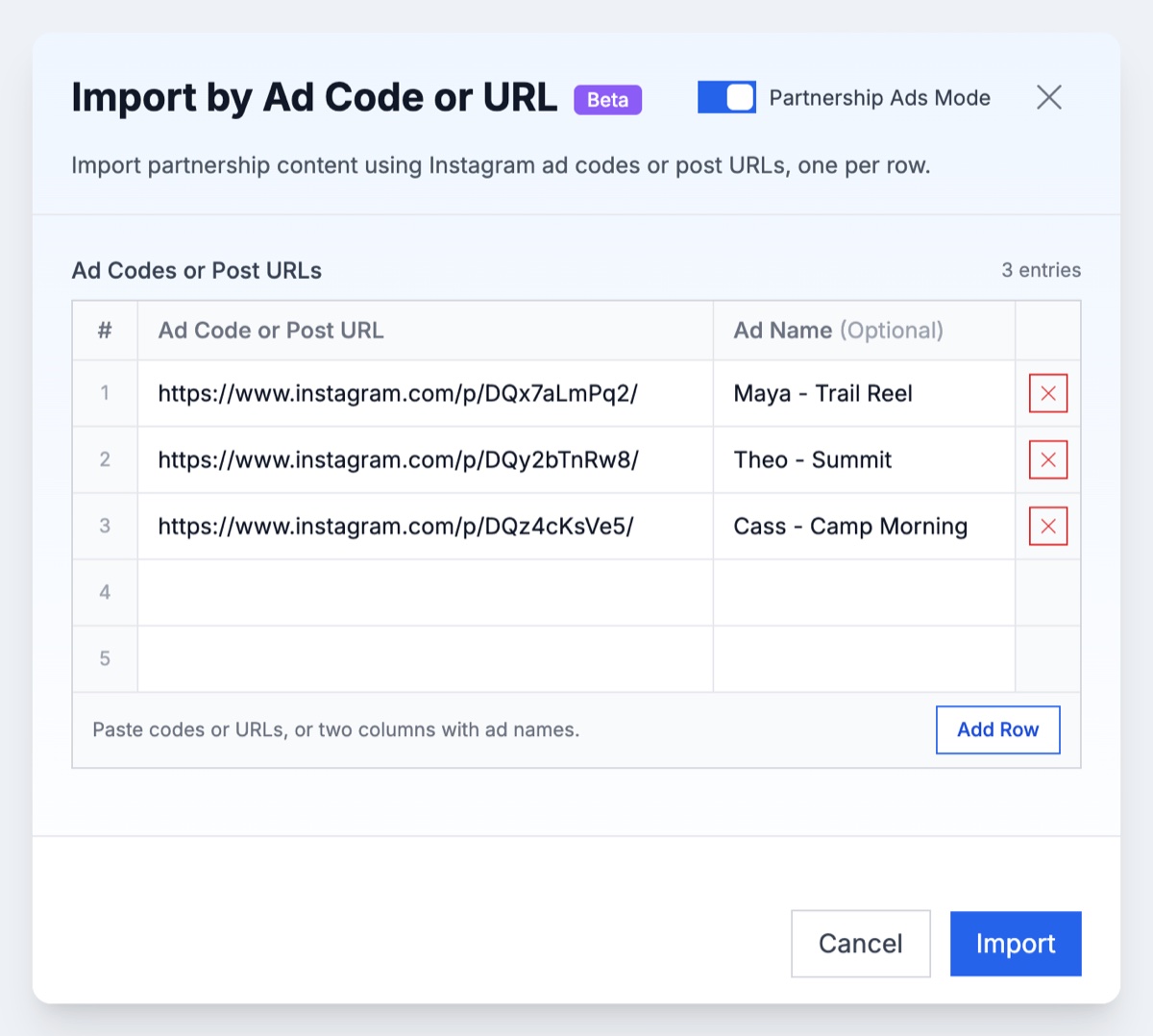
Each imported row shows the creator, the paid partnership label and the original caption, so you can check the batch before you build.
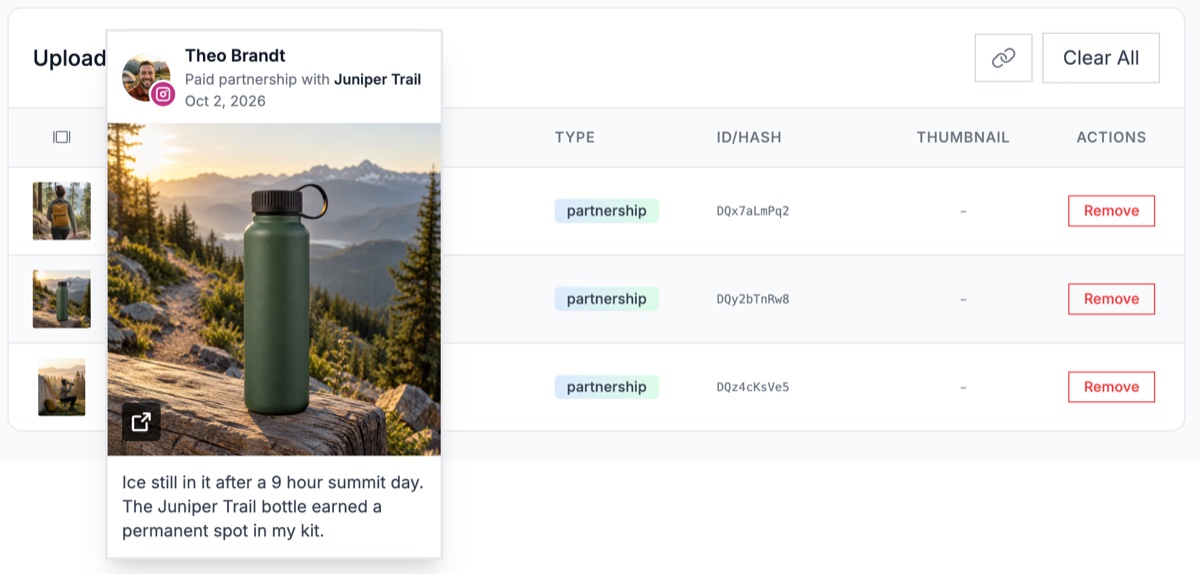
Dark posts from your own media. Switch Profile Options from Standard Ads to Partnership Ads, choose your brand as the First Identity and the approved creator as the Second Identity, and upload your own images or videos. The ads run from the creator's handle without the creator publishing anything to their profile. Pick the header display (both identities, first identity only, or dynamic identity optimization), and set a different creator per ad or per ad set if you're running several. The CLI and MCP server can launch the same uploaded-media partnership ads. The permission still comes from the creator either way.
Save Hours on Creative Testing
Stop uploading ads one by one. Bulk process unlimited creatives with automatic media matching and direct API publishing.
Try Ads Uploader FreeNo credit card required • 7-day free trial
Frequently Asked Questions
How Do I Run Partnership Ads on Instagram?
Get the creator's permission first, either a partnership ad code for one post or account-level approval for an ongoing relationship. Then create a campaign in Ads Manager with a supported objective, turn on the partnership ad option at the ad level, and either import the creator's post or select the creator as an identity for your own media. Choose the header display, preview each placement and publish.
How Do I Get Partnership Ads on Instagram?
The brand needs a Meta ad account and an Instagram professional account connected to its business portfolio. The creator needs a public Instagram professional account that meets Meta's eligibility rules for partnership ads and branded content, and has to grant your brand permission to advertise with their handle. Everything is built in the brand's Ads Manager, never by logging into the creator's account.
Do Instagram Partnership Ads Work in Reels and Stories?
Yes. Partnership ads run in Instagram Feed, Reels, Stories and Explore. Importing an existing creator post is stricter in Reels and Stories: a Reel must be 15 minutes or shorter and published after October 15, 2021, a Story must be 60 seconds or shorter with no more than five supported stickers, and the music has to be cleared for ads. If a creator's Reel or Story fails those rules and you have account-level permission, you can build a new ad from your own media under their handle instead.
Do I Need the Creator's Instagram Login to Run Partnership Ads?
No. The creator grants permission from their own Instagram account, by sharing a partnership ad code or approving your brand as an ad partner. You build and pay for the ad in your own ad account. Sharing passwords is unnecessary and creates security risk for both sides.
Can I Edit the Caption on a Creator's Post When Running It as a Partnership Ad?
Not when you import the post as it is. The creator's original caption becomes the ad copy, and the creator shouldn't edit the post while the ad runs. Some newer Ads Manager and Creator Marketing Hub flows allow ad-only edits, but availability varies by account. For full control over copy, landing pages or aspect ratios, get account-level permission and build a new ad with your own media under the creator's handle.
What's the Difference Between a Paid Partnership Label and a Partnership Ad?
The paid partnership label is an organic disclosure a creator adds to a post when a brand has given them payment, product or commission. A partnership ad is paid distribution the brand creates and funds from its own ad account. A post can carry the label without ever being advertised, and the label alone doesn't give the brand permission to advertise it.
Conclusion
Start with the permission, because it decides everything after it. A partnership ad code is enough to test one creator post that already performs. Account-level approval is what lets you run your own media under the creator's handle, build creator audiences and keep a program going without chasing a code for every asset.
A good first test is one creator, one code and one Reel or Feed post with proven organic traction, checked against the import rules before you build. If it beats your brand-handle ads, ask that creator for account-level approval and start building variations from your own media.