Creator whitelisting, also called influencer whitelisting or allowlisting, is a paid social arrangement in which a creator gives a brand permission to run ads from the creator's Facebook or Instagram identity. The ad shows the creator's name and profile photo, while the brand sets budget, targeting, copy and optimization from its own ad account. On Meta, whitelisting is delivered through partnership ads, using either a post-level partnership ad code or ongoing account-level approval, so the creator never has to hand over a login.
The creative brief says "whitelist the creator." The contract has a clause called "whitelisting rights." Then you open Ads Manager and there is no whitelisting button anywhere, just a toggle for partnership ads. Same job, two vocabularies, and the gap between them is where creator campaigns stall while everyone works out what to send to whom.
Everything below is whitelisting in the paid social sense. IT, email and network allowlisting share the word and nothing else.
What Is Creator Whitelisting?
Creator whitelisting is permission from a creator, or any partner such as a publisher or another brand, to deliver ads under that partner's Facebook or Instagram identity. Their handle and profile photo sit in the ad header. The money, the targeting and the optimization come from the brand's ad account.
Here's how control splits in a typical whitelisting deal:
| The brand controls | The creator provides |
|---|---|
| Campaign objective, targeting, placements, budget and bidding | Permission to use their identity on ads |
| Primary text, headline, CTA and landing page (within the contract) | The content, endorsement or appearance covered by the deal |
| Which authorized posts or new creative run | Platform approval for the chosen permission route |
| Testing, scheduling and optimization | Usage rights and any required disclosure |
Permission does not hand the brand the creator's account. A partnership permission on Meta doesn't give you the creator's login, their follower list or admin control of their Page. You get the ability to advertise with their identity, scoped to a post or to an approved relationship.
Creator Whitelisting, Influencer Whitelisting and Allowlisting
All three mean the same thing. "Whitelisting" is still the default in a lot of contracts, with "influencer" or "creator" in front depending on who's on the other side; "creator" fits UGC creators who aren't influencers in the follower-count sense. "Allowlisting" is a more inclusive term some brands and creators have started using. Meta uses none of them. Its product and documentation say partnership ads.
Whitelisted Ads vs Brand-Owned Ads vs Boosted Posts
Three kinds of ad can carry a creator's content, and they differ in whose name is on top and who runs the targeting:
| Brand-owned ad | Creator boosts own post | Whitelisted creator ad | |
|---|---|---|---|
| Identity in the ad header | The brand | The creator | The creator, or creator plus brand |
| Who pays and controls targeting | The brand | The creator | The brand |
| Can run new, unposted creative | Yes | No | Yes, with account-level permission |
| Optimizes for the brand's conversions | Yes | No | Yes |
A brand-owned ad using creator footage (UGC run from the brand's own Page) gets the creator's face but not their name. A whitelisted ad gets both, plus the brand's media buying behind it.
Whitelisting vs Partnership Ads
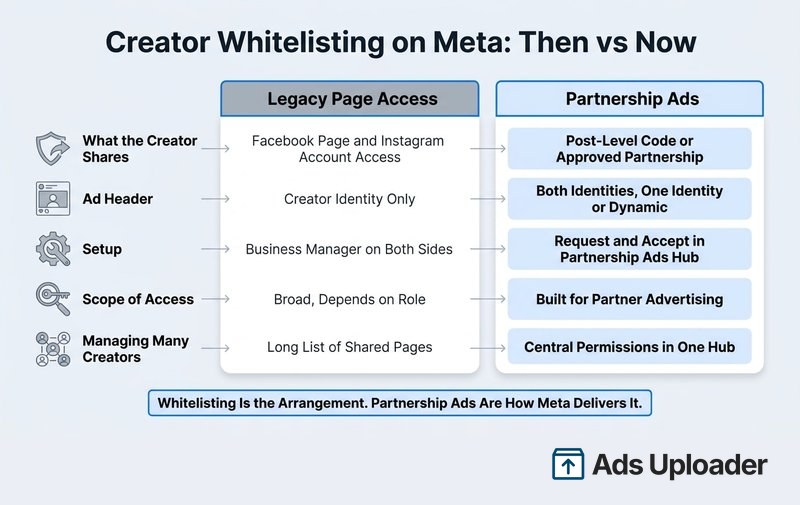
Whitelisting is the arrangement; partnership ads are how Meta delivers it. On Facebook and Instagram, you whitelist a creator by getting their permission and running partnership ads with their identity.
Meta's own definition in its partnership ads overview is that they let advertisers run ads with a creator's or partner's handle, which is exactly what marketers mean by whitelisting. You'll also see a third name in older contracts: Meta renamed branded content ads to partnership ads in May 2023. Same concept, new name.
When people talk about "whitelisting ads" and "partnership ads" as two different things, they're comparing the older shared-Page method with Meta's partnership route. Here's how the two differ:
| Shared Page access (older whitelisting) | Partnership ads (current) | |
|---|---|---|
| What the creator gives you | Access to their Facebook Page and Instagram account through Business Manager | A post-level code, a promote toggle on a branded content post, or account-level approval |
| What the ad header shows | The creator only, as a standard ad from their identity | Both identities, one identity or a dynamic mix, depending on your setting and the placement |
| How much access you get | Broad, depending on the role granted | Built for partner advertising, with no login or Page control |
| New creative without a creator post | Yes, as dark posts | Yes, with account-level permission |
| Setup | Business Manager on both sides | Request and accept in Meta's partnership tools |
| Running many creators | A growing list of shared Pages to govern | Permissions and partner content in one hub |
| How it ends | The creator removes your access to their Page | The creator removes the approved advertiser (dependent ads pause) or turns off a code (running ads continue until stopped) |
For most teams, partnership ads are the right default. Creators approve them from their own account, they expose far less than Page access, and they're built for running many creators at once. The shared Page route still works when a creator deliberately grants that access, and it's the way to keep the creator as the only name on every placement, since some placements always show both identities on a partnership ad.
First Identity, Second Identity and the Ad Header
Every partnership ad has two identities. The first identity is the primary Page or Instagram account in the ad setup. The second identity is the partner attached to it. Which account lands where depends on how you start: with a creator's post-level code, Meta normally fills in the post's author (the creator) as the first identity and you add your brand; under account-level permission, you start from your own identity and add the approved creator as the partner.
You then choose how the header displays. Meta's partnership ad header options include showing both identities, showing a single identity, or letting Meta pick the presentation dynamically. Some placements force a particular layout, so check every placement preview before you publish.
Is It Still "Whitelisting" if Both Names Show?
Some practitioners reserve "whitelisting" for ads where only the creator's handle appears and call the dual-header version a partnership ad. That split comes from the shared Page method, where the brand ran ads straight from the creator's Page. On a partnership ad, the header is a setting: both names, one name or Meta's dynamic choice, all under the same permission and the same deal. If creator-only presentation matters, test the single-identity header against both identities and check which placements fall back to the dual header.
How Whitelisting Worked Before Partnership Ads
Before branded content ads and then partnership ads became the standard route, influencer whitelisting usually meant sharing ad assets. The typical setup looked like this:
- The creator had a Facebook Page with their professional Instagram account connected to it.
- The brand or agency sent over its Business Manager ID.
- The creator added that business as a partner and shared their Page and Instagram account with advertising permissions.
- In Ads Manager, the media buyer selected the creator's Page and Instagram profile as the ad identity.
- The buyer ran ads from existing posts or uploaded unpublished creative, the classic "dark post."
That route still works. Meta's Page access settings let a Page owner give another person or business access that includes creating and managing ads, so if a creator deliberately shares their Page and Instagram account with your business, you can select them as a standard ad identity.
The friction was the problem. Creators who had never touched Business Manager had to set one up, find the right partner settings and grant access to assets they cared a lot about. Agencies running dozens of creators ended up with a long list of shared Pages to govern, and creators were wary of how broad that access was.
Why the Partnership Route Took Over
Partnership ads replaced shared assets with permissions built for one job, approved from the creator's own account. Meta then consolidated setup, partner content, permissions and troubleshooting into the Partnership Ads Hub in October 2024. In 2026 it began folding that hub and Creator Marketplace into a single Creator Marketing Hub, so depending on your account's rollout stage you may see either name.
Launch More. Click Less.
Upload hundreds of creatives at once, auto-match thumbnails to videos, and publish straight to your ad accounts through Meta's API.
Try Ads Uploader FreeNo credit card required • 7-day free trial
How to Whitelist a Creator on Facebook and Instagram
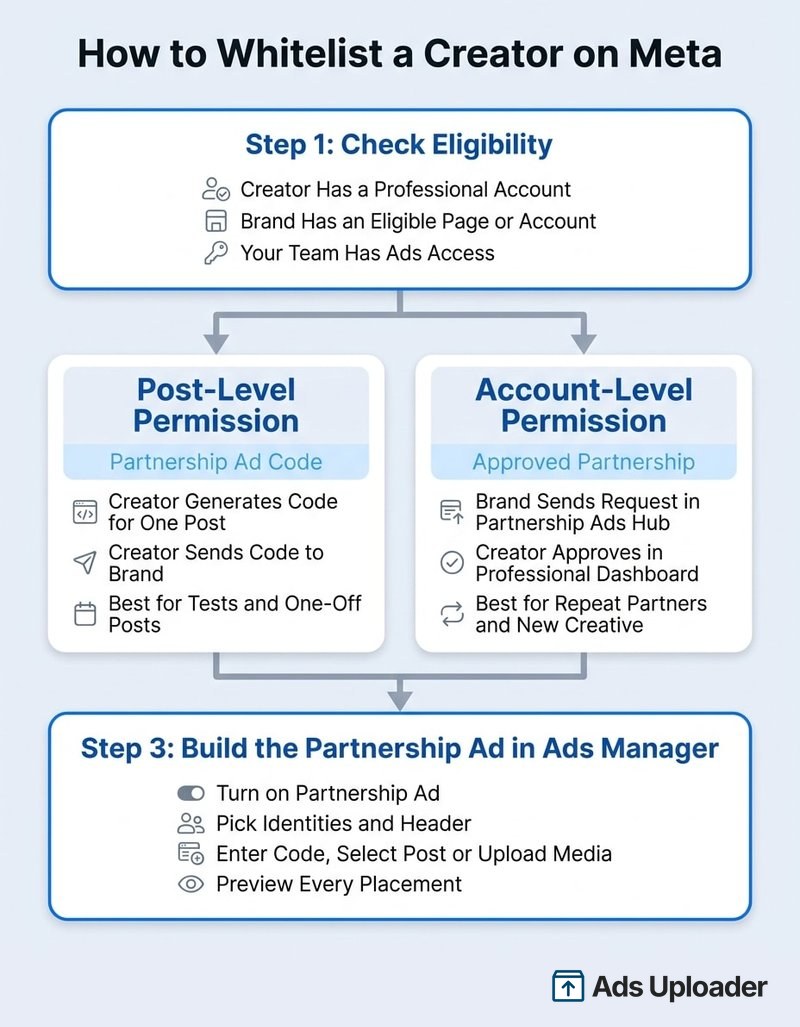
Meta documents partnership ad permissions at two levels, and picking the right one up front saves most of the back-and-forth with the creator.
Step 1: Check Eligibility on Both Sides
Before you send any request, confirm:
- The creator's Instagram account is public and set as a professional account (creator or business). Personal accounts can't grant permission for partnership ads on Instagram.
- The creator doesn't need a Facebook Page for Facebook placements. Without one, the ad shows their Instagram name and profile picture there, so check the Facebook previews before you publish.
- Your brand has an eligible Page or Instagram professional account, and your media buyer has Ads access to the ad account and to the brand identity.
- The product and content comply with Meta's Branded Content Policies.
Step 2: Choose Post-Level or Account-Level Permission
Post-level permission (partnership ad code). The creator generates a partnership ad code for one specific post, Reel or Story and sends it to you. You enter it when building the ad. Use this for one-off posts, short tests, or creators who want tight control. A code can be shared with up to two advertisers. On Instagram, a code can authorize eligible content even if it wasn't originally tagged as branded content, and Meta's December 2025 update confirmed that Facebook creators can share codes too.
There's a second post-level route for branded content: the creator tags your business as the paid partner and turns on the option allowing the business partner to promote the post. The post then shows up under partner content in Ads Manager.
Account-level permission (approved partnership). You request an ongoing partnership, the creator approves it, and you can create partnership ads with their identity without a new code each time. This is the route that lets you upload your own images and videos and run them under the creator's identity without the creator publishing anything. Use it for repeat partners and high creative volume.
Step 3: Get the Permission Granted
For a code, the creator opens the post's partnership ad settings, generates the code and sends it to you. For account-level permission:
- Open Partnership Ads Hub (or Creator Marketing Hub, depending on rollout).
- Search for the creator's Instagram account or Facebook Page and send the request.
- The creator approves it from their professional dashboard, under partnership ad permissions.
- Confirm the creator now appears as a selectable partner in your Ads Manager.
Reconnecting or re-authorizing your own Facebook or Instagram account does not grant creator permission. The approval has to come from the creator's account.
Step 4: Build the Ad in Ads Manager
- Create the campaign and ad set as normal.
- At the ad level, turn on the partnership ad option.
- Choose your identities and header display.
- Either enter the creator's code, select an authorized existing post, or upload new creative under account-level permission.
- Add copy, headline, CTA and destination within what the contract allows.
- Preview every placement, publish, then check the live ad shows the right identities.
Common Setup Problems
- The creator can't find the option: their account is personal or private, not professional.
- The code is rejected: it was generated for a different post or advertiser, it's been switched off, or it has already been shared with two advertisers.
- The creator isn't selectable: the account-level request is still pending or was approved on the wrong brand Page or business portfolio.
- A tag isn't permission: a mention, product tag or Collab post doesn't authorize you to advertise with the creator's identity.
Why Brands Run Whitelisted Creator Ads
A creator's face and handle at the top of an ad reads like a recommendation rather than a brand pitch, and the brand keeps full media-buying control. Whitelisted creator ads give you:
- Creator-native presentation that blends into Feed, Stories and Reels.
- Your targeting and optimization, so the ad reaches buyers who don't follow the creator and optimizes for your conversion events.
- Creative diversity, since a creator's voice, demo style and production look add different inputs to your account.
- Longer life for content, including Stories that would otherwise disappear after 24 hours.
- Faster iteration under account-level permission, because new cuts don't need a new organic post.
Meta has published its own numbers here. In a December 2025 announcement, Meta reported that in an experiment across roughly 2,400 advertisers in June 2025, adding partnership ads delivered 19% lower CPA and 13% higher CTR compared with running business-as-usual ads alone. An earlier Meta meta-analysis of 15 split tests from 2022 found 53% higher CTR and 19% lower CPA. Treat those as reasons to test, not guarantees.
Whitelisting has limits. A polished, high-production brand video looks odd coming from a creator's handle, and a weak hook doesn't improve because a different name sits above it. The format works best with lo-fi, person-led, phone-shot content that would plausibly come from the creator anyway.
What to Agree With the Creator Before You Launch
The Meta permission and the contract are two separate things, and they need to match. Usage rights are a legal license to use the content, name and likeness. Whitelisting is the platform access that makes the creator selectable in Ads Manager. A signed license doesn't make a creator appear in your partner list, and a partnership code doesn't grant copyright.
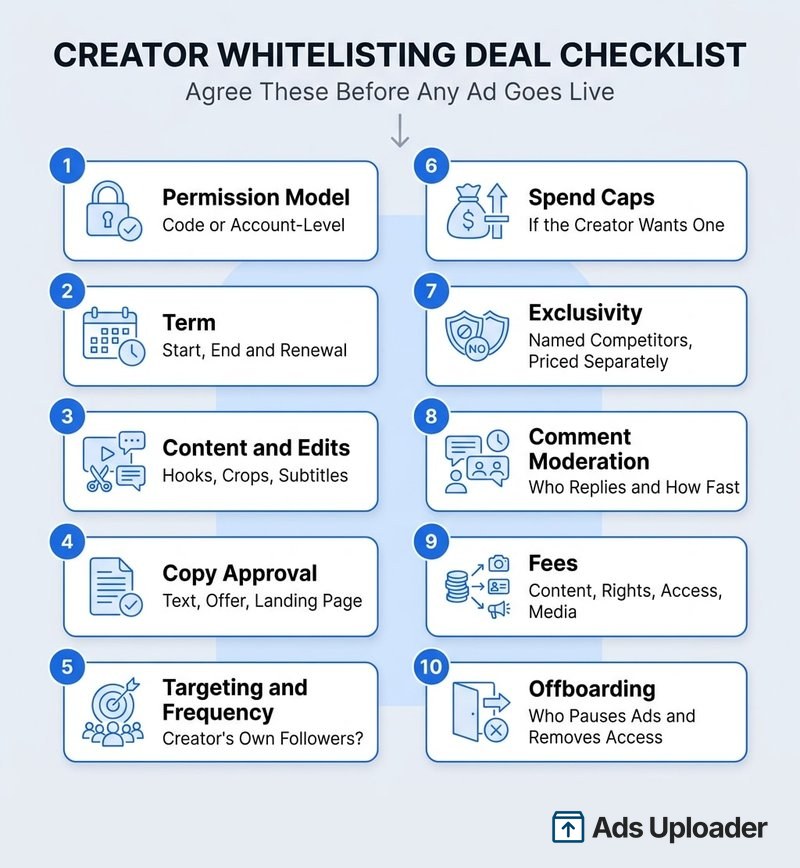
Write these down before any ad goes live:
- Permission model: post-level code for named posts, or account-level approval.
- Term: start date, end date and renewal terms. Common windows are 30, 60 or 90 days.
- Content and edits: which posts or files, and whether you can cut new hooks, add subtitles, re-crop or translate.
- Copy approval: who signs off primary text, headline, offer and landing page.
- Targeting and frequency: whether ads may reach the creator's own followers, and any frequency ceiling so their audience isn't hammered.
- Spend or exposure caps, if the creator wants one.
- Exclusivity: named competitor categories, duration and geography, priced separately.
- Comment moderation: who watches, hides and replies to comments on the ads, and how fast.
- Fees: itemize content, usage rights, whitelisting access and media. Published industry guides quote roughly 15-25% of the content fee for a first 30 days, 30-50% of the content fee per 30 days, or a flat monthly fee or 5-15% of ad spend, so there's no standard rate card.
- Offboarding: who pauses ads and removes permission when the term ends.
Offboarding needs its own line because the two permission types end differently. When a creator removes account-level permission, Meta's current interface warns that dependent ads will be paused. Turning off a partnership ad code only stops new ads from using it, and an ad already running on that code keeps running until someone stops it. Put the exact stop procedure in the contract so both sides know who does what.
Running Creator Whitelisting at Scale
One creator and a handful of ads is easy in Ads Manager. Twenty creators, each with several authorized posts and a partner identity to set per ad, is where it turns into a spreadsheet of codes and a lot of clicking. A few habits keep it manageable:
- Use account-level permission for repeat partners and codes for one-off tests.
- Keep a rights register with each creator's handles, permission type, codes, contract end date and renewal owner.
- Separate contract dates from platform permissions. An active Meta permission doesn't extend a contract, and a valid contract doesn't restore a removed permission.
- Test identity on its own: run the same creative as brand-only, creator-only and dual identity.
Building partnership ads one at a time in Ads Manager works, but it's slow at volume. Ads Uploader is a browser app plus a CLI and MCP server that builds whitelisted creator ads in bulk, two ways.
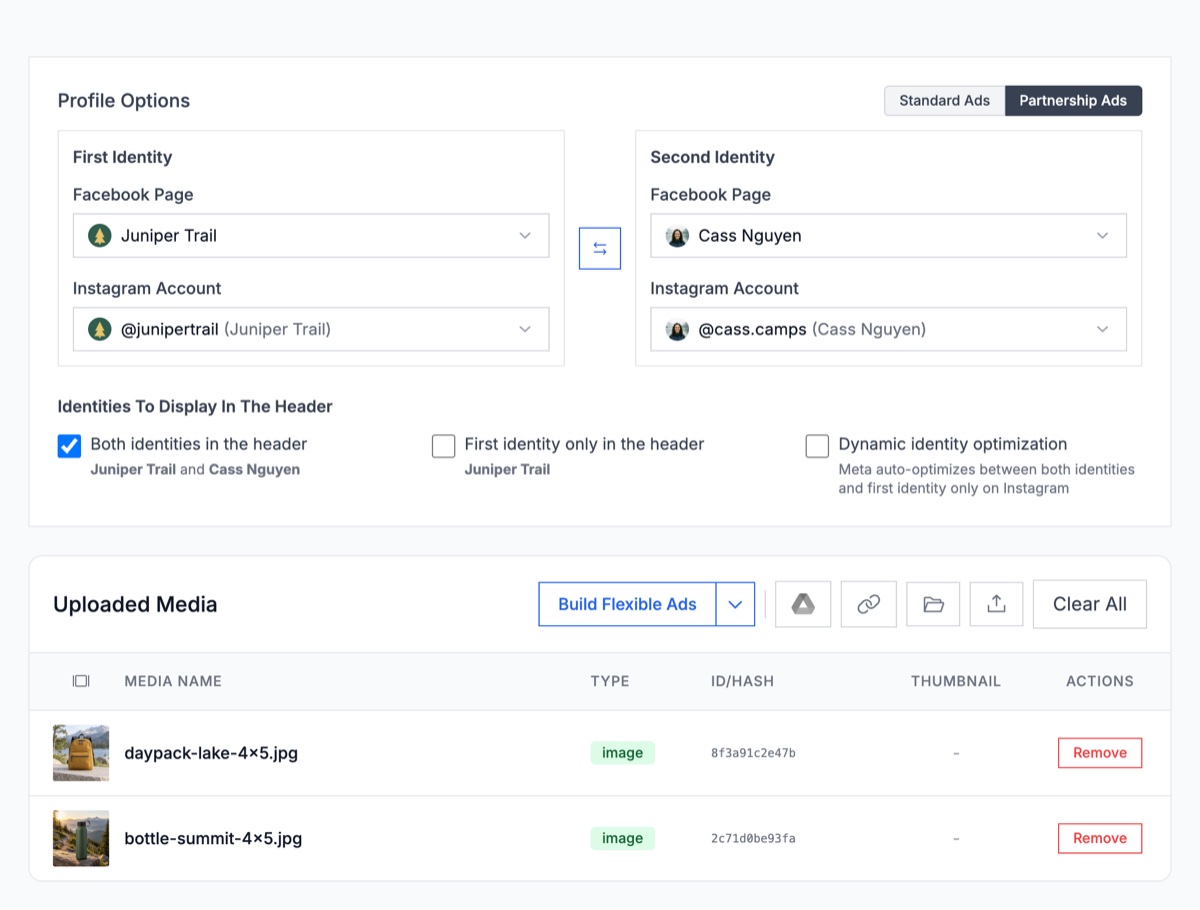
Dark posts from your own media. This is the closest match to classic whitelisting. Switch Profile Options from Standard Ads to Partnership Ads, choose your brand as the First Identity and the approved creator as the Second Identity, and upload the creative. The ads run from the creator's handle without the creator posting anything. Pick the header display (both identities, first identity only, or dynamic identity optimization), and set a different creator per ad or per ad set.
Creators' existing Instagram posts. Import by Link with Partnership Ads Mode on takes partnership ad codes or Instagram post URLs, one per row, and builds the batch together. A post URL only works where you already have partnership permission for that post, and imported posts keep their original caption.
The CLI and MCP server can launch the same uploaded-media partnership ads. The creator still has to grant the permission on Meta's side first.
Save Hours on Creative Testing
Stop uploading ads one by one. Bulk process unlimited creatives with automatic media matching and direct API publishing.
Try Ads Uploader FreeNo credit card required • 7-day free trial
Frequently Asked Questions
What Is Creator Whitelisting?
Creator whitelisting, also called influencer whitelisting or allowlisting, is an arrangement where a creator gives a brand permission to run paid ads from the creator's Facebook or Instagram identity. The brand pays for the media and controls targeting, budget, copy and optimization, while the ad shows the creator's name and profile photo. On Meta, whitelisting is delivered through partnership ads.
What's the Difference Between Whitelisting and Partnership Ads?
Whitelisting is the industry term for the arrangement and the permission behind it. Partnership ads are Meta's product for carrying it out, using a post-level partnership ad code or account-level approval. When people compare the two as different ad types, they usually mean the older method, where the creator shared their Facebook Page and Instagram account with the brand's Business Manager and the ads showed only the creator. Partnership ads need narrower permission and can show both names, one name or a dynamic mix.
How Do I Whitelist a Creator on Facebook?
Ask the creator for one of three permissions: a partnership ad code for a specific post, a branded content post where they allow you as the business partner to promote it, or account-level approval that you request in Partnership Ads Hub (Creator Marketing Hub in newer accounts) and they accept. Then build the ad in Ads Manager with the partnership ad option turned on and the creator selected as the partner identity.
Is Influencer Whitelisting the Same as Usage Rights?
No. Usage rights are a contractual license to use the creator's content, name and likeness. Whitelisting is the platform permission that makes the creator's identity selectable in Ads Manager. Most creator ad deals need both, and the contract term and the Meta permission should end on the same date.
How Much Do Creators Charge for Whitelisting?
There is no standard rate. Published industry guides quote roughly 15-25% of the base content fee for a first 30-day grant, 30-50% of the content fee per 30 days, or a flat monthly fee or about 5-15% of ad spend when the creator's identity gets heavy delivery. Price whitelisting access separately from content, usage rights and exclusivity.
Do Whitelisted Ads Appear on the Creator's Profile?
Only if the ad boosts an existing organic post, which stays on the creator's profile as it was published. Ads built from new media under account-level permission are dark ads: they run from the creator's identity but are not published to the creator's feed. They still appear in the Meta Ad Library.
Can a Creator Revoke Whitelisting Access?
Yes. A creator can remove an approved advertiser from their partnership ad permissions, which stops new ads and, per Meta's current interface, pauses ads that depend on that account-level permission. Turning off a partnership ad code stops new ads from using it, but an ad already running on that code keeps running until it is stopped separately.
Conclusion
On Meta, creator whitelisting comes down to one product and one early decision: which permission to ask for. The key points:
- Partnership ads are how you whitelist on Meta. The shared Page route still works, but it gives you broader access than the job needs and more admin to govern.
- Pick the permission first. A post-level code for single posts and tests, account-level approval for ongoing partners and your own uploaded creative.
- The header is a setting. Both names, one name or dynamic all sit under the same deal, and some placements always show both.
- Match the contract to the permission, including term, edits, comment moderation and the stop procedure.
- Volume is the real constraint. Once whitelisting works for one creator, the bottleneck becomes building and tracking dozens of partnership ads.
Start with one creator whose content already performs as a brand-run ad, get account-level approval, and test the same creative under brand-only and creator identities. If the creator version wins, you have a repeatable process to scale.