Facebook ads for ecommerce are Meta advertising campaigns that promote physical products across Facebook, Instagram, and connected placements, built on a synced product catalog and conversion tracking. Advertisers feed Meta's AI a product catalog, Pixel and Conversions API signals, and diverse creative, then let Advantage+ Sales campaigns find buyers with broad targeting. The 2026 stack centers on Advantage+ catalog ads, weekly creative refresh, and blended-margin measurement rather than platform ROAS alone. Done well, it turns product discovery into profitable, measurable online sales at scale.
For most online stores, Meta is still the largest paid discovery channel, and it is where a cold shopper first meets your product. The problem is that the playbook that worked in 2021 quietly stopped working. Granular interest stacking, one hero video running for two months, and judging success by the ROAS number inside Ads Manager: all three are now actively holding accounts back.
This guide is the current version. It walks the full funnel in the order you should actually build it, from tracking and catalog foundations through campaign structure, creative, targeting, retargeting, measurement, and scaling. It includes a dedicated section on Facebook ads for a Shopify store, real 2026 benchmarks, and the naming changes that trip people up. Everything here reflects how meta ads for ecommerce work today, not how they worked three platform updates ago.
Why Facebook Ads Still Work for Ecommerce in 2026
The short answer: reach and machine learning. Meta reported roughly 3.60 billion Family daily active people in June 2026, and among tens of thousands of tracked ecommerce brands it still captured about 67% of measured ad spend across the 2025 to 2026 window. That concentration is not nostalgia. It is where the buyers and the conversion signal are.
The honest part is that it costs more than it used to. In Triple Whale's August 2026 dataset of more than 40,000 brands, the median Meta CPM rose about 13% year over year and post-click conversion rate slipped slightly. Costs are climbing, so margin discipline matters more than it did when clicks were cheap. What offsets the rise is that Advantage+ Sales and improved conversion modeling now do the heavy lifting that manual targeting used to attempt, and they do it better at scale.
One terminology note before the tactics. "Facebook ads" is the common search phrase, but the accurate umbrella is "Meta ads," because a single campaign delivers across Facebook, Instagram, Messenger, and the wider network. For an online store the distinction rarely matters operationally: you build everything in the same Ads Manager regardless of the label.
Here is the current operator baseline for ecommerce, drawn from Triple Whale's 2026 benchmark study. Treat these as medians and ranges, not targets. A premium product with a long consideration cycle can be healthy below the benchmark click-through rate, while a low-price impulse buy may need a much lower cost per acquisition to work.
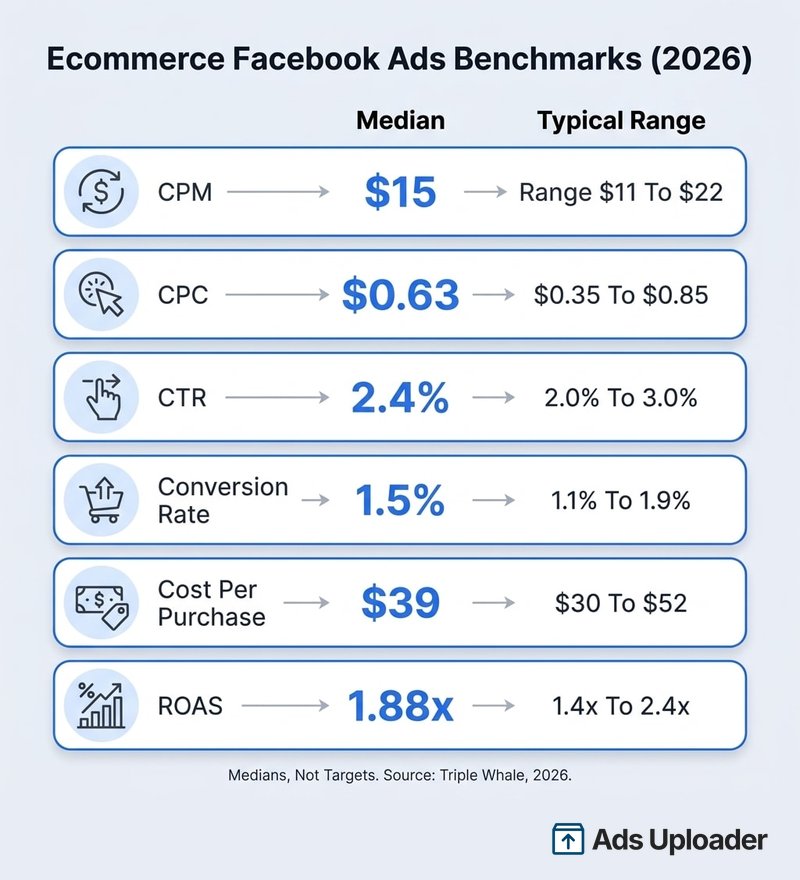
The number that actually decides whether ads work is not on that chart. It is your break-even ROAS, which equals one divided by your pre-ad contribution margin. A store with a 50% margin breaks even at 2.0x on the first order; a 40% margin needs 2.5x. So the 1.88x median ROAS in the benchmark can be comfortably profitable for one store and a slow bleed for another. Know your margin before you judge any campaign.
Set Up Your Tracking and Catalog Foundations First
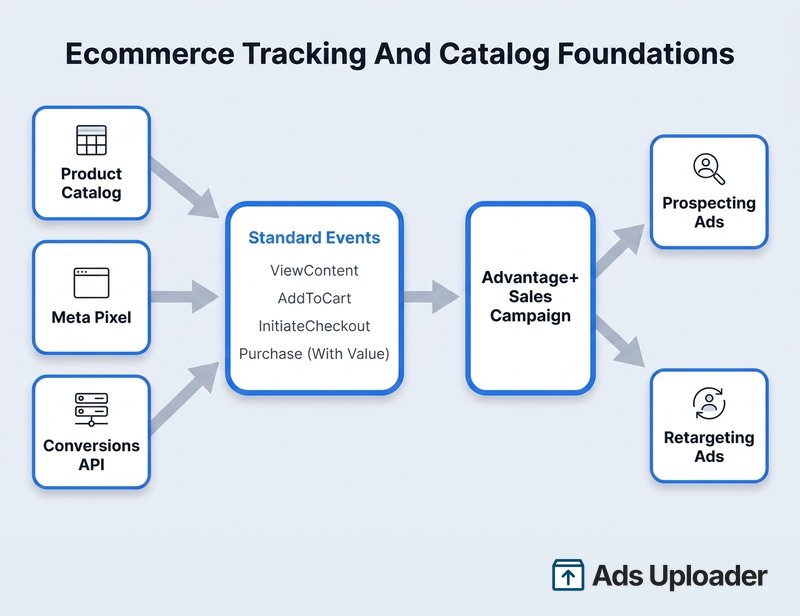
Skipping this section is the single most expensive mistake in ecommerce Facebook ads. If Meta cannot see purchases cleanly and cannot read your products, no amount of creative or budget will save the account. Build the plumbing first.
Install the Meta Pixel and Conversions API
Run both, not one. The Meta Pixel fires browser events and captures on-site behavior, while the Conversions API sends the same events server to server, where browser blockers and privacy limits cannot strip them out. Because the same purchase can arrive by both paths, you deduplicate: send the browser and server copies with the same event name and the same event ID so Meta counts one conversion, not two.
Do not expect a magic recovery percentage. Meta's own older studies reported figures like a 13% average improvement in cost per acquisition when advertisers paired the Conversions API with the Pixel, but that is a 2022 sample, not a guaranteed 2026 result. Set it up because it hardens your signal, and let the measured outcome speak for itself.
Build and Sync Your Product Catalog
Your product catalog is the engine behind the highest-performing formats. It is a structured feed of your items, prices, availability, and images that Meta reads to build Advantage+ catalog ads, the format formerly known as Dynamic Ads or DPA. Those ads use the catalog to rank and show relevant products to each shopper, whether prospecting to someone new or retargeting a person who viewed a specific item.
Keep the feed accurate and synced. A stale price, a missing image, or an out-of-stock item that still shows will burn spend and erode trust. If you run on a platform, let its native integration sync the catalog automatically rather than maintaining a manual spreadsheet. For discovery-led placements, collection ads pair a cover video with a grid of those catalog items.
Define Your Standard Events and Values
Track the full path, not just the final sale: PageView, ViewContent, AddToCart, InitiateCheckout, and Purchase. Send a real monetary value with the Purchase event so Meta can optimize for revenue and, later, for the value of the customer rather than raw purchase count. Value-based optimization is what lets the system chase your best buyers instead of your cheapest conversions.
How to Run Facebook Ads for a Shopify Store
Facebook ads for a Shopify store follow the same strategy as any other ecommerce account, but the setup path is specific, and getting it wrong quietly corrupts your data. Here is the current flow.
Connect the Facebook and Instagram Channel
Install the free Facebook and Instagram by Meta sales channel, then connect your Shopify store to Meta by linking the correct business portfolio, Page, Instagram account, ad account, and Pixel or dataset. In the channel settings, enable data sharing and choose a level: Standard uses the browser Pixel only, Enhanced adds the Conversions API, and Maximum uses the Pixel, the Conversions API, and Meta's latest supported technology. For most stores, Maximum is the right default.
Launch More. Click Less.
Upload hundreds of creatives at once, auto-match thumbnails to videos, and export directly to Meta Ads Manager.
Try Ads Uploader FreeNo credit card required • 7-day free trial
Verify Events and Product Sync
Shopify syncs eligible products into a shared Meta catalog automatically, usually within a few minutes of a change. Products must require shipping, carry a valid title, description, image, and Google Product Category, and comply with Meta's commerce rules. Before you spend anything meaningful, open Events Manager and confirm that ViewContent, AddToCart, InitiateCheckout, and Purchase are all firing, from both the browser and the server.
Common Shopify Tracking Pitfalls
A few issues account for most broken Shopify accounts:
- Duplicate Pixels. Remove legacy Pixel code from your theme after connecting the official channel. Old agency apps and hand-pasted snippets create duplicates that double count. In February 2025, Shopify began removing Pixels not configured through the official app, so migrate to the channel.
- The wrong dataset. Confirm that your campaign's conversion source is the exact dataset connected in Shopify, and that your catalog item IDs match the synced product or variant IDs.
- Value mismatches. Shopify's order-value events use the total checkout price including duties, taxes, and discounts. Reconcile that against your finance reporting so you are not comparing two different definitions of revenue.
- Consent conflicts. Make sure your cookie banner integrates with Shopify's Customer Privacy API, or browser events will fire inconsistently.
Build a Campaign Structure the Algorithm Rewards
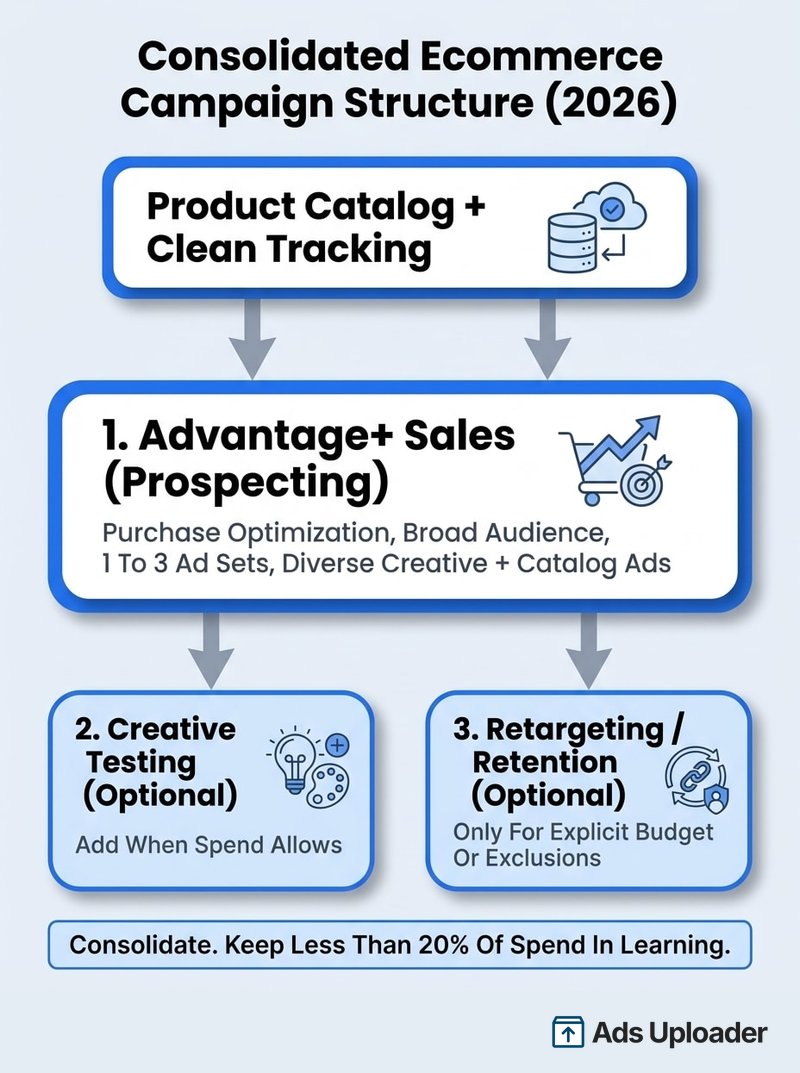
The 2026 pattern is simple: consolidate. The algorithm finds buyers when you give it room and volume, and it struggles when you fragment budget across a dozen micro-audiences. Meta's own Performance 5 guidance is blunt about this, noting that advertisers who keep less than 20% of spend in the learning phase have seen cost per purchase fall by as much as 68% in its internal analysis.
Consolidate to Advantage+ Sales for Prospecting
Advantage+ Shopping Campaigns were renamed Advantage+ Sales, and in the streamlined flow you generally no longer pick a separate manual versus Advantage+ path at the start. The recommended starting configuration for a store is the Sales objective with Purchase optimization, Advantage+ campaign budget, broad or Advantage+ audience, Advantage+ placements, and several diverse ads with catalog ads included where they fit.
One important change: the old existing-customer budget cap was removed in 2025. If you want to enforce new-customer-only delivery or split acquisition and retention budgets, build that manually with customer-list exclusions or with separate ad sets, rather than reaching for a control that no longer exists.
Add Retargeting and Testing Only When Needed
For most small to mid-sized stores, one primary Advantage+ Sales campaign with one to three ad sets is enough. Split ad sets only for materially different countries, margins, or product economics. Add a dedicated creative-testing ad set when your spend can support it, and add a separate retargeting or retention campaign only when you need an explicit budget, offer, or exclusion the primary campaign cannot enforce.
Create Ecommerce Ad Creative That Sells
With targeting largely automated, creative is now the main lever you control. The account that ships more distinct, genuinely different ideas usually wins, because it gives the algorithm more angles to match to more pockets of demand.
Formats That Convert
Lead with motion and authenticity. A short, native 9:16 video shot on a phone often outperforms a polished studio spot, because it looks like something a real customer would post. Build each concept around a clear hook in the first few seconds, then problem, solution, and proof. Rotate across formats: founder and customer stories, product demonstrations and comparisons, testimonials, objection handling, offer and bundle framing, static benefit ads, carousels, and catalog video.
Two product features are worth turning on. Advantage+ creative enhancements can adapt your uploaded assets with overlays, resizing, and generated variations, though you should review any generated text or background for wrong prices, claims, or product details. And catalog product tags connect the items shown in an ad directly to your catalog, which is money left on the table if you leave it off.
Save Hours on Creative Testing
Stop uploading ads one by one. Bulk process unlimited creatives with automatic media matching and direct API publishing.
Try Ads Uploader FreeNo credit card required • 7-day free trial
Creative Volume and Refresh Cadence
Volume is not busywork. Meta's 2025 creative analysis found roughly 29% lower incremental cost per conversion in Advantage+ test cells running more than 20 creatives versus lower-volume cells. Practical monthly targets: a smaller serious advertiser should aim for 12 to 20 genuinely different concepts, and a scaling account for 20 to 30 or more, keeping around 20-plus active, diverse ads only when the budget can actually deliver them.
Refresh on evidence, not a calendar. Watch for ad fatigue as a cluster of signals: rising frequency that coincides with falling click-through rate and rising cost per acquisition. A frequency near 3 is a useful watchpoint, not a hard cutoff, so refresh when the numbers turn, not on a fixed day.
Targeting: Go Broad and Let Meta Find Buyers
The instinct to narrow is the instinct to fight the machine. Meta recommends broad audiences and notes that ad sets of at least 2 million people often perform better, with 2 to 10 million a reasonable starting range where geography allows. Broad targeting plus strong creative lets the system find buyers you would never have picked by hand.
Interests, lookalike audiences, and custom audiences still exist, but inside Advantage+ Audience they act as suggestions that steer delivery rather than hard walls. Use a lookalike built from your best customers as a strong seed, not as a cage. Keep the controls that genuinely matter: location, language, minimum age, and custom-audience exclusions such as recent purchasers. Note that detailed-targeting exclusions were removed in March 2025, so suppression now runs through custom audiences.
Retargeting and the Full Funnel
Think in stages, but do not over-build them. Discovery runs on broad Advantage+ Sales with strong problem-aware creative. Consideration leans on demonstrations, comparisons, reviews, and objection handling. Conversion is where catalog ads shine, showing viewed or carted products with accurate price and availability. Retention uses customer-list audiences for replenishment and launches when repeat-purchase economics justify separate spend.
The trap is a large standalone retargeting campaign. Advantage+ Sales already mixes prospecting with warmer delivery, so a big separate retargeting budget often pays to reach people the primary campaign would have converted anyway. Keep retargeting proportional to real traffic, and judge it with incrementality in mind, because warm-audience ROAS frequently claims sales that would have happened without the extra ad.
Measure What Actually Matters
Platform ROAS is a delivery signal, not a verdict on profit. It is governed by Meta's attribution window and model, and other channels can claim the same order under their own models. In March 2026 Meta also narrowed click-through attribution for conversions toward link clicks and moved other interactions into engage-through attribution, so the reported numbers shifted again.
Use a store-owned hierarchy instead of a single number:
- Platform metrics (CPM, CTR, Meta CPA, Meta ROAS) for ad-level diagnostics.
- New-customer metrics (new-customer CAC and ROAS) from your own records.
- Blended metrics (total revenue over total ad spend) as a reality check.
- Profit metrics (contribution after fulfillment, fees, returns, and acquisition).
- Incrementality (holdout or geo tests) to answer what would not have happened without the ads.
Terminology varies between tools, so always publish the formula next to the metric. The point is to make decisions on contribution after acquisition, and to include repeat-purchase value only once you have actually observed it, never to let projected lifetime value paper over a first-order loss.
Scale Without Breaking the Learning Phase
Scaling is where good accounts get wrecked by impatience. Every ad set needs roughly 50 optimization events within seven days to stabilize learning, and large edits can reset that clock. The popular rule of raising budgets about 20% every three to four days is a practitioner heuristic, not official Meta policy, but it captures the right idea: move gradually and let delivery settle.
Scale in two directions. Vertical scaling raises a winning campaign's budget slowly while new-customer CAC and contribution stay inside your guardrails. Horizontal scaling adds genuinely different creative, products, offers, or geographies, rather than cloned ad sets competing for the same demand. Introduce cost or ROAS goal controls only after you have stable volume, and remember that a cost cap can restrict delivery but cannot make an unprofitable offer sell.
Common Mistakes to Avoid
Most struggling ecommerce accounts share the same handful of errors:
- Over-segmenting interests into audiences too small for the algorithm to optimize.
- Running creative too long, then blaming the platform when frequency climbs and results fall.
- Ignoring the post-click experience, sending a 2% click-through ad to a generic collection page that converts at 1%.
- Judging profit by Meta ROAS alone, which over-credits conversions other channels also claim.
- Scaling before the offer is proven, or increasing budgets so aggressively that campaigns never leave learning.
- Leaving duplicate Pixels or catalog errors in place, quietly poisoning the data the whole account depends on.
Putting It All Together
Facebook ads for ecommerce reward operators who build in the right order and measure against their own margins. Get the foundations right first: Pixel and Conversions API with clean deduplication, a synced product catalog, and accurate purchase values. Then consolidate into Advantage+ Sales, feed it broad targeting and a steady stream of diverse creative, and add retargeting or testing only when the account actually needs it.
From there, the work is discipline. Refresh creative on evidence of fatigue, scale gradually so you never break the learning phase, and judge every decision by contribution after acquisition rather than the ROAS number inside Ads Manager. The platform is more expensive than it was, but for a store with real margin and a repeatable creative pipeline, meta ads for ecommerce remain the most scalable way to turn product discovery into profitable sales. Build the system once, and it keeps paying you back.
