Facebook collection ads are a mobile ad format that pairs a cover image or video with a grid of product tiles beneath it on Facebook and Instagram. Tapping the cover opens a full-screen Instant Experience where people browse and buy without leaving the app. The cover uses a 1.91:1 to 1:1 ratio at 1080x1080 minimum, with 125-character primary text and a 40-character headline. An Instant Experience is required. The format suits ecommerce catalog ads guiding shoppers from discovery to purchase.
Most advertisers scroll past the collection format because it looks like more setup than a single image. It is, slightly. It also turns one ad unit into a mini storefront that loads instantly inside the app, which is a very different job than a single creative asking for a click.
The problem with learning the format is that the guides ranking for it are either Meta's own thin pages or third-party posts written in 2019 to 2024, several of which now list specs that no longer match what you see in Ads Manager. Meta also moved where you select the format in March 2026, so a lot of step-by-step tutorials now point at a button that is not there anymore.
This guide fixes that. Here is what Facebook collection ads are, the current 2026 specs, when to reach for them over a carousel or a catalog-powered ad, and how to actually build one today.
What Are Facebook Collection Ads?
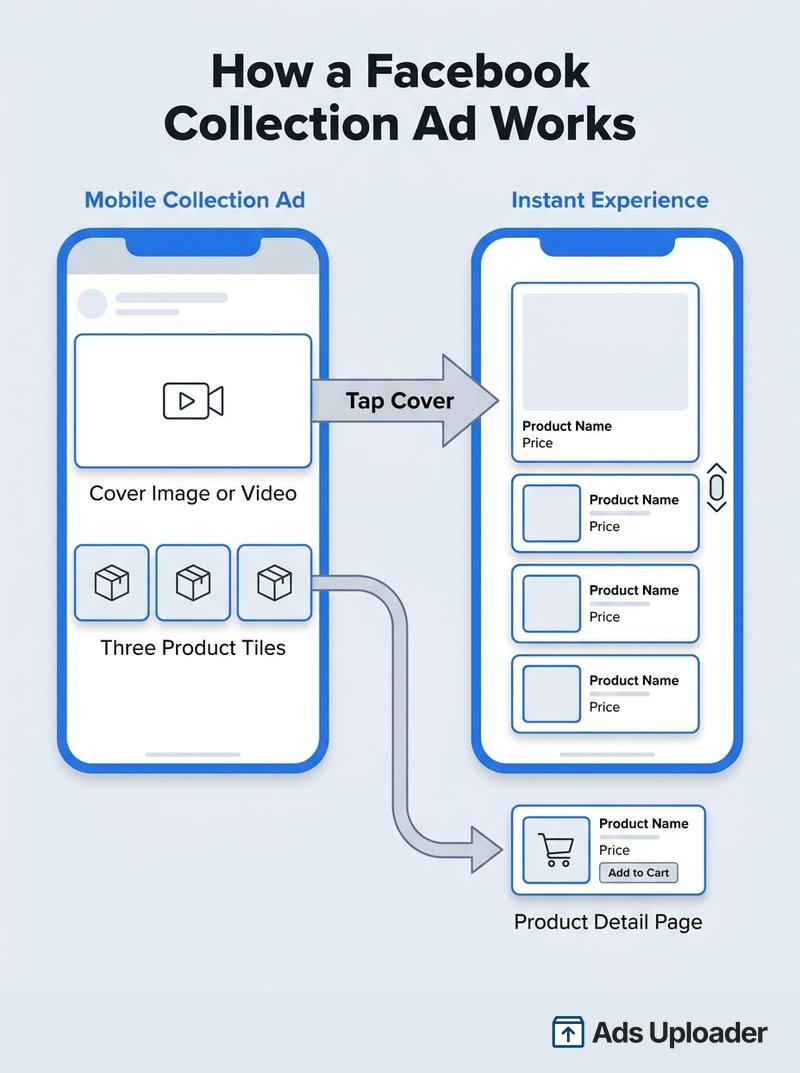
A Facebook collection ad is a mobile commerce format made of three parts: a large cover image or video, a row of smaller product tiles below it, and a full-screen Instant Experience that opens when someone taps the cover. Tapping an individual product tile can instead send the shopper to that product's detail page on your site. Meta notes that the exact behavior varies by placement.
The cover is usually the first image or video from the attached Instant Experience, so the ad and its landing destination share a visual thread. That continuity is the point: the cover earns the tap, and the Instant Experience gives people room to browse without a slow jump to a mobile website.
One detail worth correcting up front, because nearly every older guide gets it wrong: Facebook Feed now shows a cover plus three product tiles, not four. The four-tile figure came from Meta's 2017 launch materials and stuck around in third-party posts long after the Feed spec changed. The number of visible tiles depends on where the ad runs:
- Facebook Feed and Instagram Feed: cover plus 3 product images
- Instagram Stories: cover plus 2 product images
- Instagram Reels: cover plus up to 3 smaller, scrollable products
- Facebook Marketplace: 1 to 2 swipeable product images
Collection ads are mobile only. Meta's current placement documentation states plainly that the format appears in mobile placements and not on desktop, which makes sense given the Instant Experience is a mobile-first destination. If desktop delivery matters to a campaign, collection is the wrong tool.
There is no separate charge to build a collection ad or its Instant Experience. You pay through the normal Meta auction and your campaign budget, the same way you would for a single image or carousel ad. Cost moves with your objective, audience, bidding, competition, and ad quality, not with the format you pick.
How Collection Ads Work With Instant Experience
The Instant Experience is what separates collection from every other format. It is Meta's full-screen, fast-loading destination that opens when someone taps your ad on a phone. It can hold images, video, text, buttons, links, and catalog products, and it behaves like a landing page that lives inside Facebook or Instagram.
For the record, the Instant Experience is a Meta product, not a Google one. A few widely read guides describe it as a Google service, which is simply incorrect. It launched as Facebook Canvas in February 2016 and was renamed Instant Experience in 2018.
The flow is straightforward. The collection ad captures attention in the feed, the tap opens the Instant Experience for browsing, and product links carry the shopper to a product page or app to finish the purchase. Discovery, browsing, and checkout sit in one sequence instead of three disconnected steps.
Instant Experience Templates
When you build the destination, Meta gives you prebuilt templates plus a custom option. These are the templates currently exposed in the collection creation flow:
| Template | Best For | Notes |
|---|---|---|
| Storefront | A mobile storefront for browsing a group of products | Available across placements |
| Customer Acquisition | Introducing a brand or offer with conversion-focused content | Available across placements |
| Lookbook | Connecting lifestyle imagery to tagged, shoppable products | Not compatible with Instagram placements |
| Digital Circular | Promoting current offers, often to drive local store activity | Not compatible with Instagram Reels |
| Custom | A manually assembled experience using supported components | Most control, most effort |
The template list you see can differ slightly by placement and workflow. Instagram placements, for example, expose Storefront, Customer Acquisition, and Custom, but not Lookbook. The safest approach is to pick a template, then confirm in the preview that it is available for the placements you selected.
One reporting change to keep in mind: since June 2025, Meta no longer counts the opening of an Instant Experience as a landing page view. If you compare campaign reports from before and after that date, the landing page view metric has a definition break, so do not read a drop there as a performance decline.
Launch More. Click Less.
Upload hundreds of creatives at once, auto-match thumbnails to videos, and publish straight to your ad accounts through Meta's API.
Try Ads Uploader FreeNo credit card required • 7-day free trial
Facebook Collection Ad Specs (2026)
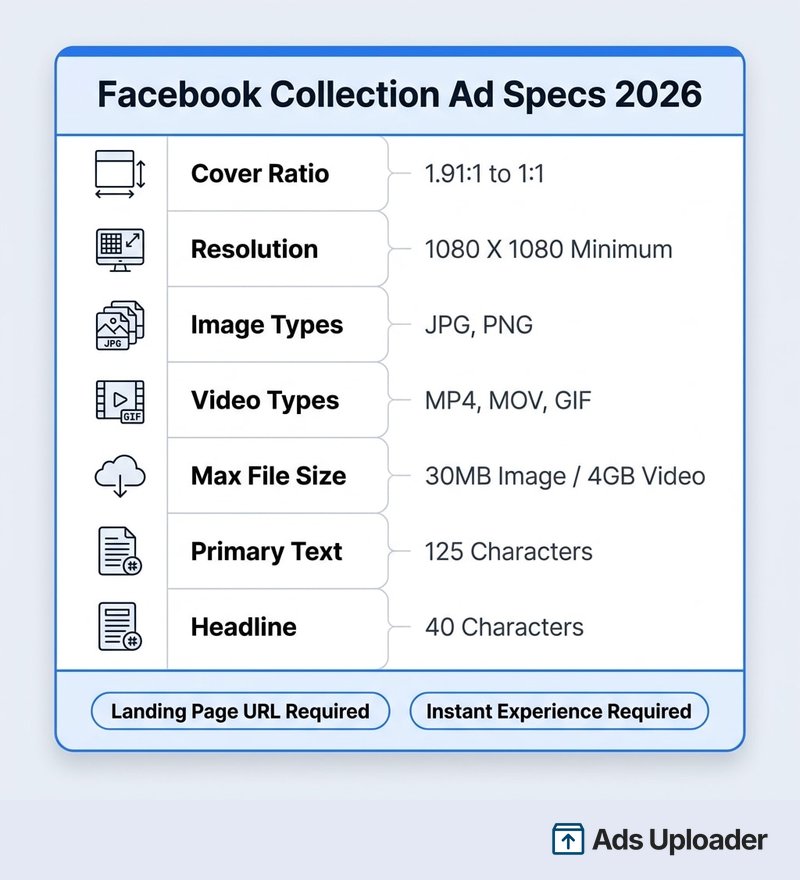
Here are the current cover specifications for Facebook Feed, taken from Meta's live Ads Guide. When third-party numbers conflict with these, trust these.
| Field | Current Meta Specification |
|---|---|
| Image types | JPG or PNG |
| Video types | MP4, MOV, or GIF |
| Cover ratio | 1.91:1 to 1:1 |
| Recommended resolution | At least 1080 x 1080 pixels |
| Maximum image size | 30MB |
| Maximum video size | 4GB |
| Primary text | 125 characters recommended |
| Headline | 40 characters recommended |
| Landing page URL | Required |
| Instant Experience | Required |
The 125-character and 40-character figures are display recommendations rather than hard input caps. Longer copy may be accepted, but Meta can truncate it, so write to the recommended length and treat the placement preview as the final word on how your text renders.
Specs shift by placement. Instagram Feed uses the same file types, ratios, and limits but displays only the primary text. Instagram Reels recommends a 9:16 cover, lists a lower minimum resolution, and does not accept GIF. Facebook Marketplace leans image-first with a 1:1 cover and a shorter 25-character headline recommendation.
You will still find older guides listing four product tiles, a 25-character headline, 90 characters of body copy, a 1200 x 628 image, and a 16:9 cover. Those are outdated as the general Facebook Feed spec. The current Feed values are three tiles, 125-character primary text, a 40-character headline, at least 1080 x 1080, and a 1.91:1 to 1:1 cover. The one exception is the 25-character headline, which is still current for Facebook Marketplace, so context matters.
What Changed in March 2026
Three changes landed in March 2026, and none of them appear in the guides currently ranking for this topic.
First, collection is no longer a standalone choice in the Ad setup format selector. Meta moved it into Ad creative, under Format display options. You now begin with a single image or video, or a carousel, then enable the collection presentation from there. Any tutorial that tells you to click Collection next to Single image and Carousel is describing the old interface.
Second, the visible URL was removed from the ad footer for all single-media and Advantage+ catalog collection ads in Facebook Feed. This applies to Facebook Feed specifically, it affects the displayed footer URL only, and it does not remove your product tiles or destination links.
Third, ads that used to carry a "Sponsored" label now display an "Ad" label on both Facebook and Instagram. It is a cosmetic transparency change, but it is worth knowing if you screenshot ads for reporting or QA.
When to Use Collection Ads vs Other Formats
Collection is not automatically the best format, and it is worth being honest about that. Aggregate agency data from creative platform Confect, published in 2025, found collection ads produced a 20% higher click-through rate than the account average but an 11% lower ROAS and a 4% higher cost per acquisition. Higher engagement did not guarantee better returns. The same dataset found the picture changed sharply once a catalog was attached, which is the real lever and something covered further down.
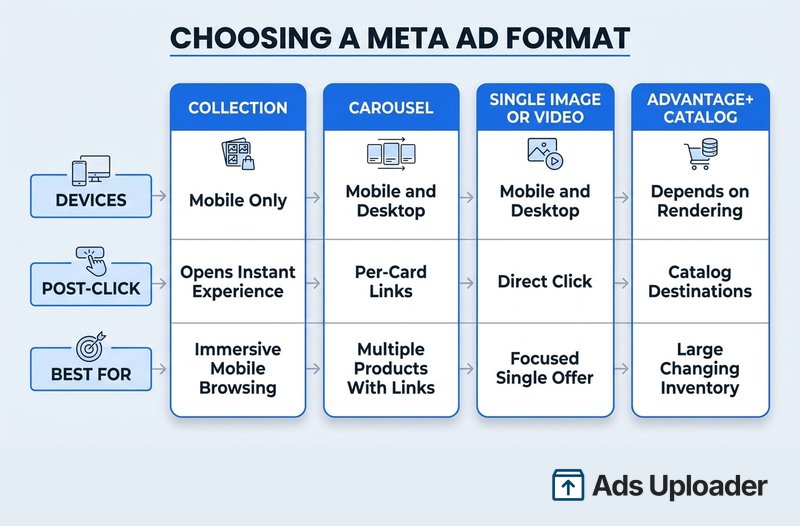
So treat the format as a deliberate choice, not a default. Here is how the main Meta formats compare.
| Format | Structure | Devices | Post-Click | Best For |
|---|---|---|---|---|
| Collection | Cover plus product tiles, Instant Experience required | Mobile only | Cover opens Instant Experience; tiles can open product pages | Immersive mobile browsing, curated ranges, catalog merchandising |
| Carousel | Multiple swipeable cards with per-card links | Mobile and desktop | Each card links to its own destination | Several products, benefits, or steps with direct links |
| Single Image or Video | One primary asset, one message | Mobile and desktop | Direct click to your website or app | Focused offers, simple messages, clean creative tests |
| Advantage+ Catalog | Automated catalog product selection | Depends on rendering | Sends people to relevant catalog destinations | Large or changing inventories, personalized delivery |
Reach for collection when the campaign needs a browsing step before the product page, when several related products belong under one concept, or when lifestyle imagery should connect directly to shoppable items. It rewards advertisers with a real assortment to show.
Choose carousel when each item or message needs its own visible, independently linked card, when desktop delivery matters, or when you want tight control over creative order without an intermediate full-screen experience.
Choose a single image or video when one product or offer should dominate, when the cleanest path is a direct click, or when you want the simplest possible creative test with the fewest variables.
Use Advantage+ catalog as the product-selection layer, not as a competing look. Catalog automation can power a collection, a carousel, or single media, so it is the engine, and the format is the body it drives.
Save Hours on Creative Testing
Stop uploading ads one by one. Bulk process unlimited creatives with automatic media matching and direct API publishing.
Try Ads Uploader FreeNo credit card required • 7-day free trial
Collection vs Carousel
This is the comparison people search for most, so it is worth stating cleanly. Both formats show multiple products in one ad. The difference is what happens after the tap. A carousel sends each card to its own link, keeping people moving toward specific destinations. A collection opens an Instant Experience, keeping people inside an app-native browsing session before they reach a product page. Carousel is a router. Collection is a storefront. Neither is better in the abstract, they just answer different questions.
How to Set Up a Facebook Collection Ad
Before you build, get the prerequisites in place: a cover image or video, an Instant Experience or the content to create one, at least four products (manual images or catalog items), and product destination URLs. A Commerce Manager catalog and product set are optional for a manual collection but required for dynamic selection.
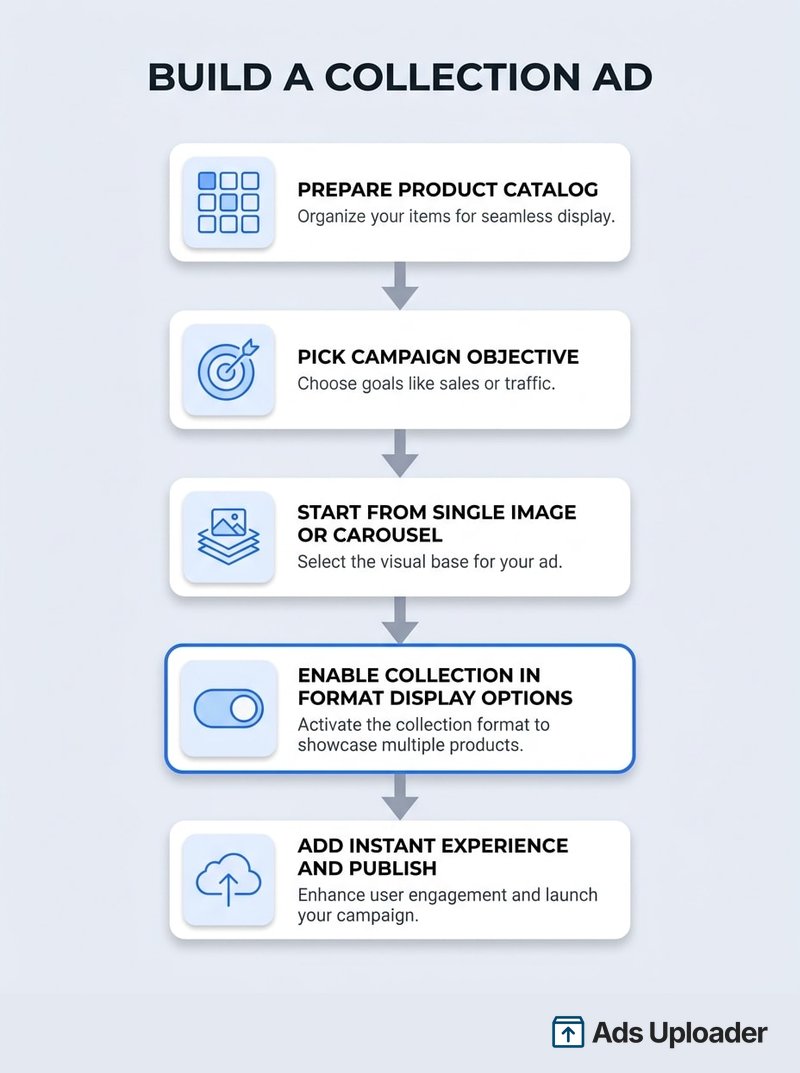
Here is the current Ads Manager flow, updated for the March 2026 interface.
- Create the campaign. Pick an objective: Awareness, Traffic, Engagement, Leads, or Sales. Sales is the common choice for ecommerce.
- Configure the ad set. Select an eligible conversion location and performance goal. The available locations vary by objective, and this matters more than it sounds (see the note below).
- Choose placements. Use eligible mobile placements, or Advantage+ placements if the preview looks right. Remove incompatible placements if you use Lookbook or Digital Circular.
- Choose the base ad setup. At the ad level, start with Single image or video, or Carousel. Collection is no longer a top-level Ad setup option.
- Attach the Instant Experience. Select an existing one or choose Create new, then pick Storefront, Customer Acquisition, Lookbook, Digital Circular, or a Custom workflow.
- Add the creative. Supply the cover, primary text, headline, destination, and product content.
- Configure products. For a catalog campaign, select the catalog and product set, and enable Order dynamically so Meta ranks the best two to four products. For a manual collection, upload at least four products and arrange them deliberately. If you started from a carousel, Meta's workflow asks for at least five cards before it applies the collection display option.
- Select Collection under Ad creative, Format display options. This is the step the old tutorials miss.
- Preview every placement. Check crops, product order, text truncation, Reels safe zones, and the path from cover to Instant Experience to product page. Meta may adapt product imagery to 1:1 or 4:5.
- Publish and check reporting. Remember that Instant Experience opens have not counted as landing page views since June 2025.
A common snag deserves its own callout. If Collection is missing from Format display options, the cause is usually the conversion location. Because eligible locations differ by objective, the wrong pairing at the ad-set level can quietly remove the collection option at the ad level. Check the objective, conversion location, placements, and creative source before assuming your account is broken.
If you are launching more than a handful of collection variations across product sets or markets, the setup repetition adds up fast, which is where bulk uploading Facebook ads from a spreadsheet saves the most time.
Facebook Collection Ad Best Practices
The format does most of its work in setup decisions, not in clever copy. These practices come straight from Meta's guidance and the performance evidence.
Attach a catalog and let it do the heavy lifting. This is the single biggest lever. Confect's data found catalog-driven collection ads delivered a 90% higher ROAS, a 45% lower cost per acquisition, and a 66% higher click-through rate than manual collection ads. It is vendor data, not a guarantee, but the direction is consistent with why catalog automation exists: Meta picks the right products per person instead of you guessing.
Enable Order dynamically. With a catalog attached, this lets Meta select and rank the best two to four products by popularity or predicted purchase likelihood. Use manual ordering only when narrative sequence or merchandising control genuinely matters more than predictive selection.
Keep the product set large. Meta recommends more than 50 products where inventory allows. A deep set gives delivery room to work and lets out-of-stock items drop out automatically without leaving gaps in your ad.
Make the cover carry the theme, not a single tile. The cover should sell the concept or offer. Duplicating one catalog product as the cover wastes the format's most valuable space.
Send tiles to the exact product page. A tile that opens the wrong page breaks the browsing promise. Map each product to its real detail page, and add URL parameters to track website-link clicks (note that the parameter does not track product-tile clicks the same way).
Retarget with it. Collection works well lower in the funnel, showing warm audiences a curated set built from their interests.
Test video covers, but do not assume they win. Video is an eligible cover type and can show products in motion, but the widely repeated claim that video covers get 20% better interaction has no primary Meta source behind it. Treat it as a hypothesis to test against an image cover, not a rule.
Preview before you trust the Feed layout. What looks right in Feed can crop badly in Stories or Reels. Walk every placement in the preview so nothing important lands under an interface overlay.
Conclusion
Facebook collection ads are a mobile-first format built for one job: turning a scroll-stopping cover into an app-native browsing session that carries shoppers from discovery to a product page. The current 2026 specs are a 1.91:1 to 1:1 cover at 1080 x 1080 or better, 125-character primary text, a 40-character headline, and a required Instant Experience, with three product tiles on Facebook Feed.
Two things separate a good collection ad from a wasted one. First, know that Meta moved the format into Ad creative under Format display options in March 2026, so build it the current way, not the way old tutorials describe. Second, attach a catalog and let dynamic ordering choose products, because that is where the real performance lives. Use collection when you have an assortment to show and want an in-app storefront, reach for carousel when you need per-card links or desktop reach, and keep single image or video for focused offers. Match the format to the job, and Facebook collection ads earn their place in the rotation.
