A Facebook lead ads privacy policy is the live web page you link inside a lead form to disclose how you handle the personal data you collect. Meta's Lead Ad Terms make this URL mandatory before any lead ad runs, and privacy laws like the GDPR and CCPA require the same notice. It must explain what you collect, how you use it, who you share it with, user rights, and the effective date. The link cannot be a PDF, and under the GDPR you and Meta are joint controllers.
You built the audience, wrote the creative, designed the form, and then Meta stops you on a single field: Privacy Policy, Link URL. You cannot publish the ad without it. That one box is where a lot of lead campaigns stall, because nobody told you what to put there, what it has to say, or why the wrong link gets your ad rejected.
A Facebook lead ads privacy policy is not optional and it is not a formality. It is required twice over: once by Meta's own Lead Ad Terms, and again by privacy law in nearly every market you advertise in. The good news is that the requirements are stable and specific, so once you understand them you can set this up once and stop worrying about it. This guide is the full walkthrough on the privacy and opt-in side of the Facebook lead ads format: what the policy must disclose, how to add the URL to your form, a sample you can adapt, and how to clear the rejections that trip most advertisers up.
I have launched lead campaigns across agency and in-house accounts, and the privacy policy is the single most common reason a finished ad sits in review limbo. It is almost always a small, fixable problem. Let's remove it for good.
Do Facebook Lead Ads Actually Require a Privacy Policy?
Yes, and the obligation comes from two independent directions.
The first is Meta. When you accept the Lead Ad Terms (which you must do per Page before any lead ad runs), you agree that every lead ad will include the disclosures and choice mechanisms necessary to comply with applicable law, a clear notice that data submitted through the form is governed by your privacy policy, and a link to that privacy policy. The Terms, last modified in October 2025, also forbid targeting minors and collecting sensitive or prohibited information. The instant form enforces this directly: the Privacy Policy URL field is a hard gate, and the form will not publish while it is empty.
The second is the law. The moment a user types a name, email, or phone number into your form, you are collecting personal data, which triggers transparency obligations under the GDPR, UK GDPR, CCPA, Canada's PIPEDA, Brazil's LGPD, and most other modern privacy regimes. These laws require you to tell people what you collect and why at the point of collection, which is exactly what the linked policy does.
So you are never choosing between Meta's rules and the law. Both apply at once, and a single compliant, hosted policy satisfies both. The field lives inside Meta's instant form, in the Privacy section, which is where you will paste your URL later in this guide.
What Meta Requires Your Privacy Policy to Cover
Meta does not dictate the exact text of your policy, and it does not require a custom one. Its official guidance on privacy policies for lead ads instead lists the topics it expects you to address:
- The kind of information you collect
- How you use the information you collect
- Whether you share it with affiliates or third parties
- Whether customers can review or delete the information you hold
- How you respond to legal requests
- How you notify customers of changes to your privacy practices
- How customers can contact you with questions
- The effective date of the policy
Two rules in that guidance get missed constantly, and both cause rejections. First, the policy URL cannot link directly to a PDF, an image, or a direct download. It has to be a real web page that opens inside the app. Second, you do not need a brand new policy: an existing business privacy policy is fine, as long as it genuinely covers the lead ad.
Beyond the privacy policy itself, the form has to respect Meta's broader ad rules on prohibited content and questions. If you are unsure what passes review in your category, our Meta ad guidelines breakdown covers the wider compliance picture that sits around your lead forms.
Questions You Are Not Allowed to Ask
Meta's Lead Ad Terms and Advertising Standards prohibit collecting sensitive or restricted data on an instant form. Do not request any of the following without prior written permission from Meta:
- Account numbers, usernames, or passwords
- Government-issued identifiers (Social Security numbers, driver's licenses)
- Financial or insurance information
- Health information
- Criminal history
- Race or ethnicity, religion, political affiliation, sexual orientation, or trade union membership
This shapes your policy too: it should never imply you collect data you are not permitted to gather. Apply data minimization and only ask for what you actually need to fulfill the offer.
Launch More. Click Less.
Upload hundreds of creatives at once, auto-match thumbnails to videos, and export directly to Meta Ads Manager.
Try Ads Uploader FreeNo credit card required • 7-day free trial
What the Law Requires: GDPR, CCPA, and the Joint-Controller Trap
Meta's checklist is the floor. Privacy law adds the structure, and one detail surprises almost every advertiser.
Under the GDPR, both Meta and the advertiser are data controllers for lead ads. You are joint controllers. That is Meta's own stated position, and it matters because it means you cannot point at Meta and assume the platform carries the compliance burden. Each party is responsible for providing notice and establishing a lawful basis for processing. In plain terms: you are on the hook for telling users how their lead data is used, and your policy should acknowledge that you share data with Meta to deliver and measure your ads.
The rest of the GDPR picture is familiar. You need a lawful basis (consent or legitimate interest, with consent being typical for follow-up marketing). Consent must be freely given, specific, informed, and unambiguous, which rules out pre-ticked boxes and bundled permissions. If you plan to email people after they submit, get a separate marketing opt-in rather than folding it into the lead submission. Users have rights to access, correct, and delete their data, and you generally have 30 days to respond.
If you target EU or UK users and run the Meta Pixel on your site, the ePrivacy Directive requires consent before non-essential trackers fire, which is why a cookie banner appears for those visitors. In California, the CCPA and CPRA give you up to 45 days to respond to requests and require a clear description of consumer rights, plus a "Do Not Sell or Share My Personal Information" mechanism if any of your data sharing could count as a sale or share. PIPEDA and LGPD impose comparable transparency duties. The point is consistent across all of them: tell people, in writing, what you do with their data.
What to Include: The Clause-by-Clause Checklist
A policy that satisfies both Meta and the major privacy laws covers these sections. Treat it as a checklist rather than a script.
- Who you are. Your business name and a real contact method (email or address), plus a Data Protection Officer contact if you have one.
- What you collect. The data categories your form gathers (name, email, phone) and any prefilled or tracking data.
- How you use it. Each purpose spelled out: fulfilling the offer, follow-up, email marketing if consented, retargeting, analytics.
- Legal basis (EU/UK). Consent or legitimate interest for each purpose.
- Who you share it with. Name your CRM, email platform, or agency by name or category, and acknowledge Meta's role in delivering and measuring ads.
- The Meta Pixel and Business Tools clause. If you run the Pixel, the Business Tools Terms require a clear notice that Meta and third parties use cookies and similar technologies to measure and target ads, plus how users opt out (link to the central opt-out pages at aboutads.info/choices and youronlinechoices.eu, or Facebook's Ad Preferences).
- Data subject rights. How users access, correct, delete, or withdraw consent, with response timeframes (30 days EU/UK, 45 days California) and any state-specific rights.
- Retention and security. How long you keep leads and that you protect them with reasonable measures.
- Changes and effective date. The effective date and how you will notify people of updates.
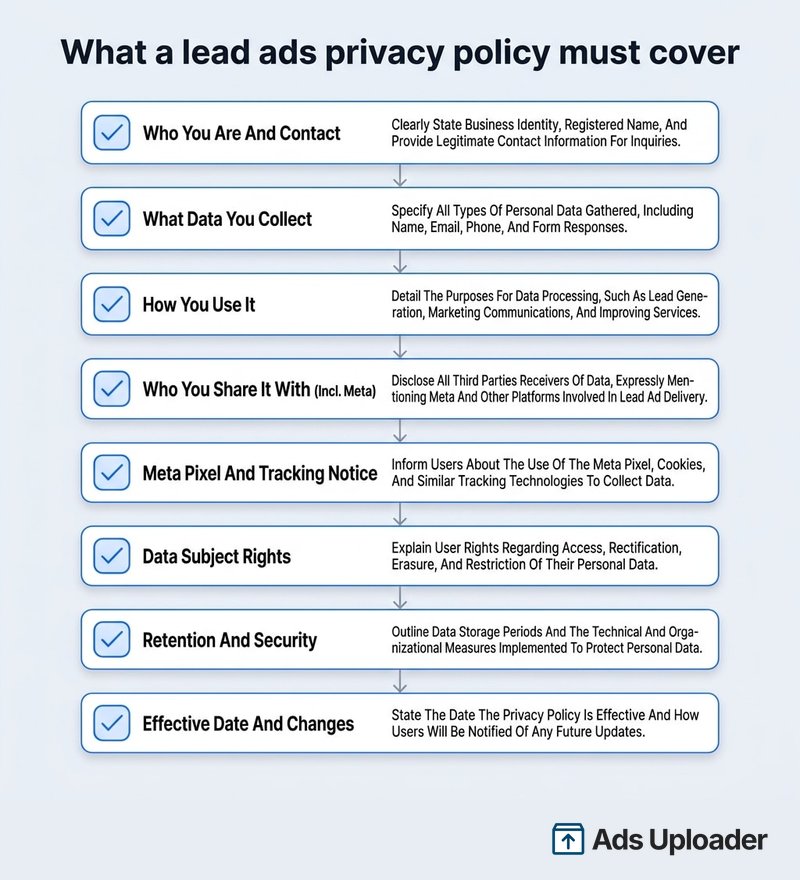
Write it in plain language. A wall of legalese is harder for users to trust and harder for Meta's reviewers to validate.
A Sample Privacy Policy Section for Lead Ads
This is a starting skeleton, not legal advice. Replace the bracketed parts and have a professional review it before you rely on it, especially for EU or California audiences.
[Business Name] Privacy Policy Effective date: [date]
Information we collect. When you submit one of our Facebook or Instagram lead forms, we collect the details you provide, such as your name, email address, and phone number.
How we use it. We use this information to [deliver the offer you requested], to contact you about [your inquiry], and, where you have agreed, to send you marketing communications. You can withdraw consent or unsubscribe at any time.
Who we share it with. We share your data with [CRM/email provider] to manage follow-up, and with Meta Platforms, Inc. to deliver and measure our ads. We do not sell your personal information.
Tracking technologies. Our website uses the Meta Pixel and similar tools to measure ad performance and show relevant ads. You can opt out via youronlinechoices.eu, aboutads.info/choices, or your Facebook Ad Preferences.
Your rights. You may request access to, correction of, or deletion of your data by emailing [privacy@yourbusiness.com]. We respond within [30/45] days.
Changes. We may update this policy and will post the new effective date here.
Anchor the link you paste into Facebook to the relevant section of the page so mobile users land directly on it.
How to Add Your Privacy Policy URL to the Instant Form
Once your policy is live, adding it takes under a minute:
- In Ads Manager, create your campaign with a lead generation goal, or open your form in Meta Business Suite.
- In the ad's creative, create or edit the instant form.
- Open the Privacy section of the form editor.
- Click Add privacy policy and paste your Link URL into the field. The page must be live and mobile-friendly.
- Optionally set the Link Text. Leaving it as "Privacy Policy" is the clearest choice.
- Save the form, then test the link from a phone before you publish.
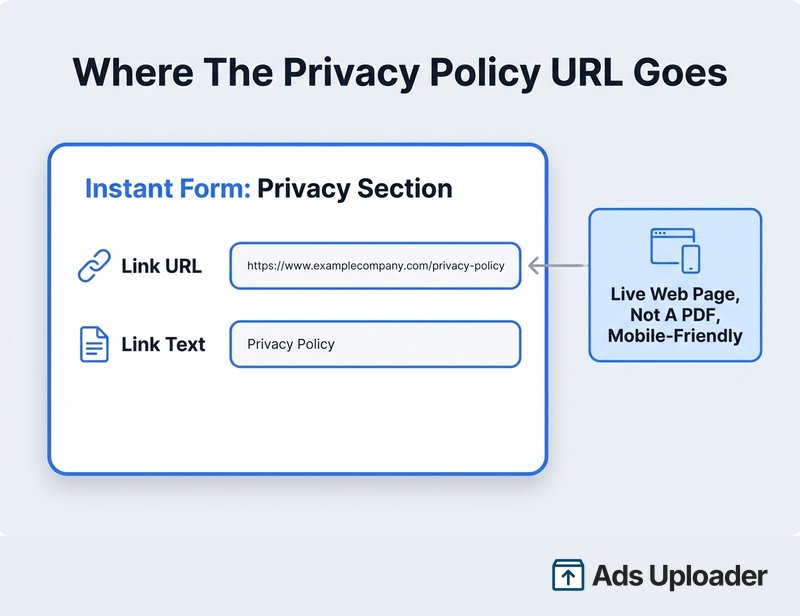
Use a clean URL with no tracking parameters. Meta's URL validation can flag links with query strings appended, and a parameter-heavy link is one more way to land in review.
Save Hours on Creative Testing
Stop uploading ads one by one. Bulk process unlimited creatives with automatic media matching and direct API publishing.
Try Ads Uploader FreeNo credit card required • 7-day free trial
"I Don't Have a Website" and Other Edge Cases
This is the question that fills marketing forums: someone is running a lead ad for a side project, a local service, or a client, and they have no domain. You still need a publicly accessible, non-PDF privacy page. There is no way around the URL field, but there are several easy ways to produce one.
Ranked roughly by speed:
- Free hosted policy generators. TermsFeed, iubenda, CookieYes, and Privyr all generate a privacy policy and host it at a live URL you can paste straight into the form. Basic versions are often free; customization and multi-language usually cost extra.
- A free one-page site. Google Sites, a free Wix or WordPress page, or GitHub Pages all give you an HTML URL. Publish your policy text there and confirm it opens on mobile.
- Meta's own policy link. Do not use it. Linking to facebook.com/privacy describes Meta's data practices, not yours, and it does not disclose how you handle the leads. It commonly causes disapproval, and even when it slips through it leaves you non-compliant.
One more practical point: a single policy can cover Facebook, Instagram, Messenger, WhatsApp, and even TikTok or LinkedIn lead gen, as long as it clearly names and applies to each platform you use. You do not need a separate document per channel. If different legal entities own different ad accounts, that is the one case where separate policies make sense.
Why Your Lead Ad Got Rejected Over the Privacy Policy
When a finished lead ad bounces with a privacy policy error, it is almost always one of these:
- Broken or unreachable link. The URL 404s, has a typo, or requires a login. Open it in an incognito window to confirm it loads for anyone.
- Wrong file type. It points to a PDF, an image, a Word doc, or a download button. Convert it to a normal web page.
- No visible policy. The link goes to your homepage or a contact page with no actual privacy notice. Link directly to the policy page, ideally with "Privacy" in the URL and title.
- Copied or generic text. A template that never mentions your lead forms, your data use, or Meta's tools can trigger manual review. Make it specific to your campaign.
- Not mobile-friendly. Lead ads run heavily on mobile. If the page is hard to use or slow on a phone, review can fail it.
Check Meta's ad diagnostics for the specific reason, fix the page, and resubmit. Most privacy rejections clear on the first correction.
Set It Once, Then Launch
The privacy policy requirement feels like a roadblock the first time you hit it, but it is a one-time setup. Once you have a live, mobile-friendly, non-PDF policy that discloses your data practices and your use of Meta's tools, you can reuse the same URL across every lead ad, every platform, and every campaign. The hard part was never the policy. It is everything after: building forms, testing offers, and shipping creative at the volume that actually moves your cost per lead. Get the compliance piece nailed down once so it stops costing you launch days, and put your energy into the testing that grows the account.
Frequently Asked Questions
The FAQs above answer the most common questions about Facebook lead ads privacy policies, including whether you can reuse your existing policy, what to do without a website, why ads get rejected, and Meta's joint-controller status under the GDPR.