Meta partnership ads are Facebook and Instagram ads that an advertiser runs with a creator, brand or other business, showing the partner's identity in the ad header alongside or instead of the advertiser's. The partner grants permission for a single post, through a partnership ad code or a boost toggle, or for the whole relationship through account-level approval. The advertiser then builds, targets and pays for the ad in Ads Manager. Meta previously called the format branded content ads.
A creator talking to camera about your product often earns more trust than a polished brand video, and Meta's own tests found that adding partnership ads to a campaign lowered its cost per acquisition. Partnership ads are Meta's native format for running that content under the creator's name, with a paid partnership label, instead of borrowing their footage and running it from your Page.
The catch is that the setup is split across two apps, two permission models and a hub Meta is in the middle of renaming. Creators approve in Instagram or Facebook, you build in Ads Manager, and both sides have to line up before a single impression is served.
What Are Meta Partnership Ads?
Meta's definition is short: partnership ads allow advertisers to run ads with partners, meaning creators, brands and other businesses. The partner and advertiser accounts can both appear in the ad's header, and Meta uses signals from both accounts for ranking and delivery.
Three things make a partnership ad different from a regular ad:
- Two identities. The ad is tied to your account and a partner's account, with a "Paid partnership" relationship shown to the viewer.
- Permission from the partner. The creator or partner business has to authorize you, either for one piece of content or for the whole account relationship.
- Your controls. You still own the campaign. Budget, targeting, optimization event, placements and reporting all sit in your ad account.
That last point separates a partnership ad from paying a creator to post. The organic post reaches the creator's followers. A partnership ad reaches whoever you target, optimizes toward your conversion event, and reports in Ads Manager next to the rest of your creative.
Branded Content Ads Are Now Partnership Ads
If you have run creator ads on Meta for a while, you may know this format as branded content ads. Meta's Help Center opens its partnership ads page with one line: "Branded content ads are now called partnership ads." Meta announced the rename in May 2023, and its February 2024 Creator Marketplace announcement already described partnership ads as "formerly known as branded content ads."
"Branded content" still has a job. It now describes the organic side: a creator post made in exchange for something of value (payment, free product, an affiliate commission), disclosed with the paid partnership label. That post only becomes an ad when an advertiser promotes it through Ads Manager with permission.
First Identity vs Second Identity
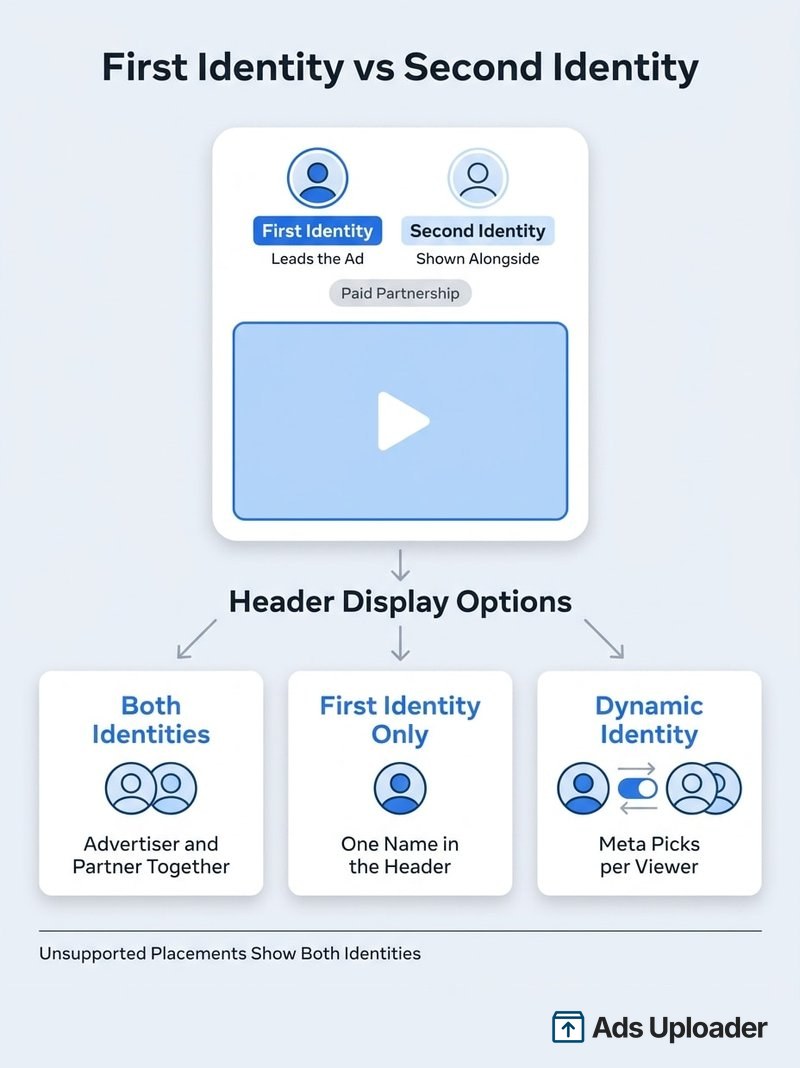
Every partnership ad has two identities. The first identity leads the ad and the second identity sits alongside it. Which account lands in which slot depends on how you start the ad, according to Meta's setup guidance:
| How you create the ad | First identity | Second identity |
|---|---|---|
| You enter a partnership ad code | The partner account tied to the code (filled automatically) | Your account, which you select |
| No code (account-level permission or boost toggle) | Your account (filled automatically) | The partner you select |
| Existing Instagram post | The account that authored the original post | The other authorized account |
You can switch the order in some no-code setups. A creator-first ad feels like a recommendation, while a brand-first ad reads more like a co-branded campaign.
Header Display Options
Ads Manager gives you three ways to show the identities in the ad header:
- Both identities. The advertiser and partner appear together.
- First identity only. Only the first identity is shown in the header on supported placements.
- Dynamic identity. Meta predicts whether a single or dual header is more likely to perform for each viewer and picks for you.
Meta turns dynamic identity on by default in Ads Manager and recommends keeping it for performance campaigns. Two caveats: dynamic identity currently optimizes on Instagram only, and placements that don't support the single-identity treatment (Facebook Stories, Facebook Marketplace and WhatsApp Status among them) show both identities whatever you pick.
How Partnership Ads Work
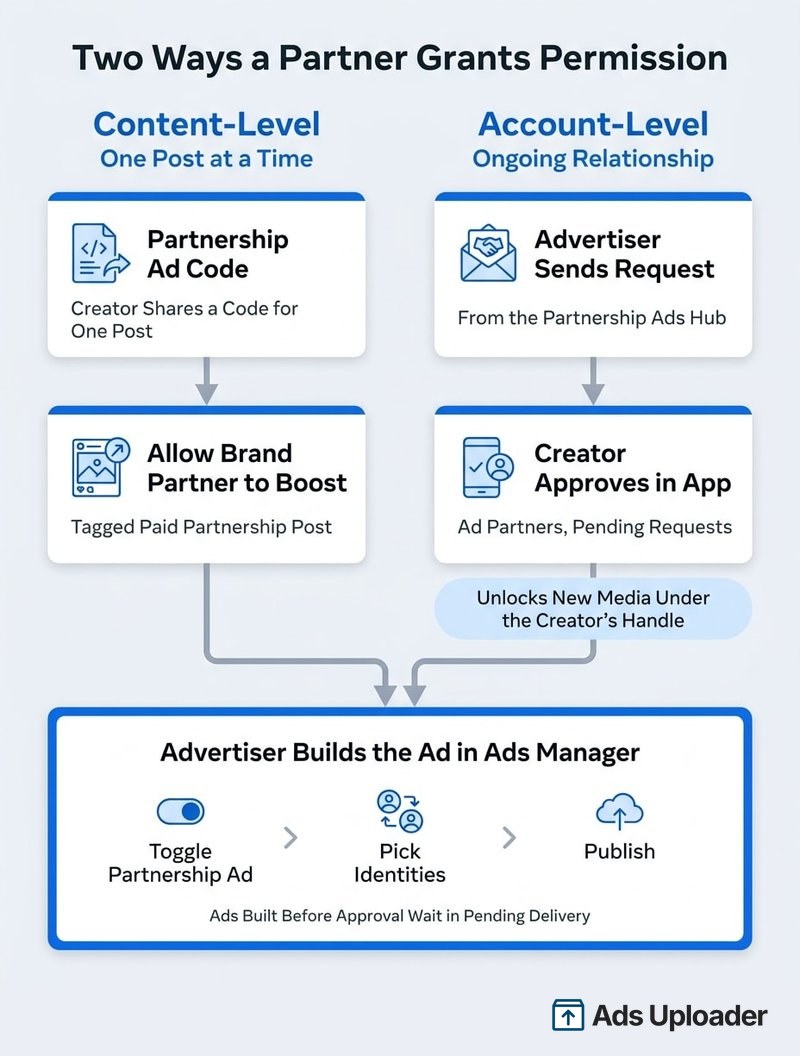
Every partnership ad needs the same three things: the partner's permission, an ad built in Ads Manager, and the paid partnership disclosure Meta shows on delivery. Permission is the part with options. Meta offers two permission scopes, which play out as three practical routes.
| Route | Scope | Who starts it | What it unlocks |
|---|---|---|---|
| Partnership ad code | Content-level | Partner | One specific post, Story or Reel |
| Allow brand partner to boost | Content-level | Partner | A paid partnership post that tags you |
| Account-level request | Account-level | Advertiser | Ongoing use of qualifying tagged content, plus new media under the partner's identity |
Content-Level Permission
Content-level permission covers one piece of content at a time.
- Partnership ad code. The creator generates a partnership ad code for a specific post, Story or Reel and sends it to you. On Instagram they can switch it on while publishing or afterwards from the post's menu. On Facebook the post or Reel has to be published first. You paste the code into Ads Manager and it pulls in both the partner identity and the media.
- Allow brand partner to boost. The creator tags you in the paid partnership label and turns on the setting that lets the brand partner boost the post. You then find the post in Ads Manager without needing a code.
On Instagram, a code can authorize content that never tagged you or carried a label, such as ordinary UGC. That doesn't waive disclosure: if the creator received anything of value, Meta's branded content policies still require the paid partnership label.
Launch More. Click Less.
Upload hundreds of creatives at once, auto-match thumbnails to videos, and publish straight to your ad accounts through Meta's API.
Try Ads Uploader FreeNo credit card required • 7-day free trial
Account-Level Permission
Account-level permission is the route for ongoing creator programs. You send the request from the Partnership Ads Hub (location below), and the creator approves it in their app, typically under their professional tools in Partnership ads, then Ad partners, then Pending requests.
Once approved, you can:
- Run partnership ads from the partner's handle without an existing post, using new image or video media you upload.
- Use qualifying content that tags you. On Instagram that includes the paid partnership label, @mentions, people tags, product tags and Collabs. On Facebook it means branded content with the paid partnership label.
- Use eligible archived Instagram content.
- Include or exclude an audience of people who engaged with the creator's Instagram account (creator audience sharing).
If the creator's Facebook and Instagram professional accounts are linked, one acceptance can cover both. If they aren't, approval only applies to the identity you selected, so check both handles in the permission record before launch.
Agencies get a shortcut. If the same business portfolio already owns or has partner access to both identities, and the person building the ad has Ads permission on both, Meta says no separate partnership permission is needed.
Building Before Approval
You don't have to wait for the creator to approve before you build. Meta lets you publish the setup first. The partner receives an approval request, and the ad sits in a pending, non-delivering state until permission comes through. Build your launch timeline around that gap, plus normal ad review.
Partnership Ads on Facebook vs Instagram
Facebook partnership ads and Instagram partnership ads share the same identity model and permission scopes. Meta's supported objectives and placements page lists all six campaign objectives for both (Awareness, Traffic, Engagement, Leads, App promotion and Sales), including Advantage+ sales campaigns. The differences are in placements and in the content you can start from.
| Placements | Feed, Explore, Stories, Reels | Feed, Stories, Reels, Marketplace |
| Eligible source content | Feed posts, Reels, Stories, single image, single video, carousels | Mainly feed posts and Reels |
| Not eligible as source | Reminder posts, Reels published before 15 October 2021, Reels over 15 minutes, existing Stories over 60 seconds | Existing Stories, text-only posts, archived posts |
| When the creator can make a code | While publishing or afterwards | Only after publishing |
| Archived content | Eligible with permission | Not eligible |
Two other apps matter. WhatsApp Status is now a partnership ad placement: Meta's About partnership ads page says you can create partnership ads there starting September 2026, and it uses the dual-identity header. Threads is the exception, since Meta's branded content documentation says partnership ads and boosting organic branded content are not available there.
Meta has also tested the two platforms together. In an A/B test run 5 to 8 March 2026, Meta reported that upper-funnel partnership ads running on both Facebook and Instagram averaged 18% more conversions and 5% lower cost per conversion than the same ads running on Instagram only. If your partnership ads are Instagram-only by habit, that is a cheap test to run.
The Partnership Ads Hub
The Partnership Ads Hub is the advertiser workspace in Ads Manager for creator partnerships. You use it to send account-level permission requests, check each partner's status and issues, and browse partner content (including UGC and posts that mention your brand) before sending it to the Ads Manager post picker.
Where to find it: in Ads Manager, open All tools, then look under Advertise for Partnership Ads Hub. Click Add partnership to request account-level permission from a creator or business.
The menu is changing. In June 2026 Meta announced a combined Creator Marketing Hub that merges Creator Marketplace with the Partnership Ads Hub, covering discovery, content selection, permissions and paid performance in one place. The September 2026 rollout added content-level permission management with expiration dates, one-click draft partnership ads and partnership messaging, and it continues through the rest of 2026. Depending on your account, you may see either name, in Ads Manager or in Meta Business Suite.
When to Use Partnership Ads vs Regular Ads
Meta has published three sets of results. Treat them as Meta-reported averages, not guarantees:
- 2022 Marketing Science meta-analysis. Across 15 advertiser split tests, campaigns running business-as-usual (BAU) ads plus partnership ads were compared with BAU ads alone. Meta reported 53% higher click-through rate, 19% lower cost per acquisition and a 99% probability that the mix would outperform BAU only.
- June 2025 experiment. Across roughly 2,400 advertisers, Meta reported that campaigns with BAU plus partnership ads averaged 19% lower CPA and 13% higher CTR than BAU campaigns.
- Creator testimonials. Ads with a creator testimonial shown as a featured comment averaged a 7.5% higher offsite conversion rate and 9.6% higher offsite CTR, per Meta's December 2025 announcement.
The two large tests measured what happens when you add partnership ads to your usual creative, not when you swap your brand ads out. That matches Meta's recommended setup: partnership and regular ads in the same ad set, or in separate ad sets inside one campaign with Advantage campaign budget on, so delivery can shift spend toward whichever ad wins for each audience.
Partnership ads tend to earn their place when:
- The creator has real authority in your category, and the ad works because it feels like a demonstration or lived experience.
- Social proof drives the purchase (beauty, wellness, apps, household products, anything that needs to be shown working).
- You need more creative variety for prospecting than your in-house team can produce.
- A complementary brand, retailer or expert is a credible second voice.
A regular brand ad is usually the better call when:
- The message is a straight offer and the partner's name adds no trust, such as a sale reminder in retargeting.
- The ad needs heavy claims, disclaimers or brand control that don't fit the creator's voice.
- You licensed the footage but don't need the creator's handle on it, or you need an asset that keeps running regardless of the creator's ongoing permission.
If you run creator whitelisting today, partnership ads are Meta's native, disclosed version of the same idea: a creator lets your brand run ads from their identity.
Meta Partnership Ads Examples
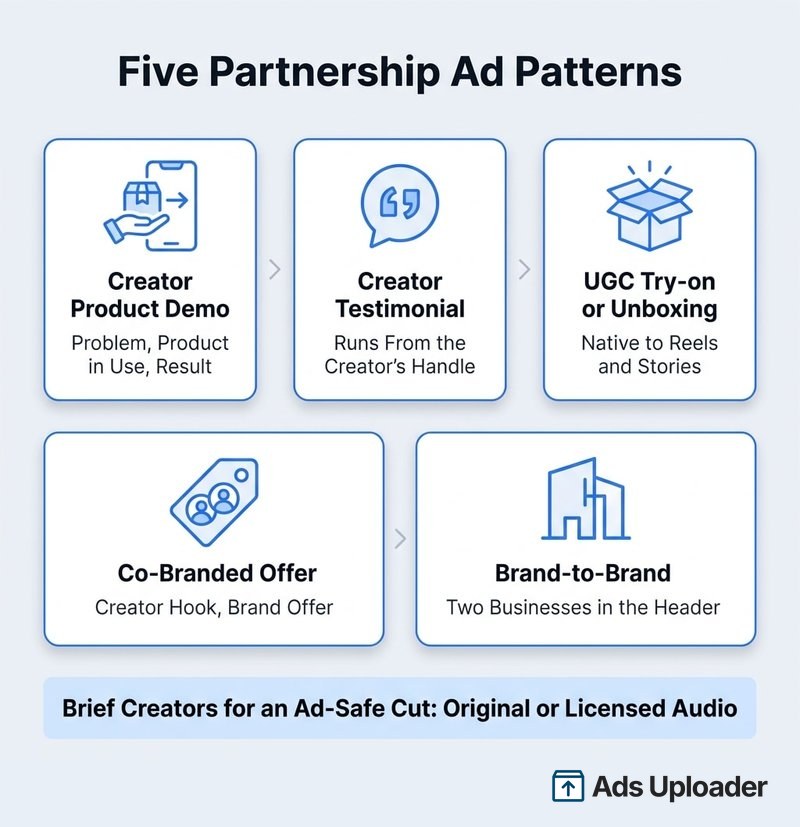
The clearest documented example is Meta's Marks & Spencer case study. The retailer tested creator-led Reels partnership ads against its usual video creative, and Meta reports a 2.4x in-store sales lift and 55% lower cost per conversion. Results like that are specific to one advertiser. The five patterns below are templates you can brief creators against and test in your own account.
Creator Product Demo
The creator opens with a problem the audience recognizes, uses the product on camera, and shows the result. Your CTA and landing page do the selling. This works best for products that need to be seen working: skincare, gadgets, apps, fitness gear, cleaning products. It pairs well with a creator-first header.
Save Hours on Creative Testing
Stop uploading ads one by one. Bulk process unlimited creatives with automatic media matching and direct API publishing.
Try Ads Uploader FreeNo credit card required • 7-day free trial
Testimonial From the Creator's Handle
The creator explains what they struggled with, what they tried before, and what changed. Because it runs from their handle, it reads as a recommendation rather than an ad claim. Keep claims substantiated: a creator's personal experience doesn't exempt the ad from Meta's advertising standards. Meta's creator testimonial feature can also pin a creator endorsement as a featured comment under the ad.
UGC-Style Try-on or Unboxing
Packaging reveal, fit or setup, first reaction, CTA. It is cheap to produce and native to Reels and Stories. It is also the pattern most likely to fail eligibility: commercial music from Instagram's library, GIFs, camera effects, link stickers and product tags can all make a post ineligible. Brief an ad-safe cut with original or licensed audio from the start.
Creator and Brand Co-Branded Offer
The creator delivers the hook and the proof, then the ad lands on a brand-specific offer, such as a bundle, a first-order discount or a launch. Use both identities in the header so the offer reads as a joint campaign. Account-level permission is the right route here, because you'll want several offer variants without asking the creator to post each one organically.
Brand-to-Brand Partnership
The second identity is another business rather than a person: a retailer that stocks your product, a software integration, a co-branded launch or a bundle. Meta's definition names brands and other businesses as partners alongside creators, and the same permission routes apply. Both names sit in the header, so the ad borrows the partner's credibility the same way a creator ad does.
How to Run Partnership Ads at Scale
Building one partnership ad in Ads Manager is quick: toggle partnership ad at the ad level, enter the code or select the partner, choose the post or media, publish. The friction shows up at volume. Ten creators with three or four hooks each means dozens of ads that each need the right partner in the right identity slot, and one wrong second identity runs an ad from the wrong creator's handle.
If you already launch Meta ads in bulk, the partnership step belongs inside that same build rather than in a manual pass afterwards. In Ads Uploader, partnership ads sit inside the normal bulk workflow, with two routes in.
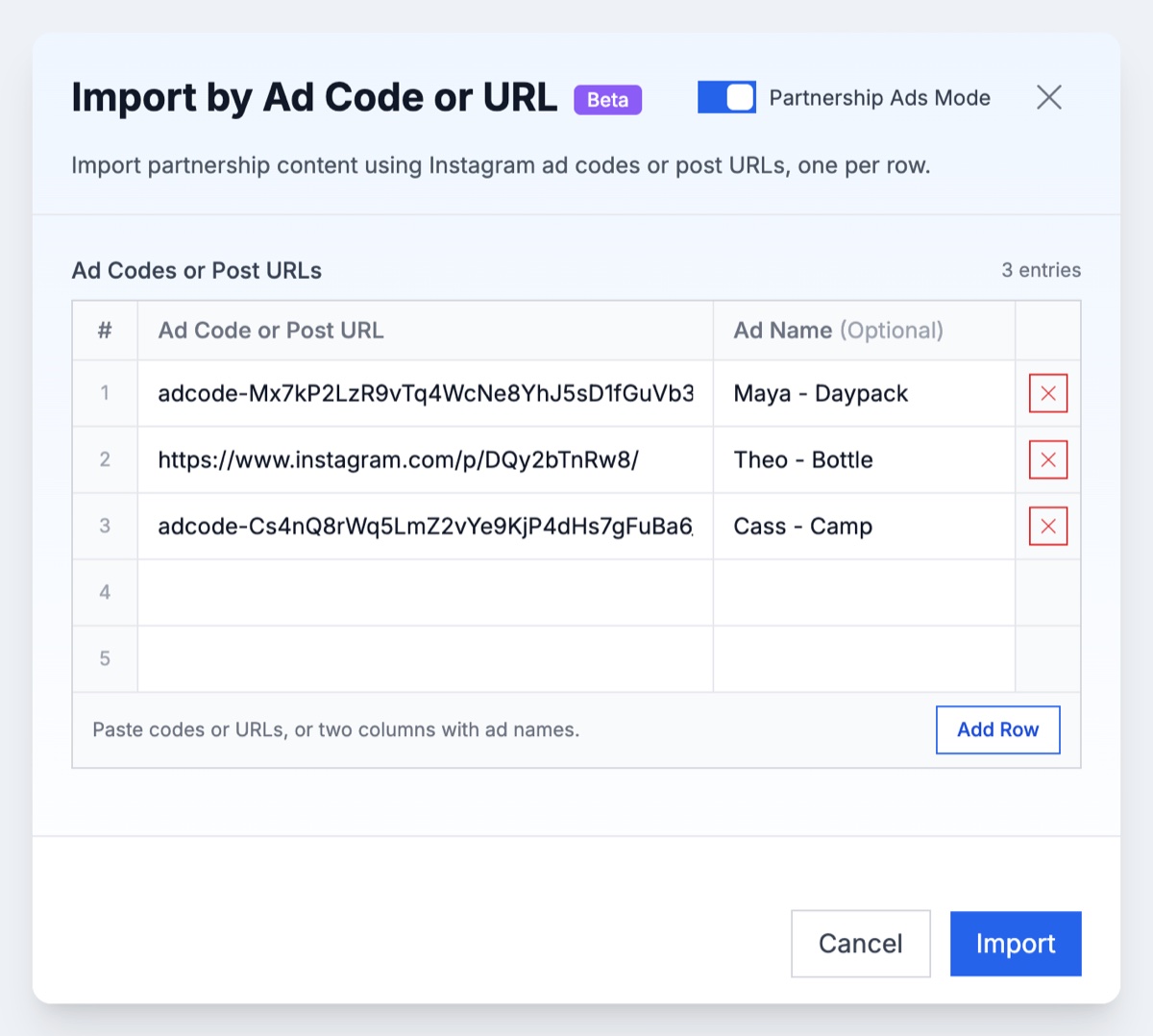
Boost creators' existing Instagram posts by ad code or URL. Open Import by Link, turn on Partnership Ads Mode, and paste Instagram partnership ad codes or post URLs, one per row, with an optional ad name next to each. Every post comes in with its creator and original caption, and the whole batch builds at once. A post URL only works if you already have partnership advertising permission for that post, while a code carries the permission with it. Facebook post imports are not supported.
Dark posts from your own media. Upload your own images or videos, switch Profile Options from Standard Ads to Partnership Ads, and pick your brand as the First Identity and the approved creator as the Second Identity. The ads run from the creator's handle as dark posts, so nothing has to be published on the creator's profile first. Choose the header display (both identities, first identity only, or dynamic identity optimization), set a different creator per ad or per ad set, or mark a row No Partner to keep it a standard ad in the same batch.
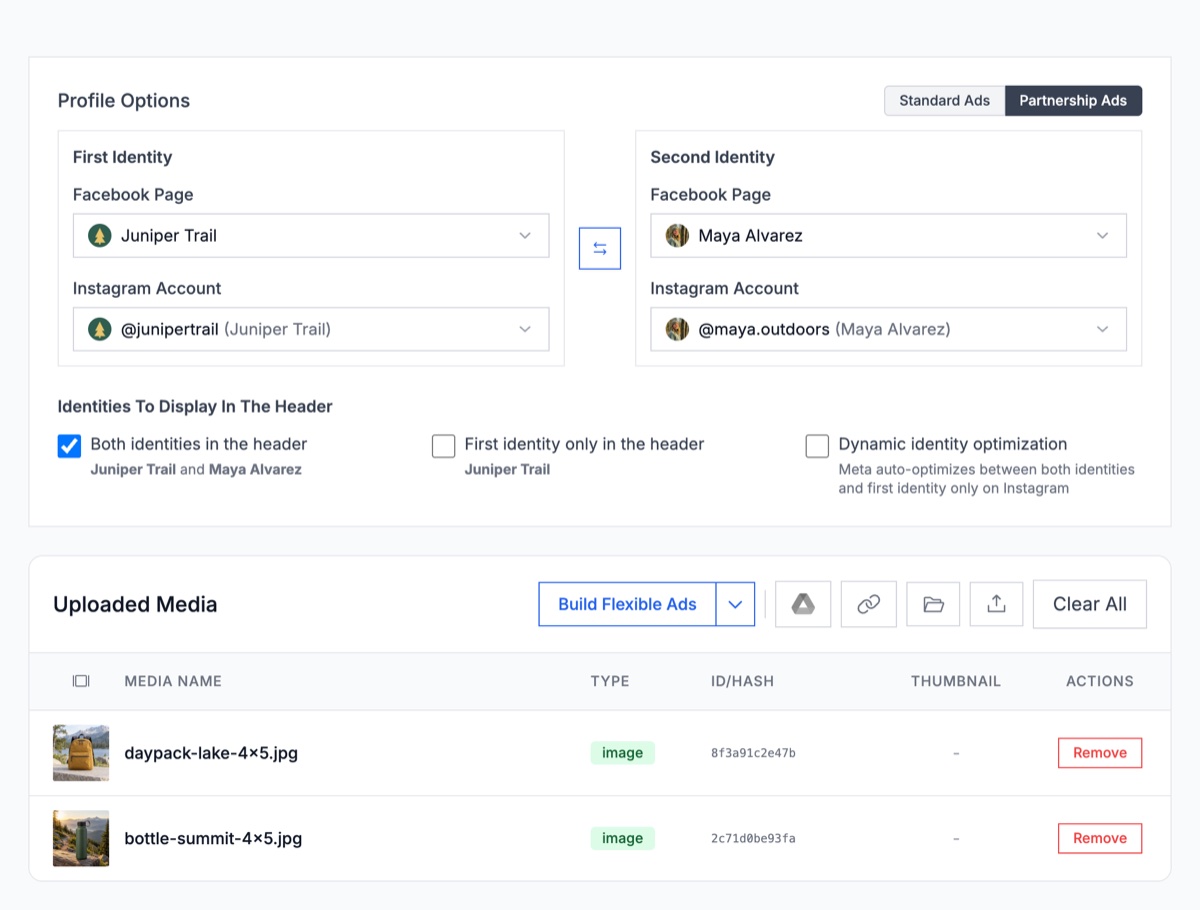
The CLI and MCP server can launch the same uploaded-media partnership ads, so a script or an AI agent can run creator batches too, with partners set per ad or per ad set.
The permission still has to come from the creator. Reconnecting your own Facebook account does not grant it, so get the code or the account-level approval first, then let the bulk build handle the repetition. If you're comparing options for this, here's how the tools that launch Meta ads in bulk stack up.
Whatever tool you use, four habits keep a creator program manageable:
- Match the permission to the relationship. Codes for one-off assets, account-level permission for ongoing creators or when you need new media and multiple hooks.
- Keep a permission tracker. Handles, linked accounts, permission route, code or post ID, and end dates.
- Separate platform permission from commercial rights. Meta's permission controls what the system allows. Your contract covers usage period, spend caps, markets, new media under their handle and takedown.
- Name ads so you can read them later. Encoding creator, concept, hook and permission route in the ad name makes creator-level reporting possible.
Frequently Asked Questions
What are partnership ads on Facebook?
They are paid Facebook ads that show an authorized partner, such as a creator, brand or other business, in the ad header alongside or instead of the advertiser. The advertiser builds and pays for the ad in Ads Manager once the partner grants permission. On Facebook the eligible source content is mainly feed posts and Reels, and an advertiser with account-level permission can also run new media under the partner's identity.
Are branded content ads the same as partnership ads?
Yes. Branded content ads is the old name for partnership ads, and Meta's Help Center now states that branded content ads are called partnership ads. The term branded content still covers the organic side: a creator post made in exchange for something of value and disclosed with the paid partnership label. That post only becomes an ad when an advertiser promotes it with the partner's permission.
Where is the Partnership Ads Hub?
In Ads Manager, open All tools and look under Advertise for Partnership Ads Hub. Meta is merging the hub with Creator Marketplace into Creator Marketing Hub, with the rollout running through the rest of 2026, so some accounts see Creator Marketing or Creator Marketing Hub in Ads Manager or Meta Business Suite instead. Either one is where you request account-level permission and find partner content.
Do partnership ads cost more?
Meta does not list a surcharge or separate price for partnership ads. They run through the same auction as any other Meta ad, so you pay normal media costs and your CPM, CPC and CPA depend on auction conditions and creative performance. Creator fees, usage rights and production are separate costs you agree with the partner outside Meta.
Do creators get paid through partnership ads?
Not automatically. Meta does not pay the creator a share of the advertiser's ad spend. Brands, agencies and creators agree compensation separately, outside the ad platform, whether that is a fee, free product or an affiliate commission.
Can I run partnership ads without a partnership ad code?
Yes. The creator can tag you in the paid partnership label and turn on the setting that lets the brand partner boost the post, or you can request account-level permission, which also lets you run new media from the partner's handle. If your business portfolio already owns or has partner access to both identities, and you have Ads permission on each, no separate partnership permission is needed.
Conclusion
Partnership ads put a creator's name on the ad while you keep the budget, targeting and reporting. Get the identity order right, match the permission to the relationship (a code for one post, account-level approval for ongoing creators and new media), and run creator ads alongside your current winners, since that is where Meta's strongest evidence sits.
Start with one creator whose content your audience already responds to. Request account-level permission, put their content in the same campaign as your best brand ads, and let delivery show you which wins. Once the first few creators prove out, the work shifts from setup to volume.