A partnership ad code is a string a creator generates from one Instagram or Facebook post, story or reel that lets a brand run that content as a partnership ad. The creator turns on the Get partnership ad code toggle, then copies and sends the code. The advertiser pastes it in Ads Manager at the ad level, under Enter ad code or post info. One code works for up to two partners at a time and covers only that piece of content, not the creator's account. Turning it off blocks new ads but doesn't stop ads already running.
If you buy media for brands that work with creators, this is the handoff you'll repeat most. The creator posts, you ask for the code, it arrives in a DM or an email, and someone pastes it into Ads Manager. When it works, the ad is built in minutes. When it doesn't, the campaign waits while three people message each other about a string of characters.
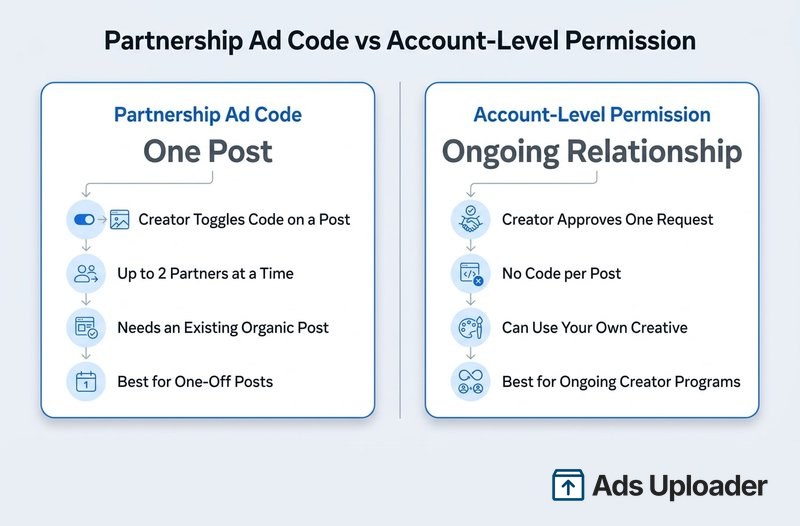
The code is one piece of Meta's partnership ads setup. Meta renamed branded content ads to partnership ads, so a "branded content ad code" is the same thing. A code covers a single piece of content. Account-level permission covers an ongoing relationship, and the two are easy to mix up.
Below are the creator steps for Instagram and Facebook (written so you can forward them as-is), the exact place an advertiser enters the code, the reasons a code fails with a fix for each, and when to switch a creator to account-level permission.
What Is a Partnership Ad Code?
The code is post-level permission: it lets an advertiser boost one specific post, story or reel with the creator's handle in the ad header. Meta's help article on creating a partnership ad code to share with partners sets out the rules that matter before you build anything:
- Up to two partners at a time. Two advertisers can hold the same code at once, and one advertiser can use it in more than one ad. It isn't single-use.
- Archived Instagram posts still work. If the creator archives an Instagram post, you can still boost it while the toggle stays on. Archived Facebook content can't be boosted.
- Off the creator's grid, in the Ad Library. The organic post stays on the creator's profile, but the partnership ad itself doesn't appear there. Like any active ad, it's listed in Meta's Ad Library.
- No documented expiry. Meta doesn't publish an expiry window for partnership ad codes. A code stops working when the creator turns it off, deletes the post or loses eligibility, not on a timer.
The code itself is a long string of letters and numbers (the example in Archive's creator guide starts with "adcode-"), which is why codes retyped from screenshots fail so often.
One naming note: Snapchat also has a feature called Partnership Ad Code. It works differently (Snap codes are single-use and carry an expiry period), so make sure the code you were sent came from Instagram or Facebook.
Partnership Ad Code vs Account-Level Permission
The code is the post-level route. Account-level permission is the relationship-level route: the creator approves your brand once, and you can then run partnership ads with their handle, including your own creative, without a code for each post. There's also a narrower route for branded content: if the creator tags your brand with the paid partnership label and turns on Allow brand partner to boost, you can boost that post without a code.
| Partnership ad code | Account-level permission | |
|---|---|---|
| Covers | One post, story or reel | The creator's identity, ongoing |
| Needs an existing organic post | Yes | No, you can use your own creative |
| Creator action | Toggle on, copy, send (per post) | Approve one request |
| Partners | Up to two per code at a time | One approval per brand relationship |
| Revocable by the creator | Yes | Yes |
| Best for | One-off posts, tight approval control | Retainers, ongoing creator programs, whitelisting |
How to Get a Partnership Ad Code on Instagram
Before the creator starts, check three things: an Instagram professional account (creator or business), Meta's partnership ads eligibility requirements, and an eligible content format. If the creator turns the toggle on while posting ineligible content, Instagram shows a screen saying so, which beats a failed paste later. For the full Instagram setup beyond the code, see the guide to partnership ads on Instagram.
Creators can generate the code while posting or from a post that's already live.
While Creating a Post, Story or Reel
- In the Instagram app, create the post, story or reel.
- Tap Partnership label & ads. For stories, tap the tag icon at the top of the story first.
- Turn on the Get partnership ad code toggle.
- Tap Share to publish.
- Once the content is live, tap the copy icon next to the code, or tap Share to send it to the brand in a direct message.
From a Post That's Already Published
- Open the post, story or reel from the Instagram profile.
- Tap the three dots (top right for posts and reels, bottom right for stories).
- Tap Partnership label & ads.
- Turn on the Get partnership ad code toggle.
- Tap Copy, or tap Share to send the code in a DM.
Creators can get a new code at any time. Meta doesn't say whether an older code keeps working after that, so always use the code currently showing on the post.
How to Share a Partnership Ad Code on Facebook
Facebook codes work the same way with one difference: Meta only documents generating them from content that's already published. The creator posts first, then gets the code.
- Go to the published post, story or reel on the Facebook Page or professional-mode profile.
- Tap the three dots in the top right corner.
- Tap Share partnership ad code.
- Turn on Get partnership ad code.
- Tap Copy, or send the code to the advertiser in a direct message.
The creator needs a Facebook Page or a profile in professional mode, plus the same partnership ads eligibility as on Instagram. The post also has to stay published, because archived Facebook content can't be boosted.
How to Use a Partnership Ad Code in Ads Manager
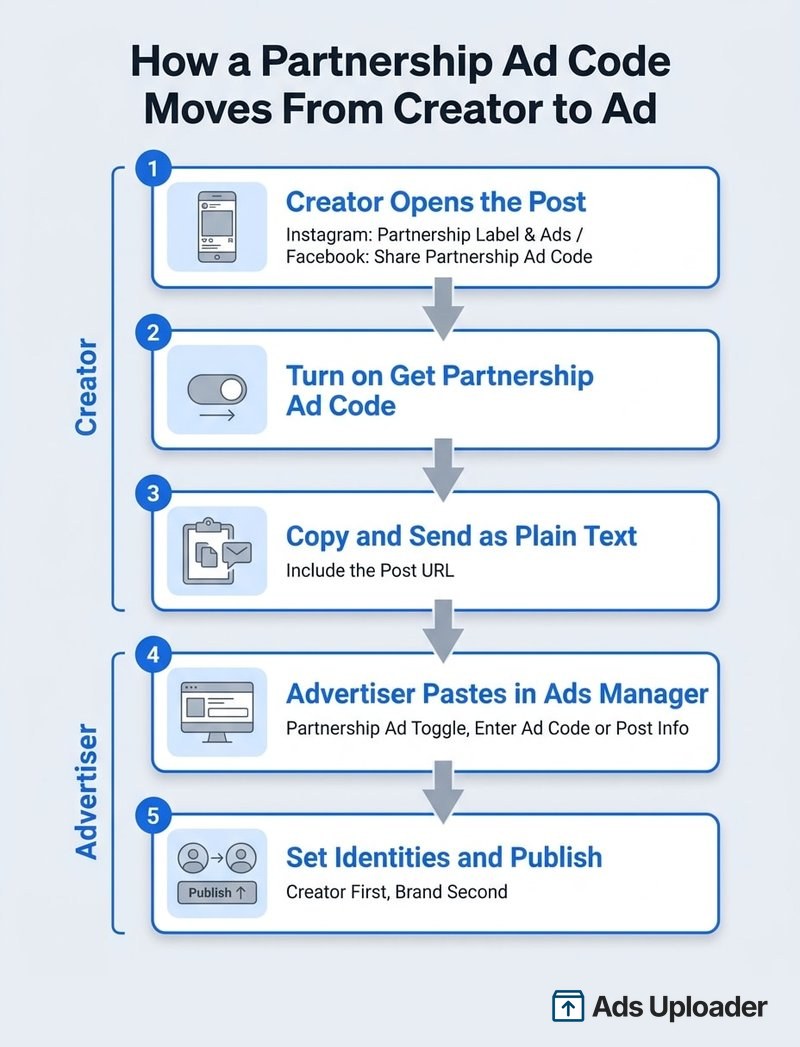
The advertiser side is the same whether the code came from Instagram or Facebook. Meta documents it in its guide to creating a partnership ad, and it runs like this:
- In Ads Manager, click + Create and choose your campaign objective.
- Set up the campaign and ad set as normal (budget, schedule, audience, placements).
- At the ad level, turn on the Partnership ad toggle.
- Click Enter ad code or post info.
- Paste the partnership ad code. The field also accepts a post URL or post ID.
- Once the post loads, confirm the creator is the first identity. The first identity is always the author of the source post, so with a creator's code it can't be your brand.
- Select the second identity, usually your brand's Facebook Page or Instagram account.
- Choose the header: both identities, the creator only, or dynamic identity (the default), where Meta decides which version to show.
- Finish the ad and click Publish.
Two details catch people out. Dynamic and creator-only headers only apply on some placements (Meta currently lists Facebook Feed and Facebook Reels), while placements such as Facebook Stories, Marketplace and WhatsApp Status show both identities. And an Instagram code can still deliver in Facebook placements: a creator without a Facebook Page appears there with their Instagram name and profile picture.
Launch More. Click Less.
Upload hundreds of creatives at once, auto-match thumbnails to videos, and publish straight to your ad accounts through Meta's API.
Try Ads Uploader FreeNo credit card required • 7-day free trial
What to Ask the Creator For
Asking for all of this in one message heads off most of the failures below:
- The partnership ad code, pasted as plain text, not a screenshot
- The post URL, and whether it's on Instagram or Facebook
- Confirmation the toggle is on and the post won't be deleted (or archived, on Facebook)
- Whether the code has already gone to another brand or agency
- Anything in the content that could block eligibility: library music, product tags, camera effects, link stickers
Log each code with its creator, post URL and campaign. Past a handful of codes, a spreadsheet beats a DM thread.
Partnership Ad Code Not Working? Common Fixes
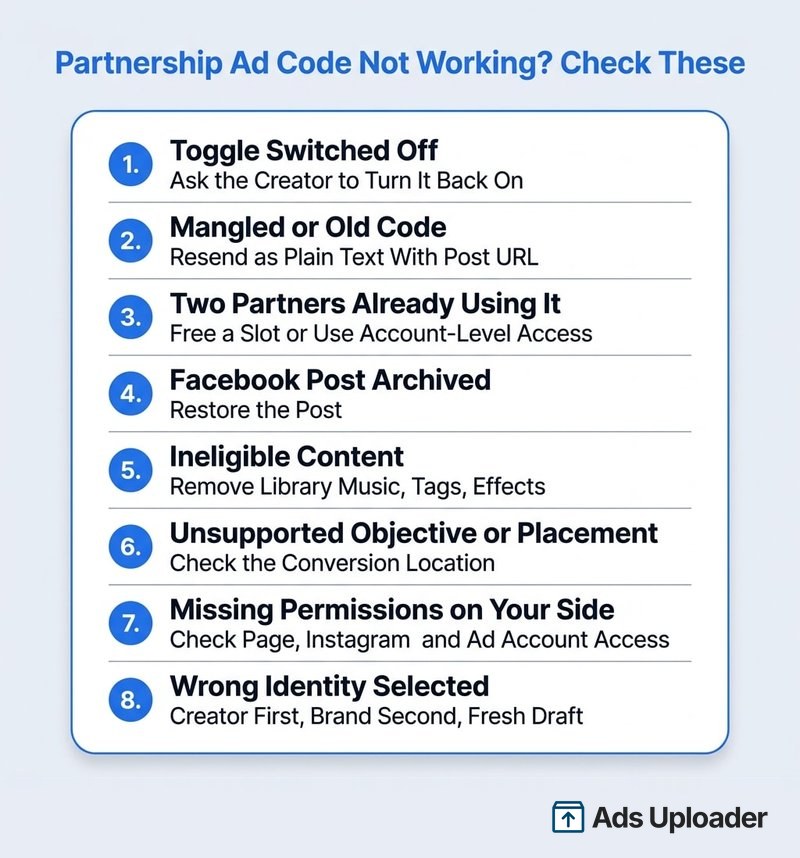
Work through these in order. The first few take a minute to rule out. The later ones need the creator to act or a fresh ad draft.
The toggle was switched off. If the creator turned off Get partnership ad code, Ads Manager won't accept the code for a new ad. Ask them to open the exact post, confirm the toggle is on and copy the code currently shown.
The code was mangled or replaced. Missing characters, trailing spaces, line breaks, smart quotes added by email clients and codes retyped from screenshots all cause rejections. If the creator has generated a new code since, the old one may not work either. Ask for it again as plain text, and if it still fails, paste the post URL into the same field instead.
Two partners are already using it. A code works for up to two partners at a time. If the creator already gave it to another brand, or to two different agencies, a third partner can't use it. The creator needs to free up a slot, or you can move to account-level permission.
The Facebook post is archived or deleted. Archived Facebook content can't be boosted. Deleted content can't be used on either platform, and deleting the source post also stops any ad running on it. Ask the creator to restore an archived Facebook post before you retry.
The content isn't eligible. In reels, the usual blockers are music from Instagram's general library (royalty-free Sound Collection tracks and original audio are fine), tappable stickers, product tags and face or camera effects. Reels must also have been posted after October 15, 2021 and run 15 minutes or less. In stories, link stickers, music stickers and product tags block boosting, and existing story videos should be 60 seconds or less. The fix is a clean version without the blocked element, which usually means the creator posts a new edit.
The objective or placement isn't supported. Some setups can't run partnership ads at all, including calls as a conversion location, Messenger or Instagram as a Leads destination, and Messenger or Audience Network placements. Check the conversion location as well as the objective against Meta's supported objectives and placements for partnership ads before deciding the code is broken.
Your side lacks permissions. A code gives you permission to use the creator's post. It gives nobody access to your brand's Page, Instagram account or ad account. If the person building the ad lacks access to the second identity, the ad fails with a permission error (media buyers report messages like "you need permission to create and edit ads") even though the code is fine. Reconnecting your own Facebook account won't fix a missing creator permission either, because only the creator can grant that.
The wrong identity is selected. If someone swapped the first identity away from the post's author, picked the wrong brand Page as second identity, or duplicated a draft carrying an old identity setup, the ad won't publish. Rebuild it in a fresh draft with the creator as first identity.
The creator's account changed. A switch back to a personal account, a monetization restriction or lost partnership eligibility can stop a code that worked last week. The creator can check Account Status and their professional dashboard.
The error is "Instagram video must be uploaded to Facebook". Meta documents this error for some existing Instagram videos. Media buyers report that entering the post ID or URL instead of the code sometimes clears it. If it persists, rebuild the ad in a fresh draft and send Meta support the exact error text.
Put one more thing in every creator agreement: turning the code off and stopping the ad are two different actions. The toggle only blocks new ads. When a usage window ends, either you pause the ads or the creator stops them from their partnership ads settings.
When to Use a Code and When to Ask for Account-Level Access
Use a partnership ad code when the deal covers one post or a small, fixed set of posts, when the creator wants to approve each piece of content, or for a one-off activation. The creator stays in control of exactly what runs.
Ask for account-level permission when the relationship is ongoing: a retainer, an ambassador program, an affiliate creator posting every month, or any creator whitelisting setup where you want to run ads from the creator's handle using your own creative. Once a creator produces weekly content, chasing a code per post slows every launch. Many teams run both: codes for one-off posts from new creators, account-level permission once a creator becomes a regular.
To request account-level permission in Meta Business Suite:
- Open Creator Marketing and go to the Creators tab.
- Select Manage permissions, then Add partnership.
- Search for the creator, choose the advertiser account and send the request.
Meta announced in June 2026 that Partnership Ads Hub and Creator Marketplace are being combined into Meta Creator Marketing Hub, so some accounts and older help pages still say Partnership Ads Hub.
The creator approves the request in the Instagram app under Professional dashboard, then Partnership ads, then Ad partners (approvals aren't available on Instagram web), or from Facebook or Creator Marketing Hub. If their Instagram and Facebook accounts are linked, one approval can cover both.
Running Partnership Ad Codes at Scale
In Ads Manager, each partnership ad code is a separate trip through the ad-level setup: toggle, paste, check identities, choose the header, publish. That's fine for three creators. With 40 codes across a creator program, it's an afternoon of repetitive clicking, and every manual paste is another chance for the errors above.
Ads Uploader handles the Instagram side in bulk. Open Import by Link, turn on Partnership Ads Mode and paste the codes one per row, with an optional ad name next to each. Instagram post URLs work in the same table when you already have partnership advertising permission for the post, while a code carries the permission with it.
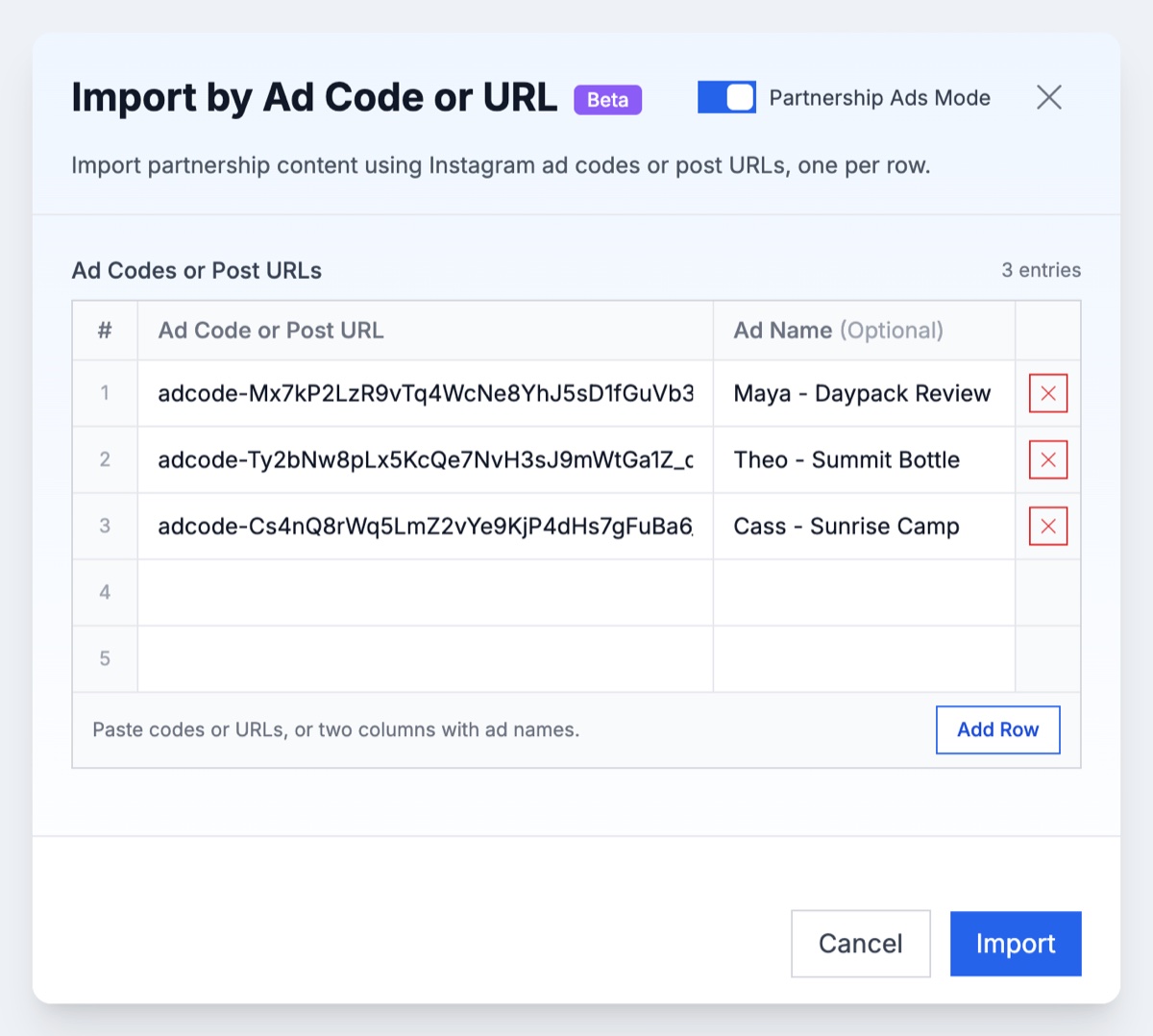
Each code resolves to the creator's post with its original caption and the paid partnership label, so you can check every row before anything is built.
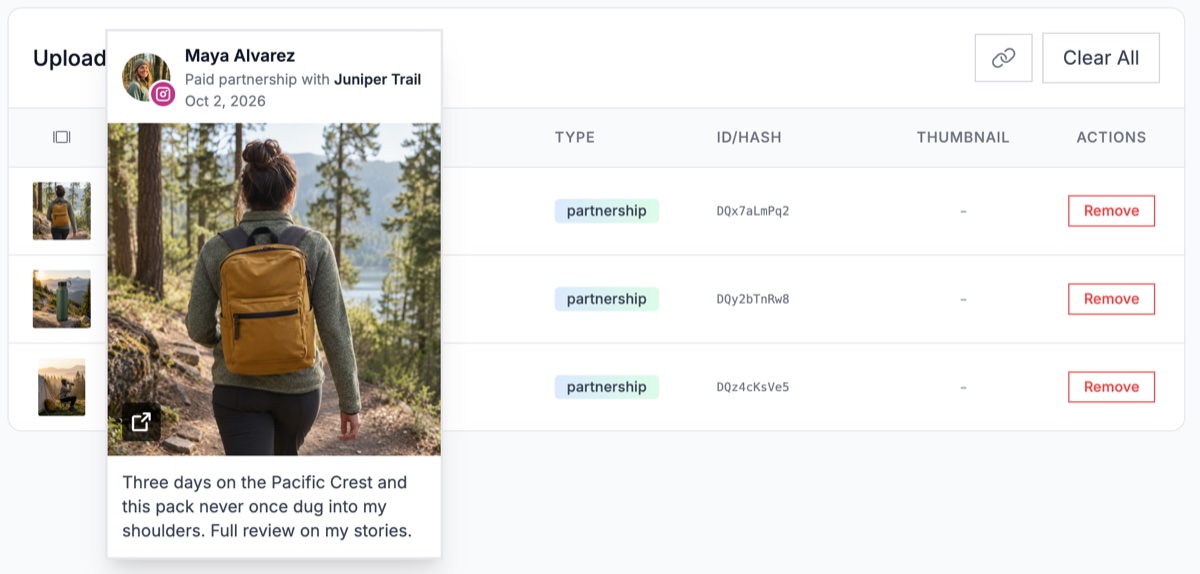
Facebook partnership ad codes and Facebook post imports aren't supported in Ads Uploader, so codes from Facebook content still go into Ads Manager using the steps above. If the creator has approved your brand as a partner at the account level, you don't need a code at all: you can run dark posts from your own media under the creator's handle. Switch Profile Options from Standard Ads to Partnership Ads, choose your brand as the First Identity (your brand authors the dark post) and the creator as the Second Identity, and set a different creator per ad or per ad set if you need to. The CLI and MCP server can launch the same uploaded-media partnership ads.
Either way, the creator still has to grant the permission, through a code or an account-level approval.
Frequently Asked Questions
How Do I Get a Partnership Ad Code on Instagram?
Open the post, story or reel in the Instagram app, tap the three dots, choose Partnership label & ads and turn on the Get partnership ad code toggle. The code appears straight away. Tap Copy or Share to send it to the advertiser. You can also turn the toggle on while creating the post, and the code is ready once it publishes.
How Do I Share a Partnership Ad Code on Facebook?
On Facebook, Meta documents the code flow for content that's already published. Open the post, story or reel, tap the three dots, choose Share partnership ad code, turn on Get partnership ad code, then copy the code or send it to the advertiser in a direct message.
Save Hours on Creative Testing
Stop uploading ads one by one. Bulk process unlimited creatives with automatic media matching and direct API publishing.
Try Ads Uploader FreeNo credit card required • 7-day free trial
Where Do I Enter a Partnership Ad Code in Ads Manager?
At the ad level. Turn on the Partnership ad toggle, click Enter ad code or post info and paste the code. The creator's post loads as the first identity, then you pick your brand as the second identity and choose how the header displays. The same field also accepts a post URL or post ID.
Why Isn't My Partnership Ad Code Working?
The usual causes are a toggle the creator switched off, a code that was mangled in the paste, a code already in use by two partners, an archived Facebook post, ineligible content such as library music or product tags, an unsupported objective or placement, or missing permissions on the advertiser's own Page, Instagram account or ad account. Ask for the code again as plain text with the post URL, then check eligibility and identities.
What's the Difference Between a Partnership Ad Code and Account-Level Permission?
A partnership ad code authorizes one specific post, story or reel. Account-level permission is an ongoing relationship the creator approves once, which lets the advertiser run partnership ads with that creator's identity, including new creative, without collecting a code for every post.
Do Partnership Ad Codes Expire?
Meta doesn't document a fixed expiry for partnership ad codes. A code stops working when the creator turns the toggle off, deletes the post or loses eligibility, or when a Facebook source post is archived. Snapchat has a separate feature with the same name that does expire, so its rules don't apply to Meta.
How Many Brands Can Use One Partnership Ad Code?
Meta allows a code to be used by up to two partners at a time. It is not a single-use token, so one advertiser can use the same code across more than one ad.
What Happens to Running Ads if the Creator Turns Off the Code?
Turning off the Get partnership ad code toggle stops the code from being used to create new ads. Ads already running with it keep running. To end those, the creator has to stop the ad separately or the advertiser has to turn it off.
Conclusion
A partnership ad code turns one creator post into a partnership ad in a few clicks, as long as both sides know their half of the handoff.
- Creators generate it from Partnership label & ads on Instagram (while posting or after), or from Share partnership ad code on a published Facebook post.
- Advertisers paste it under Enter ad code or post info, with the creator as first identity and the brand as second.
- Failed codes usually trace back to the toggle, the paste, the two-partner limit, an archived Facebook post, ineligible audio or stickers, or permissions on the advertiser's own assets.
- Ongoing creators belong on account-level permission, which ends the per-post code chase.
Next step: forward the creator steps above with your ask list, and log every code with its post URL. Once you're handling more than a few codes a week, build them in bulk instead of one at a time.