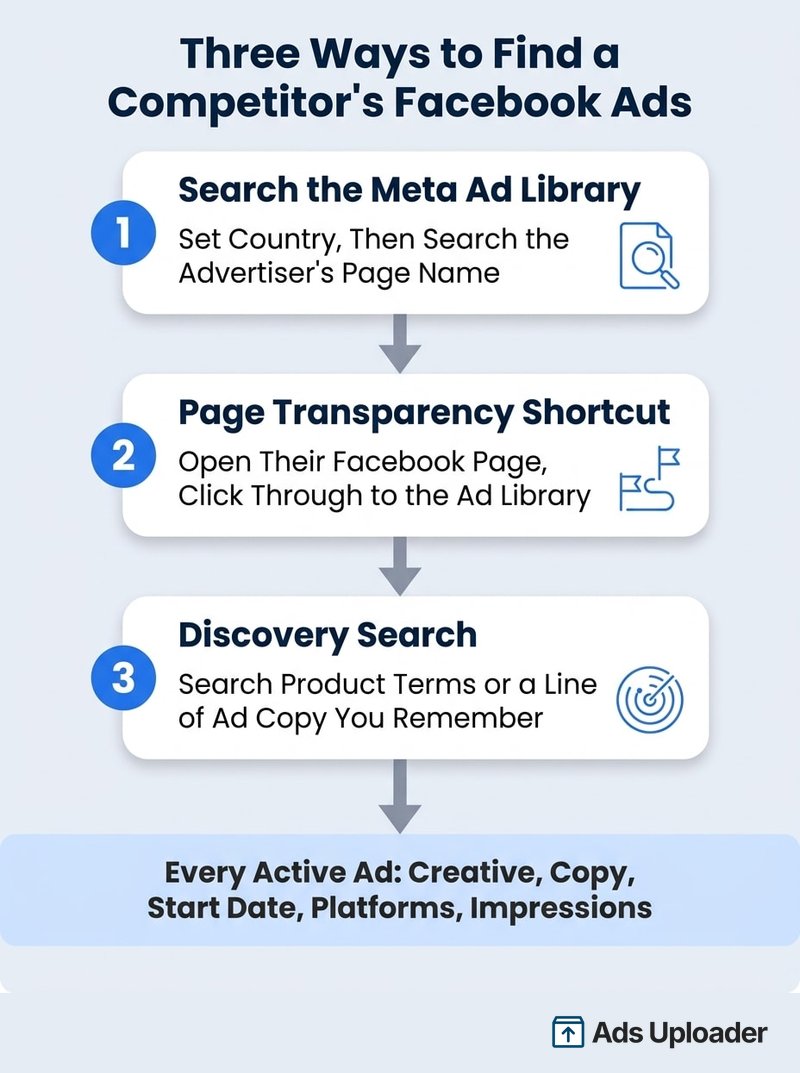
You can find competitors' Facebook ads in the Meta Ad Library, a free public archive of every ad currently running across Facebook, Instagram, and Meta's other apps. Search the advertiser's page name at facebook.com/ads/library, or open their Facebook page and use the Page Transparency section to jump straight to their ads. Each listing shows the creative, copy, start date, platforms, and an impression range, so you can judge which ads carry real delivery and track competitors over time.
Here is the part most advertisers underuse: your competitors' entire active ad strategy is public. Every angle they are testing, every offer they are pushing, every format they are scaling sits in a free database, updated within minutes of launch. They can see yours too, so the edge does not come from access. It comes from reading the data correctly and checking it consistently.
That second part is where most teams stall. Finding a competitor's ads takes thirty seconds (our complete Meta Ads Library guide covers the tool end to end). Knowing which of their 200 ads actually work, and noticing when their strategy shifts next month, is the skill. This guide covers the full workflow: find any advertiser, separate their winners from their noise, filter a wall of ads in minutes, and build a free monitoring routine with saved advertisers so you never lose track of them.
Why Spy on Competitors' Facebook Ads at All
Be clear about what competitor research gives you, because the SERP-bait version oversells it. The Ad Library will not show you budgets, targeting, CPMs, or ROAS for standard commercial ads. Anyone claiming a tool reveals a competitor's audience setup or cost per purchase is selling something.
What you do get is strategy in plain sight:
- Angles: which pain points, promises, and hooks they lead with
- Offers: discounts, trials, bundles, lead magnets, and how often they change
- Formats: their video-to-static ratio, UGC versus studio, carousel usage
- Funnels: where the ads send people, which tells you what game they are playing
- Volume and rhythm: how many ads they run, how often they refresh, when they launch
One framing rule before the tactics: research for inspiration, not duplication. If you clone whatever a competitor ships, you are permanently one step behind them. The point is to spot proven structures, adapt them to your own brand, and test them at volume.
How to Find a Competitor's Facebook Ads (Step by Step)
There are three reliable routes to any advertiser's ads. Use whichever fits what you know.
Search the Meta Ad Library Directly
Open the Meta Ad Library in any browser. No login is needed for commercial ads.
- Set the country first. The library shows ads delivered to the selected country, not where the advertiser is based. If your competitor sells in the US and you are browsing from the UK, switch to the US or you may see nothing.
- Keep the ad category on All ads. The other categories cover political, housing, employment, and financial ads.
- Search the advertiser's page name and pick the right page from the dropdown. Watch for regional pages ("Brand UK"), product pages, and impersonators. The verified page with the largest following is usually the real one.
- Scan the results. Every active ad appears with its creative, copy, start date, platforms, and an impression-range bucket.
Use the Page Transparency Shortcut
When page-name search gets messy, go in through the page itself. Open the competitor's Facebook page, scroll to the Page Transparency section, and click through to the Ad Library. This pulls every ad that page is running, with zero spelling or duplicate-page ambiguity. It is the most reliable route for brands with generic names, and it works on mobile too.
Find Competitors You Don't Know About
The library searches ad text as well as advertiser names, which turns it into a discovery tool:
- Search product or category terms ("meal kit delivery", "posture corrector") to surface every advertiser bidding on that demand, including new entrants you have never heard of.
- Search a distinctive line of copy. Saw an ad in your feed but forgot the brand? A memorable phrase in quotes usually finds it, along with every other advertiser using the same script.
- Walk the corporate family. Parent companies, sister brands, and regional pages run separate ad accounts. Check them all before concluding a competitor "isn't running ads."
Launch More. Click Less.
Upload hundreds of creatives at once, auto-match thumbnails to videos, and publish straight to your ad accounts through Meta's API.
Try Ads Uploader FreeNo credit card required • 7-day free trial
How to Tell Which Competitor Ads Are Actually Working
This is where almost every guide on the internet gives you 2019 advice, so let's fix it.
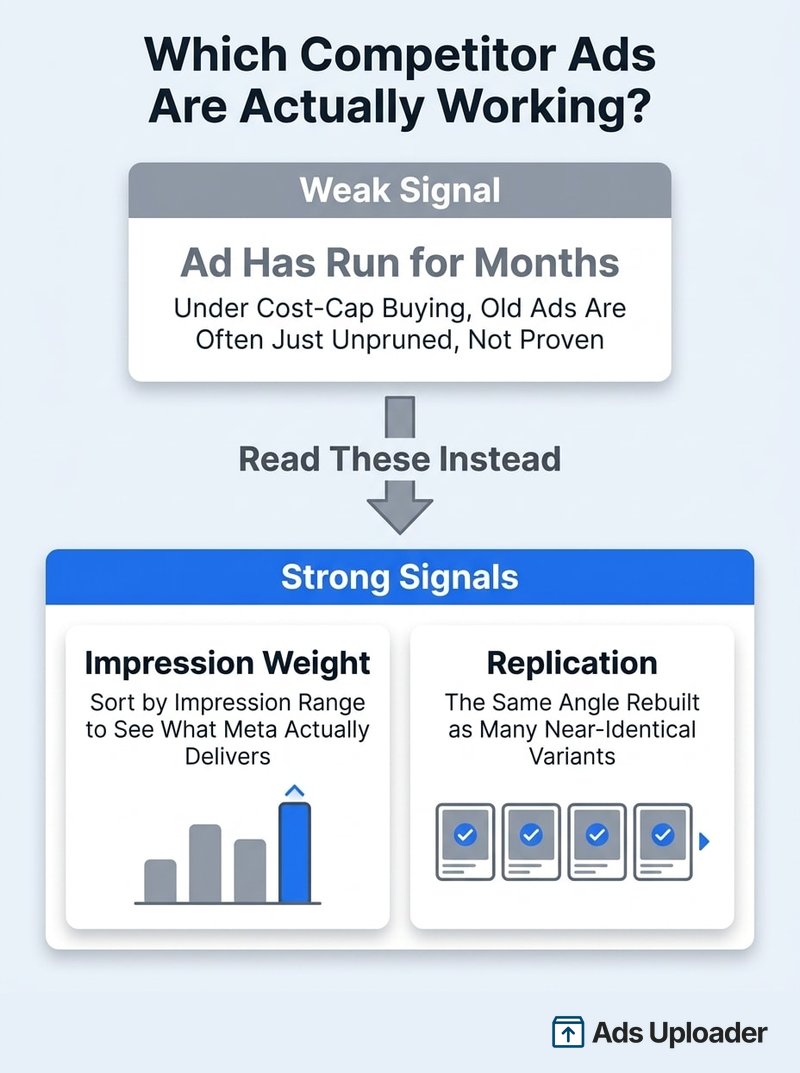
The old heuristic said: an ad that has been running for 30, 60, or 90 days must be a winner, because nobody pays for a loser that long. That logic broke. Under cost-cap and bid-cap buying, advertisers load an ad set with 10 or 20 ads, let the auction decide, and never prune. One or two ads take all the spend while the rest sit active with almost no delivery for months. Age now mostly measures neglect.
Meta quietly handed us something far better. Across late 2025 and early 2026, Meta attached an impression-range bucket to every ad in the library, from under 1K up to 1M+, and made it sortable and filterable. Ads with fewer than 100 impressions also get a "Low impression count" badge (added December 22, 2025, alongside the WhatsApp placement filter), so the duds flag themselves.
So read two signals together, and ignore the clock:
- Impression weight. Sort the competitor's ads by impressions. The ads in the top buckets are the ones Meta's delivery system is actually spending on. That is the closest thing to a public performance signal that exists.
- Replication. Winners get rebuilt. When you see the same hook or visual structure appearing as five near-identical ads, the advertiser is scaling something that works. A "2 ads use this creative and text" label on the detail view is the same tell.
An ad that is three weeks old with 500K impressions and six sibling variants is a confirmed winner. An ad that is eight months old wearing a low-impression badge is furniture. Most of the SERP still has this backwards.
What stays hidden: actual spend, budgets, targeting, clicks, and conversions. For standard commercial ads you get delivery weight, not economics. EU-delivered ads expose more under the Digital Services Act, including tighter impression ranges and demographic breakdowns, which is why experienced researchers occasionally flip the country filter to France or Germany.
Filter a Competitor's Ads Like a Pro
Finding the advertiser is step one. Then you hit the wall: a serious competitor runs 100 to 400 active ads, and the native library gives you a slow infinite scroll with scattered filters. Meta's own impression sort exists but lives awkwardly across sections, and there is still no way to isolate replicated creative, search within one advertiser's ads, or save anything.
This is exactly the friction the free Ad Library Helper extension removes. It adds a floating panel on top of the Ad Library (no account, no login) with the controls a media buyer actually reaches for:
- Load all ads from the advertiser in one click instead of scroll-loading for ten minutes
- Sort by impressions over a window: 7, 14, 30, 90 days, or all time, so you see what is being delivered hardest right now, not just lifetime totals
- Hide low impression ads to clear the noise floor
- Single Use vs Multi Use creative: one click isolates the replicated creatives, which is the strongest winner signal the native UI still will not surface
- Text search within the advertiser's ads to find every ad mentioning "free shipping" or a specific product
- Active/inactive, image/video, and partnership filters, plus newest and oldest sorts
- Bulk download of any single ad or everything visible, organized by brand, straight into your swipe file
A practical five-minute teardown looks like this: load all ads, hide low impressions, sort by impressions over the last 30 days, then flip on Multi Use. What remains is the competitor's proven core: the handful of angles carrying their account. Screenshot or bulk-download those, note the offers and destinations, and you have extracted more signal than an afternoon of raw scrolling.
Track Competitors Over Time With Saved Advertisers
A single teardown is a snapshot. The compounding value comes from watching the same advertisers month after month, because strategy reveals itself in the changes: new ad clusters mean a launch, rising volume means something is scaling, a sudden discount means pressure. This is the part most teams never systematize, and it is the main thing paid spy tools charge for. You can build it free.
Save the Advertisers Worth Watching
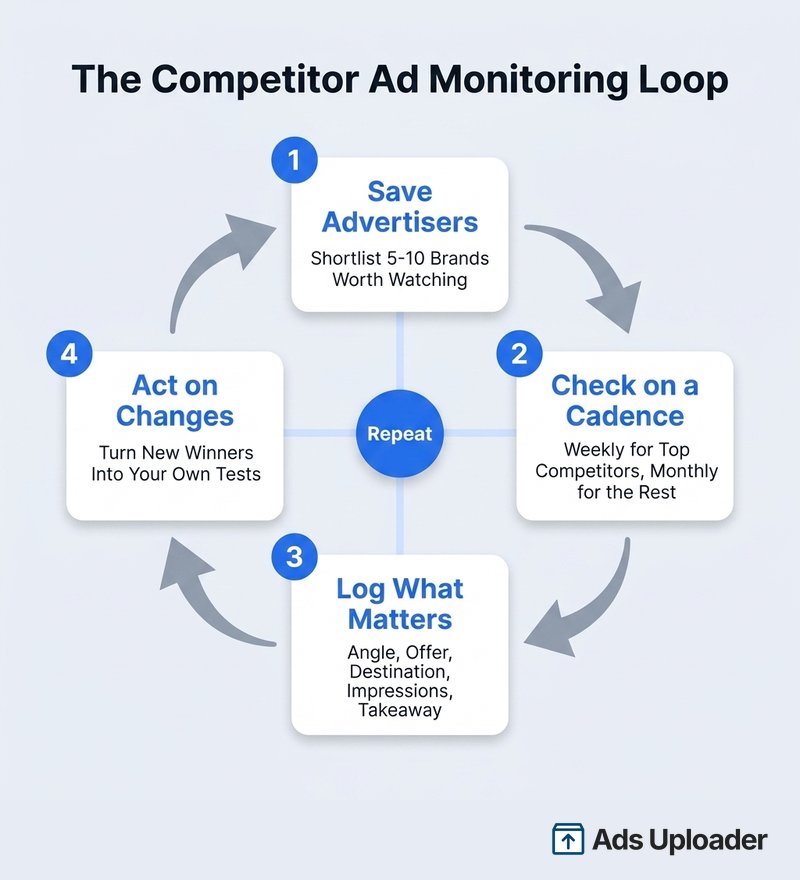
Re-finding each competitor through search every session is exactly the kind of friction that kills a routine. Ad Library Helper's Save Advertisers feature fixes it: save the brands you track and jump back to any of them instantly from the extension panel, with your filters ready to go. Build a shortlist of five to ten advertisers: your three direct competitors, a couple of category leaders, and one or two brands whose creative craft you admire regardless of niche.
Set a Monitoring Cadence
Match effort to stakes:
- Top three direct competitors: weekly, five minutes each
- The rest of the shortlist: monthly
- Known launch windows: daily during Q4, their historical sale periods, or right after they raise funding
During each check, sort by newest to catch fresh launches, then re-run the impressions-plus-replication read to see if the winner set has changed.
Save Hours on Creative Testing
Stop uploading ads one by one. Bulk process unlimited creatives with automatic media matching and direct API publishing.
Try Ads Uploader FreeNo credit card required • 7-day free trial
Log What Matters
Keep a simple tracker, one row per notable ad: date observed, advertiser, angle summary, offer and CTA, destination, impression bucket, single or multi use, and a one-line takeaway. Eight columns, no more. Over a quarter, the sheet starts answering strategic questions: how often they refresh creative before ad fatigue sets in, which seasonal windows they spend into, and which angles they keep returning to because those angles keep paying.
Read Their Creative, Offers, and Funnels
With the winners isolated and the routine running, extract the actual intelligence. Three reads, in order of depth:
Creative themes. What leads: price, social proof, problem agitation, founder story? What is the video-to-static split? Is the production UGC-style or studio? If every top ad is a talking-head testimonial, that structure is carrying their account, and a version of it will probably carry in your niche too.
Offers and CTAs. Log discount depth and cadence, free-trial terms, bundles, and guarantee language. "Shop Now" versus "Learn More" versus "Get Quote" tells you how aggressively they convert cold traffic. Offer changes over time are margin signals you can act on before their next move lands.
Destinations. Click through. Homepage links signal broad awareness spend. Product pages mean direct-response acquisition. A dedicated landing page with a countdown means they are protecting a control offer. A lead magnet means the email sequence behind it is the real conversion event. Copying a competitor's creative without understanding which funnel it feeds is how teams waste a quarter.
E-commerce teams get one extra layer here: the same impression-and-replication read works for spotting which products a category is scaling, which is its own discipline. We cover it in finding winning products in the Facebook Ad Library.
Whatever you capture, organize the swipe file by angle, not by brand: "social proof", "before/after", "price anchor", "founder story". When you brief new creative, you want a library of proven structures, not a folder of screenshots.
Do You Need a Paid Spy Tool?
Honest answer: probably not for Facebook and Instagram research. Paid tools (Foreplay, AdSpy, BigSpy, PowerAdSpy, Minea, and the rest, roughly $30 to $150+ per month) sell three things on top of the same public data: longer history, alerts, and organization. Their databases are built on what Meta already exposes, their coverage of small and new advertisers is often spottier than the live library, and the library updates within minutes while scrapers lag.
| Job | Free stack (Ad Library + Ad Library Helper + a tracker sheet) | What paid adds |
|---|---|---|
| Find any advertiser's active ads | Yes, in seconds | Nothing |
| Judge winners | Impression sort + Multi Use filter | Engagement proxies of mixed reliability |
| Track over time | Saved advertisers + weekly cadence | Email alerts, auto-history |
| Swipe file | Bulk download by brand | Tagging, team workspaces |
| Cross-platform (TikTok, Google) | No | Yes, the genuine gap |
If you manage dozens of clients or need TikTok and Google coverage in one dashboard, a paid tool earns its fee. For everyone else, the free stack covers 90% of the job, and the missing 10% is rarely the bottleneck. The bottleneck is what you do with the research.
Conclusion
Finding competitors' Facebook ads is the easy part: the Meta Ad Library makes every active ad public, and the Page Transparency shortcut gets you to any advertiser in two clicks. The skill is in the reading and the rhythm. Judge ads by impression weight and replication instead of age, filter the noise with the free Ad Library Helper extension, save the advertisers that matter, and log what you see on a fixed cadence so strategy shifts can't sneak past you.
Then close the loop. Competitor research that never becomes a launched test is procrastination with a spreadsheet. The advertisers who win take the proven angle, rebuild it as their own, and ship it as a proper test matrix the same week, usually with a bulk ad launch tool doing the heavy lifting. Find what is working in your market, make it unmistakably yours, and test it at volume.
Frequently Asked Questions
How do I see my competitors' Facebook ads for free?
Use the Meta Ad Library at facebook.com/ads/library. Search the advertiser's page name, or open their Facebook page, find the Page Transparency section, and click through to their ads. No account or payment is required for commercial ads. You will see every active ad's creative, copy, start date, platforms, and an impression range.
How do I know which competitor Facebook ads are performing well?
Read two signals together: impression weight and replication. Sort or filter by impression range to see which ads Meta is actually delivering hardest, then look for the same creative rebuilt across multiple near-identical ads. An ad that is old but barely delivered is usually one nobody pruned, not a winner, so do not rely on how long an ad has been running.
Can I see how much my competitors spend on Facebook ads?
Not for standard commercial ads. The Ad Library shows spend ranges only for political and social-issue ads. Every ad now carries a coarse impression-range bucket, from under 1K up to 1M+, which is the closest free proxy for delivery. In the EU, the Digital Services Act forces richer data, including tighter impression ranges and demographic breakdowns.
How do I find competitor ads when I don't know their Facebook page name?
Search the Ad Library by keyword instead of advertiser. Product terms, category phrases, or a distinctive line of ad copy you remember will surface the ads and the pages running them. You can also find the brand on Facebook first, then use Page Transparency to jump to their ads, which avoids page-name spelling issues entirely.
Can I get notified when a competitor launches a new Facebook ad?
The Ad Library has no native alerts. The free workaround is a routine: save the advertiser with the Ad Library Helper extension so you can jump back to them instantly, then re-check on a fixed cadence and sort by newest to spot fresh launches. Paid spy tools sell email alerts, but a weekly five-minute check covers most teams.
Can I see who my competitors are targeting with their ads?
No. Meta hides targeting for standard commercial ads, so you cannot see interests, lookalikes, ages, or custom audiences. The one exception is EU and UK delivered ads, where the Digital Services Act exposes the targeting parameters the advertiser chose. Everywhere else, infer the audience from the creative, the copy, and the landing page.
Is it legal to spy on competitors' Facebook ads?
Yes. The Meta Ad Library is a transparency tool that Meta runs deliberately, and browsing it for competitor research is exactly what it is built for. Viewing, saving, and analyzing public ads breaks no rules. The line to respect is copyright: study competitor creative all you want, but do not republish their assets as your own.
Can I download my competitors' Facebook ads?
Yes, for analysis. Images can be saved with right-click or screenshot, videos can be captured through browser dev tools, and the free Ad Library Helper extension adds one-click bulk download of every visible ad, organized by brand. Keep downloads in your swipe file for study and inspiration. Republishing someone else's creative would infringe copyright.
