When the Meta Ads MCP is not working, the cause is usually Meta's gradual rollout, the AI client or account access rather than an outage. An is_ads_mcp_enabled value of false means Meta has not switched that ad account on yet, and no admin setting changes it. Missing tools point to connector setup, and Cursor or Codex sign-in errors need your own Meta developer app. Campaigns arriving paused are expected. When an account isn't enabled, an MCP server with its own Meta connection is the practical workaround.
You pasted https://mcp.facebook.com/ads into Claude, signed in with Meta, asked for last week's numbers, and got "this ad account is not enabled". Or no Meta tools showed up at all. Or the agent said it launched your campaign, and it's sitting there paused.
None of that means you set it up wrong, and it rarely means Meta's MCP is down. Meta's official Ads MCP is still an open beta that switches on account by account, and a few of its error messages aren't documented anywhere.
This guide is built around the symptom you're seeing. Find it in the table, jump to the section, and work through the fix. If the account you need simply isn't enabled yet, the third section shows how to run the same jobs through Ads Uploader's MCP today. A disclosure: I run Ads Uploader. I also run Meta's server on a login with 20 ad accounts, and every behaviour below was checked against Meta's documentation and our own connection in October 2026.
Quick Diagnosis: Find Your Symptom
Start any troubleshooting with one prompt: "List my ad accounts and show which ones are enabled for the Ads MCP." If the list comes back at all, Meta's server is up, and the answer tells you whether the problem is sign-in, the account or something else.
| What you see | What it usually means | Section |
|---|---|---|
is_ads_mcp_enabled: false, "Ads MCP is gradually being rolled out" | Meta hasn't enabled that ad account yet | Account not enabled |
| Account enabled, but reports fail or "not queryable" | The ad account is disabled, closed or restricted | Enabled but not queryable |
| No Meta tools in the chat, or some tools missing | Connector off, plan limits, stale tools or tool rollout | Tools missing |
| "Couldn't register with Meta's login service", sign-in repeats | Registration or session problem | Sign-in errors |
| "You can't connect to Ads MCP server with this account", account missing | Wrong profile or missing access | Permissions |
| Action denied, account shows "Limited" | An Ads MCP server rule blocked it | Blocked actions |
| Campaign, ad set or ad created paused | Expected behaviour | Paused objects |
| Expected an Ads Manager draft, got a paused campaign | Draft mode hasn't reached your account | Draft mode |
| "User request limit reached" | Meta's API throttling | Rate limits |
| "Dynamic registration is not available for this client" | Unsupported client (Cursor, Codex and others) | Unsupported clients |
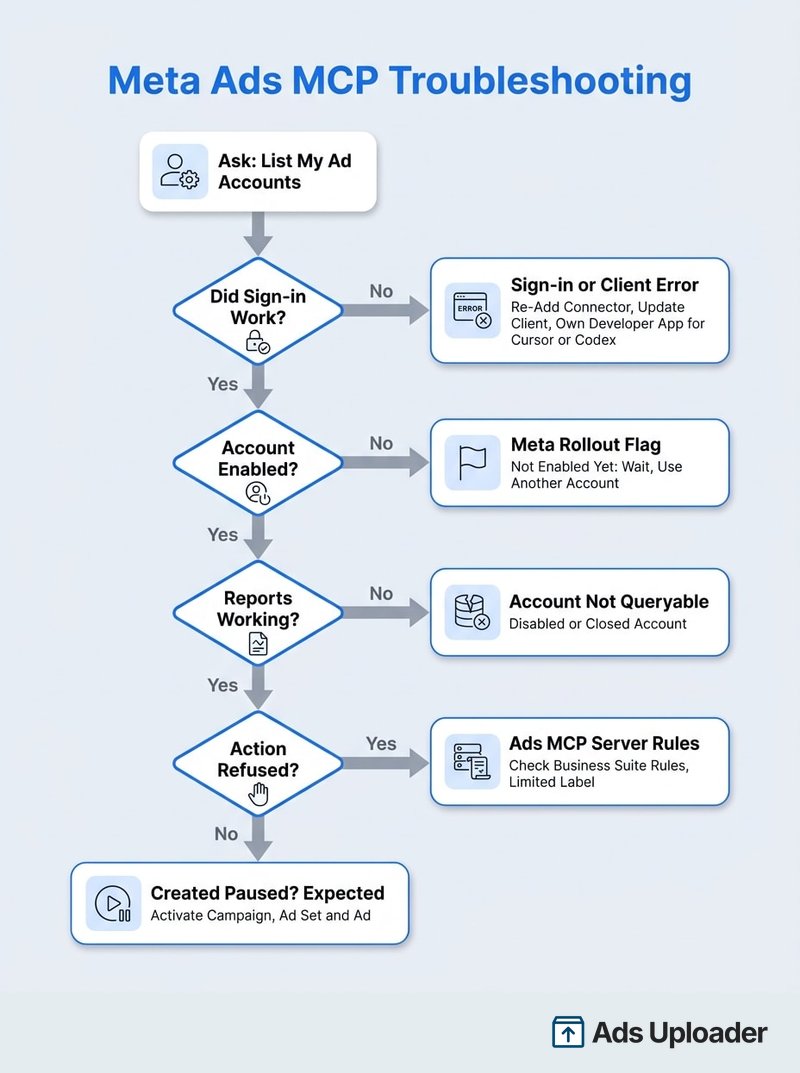
"This Ad Account Is Not Enabled for the Ads MCP"
This is the most common one, and it's what most people mean when they say the Meta Ads MCP rollout is not working or the MCP is disabled on Facebook. When the agent lists your accounts, the affected account comes back like this:
"is_ads_mcp_enabled": false,
"is_ads_mcp_disabled_reason": "Ads MCP is gradually being rolled out. Please check back at a later date to use Ads MCP with this Ad Account."
What it means: your sign-in worked. Meta enables its MCP one ad account at a time, and this account isn't on yet. It's a flag on Meta's side, not a permission you're missing. Meta's ads AI connectors help page still says "You may not have access to all of these tools and features yet," and Meta hasn't published a waitlist, eligibility rules or a date.
The order is hard to predict. On our login, 19 of 20 ad accounts were enabled when I checked on October 19 and again on October 20, 2026. The one still waiting is an active account with a payment method on file, not a dormant one. Buyers report the same pattern: idle accounts switched on while the main spending account waits.
Fix:
- Ask the agent to list every ad account with its
is_ads_mcp_enabledvalue, and note which IDs are true. - Work in an enabled account for now. The agent's tool guidance tells it not to touch accounts where the flag is false, so it will refuse rather than guess.
- Leave the connector installed. Reconnecting, switching AI clients or making new tokens won't flip the flag, and neither will contacting support, since Meta has no request form.
- If the account you need is the one that's off, use a server that doesn't depend on Meta's rollout flag (next section), and check Meta's server again every week or two.
There's no admin toggle. The Ads MCP server page in Business Suite sets rules for what agents may do; it can't switch an account on.
Skip the Rollout Gate: Run the Same Jobs Through Ads Uploader's MCP
If you need an AI agent on that ad account this week, waiting isn't a plan. Ads Uploader's MCP connects through your existing Ads Uploader connection to Meta, an approved Meta app we maintain, so it doesn't check Meta's MCP rollout flag at all. If your Facebook profile can reach the ad account in Business Manager, the agent can work on it.
Connect It
- Claude, ChatGPT or Cursor: add
https://adsuploader.com/api/mcpas a custom connector (in Claude: Settings, then Connectors, then Add custom connector), then finish the Ads Uploader sign-in in your browser. There's no token to copy. - Claude Code: run
claude mcp add --transport http ads-uploader https://adsuploader.com/api/mcp. Codex and other coding agents add the same URL as a remote MCP server, and agents that only take local servers can bridge withnpx mcp-remote https://adsuploader.com/api/mcp. - Local server and CLI:
npm install -g @adsuploader/cli @adsuploader/mcp, thenads login, and point your agent at theads-mcpcommand. The local server can upload files straight from your disk.
To check it works, ask the agent to list your ad accounts.
What the Agent Can Do
- Read the account.
ads_query_insightsreturns performance with breakdowns, period comparisons and plain metrics such as purchases, cost per lead and ROAS, across up to five ad accounts in one call, reported per account and never summed.ads_campaign_healthanswers "how is this campaign doing?" with Meta's own result for the goal, delivery issues and learning status, and rejected ads come back with Meta's reasons. - Launch in bulk. The agent works from saved builds and presets, the same ones you see in the web app: hundreds of ads per launch, 4:5 feed and 9:16 Stories and Reels media paired per placement, your naming convention, and protection against launching the same thing twice.
ads_previewshows exactly what will be created beforeads_createruns the job. - Propose edits for approval. By default, every change the agent proposes with
ads_edit_previewlands in your Agent Inbox with the current and proposed values side by side and the agent's reason. You approve the lines you want and watch each one apply. Reversible changes can be undone later, and archive and delete need a separate confirmation. - Duplicate.
ads_duplicatecopies campaigns, ad sets and ads the way Ads Manager does, andads_duplicate_by_postcopies an ad by Post ID so it keeps its likes and comments. - Check History. Launches and changes from the web app, CLI, MCP and API sit in one timeline per account, which the agent can read with
ads_list_historybefore it proposes anything new.
Permissions are set per ad account, so you can keep one client read-only and let the agent propose edits on another.
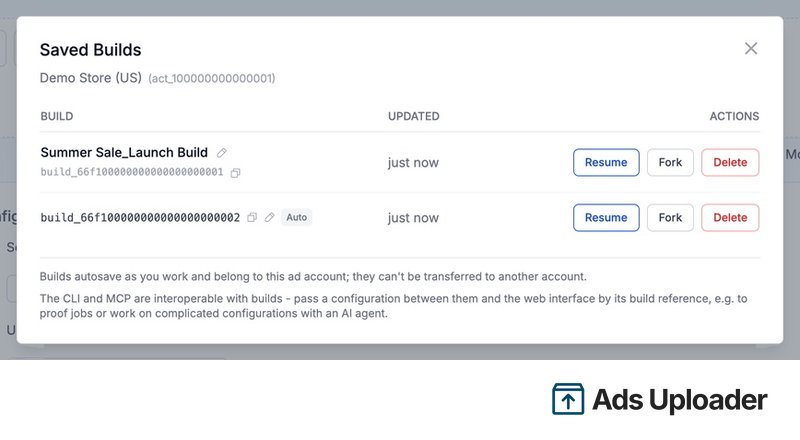
A build you set up in the web uploader can be handed to the agent by its reference, changed, and opened again in the browser before any ads are created.
Ads Uploader is $59 a month flat with unlimited ad accounts. MCP access is on paid plans and isn't part of the web app's 7-day trial.
Account Enabled, but Reports Fail
A less obvious variant: the flag says true, yet every reporting request fails. The account list holds the reason in is_queryable and not_queryable_reason. On our login, disabled accounts returned "Your ad account was flagged because of unusual activity" and closed accounts returned "Unknown error".
What it means: the MCP is fine. The ad account itself can't serve reports because Meta has restricted it or it's closed, and no MCP server can report on it until that's resolved.
Fix:
- Ask the agent to show the account status and
not_queryable_reason. - If it's disabled, resolve the restriction in Meta's Account Quality or Business Support Home.
- If it's closed, point the agent at the account you actually use.
Meta Ads MCP Tools Missing in Claude or ChatGPT
No Meta Tools at All
If the chat doesn't see any Meta tools, the client is usually the cause, not Meta. The same checks apply to any MCP connector.
- Claude: custom connectors work on Free, Pro, Max, Team and Enterprise, but Free allows only one. A connector can also be switched off for a single chat. On Team and Enterprise, an owner has to add it before members can connect.
- ChatGPT: remote MCP servers run through Developer mode. OpenAI documents full read and write connectors for Business, Enterprise and Edu, and read-only tools on Pro. On a managed workspace, an admin turns Developer mode on, and new tools can start disabled until an admin refreshes them.
Fix:
- Open the chat's connector menu (in Claude, + → Connectors) and make sure the connector is on for this conversation.
- Ask: "List the Meta Ads tools you can see." No answer means the client isn't loading the server.
- Remove and re-add the connector with the exact URL, then restart the app.
- On a workspace plan, ask your admin to approve or refresh the connector's tools.
Setup steps for each client are in our Meta Ads MCP setup guide.
Wary of Wiring AI Straight to Meta?
Ads Uploader is loved by power media buyers and agencies, and trusted to launch hundreds of thousands of Meta ads every month.
See the MCP for Meta AdsNo credit card required • 7-day free trial
Some Tools Missing on One Account
Meta also rolls out individual tools per ad account. If most tools work but one fails, you may see "This tool is new and is being gradually rolled out across ad accounts." That's the reply I got on October 19, 2026 when I asked to read Ads Manager drafts on our main account.
Fix: ask the agent which tools it has for that account, use another tool or Ads Manager for the missing step, and try again later. Nothing you change on your side unlocks it.
Sign-in Loops and Connection Errors
"Couldn't register with Meta's login service. You can try again or add an OAuth Client ID in the connector settings." This one shows up in Claude, and the public report points at an old connector record rather than Meta. Remove the connector and add it again; if it still fails, connect from Claude Code, or create your own Meta developer app (see the Cursor and Codex section) and enter its app ID as the OAuth Client ID.
"The provided redirect_uris are not registered for this client." Your client is signing in with a Meta app that doesn't list its return address. Meta documents adding your app ID with claude mcp add --transport http --client-id <META_APP_ID> meta-ads https://mcp.facebook.com/ads, and the redirect URL in the app has to match the client's character for character.
It asks you to sign in again after about two months. Meta's long-lived user tokens usually last about 60 days and can end sooner after a password or permission change. Some clients don't refresh them reliably. Update the client, disconnect and sign in again.
HTTP 405 when you open the URL in a browser. That's normal, not a sign the server is down: the endpoint only answers MCP requests. If a client itself fails with 405 or 400, update it.
Permission Errors and Missing Ad Accounts
"You can't connect to Ads MCP server with this account." Meta doesn't document this message. The reports tie it to the Facebook profile used at sign-in: either the wrong profile, or one without enough access to the ad account.
An ad account is missing from the list. At Meta's consent screen you choose which businesses to share, current businesses or all current and future ones. Skip a business there and its accounts never appear.
Fix:
- Disconnect, reconnect, and check which Facebook profile the Meta login screen is using.
- In your business portfolio settings, confirm that profile has access to the exact ad account ID. Reporting needs view access, and creating or editing ads needs campaign management access.
- On reconnect, choose Edit previous settings if offered and include the missing business.
- For a client account, the client has to share the asset with your agency's business and assign you to it. No connector, Meta's or a third party's, can grant access your Facebook profile doesn't already have.
If the account then appears with is_ads_mcp_enabled: false, permissions are fixed and you're back to the rollout question.
Budget Rules and Blocked Actions
If reads work but a write is refused on Meta's server, check the Ads MCP server rules. Anyone with full control of a business portfolio can block actions per ad account in Meta Business Suite → Settings → Integrations → Ads MCP server: creating campaigns, ad sets or ads, budget edits above a percentage or amount, targeting, creative and status changes. When some actions are blocked, the account shows Limited next to "Take actions in this ad account".
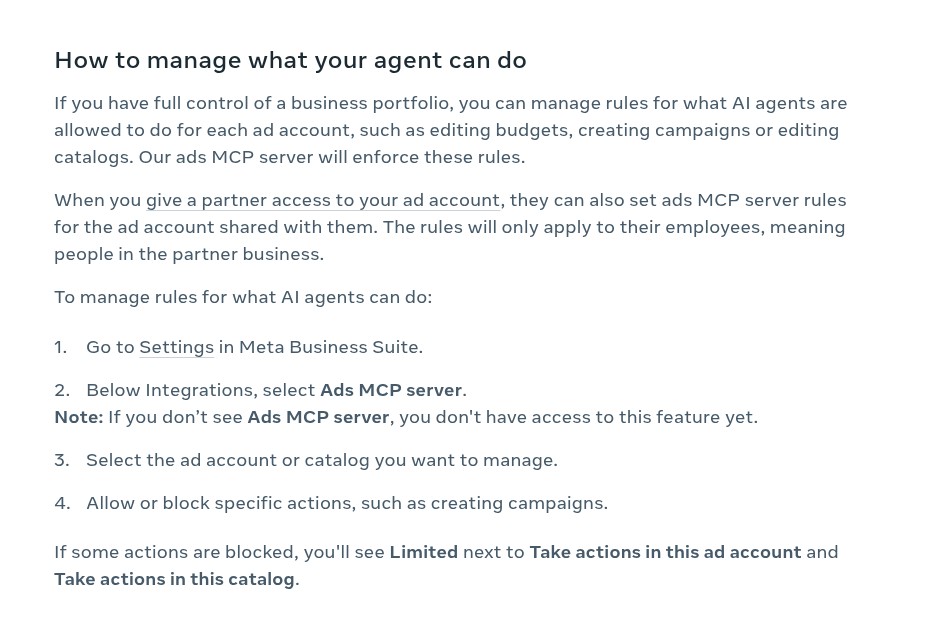
Two details catch agencies out. A partner business can set its own rules on a client's shared account, and those apply only to the partner's people, so your agency's rules can block you even when the client's don't. And Meta doesn't publish one standard denial message, so different AI clients word the refusal differently. The feature is still in limited availability.
Fix:
- Ask an admin to open the Ads MCP server page and select the affected ad account.
- Check creation, budget, targeting, creative and status rules. A budget increase can be blocked even when creation is allowed.
- Either change the rule on purpose, or keep it and ask the agent for a change inside the limit, such as a 15% budget increase instead of 50%.
Why the Meta Ads MCP Created Your Campaign as Paused
This one isn't a bug. Meta's tool reference says "Write tools create entities in a paused state; your AI client asks for confirmation before activation." Campaigns, ad sets and ads all start paused, and a separate activate tool turns them on.
- Activating the campaign didn't make the ads run. Meta's tool descriptions say activating a parent doesn't activate its children. Campaign, ad set and ad all have to be active for anything to deliver.
- An edit paused a live ad. On our connection, the update tool's description says that outside draft mode, "a non-trivial edit on an ACTIVE entity is force-paused" unless the request sets the status itself. Check delivery after any edit to a running campaign.
Creatives also can't be edited in place. To change an ad's copy or media, Meta's agent creates a new ad and pauses the old one, so the new ad starts without the old one's likes and comments.
Fix:
- Review the paused objects in Ads Manager: budget, optimisation event, targeting, placements, tracking and creative.
- Ask the agent to activate the campaign, then the ad set, then the ad, and check delivery afterwards.
Draft Mode Not Available on Your Account
On October 6, 2026, Meta announced that "Agent-staged work now lands as a draft in Ads Manager, so people and agents can co-author the same campaign and publish from either surface." Meta's tool descriptions on our connection now describe this draft mode too.
It isn't live everywhere yet. When I asked for a campaign shell on our main account on October 19, the create call came back PAUSED, not DRAFT, and reading drafts returned "This tool is new and is being gradually rolled out across ad accounts." A draft sits in Ads Manager's draft area until published; a paused object is a real campaign that isn't delivering.
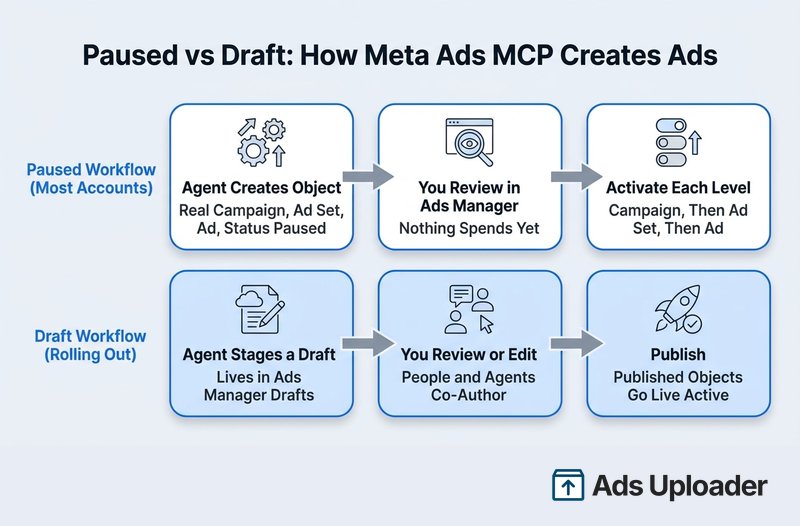
Fix: ask the agent whether its last create returned PAUSED or DRAFT, and look in both places in Ads Manager. There's no switch to turn draft mode on. If what you really wanted was a review step before changes reach Meta, that's what an approval queue such as Ads Uploader's Agent Inbox is for.
Rate Limits and Slow Responses
Meta publishes no separate quota for its MCP, but the calls behind it count against the normal Marketing API rate limits. On a big account you may see "User request limit reached" or "There have been too many calls from this ad-account. Please wait a bit and try again." Meta also caps repeat edits: an ad set's budget can change at most four times an hour.
Fix: stop and wait rather than retrying, narrow the request (one account, a shorter date range, fewer breakdowns), and batch changes into one deliberate update per object.
This is also where a server built for repeat questions helps. Ads Uploader reuses recent report results for a few minutes, so asking the same question twice doesn't spend your Meta quota again, and it pauses fresh calls on its own when Meta reports heavy usage instead of letting the agent hammer the account.
Cursor, Codex and Other Unsupported Clients
Meta lists four supported clients for its server: ChatGPT, Claude, Claude Code and Perplexity. Others can fail before a login window even opens:
Dynamic registration is not available for this client.
Codex can show the same thing as invalid_client_metadata.
What it means: most MCP clients register themselves with a server on first connect, and Meta's server only accepts that from the clients it supports. Public Codex bug reports were still open in mid-October 2026, including a "missing field access_token" failure after login.
Fix (your own developer app, documented since July 16, 2026):
- Create or open an app at Meta for Developers and add the use case Create & manage ads with ads MCP server.
- Add your client's exact redirect URL in the app's Facebook Login for Business settings.
- Give the client the app ID as its OAuth client ID. The token needs the Ads MCP permission plus read or management access.
- If your client can send custom headers, Meta also accepts a user or Employee-role system user token as a bearer token. Keep it out of repositories and chat history.
Meta's getting started guide covers the details, and an app that manages other businesses' ad accounts also needs App Review and Advanced Access. For full Cursor and Codex walkthroughs, see our guide to the Meta Ads MCP in Codex and Cursor. If you'd rather skip the developer app, Ads Uploader's hosted MCP connects from Cursor and coding agents with a browser sign-in.
Meta's Server or Ads Uploader's: Which to Use
They aren't either-or, and you can connect both.
Meta's official Ads MCP is free during its open beta, first-party, and the broadest toolset for reading an account. It's the one to use for catalogs and product feeds, pixels and datasets, A/B and lift tests, benchmarks and Opportunity Score, none of which Ads Uploader covers. Its limits are the ones this article is about: the per-account rollout, a short list of supported clients, one object per call when building ads, and no approval queue or undo.
Ads Uploader's MCP is for the launch and management work: bulk launches from saved builds, edits that wait in the Agent Inbox, duplication by Post ID, History and per-account permissions, on any ad account your profile can reach. It covers Meta only.
Whatever you connect, every server still needs your access to the ad account and follows Meta's advertising policies and rate limits. For the wider field, see our comparison of the best Meta Ads MCP servers, and if you'd rather script against Meta directly, our Meta Ads CLI guide covers Meta's command line tool.
Give Your AI Agent a Safety Net
Launch across every client account with an MCP and CLI built for power media buyers and agencies.
See the MCP for Meta AdsNo credit card required • 7-day free trial
Frequently Asked Questions
Why Does My Ad Account Say It Is Not Enabled for the Meta Ads MCP?
An is_ads_mcp_enabled value of false means Meta's gradual rollout hasn't reached that ad account yet. Your sign-in worked. Meta switches the MCP on account by account, with no admin toggle, waitlist or request form, and reconnecting won't change it. Work in an enabled account, or use an MCP server that connects through its own Meta app, such as Ads Uploader's.
Is the Meta Ads MCP Down?
Usually not. Ask your agent to list your ad accounts: if the list comes back, Meta's server is up and the problem is account-level, most often the rollout flag, a missing permission or a rule. Outages are far rarer than rollout and client issues.
How Can I Use an AI Agent on My Meta Ads if My Account Isn't Enabled?
Use an MCP server that reaches Meta through its own approved connection rather than Meta's rollout flag. Ads Uploader's hosted MCP at https://adsuploader.com/api/mcp works in Claude, ChatGPT, Cursor and coding agents, and covers reporting, bulk launches from saved builds, edits that wait in an Agent Inbox for approval, duplication and History. It's included on paid plans at $59 a month.
Why Can't I See the Meta Ads MCP Tools in Claude or ChatGPT?
Usually the connector isn't switched on for that chat, your plan doesn't allow it, or the tool list is stale. In Claude, enable it under + then Connectors. In ChatGPT, Developer mode must be on and write actions need a Business, Enterprise or Edu plan. If only some tools are missing, Meta hasn't rolled them out to that account yet.
Why Did the Meta Ads MCP Create My Campaign as Paused?
Because that's how Meta built it. The standard create tools make campaigns, ad sets and ads paused, and a separate activate step turns them on after your AI client asks you to confirm. Activate each level, campaign then ad set then ad, or nothing delivers.
Why Does the Meta Ads MCP Work in Claude but Not in Cursor?
Meta's server accepts automatic sign-in registration only from the clients it supports: ChatGPT, Claude, Claude Code and Perplexity. Cursor and Codex get errors such as "Dynamic registration is not available for this client." The documented fix is your own Meta developer app with the client's exact redirect URL.
Why Did My Meta Ads MCP Connection Stop Working After Two Months?
Meta's long-lived user tokens usually last about 60 days, and not every client refreshes them reliably. Disconnect the connector, update your AI client and sign in again. For unattended jobs, use a developer app with a system user token instead of a personal login.
Conclusion
When the Meta Ads MCP is not working, start with the account list. It separates the big causes in one prompt: Meta's rollout, account access and everything else, and it tells you the server isn't down.
is_ads_mcp_enabled: falseis Meta's rollout flag. Nothing on your side flips it.- If that account matters now, run the job through an MCP server with its own Meta connection, such as Ads Uploader's.
- Missing tools are usually the client: connector switched off, plan limits or a stale tool list.
- Denied actions usually trace to Ads MCP server rules, including your agency's own.
- Paused is by design on Meta's server. Activate campaign, ad set and ad in turn.
- Cursor, Codex and other clients need your own Meta developer app for Meta's server.
Re-run "list my ad accounts" every week or two; accounts and tools keep switching on.