Meta catalog ads build themselves from a product feed, so the specs that matter live in two places: the feed and the image. A product feed needs nine required fields, and product images must be JPEG or PNG, at most 8 MB, and at least 500x500 pixels, with 1024x1024 recommended at a 1:1 ratio. Running the ads also requires a catalog in Commerce Manager connected to a Meta Pixel or the Conversions API. Get those right and the rest is formatting detail.
The creative is rarely why a catalog campaign underperforms. The feed is. A missing required field, a price without a currency code, or an image URL that returns a 404 will quietly keep products out of your ads long before creative quality enters the picture. The catch is that Meta splits these requirements across two separate help pages, so it is easy to satisfy one and miss the other.
This page pulls the whole spec into one reference: every required feed field, the exact image and file limits, the aspect ratios and cropping rules, the character counts per format, and the setup prerequisites. Values here are grounded in Meta's current catalog documentation as of August 2026, with the recent changes flagged so you are checking your feed against today's rules, not a table from three years ago.
What Are Meta Catalog Ads?
Meta Advantage+ catalog ads, previously called Dynamic Ads or Dynamic Product Ads (DPAs), generate personalized ads automatically from your product catalog. Instead of hand-building an ad per SKU, you define a template once and Meta populates it with the right product image, price and details for each shopper, drawn from the feed. The ads run across Facebook, Instagram, Messenger and the Audience Network, matched to people based on what they browsed, added to cart or bought.
Because the system pulls everything from your feed, the feed is the source of truth. That is why "specs" for catalog ads means feed structure and image requirements first, and creative dimensions second. The industry still says "DPA" out of habit, and the term survives in some API names, but the current product name is Advantage+ catalog ads.
Requirements Before You Can Run Catalog Ads
Before any spec matters, four pieces have to be in place for a website catalog. Meta's Advantage+ catalog ad requirements page is the primary source:
- A product catalog created in Commerce Manager and held in the right business portfolio, with eligible products added.
- A connected event source. Install a Meta Pixel, send equivalent web events through the Conversions API, or run both together, which is Meta's general recommendation.
- The event source associated with the catalog, so shopping behavior maps to specific items.
- Matching identifiers. The product IDs in your Pixel, CAPI or app events must exactly match the
idvalues in your catalog.
For app catalog ads, install the Meta SDK (or use a supported mobile measurement partner), send the required app events with product identifiers, and connect that source to the catalog. The three commerce events Meta's diagnostics look for are ViewContent, AddToCart and Purchase; the broader implementation guide also calls for Search and ViewCategory where they apply.
One clarification worth making: content_ids (or the contents array) is the required matching payload on those events. content_type, value and currency are recommended, not strictly required just for an event to match a catalog item, though value and currency matter a great deal for revenue reporting and value optimization. And despite how often you see "aim for a 75% match rate" repeated, no current Meta source sets a universal required percentage. Treat 75% or 90% as third-party guidance and aim as close to 100% as you can on your key events.
Meta Product Feed Field Specifications
The feed is a data file listing your products and their attributes. Meta's April 2026 reference lists five supported formats: CSV, TSV, RSS XML, Atom XML and Google Sheets. XLSX works for a one-time upload in Commerce Manager but is absent from the official supported-formats table, so use CSV, TSV or XML for anything automated.
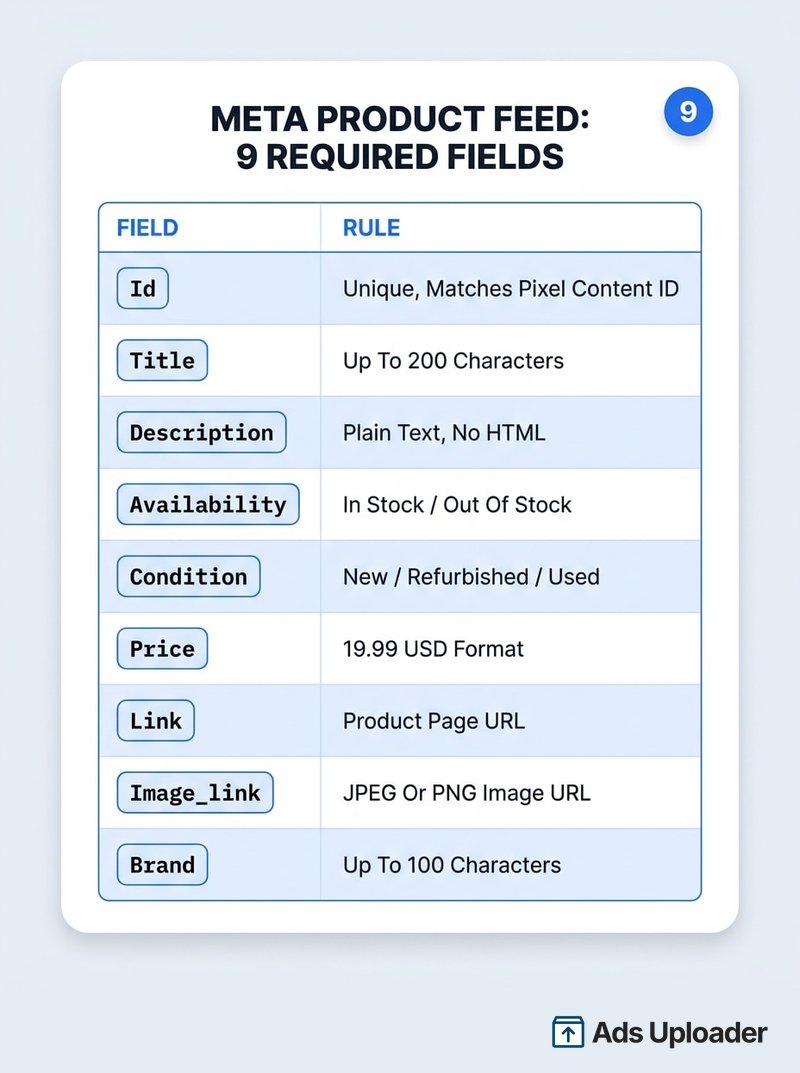
Meta's current developer reference lists nine required fields for product ads, not the eight that older checklists quote. The addition is brand.
| Field | Requirement and format |
|---|---|
id | Required. Unique within the catalog, up to 100 characters. Must match the content_id in your Pixel, CAPI or app events. Duplicate IDs are all ignored. |
title | Required. Up to 200 characters; Meta recommends 65 or fewer to reduce truncation. |
description | Required. Up to 9,999 characters, plain text, no HTML. Should differ from the title. |
availability | Required. For a standard feed the accepted values are in stock and out of stock, in US English. |
condition | Required. Exact values: new, refurbished or used. |
price | Required. Number, one space, then an ISO 4217 currency code: 19.99 USD. Period as the decimal, no currency symbol. |
link | Required. A valid http:// or https:// URL to the product page on your own domain. |
image_link | Required. Public URL to the main JPEG or PNG image (see image specs below). |
brand | Required. Up to 100 characters. |
Beyond the required nine, a handful of optional fields do real work. Use item_group_id to tie size and color variants together, sale_price (with sale_price_effective_date) for promotions, gtin or mpn for product identifiers, and custom_label_0 through custom_label_4 to build product sets. A category identifier (google_product_category or fb_product_category) becomes conditionally required once you use category-specific attributes.
One narrow but important rule: field names and certain controlled values must be in US English. That covers column headers and strings like in stock, out of stock, new, used and refurbished. Titles and descriptions can still be localized through Meta's language and country feeds.
Launch More. Click Less.
Upload hundreds of creatives at once, auto-match thumbnails to videos, and publish straight to your ad accounts through Meta's API.
Try Ads Uploader FreeNo credit card required • 7-day free trial
Meta Catalog Image Specs
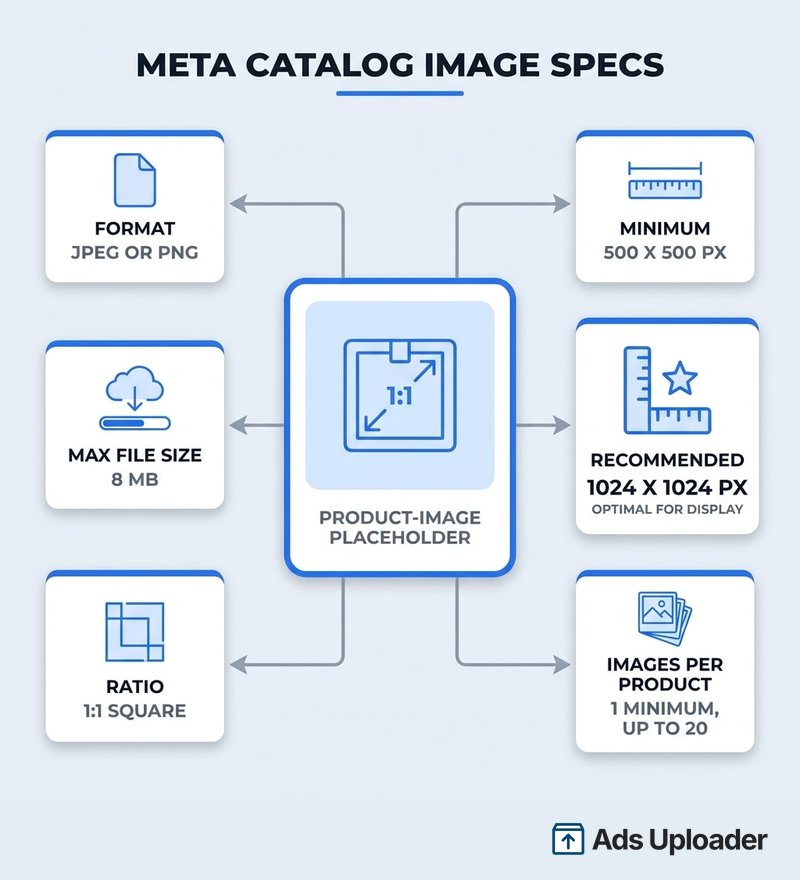
For catalog ads the image does most of the persuading, and the technical bar is low enough that most breakage comes from formatting rather than quality. These values come straight from Meta's product image specifications for catalogs.
| Requirement | Value |
|---|---|
| Images per product | At least one, supplied through image_link |
| Accepted formats | JPEG/JPG or PNG |
| Maximum file size | 8 MB |
| Minimum resolution | 500x500 pixels |
| Recommended resolution | 1024x1024 pixels |
| Recommended ratio | 1:1 square |
| Additional images | Up to 20 through additional_image_link |
Content rules matter as much as dimensions. The image has to accurately represent the item for sale. Keep the base catalog photo free of promotional copy, coupon codes, CTA buttons, shipping messages, watermarks and time-sensitive sale text. Use a clean white or neutral background where it suits the product, and prefer JPEG for standard product photography (smaller files) while reserving PNG for transparency or sharp graphic detail. This is a catalog quality-and-representation guideline, not a revival of Meta's retired 20% text rule. When you want a price or a discount badge on the creative, add it through an approved overlay or catalog info label at the ad layer, not by baking it into the product photograph.
There is one caching gotcha that trips up real feeds. Meta caches catalog images by URL. If you change the underlying file but keep the same image_link, Meta may never notice. Publish the replacement at a new URL, for example .../SKU123-v2.jpg.
Aspect Ratios and Image Cropping
A catalog image's source ratio and its final placement ratio are not always the same. Supply source images as 1:1 squares, then understand that Meta may crop, pad, mask or expand them per placement:
- Feed renders roughly 1.91:1 through 4:5. Use 1:1 or 4:5 for predictable ecommerce delivery.
- Stories and Reels use a native 9:16 canvas (1080x1920). A square product may appear cropped or embedded in a vertical layout unless a 9:16 asset or an Image touch-up is applied.
- Collection covers are normally 1:1, with product tiles staying square.
The cropping behavior is controlled in Commerce Manager, which offers three catalog-level settings: Fill frame with image (the default, which zooms and crops overflow), Show entire image in frame (which pads to preserve the whole image), and Crop and resize image to fit frame (best for products on white or transparent backgrounds). These apply broadly, so one choice affects many products.
New in April 2026, Meta began recommending Advantage+ creative Image touch-ups for catalog ads, which can automatically crop product media to 4:5 for Feed and 9:16 for Reels and Stories. Manual fit controls remain, but an ad-level treatment can override the catalog-level crop.
Whenever you build a dedicated 9:16 asset, keep critical product detail, logos and copy clear of the interface. On Reels that means roughly the top 14%, the bottom 35% and 6% on each side; the Meta ads safe zones reference has the measured guardrails for every placement.
Creative Format Specs and Character Limits
Catalog ads render in three formats, and you pick the format separately from the audience type. Format controls how products display; audience type (prospecting, retargeting or cross-selling) controls who sees them.
| Format | Source media | Notes |
|---|---|---|
| Single image | JPG/PNG, 1:1 or 4:5 for Feed | One product or a dynamically selected product |
| Carousel | JPG/PNG, at least 1080x1080, 1:1 or 4:5 | 2 to 10 cards, each with its own link |
| Collection | JPG/PNG cover (1:1, min 1080x1080) or video cover | Requires a catalog and an Instant Experience |
Every carousel card should use the same ratio. When ratios differ, Meta normalizes them by cropping or padding to match the first card or the placement, so supply the whole carousel as 1:1 or the whole carousel as 4:5. The Meta carousel ads guide covers the format in depth, and if you are still deciding between hand-building those cards and letting the feed fill them, we compare manual carousels against catalog-powered delivery.
On text, treat Meta's numbers as recommendations, not hard caps. Ads Manager generally accepts longer text and then truncates by placement, device and language, so the practical goal is fitting the visible window rather than hitting a maximum.
| Format | Primary text | Headline | Link description |
|---|---|---|---|
| Single image, Feed | 50 to 150 recommended | 27 recommended | Not listed for Feed |
| Carousel | 80 recommended | 20 for reliable display | 18 per card |
| Collection | 125 recommended | 40 recommended | Not applicable |
Note that a product's 200-character feed title is a separate thing from the much shorter headline space on a catalog card. For the wider set of copy limits across every Meta format, see the Meta ad copy specs reference.
Save Hours on Creative Testing
Stop uploading ads one by one. Bulk process unlimited creatives with automatic media matching and direct API publishing.
Try Ads Uploader FreeNo credit card required • 7-day free trial
Feed Upload Methods and Keeping It Healthy
You have several ways to get products into a catalog, and the right one depends on how fast your inventory moves:
- Scheduled data feed: Meta fetches a hosted file hourly, daily or weekly (no more than once per hour). Good default for most stores.
- One-time upload: a local file or hosted URL for an initial import or occasional replacement.
- Partner platform: automatic sync from Shopify, WooCommerce and similar.
- Pixel or microdata: imports products from structured markup on your site.
- Product Feed API or batch upload: programmatic and near-real-time updates for large or fast-moving catalogs.
- Supplementary feed: updates selected fields on existing items matched by
id; it cannot create or delete items.
Whatever the method, price and availability in the feed must match your site. An ad that promises $19.99 and lands on a $29.99 or sold-out page burns the click and the trust. Meta also recommends marking unavailable items out of stock rather than deleting them, so its system can recommend alternatives.
After every upload, check Commerce Manager Diagnostics. The same handful of errors accounts for most problems: duplicate IDs (all instances get ignored), a missing required field like price, an invalid price format ($10 or 10,00 USD instead of 10.00 USD), an unsupported availability or condition string (InStock instead of in stock), a broken image_link (404, wrong file type, under 500x500 or over 8 MB), or a malformed CSV or XML file. Meta separates fatal errors, where the product is not ingested at all, from warnings, where the item loads but a field or capability is dropped.
Frequently Asked Questions
What are the required fields in a Meta product feed?
Nine: id, title, description, availability, condition, price, link, image_link and brand. The addition of brand is what makes the common eight-field checklist out of date. Each id must be unique and match the content_id in your tracking events.
What image size should Meta catalog product images be? JPEG or PNG, at most 8 MB, at least 500x500 pixels, with 1024x1024 recommended at a 1:1 square ratio. Every product needs at least one image, and the field reference supports up to 20 additional images.
What aspect ratio do Meta catalog ads use? Supply 1:1 source images. The rendered ad can appear 1:1 or 4:5 in Feed and 9:16 in Reels and Stories, depending on placement and cropping. Keep carousel cards all the same ratio.
Are Meta catalog ads the same as dynamic ads? Yes. Advantage+ catalog ads are the current name for Dynamic Ads or DPAs. The concept, feed-driven personalized ads, is unchanged.
What file formats does a Meta product feed accept? CSV, TSV, RSS XML, Atom XML and Google Sheets are the officially supported formats. XLSX works for one-time uploads but is not in the supported-formats table for automation.
Do Meta catalog ads require the Meta Pixel? They require a connected event source: a Pixel and/or the Conversions API for web, or the Meta SDK for apps. It must fire product events whose IDs match your catalog.
Conclusion
Catalog ads reward getting the unglamorous parts right. The feed carries nine required fields, images are JPEG or PNG at 500x500 minimum (1024x1024 recommended) and no more than 8 MB, source images should be square, and the ads need a catalog wired to a Pixel or the Conversions API. The two changes most likely to catch you out this year are the ninth required field, brand, and the April 2026 Image touch-ups that auto-crop to 4:5 and 9:16.
Before your next launch, run your feed against the three tables above: required fields, image specs, and format limits. Fix the Diagnostics errors first, confirm price and availability match your site, and your products will actually be eligible to serve, which is the prerequisite every creative decision depends on.
