The Facebook Ad Library API is Meta's official Graph API endpoint, ads_archive, for searching the public ad archive programmatically. You authenticate with a user access token, pass the required ad_reached_countries parameter, and filter by keywords, Page IDs, ad type, dates, and platforms to receive JSON results. Coverage is limited: political and issue ads worldwide for seven years, plus all ads delivered to the EU or UK for one year. Spend and impressions return as ranges, making it free but bounded competitive research data.
You have searched the ad library in a browser, found what you needed, and now you want the same data in JSON: scheduled pulls, a competitor dashboard, a research dataset. That is exactly what the Ad Library API (officially the Meta Ad Library API since the rebrand) is for, and it is genuinely free. It is also the most misunderstood API in Meta's developer surface, because most developers arrive expecting programmatic access to everything they can see on the website and discover the archive has rules of its own.
If you have not worked with the underlying tool yet, start with our complete guide to the Meta Ads Library, because the API inherits every property of the web version and then narrows it further. This guide covers the part that matters to developers: what the API actually returns, the access setup, the ads_archive endpoint with working curl and Python examples, rate limits and error codes, and the honest list of things it will never give you, along with what to use instead.
What the Facebook Ad Library API Actually Covers
Before you write a line of code, internalize the scope, because it explains nearly every empty response you will ever get. The archive behind the API contains exactly two categories of ads:
| Ads in the archive | Retention | Available data |
|---|---|---|
| Political, electoral, and social-issue ads, worldwide | 7 years | Creative, dates, platforms, spend range, impressions range, demographic and regional breakdowns, funding bylines |
| Ads of any type delivered to the EU or UK | 1 year | Creative, dates, platforms, estimated EU/UK reach, high-level targeting (age, gender, location), advertiser and payer info (EU) |
Everything else does not exist as far as the API is concerned. A commercial ad that ran only in the United States is not archived, not searchable, and not retrievable. That Stack Overflow question from 2019 asking why keyword searches only return political ads still ranks today because the confusion never went away. Keyword search across commercial ads works only where those ads were delivered to EU or UK users, since those are the only commercial ads in the archive.
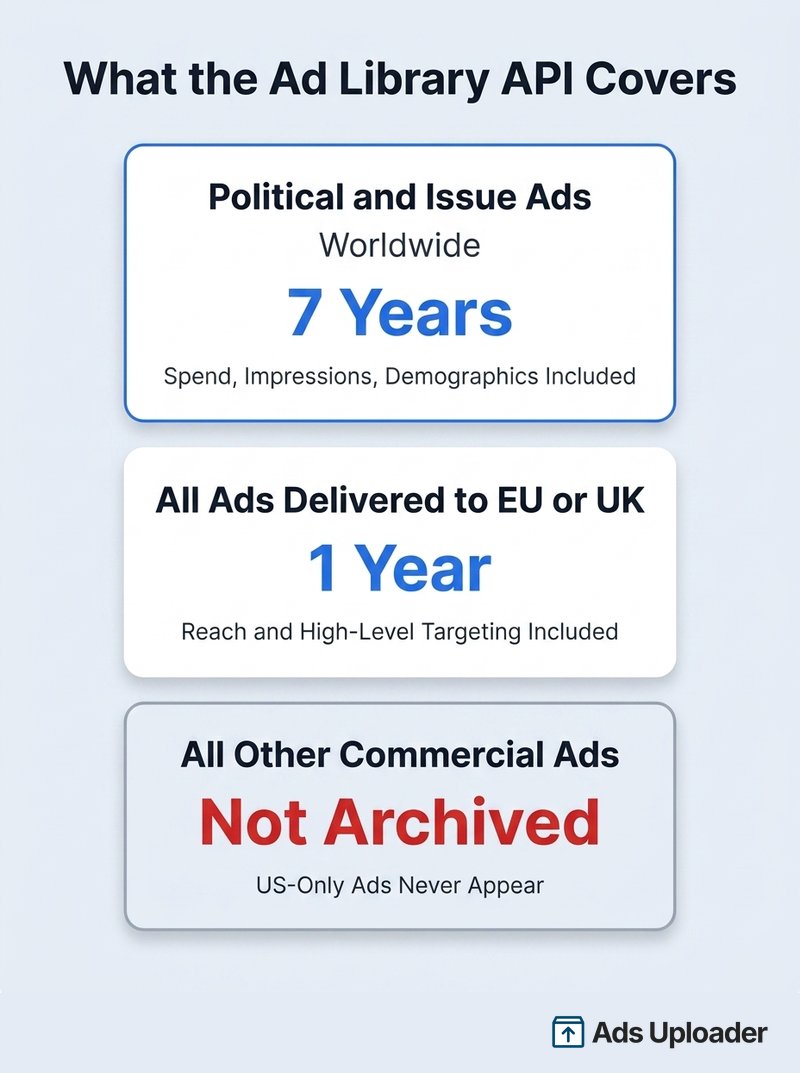
Two recent changes tightened this further. UK coverage applies to ads that ran after July 1, 2025, so the UK archive is still building toward a full rolling year. And in early October 2025, Meta stopped accepting political, electoral, and social-issue ads in the EU entirely in response to the EU's Transparency and Targeting of Political Advertising regulation. The historical EU political archive remains queryable, but it is now frozen: queries for EU political ads after that date return nothing because none are running.
For a developer, the practical test is simple. If your use case is political ad research anywhere, or any-ad research in EU and UK markets, the official API works. If you need US commercial ads by keyword, it cannot help, and you should skip ahead to the alternatives section.
Ad Library API vs Marketing API
These two get conflated constantly, and they share nothing but a domain name. The Marketing API manages advertising you own: it creates campaigns, uploads creative, and reads performance for ad accounts you have permissions on. The Ad Library API is read-only access to the public transparency archive of everyone else's ads.
The differences run through every layer. The Marketing API needs ads_read or ads_management permissions and often App Review; the Ad Library API needs neither. The Marketing API returns exact spend and results for your ads; the Ad Library API returns banded ranges for other people's political and EU/UK ads. If you want your own campaign data programmatically, you want the Marketing API. This guide is about the other one.
How to Get Access to the Ad Library API
Access requires three one-time steps. None of them are hard, but the first involves a waiting period, so start it before you need the data.
Step 1: Confirm Your Identity
Because the archive includes political ad data, Meta requires every API user to confirm their identity and location, the same process advertisers complete to run political ads. Go to facebook.com/ID while logged in, and follow the prompts. Expect to upload a government-issued ID and confirm your residential location. Approval typically takes a few days. This is per-account and one-time, but skipping it is the most common setup failure: your token will be valid and your queries will still be rejected.
Step 2: Create a Meta for Developers App
Sign up at Meta for Developers if you have not, then create a new app from My Apps. The simplest app type works; the app is just a container that lets you generate tokens. You do not need to add products to it, and the Ad Library API does not require App Review, because you are only reading public archive data.
Launch More. Click Less.
Upload hundreds of creatives at once, auto-match thumbnails to videos, and publish straight to your ad accounts through Meta's API.
Try Ads Uploader FreeNo credit card required • 7-day free trial
Step 3: Generate an Access Token
Open the Graph API Explorer from the developer tools menu, select your app, and generate a user access token. No special permissions are needed beyond the defaults; what matters is that the user behind the token has completed Step 1.
Tokens from the Explorer are short-lived, expiring in an hour or two. For anything beyond a quick test, exchange it for a long-lived token, which lasts about 60 days, using the token tools in the developer dashboard. Scheduled pipelines need a renewal routine, because when the token lapses your requests start failing with error 190 until you swap in a fresh one.
To verify everything works, run a test query in the Explorer:
ads_archive? ad_reached_countries=['US']&ad_type=POLITICAL_AND_ISSUE_ADS&search_terms='election'
If JSON comes back, you are in.
Querying the ads_archive Endpoint
Every request is an HTTP GET against one URL:
https://graph.facebook.com/v25.0/ads_archive
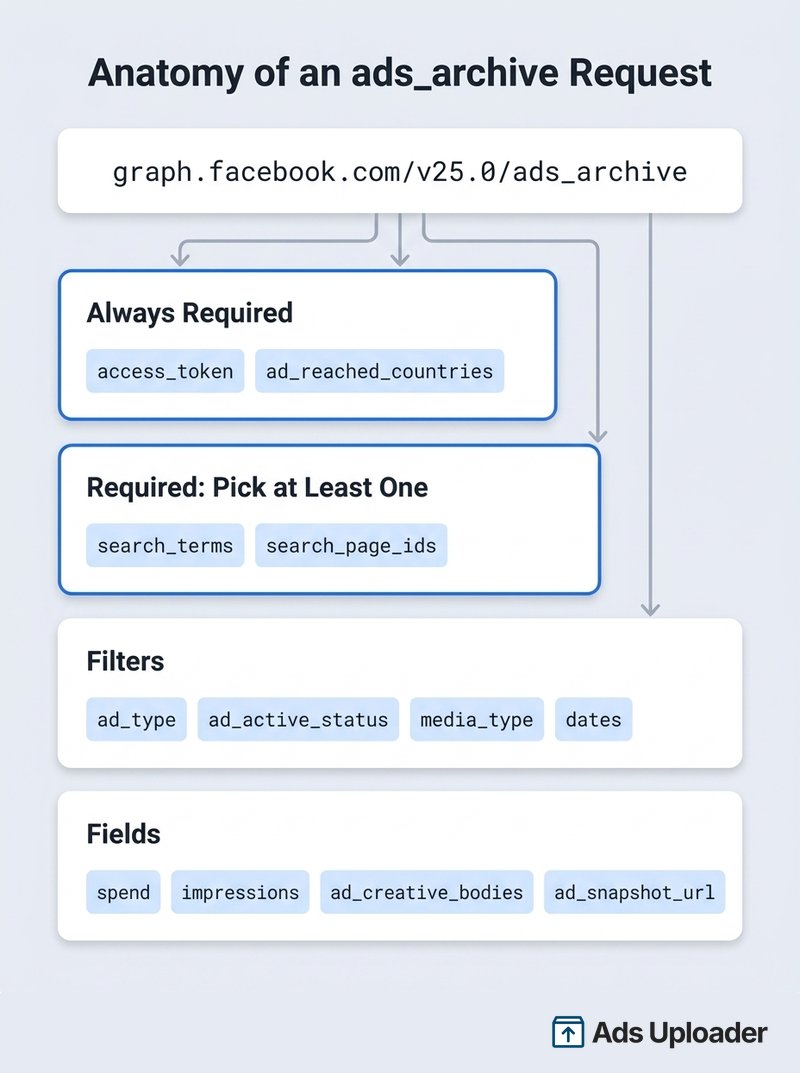
The version segment tracks Meta's quarterly Graph API releases (v25.0 as of mid-2026). Two things are mandatory on every call: your access_token and ad_reached_countries, an array of ISO country codes (or ALL) defining where the ads you want were delivered. Every query also needs either search_terms or search_page_ids; leave both out and the API rejects the call with a parameter error instead of returning everything. Remember the scope rule: ad_reached_countries=['US'] can only ever surface political and issue ads, while ['GB'] or any EU code surfaces commercial ads too.
The Parameters That Matter
The full parameter list is in Meta's ads_archive reference, but these are the ones real queries are built from:
| Parameter | What it does |
|---|---|
search_terms | Keyword search across ad text, images, audio from video, and CTA button. Max 100 characters. Spaces act as AND. Not translated, so search in the ad's language. |
search_type | KEYWORD_UNORDERED (default) matches words in any order; KEYWORD_EXACT_PHRASE matches the phrase. Comma-separate groups to require multiple phrases. |
search_page_ids | Pull ads from up to 10 specific Facebook Page IDs. The cleanest way to monitor known advertisers. Use numeric IDs, not vanity names. |
ad_active_status | ACTIVE (default), INACTIVE, or ALL. Set ALL for any historical analysis, or past ads silently vanish from results. |
ad_type | ALL (default), POLITICAL_AND_ISSUE_ADS, HOUSING_ADS, EMPLOYMENT_ADS, or FINANCIAL_PRODUCTS_AND_SERVICES_ADS (which replaced the old CREDIT_ADS value). |
ad_delivery_date_min / max | Bound results by delivery dates (YYYY-MM-DD), based on when impressions happened. |
media_type | ALL, IMAGE, VIDEO, MEME, or NONE, for format-specific research. |
publisher_platforms | Filter by FACEBOOK, INSTAGRAM, MESSENGER, AUDIENCE_NETWORK, WHATSAPP, OCULUS, or THREADS. |
languages | ISO 639-1 codes, useful in multilingual markets. |
bylines | Filter political ads by the exact "paid for by" disclaimer text. Political ads only. |
A handful of others (delivery_by_region, estimated_audience_size_min and max) are political-only filters; the API ignores or errors on them otherwise.
Choosing Your Fields
By default you get a minimal record: id, ad_snapshot_url, delivery start and stop times, and page_id. Everything else must be requested explicitly through the fields parameter. The ones worth knowing:
- All ads:
page_name,ad_creative_bodies,ad_creative_link_titles,ad_creative_link_captions,ad_creative_link_descriptions,publisher_platforms,languages,ad_creation_time - Political and issue ads only:
spendandimpressions(banded ranges, from under 100 up to over 1M),currency,demographic_distribution,delivery_by_region,estimated_audience_size,bylines - EU and UK delivered ads:
eu_total_reach,total_reach_by_location,age_country_gender_reach_breakdown,target_ages,target_gender,target_locations, andbeneficiary_payers(EU only)
Fields that do not apply to a given ad are simply absent from its JSON object, so write your parsing code defensively.
Example: curl
The canonical example from Meta's own docs, expanded with fields:
curl -G \
 -d "search_terms='california'" \
 -d "ad_type=POLITICAL_AND_ISSUE_ADS" \
 -d "ad_reached_countries=['US']" \
 -d "ad_active_status=ALL" \
 -d "fields=id, page_name, ad_creative_bodies, ad_delivery_start_time, spend, impressions" \
 -d "access_token=<ACCESS_TOKEN>" \
 "https://graph.facebook.com/v25.0/ads_archive"
Save Hours on Creative Testing
Stop uploading ads one by one. Bulk process unlimited creatives with automatic media matching and direct API publishing.
Try Ads Uploader FreeNo credit card required • 7-day free trial
Example: Python With Pagination
Results arrive in pages, and the real work is looping through them. This script pulls every archived ad from a competitor's page as delivered in the UK:
import requests

TOKEN = "YOUR_LONG_LIVED_TOKEN"
url = "https://graph.facebook.com/v25.0/ads_archive"
params = {
 "access_token": TOKEN,
 "ad_reached_countries": '["GB"]',
 "search_page_ids": '["123456789"]',
 "ad_active_status": "ALL",
 "fields": "id, page_name, ad_creative_bodies,"
 "ad_delivery_start_time, ad_delivery_stop_time,"
 "publisher_platforms, ad_snapshot_url, eu_total_reach",
 "limit": 250,
}

ads = []
while url:
 resp = requests. get(url, params=params, timeout=60)
 payload = resp. json()
 if "error" in payload:
 raise RuntimeError(payload["error"]["message"])
 ads. extend(payload. get("data", []))
 url = payload. get("paging", {}). get("next")
 params = {} # the next URL already carries every parameter

print(f"Collected {len(ads)} ads")
Swap the page ID, country, and fields for your use case. For reference code, Meta's own Ad Library API Script Repository on GitHub includes a simple command-line interface and Python examples, though it targets older Graph API versions and is no longer actively updated.
Rate Limits, Pagination, and Common Errors
Pagination is cursor-based. Each response contains a data array and a paging object with cursors and a next URL; you have reached the end when data comes back empty. The default page size is 25 ads, and the limit parameter raises it. Push it too high and you trade rate-limit problems for timeout problems on heavy queries, which is why most production scripts settle around a few hundred ads per page.
Rate limits on ads_archive are dynamic and unpublished. They scale per app and per token, and heavy usage gets throttled rather than cleanly metered. Three habits keep you under the ceiling: request only the fields you need, constrain queries with country codes and search_page_ids instead of broad keywords, and add exponential backoff whenever you see error 613. For recurring jobs, batching up to 10 page IDs per call is the cheapest efficiency win available.
The errors you will actually encounter:
| Code | Meaning |
|---|---|
| 613 | Rate limit exceeded. Back off and retry later. |
| 190 | Invalid or expired OAuth token. Generate or refresh your long-lived token. |
| 100 | Invalid parameter, often a malformed array or a political-only filter on a general query. |
| 2500 / 1009 | Query parsing or parameter validation failure. Check quoting and URL encoding. |
| 1357045 | Ad Library access error. In practice this almost always means the account behind the token has not completed identity confirmation at facebook.com/ID, or the confirmation has not finished processing. |
One structural quirk catches everyone eventually: there is no endpoint to fetch a single ad by its Library ID. If you have an ID from the website, query the advertiser's page with search_page_ids and filter the results client-side for the matching id.
What the API Won't Give You
The Ad Library API is a transparency tool, and Meta drew its boundaries deliberately. Knowing them up front saves you from designing features the data cannot support.
- No performance metrics. No clicks, CTR, conversions, or engagement counts, for any ad, ever. Spend and impressions exist only for political and EU/UK ads, and only as ranges.
- No creative files. Responses include an ad_snapshot_url that renders the ad in a browser, but never image or video files. Bulk-downloading media from snapshot pages is unsupported and collides with Meta's terms of service.
- No real targeting detail. You cannot see interests, custom audiences, or lookalikes. EU and UK ads expose only the broad age, gender, and location selections.
- A short commercial memory. Non-political ads fall out of the archive one year after their last impression. Political ads persist for seven. If you need a longer history, you must collect continuously and build your own archive.
None of these are bugs, and no amount of clever querying gets around them. When the gap matters, you change tools.
Alternatives When the API Is Too Limited
Match the tool to the gap rather than fighting the official API.
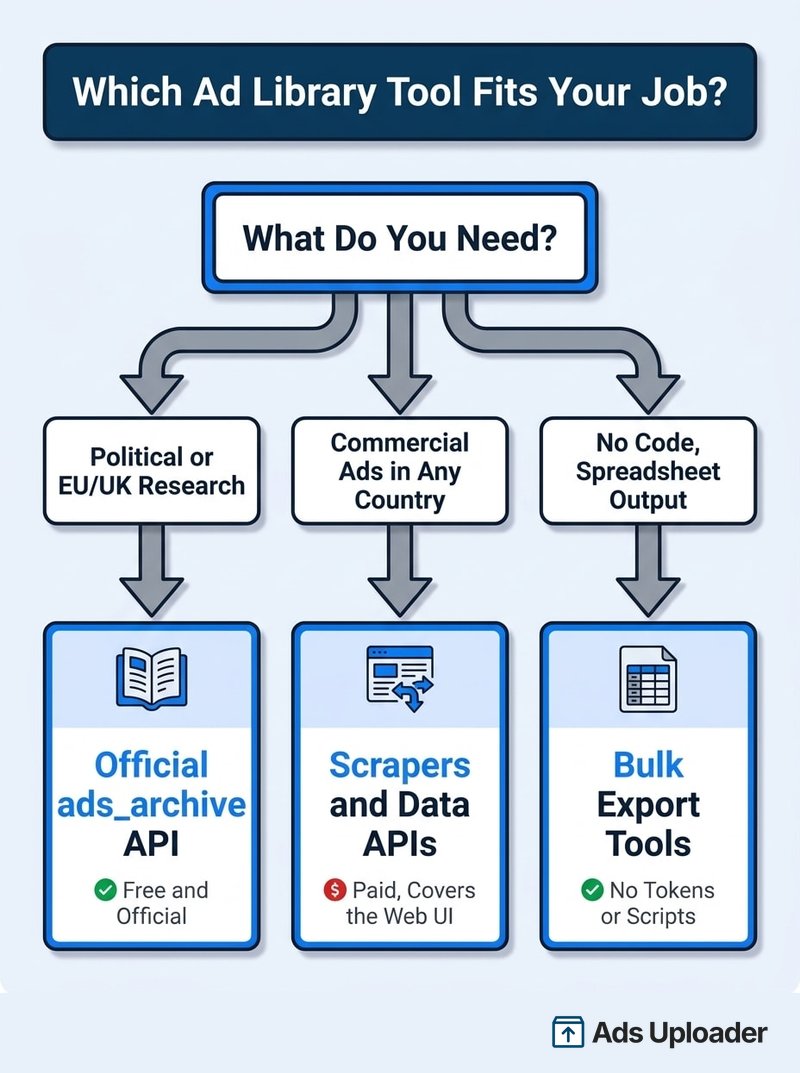
You need commercial ads outside the EU and UK. This is the big one, and the answer is scraping the Ad Library website, which displays active commercial ads in every country even though the API does not serve them. Purpose-built scrapers and wrapper APIs (Apify actors from around $0.75 per 1,000 ads, plus services like SearchApi and ScrapeCreators that sell the same data as clean JSON) handle the browser automation for you. The trade-offs are real: you are outside the official API's terms, schemas break when Meta updates the site, and taking that route is a deliberate risk decision the buyer owns, not something we recommend.
You are not a developer, or your team is not. Most competitive research tasks that look like API projects are actually export problems: someone wants competitor ads or their own account data in a spreadsheet. No-code bulk export tooling covers that without tokens or scripts, and our guide to exporting Facebook ads data walks through the options end to end.
You are doing formal research. Academics and qualifying researchers can apply for the Meta Content Library and its API, the successor to CrowdTangle, which covers public posts and content beyond ads with stricter vetting and stronger guarantees. For studying organic reach and coordinated activity alongside ads, it is the more complete instrument.
You only need a handful of advertisers, occasionally. Skip the engineering. The website plus its native filters, checked weekly, beats maintaining a token-refresh pipeline for data you could read in ten minutes.
Frequently Asked Questions
Is the Facebook Ad Library API free? Yes, completely. No usage tiers, no credits. The costs are indirect: identity verification time, rate-limit engineering, and the scope restrictions that may push you toward paid alternatives.
Can I see all competitor ads in any country? No. Political and issue ads worldwide, plus ads delivered to the EU or UK, are the entire archive. US-only commercial ads are simply absent.
Can I download ad images and videos through the API? No. You get an ad_snapshot_url for viewing each ad in a browser. Media files never appear in responses, and bulk-harvesting them from snapshot pages breaches Meta's terms.
Can I look up a single ad by its Library ID? No. There is no by-ID endpoint. Query the advertiser's page with search_page_ids and filter client-side for the id you want.
How many results can one query return? 25 per page by default, raisable via the limit parameter, with cursor pagination through paging.next until data returns empty. A few hundred per page is the reliable ceiling before timeouts become common.
What does error 613 mean? You exceeded the rate limit. Limits are dynamic and unpublished, so build in exponential backoff, request fewer fields, and batch page IDs to stay under the threshold.
Do I need App Review to use the Ad Library API? No. You need identity confirmation at facebook.com/ID, a developer app, and a user access token. App Review only applies to private user data and ad account permissions.
What is the Ad Library API rate limit? Meta does not publish one. Throttling is dynamic per app and token. Treat 613 errors as the signal, back off when they appear, and space scheduled pulls rather than bursting.
Build With the Scope in Mind
The Facebook Ad Library API is excellent at exactly what it was built for: free, official, programmatic access to political ad transparency worldwide and to every ad that touches EU and UK users. Within that scope it is the right choice every time, and the setup (identity confirmation, a developer app, a long-lived token) takes one afternoon plus a few days of verification wait.
The failure mode is building against the archive you imagined instead of the archive that exists. So decide up front: political or EU/UK research goes through ads_archive; all-country commercial intelligence means scrapers or third-party data APIs; spreadsheet-shaped problems deserve no-code export tools instead of an engineering project. Whichever path fits, the data side of competitive research is now the easy half. The hard half is what it has always been, which is turning what you learn from other people's ads into creative tests of your own, at a volume that actually teaches you something.
