Ad Library Helper is a free Chrome extension that adds a floating research panel to the Facebook Ad Library, Meta's public archive of active ads. It installs from the Chrome Web Store in under a minute, with no account or login required. The extension adds impression sorting across 7 to 90 day windows, single use versus multi use creative filters, partnership ad detection, text search, saved advertisers, and bulk downloads organized by brand. It turns free public data into subscription grade competitor research.
Marketers spend $50 to $100 a month on spy tools that resell data Meta gives away for free. Every active ad on Facebook and Instagram is sitting in the Ad Library right now: the creative, the copy, the start date, even a sortable impression range showing what Meta is actually delivering.
The catch is the interface. As we covered in our complete Meta Ads Library guide, the native library has quietly become one of the most powerful free research tools in advertising, but the workflow around it is still clunky. Impression data hides behind scattered menus. There is no way to isolate the creatives a competitor keeps rebuilding. You cannot save an advertiser, and there is no export of any kind.
A Facebook Ad Library Chrome extension closes that gap. This guide walks through the one we built and use daily: Ad Library Helper. You will install it, filter and sort ads the native UI cannot, run two filters that exist nowhere else, save advertisers for ongoing tracking, and bulk download every winning ad into a swipe file. The whole workflow takes about 15 minutes per competitor.
Why the Meta Ad Library Needs a Chrome Extension
Credit where it is due: Meta has closed real ground. The native library now shows impression range buckets on every ad, flags ads under 100 impressions with a Low Impression Count badge, and exposes branded content in its own section. For ads delivered in the EU, the Digital Services Act forces even richer data, including audience breakdowns.
But the day-to-day research workflow still fights you:
- Impression data is scattered. Ranges exist, but reading delivery weight across an account means bouncing between sections, and the richest data sits in EU markets you have to switch to manually.
- No replication signal. The strongest free indicator that an ad works is the same creative rebuilt across many near-identical ads. The native UI buries this on each ad's detail card, one click at a time.
- Endless scrolling. Big advertisers run hundreds of ads. The library loads them a screenful at a time.
- Nothing persists. No saved advertisers, no favorites, no export, no download button.
Paid spy tools solve some of this, at $20 to $99 or more per month, mostly by re-indexing the same public data. An extension solves it in the browser tab you already have open, for free.
What the Ad Library Helper Extension Does
Ad Library Helper is a free Chrome extension built by the team behind Ads Uploader. A quick disambiguation, because several unrelated tools use similar names: this is the one at adlibraryhelper.com, with no account, no login, and no paid tier.
Once installed, it adds a floating panel to any Meta Ad Library page. Everything it does falls into four buckets:
- Filter: toggle active or inactive ads, images only or videos only, and search ad text for specific words or phrases without fighting the native UI.
- Analyze: sort by impressions over 7, 14, 30, or 90 days (or all time), hide low impression ads, split single use from multi use creative, and separate regular ads from paid partnerships.
- Track: favorite advertisers and jump back to them instantly, and load an advertiser's entire ad list in one click instead of scrolling.
- Download: pull any single image or video, or bulk download the whole visible set, organized into folders by brand.
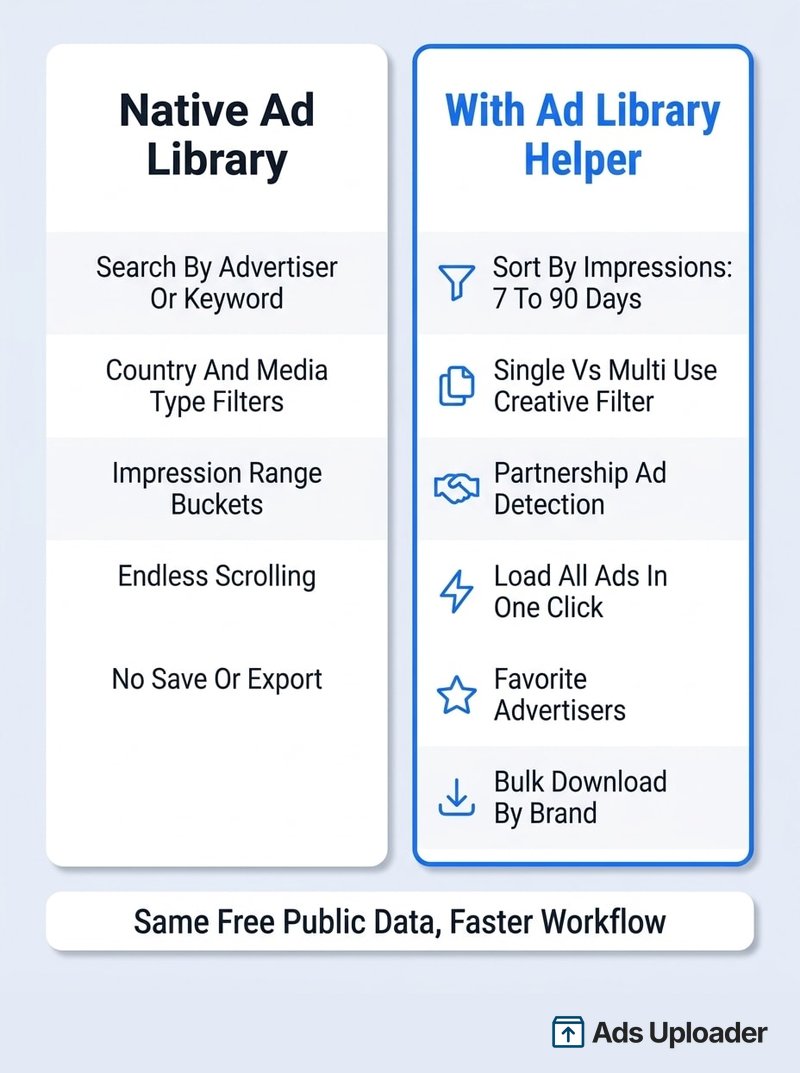
The point is not that the native library is bad. It is that the extension collapses ten minutes of menu-hopping into controls that sit next to the results.
How to Install Ad Library Helper
Step 1: Add the Extension From the Chrome Web Store
Open the Ad Library Helper listing on the Chrome Web Store and click Add to Chrome, then confirm with Add extension. There is no signup step afterward. Edge and Brave users can install from the same listing, since both run Chrome extensions.
Step 2: Open the Meta Ad Library
Go to the Meta Ad Library, set your country, keep the ad category on All ads, and search for an advertiser or keyword. No Facebook login is needed, although staying logged in tends to reduce the library's rate-limit blocks if you search heavily.
Step 3: Check the Floating Panel Loads
Run any search. The Ad Library Helper panel appears on top of the results page with its filters, sort options, and download controls. If you installed the extension while the tab was already open, refresh the page once. That is the entire setup.
How to Filter Ads More Effectively
The native library gives you country, ad category, platform, and media type. Useful, but coarse. Here is how the extension sharpens each pass.
Quick Filters for Status and Media Type
The panel toggles between active and inactive ads, images only, or videos only, without reopening Meta's filter dialog every time. Use this to study one format at a time. Video-heavy accounts and static-heavy accounts are telling you different things about where their performance comes from.
Search Ad Text Within Results
Type a word or phrase and the panel filters the loaded ads to ones containing it. This is the fastest way to isolate an angle: search "free shipping" across a competitor's ads, or "clinically" across a supplements category, and you see every variation of that hook side by side. The native keyword search starts a whole new query; this filters what is already in front of you.
Launch More. Click Less.
Upload hundreds of creatives at once, auto-match thumbnails to videos, and publish straight to your ad accounts through Meta's API.
Try Ads Uploader FreeNo credit card required • 7-day free trial
Load Every Ad From an Advertiser in One Click
Large advertisers run hundreds of ads, and the native library reveals them a scroll at a time. The extension loads the full set in one click, which matters because every other signal (impression sorting, replication analysis) only works properly on the complete picture, not the first 30 ads Meta happened to render.
Sort by Launch Date or by Impressions
Newest and oldest sorts are built in, and sorting newest first is the quickest read on what a competitor launched this week. The bigger unlock is Impressions by Date: sort the account by delivery weight over the last 7, 14, 30, or 90 days, or all time, then flip on Hide Low Impression to clear the sub-100-impression test ads off the screen entirely.
This matters because ad age is a misleading metric. Under cost-cap and bid-cap buying, ads get left running while the auction decides what actually spends, so an old ad is often just one nobody pruned. Impression weight over a recent window shows you what Meta is delivering hardest right now, which is the closest thing to performance data the public library will ever give you.
Two Filters You Will Not Find in the Native Library
These two are the reason the extension exists. Both read signals that are technically in the public data but that the native UI never surfaces as filters.
Single Use vs Multi Use Creative
When an advertiser finds an angle that works, they do not run it once. They rebuild it: same creative and copy duplicated across many near-identical ads, new audiences, new placements. The library hints at this with the "2 ads use this creative and text" line buried on each detail card, but you would have to click into every ad to map it.
The extension turns it into a one-click filter. Single Use shows creatives that appear in exactly one ad: early tests, duds, one-offs. Multi Use isolates the creatives replicated across multiple ads, which is the cleanest free signal that an angle is getting budget.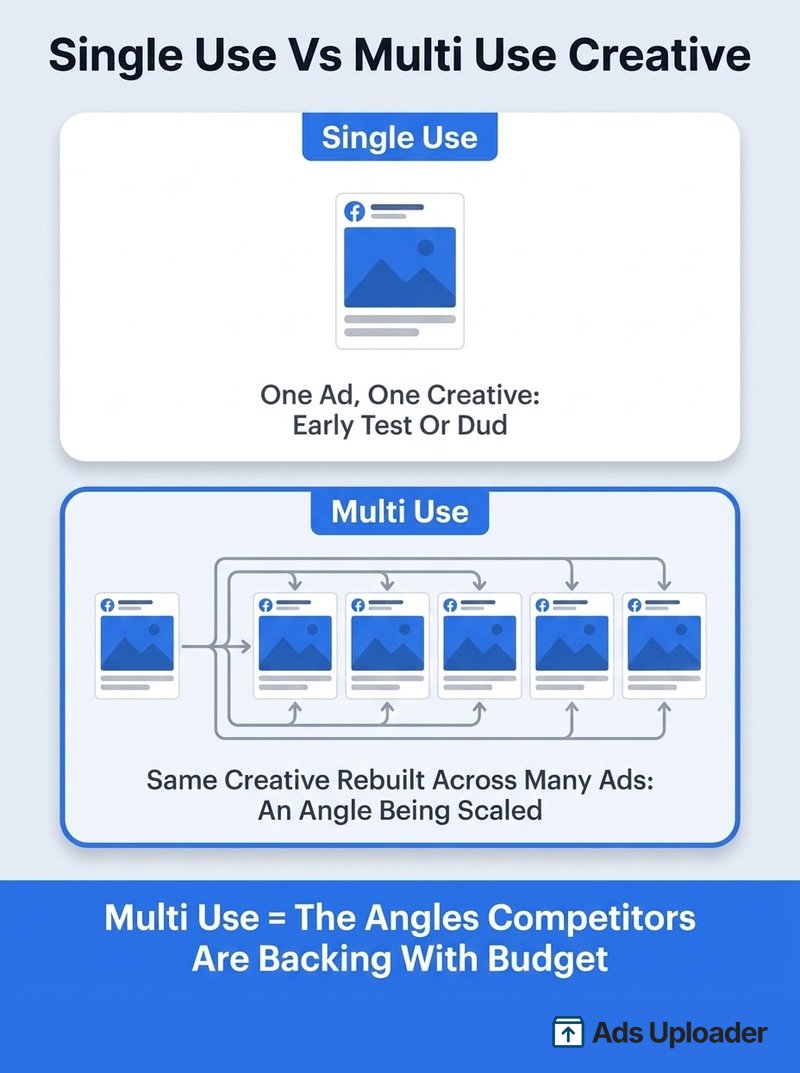
Filter any serious advertiser to Multi Use and the noise drops away. What is left is their actual playbook: the three to five angles they are scaling, instead of the fifty things they tried once.
Partnership Ad Detection
Creator collaborations and paid partnership ads sit in a separate branded content section of the native library, away from the advertiser's normal results. The extension flags partnership ads inline, so you can split a brand's standard ads from its creator-led ads in the same view. If a competitor is quietly shifting budget into whitelisted creator content, this filter is where you will spot it.
How to Save Advertisers and Bulk Download Ads
Research you cannot revisit is research you will redo. The last two capability buckets handle persistence.
Favorite Advertisers for Ongoing Tracking
The native library has no memory: every session starts from a blank search box. The extension lets you favorite advertisers and jump back to any of them instantly. Build a watch list of five to ten accounts (direct competitors plus a couple of brands whose creative you admire) and recheck it weekly. New ads sorted newest first, then the Multi Use filter to see if any recent test got promoted to scale. That cadence takes minutes once the list exists.
Bulk Download Images and Videos
The library has no download button at all. The extension adds one-click download on every ad, and a bulk option that grabs the entire visible set, saved into folders organized by brand. Filter first, then download: Multi Use creatives sorted by 30-day impressions gives you exactly the winners, not 200 random files. For a single video without the extension, the manual fallback is the browser's developer tools: open the Network tab, play the ad, and save the .mp4 file that loads.
What to Do With a Folder Full of Competitor Ads
A decade ago a swipe file was inspiration you scrolled through. In 2026 it is raw material for analysis. A folder of competitor creative, organized by brand, is exactly what AI tools want: transcribe the video ads, extract the hooks, map the angles and personas a competitor leans on, and draft your own briefs against those patterns. The research loop used to end at "save the ad." Now saving the ad is where the useful work starts, and bulk download is what makes it practical at volume.
The Full Competitor Research Workflow
Here is the complete process, end to end. Budget about 15 minutes per competitor.
- Search the advertiser in the Ad Library. Set the country to their main market first; the library only shows ads delivered in the selected country.
- Load all their ads in one click. Every later step needs the full set, not the first screenful.
- Hide low impression ads. Sub-100-impression tests and duds disappear.
- Sort by impressions over the last 30 days. You are now looking at what Meta is delivering hardest, not what happens to be oldest.
- Filter to Multi Use creative. The replicated angles rise to the top. This is the competitor's actual playbook.
- Check partnership ads separately. Note whether creator content is part of their mix and how it differs from their standard ads.
- Favorite the advertiser. Next week's check takes one click instead of a fresh search.
- Bulk download the winners. The filtered, sorted survivors go into your swipe file, organized by brand, ready for analysis.
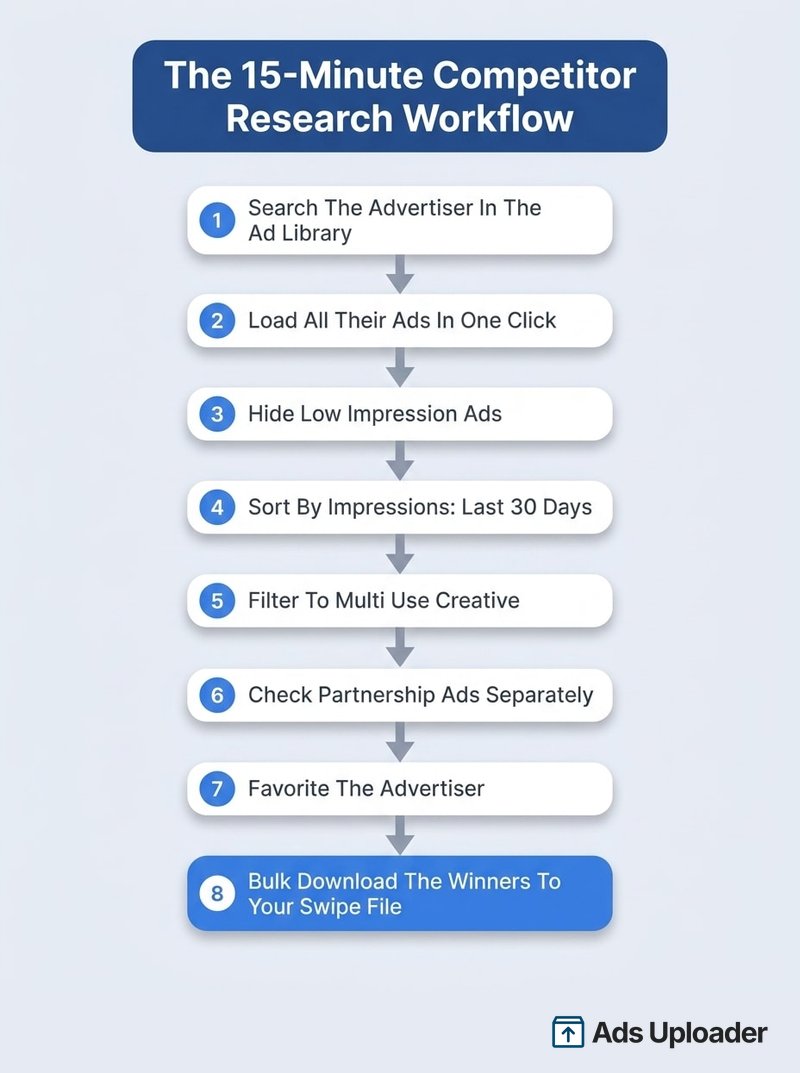
Repeat across your top five to ten competitors and you have something no spy tool subscription gives you: a current, delivery-weighted map of every angle being scaled in your category, on disk, for free.
Two practical notes. First, search the advertiser's exact page name, and check for regional variants ("Nike Running UK" runs separate pages). Second, if the library itself starts misbehaving (searches returning nothing, temporary blocks, missing ads), that is a library quirk rather than an extension problem; our Facebook Ad Library troubleshooting guide covers the common failures and fixes.
Save Hours on Creative Testing
Stop uploading ads one by one. Bulk process unlimited creatives with automatic media matching and direct API publishing.
Try Ads Uploader FreeNo credit card required • 7-day free trial
Frequently Asked Questions
Is the Ad Library Helper Chrome Extension Free?
Yes. It is completely free, with no account, login, trial, or paid tier. Install it from the Chrome Web Store and it works immediately on any Meta Ad Library page.
Do I Need a Facebook Account to Use It?
No. The Ad Library works logged out, and so does the extension. Logging in to Facebook can reduce the "temporarily blocked" rate-limit errors that appear when you search the library heavily, but no extension feature requires it.
Are Chrome Extensions Allowed on the Ad Library?
An on-page helper reads the same public data you are already viewing and adds controls on top, which is a different category from the large-scale automated scraping Meta's terms prohibit. As with any extension, read the Chrome Web Store privacy disclosure before installing. Plenty of Ad Library extensions have come and gone; prefer ones that state plainly what they collect, which in Ad Library Helper's case is nothing.
Does It Work on Edge or Firefox?
Edge and Brave, yes: both are Chromium browsers and install extensions straight from the Chrome Web Store. Firefox and Safari use different extension systems and are not supported.
Can I Download Videos From the Facebook Ad Library?
Yes. The extension downloads any single video or image, or the entire visible set in bulk, organized by brand. The manual alternative is pulling the .mp4 URL out of your browser's developer tools for each video, which works for one-offs but not at volume.
How Is It Different From Paid Spy Tools?
Paid tools like Foreplay, Atria, Swipekit, and MagicBrief maintain their own databases, which buys you archives of inactive ads, cross-platform coverage, and team boards, typically for $49 to $99 or more per month. The extension makes the free, live, public data faster to work with. Since commercial ads leave the library within weeks of stopping, the live view is where most of the signal lives anyway; the paid tier earns its keep when you need history and team workflow on top.
Why Do Some Ads Show No Impression Data?
Meta shows ranges, not exact numbers, and the data is richest for EU-delivered ads, where the Digital Services Act mandates tighter ranges plus audience breakdowns. Ads under 100 impressions get a Low Impression Count badge. A coarse bucket, or nothing, is normal everywhere else.
Can I See a Competitor's Spend or Targeting?
No, and be skeptical of any tool claiming otherwise. Spend ranges exist only for political and social-issue ads, and targeting details only for EU and UK delivered ads under the Digital Services Act. Impression weight and creative replication are the strongest signals legitimately available, and surfacing those two is exactly what the extension is built around.
Stop Paying for Public Data
The Facebook Ad Library was already the best free research tool in paid social. A Facebook Ad Library Chrome extension is what makes it usable at professional speed. To recap:
- Install takes under a minute: Chrome Web Store, no account, free.
- Filter and sort like the native UI cannot: text search within results, full-account loading, impression sorting across 7 to 90 day windows.
- Read the two signals that matter: Multi Use creative shows which angles get budget, and impression weight shows what Meta is delivering now.
- Make it compound: favorite your competitors, recheck weekly, and bulk download the winners into a swipe file your whole team (and your AI tooling) can work from.
Install the extension, pick your three biggest competitors, and run the eight-step workflow on each. Forty-five minutes from now you will know exactly which angles your market is scaling, and you will have every one of those ads on disk to learn from.
