When the Facebook Ad Library is not working, the cause is usually one of three things: a Meta outage, a browser conflict, or search settings that filter every ad out. Meta's status page at metastatus.com confirms outages, and an incognito window isolates browser problems. Ad blockers, corrupted cache, the wrong country filter, and the library's active-ads-only visibility rules explain most blank pages and empty results. Most failures are fixable in under five minutes without waiting on Meta.
You sit down to research a competitor, open facebook.com/ads/library, and get a blank page. Or a spinner that never stops. Or the dreaded "no results" for a brand you watched run ads yesterday. Annoying, but almost always fixable.
The Ad Library is the backbone of competitive research for anyone running Meta ads, and our complete Meta Ads Library guide covers how to use it properly when it behaves. This article covers the other days: how to tell in two minutes whether the library is actually down, which browser settings silently break it, and why "no results" often means the tool is working exactly as designed.
Work through the sections in order. They are sorted by how often each cause turns out to be the real problem.
First, Check if the Facebook Ad Library Is Actually Down
Before touching your browser settings, rule out Meta's end. It takes two minutes.
Check Meta's official status page. The Ad Library itself links to Meta's Ads Transparency status page, a component of metastatus.com that covers the Ad Library, the Ad Library Report, and the Ad Library API. Green means Meta considers everything operational. Keep in mind that Meta acknowledges incidents slowly, often 30 minutes to 2 hours after users start reporting them, and many small disruptions never get acknowledged at all.
Cross-check crowd reports. Downdetector's Facebook page shows a live graph of user-submitted problem reports. The Ad Library does not get its own listing, but it runs on the same infrastructure as the rest of Facebook, so a big spike there usually means the library is struggling too. Slow performance and loading failures are the two most commonly reported symptoms.
Search X or Reddit. A quick search for "ad library down" sorted by latest tells you within seconds whether other media buyers are hitting the same wall right now. The r/FacebookAds subreddit lights up fast during real outages.
If all three signals are clean, the problem is on your side, which is good news: you can fix your side.
The Quick Fix Checklist
Here is the full troubleshooting sequence. Most people never get past step 3.
- Check the status page. Visit Meta's Ads Transparency status and Downdetector. If there is a real outage, wait it out.
- Open the library in an incognito window. Extensions are disabled there by default. If the page loads, a browser extension is your culprit.
- Disable your ad blocker for facebook.com. The URL says "ads," so blockers block it. This single step resolves the majority of blank-page cases.
- Clear cache and cookies for facebook.com. No need to wipe your whole browser, just the Facebook domain.
- Reset the country filter. Set it to the advertiser's main market, or switch to "All" to cast the widest net.
- Set the ad category to "All ads". The politics category hides every commercial ad.
- Search the exact Facebook Page name. Not the Instagram handle, not the company's legal name.
- Try another browser, device, or network. This isolates anything machine-specific, including corporate firewalls that block Meta domains.
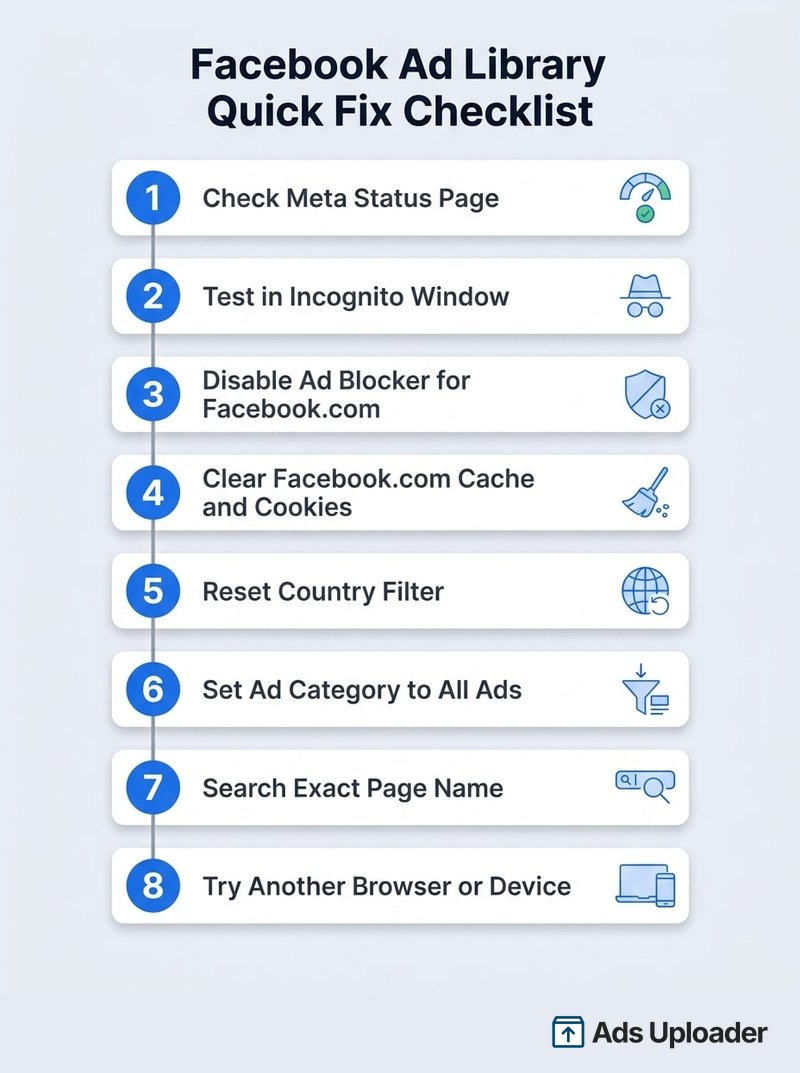
The rest of this article explains why each step works and what to do when none of them do.
Browser Problems: The Most Common Culprit
When the Ad Library loads a blank page, hangs on a spinner, or renders half-broken, the problem usually lives in your browser, not at Meta.
Ad Blockers Break the Ad Library
This is the number one cause, and it is almost funny: the page you are trying to load is literally called facebook.com/ads/library, and ad blockers exist to block URLs with "ads" in them. uBlock Origin, AdBlock Plus, Ghostery, and Firefox's built-in tracking protection have all been confirmed to break the library. In one long-running Mozilla support thread, a user who could not load the Ad Library on any Firefox version traced it back to exactly this, and the chosen solution was two words: the ad blocker.
The fix takes ten seconds. Open your blocker's extension menu while on the Ad Library page and pause it for facebook.com, or add facebook.com to its allowlist. Reload. In most cases the library comes straight back.
Corrupted Cache and Cookies
Browsers store site data so pages load faster on repeat visits. When that stored data goes stale or gets corrupted, a heavy JavaScript app like the Ad Library can fail in odd ways: half-rendered filters, search buttons that do nothing, results that never paint.
Clear the data for facebook.com specifically rather than nuking your entire browsing history. In Chrome: Settings, then Privacy and security, then Cookies and other site data, then See all site data, search "facebook.com" and delete it. Restart the browser and reload the library. You will be logged out of Facebook, which is a small price for a working tool.
Extensions, VPNs, and Privacy Tools
Ad blockers are the usual suspect, but any extension that touches network requests can interfere: VPN extensions, script managers, privacy badges, even some SEO toolbars. The incognito test isolates this class of problem in one move, since incognito windows run without extensions by default.
If the library works in incognito but you cannot figure out which extension is guilty, disable them all, confirm the library loads, then re-enable one at a time until it breaks again. VPNs add a second wrinkle: the library serves results based on region, so a VPN exit node in another country can quietly change what you see, and a flagged VPN IP range can trigger rate limiting or consent walls that normal traffic never hits.
Search Settings That Make the Library Look Broken
Sometimes nothing is broken. The library is doing precisely what you told it to do, and what you told it to do returns nothing.
Launch More. Click Less.
Upload hundreds of creatives at once, auto-match thumbnails to videos, and publish straight to your ad accounts through Meta's API.
Try Ads Uploader FreeNo credit card required • 7-day free trial
Wrong Country or Region Selected
The country filter is the single most common reason people "can't find" an advertiser. The library shows ads delivered to the selected country. A DTC brand running ads only in Australia returns zero results when your filter says United States. Start with the advertiser's primary market. If you genuinely do not know it, switch the filter to "All," accept the noise, and narrow from there.
Ad Category Set to Politics Instead of All Ads
The ad category dropdown has tripped up more researchers than any outage. If it is set to "Issues, elections or politics," every commercial ad on the platform is filtered out, and your search for a skincare brand returns a perfectly correct, perfectly useless empty page. Set it to "All ads" and keep it there unless you are specifically researching political advertising.
Searching the Wrong Advertiser Name
The library searches official Facebook Page names. It does not match Instagram handles, abbreviations, or the name printed on the company's invoices. "Glossier" works because that is the Page name; "glossier_official" does not.
When the name search fails, go around it: open the advertiser's Facebook Page, scroll to the Page transparency section, and click "See ad library" (sometimes labelled "Go to ad library"). That jumps you straight to their ads with no spelling required, and it is the most reliable advertiser lookup the platform offers.
No Results for an Advertiser? It May Be Working as Designed
Here is the part most troubleshooting guides skip, and it explains the majority of "the Ad Library is broken" complaints that are not actually breakage.
The Ad Library is not a permanent archive of everything ever run. What you can see depends entirely on the ad type and where it was delivered:
- Standard commercial ads show as active only while running. The moment an advertiser pauses or ends a campaign, those ads drop out of the default view. They are not gone instantly: switch the Active status filter to Inactive and recently stopped ads stay visible for a short window, typically around two weeks, before leaving the library for good. A competitor showing zero results may simply have turned everything off this week, so check the Inactive view before concluding anything.
- Ads delivered in the EU stay visible for a year. Under the Digital Services Act, the library shows ads that ran anywhere in the EU within the past year, even after they stop. This is why switching the country filter to an EU market like Germany or France often reveals history that the US view hides.
- UK ads that ran after July 1, 2025 also stay visible for a year, under the UK's newer transparency rules.
- Political and social-issue ads stay archived for seven years, complete with funding disclosures and spend ranges.
- New ads take up to 24 hours to appear. Meta states an ad shows up within 24 hours of its first impression, and edits propagate on the same delay. Searching for a campaign you launched two hours ago and finding nothing is normal.
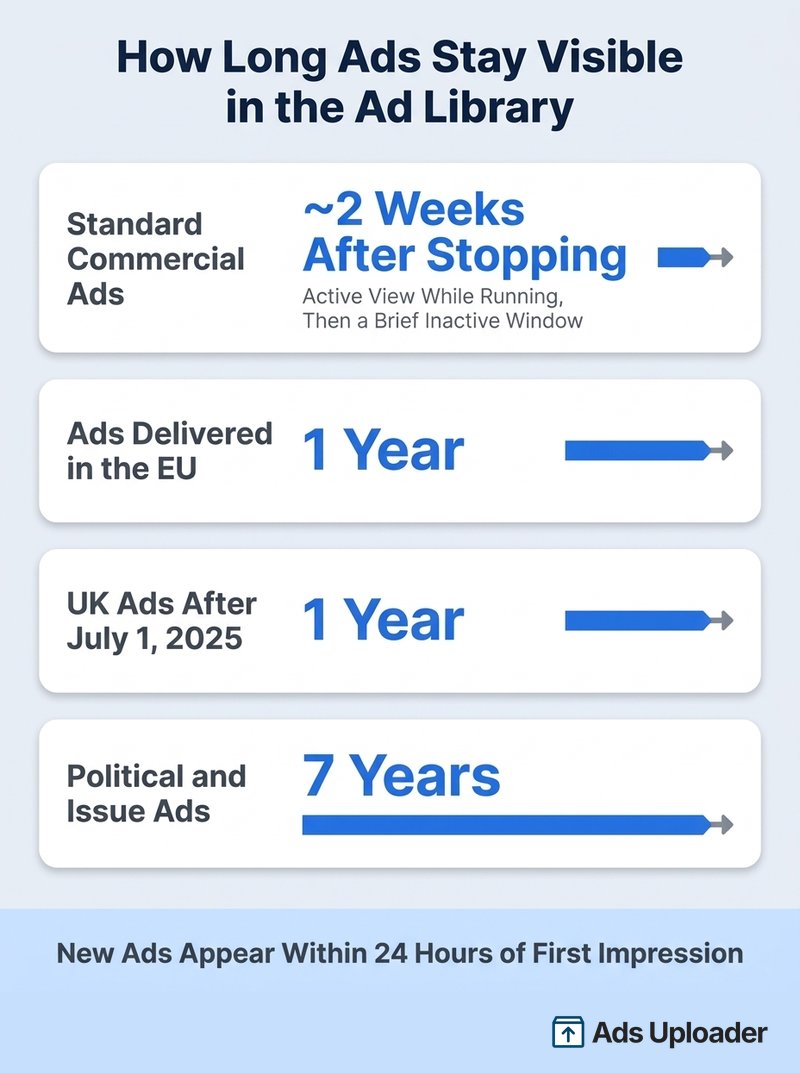
So before concluding the library is down, ask: is the advertiser actually running ads right now, in the country I have selected? An empty default view for a paused account is not a bug. It is the design, and flipping the Active status filter to Inactive is the first check before deciding a competitor has gone dark. For the longer view past that short inactive window, the EU country-filter trick is the closest thing to a time machine the native library has.
A few rarer visibility quirks worth knowing: ads still in Meta's review queue do not appear until approved and delivering, ads removed for policy violations disappear even mid-flight, and a recently renamed Page can take time to become searchable under its new name.
Blank Page, Infinite Spinner, or Something Went Wrong Errors
Different symptoms point to different causes. This table is the fast path:
| Symptom | Most Likely Cause | Fix |
|---|---|---|
| Completely blank page | Ad blocker or privacy extension | Allowlist facebook.com, reload |
| Infinite loading spinner | Corrupted cache, slow connection, or heavy result set | Clear facebook.com cache, narrow the search |
| "Something went wrong" error | Transient Meta-side glitch or rate limiting | Wait a minute, retry; check status page if persistent |
| "Temporarily blocked" message | Too many rapid searches | Slow down; log in to Facebook to raise the limit |
| Search returns nothing | Filters or visibility rules | Reset country and category, check the advertiser is active |
| Results vanish mid-scroll | Session or rate-limit hiccup | Refresh and reapply filters |
Two of these deserve a closer look.
"Something went wrong" is Facebook's generic error overlay, and it genuinely can be Meta's fault. Short-lived Ad Library glitches happen regularly and mostly resolve within minutes to a few hours. If a retry, a hard refresh (Ctrl+Shift+R or Cmd+Shift+R), and an incognito test all fail while the status page stays green, give it 30 minutes before escalating your troubleshooting, because transient server-side errors usually clear on their own.
Rate limiting hits power users. Run a long string of rapid searches and the library may temporarily block you or quietly stop returning results. Being logged into a Facebook account raises your tolerance. If you got blocked while logged out, signing in usually restores access immediately.
When the Ad Library Breaks for Scrapers and the API
If you reached this article because an automation, scraper, or the official Ad Library API stopped working, the failure modes are different from the browser ones.
The official API only returns political and social-issue ads for most countries; full commercial ad data via API is limited to EU-delivered ads under the DSA. Tools that scrape the web UI instead are fragile by design: Meta changes the library's markup regularly, and errors like "ads not found" from third-party scrapers often mean the scraper's selectors broke or its request was rate limited, not that the library itself is down. The reliable test is always the same: open the same search in your own browser. If the UI shows ads your tool cannot fetch, the tool is the problem.
API users should also expect aggressive, unpublished rate limits on the ads_archive endpoint. Batch your queries, filter tightly by country and page ID, and back off on errors rather than hammering it.
Making the Ad Library Easier When It Is Working
Even when nothing is broken, the native Ad Library is a clunky research tool. Filters reset between sessions, impression data hides behind extra clicks, and comparing creatives means endless scrolling.
If you live in the library, a purpose-built Facebook Ad Library Chrome extension fixes most of those paper cuts. Ad Library Helper, the free extension from the team behind Ads Uploader, adds the sorting and filtering the native interface lacks, including filtering by impression range and spotting how many near-identical variants an advertiser is running. None of that helps when the library is down, but it makes the working days considerably faster.
Save Hours on Creative Testing
Stop uploading ads one by one. Bulk process unlimited creatives with automatic media matching and direct API publishing.
Try Ads Uploader FreeNo credit card required • 7-day free trial
Frequently Asked Questions
Is the Facebook Ad Library Down Right Now?
Check Meta's official status page at metastatus.com, which has a dedicated Ads Transparency component covering the Ad Library. Cross-check Downdetector for a spike in user reports. If both look clean, the problem is almost certainly on your end: an ad blocker, corrupted cache, or a search filter. True Ad Library outages are rare and usually last minutes to hours, not days.
Why Does the Facebook Ad Library Show No Results for an Advertiser?
Usually because nothing is wrong. The default view shows only currently active ads for standard commercial advertisers, so a paused account returns zero results until you switch the Active status filter to Inactive, which reveals recently stopped ads for a short window. Other common causes: the wrong country selected, the ad category filter set to politics instead of All ads, a misspelled or unofficial page name, or a brand-new ad that has not finished indexing yet.
Do I Need a Facebook Account to Use the Ad Library?
No. The Ad Library is public and works without logging in. A login helps in one situation: if you search rapidly and hit Meta's temporary rate-limit block, being signed in reduces how often that happens. API access is separate and does require a verified developer account.
How Long Does It Take for an Ad to Show in the Ad Library?
Meta states an ad appears in the Ad Library within 24 hours of receiving its first impression, and edits to existing ads also propagate within 24 hours. Many ads show up faster, but a launch-day search that returns nothing is normal. If an ad has delivery but still is not listed after a full day, start troubleshooting filters and page names.
Why Is the Ad Library Blank or Stuck Loading?
An ad blocker is the most likely cause. The URL contains ads, so blockers and privacy extensions routinely kill the page's scripts, leaving a blank screen or infinite spinner. Test in an incognito window with extensions off. If it loads there, allowlist facebook.com in your blocker. Corrupted cache and cookies are the next suspects.
Why Did Ads Disappear From the Ad Library?
Commercial ads drop out of the default Active view as soon as they stop running, then leave the library entirely after a short inactive window, typically a couple of weeks. Switch the Active status filter to Inactive to catch recently stopped ads before they go. The exceptions are political and social-issue ads, which stay archived for seven years, and ads delivered in the EU or UK, which remain visible for about a year. If a competitor's ads disappeared overnight, they most likely paused those campaigns, or Meta removed the ads for a policy violation.
Work the List, Then Blame Meta
When the Facebook Ad Library is not working, the odds strongly favor a cause you control. Run the order of operations: status page first, incognito test second, ad blocker third, cache fourth, filters fifth. That sequence resolves the overwhelming majority of blank pages, spinners, and empty searches.
And when a search comes back empty even though everything loads fine, remember the visibility rules before assuming breakage. Commercial ads show as active only while running and hang around in the Inactive view just briefly after they stop, EU and UK ads keep a year of history, political ads keep seven, and new ads can take a full day to appear. Half of all "broken library" moments are the library quietly doing exactly what it was built to do.
If the status page confirms a genuine outage, close the tab and come back in an hour. Meta's transparency tools fail rarely and recover quickly, and no amount of cache clearing speeds that up.
