To find winning products in the Facebook Ad Library, search Meta's free public ad database for active ads in your niche, then read three signals: impression weight, creative replication, and sustained run time. Ads carrying high impression ranges are being delivered hardest, and listings showing "N ads use this creative and text" reveal products an advertiser is actively scaling. Combined with engagement on the ad post, these signals identify products with proven paid demand before you spend a dollar testing them.
Every winning product was sitting in plain sight before it blew up. Someone was already paying to advertise it, scaling budget into it, and rebuilding the same creative over and over, all in a public database anyone can search for free. The Facebook Ad Library is that database, and for dropshippers and ecommerce operators it is the closest thing to seeing competitors' bets in real time.
The problem is how most people use it. They scroll for an hour, screenshot a few ads that look nice, and walk away with nothing testable. Worse, the standard advice (find the oldest running ad and copy it) quietly stopped working once Meta changed how the library reports delivery. If you are new to the tool itself, start with our complete Meta Ads Library guide; this article assumes the basics and goes straight to the product-research workflow.
What follows is the 2026 version: the three signals that actually separate winners from wallpaper, a five-step search workflow, the validation checks that stop you testing saturated products, and a watchlist system for tracking what keeps running.
Why the Ad Library Beats Guessing for Product Research
Every ad in the library is a paid experiment someone else funded. An active ad means an advertiser believes in the product enough to spend on it today. A replicated, heavily delivered ad means their data is telling them it works. You get to read those experiment results without spending anything.
The library covers every ad currently running across Facebook, Instagram, Messenger, Threads, and Audience Network. For each one you can see the full creative, the ad copy, the start date, the platforms it runs on, and an impression-range bucket. You can search it at facebook.com/ads/library without an account.
Know its limits before you lean on it. The library never shows ROAS, conversion data, targeting, or exact spend. Inactive commercial ads leave the library within weeks (only EU-delivered and political ads keep a real archive). So the library tells you what advertisers are running and roughly how hard Meta is delivering it, never how profitably it converts. That is exactly enough for product research, as long as you read the right signals.
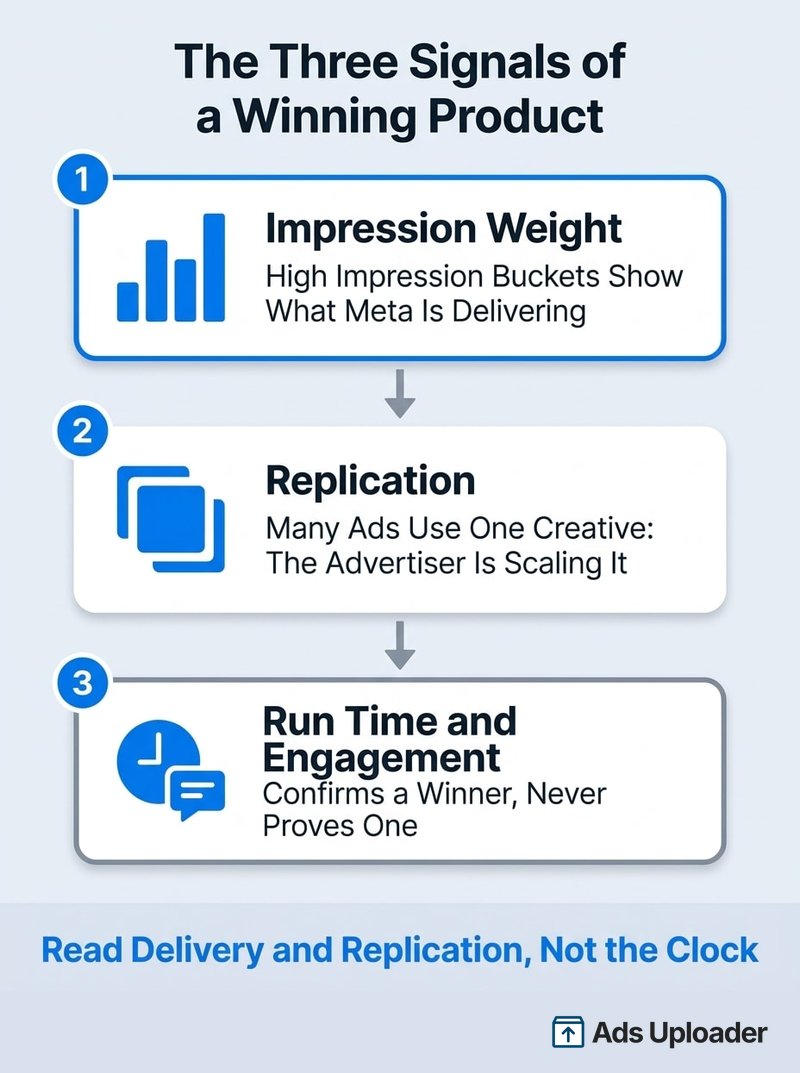
The Three Signals of a Winning Product
Page one of Google still tells you to find the longest-running ad. That heuristic broke. Here is the signal stack that replaced it, in order of weight.
Signal 1: Impression Weight
Since late 2025, every ad in the library carries an impression-range bucket, from under 1K up to 1M+, and you can sort and filter by it. Ads with fewer than 100 impressions get a "Low Impression Count" badge, which makes obvious tests and duds easy to skip.
This matters because impressions are the closest thing to a public performance signal. Meta's auction delivers impressions to ads that earn them, so a product ad carrying a 100K+ bucket is one the system is actively spending delivery on. An ad that has been live for three months with a low bucket is just furniture.
For richer data, switch the country filter to an EU market like Germany or France. Under the Digital Services Act, EU-delivered ads show tighter impression and reach ranges, spend brackets, demographic splits, and a one-year archive of inactive ads. Global campaigns often show up there with far more detail than the US view gives you.
Signal 2: Replication (Many Ads, One Creative)
Open any ad's detail view and look for the label "N ads use this creative and text." That line counts how many active ads share the identical asset and copy, and it is the single most honest tell in the library. Nobody duplicates a losing ad 15 times. Advertisers replicate a creative across ad sets for one reason: it is producing sales and they are scaling it.
You can hunt this manually (load an advertiser's ads, press Ctrl+F or Cmd+F, and search "use this creative"), but the native interface buries the label on each card. The free Ad Library Helper extension surfaces it directly: its Multi Use filter isolates replicated creative across an account in one click, which turns a 40-minute scroll into a shortlist.
Signal 3: Run Time and Engagement (Useful, but Demoted)
A product ad that has run continuously for six weeks still means something: budget stayed committed. But treat age as a prompt, not a verdict. Under cost-cap and bid-cap buying, advertisers leave ads switched on and let the auction decide what delivers, so an old ad is often one nobody bothered to prune. Always confirm longevity against the impression bucket and the replication count.
Engagement is the supporting witness. Click through to the ad post and read the comments. Hundreds of recent comments mean real demand, and the content of those comments is free market research: shipping complaints, price objections, "does it work on X" questions. Those are the objections your own ads and product page will need to answer.
Launch More. Click Less.
Upload hundreds of creatives at once, auto-match thumbnails to videos, and export directly to Meta Ads Manager.
Try Ads Uploader FreeNo credit card required • 7-day free trial
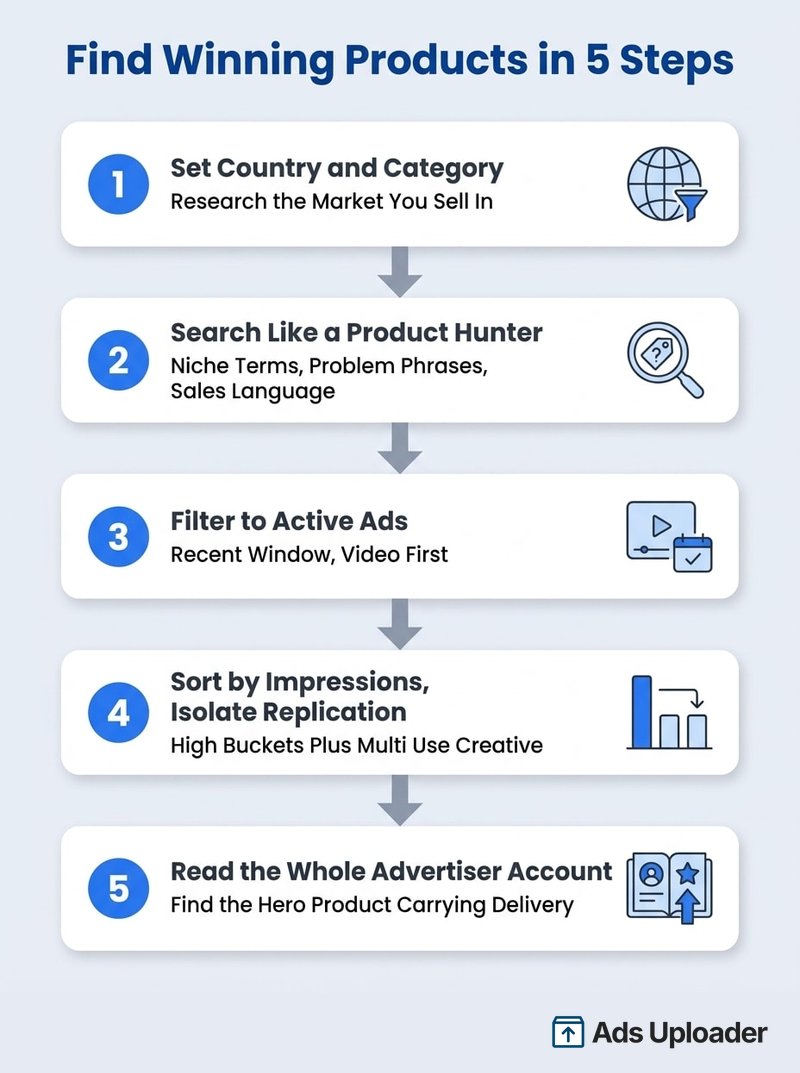
How to Find Winning Products in the Ad Library (Step-by-Step)
Here is the repeatable workflow, start to shortlist, in about 20 minutes once you have done it a few times.
Step 1: Set Your Country and Category
Open the library and set the country to the market you actually sell in. Product winners are market-specific: shipping promises, currency, and offers all differ, so researching "All" mixes signals you cannot use. Keep the ad category on All ads. If you sell in several markets, run the same search per country rather than one global pass.
Step 2: Search Like a Product Hunter
Keyword choice decides whether you find products or noise. Layer three types of searches:
- Niche terms: "pet hair," "posture," "car organizer," "knee support"
- Problem and outcome phrases: "back pain," "no more tangles," "in 30 seconds"
- Sales language only product ads use: "50% off," "free shipping," "shop now," "limited time"
Wrap phrases in quotes for exact matching, since multi-word searches otherwise use AND logic across the ad text. Two power moves: search myshopify.com to surface ads from Shopify stores (the library indexes the original URL even after stores move to a custom domain), and when you find one good ad, copy a distinctive phrase from it and search that to surface every competitor using the same angle.
Step 3: Filter to Active Ads and a Recent Window
Filter to active ads and, where available, narrow to a recent window. Active status means the advertiser is choosing to spend today. Filter media type to video if you are researching scroll-stopping product demos, which most dropshipping winners are. Language filters keep multilingual markets readable.
Step 4: Sort by Impressions and Isolate Replicated Creative
Now rank what is left. Sort by impressions so the heaviest-delivered ads rise to the top, and skip everything carrying the Low Impression Count badge. Then look for replication: which of these high-delivery ads exist as clusters of near-identical variants?
Natively this is the clunky part. Impression sorting is scattered across sections, the buckets are wide, and there is no replication filter at all. The Ad Library Helper extension collapses it into one pass: an Impressions by Date filter, a Hide Low Impression toggle, and the Single Use versus Multi Use creative filter that isolates scaled ads directly. High impressions plus Multi Use is your shortlist.
Step 5: Open the Advertiser and Read the Whole Account
For every shortlisted ad, open the advertiser's full library (use the Page Transparency panel's "Go to Ad Library" link if keyword search misses them). You are answering one question: what is this account's hero product? If one product carries most of the impression weight across dozens of ads while everything else churns, that product is selling. If the account scattershots 30 products with no concentration, they are still testing, and you are looking at their guesses rather than their results.
Save Hours on Creative Testing
Stop uploading ads one by one. Bulk process unlimited creatives with automatic media matching and direct API publishing.
Try Ads Uploader FreeNo credit card required • 7-day free trial
Validate Before You Test: Saturation, Store, and Supplier Checks
A product that passes the three signals is a candidate, not a winner. Three checks separate "proven demand" from "proven and already overrun."
Read saturation by counting advertisers. Search the product name and look at who else is running it. The late-stage pattern: many different stores pushing near-identical creative, the same demo clips, the same hooks. By the time an angle is everywhere, CPMs are bid up and the easy demand is captured. The early-stage pattern you want: one or two advertisers scaling hard (heavy replication, climbing impressions) with few copycats. The same teardown skills apply to watching specific rivals, which we cover in how to spy on competitor Facebook ads.
Check the store behind the ad. Click through to the landing page. Note the price point, the offer structure (bundle, discount threshold, free shipping bar), review volume, and how polished the page is. A strong ad pointing at a weak page means the ad is doing unusual work, and also means a better page could beat them. Record the price: you need roughly a 2-3x markup over landed cost for the unit economics to survive ad spend.
Confirm supply. Find the product on AliExpress, CJdropshipping, or your supplier of choice. Check seller ratings, shipping times to your market, and whether variations (colors, sizes, bundles) exist, since variation depth supports higher average order values. A winning ad for a product you cannot source reliably is trivia, not opportunity.
Finally, mine the comments one more time. Real buyer comments confirm orders are flowing. Repeated complaints tell you the objection your version must solve to win the same auction.
Build a Watchlist: Track What Keeps Running
One search session tells you what is running today. Winners are confirmed by what is still running in two weeks. The single biggest upgrade to ad-library research is making it longitudinal, and the library gives you nothing for this natively: no saves, no alerts, no export. Most people lose the advertisers they meant to track and start from zero every session.
The fix is a watchlist. The Ad Library Helper extension lets you save advertisers and stores to watch, so your shortlist persists between sessions, and its filters make the recheck fast. Advertiser URLs in the library are also stable, so a bookmark folder works as a fallback.
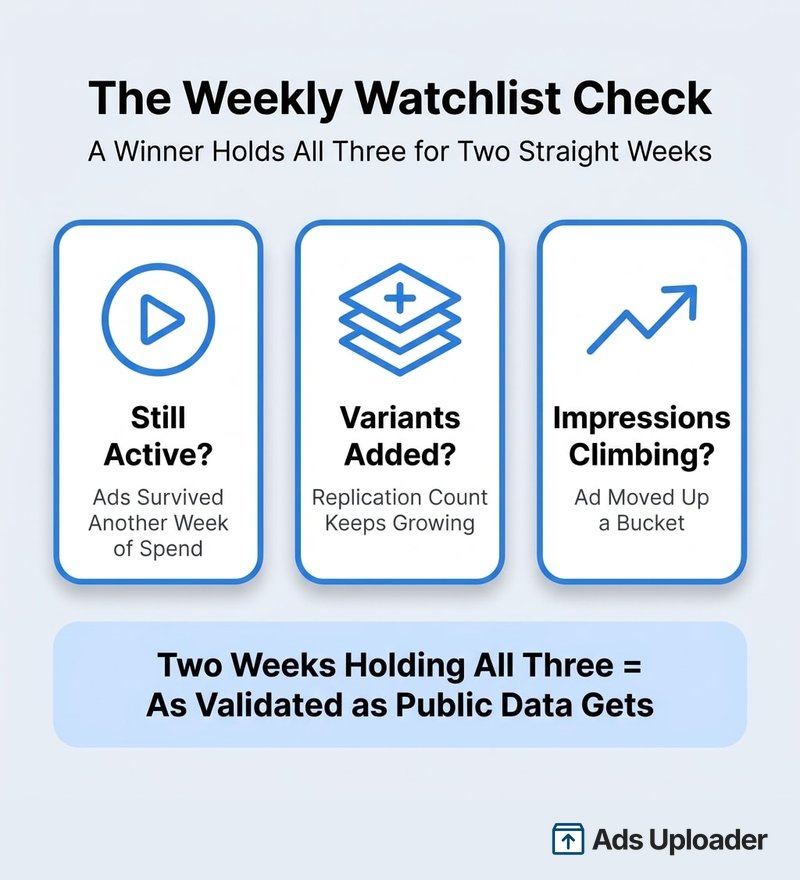
Recheck saved advertisers on a fixed cadence, weekly is plenty, and log three things per product:
- Still active? Did the ads survive another week of spend?
- Variants added? Is the replication count growing? Growing variant counts mean the advertiser is scaling, not coasting.
- Impressions climbing? Did the ad move up a bucket, or fade toward the low-impression badge?
A product that holds all three for two consecutive weeks is as validated as public data gets. As a bonus, the watchlist also shows you when winners die: when a heavily replicated product suddenly drops to a handful of ads, the advertiser's data turned, often from creative fatigue or collapsing margins, and that angle is a warning rather than an invitation.
Use the extension's bulk download to keep a swipe file of each watched product's creative, organized by angle (demo, testimonial, problem-agitation) rather than by brand. When you brief your own creative, you start from proven structures instead of a blank page.
From Found Product to Live Test
The product you found is not the prize. The angle is. Cloning a competitor's creative pixel-for-pixel puts you a step behind them forever, usually with worse data and a weaker page. Extract the structure instead: the hook (the first three seconds or the first line), the proof (demo, before and after, testimonial), and the offer (discount, bundle, guarantee).
Then test it like the advertiser you just studied, with volume. One "inspired" ad teaches you nothing. Build a matrix: three hooks, four visuals, two CTAs is 24 variants, which is the kind of breadth Meta's creative-first delivery system rewards. Launch the matrix, let the auction pick, and feed the winner back into your own swipe file. The whole point of finding a proven product is to learn from someone else's spend; the way you bank that advantage is by out-testing them on the angle they validated.
Common Mistakes That Burn Weeks
- Trusting ad age alone. The oldest ad in an account is often the least-managed one. Age means nothing without impression weight and replication behind it.
- Copying creative without the offer. An ad wins as a system: creative, offer, landing page, and shipping promise. Lifting the video while ignoring the $39 bundle behind it produces a pretty ad that loses money.
- Searching only product names. Names find the advertisers you already know. Problem phrases, outcome phrases, and sales language find the ones you do not.
- Ignoring the country filter. A product crushing it in Germany may be saturated in the US, or unshippable from your supplier. Research the market you will actually sell in.
- Treating ad count as budget. Thirty ads can run on $50 a day. Read delivery (impressions), not volume.
- Testing one ad per product. The advertiser you found validated the angle with dozens of variants. Matching their conviction with a single creative is how proven products still fail tests.
- Skipping the saturation check. The most common expensive mistake: finding a real winner six months late and paying peak CPMs to compete with 20 copycats.
Frequently Asked Questions
How do I find winning products in the Facebook Ad Library?
Search by niche or sales keywords with the country set to your target market, filter to active ads, then read three signals: the impression-range bucket, the "N ads use this creative and text" replication label, and sustained run time backed by engagement. High delivery plus heavy replication is the strongest public evidence a product is winning.
Is the Facebook Ad Library free for product research?
Yes. It is a free public database of every active ad across Facebook, Instagram, Messenger, Threads, and Audience Network, available at facebook.com/ads/library with no account required. Free extensions add filtering and saving on top of the same data.
How long should an ad run before it counts as a winning product?
There is no magic number, because run time alone is unreliable. Under cost-cap and bid-cap buying, old ads are often just unpruned ones. Treat two or more weeks of activity as a prompt to check impression weight and replication. All three together make a winner.
Can you see how much a competitor spends on a product?
No. Standard commercial ads show no spend, budget, or performance data. You get an impression-range bucket everywhere, and tighter ranges plus spend brackets for EU-delivered ads under the Digital Services Act, which is why switching the country filter to an EU market is a standard research move.
How do I know if a product is saturated?
Count distinct advertisers running near-identical creative for it. Many stores with the same demo clips and hooks means you are late, and rising CPMs will price out the margin. One or two advertisers scaling hard with few copycats means you are early.
What keywords should I search to find dropshipping products?
Layer niche terms ("pet hair," "posture"), problem and outcome phrases ("back pain," "in 30 seconds"), and sales language ("50% off," "free shipping," "shop now"). Search myshopify.com to surface Shopify stores directly, and use quotes for exact phrases.
Can I save or track advertisers in the Ad Library?
Not natively, since the library has no watchlist or export. Advertiser URLs are stable enough to bookmark, and the free Ad Library Helper extension adds saving, so you can keep a list of advertisers and stores to watch and recheck what keeps running.
Do I need a paid spy tool to find winning products?
No. Paid spy tools repackage the same public ad data with history and alerts on top. The free library plus a free filtering extension covers product discovery end to end. Pay for tooling only when ongoing multi-market monitoring becomes the job itself.
Conclusion
Finding winning products on the Facebook Ad Library comes down to reading the right evidence in the right order:
- Impression weight first: high buckets show what Meta's auction is actually delivering
- Replication second: "N ads use this creative and text" reveals what advertisers are scaling
- Run time and engagement last: confirmation signals, never the verdict on their own
- Validate before testing: saturation count, store and offer check, supplier check
- Track over time: a watchlist of saved advertisers beats any single research session
The library hands you the market's test results for free. The advertisers who turn that into profit are not the best researchers; they are the ones who move from "found it" to "testing 24 variants of it" the fastest. Find the proven angle, make it unmistakably yours, and let volume do the rest.
